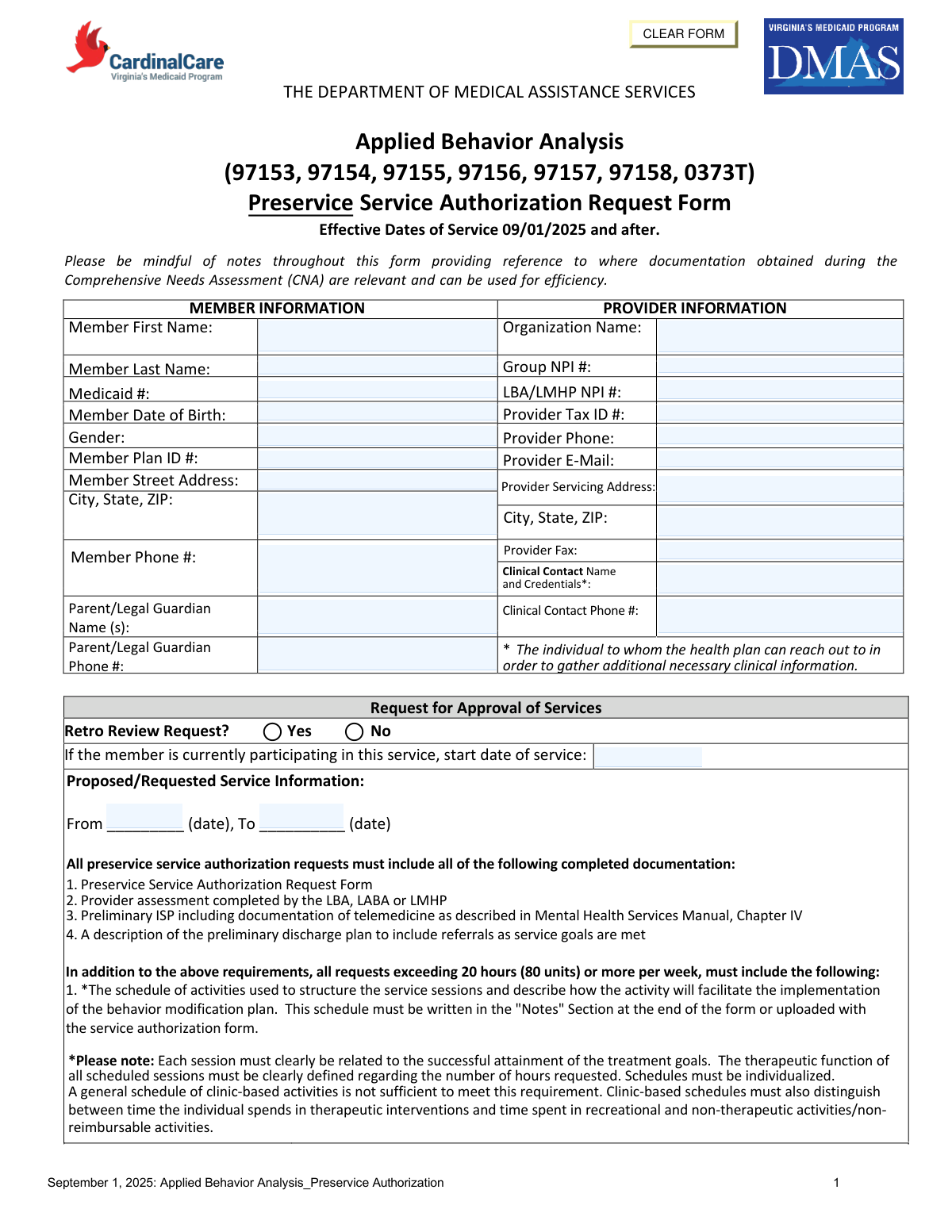
Yes! You can use AI to fill out The Department of Medical Assistance Services Applied Behavior Analysis Preservice Service Authorization Request Form (Effective Dates of Service 09/01/2025 and after)

This is an official Department of Medical Assistance Services (DMAS) form used to request preservice (prior) authorization for Applied Behavior Analysis (ABA) services billed under specific CPT codes (97153–97158 and 0373T). It captures member and provider details, requested service hours/units, diagnoses, admission criteria, and preliminary treatment goals, including documentation of telemedicine when applicable. The form is important because DMAS/health plans use it to determine medical necessity and approve the amount, type, and duration of ABA services before they are delivered (or for retro review when indicated).
Our AI automatically handles information lookup, data retrieval, formatting, and form filling.
It takes less than a minute to fill out DMAS ABA Preservice Authorization Request using our AI form filling.
Securely upload your data. Information is encrypted in transit and deleted immediately after the form is filled out.

Form specifications

Form name: The Department of Medical Assistance Services Applied Behavior Analysis Preservice Service Authorization Request Form (Effective Dates of Service 09/01/2025 and after)
Number of pages: 8
Language: English
main-image

Instafill Demo: filling out a legal form in seconds

How to Fill Out DMAS ABA Preservice Authorization Request Online for Free in 2026

Are you looking to fill out a DMAS ABA PRESERVICE AUTHORIZATION REQUEST form online quickly and accurately? Instafill.ai offers the #1 AI-powered PDF filling software of 2026, allowing you to complete your DMAS ABA PRESERVICE AUTHORIZATION REQUEST form in just 37 seconds or less.
Follow these steps to fill out your DMAS ABA PRESERVICE AUTHORIZATION REQUEST form online using Instafill.ai:
  1. 1 Enter member information (name, Medicaid number, DOB, gender, plan ID, address/phone) and parent/legal guardian contact details.
  2. 2 Enter provider information (organization name, Group NPI, LBA/LMHP NPI, tax ID, servicing address, phone/fax/email) and identify the clinical contact person and credentials.
  3. 3 Complete the request for approval section: indicate whether this is a retro review, list current start date if already receiving services, and specify the requested date range (from/to).
  4. 4 Fill in the proposed/requested service table for each CPT code (97153–97158, 0373T): provider qualifications, daily hours/days per week, total weekly hours, total hours for the requested period, total units requested, and any required notes.
  5. 5 Document prior ABA/behavior therapy treatment periods in the past 12 months (provider, dates of service, outcomes).
  6. 6 Complete clinical justification: ICD-10 primary/secondary diagnoses, DSM diagnosis/provisional diagnosis, symptom description and functional impairment, admission criteria checkboxes (2A–2E) with narratives, and preliminary treatment goals including telemedicine vs in-person details and clinical evidence when telemedicine is recommended.
  7. 7 Finish recovery/discharge planning (progress definition, barriers, supports/resources, anticipated discharge level of care and estimated discharge date), attach required supporting documents (assessment, preliminary ISP, discharge plan, and schedule if requesting 20+ hours/week), and obtain LMHP/LABA attestation signature, printed name, credentials, and date.

Our AI-powered system ensures each field is filled out correctly, reducing errors and saving you time.

Why Choose Instafill.ai for Your Fillable DMAS ABA Preservice Authorization Request Form?

Speed

Complete your DMAS ABA Preservice Authorization Request in as little as 37 seconds.

Up-to-Date

Always use the latest 2026 DMAS ABA Preservice Authorization Request form version.

Cost-effective

No need to hire expensive lawyers.

Accuracy

Our AI performs 10 compliance checks to ensure your form is error-free.

Security

Your personal information is protected with bank-level encryption.

Frequently Asked Questions About Form DMAS ABA Preservice Authorization Request

This is the Department of Medical Assistance Services (DMAS) Applied Behavior Analysis (ABA) Preservice Service Authorization Request Form. It is used to request approval for ABA services (e.g., CPT 97153–97158 and 0373T) before services are provided.

The requesting ABA provider/organization completes and submits the form, including the clinical sections. An LMHP (or LMHP-R/LMHP-S/LMHP-RP) or LABA must review the psychiatric history, complete the assessment/addendum, and sign the attestation.

This form is effective for dates of service on or after 09/01/2025. Use it for any ABA authorization requests that start on or after that date.

You must provide identifying and contact details for the member (name, Medicaid ID, DOB, address/phone, plan ID, guardian info) and the provider (organization name, NPIs, tax ID, servicing address, phone/fax/email). You also must list a clinical contact name/credentials and phone number for follow-up questions.

Every request must include: (1) the completed Preservice Service Authorization Request Form, (2) a provider assessment completed by the LBA, LABA, or LMHP, (3) a preliminary ISP including any telemedicine documentation required by the Mental Health Services Manual, Chapter IV, and (4) a description of the preliminary discharge plan with referrals as goals are met.

If you are requesting more than 20 hours (80 units) per week, you must include an individualized schedule of activities. It can be written in the “Notes” section at the end of the form or uploaded with the service authorization request.

The schedule must be individualized and clearly tied to treatment goals and the behavior modification plan. For clinic-based services, it must distinguish therapeutic intervention time from recreational or other non-therapeutic/non-reimbursable activities; a generic clinic schedule is not sufficient.

Enter the daily hours/days per week and total weekly hours for each CPT code requested, then calculate total hours as (weekly hours Ă— number of weeks requested). Total units requested are calculated as (total hours Ă— 4) because units are in 15-minute increments.

The form indicates that 97153/97154 are delivered by qualified staff, while 97155–97158 and 0373T involve LBA/LMHP/LABA-level oversight or delivery (with specific notes about technicians/caregivers and team-based rates). Use the table’s “Provider qualifications” column to ensure the requested code matches the staff who will provide the service.

A retro review request is used when you are seeking authorization after services have already started. If the member is currently participating, mark “Yes” and provide the start date of service; otherwise mark “No” and request prospective dates.

Yes. The form asks you to identify all known treatment periods in the past 12 months (including services from other providers), with dates of service and outcomes.

You must list the primary ICD-10 diagnosis and any secondary diagnoses, and also specify the corresponding DSM diagnosis or provisional diagnosis. You must describe current symptoms (frequency, intensity, duration) and functional impairments that support medical necessity.

To qualify, the individual must meet criteria 1, 2, and 3 as described in Section I. Criterion 2 also requires that within the past 30 days the youth has demonstrated at least two of the listed areas (A–E), and you must document and connect them to the symptoms in criterion 1.

Each goal should directly address the symptoms/difficulties you documented and be tied to the relevant criterion (e.g., communication, social interaction, outbursts, repetitive behaviors, sensory integration). If telemedicine is used or recommended, specify when/under what conditions services will be via telemedicine versus in-person and include clinical evidence that telemedicine is appropriate.

You must describe what progress/recovery would look like, barriers to progress, supports/services/resources needed, the expected level of care at discharge, and an estimated discharge date. This should align with the preliminary discharge plan you submit with the request.

Compliance DMAS ABA Preservice Authorization Request
Validation Checks by Instafill.ai

1
Member identity fields are complete and non-placeholder
Validates that Member First Name, Member Last Name, Member Date of Birth, Medicaid #, and Member Plan ID # are present and not left blank or filled with placeholders (e.g., underscores). These fields are required to correctly match the request to the right beneficiary and avoid misrouting PHI. If validation fails, the submission should be rejected as incomplete and returned for correction before clinical review.
2
Member Date of Birth is a valid date and logically consistent
Checks that the Member Date of Birth is a real calendar date in an accepted format (e.g., MM/DD/YYYY) and is not in the future. Because the form repeatedly references a "youth," the DOB should also indicate a minor (or the system should require an explicit attestation if the member is not a minor). If the date is invalid or inconsistent, the request should be pended for clarification to prevent eligibility and medical-necessity errors.
3
Member contact information format validation (phone and address)
Validates that Member Phone # contains a valid 10-digit US phone number (allowing standard punctuation) and that the street address and City/State/ZIP are complete with a valid 5-digit or 9-digit ZIP code. Accurate contact data is necessary for care coordination, notices, and potential audits. If validation fails, the form should be returned for correction or flagged for outreach before authorization processing.
4
Provider identifiers (NPI and Tax ID) format and checksum validation
Ensures Group NPI # and LBA/LMHP NPI # are 10-digit NPIs and pass the NPI Luhn check, and that Provider Tax ID is 9 digits (EIN/SSN format as applicable). Correct identifiers are essential for provider enrollment matching, claims payment, and compliance. If any identifier fails validation, the request should be rejected or pended until corrected to avoid authorizing services under the wrong provider.
5
Provider contact information completeness and format (phone, fax, email)
Checks that Provider Phone and Provider Fax (if provided) are valid US phone numbers and that Provider E-Mail matches a standard email pattern (e.g., [email protected]). The health plan must be able to contact the provider/clinical contact for additional clinical information. If invalid or missing, the submission should be pended and the provider prompted to correct contact details.
6
Clinical Contact Name and Credentials required when provided as point of contact
Validates that Clinical Contact Name and Credentials are present and that Clinical Contact Phone # is provided in valid format. This is the designated person the health plan will contact for clinical questions, so missing or ambiguous information delays review. If validation fails, the request should be pended until a reachable clinical contact is supplied.
7
Retro Review Request logic and current participation start date requirement
If "Retro Review Request" is marked Yes, the system must require a start date of service and ensure it is on or before the requested authorization period. If marked No, the start date should be optional but, if entered, must still be a valid date. If the logic is violated, the request should be pended because retroactive review rules and timeliness depend on these dates.
8
Requested service date range validity (From/To) and effective date rule
Validates that the Proposed/Requested Service Information includes both From and To dates, that From ≤ To, and that dates are on/after 09/01/2025 (the form’s stated effective date). This prevents authorizations outside the program’s effective window and avoids overlapping/invalid periods. If validation fails, the request should be rejected or pended for corrected dates.
9
CPT code selection restricted to allowed ABA codes on the form
Checks that any CPT codes entered in the service table are limited to the listed codes (97153, 97154, 97155, 97156, 97157, 97158, 0373T) and that each row includes the required unit basis (per 15 min). Using non-covered or incorrect codes can lead to improper authorization and claim denials. If an invalid code is detected, the system should block submission and require correction.
10
Service table arithmetic validation (daily/weekly hours, total hours, total units)
Validates internal consistency: Total Weekly Hours must equal (Total Daily Hours Ă— Days Per Week) when both are provided; Total Hours must equal (Total Weekly Hours Ă— number of weeks requested); Total Units Requested must equal (Total Hours Ă— 4) for 15-minute units. This prevents over/under-authorizing units and reduces downstream claim mismatches. If calculations do not reconcile, the submission should be pended and the user prompted to correct the figures.
11
Provider qualification alignment with CPT code requirements
Ensures that codes requiring LBA/LMHP/LABA involvement (e.g., 97155–97158 and 0373T as described) list appropriate provider qualifications and do not indicate only “qualified staff” where a licensed clinician is required. Correct qualification mapping is necessary for medical necessity compliance and to prevent authorizing services that cannot be billed. If mismatched, the request should be pended for correction and potential clinical review.
12
High-intensity threshold rule: schedule required when ≥20 hours/week (≥80 units/week)
Checks whether the requested services total 20 or more hours per week (or 80+ units/week) across all CPT lines, and if so requires a session schedule in the Notes/Schedule section or as an uploaded attachment. The form explicitly requires this documentation to justify intensity and distinguish therapeutic vs non-therapeutic time. If missing when threshold is met, the request should be rejected as incomplete or pended until the schedule is provided.
13
Diagnosis fields completeness and ICD-10 format validation
Validates that Primary ICD-10 Diagnosis is present and matches ICD-10 formatting (e.g., letter + 2 digits, optional decimal and additional characters), and that any Secondary Diagnoses follow the same pattern. Accurate diagnosis coding is required for medical necessity determination and correct authorization categorization. If invalid or missing, the request should be pended for corrected diagnostic information.
14
Admission criteria #2: at least two sub-criteria marked Yes with supporting narratives
Checks that within criteria 2 (A–E), at least two items are marked Yes, consistent with the form’s requirement, and that each Yes selection includes a corresponding narrative description and a Preliminary Treatment Goal for that subsection. This ensures the request meets stated admission criteria and provides measurable targets for treatment. If fewer than two are Yes or narratives/goals are missing, the request should be pended or denied for not meeting criteria/documentation requirements.
15
Telemedicine documentation required when telemedicine is referenced in any goal
Scans Preliminary Treatment Goals for telemedicine usage and requires explicit documentation of when/under what conditions telemedicine will be used, when in-person services will occur, and clinical evidence supporting appropriateness (as the form instructs). This is important for compliance with telehealth policy and to avoid authorizing an unsupported modality. If telemedicine is mentioned without required details, the request should be pended for completion.
16
Signature attestation block completeness and date consistency
Validates that the LMHP/LABA signature (electronic or actual), printed name, credentials, assessment completion date, and signature date are all present and valid dates. Also checks that the assessment completion date is not after the signature date and is reasonably close to the request (to support current medical necessity). If any element is missing or inconsistent, the request should be rejected/pended because the attestation is required for authorization.

Common Mistakes in Completing DMAS ABA Preservice Authorization Request

Leaving required member/provider identifiers blank or inconsistent

People often omit or mismatch key identifiers such as Medicaid #, Member Plan ID, Member DOB, Group NPI, and LBA/LMHP NPI because the information is stored in different systems or copied from prior authorizations. Missing or inconsistent identifiers can prevent the health plan from matching the request to the correct member/provider record, causing delays or outright rejection. To avoid this, verify all identifiers against the eligibility/roster and NPI registry before submission and ensure the same member name/Medicaid # appears on every page where requested.

Using the wrong address fields (mailing vs servicing) or incomplete addresses

A common error is entering the organization’s mailing address where the form asks for the Provider Servicing Address, or leaving out city/state/ZIP because it seems redundant. This can create network/credentialing and service-location mismatches, which may trigger pends or denials if the service location cannot be validated. Always enter the physical service location in the servicing address field and complete city/state/ZIP for both member and provider sections.

Not identifying a valid clinical contact (or listing someone without credentials)

Submitters sometimes list a front-desk contact or omit credentials, even though the form specifies a clinical contact the health plan can reach for additional clinical information. This leads to back-and-forth, missed outreach, and delays when the plan cannot obtain clarifications about medical necessity or goals. Provide a reachable clinical staff member’s name, role/credentials, and direct phone number, and ensure the email/phone are monitored.

Retro review request marked incorrectly or missing the current start date

Many requests incorrectly check “Retro Review Request” without meeting retro criteria, or they forget to provide the start date when the member is already receiving services. Incorrect retro status can route the request to the wrong workflow and may result in denial for timeliness or missing retro documentation. Confirm whether services have already started, enter the actual start date, and only mark retro when you are truly requesting authorization after services began per plan policy.

Service date range errors (missing dates, reversed dates, or dates outside the effective period)

People frequently leave the “From/To” dates blank, reverse them, or request dates that conflict with the form’s effective dates (09/01/2025 and after) or the assessment completion date. Date errors can cause automatic pends because the plan cannot determine the requested authorization span or because the request appears invalid. Always enter a clear start and end date, ensure the range is chronological, and confirm it aligns with policy and the assessment date.

Incorrect CPT selection or misunderstanding code intent (97153–97158, 0373T)

A frequent mistake is requesting codes that don’t match the described service (e.g., using group codes for 1:1 services, or using 0373T without meeting the “two or more technicians and LBA/LMHP/LABA team rate” requirement). This can lead to denials, downcoding, or requests for clarification because the billed model does not align with code definitions and provider qualifications. Choose CPT codes that match the delivery format (individual vs group vs family), document the required staffing model, and ensure the provider qualifications listed align with each code’s requirements.

Hours/units math mistakes (weekly totals, total hours, and units conversion)

Because units are in 15-minute increments, people often miscalculate Total Weekly Hours, Total Hours (weekly hours Ă— weeks), or Total Units Requested (total hours Ă— 4). Math errors can cause the request to exceed limits unintentionally or appear internally inconsistent, triggering pends and rework. Use a consistent method: compute daily hours Ă— days/week = weekly hours, multiply by number of weeks for total hours, then multiply total hours by 4 for units, and double-check totals for each CPT line.

Failing to include the required “Schedule of activities” for requests ≥20 hours/week

Requests at or above 20 hours (80 units) per week are often submitted without the individualized schedule of activities, or with a generic clinic schedule that doesn’t tie activities to treatment goals. Missing or non-individualized schedules commonly result in pends/denials because the form explicitly requires a schedule that defines the therapeutic function of sessions and distinguishes therapeutic vs recreational/non-reimbursable time. Provide an individualized schedule in the Notes section or as an upload, explicitly linking each block of time to goals and identifying non-therapeutic time separately.

Not documenting telemedicine details and clinical appropriateness in goals

The form repeatedly requires that each preliminary treatment goal specify when services will be via telemedicine vs in-person and, if telemedicine is recommended, the clinical evidence supporting appropriateness. Many submissions include goals but omit modality details, which can lead to pends because the plan cannot determine whether the requested delivery method meets policy. For each goal, state the modality (telehealth/in-person), conditions for use, and a brief clinical rationale supporting telemedicine when applicable.

Admission criteria not fully met or not clearly connected to symptoms and functional impairment

Submitters sometimes provide a diagnosis but fail to describe current symptoms with frequency/intensity/duration, functional impairment, or how criteria 2A–2E connect back to criterion 1. If the narrative doesn’t demonstrate that all required criteria are met (including “at least two” items in section 2 within the past 30 days), medical necessity may not be established and the request may be denied. Explicitly document symptom details, functional impact, check Yes/No appropriately, and write narratives that clearly link each selected criterion to the diagnosis and impairment.

Missing required attachments or incomplete supporting documentation list

A common reason for pends is forgetting one of the required items: the LBA/LABA/LMHP assessment, the preliminary ISP (including telemedicine documentation per the Mental Health Services Manual), or the preliminary discharge plan with referrals. Without these, the plan cannot validate medical necessity, service model, or transition planning. Before submission, use a checklist to confirm all required documents are completed, dated, and uploaded, and ensure the content matches what is referenced in the form.

Signature/attestation section incomplete (missing assessment date, credentials, or signer type)

People often leave the assessment completion date blank, omit printed name/credentials, or have the wrong professional sign (the attestation requires an LMHP/LMHP-R/LMHP-S/LMHP-RP or LABA). Incomplete attestation can invalidate the request because it is the formal confirmation that medical necessity criteria are met based on an appropriate assessment. Ensure the correct credentialed professional signs (actual or electronic), prints their name, lists credentials, and enters both the assessment completion date and signature date.
Saved over 80 hours a year

“I was never sure if my IRS forms like W-9 were filled correctly. Now, I can complete the forms accurately without any external help.”

Kevin Martin Green

Your data stays secure with advanced protection from Instafill and our subprocessors

Robust compliance program

Transparent business model

You’re not the product. You always know where your data is and what it is processed for.

ISO 27001, HIPAA, and GDPR

Our subprocesses adhere to multiple compliance standards, including but not limited to ISO 27001, HIPAA, and GDPR.

Security & privacy by design

We consider security and privacy from the initial design phase of any new service or functionality. It’s not an afterthought, it’s built-in, including support for two-factor authentication (2FA) to further protect your account.

Fill out DMAS ABA Preservice Authorization Request with Instafill.ai

Worried about filling PDFs wrong? Instafill securely fills the-department-of-medical-assistance-services-appl forms, ensuring each field is accurate.