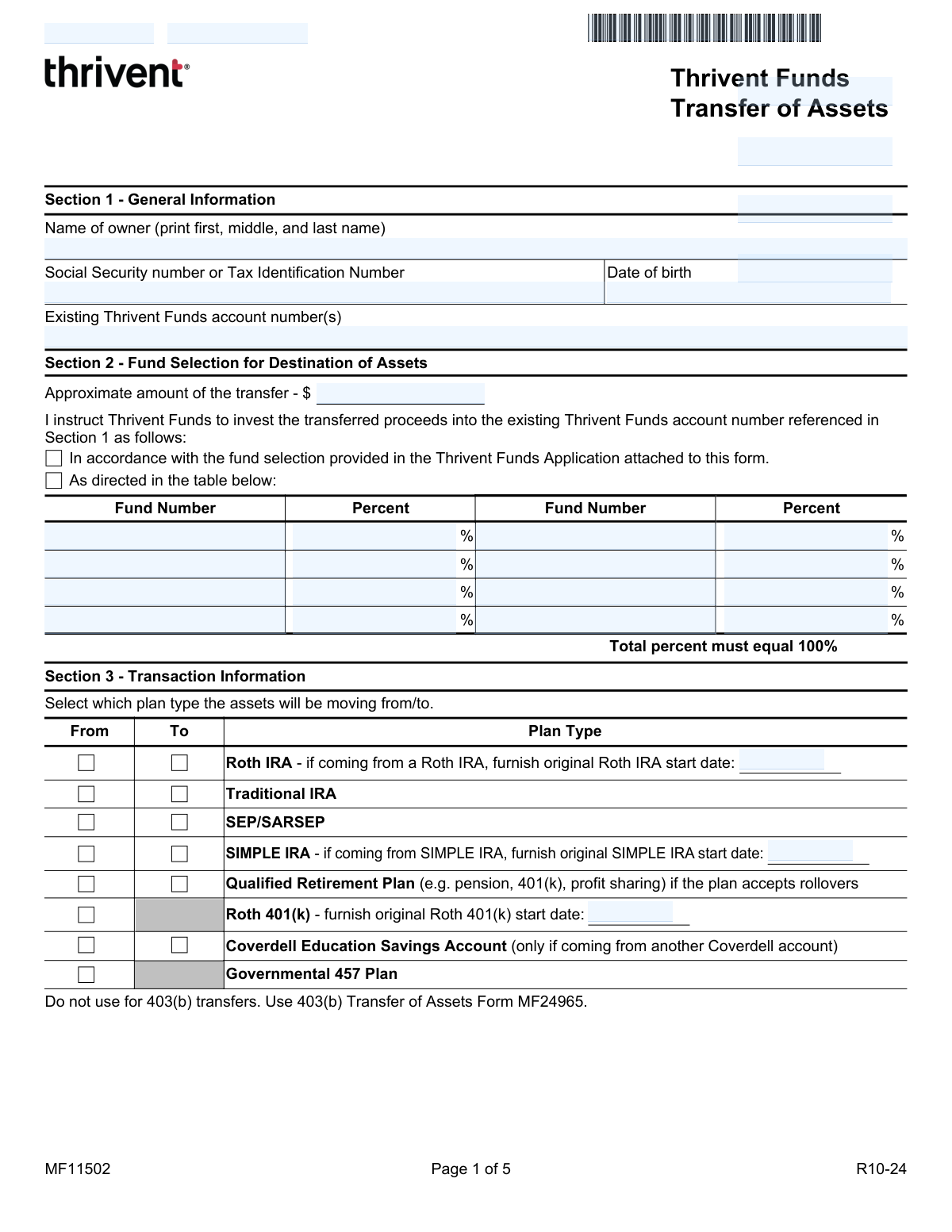
Yes! You can use AI to fill out Thrivent Funds Transfer of Assets, Form MF11502

Form MF11502, the Thrivent Funds Transfer of Assets, is a crucial document for individuals wanting to consolidate their investments by moving assets from other financial institutions into a Thrivent Mutual Funds account. It provides the necessary authorization and instructions for the releasing company to perform a direct rollover, transfer, or conversion of funds from plans like IRAs, 401(k)s, and SEPs. Completing this form accurately is vital for ensuring the transaction is processed correctly and for maintaining the tax status of retirement accounts. Today, this form can be filled out quickly and accurately using AI-powered services like Instafill.ai, which can also convert non-fillable PDF versions into interactive fillable forms.
Our AI automatically handles information lookup, data retrieval, formatting, and form filling.
It takes less than a minute to fill out MF11502 using our AI form filling.
Securely upload your data. Information is encrypted in transit and deleted immediately after the form is filled out.

Form specifications

Form name: Thrivent Funds Transfer of Assets, Form MF11502
Number of pages: 1
Language: English
Categories: asset transfer forms, transfer forms, funds transfer forms
main-image

Instafill Demo: How to fill out PDF forms in seconds with AI

How to Fill Out MF11502 Online for Free in 2026

Are you looking to fill out a MF11502 form online quickly and accurately? Instafill.ai offers the #1 AI-powered PDF filling software of 2026, allowing you to complete your MF11502 form in just 37 seconds or less.
Follow these steps to fill out your MF11502 form online using Instafill.ai:
  1. 1 Navigate to Instafill.ai and upload or select the Thrivent Funds Transfer of Assets (Form MF11502).
  2. 2 Use the AI assistant to accurately fill in your personal details in Section 1, including your name, Social Security Number, and existing Thrivent account number.
  3. 3 In Section 2, detail how the transferred assets should be invested by specifying the fund numbers and allocation percentages for your Thrivent account.
  4. 4 Complete Sections 3, 4, and 5 by providing information about the plan type you are transferring from, liquidation instructions, and details about the releasing financial institution.
  5. 5 Specify your federal and state income tax withholding preferences in Section 6, which is particularly important for Roth IRA conversions.
  6. 6 Carefully review all entered information for accuracy, then electronically sign the form in Section 7. The platform will guide you if a Medallion Signature Guarantee or Notary is required by the releasing institution.
  7. 7 Securely download, print, or fax the completed form to the appropriate Thrivent Funds address or fax number as provided in Section 8.

Our AI-powered system ensures each field is filled out correctly, reducing errors and saving you time.

Why Choose Instafill.ai for Your Fillable MF11502 Form?

Speed

Complete your MF11502 in as little as 37 seconds.

Up-to-Date

Always use the latest 2026 MF11502 form version.

Cost-effective

No need to hire expensive lawyers.

Accuracy

Our AI performs 10 compliance checks to ensure your form is error-free.

Security

Your personal information is protected with bank-level encryption.

Frequently Asked Questions About Form MF11502

This form is used to instruct another financial institution to transfer your assets, such as from an IRA or a former employer's 401(k), directly into a new or existing Thrivent Mutual Funds account.

You should fill out this form if you want to move funds from a retirement or savings account at another company into a Thrivent Mutual Funds account. This includes rollovers from plans like a 401(k) or transfers from another IRA.

No, this form explicitly states it should not be used for 403(b) transfers. You must use the specific '403(b) Transfer of Assets Form' (MF24965) for that purpose.

You must provide a copy of your most recent account statement from the financial institution you are transferring assets from, as requested in Section 5.

It depends on the requirements of your current financial institution. You must check with them to determine if they require a Medallion Signature Guarantee or a Notary Seal to process the distribution.

You must take your RMD for the year from your current plan *before* you initiate the transfer or rollover. RMDs cannot be rolled over and must be distributed prior to this transaction.

A conversion is a taxable event, and you must complete Section 6 to specify your tax withholding preferences. If you don't make a selection, 10% will be withheld for federal taxes by default.

A transfer (e.g., IRA to IRA) is not taxable or reported to the IRS. A direct rollover (e.g., 401(k) to IRA) is not taxable but is reported, while a conversion (e.g., Traditional IRA to Roth IRA) is both taxable and reported.

You can mail the form to the regular or express mail addresses listed in Section 8, or fax it to 866-278-8363. Your current institution will then send the funds via check or wire transfer per the instructions.

In Section 2, you can list the specific fund numbers and the percentage of your assets you want to allocate to each. The total percentage must equal 100%.

Yes, in Section 4 you can select 'Partial liquidation' and specify the exact dollar amount you wish to transfer to your Thrivent Funds account.

Yes, services like Instafill.ai use AI to accurately auto-fill form fields with your information, which can save you time and help reduce errors.

You can use a service like Instafill.ai, which can convert flat, non-fillable PDFs into interactive forms that you can easily complete on your computer.

Simply upload the Transfer of Assets PDF to the Instafill.ai platform. The AI will make the form fillable and help you enter your information into the correct fields before you download, print, and sign it.

Compliance MF11502
Validation Checks by Instafill.ai

1
SSN or TIN Format Validation
This check ensures the Social Security Number or Tax Identification Number provided in Section 1 is in a valid format (e.g., XXX-XX-XXXX or XXXXXXXXX for SSN, XX-XXXXXXX for TIN). This number is critical for IRS tax reporting and uniquely identifying the client. If the format is invalid, the form submission will be rejected as it cannot be processed for legal and tax compliance.
2
Fund Allocation Percentage Sum
This validation verifies that if the fund allocation table in Section 2 is used, the sum of all specified percentages equals exactly 100%. This is crucial to ensure the client's assets are fully and correctly allocated according to their instructions. A total not equal to 100% would create an ambiguous instruction, causing the transaction to be rejected pending clarification.
3
Mutually Exclusive Fund Allocation Method
This check ensures that in Section 2, the user either fills out the fund allocation table OR checks the box to use the allocation from an attached application, but not both. These are mutually exclusive instructions for directing the investment. If both are selected, it creates a conflict, and the form will be returned to the user for correction.
4
Conditional Roth IRA Start Date Requirement
This validation ensures that if 'Roth IRA' is selected as the 'From' plan type in Section 3, the 'original Roth IRA start date' field is populated with a valid date. This date is essential for determining the five-year clock for qualified distributions and other tax-related tracking. Failure to provide this date when required will result in an incomplete application and delay the transfer process.
5
SIMPLE IRA Two-Year Conversion Rule
This check validates that if a transfer is a conversion from a SIMPLE IRA (Section 3), the provided 'original SIMPLE IRA start date' is more than two years in the past. IRS regulations impose a significant tax penalty on conversions made within the first two years of the plan's inception. A violation would cause the transaction to be rejected to protect the client from adverse tax consequences.
6
403(b) Plan Transfer Exclusion
This check verifies that the form is not being used for a 403(b) transfer, as explicitly prohibited in Section 3. The system should flag any submission where '403(b)' is indicated as a plan type. Using the incorrect form leads to rejection, as a specific form (MF24965) with different requirements must be used for 403(b) transactions.
7
Mutually Exclusive Liquidation Instructions
This validation ensures that in Section 4, only one of the three transfer instructions ('Full liquidation', 'Partial liquidation', or 'In-kind shares') is selected. These options are mutually exclusive, and selecting more than one creates a conflicting directive for the releasing company. The form would be rejected for ambiguity.
8
Conditional Partial Liquidation Amount
This check ensures that if 'Partial liquidation' is selected in Section 4, the corresponding dollar amount field is filled with a valid, positive numeric value. The instruction is incomplete and cannot be executed without a specified amount. The submission will be flagged as incomplete if the amount is missing.
9
Releasing Company Information Completeness
This validation verifies that all fields for the releasing company in Section 5 (Name, Current account number, and full address including City, State, ZIP) are completed. This information is absolutely essential for Thrivent to contact the correct institution and identify the correct account for the transfer. Missing information will halt the entire process until it is provided.
10
Conditional Withholding for Roth Conversion
This check ensures Section 6 (Tax Withholding) is completed if the transaction is a Roth IRA conversion (e.g., from a Traditional IRA to a Roth IRA, as indicated in Section 3). A conversion is a taxable event, and withholding elections are required. If this section is blank during a conversion, the form will be rejected or processed with default withholding, which may not align with the owner's financial plan.
11
Signature and Date Presence
This validation confirms that the form has been signed and dated by the owner in Section 7. A signature provides the legal authorization to execute the transfer, and the date establishes when that authorization was granted. An unsigned or undated form is legally invalid and will be immediately rejected.
12
Plan Type Selection Completeness
This check ensures that at least one plan type is selected in both the 'From' and 'To' columns in Section 3. This information is fundamental as it defines whether the transaction is a transfer, rollover, or conversion, which have different tax and reporting implications. An omission in either column makes the request ambiguous and will cause it to be rejected.

Common Mistakes in Completing MF11502

Incorrect or Missing Signature Guarantee

People often misunderstand or overlook the requirement for a Medallion Signature Guarantee or Notary Seal in Section 7. They may fail to get one, or obtain a notary when a Medallion Guarantee is required, which are not interchangeable. This mistake leads to immediate rejection by the releasing institution, causing significant delays. To avoid this, always contact the releasing company (as instructed on the form) to confirm their specific requirement before signing.

Forgetting to Attach a Recent Account Statement

Section 5 explicitly requires the applicant to provide a copy of their most recent statement from the releasing company, but this is one of the most commonly missed steps. Submitting the form without the required statement results in an incomplete application that cannot be processed. To prevent this, create a checklist for all required documents and ensure the statement is included before mailing or faxing the form.

Fund Allocation Percentages Not Totaling 100%

In Section 2, applicants must specify how the incoming assets should be invested, and the percentages must add up to exactly 100%. Simple calculation errors are common, causing the form to be rejected and returned for correction. Always double-check your math to ensure the fund percentages sum to 100% before submitting. AI-powered form-filling tools like Instafill.ai can prevent this by automatically validating that the total equals 100%.

Using the Wrong Form for a 403(b) Transfer

The form clearly states in Section 3, 'Do not use for 403(b) transfers. Use 403(b) Transfer of Assets Form MF24965.' Despite this explicit warning, applicants sometimes overlook it and attempt to use this form for an ineligible plan type. This results in wasted time and effort, as the request will be rejected and the applicant will have to start over with the correct paperwork. Always read all instructions and warnings carefully.

Confusion Between Transfer, Rollover, and Conversion

Applicants often confuse the different transaction types in Section 3, which have vastly different tax consequences. For example, selecting 'Conversion' by mistake can trigger a taxable event, leading to an unexpected tax bill. This error happens due to the complexity of financial regulations. Before selecting an option, carefully read the disclosures on page 4 of the form and consult a financial or tax advisor to understand the implications for your specific situation.

Incomplete or Incorrect Releasing Company Information

Section 5 requires the full name, account number, and overnight address of the releasing company. People often provide a general customer service address instead of the specific address required for asset transfers, or make typos in the account number. These errors will cause the transfer request to fail or get lost. To avoid this, call the releasing institution to verify the exact account number and the correct overnight mailing address for their transfer or processing department.

Missing Required IRA Start Dates

When transferring from a Roth IRA or SIMPLE IRA, Section 3 requires the original start date of that account. Applicants frequently leave this field blank because they do not know the date or cannot easily find it. Missing this information can delay processing as it is necessary for proper tax reporting and to ensure rules like the SIMPLE IRA 2-year rule are met. You can find this date on old account statements or by contacting your current IRA provider.

Misunderstanding Tax Withholding Elections

In Section 6 (for Roth conversions), applicants often fail to make a selection, not realizing that a default 10% federal tax will be withheld. They may also be confused about whether the tax is 'subtracted from the amount requested (gross)' or 'added to the amount requested (net)'. This can result in a smaller amount being transferred than intended. Carefully review your options and consult a tax advisor to ensure your election aligns with your financial goals.

Inaccurate Personal Identification Information

Simple typos in critical fields like the Social Security Number, name, or date of birth in Section 1 are a frequent cause for rejection. The information must exactly match the records at both the releasing and receiving institutions for the transfer to be validated. This often happens when rushing or filling out the form by hand. Using a tool like Instafill.ai can help prevent these data entry errors by securely storing and accurately populating your personal information.

Ambiguous Liquidation Instructions

In Section 4, the applicant must clearly instruct the releasing company whether to perform a 'Full liquidation' or a 'Partial liquidation' for a specific dollar amount. Some people fail to check either box, or check both, creating ambiguity that halts the process. This indecision requires the firm to contact the applicant for clarification, delaying the transfer. To avoid this, make a clear choice and, if selecting partial, ensure the dollar amount is written legibly.
Saved over 80 hours a year

“I was never sure if my IRS forms like W-9 were filled correctly. Now, I can complete the forms accurately without any external help.”

Kevin Martin Green

Your data stays secure with advanced protection from Instafill and our subprocessors

Robust compliance program

Transparent business model

You’re not the product. You always know where your data is and what it is processed for.

ISO 27001, HIPAA, and GDPR

Our subprocesses adhere to multiple compliance standards, including but not limited to ISO 27001, HIPAA, and GDPR.

Security & privacy by design

We consider security and privacy from the initial design phase of any new service or functionality. It’s not an afterthought, it’s built-in, including support for two-factor authentication (2FA) to further protect your account.

Fill out MF11502 with Instafill.ai

Worried about filling PDFs wrong? Instafill securely fills thrivent-funds-transfer-of-assets-form-mf11502 forms, ensuring each field is accurate.