Yes! You can use AI to fill out Request for Transfer of Records (Adelaide Health Care) – AHC-0013-05-PS (Version 2)

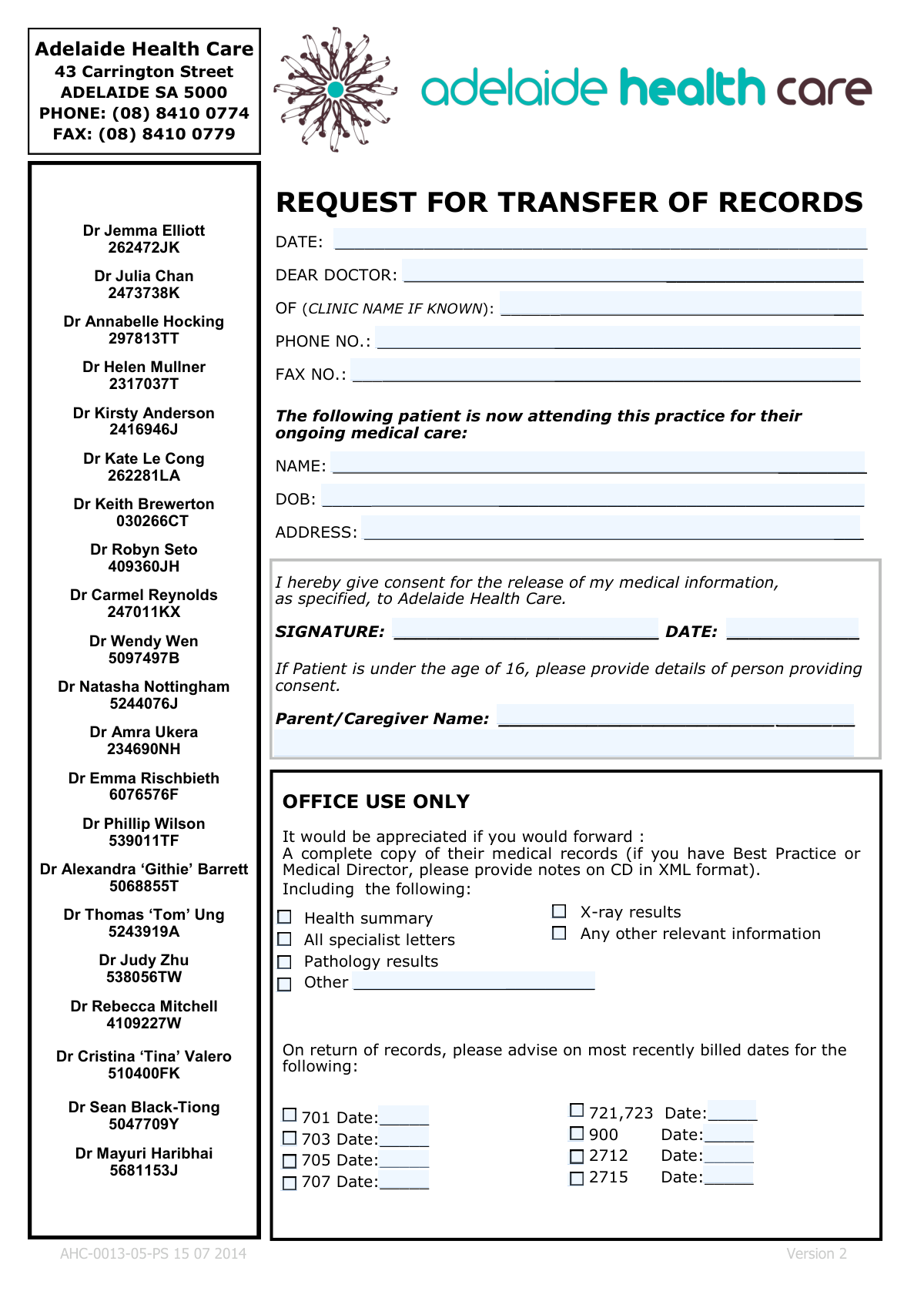
This is a patient consent and provider request form used by Adelaide Health Care to obtain a complete copy of a patient’s medical records from a prior doctor/clinic for ongoing care. It identifies the recipient doctor/clinic, the patient’s identifying details, and the specific categories of records to be forwarded, and it includes the patient’s (or parent/caregiver’s) consent signature and date. The form also asks the sending practice to note the most recently billed dates for specific item codes (e.g., 701, 703, 705, 707, 721/723, 900, 2712, 2715) when returning records. Today, this form can be filled out quickly and accurately using AI-powered services like Instafill.ai, which can also convert non-fillable PDF versions into interactive fillable forms.
Our AI automatically handles information lookup, data retrieval, formatting, and form filling.
It takes less than a minute to fill out AHC-0013-05-PS using our AI form filling.
Securely upload your data. Information is encrypted in transit and deleted immediately after the form is filled out.

Form specifications

Form name: Request for Transfer of Records (Adelaide Health Care) – AHC-0013-05-PS (Version 2)
Number of pages: 1
Language: English
Categories: healthcare forms, medical records forms, Adelaide Health Care forms, patient forms, medical transfer forms, health record forms
main-image

Instafill Demo: filling out a legal form in seconds

How to Fill Out AHC-0013-05-PS Online for Free in 2026

Are you looking to fill out a AHC-0013-05-PS form online quickly and accurately? Instafill.ai offers the #1 AI-powered PDF filling software of 2026, allowing you to complete your AHC-0013-05-PS form in just 37 seconds or less.
Follow these steps to fill out your AHC-0013-05-PS form online using Instafill.ai:
  1. 1 Go to Instafill.ai and upload the AHC-0013-05-PS “Request for Transfer of Records” form (or select it from the form library if available).
  2. 2 Enter the request details: the request date, the recipient/previous doctor name (“Dear Doctor”), clinic name (if known), and the clinic’s phone and fax numbers.
  3. 3 Fill in the patient details: full name, date of birth, and current residential address.
  4. 4 Select which records should be included (e.g., health summary, all specialist letters, pathology results, X-ray results, any other relevant information) and specify any “Other” records if needed.
  5. 5 Complete the consent section: add the patient’s signature (typed/e-signature as supported) and the consent date; if the patient is under 16, enter the parent/caregiver name and any additional consent details.
  6. 6 If applicable for returned records, check the relevant item-code boxes (701, 703, 705, 707, 721/723, 900, 2712, 2715) and enter the most recently billed date next to each selected code.
  7. 7 Review for completeness and accuracy, then download the completed form and send it to the prior clinic/doctor (or share/export it) for processing and records transfer to Adelaide Health Care.

Our AI-powered system ensures each field is filled out correctly, reducing errors and saving you time.

Why Choose Instafill.ai for Your Fillable AHC-0013-05-PS Form?

Speed

Complete your AHC-0013-05-PS in as little as 37 seconds.

Up-to-Date

Always use the latest 2026 AHC-0013-05-PS form version.

Cost-effective

No need to hire expensive lawyers.

Accuracy

Our AI performs 10 compliance checks to ensure your form is error-free.

Security

Your personal information is protected with bank-level encryption.

Frequently Asked Questions About Form AHC-0013-05-PS

This form authorises a patient’s previous doctor/clinic to send a copy of the patient’s medical records to Adelaide Health Care for ongoing care. It also requests specific record types (e.g., health summary, specialist letters, pathology, X-ray results).

The patient (or an authorised person) completes the patient details and signs the consent section. The previous clinic/doctor typically uses the “Office Use Only” section to confirm what records are included and to note relevant billed item dates.

Records should be sent to Adelaide Health Care, 43 Carrington Street, Adelaide SA 5000. You can also use PHONE (08) 8410 0774 or FAX (08) 8410 0779 for coordination and submission by fax where appropriate.

You must provide the patient’s full name, date of birth, and residential address. The request date and the recipient doctor/clinic details (Dear Doctor, clinic name if known, phone, fax) should also be completed.

The form requests a complete copy of medical records, including a health summary, all specialist letters, pathology results, X-ray results, and any other relevant information. If “Other (specify)” is selected, you should write exactly what additional documents are needed.

It asks clinics using the Best Practice or Medical Director practice software to export clinical notes in XML format and provide them on a CD. This helps ensure the receiving clinic can import records accurately.

If you don’t know the individual doctor, you can address it to the clinic (e.g., “Practice Manager” or “Medical Records Department”) and enter the clinic name if you know it. If the clinic name is unknown, provide as much identifying information as possible (e.g., suburb or phone number) and leave the rest blank.

The consent section is the patient’s authorisation to release medical information to Adelaide Health Care. Most clinics cannot legally transfer records without a signed consent and the date of signature.

A parent or caregiver must provide consent and their name should be entered in the Parent/Caregiver section. Add any extra details requested (such as relationship or contact information) in the additional details area.

These are used to indicate the most recently billed dates for those specific item codes when returning records. The clinic should tick the relevant code(s) and write the corresponding date next to each selected item.

No—tick the boxes for the documents you want included, but the form also requests a complete copy of records, so many clinics will include all standard documents. Use “Other (specify)” to request anything not listed (e.g., immunisation history or allergy list).

Processing time varies by the previous clinic’s workload and their record-release procedures. If it’s urgent, contact the previous clinic and Adelaide Health Care to confirm timelines and whether fax or electronic export is available.

Yes—AI form-filling tools can help extract your details and place them into the correct fields to reduce errors and save time. Services like Instafill.ai use AI to auto-fill form fields accurately and speed up completion.

Upload the PDF to Instafill.ai, then provide or confirm the required details (patient name, DOB, address, clinic/doctor contact details, and consent date/signature). Instafill.ai can auto-populate the fields and you can review, edit, and export the completed form for printing, emailing, or faxing.

If the PDF is “flat” (non-fillable), Instafill.ai can convert it into an interactive fillable form so you can type directly into the fields. After conversion, you can auto-fill and generate a clean, completed version for submission.

Compliance AHC-0013-05-PS
Validation Checks by Instafill.ai

1
Request Date is present and in valid date format
Validates that the 'Date (Request Details)' field is completed and matches an accepted date format (e.g., DD/MM/YYYY) and represents a real calendar date. This is important to establish when the transfer request was initiated and for audit/processing timelines. If the date is missing or invalid (e.g., 31/02/2025), the submission should be rejected or routed for manual review with a prompt to correct the date.
2
Patient full name completeness and character validation
Ensures 'Patient Name' is provided and contains at least a given name and surname, not just initials or a single token. It also checks for invalid characters (e.g., excessive punctuation, numeric-only entries) that can break downstream matching. If validation fails, the form should be flagged because records may be requested for the wrong patient or fail to match the prior clinic’s system.
3
Patient Date of Birth is valid and not in the future
Checks that 'Patient Date of Birth' is present, in a valid date format, and is not a future date. This is critical for patient identification and for determining whether a parent/caregiver must provide consent. If invalid or missing, the submission should be blocked or sent to exception handling because consent rules and patient matching cannot be reliably applied.
4
Under-16 consent logic: Parent/Caregiver details required when patient is under 16
Calculates the patient’s age from the Date of Birth and, if under 16 on the 'Consent Date' (or on the request date if consent date is missing), requires 'Parent/Caregiver Name' and 'Parent/Caregiver Additional Details'. This ensures legal/ethical compliance for consent when the patient is a minor. If the patient is under 16 and these fields are blank, the submission should fail validation and request completion before processing.
5
Adult consent logic: Parent/Caregiver fields must be empty or justified when patient is 16+
If the patient is 16 or older, validates that parent/caregiver fields are not populated unless there is a documented reason (captured in 'Parent/Caregiver Additional Details', e.g., guardian/POA). This prevents misattribution of consent and reduces privacy risk. If parent/caregiver fields are filled without justification, the form should be flagged for manual review.
6
Consent Signature presence and minimum quality check
Validates that 'Consent Signature' is present and not a placeholder (e.g., 'N/A', 'test', or blank/whitespace). Consent is the legal basis for releasing medical information, so missing or obviously invalid signatures must stop processing. If it fails, the request should be rejected and returned for a valid signature.
7
Consent Date is present, valid, and logically consistent with request date
Checks that 'Consent Date' is completed, is a valid date, and is not after the current date; additionally, it should not be later than the date the request is being made (or must be within an allowed tolerance if workflows permit same-day capture). This ensures consent existed at the time of requesting records. If consent date is missing/invalid or clearly inconsistent, the submission should be blocked or escalated for verification.
8
Patient address completeness (minimum deliverability fields)
Ensures 'Patient Address' includes at least street address, suburb, state, and postcode (or equivalent components), and is not just a partial entry. Accurate address supports correct patient identification and reduces risk of mixing records between similarly named patients. If incomplete, the form should be flagged and the submitter prompted to provide the missing address components.
9
Recipient doctor name and clinic identification requirements
Validates that 'Dear Doctor (recipient name)' is provided and is not blank; if 'Clinic name (if known)' is empty, the doctor name must be sufficiently specific (e.g., not just 'Doctor' or 'Reception'). This ensures the request is directed to the correct provider and reduces delays. If both are missing or non-specific, the submission should fail validation and request clearer recipient details.
10
Phone number format validation (Australian and international tolerant)
Checks that 'Phone number' contains a valid phone pattern (digits with optional spaces, parentheses, leading +country code) and meets minimum length requirements (e.g., 8–15 digits after normalization). Correct phone details are needed to resolve issues with the record transfer quickly. If invalid, the form should be flagged and the user asked to correct the number before submission is accepted.
11
Fax number format validation and differentiation from phone number
Validates that 'Fax number' matches acceptable fax/phone formatting rules and is not identical to the phone number unless explicitly allowed. Fax is often used for secure transmission confirmations; incorrect fax details can cause privacy breaches or failed delivery. If invalid or suspiciously identical without confirmation, the submission should be flagged for correction or manual verification.
12
Records-to-include selection: at least one record category must be requested
Ensures at least one checkbox is selected among 'Health summary', 'All specialist letters', 'Pathology results', 'X-ray results', 'Any other relevant information', or 'Other (specify)'. This prevents sending an empty/ambiguous request that the prior clinic cannot action. If none are selected, validation should fail and require the requester to specify what records are needed.
13
Other (specify) requires a description; description must be meaningful
If 'Other (specify)' is checked, validates that 'Other records (Office Use)' is filled with a specific description (minimum length and not generic text like 'other' or 'all'). This ensures the prior clinic knows exactly what additional documents to include. If the description is missing or too vague, the submission should be rejected or returned for clarification.
14
Return-records billed item checkbox-to-date dependency
For each billed item row (701, 703, 705, 707, 721/723, 900, 2712, 2715), validates that if the checkbox is selected, the corresponding date field is present and valid. This prevents incomplete billing-date reporting that could affect Medicare/item history tracking. If any selected item lacks a valid date, the form should fail validation and identify the specific row(s) needing correction.
15
Return-records billed item date must not be in the future and must be plausible
Validates that each provided billed date (for 701/703/705/707/721-723/900/2712/2715) is not in the future and is within a reasonable historical window (e.g., not earlier than a configurable cutoff such as 20 years unless allowed). This reduces data entry errors like wrong year or transposed digits. If a date is implausible, the system should flag it for confirmation or manual review rather than silently accepting it.

Common Mistakes in Completing AHC-0013-05-PS

Leaving the request DATE blank or using an ambiguous date format

People often skip the main request date or write it in a format that can be misread (e.g., 03/04/24). Missing or unclear dates can delay processing because the receiving clinic can’t confirm when consent/request was made. Always enter the date and use an unambiguous format (e.g., 17 Feb 2026 or YYYY-MM-DD). AI-powered tools like Instafill.ai can standardize date formats and flag missing required dates before submission.

Not addressing the request to the correct doctor/clinic (Dear Doctor + Clinic Name)

A common error is writing only “Dear Doctor” without a name, or leaving the clinic name blank even when it’s known. This can cause misrouting, slower handling, or the request being rejected by administrative staff who need a clear recipient. Enter the full recipient name and the previous clinic name (if known), and double-check spelling. Instafill.ai can auto-populate known provider details and reduce typos.

Incorrect or incomplete phone/fax numbers (missing area code or transposed digits)

Phone and fax fields are frequently entered with missing area codes, outdated numbers, or digit transpositions. If the sender can’t confirm details or transmit records, the transfer stalls and may require follow-up calls. Always include the full number with area code (e.g., (08) for SA) and verify against the clinic’s official contact details. Instafill.ai can validate number length/format and catch obvious inconsistencies.

Patient name not matching medical records (nicknames, missing middle names, spelling errors)

Patients often enter a preferred name or omit parts of their legal name, which may not match the previous practice’s record system. Mismatches can lead to the wrong chart being pulled or the request being delayed for identity verification. Use the patient’s full name exactly as it appears on prior medical records (given names and surname). Instafill.ai can help by reusing verified identity data consistently across forms.

DOB entered incorrectly (wrong order, missing leading zeros, or inconsistent with age/consent section)

DOB is commonly written in a day/month vs month/day order confusion or with incomplete digits. An incorrect DOB can cause the wrong patient file to be released or trigger privacy/consent issues, especially for minors. Write DOB in a clear format (e.g., 05 Jul 2014) and ensure it aligns with whether the patient is under 16. Instafill.ai can enforce a single DOB format and cross-check age-dependent fields.

Incomplete patient address (missing unit number, suburb, state, or postcode)

People often provide only a street line and forget suburb/state/postcode, or omit unit/flat details. Incomplete addresses can complicate patient identification and create issues if any correspondence or confirmation needs to be mailed. Enter the full residential address including unit/flat, street, suburb, state, and postcode. Instafill.ai can format addresses consistently and prompt for missing components.

Consent signature/date missing or signed by the wrong person

A frequent mistake is forgetting to sign, forgetting the consent date, or having someone other than the patient/authorized representative sign without clarification. Without valid consent, the previous clinic may legally be unable to release records, causing significant delays. Ensure the signature is provided and dated, and that the signer is authorized. Instafill.ai can flag missing signatures/dates and guide the correct signer workflow.

Minor consent section not completed when patient is under 16

When the patient is under 16, people often leave the Parent/Caregiver Name and additional details blank or fail to indicate the relationship. This can invalidate consent and force the clinic to request additional documentation before releasing records. If DOB indicates the patient is under 16, complete the parent/caregiver name and add relationship/contact details in the additional details field. Instafill.ai can automatically detect the age from DOB and require the guardian fields when needed.

Not selecting the correct ‘Records to Include’ checkboxes (or forgetting to specify ‘Other’)

Submitters often assume “complete copy” is enough and leave the specific inclusions unchecked, or they tick ‘Other’ but don’t describe what they want. This can result in missing key documents (e.g., specialist letters, pathology, X-ray results) and incomplete continuity of care. Tick all applicable categories and, if selecting ‘Other (specify)’, write a short, precise description (e.g., immunisation history, allergy list). Instafill.ai can prompt for a description when ‘Other’ is selected and reduce omissions.

Confusing ‘Office Use Only’ sections and leaving them blank or incorrectly completed

Because the form labels some areas as “OFFICE USE ONLY,” people either skip them entirely or fill them inconsistently, especially the list of records to include. This can create uncertainty about what the receiving practice expects and what the sending practice should provide. Follow your clinic’s process: if you are the requesting/sending office, complete the relevant checkboxes; if you are the patient, ask staff which parts you should complete. Instafill.ai can guide role-based completion so only the appropriate sections are filled.

Incorrectly completing Medicare item ‘most recently billed date’ rows (701/703/705/707/721-723/900/2712/2715)

People often tick an item code box but forget to enter the corresponding date, enter dates on the wrong line, or provide a non-date note (e.g., “N/A”) where a date is required. This can lead to billing/administrative follow-ups and delays in finalizing the transfer documentation. Only tick the item codes that apply and enter the most recently billed date next to each selected code in a consistent date format. Instafill.ai can enforce the rule “if box is checked, date is required,” and validate that the entry is a real date.
Saved over 80 hours a year

“I was never sure if my IRS forms like W-9 were filled correctly. Now, I can complete the forms accurately without any external help.”

Kevin Martin Green

Your data stays secure with advanced protection from Instafill and our subprocessors

Robust compliance program

Transparent business model

You’re not the product. You always know where your data is and what it is processed for.

ISO 27001, HIPAA, and GDPR

Our subprocesses adhere to multiple compliance standards, including but not limited to ISO 27001, HIPAA, and GDPR.

Security & privacy by design

We consider security and privacy from the initial design phase of any new service or functionality. It’s not an afterthought, it’s built-in, including support for two-factor authentication (2FA) to further protect your account.

Fill out AHC-0013-05-PS with Instafill.ai

Worried about filling PDFs wrong? Instafill securely fills request-for-transfer-of-records-adelaide-health-care-ahc-0013-05-ps-version-2 forms, ensuring each field is accurate.