Yes! You can use AI to fill out DBPR Form ABT-6002, Division of Alcoholic Beverages and Tobacco Application for Transfer of Ownership of an Alcoholic Beverage License

DBPR ABT-6002 is an official Florida Department of Business and Professional Regulation (DBPR) Division of Alcoholic Beverages and Tobacco (ABT) application used when an alcoholic beverage license is being transferred to a new owner and/or when certain license details are changing (e.g., location, business name, series, officers/stockholders, or adding retail tobacco products options). It collects license transaction details, business/entity identifiers (such as FEIN and Florida Division of Corporations document number), and personal/background information for related parties, including disclosures about prior permits and criminal history. Submitting an accurate ABT-6002 is important to maintain legal authority to sell/manufacture/distribute alcoholic beverages and to avoid processing delays due to missing documentation (e.g., fingerprints, arrest dispositions, right of occupancy, surety bond where required). Today, this form can be filled out quickly and accurately using AI-powered services like Instafill.ai, which can also convert non-fillable PDF versions into interactive fillable forms.
Our AI automatically handles information lookup, data retrieval, formatting, and form filling.
It takes less than a minute to fill out DBPR ABT-6002 using our AI form filling.
Securely upload your data. Information is encrypted in transit and deleted immediately after the form is filled out.

Form specifications

Form name: DBPR Form ABT-6002, Division of Alcoholic Beverages and Tobacco Application for Transfer of Ownership of an Alcoholic Beverage License
Number of pages: 4
Language: English
Categories: liquor license forms, DBPR forms, Florida business forms, alcohol license forms
main-image

Instafill Demo: filling out a legal form in seconds

How to Fill Out DBPR ABT-6002 Online for Free in 2026

Are you looking to fill out a DBPR ABT-6002 form online quickly and accurately? Instafill.ai offers the #1 AI-powered PDF filling software of 2026, allowing you to complete your DBPR ABT-6002 form in just 37 seconds or less.
Follow these steps to fill out your DBPR ABT-6002 form online using Instafill.ai:
  1. 1 Go to Instafill.ai and upload the DBPR ABT-6002 PDF (or select it from the form library) to start an AI-guided fill session.
  2. 2 Confirm the license transaction(s) and transaction type(s) (e.g., Transfer of Ownership, Change of Location, Change of Business Name, Change/Increase/Decrease in Series, officer/stockholder changes, and any New Retail Tobacco Products options).
  3. 3 Enter the license and business/entity information in Section 2, including applicant legal name, FEIN, Florida Department of State document number, D/B/A, location address, mailing address, and optional contact person details.
  4. 4 Complete Section 3 for each related party (as required), providing personal identifiers and background disclosures (citizenship, addresses, ownership interests, prior permit actions, felony/offense history) and attach supporting details where prompted.
  5. 5 Use Instafill.ai to validate conditional fields (e.g., temporary license request, child licenses, revocation-related transfer questions, and tobacco product sub-options) and run an error check for missing required entries.
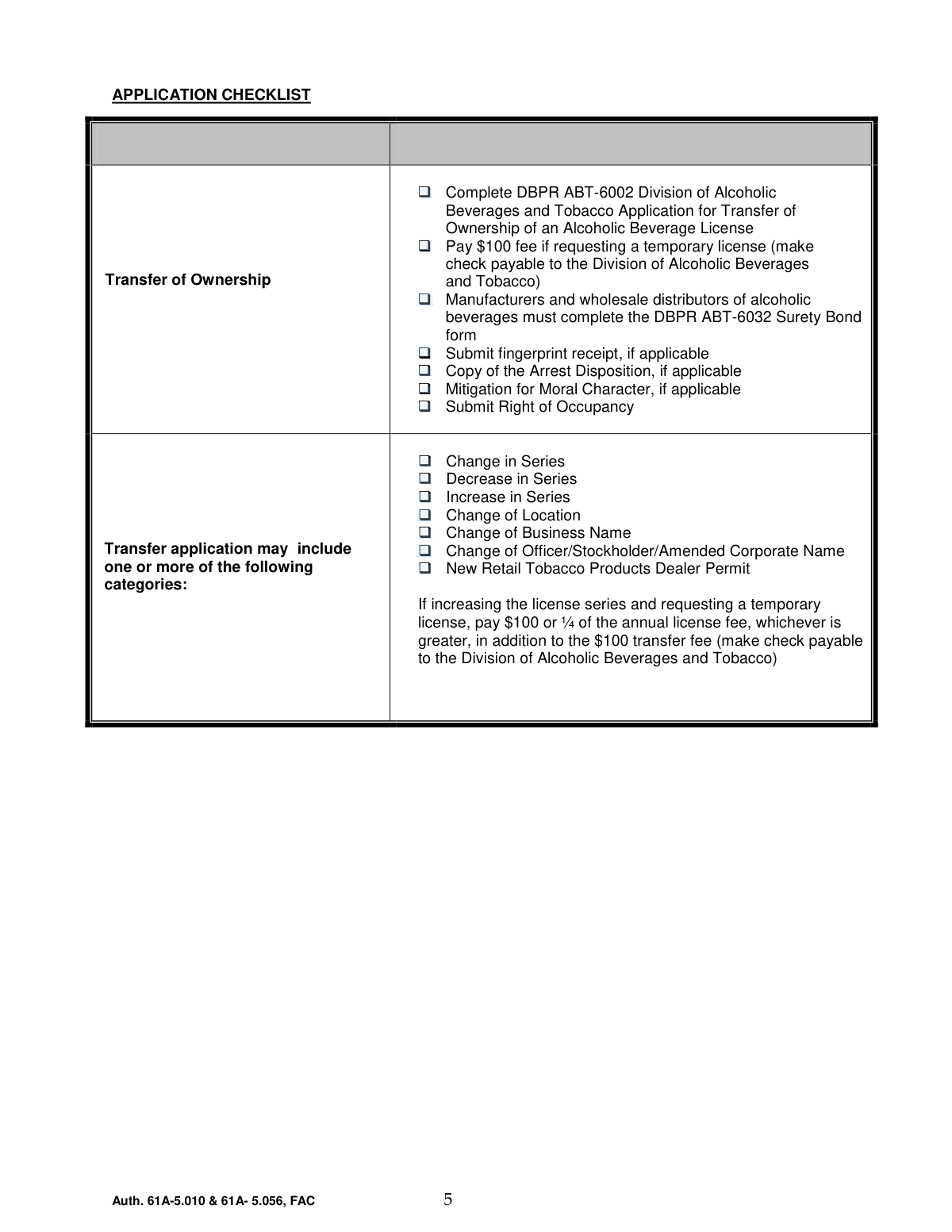
  6. 6 Upload/attach required supporting documents per the checklist (as applicable), such as fingerprint receipt, arrest disposition, mitigation for moral character, right of occupancy, and ABT-6032 surety bond for manufacturers/wholesalers, and confirm fee amounts (including temporary license fees if requested).
  7. 7 Review the completed application for accuracy, export the finalized packet, and submit it to the appropriate local ABT district office (mail, appointment, or drop-off) with the required fee(s).

Our AI-powered system ensures each field is filled out correctly, reducing errors and saving you time.

Why Choose Instafill.ai for Your Fillable DBPR ABT-6002 Form?

Speed

Complete your DBPR ABT-6002 in as little as 37 seconds.

Up-to-Date

Always use the latest 2026 DBPR ABT-6002 form version.

Cost-effective

No need to hire expensive lawyers.

Accuracy

Our AI performs 10 compliance checks to ensure your form is error-free.

Security

Your personal information is protected with bank-level encryption.

Frequently Asked Questions About Form DBPR ABT-6002

DBPR ABT-6002 is used to request a transfer of ownership of a Florida alcoholic beverage license and/or related changes such as location, business name, license series, or officers/stockholders. It is submitted to the Division of Alcoholic Beverages & Tobacco (AB&T) through your local district office.

The new owner/applicant (individual or legal entity) who will hold the alcoholic beverage license must complete the form. If the applicant is a corporation or other entity, you must use the exact name and document number registered with the Florida Department of State Division of Corporations.

Submit the completed application and required fee(s) to your local AB&T district office. The form can be submitted by mail, by appointment, or dropped off at the district office.

At minimum, you must complete ABT-6002 and include any applicable supporting items such as the temporary license fee (if requested), ABT-6032 surety bond (if required), fingerprint receipt (if applicable), arrest disposition and moral character mitigation (if applicable), and proof of right of occupancy.

You pay the $100 fee only if you are requesting a temporary license and check “Yes” for Temporary License Purchase. The check should be payable to the Division of Alcoholic Beverages and Tobacco.

Yes—if you are increasing the license series and requesting a temporary license, you must pay $100 or one-quarter of the annual license fee (whichever is greater) in addition to the $100 transfer fee. Include payment as instructed (check payable to the Division of Alcoholic Beverages and Tobacco).

In Section 1, select the license type (e.g., Retail Alcoholic Beverages) and then check all transaction types that apply (transfer of ownership, change of location, change of business name, change/increase/decrease in series, etc.). If you are adding New Retail Tobacco Products, you must also select at least one option (Pipes Only, Over the Counter, and/or Vending Machine).

“Seller’s Business Name” refers to the current business name associated with the license being transferred. “Full Name of Applicant(s)” is the legal name the license will be issued to (person or entity), and “Business Name (D/B/A)” is the trade name the business operates under, if different.

This is the Florida Division of Corporations document/registration number for the applicant entity. You can find it on the Florida Department of State Division of Corporations records for your business.

Right of occupancy is proof that the business has the legal right to use the licensed premises (for example, a lease or other occupancy documentation). AB&T uses it to confirm the licensed location is authorized for the applicant’s use.

Section 3 must be completed for each person directly connected with the business unless they are a current licensee. This section collects personal details and background questions that AB&T uses to evaluate eligibility.

Only if they apply to your situation: submit a fingerprint receipt if fingerprinting is required, and include arrest disposition documents and any mitigation for moral character if you answered “Yes” to relevant conviction or character-related questions. If you are unsure what applies, contact your local AB&T district office for guidance.

Answer each question truthfully and completely, and if you check “Yes,” provide the requested details (business name, license number, dates, locations, and type of offense/action). For convictions where requested, include a copy of the arrest disposition with your application.

Yes—AI tools can help organize your information and reduce errors when completing the form. Services like Instafill.ai use AI to auto-fill form fields accurately and save time, especially when you have repeated business and personal details.

You can upload the ABT-6002 PDF to Instafill.ai, answer a guided set of questions, and have the system map your responses into the correct fields for review before downloading. If the PDF is flat/non-fillable, Instafill.ai can convert it into an interactive fillable form so you can complete and sign it more easily.

Compliance DBPR ABT-6002
Validation Checks by Instafill.ai

1
Requires at least one License Transaction category selection
Validates that the applicant selected at least one license transaction/license type in Section 1 (e.g., Retail Alcoholic Beverages, Wholesaler, Manufacturer, Importer, etc.). This is necessary to route the application to the correct licensing workflow and determine which supporting requirements apply. If no license transaction is selected, the submission should be rejected and the applicant prompted to choose the applicable license type(s).
2
Enforces exactly one Temporary License Purchase choice (Yes/No)
Checks that the applicant selected either Temporary License Purchase — Yes or Temporary License Purchase — No, but not both and not neither. This prevents ambiguous fee and processing requirements. If the selection is missing or conflicting, the system should block submission and require a single definitive choice.
3
Validates Transaction Type selection and prevents contradictory combinations
Ensures at least one Transaction Type option is checked (Transfer of Ownership, Change of Location, Change of Business Name, etc.) and flags logically conflicting combinations where the form design expects a single primary transaction (e.g., both Increase in Series and Decrease in Series simultaneously). Correct transaction typing is critical for fee calculation and required attachments. If invalid combinations are detected, the submission should be stopped and the applicant required to correct the selections.
4
Requires Seller’s Business Name and License Number for transfer-related submissions
When Transfer of Ownership is selected, validates that Seller’s Business Name and License Number are provided and not blank. These fields identify the existing license being transferred and are essential for matching the application to the correct record. If either is missing, the application should be rejected as incomplete.
5
Validates License Series Requested and Type/Class Requested format and presence
Checks that License Series Requested and Type/Class Requested are completed when any series-related transaction is selected (Change in Series, Increase in Series, Decrease in Series). It should also validate that the values match expected patterns (e.g., alphanumeric series/class codes) and are not free-text descriptions that cannot be interpreted. If invalid or missing, the system should require correction before acceptance.
6
New Retail Tobacco Products requires at least one sub-option (Pipes/Over-the-Counter/Vending)
If New Retail Tobacco Products is checked, validates that at least one of Pipes Only, Over the Counter, or Vending Machine is also selected. This is required because the permit request is incomplete without specifying the sales method/category. If none are selected, the submission should fail validation and prompt the applicant to choose one or more sub-options.
7
Child License Requested requires a valid count and non-negative integer
If a Child License is requested, validates that Number of Child Licenses Requested is provided and is a whole number (integer) greater than or equal to 1. This prevents nonsensical requests (e.g., 0, negative numbers, decimals) and supports correct fee and issuance processing. If the count is missing or invalid, the system should block submission and request a corrected value.
8
FEIN format validation (EIN must be 9 digits)
Validates that the FEIN/EIN is present when the applicant is a business entity and that it contains exactly 9 digits (optionally allowing the standard hyphen format XX-XXXXXXX). Accurate FEIN data is important for identity verification and tax/registration matching. If the FEIN is missing or malformed, the submission should be rejected or routed to an exception queue depending on policy.
9
Florida Department of State Document Number required for entities and format-checked
When the applicant is a corporation/other legal entity, validates that the Department of State Document Number is provided and matches expected Florida Division of Corporations formats (e.g., numeric or alphanumeric patterns used by Sunbiz). This ensures the entity can be verified against state registration records. If missing or invalid, the application should be marked incomplete and not accepted for processing.
10
Business and Contact phone number format validation (including extension rules)
Validates Business Telephone Number and (if provided) Contact Telephone Number are in a valid phone format (e.g., 10 digits for US numbers, allowing punctuation and optional country code). If an extension is provided, it must be numeric and within a reasonable length (e.g., 1–6 digits) and should not appear inside the main phone field. If phone formatting fails, the system should require correction to ensure the agency can contact the applicant.
11
Email address format validation for optional email fields
If E‑Mail Address (business) or Contact E‑Mail Address is provided, validates it conforms to a standard email format (local-part@domain) and does not contain spaces or invalid characters. Even though optional, invalid emails cause delivery failures for notices and deficiency letters. If invalid, the system should prompt correction or allow removal of the email value.
12
Location address completeness and Florida constraints
Validates that Location Street Address, City, County, and ZIP Code are present and that Location State is 'FL' (as indicated by the form). It should also validate ZIP format (5-digit or ZIP+4) and reject non-Florida state codes for the licensed premises. If any required location component is missing or inconsistent, the submission should be rejected because the licensed premises cannot be identified.
13
Mailing address completeness when provided and state/ZIP format checks
Validates that if any part of the business mailing address is entered, the remaining required components (street/PO box, city, state, ZIP) are also provided, and that state is a valid two-letter code with ZIP in 5-digit or ZIP+4 format. Partial mailing addresses create undeliverable correspondence and processing delays. If incomplete or malformed, the system should require completion or clearing of the mailing address fields.
14
Revocation proceeding logic: relationship question and explanation required when applicable
If Transfer Due to Revocation is marked Yes, validates that the Personal Relationship to Transferor question is answered (Yes/No). If Personal Relationship to Transferor is Yes, the Explanation of Personal Relationship to Transferor must be non-empty and sufficiently descriptive (not just 'N/A' or a single character). If these dependencies are not satisfied, the submission should be blocked because the agency needs this information for compliance review.
15
Related party SSN format and uniqueness per individual
Validates that each Related Party Social Security Number is exactly 9 digits (optionally allowing XXX-XX-XXXX formatting) and is not an obvious invalid value (e.g., all zeros). It should also check that the same SSN is not duplicated across multiple related-party entries unless explicitly allowed by the system (to prevent accidental duplicate person records). If SSN validation fails, the system should reject the entry and require correction.
16
Related party Date of Birth validity and age reasonableness
Validates that Date of Birth is a real calendar date and is not in the future, and applies a reasonableness check (e.g., age between 16 and 120) to catch data entry errors. DOB is used for identity verification and background screening. If invalid, the submission should be blocked and the applicant prompted to correct the date.
17
Citizenship dependency: immigration/passport number required when not a U.S. citizen
If Are you a U.S. citizen? is marked No, validates that an Immigration Card Number or Passport Number is provided and meets basic format constraints (non-empty, minimum length, alphanumeric). This information is required to verify identity and eligibility for non-citizen applicants. If missing or clearly invalid, the system should reject the submission as incomplete.
18
Background questions (Q5–Q8) require detail fields and supporting documents when answered Yes
For Q5 (ownership interest), Q6 (prior refusal/revocation/suspension), Q7 (felony conviction), and Q8 (alcohol/tobacco offense), validates that when Yes is selected the corresponding detail fields (business name/license/address or date/location/type of offense) are completed. It should also enforce checklist/document dependencies: Q7 or Q8 Yes requires Copy of the Arrest Disposition to be indicated as included, and moral character mitigation/fingerprint receipt should be required when applicable per agency rules. If details or required attachments are missing, the system should fail validation and list the specific missing items.

Common Mistakes in Completing DBPR ABT-6002

Checking the wrong license type (Retail vs. Wholesaler/Manufacturer/Importer)

Applicants often check a license type box that doesn’t match the license number being transferred (e.g., selecting Retail when the license is actually a wholesaler/manufacturer). This usually happens because people focus on what they plan to do rather than what the current license is. The consequence is misrouting or rejection because the transaction is processed under the wrong program rules. Avoid this by matching the license type selection to the existing license record and license number; AI-powered tools like Instafill.ai can flag mismatches between license type and license identifiers before submission.

Selecting inconsistent transaction categories (Section 1 vs. checklist categories)

A common error is checking “Transfer of Ownership” but also forgetting to check other applicable transaction types (e.g., Change of Location, Change of Business Name, Change of Officer/Stockholder) that are part of the same filing. This happens when applicants treat the form as “one purpose only,” even though the checklist explicitly allows multiple categories. Missing a needed category can delay approval or require an amended filing and additional documentation. Avoid this by reviewing the entire deal structure (ownership, address, name, officers/stockholders, series) and ensuring every applicable box is checked; Instafill.ai can prompt for related selections when one change implies another.

Requesting a temporary license but not including the correct fee (or payee)

People frequently check “Temporary License—Yes” but forget to include the $100 fee, make the check payable to the wrong entity, or overlook the special rule when increasing series (pay $100 or 1/4 of the annual fee, whichever is greater, in addition to the $100 transfer fee). This happens because the fee logic is split between the checklist and the “Increase in Series” note. The result is an incomplete application and processing delays until payment is corrected. Avoid this by calculating fees based on whether you are increasing series and confirming the payee is “Division of Alcoholic Beverages and Tobacco”; Instafill.ai can help by validating fee conditions and generating a fee checklist based on your selections.

Leaving “License Series Requested” and “Type/Class Requested” blank or using the wrong codes

Applicants often don’t know the correct series/type/class codes and either leave these fields empty or enter informal descriptions (e.g., “beer and wine”) instead of the required series identifier. This leads to back-and-forth with the district office or a request for correction because the agency can’t confirm what authority is being requested. Avoid this by copying the series/type/class exactly from the existing license or ABT guidance for the requested change. Instafill.ai can reduce errors by formatting entries consistently and prompting for missing series/type fields when a “Change in Series/Increase/Decrease” box is checked.

Mismatching the legal entity name and Florida Department of State document number

For corporations/LLCs, a frequent mistake is entering a trade name (DBA) as the “Full Name of Applicant(s)” or providing a document number that doesn’t match the entity name on Sunbiz. This happens when applicants confuse the legal licensee with the storefront name. The consequence can be rejection or a requirement to amend the application because the license must be issued to the legal entity exactly as registered. Avoid this by pulling the exact legal name and document number from the Florida Division of Corporations record; Instafill.ai can help validate entity formatting and reduce name/document-number inconsistencies.

Confusing Business Name (D/B/A) with the applicant’s legal name

Many applicants enter the same value in both “Full Name of Applicant(s)” and “Business Name (D/B/A),” or they swap them. This is common because people assume the business name is always the name on the license, but the form distinguishes the legal licensee from the trade name. Errors here can cause licensing records to be created incorrectly and may require corrections after submission. Avoid this by using the legal entity/individual name for the applicant field and the public-facing trade name for the DBA field; Instafill.ai can guide field-by-field mapping to prevent swapping.

Providing an incomplete location address or wrong county

Applicants often omit suite/unit numbers, use a mailing address instead of the physical location, or guess the county (especially in border areas or unincorporated locations). This happens because the form separates location and mailing addresses and requires county explicitly. The consequence is delays in inspections, jurisdictional routing, and correspondence, and it can trigger requests for clarification. Avoid this by using the exact physical premises address (including suite/unit) and verifying the county from official property records or GIS; Instafill.ai can standardize address formatting and catch missing components like unit numbers or ZIP+4.

Not submitting “Right of Occupancy” documentation (or submitting the wrong document)

A very common checklist failure is forgetting to include proof of right of occupancy (lease, deed, or other acceptable authorization) for the licensed premises. This happens when applicants assume the address on the application is enough or they submit a document that doesn’t show the applicant’s legal name or the full premises address. The result is an incomplete application and a hold until acceptable occupancy proof is provided. Avoid this by ensuring the occupancy document matches the applicant’s legal name and the exact location address; Instafill.ai can help by generating a document checklist based on your transaction type and flagging missing attachments.

Skipping Section 3 for all required related parties (or only completing it for one person)

Applicants frequently complete Section 3 for a single owner but fail to include every person “directly connected with the business” (e.g., multiple owners, officers, partners, or key individuals), unless they are current licensees. This happens because the form doesn’t provide unlimited rows and people assume one entry is sufficient. The consequence is a deficiency notice and delays while additional personal information is collected. Avoid this by identifying all related parties up front and attaching additional pages in the same format if needed; Instafill.ai can help replicate sections and ensure each required person has a complete set of fields.

Errors in sensitive personal data (SSN, DOB, citizenship/immigration number)

Common mistakes include transposed SSN digits, inconsistent DOB formats, leaving citizenship unanswered, or failing to provide an immigration card/passport number when “Not a U.S. citizen” is selected. These errors happen because the fields are sensitive, applicants rush, or they are unsure what documentation is required. The consequence can be background-check delays, fingerprinting issues, or requests for corrected identity information. Avoid this by double-checking against official IDs and ensuring conditional fields (like immigration/passport number) are completed when triggered; Instafill.ai can validate formats (e.g., DOB/SSN patterns) and prompt for required conditional entries.

Answering criminal/disciplinary history questions incorrectly or omitting required dispositions/mitigation

Applicants sometimes answer “No” to Questions 6–8 (revocations/suspensions, felony convictions, alcohol/tobacco offenses) due to misunderstanding the lookback periods (15 years vs. 5 years) or thinking out-of-state matters don’t count. Others answer “Yes” but fail to attach the required Arrest Disposition and/or Mitigation for Moral Character documentation. The consequence is serious: delays, potential denial, or allegations of misrepresentation if omissions are discovered. Avoid this by carefully applying the correct time windows, including all jurisdictions, and attaching dispositions/mitigation whenever applicable; Instafill.ai can help by reminding users of lookback periods and generating an attachment checklist when “Yes” is selected.
Saved over 80 hours a year

“I was never sure if my IRS forms like W-9 were filled correctly. Now, I can complete the forms accurately without any external help.”

Kevin Martin Green

Your data stays secure with advanced protection from Instafill and our subprocessors

Robust compliance program

Transparent business model

You’re not the product. You always know where your data is and what it is processed for.

ISO 27001, HIPAA, and GDPR

Our subprocesses adhere to multiple compliance standards, including but not limited to ISO 27001, HIPAA, and GDPR.

Security & privacy by design

We consider security and privacy from the initial design phase of any new service or functionality. It’s not an afterthought, it’s built-in, including support for two-factor authentication (2FA) to further protect your account.

Fill out DBPR ABT-6002 with Instafill.ai

Worried about filling PDFs wrong? Instafill securely fills dbpr-form-abt-6002-division-of-alcoholic-beverages-and-tobacco-application-for-transfer-of-ownership-of-an-alcoholic forms, ensuring each field is accurate.