Yes! You can use AI to fill out Out-of-Network Pre-Authorization and Exception Request Form
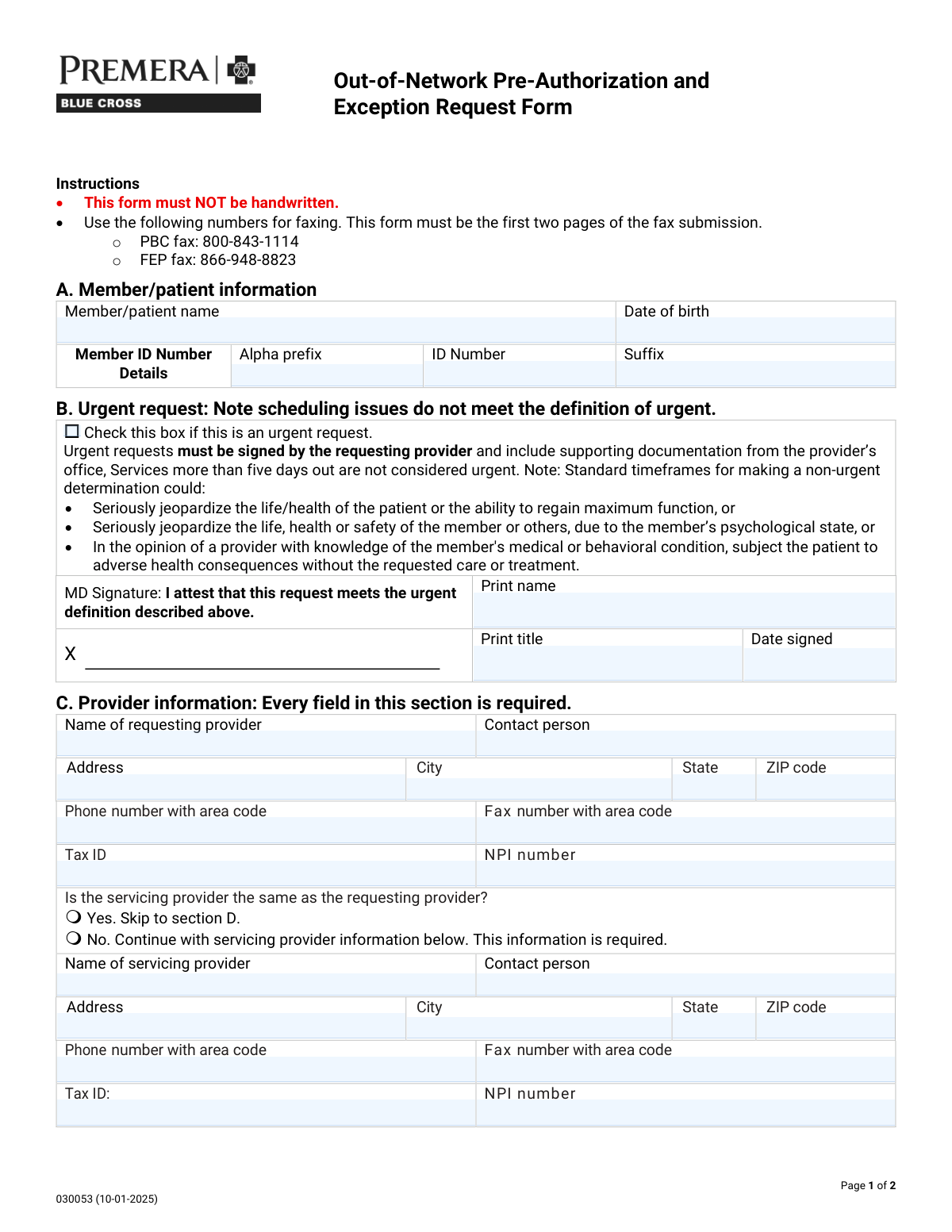
The Out-of-Network Pre-Authorization and Exception Request Form is a health plan utilization-management document used by providers to request authorization or an exception for services to be performed by an out-of-network provider or facility. It captures member identifiers, requesting/servicing provider details, facility type and identifiers (Tax ID/NPI), the reason for the out-of-network request (e.g., Transition of Care, Continuity/Coordination of Care, Benefit Level Exception, Single Case Agreement), and the clinical/procedural details (CPT/HCPCS, modifiers, units, ICD diagnosis codes) with a written justification and supporting records. It is important because incomplete or inaccurate submissions can delay determinations and care, and urgent requests require provider attestation and documentation. Today, this form can be filled out quickly and accurately using AI-powered services like Instafill.ai, which can also convert non-fillable PDF versions into interactive fillable forms.
Our AI automatically handles information lookup, data retrieval, formatting, and form filling.
It takes less than a minute to fill out Out-of-Network Pre-Authorization and Exception Request (Form 030053) using our AI form filling.
Securely upload your data. Information is encrypted in transit and deleted immediately after the form is filled out.
Form specifications
| Form name: | Out-of-Network Pre-Authorization and Exception Request Form |
| Number of pages: | 2 |
| Language: | English |
| Categories: | insurance forms, prior authorization forms, medical authorization forms, health insurance forms, authorization forms |
Instafill Demo: filling out a legal form in seconds
How to Fill Out Out-of-Network Pre-Authorization and Exception Request (Form 030053) Online for Free in 2026
Are you looking to fill out a OUT-OF-NETWORK PRE-AUTHORIZATION AND EXCEPTION REQUEST (FORM 030053) form online quickly and accurately? Instafill.ai offers the #1 AI-powered PDF filling software of 2026, allowing you to complete your OUT-OF-NETWORK PRE-AUTHORIZATION AND EXCEPTION REQUEST (FORM 030053) form in just 37 seconds or less.
Follow these steps to fill out your OUT-OF-NETWORK PRE-AUTHORIZATION AND EXCEPTION REQUEST (FORM 030053) form online using Instafill.ai:
- 1 Go to Instafill.ai and upload the Out-of-Network Pre-Authorization and Exception Request Form (or select it from the form library).
- 2 Enter member/patient information (name, date of birth, and member ID details including alpha prefix, ID number, and suffix).
- 3 Indicate whether the request is urgent; if urgent, complete the provider attestation fields (printed name, title, and date signed) and attach supporting documentation as prompted.
- 4 Complete requesting provider information (name, contact person, address, phone/fax, Tax ID, and NPI), then specify whether the servicing provider is the same; if not, enter servicing provider details.
- 5 Select the facility type (e.g., inpatient hospital category, outpatient hospital, ASC, LLOC, home/office/other) and fill in facility identifiers and contact details (address, phone/fax, Tax ID, NPI).
- 6 Choose the reason for the out-of-network request (Transition of Care, Continuity/Coordination of Care, Benefit Level Exception/BLE extension, Single Case Agreement/SCA extension), provide any required dates (prior visits/emergency follow-up), and add SCA contact email if applicable.
- 7 Add procedure and diagnosis details (CPT/HCPCS codes, modifiers, units, ICD codes) and write the detailed justification; have Instafill.ai validate completeness, then download/submit per the form instructions (fax with these pages first).
Our AI-powered system ensures each field is filled out correctly, reducing errors and saving you time.
Why Choose Instafill.ai for Your Fillable Out-of-Network Pre-Authorization and Exception Request (Form 030053) Form?
Speed
Complete your Out-of-Network Pre-Authorization and Exception Request (Form 030053) in as little as 37 seconds.
Up-to-Date
Always use the latest 2026 Out-of-Network Pre-Authorization and Exception Request (Form 030053) form version.
Cost-effective
No need to hire expensive lawyers.
Accuracy
Our AI performs 10 compliance checks to ensure your form is error-free.
Security
Your personal information is protected with bank-level encryption.
Frequently Asked Questions About Form Out-of-Network Pre-Authorization and Exception Request (Form 030053)
This form is used to request approval to receive covered services from an out-of-network provider or facility. It supports requests such as Transition of Care, Continuity/Coordination of Care, Benefit Level Exceptions (BLE), and Single Case Agreements (SCA).
It is typically completed and submitted by the requesting providerâs office, because provider details, clinical justification, and medical records are required. Patients may help supply member information, but the provider generally submits the fax package.
No. The instructions state the form must NOT be handwritten, so it should be typed or completed electronically before submission.
Fax the first two pages as the start of your submission to the correct fax number: PBC fax 800-843-1114 or FEP fax 866-948-8823. Make sure these two pages are the first pages in the fax packet.
You must provide the member/patient name, date of birth, and the full Member ID details (alpha prefix, ID number, and suffix if applicable). Enter the information exactly as it appears on the insurance card.
Urgent requests are only for situations where standard timeframes could seriously jeopardize life/health, safety, or the ability to regain maximum function, or could cause adverse health consequences without the requested care. Scheduling issues do not qualify, and services more than five days out are not considered urgent.
The requesting provider must sign and attest that the request meets the urgent definition, and you must include supporting documentation from the providerâs office. You also need the printed name, title, and date signed.
Yes. The form states every field in Section C is required for the requesting provider, including contact details, Tax ID, and NPI.
The requesting provider is the clinician/office initiating the request, while the servicing provider is the out-of-network provider delivering the service. If they are not the same, you must complete the servicing provider subsection with full contact, Tax ID, and NPI information.
Select the facility type (e.g., inpatient hospital, outpatient hospital, ambulatory surgical center, LLOC options like SNF/LTAC/RTC, home, office, etc.), then provide the facilityâs name, address, phone/fax, and the required Tax ID and NPI. If none apply, choose âOtherâ and specify the facility type.
You must attach supporting medical records and include presenting symptoms and previous treatment history. The form also asks for procedure/CPT codes, modifiers, units, and ICD diagnosis codes to support medical necessity.
Explain in detail why the services can only be provided by that specific out-of-network provider, referencing clinical needs, prior treatments, and any relevant history (including last visit dates if applicable). Clear, specific medical rationale and documentation generally helps avoid delays.
Yes. The form notes billed charges for SCAs must be over $1,000 to be considered, and it requests an email address for SCA contact. If you are requesting an SCA extension, indicate that as well.
No, unless the form specifically requests it. The form explicitly says not to send DNA or other genetic samples or genetic test results unless requested elsewhere in the document.
YesâAI tools can help reduce errors and save time by auto-filling fields from the information you provide; services like Instafill.ai use AI to accurately populate form fields. If the PDF is flat/non-fillable, Instafill.ai can convert it into an interactive fillable form, then you can upload the PDF, map or confirm fields, auto-fill, and download the completed version for fax submission.
Compliance Out-of-Network Pre-Authorization and Exception Request (Form 030053)
Validation Checks by Instafill.ai
1
Member/Patient Name completeness and character validation
Validates that the Member/Patient Name is present and contains a plausible full name (e.g., at least first and last name) using allowed characters (letters, spaces, hyphens, apostrophes). This is important to correctly match the request to eligibility and claims systems and to avoid misidentification. If validation fails, the submission should be rejected or routed to manual review with a prompt to correct the name.
2
Date of Birth format and plausibility check
Ensures Date of Birth is provided and matches an accepted date format (e.g., MM/DD/YYYY) and represents a real calendar date. Also checks plausibility (not in the future, and not unreasonably old such as >120 years). If validation fails, the request should be blocked because member matching and age-dependent clinical rules may be incorrect.
3
Member ID structure validation (alpha prefix + numeric ID + suffix)
Validates that the Member ID components follow expected patterns: alpha prefix contains only letters (if present), the ID Number contains only digits with an expected length range, and the suffix contains only allowed alphanumeric characters (if present). This prevents downstream eligibility lookup failures caused by transposed or malformed IDs. If validation fails, the system should require correction before submission or flag for manual verification.
4
Urgent request attestation required fields when urgent is selected
If the urgent request box is checked, validates that MD Signature printed name, title, and date signed are all completed. This is required because the form states urgent requests must be signed by the requesting provider and include supporting documentation. If any attestation field is missing, the request should be treated as non-urgent or rejected until the urgent attestation is complete (per business policy).
5
Urgent request date signed format and recency validation
Checks that the urgent attestation date signed is a valid date and is not in the future, and optionally that it is reasonably recent relative to submission (e.g., within 30 days) to reflect a current clinical determination. This reduces risk of processing outdated urgent determinations. If validation fails, the urgent designation should be removed or the submission returned for correction.
6
Requesting provider section completeness (all fields required)
Validates that every field in Section C for the requesting provider is populated: provider name, contact person, address, city, state, ZIP, phone, fax, Tax ID, and NPI. The form explicitly states every field in this section is required, and missing data prevents outreach, contracting, and authorization processing. If validation fails, the submission should be rejected with a list of missing fields.
7
Provider phone and fax number format validation
Ensures requesting (and servicing, if applicable) provider phone and fax numbers include area code and contain valid digits/format (e.g., 10 digits plus optional extension for phone). This is important for timely communication and for fax-based documentation workflows. If validation fails, the system should prompt for correction and prevent submission if the field is required.
8
Provider Tax ID (TIN/EIN/SSN) format validation
Validates that the Tax ID is present where required and matches acceptable TIN formats (typically 9 digits; may be displayed as XX-XXXXXXX or XXXXXXXXX). This is critical for billing, contracting, and correct entity identification. If validation fails, the request should be blocked or routed to manual review because incorrect TINs can cause payment and contracting errors.
9
Provider NPI format and checksum validation
Ensures NPI is exactly 10 digits and passes the NPI Luhn check-digit algorithm. This prevents misrouting and incorrect provider identification in authorization and claims systems. If validation fails, the submission should be rejected or flagged for correction before processing.
10
Servicing provider same-as-requesting selection consistency
Validates that exactly one option is selected for whether the servicing provider is the same as the requesting provider (Yes or No, not both and not neither). This is necessary to determine whether servicing provider fields are required and to avoid ambiguous provider responsibility. If validation fails, the system should require the user to select one option before continuing.
11
Conditional servicing provider section requirement when 'No' is selected
If 'Servicing provider is NOT the same' is selected, validates that all servicing provider fields are completed (name, contact, address, city, state, ZIP, phone, fax, Tax ID, NPI). This ensures the actual rendering provider can be contacted and properly identified for authorization. If validation fails, the submission should be rejected with missing-field details.
12
Facility type selection and 'Other' specification requirement
Validates that at least one facility type is selected in Section D, and if 'Other' is selected, the 'Facility location - Other' text is provided and non-trivial (not blank or 'N/A'). Facility type drives clinical routing and level-of-care rules, so missing/ambiguous selection can misclassify the request. If validation fails, the system should prompt for a valid facility type and required 'Other' detail.
13
Facility information required identifiers and contact details validation
Validates that facility name, address, city, state, ZIP, phone, fax are present, and that facility Tax ID and NPI are provided (both explicitly required). This is important for correct site-of-service identification, contracting checks, and communication. If validation fails, the submission should be blocked until required facility identifiers are supplied.
14
Prior visit and emergency follow-up conditional date requirement
If 'Has the patient seen this provider in the past' is Yes, validates that the last visit date is provided and is a valid past date. If 'Follow-up to an emergency' is Yes, validates that the last visit date is provided and is a valid past date as well. If validation fails, the system should request the missing/invalid date because these answers affect medical necessity and continuity-of-care evaluation.
15
Requested service type selection and extension dependency rules
Validates that at least one request type is selected (Transition of Care, Continuity/Coordination, Benefit Level Exception, Single Case Agreement). Additionally enforces dependency rules: BLE Extension cannot be selected unless Benefit Level Exception is selected, and SCA Extension cannot be selected unless Single Case Agreement is selected. If validation fails, the system should prevent submission and instruct the user to correct the selection logic.
16
SCA contact email required and email format validation
If Single Case Agreement (or SCA Extension) is selected, validates that the SCA contact email address is provided and matches a standard email format (local@domain). This is important because SCA negotiations and documentation often require email communication and missing/invalid emails delay processing. If validation fails, the submission should be blocked or the SCA request type should be disallowed until a valid email is entered.
17
Procedure rows: code format, units numeric, and ICD-10 format validation
For each populated procedure row, validates that CPT/HCPCS codes match expected formats (5-digit CPT or alphanumeric HCPCS), modifiers are from an allowed set or valid modifier pattern (including LT/RT/NU/RR where specified), units are positive integers, and ICD diagnosis codes match ICD-10-CM formatting rules. Also enforces row completeness: if any field in a row is filled, required companions (procedure + units + ICD at minimum) must be present. If validation fails, the system should identify the specific row and field errors and prevent submission to avoid authorization being issued for incorrect services.
Common Mistakes in Completing Out-of-Network Pre-Authorization and Exception Request (Form 030053)
People often print the PDF and handwrite it because it feels faster, but this form explicitly states it must NOT be handwritten. Handwritten submissions are commonly rejected or delayed because theyâre hard to read and canât be reliably indexed into the payerâs system. Always type directly into a fillable version (or convert the PDF to fillable first); AI-powered tools like Instafill.ai can convert flat PDFs into fillable forms and help ensure typed, legible entries.
A frequent error is entering the entire member ID in the numeric field, omitting the alpha prefix, or putting the suffix in the wrong place. This causes eligibility mismatches and can lead to immediate processing failures or requests for resubmission. Copy the ID exactly as shown on the insurance card and split it into prefix, number, and suffix as required; Instafill.ai can auto-parse and validate the format to prevent transposition and placement errors.
Submitters often use inconsistent date formats (MM/DD/YY vs. MM/DD/YYYY) or enter the subscriberâs DOB instead of the patientâs. Even small discrepancies can prevent the plan from matching the member record, delaying authorization decisions. Use a consistent full date format (e.g., MM/DD/YYYY) and confirm the name and DOB match the insurance record exactly; Instafill.ai can standardize date formatting and flag identity mismatches.
Many requests are incorrectly labeled urgent due to appointment timing, but the form states scheduling issues do not meet the urgent definition and services more than five days out are not urgent. If the urgent box is checked without the requesting providerâs signature/printed name/title/date and supporting documentation, the request may be downgraded, delayed, or denied. Only select urgent when the clinical criteria are met and include the signed attestation plus documentation; Instafill.ai can prompt for the required urgent fields when the urgent box is selected.
Section C states every field is required, yet submissions commonly omit the contact person, fax, Tax ID (TIN), or NPI. Missing identifiers prevent the payer from verifying the provider and routing the request, often resulting in pend status or rejection. Complete every field and double-check TIN/NPI lengths and digits; Instafill.ai can validate required fields and catch incomplete provider profiles before submission.
People frequently check âYes, same providerâ but then list a different servicing provider later, or they check âNoâ and forget to complete the servicing provider block. This creates contradictions that slow down review because the payer canât determine who is delivering care and who is responsible for the request. Confirm whether the requesting and servicing providers are truly the same entity and follow the skip logic exactly; Instafill.ai can enforce conditional logic so the correct sections appear and required fields arenât missed.
The facility section requires selecting a type (e.g., inpatient medical vs. surgical vs. detox ASAM level, outpatient hospital, ASC, LLOC options), but many submissions leave it blank or select multiple conflicting categories. Incorrect facility type can trigger the wrong clinical criteria, benefits pathway, or review team, causing delays or denials. Choose the single best matching facility category and the appropriate sub-type (e.g., ASAM level where applicable); Instafill.ai can help by guiding selection and preventing incompatible combinations.
Even when the facility name/address is provided, the facility Tax ID and NPI are often omitted despite being explicitly required. Without these, the payer may be unable to identify the billing entity or confirm network status, leading to pend requests for additional information. Always include the facilityâs TIN and NPI exactly as registered; Instafill.ai can auto-fill known facility identifiers and validate that required IDs are present.
Submitters often check Yes/No but forget the âwhen was the last visit?â date, or they leave the entire question unanswered. These details can be critical for transition-of-care, continuity, or post-emergency follow-up determinations, and missing dates commonly trigger requests for more information. If you select âYes,â provide the last visit date in a clear format (MM/DD/YYYY) and ensure it aligns with the narrative; Instafill.ai can require the date field when âYesâ is selected.
A common mistake is checking multiple request types without clarity, or selecting âBLE Extensionâ/âSCA Extensionâ without indicating the underlying BLE/SCA or providing context. This can lead to misrouting, incorrect benefit review, or denial because the payer canât determine what decision is being requested. Select the single most accurate request category and only choose an extension when there is an existing approval to extend (and reference it in the justification); Instafill.ai can help by validating logical dependencies between request types.
People frequently enter narrative descriptions instead of codes, omit units, use outdated/invalid ICD-10 codes, or forget required modifiers (e.g., LT/RT) when laterality applies. Coding errors can cause medical-necessity review failures, incorrect authorization scope, or denials that require resubmission. Enter valid CPT/HCPCS codes, appropriate modifiers, accurate units, and matching ICD-10 diagnosis codes (including decimals where applicable); Instafill.ai can validate code formats and flag missing modifiers/units.
The form requires a detailed explanation of why services can only be provided by the specific out-of-network provider and states supporting medical records must be attached (including presenting symptoms and previous treatment). Submissions often provide generic statements (e.g., âbest providerâ or âno availabilityâ) without clinical detail, prior in-network attempts, or documentation, which commonly results in denial or a request for additional information. Provide a structured narrative (symptoms, prior treatments, in-network limitations, clinical rationale, and dates) and attach the relevant records; Instafill.ai can prompt for key justification elements and ensure required attachments are not overlooked.
Saved over 80 hours a year
âI was never sure if my IRS forms like W-9 were filled correctly. Now, I can complete the forms accurately without any external help.â
Kevin Martin Green
Your data stays secure with advanced protection from Instafill and our subprocessors

Robust compliance program
Transparent business model
Youâre not the product. You always know where your data is and what it is processed for.
ISO 27001, HIPAA, and GDPR
Our subprocesses adhere to multiple compliance standards, including but not limited to ISO 27001, HIPAA, and GDPR.
Security & privacy by design
We consider security and privacy from the initial design phase of any new service or functionality. Itâs not an afterthought, itâs built-in, including support for two-factor authentication (2FA) to further protect your account.
Fill out Out-of-Network Pre-Authorization and Exception Request (Form 030053) with Instafill.ai
Worried about filling PDFs wrong? Instafill securely fills out-of-network-pre-authorization-and-exception-request-form forms, ensuring each field is accurate.