
Yes! You can use AI to fill out Vanguard Asset Transfer Authorization
Don't type 10 fields by hand. Tell our AI about yourself, or upload a document you already have, and it fills every field in seconds. You check it, then download, print or sign.
The AI does the filling. You just check it.
No typing into boxes, nothing to install.
What this form asks for
The AI fills all of it, from your answers or your documents.
The AI checks your answers before you download
12 checks built for this form, so a wrong date or a missing answer is caught before anyone else sees it.
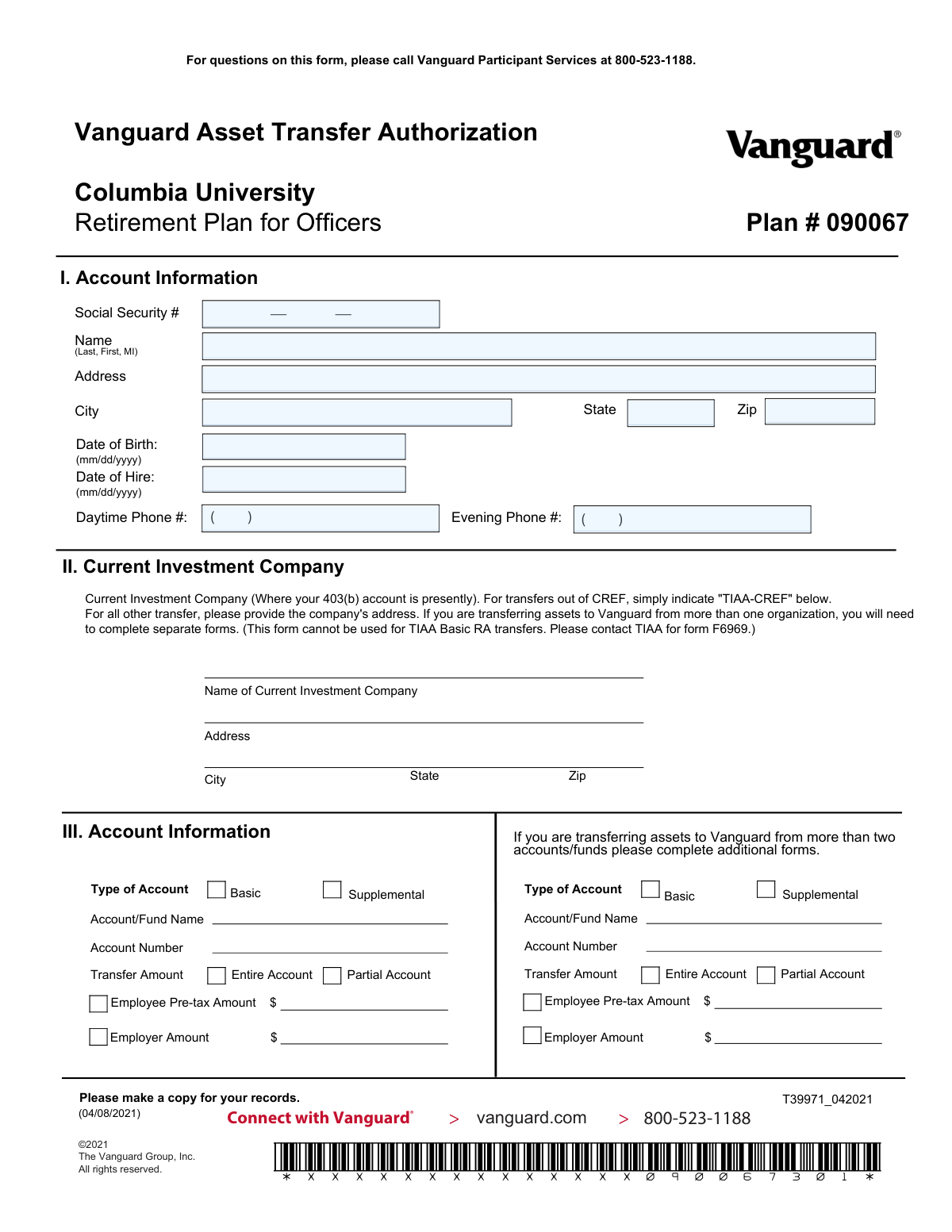
This check ensures that the Social Security Number field in Section I is not empty and is entered in a valid 9-digit format, such as XXX-XX-XXXX or XXXXXXXXX. The SSN is a critical unique identifier for financial and tax-reporting purposes, and an incorrect or missing number will prevent the account from being correctly identified. If validation fails, the user will be prompted to enter a valid SSN before the form can be submitted.
This validation confirms that the Date of Birth in Section I is a real calendar date in MM/DD/YYYY format and that the individual is of a reasonable age to be employed (e.g., over 16). It prevents future dates or impossible dates from being entered, which is essential for identity verification and determining eligibility for retirement products. A failure would require the user to correct the date.
This check performs a logical comparison to ensure the Date of Hire is not on or before the individual's Date of Birth. This prevents data entry errors that would be logically impossible and could cause processing delays or rejection of the form. If the hire date is before the birth date, an error message will instruct the user to review and correct the dates.
This validation ensures that at least one of the phone number fields (Daytime or Evening) in Section I is completed with a valid 10-digit phone number. Having a contact number is crucial for Vanguard to communicate with the participant about any issues or questions regarding the asset transfer. If both fields are empty, the form submission will be blocked until at least one number is provided.
This check validates that if the 'Name of Current Investment Company' in Section II is anything other than 'TIAA-CREF', then the full address fields (Address, City, State, Zip) for that company must be completed. This information is necessary for Vanguard to contact the correct institution to initiate the transfer. If the address is missing when required, the user will be prompted to provide it.
This validation enforces the explicit instruction on the form that it cannot be used for TIAA Basic RA transfers. The check will scan the 'Name of Current Investment Company' field for 'TIAA Basic RA' or similar variations. If a match is found, it will display an error message directing the user to contact TIAA for the correct form (F6969), preventing the submission of an invalid request.
And 6 more checks
- Validates Completeness of Account Transfer Details
- Validates Transfer Amount Selection and Values
- Ensures Investment Allocation Instructions are Selected
- Verifies Investment Allocation Percentages Sum to 100%
- Validates Format of Investment Allocation Percentages
- Confirms Presence of Signature and Date
Let AI fill out your T39971_042021
No typing. Every field filled in seconds, checked, ready to sign.
How to Fill Out T39971_042021 Online for Free in 2026
What the AI walks you through.
- Navigate to Instafill.ai and upload the Vanguard Asset Transfer Authorization form or select it from their template library.
- Use the AI assistant to automatically fill in your personal account information, including your name, Social Security Number, address, and date of birth.
- Provide the name and address of the current investment company from which you are transferring the assets.
- Specify the account details, including the account number and whether you are transferring the entire account or a partial amount.
- Detail your investment instructions for Vanguard, either by allocating the funds to new investments or using your current fund allocations.
- Carefully review all the information pre-filled by the AI for accuracy, then electronically sign and date the authorization section.
- Download the completed, signed form to submit to Vanguard at the address provided.
Common Mistakes in Completing T39971_042021
The ones the AI is built to catch.
Incomplete Current Investment Company Information
Ignoring Transfer Limitations and Special Instructions
Incorrect or Missing Account Number
Ambiguous Transfer Amount Instructions
Investment Allocation Calculation Errors
Failure to Provide Any Investment Instructions
Missing Signature or Date
Using Incorrect Date Formats
Transposing Social Security Number Digits
Frequently Asked Questions About T39971_042021
Is it really free for 7 days?
Can I fill other forms too?
How do I cancel?
How does the AI fill out T39971_042021?
What happens to my information?
How complex is T39971_042021 to fill out?
What is the purpose of this Vanguard Asset Transfer Authorization form?
Who needs to fill out this form?
I want to transfer assets from two different companies. Can I use one form?
Can I use this form to transfer my TIAA Basic RA account?
What information do I need for Section II, 'Current Investment Company'?
In Section III, how do I specify if I want to move all my money or just some of it?
What if I'm transferring more than two funds from the same company?
What happens if I don't choose any funds in Section IV, 'Investment Instructions'?
Where do I send the completed form?
What personal information do I need to have ready to fill out this form?
Can I use an AI tool to help me fill out this form?
How can I fill out this form online instead of by hand?
The PDF version of this form I have is not fillable. What can I do?
Who should I contact if I have questions about filling out the form?
Get your T39971_042021 filled out by AI
$0 today. Cancel before Nov 1 and you pay nothing.
Other forms like this one
asset transfer forms: Fidelity Funds Account Transfer of Assets Form, How to Transfer Assets from Morgan Stanley to Fidelity Investments (Fidelity Stock Plan Services Guide), Transfer of Assets Out - Partial Account or Charitable Gift Transfers, Schwab Charitable Fund Transfer of Assets, Vanguard Asset Transfer Authorization Form for the Emory University Retirement Plan, Fidelity Transfer of Assets, TIAA Trust, N.A. Private Asset Management, Request for a Direct Transfer From IRA Contracts, Inherited IRA Transfer of Assets/ Direct Rollover Form, Outgoing Partial Asset/Gifting Transfer Authorization Letter, RL360 Asset Transfer Form, Thrivent Funds Transfer of Assets, Form MF11502, Inherited IRA Transfer of Assets/Direct Rollover
transfer forms: Form REG 227, Application for Replacement or Transfer of Title, City of Harvey Real Estate Transfer Declaration & Application (with Certificate for Exemption), DBPR ABT-6002 – Application for Transfer of Ownership of an Alcoholic Beverage License, DBPR ABT-6002, Division of Alcoholic Beverages and Tobacco Application for Transfer of Ownership of an Alcoholic Beverage License, Request for Transfer of Records (Adelaide Health Care) – AHC-0013-05-PS (Version 2), DBPR Form ABT-6002, Division of Alcoholic Beverages and Tobacco Application for Transfer of Ownership of an Alcoholic Beverage License, Pfändungs- und Überweisungsbeschluss (Garnishment and Transfer Order) – German Civil Enforcement Court Form, Fidelity Funds Account Transfer of Assets Form, Fidelity Stock Plan Services (SPS) Transfer Request Form, How to Transfer Assets from Morgan Stanley to Fidelity Investments (Fidelity Stock Plan Services Guide), Transfer Due to Divorce — IRA/HSA/529, Fidelity Investments Transfer/Rollover/Exchange Form, Fidelity Investments Standing Transfer Instructions Form, Fidelity Investments Transfer/Rollover Form, Group Transfer Form Fidelity Health Savings Account (HSA), Plan–to-Plan Transfer, Plan Exchange, or Service Credit Authorization Form, Beneficiaries — Nonretirement Transfer on Death, Transfer Shares as a Gift — Nonretirement, Form APP13017-29, Transfer Your Account to Schwab, Transfer of Assets Out - Partial Account or Charitable Gift Transfers
Vanguard forms: Gift of Nonretirement Assets to Existing Vanguard Account Form, Vanguard VRPA Transfer Request Form, Vanguard Personal Investor – Transfer form, Vanguard Asset Transfer Authorization Form for the Emory University Retirement Plan, Retirement Transfer Between Existing Vanguard Accounts, Vanguard Personal Investor – Transfer initiation form – Transfer out, Moving your Vanguard funds to a Vanguard Brokerage Account Disclosure statement, Make a contribution - Vanguard Charitable, Vanguard Transfer Form, Vanguard Full Agent Authorization, Vanguard Transfer on Death Plan Form, The Vanguard 529 College Savings Plan: Power of Attorney, Vanguard Direct Rollover IRA Adoption Agreement, Vanguard Limited Agent Authorization, The Vanguard 529 College Savings Plan Agent Authorization/Limited Power of Attorney, The Vanguard 529 College Savings Plan Direct Rollover Out to Roth IRA Form, The Vanguard 529 College Savings Plan Transfer Due to Death of Account Owner Form, Your guide to completing a rollover - Vanguard, Vanguard IRA Distribution Kit (including IRA Distribution Form RRDFT and Form W-4R), The Vanguard 529 College Savings Plan Incoming Direct Rollover Form
Let AI fill out your T39971_042021
Your trial starts once a card is added. You pay nothing before Nov 1.
Our AI already knows this form, all 10 fields of it. Skip the typing: tell it about yourself, or upload what you have, and it fills the whole form in seconds.
- AI fills every field on the form, checkboxes included
- No typing into boxes: answer a few questions, or upload a document you already have, an old copy of this form, a photo of a document
- The AI checks the answers; you review and change anything before you download
- Download the finished PDF, print it, or sign it online
- Encrypted, and never used to train AI
Cancel before Nov 1 and you pay nothing.
A card is needed to start the trial. Cancel in two clicks from your account.
Terms · Privacy