
Yes! You can use AI to fill out Vanguard VRPA Transfer Request Form
Don't type 14 fields by hand. Tell our AI about yourself, or upload a document you already have, and it fills every field in seconds. You check it, then download, print or sign.
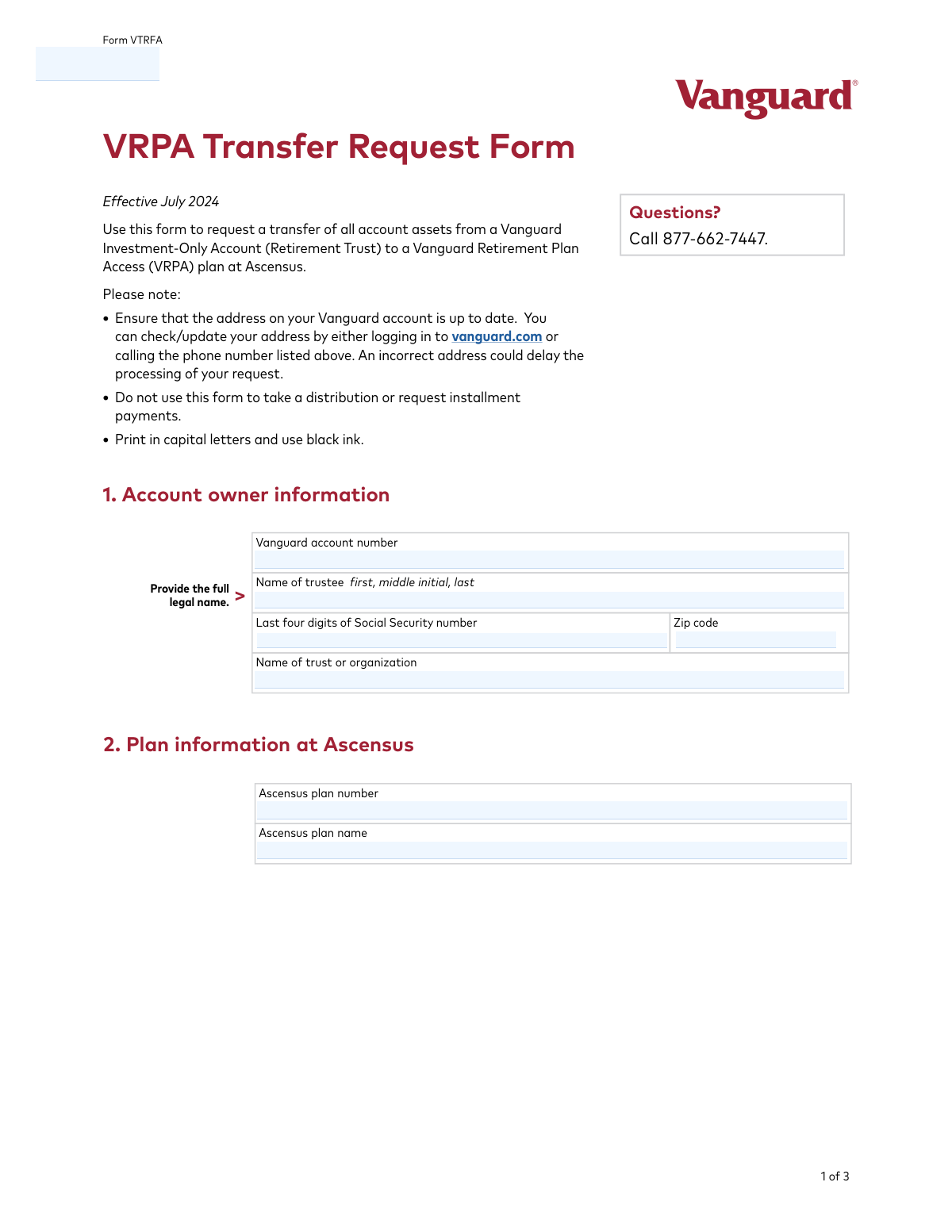
The AI does the filling. You just check it.
No typing into boxes, nothing to install.
What this form asks for
The AI fills all of it, from your answers or your documents.
The AI checks your answers before you download
12 checks built for this form, so a wrong date or a missing answer is caught before anyone else sees it.
This check ensures that both the first and last name fields for the 'Name of trustee' in Section 1 are populated. The full legal name is required for proper identification and authorization of the individual initiating the transfer. If the name is incomplete, the form will be rejected as the identity of the authorizing party cannot be legally verified.
Validates that the 'Last four digits of Social Security number' field contains exactly four numeric characters. This information is a key data point for verifying the account owner's identity. Submissions with non-numeric characters, or fewer or more than four digits, will fail validation and prevent the system from matching the request to the correct Vanguard account.
This check verifies that the 'Vanguard account number' field in Section 1 is not empty. The account number is the primary identifier for the source of the assets to be transferred. A missing account number makes it impossible for Vanguard to locate the funds, resulting in an immediate rejection of the form.
Ensures the 'Name of trust or organization' field is filled out. As the form is for a Retirement Trust account, this name identifies the legal entity that owns the assets. Omitting this information creates legal ambiguity and will cause the form to be rejected for being incomplete and failing to identify the account owner.
This validation confirms the zip code in Section 1 conforms to a standard U.S. format (5 digits or 9 digits with a hyphen). The form explicitly warns that an incorrect address can cause delays. This check helps catch data entry errors to ensure any physical correspondence regarding the transfer is deliverable.
Verifies that the 'Ascensus plan number' in Section 2 is provided. This number is critical for identifying the destination account for the transferred assets. Without this information, Ascensus cannot correctly allocate the incoming funds, making the transfer impossible to complete and leading to rejection.
And 6 more checks
- Ascensus Plan Name Completeness
- Required Trustee Signature
- Signature Date Format and Presence
- Signature Date Logical Validity
- Account Holder and Account Number Match
- Non-Transferable Asset Liquidation Check
Let AI fill out your VTRFA
No typing. Every field filled in seconds, checked, ready to sign.
How to Fill Out VTRFA Online for Free in 2026
What the AI walks you through.
- Navigate to Instafill.ai and upload or select the Vanguard VRPA Transfer Request Form (VTRFA).
- Provide the account owner information in Section 1, including the trustee's name, Vanguard account number, and the name of the trust or organization.
- Enter the destination plan information at Ascensus in Section 2, including the Ascensus plan number and name.
- Review Section 3 to understand how assets will be transferred and take any required action to liquidate ineligible holdings before submitting the form.
- The plan trustee must sign and date the form in Section 4 to authorize the transfer.
- Review the entire completed form for accuracy, then download a copy for your records and mail the original to the Vanguard address provided.
Common Mistakes in Completing VTRFA
The ones the AI is built to catch.
Entering Incorrect or Incomplete Account Numbers
Failure to Liquidate Non-Transferable Assets
Missing Signature or Incorrect Date
Providing an Incorrect Trustee or Trust Name
Not Verifying the Address on File with Vanguard
Illegible Handwriting on a Printed Form
Providing Full SSN Instead of Last Four Digits
Using the Form for an Invalid Purpose
Mismatching Ascensus Plan Information
Using an Outdated Version of the Form
Frequently Asked Questions About VTRFA
Is it really free for 7 days?
Can I fill other forms too?
How do I cancel?
How does the AI fill out VTRFA?
What happens to my information?
How complex is VTRFA to fill out?
What is the purpose of the VRPA Transfer Request Form?
Who needs to fill out this form?
Can I use this form to transfer only some of my assets?
Where can I find my Ascensus plan number and name for Section 2?
What does it mean for assets to be transferred 'in-kind'?
What actions must I take before submitting this form?
How do I know which of my investments need to be sold before the transfer?
Are there any fees for this transfer?
Who is required to sign the form in Section 4?
Where do I mail the completed form?
Can AI tools help me fill out this form?
How can I fill out the VRPA Transfer Request Form online?
The PDF version of this form I have is not fillable. What can I do?
How can I get a record of my account's holdings for this transfer?
Get your VTRFA filled out by AI
$0 today. Cancel before Nov 2 and you pay nothing.
Other forms like this one
transfer forms: Form REG 227, Application for Replacement or Transfer of Title, City of Harvey Real Estate Transfer Declaration & Application (with Certificate for Exemption), DBPR ABT-6002 – Application for Transfer of Ownership of an Alcoholic Beverage License, DBPR ABT-6002, Division of Alcoholic Beverages and Tobacco Application for Transfer of Ownership of an Alcoholic Beverage License, Request for Transfer of Records (Adelaide Health Care) – AHC-0013-05-PS (Version 2), DBPR Form ABT-6002, Division of Alcoholic Beverages and Tobacco Application for Transfer of Ownership of an Alcoholic Beverage License, Pfändungs- und Überweisungsbeschluss (Garnishment and Transfer Order) – German Civil Enforcement Court Form, Fidelity Funds Account Transfer of Assets Form, Fidelity Stock Plan Services (SPS) Transfer Request Form, How to Transfer Assets from Morgan Stanley to Fidelity Investments (Fidelity Stock Plan Services Guide), Transfer Due to Divorce — IRA/HSA/529, Fidelity Investments Transfer/Rollover/Exchange Form, Fidelity Investments Standing Transfer Instructions Form, Fidelity Investments Transfer/Rollover Form, Group Transfer Form Fidelity Health Savings Account (HSA), Plan–to-Plan Transfer, Plan Exchange, or Service Credit Authorization Form, Beneficiaries — Nonretirement Transfer on Death, Transfer Shares as a Gift — Nonretirement, Form APP13017-29, Transfer Your Account to Schwab, Transfer of Assets Out - Partial Account or Charitable Gift Transfers
Vanguard forms: Gift of Nonretirement Assets to Existing Vanguard Account Form, Vanguard Personal Investor – Transfer form, Vanguard Asset Transfer Authorization Form for the Emory University Retirement Plan, Retirement Transfer Between Existing Vanguard Accounts, Vanguard Personal Investor – Transfer initiation form – Transfer out, Vanguard Asset Transfer Authorization, Moving your Vanguard funds to a Vanguard Brokerage Account Disclosure statement, Make a contribution - Vanguard Charitable, Vanguard Transfer Form, Vanguard Full Agent Authorization, Vanguard Transfer on Death Plan Form, The Vanguard 529 College Savings Plan: Power of Attorney, Vanguard Direct Rollover IRA Adoption Agreement, Vanguard Limited Agent Authorization, The Vanguard 529 College Savings Plan Agent Authorization/Limited Power of Attorney, The Vanguard 529 College Savings Plan Direct Rollover Out to Roth IRA Form, The Vanguard 529 College Savings Plan Transfer Due to Death of Account Owner Form, Your guide to completing a rollover - Vanguard, Vanguard IRA Distribution Kit (including IRA Distribution Form RRDFT and Form W-4R), The Vanguard 529 College Savings Plan Incoming Direct Rollover Form
transfer request forms: Securities Transfer Request and Notification Form, Request for Transfer of Records (Adelaide Health Care) – AHC-0013-05-PS (Version 2), Fidelity Stock Plan Services (SPS) Transfer Request Form, Rollover/Transfer Request — ABLE Account, 401(k) Program Request for Transfer, Oklahoma Pathfinder 457 Plan Incoming Transfer/Rollover Request Governmental 457(b) Plan, Rollover/Transfer Request — ABLE Account, Transamerica Transfer of Ownership Request Form (OWN-CCC 12/13), 1035 Exchange, Rollover or Transfer Request Form - Transamerica, TIAA Trust, N.A. Private Asset Management, Request for a Direct Transfer From IRA Contracts, Form F10983, Request For A Direct Transfer, Health Savings Account (HSA) Transfer Request, FS Form 5511, TreasuryDirect® Transfer Request, Computershare Alternative Investment Product Transfer Request, FS Form 5179, Legacy Treasury Direct Security Transfer Request, J.P. Morgan Securities LLC Account Transfer Request, Form REC-001(R), Request for Transfer or Extension of Time for Retention of Superior Court Records, Notice of Hearing on Request for Transfer or Extension of Time for Retention of Superior Court Records; Court Order; Release and Receipt of Superior Court Records
Let AI fill out your VTRFA
Your trial starts once a card is added. You pay nothing before Nov 2.
Our AI already knows this form, all 14 fields of it. Skip the typing: tell it about yourself, or upload what you have, and it fills the whole form in seconds.
- AI fills every field on all 3 pages, checkboxes included
- No typing into boxes: answer a few questions, or upload a document you already have, an old copy of this form, a photo of a document
- The AI checks the answers; you review and change anything before you download
- Download the finished PDF, print it, or sign it online
- Encrypted, and never used to train AI
Cancel before Nov 2 and you pay nothing.
A card is needed to start the trial. Cancel in two clicks from your account.
Terms · Privacy