Yes! You can use AI to fill out Vanguard Direct Rollover IRA Adoption Agreement
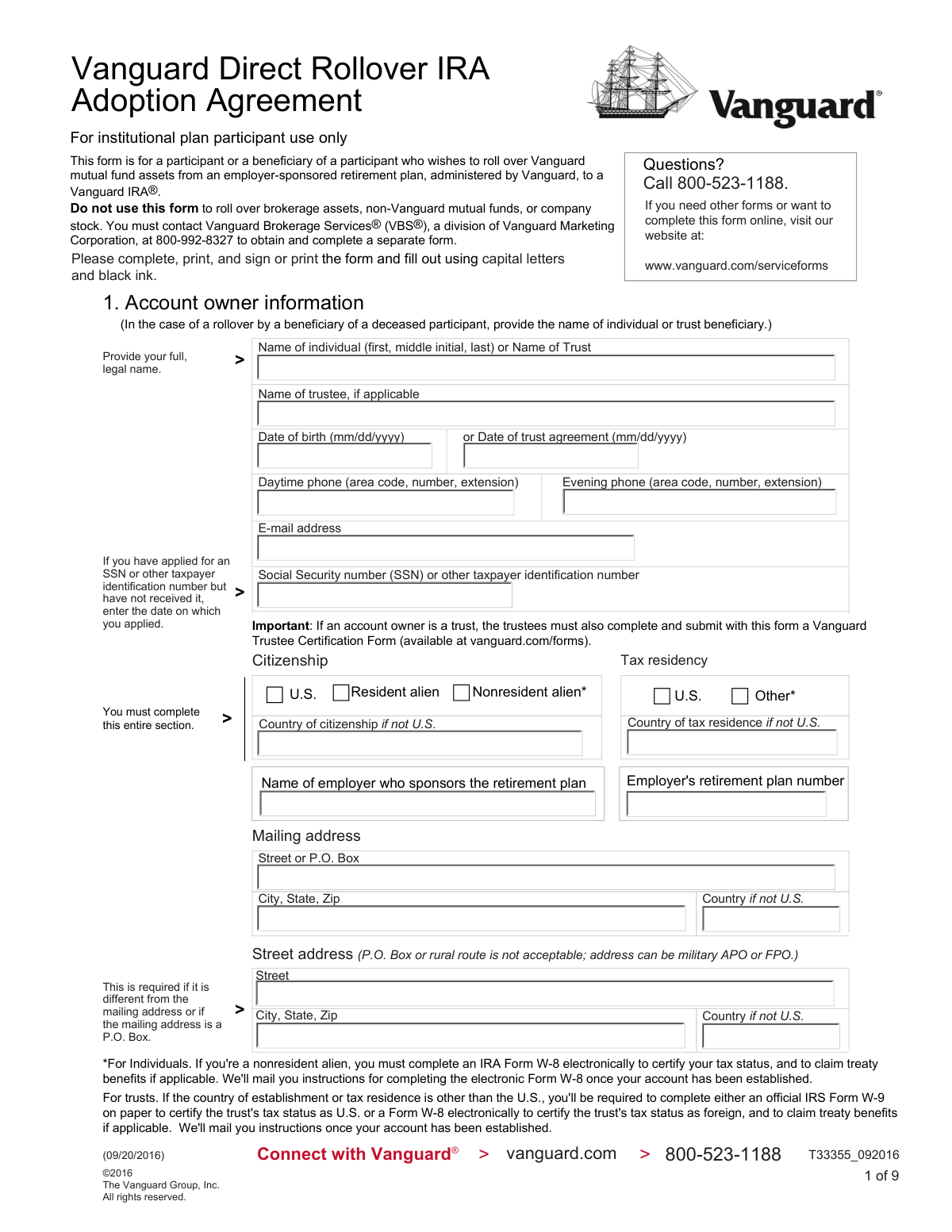
This form is an agreement for a participant or beneficiary to roll over Vanguard mutual fund assets from an employer-sponsored retirement plan, administered by Vanguard, into a Vanguard Individual Retirement Account (IRA). It allows the account holder to specify whether the funds go into a Traditional or Roth IRA and to designate investment allocations and beneficiaries. Today, this form can be filled out quickly and accurately using AI-powered services like Instafill.ai, which can also convert non-fillable PDF versions into interactive fillable forms.
T33355_092016 is part of the
adoption forms, rollover forms, IRA forms, Vanguard forms and IRA rollover forms categories on Instafill.
Rather not fill this in by hand? Instafill is an online form filler that completes PDF forms automatically — upload the blank form, answer a few questions, and the AI fills every field.
Form specifications
| Form name: | Vanguard Direct Rollover IRA Adoption Agreement |
| Number of pages: | 1 |
| Language: | English |
Our AI automatically handles information lookup, data retrieval, formatting, and form filling.
It takes less than a minute to fill out T33355_092016 using our AI form filling.
Securely upload your data. Information is encrypted in transit and deleted immediately after the form is filled out.
Instafill Demo: How to fill out PDF forms in seconds with AI
How to Fill Out T33355_092016 Online for Free in 2026
Are you looking to fill out a T33355_092016 form online quickly and accurately? Instafill.ai offers the #1 AI-powered PDF filling software of 2026, allowing you to complete your T33355_092016 form in just 37 seconds or less.
Follow these steps to fill out your T33355_092016 form online using Instafill.ai:
- 1 Navigate to Instafill.ai and upload the Vanguard Direct Rollover IRA Adoption Agreement form or select it from their template library.
- 2 Provide the account owner's personal information in Section 1, including name, address, Social Security number, and date of birth.
- 3 If opening the IRA for a minor, complete the custodian information in Section 2.
- 4 Select the type of rollover (Traditional or Roth IRA) and provide detailed investment instructions for your assets in Section 3 or 4.
- 5 Designate your primary and secondary beneficiaries in Section 5, specifying the percentage of assets for each.
- 6 Carefully review all the information you've entered, then electronically sign and date the form in Section 6 to certify its accuracy.
- 7 Download the completed, signed form and mail it to the appropriate Vanguard address provided on the form.
Our AI-powered system ensures each field is filled out correctly, reducing errors and saving you time.
Why Choose Instafill.ai for Your Fillable T33355_092016 Form?
Speed
Complete your T33355_092016 in as little as 37 seconds.
Up-to-Date
Always use the latest 2026 T33355_092016 form version.
Cost-effective
No need to hire expensive lawyers.
Accuracy
Our AI performs 10 compliance checks to ensure your form is error-free.
Security
Your personal information is protected with bank-level encryption.
Frequently Asked Questions About T33355_092016
This form is used to move, or 'roll over,' your Vanguard mutual fund assets from an employer-sponsored retirement plan administered by Vanguard into a new or existing Vanguard IRA.
You should fill out this form if you are a participant, or a beneficiary of a deceased participant, in a Vanguard-administered employer retirement plan and wish to transfer your Vanguard mutual fund assets into a Vanguard IRA.
No, this form is specifically for Vanguard mutual fund assets. To roll over brokerage assets, company stock, or non-Vanguard funds, you must contact Vanguard Brokerage Services at 800-992-8327 for a separate form.
You must provide your full legal name, Social Security number, date of birth, physical and mailing addresses, and citizenship status. You also need to provide the name of the employer who sponsors your retirement plan.
As a non-spouse beneficiary, you must select the option to open a 'new inherited traditional IRA' (Section 3) or a 'new inherited Roth IRA' (Section 4), depending on the asset type.
In Section 3 or 4, you can either choose to roll over assets into the same Vanguard funds you currently hold or list new Vanguard funds and the percentage to allocate to each. Ensure your total allocation equals 100%.
Yes, there is a $20 annual account service fee for each Vanguard fund with a balance under $10,000. This fee can be waived if you sign up for electronic delivery of documents on Vanguard.com or meet certain household asset minimums.
No, if you are rolling assets into an existing IRA, your current beneficiary designations will remain in effect. You only need to complete Section 5 if you are opening a new IRA or wish to update your beneficiaries.
If a trust is the account owner, the trustees must also complete and submit a separate Vanguard Trustee Certification Form along with this adoption agreement. The beneficiary section should be skipped.
After signing the form, you should mail the completed document to the address provided in the 'Mailing information' section at the end of the form. An address is provided for both standard and overnight delivery.
Yes, services like Instafill.ai use AI to accurately auto-fill form fields with your information, which can save you time and help prevent errors.
You can visit vanguard.com/serviceforms to find an online version. Alternatively, you can use a service like Instafill.ai to upload the PDF and fill it out interactively online.
If your PDF is not fillable, you can print it and fill it out by hand in capital letters with black ink. You can also use a service like Instafill.ai, which can convert flat, non-fillable PDFs into interactive forms you can complete online.
The form notes that for most funds, the minimum initial investment is $3,000. Be sure your rollover amount and allocation percentages meet the minimum requirements for the funds you select.
Compliance T33355_092016
Validation Checks by Instafill.ai
1
SSN/TIN Format and Completeness
This check verifies that the Social Security Number (SSN) or other taxpayer identification number in Section 1 is present and follows the correct 9-digit format. This number is legally required for tax reporting and identity verification. If the number is missing, invalidly formatted, or the user indicates they have applied but provides no date, the form cannot be processed.
2
Physical Street Address Requirement
Validates that the 'Street address' field in Section 1 does not contain 'P.O. Box' or 'rural route'. Federal law requires a physical address for identity verification purposes. If a physical address is not provided, the account cannot be opened, and the form will be rejected until a valid address is supplied.
3
Conditional Mailing Address Completeness
Ensures the 'Mailing address' section is completed if it is different from the street address or if the mailing address is a P.O. Box. This check is important to guarantee that the account owner receives critical financial statements, tax forms, and other communications. Failure to provide this information when required will result in an incomplete application.
4
Account Owner Age and Type Validation
Verifies the 'Date of birth' in Section 1 is a valid, past date, indicating the owner is of a reasonable age to have a retirement plan. If the account is for a trust, it validates the 'Date of trust agreement' instead. This prevents data entry errors and confirms eligibility; an invalid or future date would halt processing.
5
Custodian for Minor Requirement
This check determines if the account owner's date of birth in Section 1 classifies them as a minor. If so, it validates that Section 2, 'Custodian Information', is filled out completely. Opening a custodial account is a legal requirement for minors, and if this section is incomplete, the application is invalid.
6
Rollover Account Type Selection
Confirms that for any rollover section being completed (Section 3 or 4), exactly one account type option is selected (e.g., 'A new rollover IRA' or 'An existing traditional/rollover IRA'). This is crucial for directing the funds to the correct destination. If multiple or no options are selected within a section, the user's intent is ambiguous and the form must be rejected for clarification.
7
Conditional Rollover Account Information
If an 'existing' IRA option is chosen in Section 3 or 4, this validates that a 'Vanguard IRA account number' has been provided. If an 'inherited' IRA option is chosen, it validates that the 'Name of deceased employer-sponsored plan participant' is filled. This ensures the rollover is credited to the correct account or established with the correct legal titling.
8
Fund Allocation Percentage Total
Verifies that the sum of all percentages in the investment allocation tables (Sections 3 and 4) equals exactly 100%. The form explicitly requires this to ensure the client's entire rollover amount is invested according to their wishes. A total other than 100% will cause the form to be rejected for correction.
9
Fund Allocation Row Completeness
For each row in the investment allocation table where a percentage is entered, this check ensures that a corresponding 'Fund name' or 'Fund number' is also provided. An allocation percentage without a designated fund is an incomplete instruction. The submission would be rejected for clarification from the account owner.
10
Primary Beneficiary Allocation Total
Confirms that the percentages assigned to all primary beneficiaries in Section 5 sum to exactly 100%. This is a strict requirement to ensure the full and correct distribution of assets upon the account owner's death. If the total is not 100%, the beneficiary designation is invalid and must be corrected.
11
Secondary Beneficiary Allocation Total
Validates that the percentages for all secondary beneficiaries in Section 5 also sum to 100%. Although secondary beneficiaries only inherit if no primary beneficiaries survive, the allocation must still be legally sound and account for 100% of the assets. An incorrect total will invalidate the secondary designations.
12
Beneficiary Information Completeness
For each primary or secondary beneficiary listed in Section 5, this check verifies that all required information (e.g., Name, Birth Date or Trust Date, and Percentage) is provided. Missing information can cause significant delays and legal issues during the inheritance process. An incomplete entry would invalidate that specific beneficiary designation.
13
Mutually Exclusive Spouse Beneficiary Selection
In Section 5, this check ensures that for the 'My spouse' option, the user has selected either 'To the person I am married to at the time of my death' OR 'To the person named here,' but not both. Selecting both creates a conflicting instruction for asset distribution. The form would be returned for clarification.
14
Signature and Date Presence
Validates that the 'Account owner's signature' and 'Date' fields in Section 6 are both completed. The signature legally binds the owner to the agreement, and the date establishes when the agreement was made. An unsigned or undated form is not legally executable and will be rejected immediately.
Common Mistakes in Completing T33355_092016
Failing to sign and date the form in Section 6 is one of the most frequent and critical errors. An unsigned application is not legally valid and will be immediately rejected, requiring the applicant to fill out and resubmit the entire form. This simple oversight can cause significant delays in opening the account and rolling over funds. Always perform a final check for the signature and date before mailing the document.
Section 1 explicitly requires a physical street address and states that a P.O. Box is not acceptable. This is a federal requirement for identity verification. Applicants often enter their P.O. Box out of habit, which leads to rejection of the form. To avoid this, provide your actual residential address in the 'Street address' field and use the separate 'Mailing address' field if you receive mail at a P.O. Box.
In the investment instruction sections (3 and 4), the percentages allocated to different funds must add up to exactly 100%. Applicants often make simple calculation errors or leave the section incomplete. This forces Vanguard to either default to an equal allocation, which may not be what the investor wanted, or contact the applicant for clarification, delaying the investment of their funds. Double-checking the math is crucial to ensure assets are invested according to your wishes.
The form creates confusion about rolling over non-Vanguard funds or company stock. Applicants often think this form can be used to transfer these assets 'in-kind'. However, the form's options are to sell these assets and invest the cash proceeds, or to contact Vanguard Brokerage Services for a separate application to retain them. This misunderstanding can lead to the unintended liquidation of assets or significant processing delays while the correct procedure is determined.
Section 1 requires the full name of the employer sponsoring the retirement plan and the plan number. Applicants often provide an abbreviated company name or do not know their specific plan number. This missing or inexact data prevents Vanguard from identifying the correct source account for the rollover, halting the entire process until the applicant can provide the correct information from a plan statement.
In Section 5, the percentages assigned to primary beneficiaries must total 100%, and the same is required for secondary beneficiaries. People frequently miscalculate these totals or forget to assign a percentage. While the form notes that Vanguard will default to an equal distribution, this might not reflect the account owner's true intent, potentially causing unintended consequences for their heirs. It is vital to ensure the percentages for each beneficiary group sum to 100%.
The instructions require filling out the form using 'capital letters and black ink' to ensure it can be scanned and processed accurately. Applicants who use cursive, lowercase letters, or blue ink risk having their information misread by optical character recognition (OCR) software or human data entry staff. This can lead to errors in names, addresses, or account numbers, causing significant delays. Since this is a non-fillable PDF, using a tool like Instafill.ai to convert it into a fillable version ensures all entries are perfectly legible.
In Sections 3 and 4, applicants must specify whether they are rolling assets into a 'new' or an 'existing' IRA. An existing Vanguard client might mistakenly select 'new IRA,' leading to the creation of a redundant account and complicating account management. Conversely, a new client might check 'existing IRA' without providing an account number. This error can misdirect funds or delay the rollover until the correct destination is clarified.
A note in Section 1 specifies that if the account is being opened for a trust, a separate 'Vanguard Trustee Certification Form' must also be submitted. This is a critical but easily overlooked requirement because the form is not included in this packet. Forgetting to find, complete, and include this separate document will render the application incomplete and stop the account setup process entirely.
In Section 5, when designating a spouse as a beneficiary, there are two options: naming a specific person or selecting 'To the person I am married to at the time of my death.' Applicants sometimes check both boxes or misunderstand the distinction, creating legal ambiguity. This can lead to complications and potential disputes over the assets in the event of divorce and remarriage. It is essential to choose only one option to clearly state your intent.
Saved over 80 hours a year
“I was never sure if my IRS forms like W-9 were filled correctly. Now, I can complete the forms accurately without any external help.”
Kevin Martin Green
Your data stays secure with advanced protection from Instafill and our subprocessors




Robust compliance program
Transparent business model
You’re not the product. You always know where your data is and what it is processed for.
ISO 27001, HIPAA, and GDPR
Our subprocesses adhere to multiple compliance standards, including but not limited to ISO 27001, HIPAA, and GDPR.
Security & privacy by design
We consider security and privacy from the initial design phase of any new service or functionality. It’s not an afterthought, it’s built-in, including support for two-factor authentication (2FA) to further protect your account.
Fill out T33355_092016 with Instafill.ai
Worried about filling PDFs wrong? Instafill securely fills vanguard-direct-rollover-ira-adoption-agreement forms, ensuring each field is accurate.
