Yes! You can use AI to fill out Fidelity Transfer of Assets Form (TOA) - Your Veolia Benefits
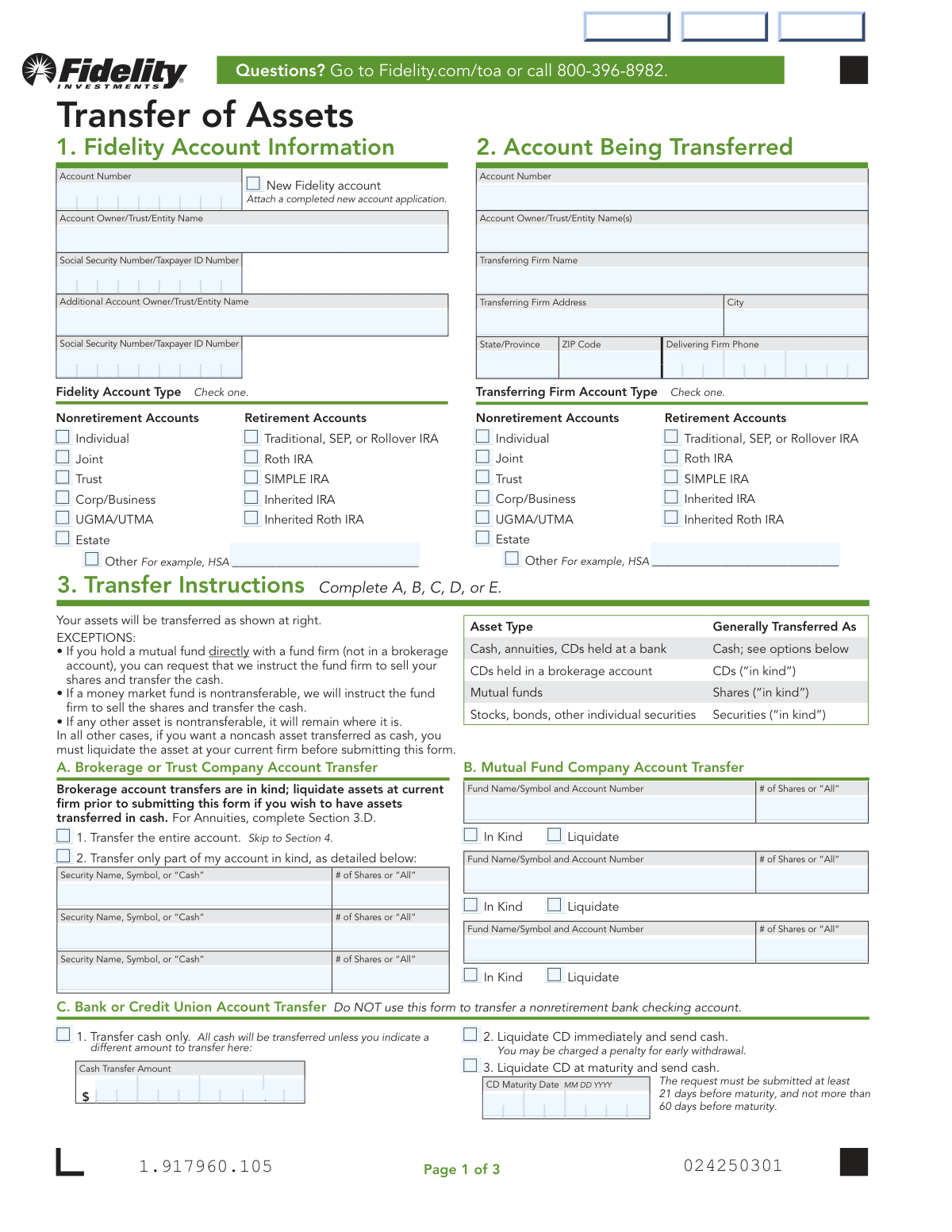
The Fidelity Transfer of Assets (TOA) form is an official document used to initiate the transfer of investment assets—such as brokerage holdings, mutual funds, CDs, annuities, or direct-registered shares—from an outside financial institution to a Fidelity account. It is an essential form for consolidating retirement or nonretirement accounts, ensuring assets are moved securely and in compliance with IRS and FINRA regulations. Completing this form accurately is critical, as errors can cause delays, tax implications, or legal complications related to account ownership and beneficiaries. Today, this form can be filled out quickly and accurately using AI-powered services like Instafill.ai, which can also convert non-fillable PDF versions into interactive fillable forms.
Our AI automatically handles information lookup, data retrieval, formatting, and form filling.
It takes less than a minute to fill out Fidelity TOA Form using our AI form filling.
Securely upload your data. Information is encrypted in transit and deleted immediately after the form is filled out.
Form specifications
| Form name: | Fidelity Transfer of Assets Form (TOA) - Your Veolia Benefits |
| Number of pages: | 1 |
| Filled form examples: | Form Fidelity TOA Form Examples |
| Language: | English |
Instafill Demo: filling out a legal form in seconds
How to Fill Out Fidelity TOA Form Online for Free in 2026
Are you looking to fill out a FIDELITY TOA FORM form online quickly and accurately? Instafill.ai offers the #1 AI-powered PDF filling software of 2026, allowing you to complete your FIDELITY TOA FORM form in just 37 seconds or less.
Follow these steps to fill out your FIDELITY TOA FORM form online using Instafill.ai:
- 1 Navigate to Instafill.ai and upload the Fidelity Transfer of Assets (TOA) form or select it from the available form library to begin filling it out online.
- 2 Complete Section 1 (Fidelity Account Information) by entering your Fidelity account number, account owner name(s), Social Security or Taxpayer ID number, and selecting the appropriate Fidelity account type (e.g., Individual, Roth IRA, Traditional IRA).
- 3 Complete Section 2 (Account Being Transferred) by providing the account number, account owner name(s), and full details of the transferring firm, including firm name, address, phone number, and account type.
- 4 Complete Section 3 (Transfer Instructions) by selecting the appropriate transfer method—Brokerage/Trust Company (A), Mutual Fund Company (B), Bank or Credit Union (C), Annuity (D), or Transfer Agent (E)—and specifying whether to transfer the entire account or only specific assets, shares, or cash amounts.
- 5 Review all entered information for accuracy, ensuring account names match exactly between Section 1 and Section 2, and attach any required supporting documents such as a recent account statement or registration difference documentation.
- 6 Complete Section 4 (Signatures and Dates) by having all owners of both accounts print their names, sign, and date the form; obtain a Medallion Signature Guarantee if required by Fidelity.
- 7 Submit the completed form along with a copy of your non-Fidelity account statement to Fidelity via regular mail, overnight mail, or by dropping it off at a Fidelity Investor Center, then track your transfer progress at Fidelity.com/toa.
Our AI-powered system ensures each field is filled out correctly, reducing errors and saving you time.
Why Choose Instafill.ai for Your Fillable Fidelity TOA Form Form?
Speed
Complete your Fidelity TOA Form in as little as 37 seconds.
Up-to-Date
Always use the latest 2026 Fidelity TOA Form form version.
Cost-effective
No need to hire expensive lawyers.
Accuracy
Our AI performs 10 compliance checks to ensure your form is error-free.
Security
Your personal information is protected with bank-level encryption.
Frequently Asked Questions About Form Fidelity TOA Form
This form is used to move some or all assets from another financial firm to your Fidelity account under the Veolia Benefits plan. It supports transfers from brokerage or trust companies, mutual fund companies, banks or credit unions, annuity firms, and transfer agents.
Any Veolia benefits participant who wants to transfer assets from an outside financial institution to their Fidelity account must complete this form. All owners of both the receiving Fidelity account and the account being transferred must sign the form in Section 4.
Do NOT use this form to convert an IRA to a Roth IRA, roll over from a 529 college savings plan, ABLE account, 401(k), 403(b), or other workplace plan, transfer from a nonretirement checking account, or transfer between retirement accounts where the names appear differently on the accounts.
Yes, you must use one form for each account you are transferring. If you are moving assets from multiple outside accounts to Fidelity, you will need to complete a separate Transfer of Assets form for each one.
You must attach all pages of a recent account statement from the delivering firm. If there are differences in account owner names between the two accounts, you may also need to attach supporting documents such as a marriage or divorce certificate, a letter explaining a name difference, or an updated trust document.
If there is any difference in owner name(s) or account type between your Fidelity account (Section 1) and the account being transferred (Section 2), you must follow specific steps. For nonretirement accounts, attach the required documents listed on the form; for retirement accounts, contact Fidelity for instructions before submitting. In all cases, all owners must sign Section 4, and if an owner's name appears differently on different accounts, that owner must sign both ways.
You can transfer cash only, liquidate the CD immediately (with a possible early withdrawal penalty), or liquidate the CD at maturity. If you choose to liquidate at maturity, you must submit the form at least 21 days but no more than 60 days before the CD's maturity date to ensure timely processing.
All annuities must be surrendered (cashed in) as part of the transfer process, which may result in tax implications, penalties, fees, and loss of product features. You should contact the annuity firm or Fidelity for any additional requirements before submitting this form.
Yes, for brokerage or trust company accounts, you can choose to transfer only part of your account by specifying the security name, symbol, or 'Cash' and the number of shares you want to transfer. For mutual fund and annuity transfers, partial transfer options are also available.
A Medallion signature guarantee may be required depending on your situation — check with Fidelity or your current firm to find out if one is needed. If required, you must provide one for each account owner; note that a notary seal or stamp is NOT the same as a Medallion signature guarantee, which is available from most banks, credit unions, and other financial institutions.
You can send the completed form and a copy of your non-Fidelity account statement by regular mail to Fidelity Investments, Attention: TOA, P.O. Box 770001, Cincinnati, OH 45277-0036, or by overnight mail to 100 Crosby Parkway, Mailzone KC1A, Covington, KY 41015. You can also drop it off at a Fidelity Investor Center or use the postage-paid envelope provided.
You can register and track the progress of your transfer online at Fidelity.com/toa. You can also call 800-396-8982 if you have questions or need assistance with your transfer status.
Yes, AI-powered services like Instafill.ai can help you accurately auto-fill the Transfer of Assets form, saving you time and reducing the risk of errors. If you have a flat, non-fillable PDF version of the form, Instafill.ai can also convert it into an interactive fillable form so you can complete it digitally.
To fill out this form online, visit Instafill.ai and upload your Transfer of Assets PDF. The AI will guide you through each section — including account information, transfer instructions, and signatures — auto-filling fields accurately based on the information you provide. Once complete, you can download, print, and submit the form to Fidelity.
Yes, transfers can create legal issues (especially around beneficiaries and form of ownership), as well as tax issues and financial risks. Fidelity is not responsible for changes in the value of assets during the transfer process, and by signing the form you affirm that you are aware of any potential tax or financial implications, including penalties, fees, or loss of product features. It is strongly recommended that you consult appropriate financial, legal, and tax professionals before making a transfer.
Compliance Fidelity TOA Form
Validation Checks by Instafill.ai
1
Fidelity Account Number Format Validation
Validates that the Fidelity account number entered in Section 1 (AcctNumber field) conforms to the expected numeric format and length used by Fidelity Brokerage Services. If a new account is selected via the NewAcct checkbox, this field should be left blank and a completed new account application must be attached. Failure to provide a valid account number for an existing account or to attach a new account application will result in processing delays or rejection of the transfer request.
2
Social Security Number / Taxpayer ID Format Validation
Ensures that the Social Security Number or Taxpayer ID Number fields for both the primary and additional account owners follow the correct format — SSNs must be nine digits in the format XXX-XX-XXXX, and EINs must follow the XX-XXXXXXX format. These fields are required for identity verification and tax reporting purposes. Submitting an incorrectly formatted or incomplete ID number will prevent Fidelity from processing the transfer and may trigger compliance holds.
3
Account Owner Name Consistency Between Sections 1 and 2
Checks that the account owner names listed in Section 1 (Fidelity account) and Section 2 (transferring firm account) share at least one common owner, as required by the form instructions. If names differ due to legal name changes or other reasons, supporting documentation such as a marriage/divorce certificate or explanatory letter must be attached. Failure to meet this requirement or provide supporting documentation will result in the transfer being rejected or delayed pending further review.
4
Account Type Selection Completeness
Verifies that exactly one account type is selected in both Section 1 (Fidelity Account Type) and Section 2 (Transferring Firm Account Type) from the provided checkboxes. If 'Other' is selected in either section, the corresponding free-text field must also be populated with a valid account type description. Leaving the account type unselected or selecting multiple types will cause processing errors and may result in assets being transferred to an incorrect account structure.
5
Transfer Instruction Section Mutual Exclusivity
Ensures that only one transfer instruction section (A, B, C, D, or E) is completed, as the form explicitly instructs users to complete only one of these sections based on the type of account being transferred. Completing multiple sections introduces conflicting instructions that cannot be reconciled during processing. If more than one section is filled out, the form must be returned to the submitter for clarification before any transfer action can be taken.
6
Partial Transfer Security Name and Share Count Completeness
When Section 3A option 2 (partial account transfer) is selected, validates that each row used in the partial transfer table contains both a Security Name/Symbol (or 'Cash') and a corresponding number of shares (or 'All'). Rows with only one field populated are incomplete and cannot be processed. Incomplete rows will cause the transfer to be processed incorrectly or returned to the submitter for correction.
7
CD Maturity Date Format and Timing Validation
When Section 3C option 3 (Liquidate CD at maturity) is selected, validates that the CD Maturity Date (CDDate field) is provided in MM/DD/YYYY format and represents a valid calendar date. Additionally, checks that the form submission date is at least 21 days but no more than 60 days before the specified maturity date, as required by the form instructions. Submitting outside this window will result in the request being rejected, potentially causing the CD to auto-renew or incur early withdrawal penalties.
8
Annuity Transfer Date Format Validation
When Section 3D option 2 (Full Annuity Surrender on a specific date) is selected, validates that the AnnuityDate field is populated and follows the MM/DD/YYYY format with a valid future calendar date. A missing or past date would result in an unprocessable instruction, as the delivering firm requires a clear future surrender date to coordinate the transaction. Invalid dates may also trigger unintended immediate surrenders with associated tax and penalty consequences.
9
Annuity Cash Amount Required Field Validation
When Section 3D option 3 (Partial Annuity Surrender with a specific cash amount) is selected, validates that the AnnuityAmmt1 field contains a positive numeric dollar value greater than zero. The field must not be left blank or contain non-numeric characters, as the delivering firm requires a precise dollar amount to execute a partial surrender. An empty or invalid amount will prevent the transfer from being initiated and may require resubmission of the entire form.
10
Transfer Agent Security Symbol or Name Completeness
When Section 3E (Transfer Agent Transfer) is selected, validates that the DRIPSecurity field containing the security symbol or name is populated and not left blank. Additionally, if option 4 (transfer a specific number of whole shares) is selected, the AnnuityShares field must contain a positive whole number, as fractional shares are explicitly ineligible for this transfer type. Missing or fractional share values will result in the transfer agent being unable to process the request.
11
Signature and Printed Name Completeness for All Account Owners
Validates that all account owners of both the Fidelity account (Section 1) and the transferring firm account (Section 2) have provided both a printed name and a signature with a date in Section 4. If an owner's name appears differently across the two accounts, that owner must sign in both name variations as instructed. Missing signatures or dates from any required owner will render the form legally insufficient and result in rejection of the transfer request.
12
Signature Date Format and Currency Validation
Ensures that the date fields accompanying each owner's signature in Section 4 are in MM/DD/YYYY format and represent a valid, recent calendar date that is not in the future. Signature dates that are missing, improperly formatted, or dated significantly in the past may indicate a stale form submission, which could raise compliance concerns or require re-execution of the document. Fidelity and the delivering firm rely on the signature date to establish the legal effective date of the transfer authorization.
13
Delivering Firm Contact Information Completeness
Validates that the transferring firm's name (FirmName), address (FirmAddress), city (FirmCity), state/province (StateProvince), ZIP code (FirmZIP), and phone number (FirmPhone) fields in Section 2 are all populated and that the phone number follows a valid 10-digit North American format. Fidelity requires complete delivering firm contact information to initiate the transfer request with the correct institution. Missing or invalid contact details will delay or prevent Fidelity from contacting the delivering firm to process the transfer.
14
Prohibited Transfer Type Detection
Checks that the combination of account types selected in Sections 1 and 2 does not represent a transaction explicitly prohibited by the form, such as converting a Traditional IRA to a Roth IRA, rolling over from a 529 or workplace plan (401k/403b), or transferring from a nonretirement bank checking account. If a prohibited combination is detected, the form should be flagged immediately with a clear error message directing the user to the appropriate process. Submitting a prohibited transfer type will result in outright rejection and potential tax or legal complications for the account holder.
15
UGMA/UTMA Account Owner Order Validation
When UGMA/UTMA is selected as the account type in Section 1 or Section 2, validates that the minor's name is listed first in the Account Owner/Trust/Entity Name field, followed by the custodian's name, as explicitly required by the form instructions. Reversing the order or omitting either party creates a registration discrepancy that may invalidate the transfer or create legal complications regarding the custodial relationship. Both the minor and custodian must also be reflected consistently across both sections to satisfy the common-owner requirement.
16
Mutual Fund Account Number Completeness for Section 3B
When Section 3B (Mutual Fund Company Account Transfer) is selected, validates that each fund row used includes both a Fund Name/Symbol with its associated account number and a share quantity (or 'All'), and that a transfer method (In Kind or Liquidate) is selected for each fund listed. If the fund account numbers differ from the account number in Section 2, all unique fund account numbers must be individually specified. Incomplete fund rows or missing transfer method selections will prevent Fidelity from instructing the fund company to initiate the transfer for those positions.
Common Mistakes in Completing Fidelity TOA Form
One of the most frequent errors is entering names in Section 1 (Fidelity account) and Section 2 (transferring account) that differ even slightly — such as using a nickname, omitting a middle initial, or using a maiden name. The form explicitly requires that the two accounts have at least one owner in common, and any name difference triggers additional documentation requirements or outright rejection for retirement accounts. Always compare both account statements side by side before filling out the form, and if names differ, attach the required supporting documents (e.g., marriage certificate) or contact Fidelity before submitting. Tools like Instafill.ai can flag name inconsistencies across sections automatically.
Many people attempt to use this Transfer of Assets form to roll over funds from a 401(k), 403(b), 529 plan, or ABLE account, or to convert a Traditional IRA to a Roth IRA — all of which are explicitly prohibited uses of this form. This results in the form being rejected and significant processing delays. Carefully read the 'Do NOT use this form to' section before proceeding, and contact Fidelity at 800-396-8982 to determine the correct form for your specific transaction type.
Submitting the form without attaching all pages of a recent account statement from the transferring firm is a very common oversight that causes delays or outright rejection of the transfer request. The statement helps Fidelity verify account details, asset holdings, and ownership information. Always include a complete, recent statement (not just the first page) from the delivering firm when mailing or submitting this form. Instafill.ai can remind users of required attachments during the form-filling process.
The form requires ALL owners of BOTH the Fidelity account (Section 1) and the transferring account (Section 2) to sign and date Section 4. People frequently forget to obtain signatures from joint account holders or trustees, which invalidates the form and causes processing delays. If an owner's name appears differently on different accounts, that owner must sign both ways. Review all account ownership records carefully before submitting and ensure every required party has signed.
Transposing digits or leaving the Social Security Number or Taxpayer ID Number field blank is a common data entry error that can cause the transfer to be rejected or flagged for identity verification issues. This is especially problematic for retirement accounts where IRS reporting depends on accurate tax identification. Double-check the SSN/TIN against an official document before submitting, and ensure the number matches exactly what is on file with both the delivering firm and Fidelity. Instafill.ai can validate the format of SSN/TIN fields to catch obvious errors.
Checking the wrong account type box — for example, selecting 'Traditional IRA' when the account is a 'Rollover IRA,' or selecting 'Individual' when the account is 'Joint' — can cause the transfer to be misrouted or rejected. Mismatched account types between sections also trigger additional requirements, particularly for retirement accounts. Verify the exact account type by checking your most recent account statement from both the delivering firm and Fidelity before checking any box.
For CD transfers, the form must be submitted at least 21 days before the CD's maturity date but no more than 60 days before maturity. Many people either submit too early (more than 60 days out) or too late (fewer than 21 days before maturity), resulting in either early withdrawal penalties or a missed transfer window. Calculate the submission window carefully using the CD maturity date and plan accordingly. If you miss the window, you may need to choose the 'Liquidate CD immediately' option and accept the early withdrawal penalty.
People often submit the annuity transfer section (Section 3D) without first contacting the annuity firm or Fidelity for additional requirements, which are almost always necessary for annuity transfers. Since all annuities must be surrendered (cashed in), this can trigger significant tax implications, surrender charges, penalties, and loss of product features that the account holder was unaware of. Always contact both the annuity firm and Fidelity before completing Section 3D to understand all consequences and gather any additional required documentation.
Section 3 instructs filers to complete only ONE of the five subsections (A, B, C, D, or E) based on the type of account being transferred, but people frequently fill out more than one section, causing confusion and processing errors. For example, someone transferring a brokerage account might also fill out the mutual fund section for funds held within that brokerage account, when Section 3A already covers those assets. Read the instructions for each subsection carefully and select only the one that matches your account type.
The form explicitly instructs filers to use CAPITAL letters and black ink when completing the paper version, but many people fill it out in lowercase or use blue or other colored ink. This can cause scanning and processing issues, leading to delays or requests to resubmit. If completing the form by hand, use a black ballpoint pen and write all text in capital letters. Alternatively, use the digital fillable version at Fidelity.com/toa or use a tool like Instafill.ai to fill out the form electronically and avoid handwriting issues entirely.
The instructions clearly state that a separate form must be used for each account being transferred, but people commonly try to list multiple transferring accounts on a single form to save time. This results in the form being rejected or only one account being processed. If you are transferring assets from more than one account at another firm, complete and submit a separate Transfer of Assets form for each account, each with its own account statement attached.
Certain transfers — particularly those involving large amounts, retirement accounts, or registration differences — may require a Medallion Signature Guarantee, which is a special certification available from banks, credit unions, and other financial institutions. Many filers either don't know this requirement exists, confuse it with a notary seal (which is explicitly NOT acceptable), or fail to ask Fidelity or their current firm whether it is needed. Contact Fidelity or your delivering firm before submitting to determine if a Medallion Signature Guarantee is required, and if so, obtain one from an eligible institution for each account owner.
Saved over 80 hours a year
“I was never sure if my IRS forms like W-9 were filled correctly. Now, I can complete the forms accurately without any external help.”
Kevin Martin Green
Your data stays secure with advanced protection from Instafill and our subprocessors
Robust compliance program
Transparent business model
You’re not the product. You always know where your data is and what it is processed for.
ISO 27001, HIPAA, and GDPR
Our subprocesses adhere to multiple compliance standards, including but not limited to ISO 27001, HIPAA, and GDPR.
Security & privacy by design
We consider security and privacy from the initial design phase of any new service or functionality. It’s not an afterthought, it’s built-in, including support for two-factor authentication (2FA) to further protect your account.
Fill out Fidelity TOA Form with Instafill.ai
Worried about filling PDFs wrong? Instafill securely fills fidelity-transfer-of-assets-form-toa-your-veolia-benefits forms, ensuring each field is accurate.