Yes! You can use AI to fill out RL360 Asset Transfer Form
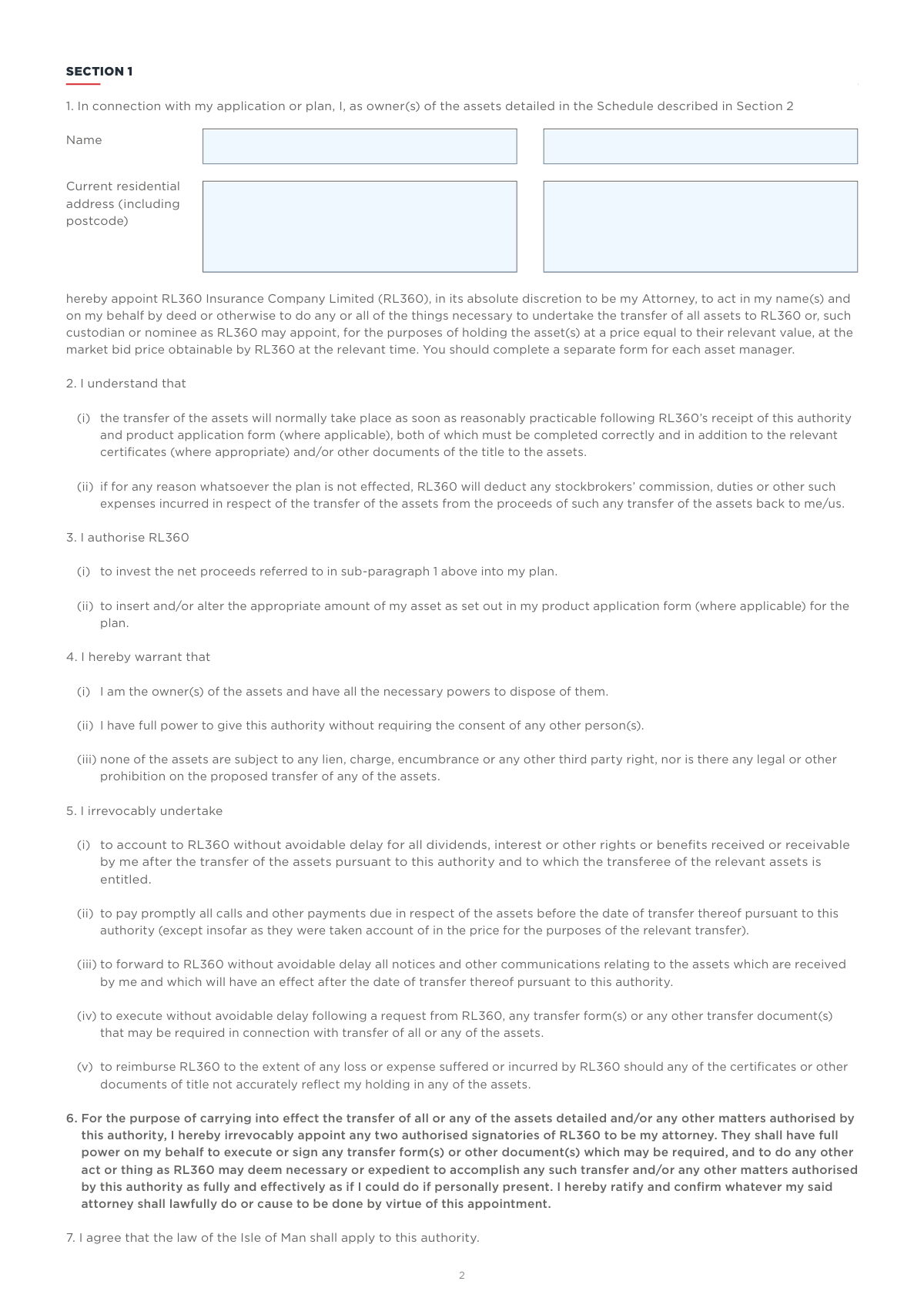
The RL360 Asset Transfer Form is a legal document that authorizes RL360 to act on a plan owner's behalf to transfer specified assets into their investment plan. By completing this form, the owner grants RL360 a Power of Attorney to manage the transfer process, which can involve stocks, shares, or other securities. Today, this form can be filled out quickly and accurately using AI-powered services like Instafill.ai, which can also convert non-fillable PDF versions into interactive fillable forms.
RL024d is part of the
investment forms, asset transfer forms, financial transfer forms, transfer forms and RL360 forms categories on Instafill.
Rather not fill this in by hand? Instafill is an online form filler that completes PDF forms automatically — upload the blank form, answer a few questions, and the AI fills every field.
Form specifications
| Form name: | RL360 Asset Transfer Form |
| Number of pages: | 1 |
| Language: | English |
Our AI automatically handles information lookup, data retrieval, formatting, and form filling.
It takes less than a minute to fill out RL024d using our AI form filling.
Securely upload your data. Information is encrypted in transit and deleted immediately after the form is filled out.
Instafill Demo: How to fill out PDF forms in seconds with AI
How to Fill Out RL024d Online for Free in 2026
Are you looking to fill out a RL024D form online quickly and accurately? Instafill.ai offers the #1 AI-powered PDF filling software of 2026, allowing you to complete your RL024D form in just 37 seconds or less.
Follow these steps to fill out your RL024D form online using Instafill.ai:
- 1 Navigate to Instafill.ai and upload or select the RL360 Asset Transfer Form.
- 2 Use the AI assistant to automatically populate Section 1 with your personal details, including your full name and residential address.
- 3 Carefully review the Power of Attorney clauses in Section 1 to understand the authority you are granting to RL360.
- 4 In Section 2, accurately list each asset to be transferred, providing the account number, owner's name, full asset description with ISIN/SEDOL codes, and the number of units or shares.
- 5 Enter the contact information for your financial adviser and the counter-party (the current asset holder) to facilitate communication.
- 6 Review the entire form for accuracy, then print the document for original signatures from all asset owners and an independent witness.
- 7 Gather all required original documents, such as share certificates or recent statements of holdings, and mail them with the completed, signed form to the RL360 address provided.
Our AI-powered system ensures each field is filled out correctly, reducing errors and saving you time.
Why Choose Instafill.ai for Your Fillable RL024d Form?
Speed
Complete your RL024d in as little as 37 seconds.
Up-to-Date
Always use the latest 2026 RL024d form version.
Cost-effective
No need to hire expensive lawyers.
Accuracy
Our AI performs 10 compliance checks to ensure your form is error-free.
Security
Your personal information is protected with bank-level encryption.
Frequently Asked Questions About RL024d
This form is used to authorize RL360 to transfer existing assets, such as shares or funds, from another institution directly into your RL360 lump sum plan. It should not be used for cash transfers.
This form is for applicants or current plan owners of RL360 lump sum products who wish to transfer assets they already own into their plan.
The process can take a significant amount of time, potentially several months or longer. The completion time is dependent on third-party institutions and is outside of RL360's direct control.
You must include the original, signed form along with all original certificates or recent statements of holdings for the assets being transferred. Printouts of online statements are discouraged as they may lack vital information.
In Section 2, you must list the full description of the asset, including any ISIN or SEDOL code, the number of units or shares, your account number, and the owner's name as it appears on the title document.
Your signature must be witnessed by an independent person. A spouse is not considered an independent witness and cannot sign as one.
If you make a mistake, cross it out and write the correction, ensuring all asset owners initial the change. Do not use correction fluid, as it will invalidate the form.
You should complete a separate form for each different asset manager or counter-party. However, you can list multiple assets from the same manager on a single form.
Yes, an administration fee is applied for each asset transferred into your plan. Details of these fees can be found in your product literature.
Yes, you are responsible for calculating and paying any tax liability that may result from the transfer. It is strongly recommended that you speak with a financial adviser about this.
Once completed and signed, send the form and all supporting documents to: Dealing Team, RL360, International House, Cooil Road, Douglas, Isle of Man, IM2 2SP.
Yes, services like Instafill.ai use AI to accurately auto-fill form fields with your saved information, which can save time and help prevent errors.
You can use a service like Instafill.ai to fill out the form online. Simply upload the PDF, and the platform allows you to type your information into the fields before printing it for the required original signature.
If you have a non-fillable or 'flat' PDF, you can upload it to a platform like Instafill.ai. The service can convert the document into an interactive, fillable form that you can easily complete on your computer.
Compliance RL024d
Validation Checks by Instafill.ai
1
Ensures Owner Information is Complete
This check verifies that the owner's full name and current residential address, including postcode, are provided in Section 1. This information is essential for identifying the plan owner and legally appointing RL360 as their Attorney for the asset transfer. If this information is missing, the Power of Attorney is not legally sound, and the form cannot be processed.
2
Validates Owner's Signature and Date Presence
This validation confirms that the 'Owner(s) Signature' field is signed and the 'Date' field is completed. The signature is a legal requirement to authorize the Power of Attorney and the entire asset transfer process. Failure to sign and date the form invalidates the instruction, and RL360 will be unable to act on the owner's behalf.
3
Verifies Witness Information Completeness
This check ensures all witness details are fully provided, including Name, Address, Occupation, Signature, and Date. A witness is required to validate the owner's signature on this legal document, confirming it was signed willingly. Incomplete witness information can render the deed invalid, halting the transfer process until a correctly witnessed form is submitted.
4
Confirms Witness and Owner Signature Dates Match
This validation checks that the date provided by the witness is the same as the date provided by the asset owner. The witness must be present at the time of signing, so the dates must correspond to legally attest to the signature. A mismatch in dates suggests the witnessing was not done correctly and will cause the form to be rejected.
5
Ensures Witness Independence
This check verifies that the witness's name is not the same as the asset owner's name, as a person cannot witness their own signature. The form also specifies a spouse is not an independent witness, so this check helps enforce the rule for an impartial third-party witness. A non-independent witness invalidates the legal standing of the signature, requiring the form to be re-signed and re-witnessed.
6
Validates Signature Date Format (DD/MM/YYYY)
This check ensures that both the owner's and witness's signature dates strictly follow the DD/MM/YYYY format. A standardized date format is crucial for accurate record-keeping and establishing a clear, unambiguous timeline for the legal instruction. Incorrectly formatted dates will cause a processing error and may require the user to correct the form.
7
Requires at Least One Asset in Schedule
This validation confirms that at least one row in the 'Schedule of Assets' in Section 2 has been completed. The entire purpose of the form is to transfer assets, so an empty schedule means there are no instructions to execute. The form is considered incomplete and cannot be processed if no assets are listed for transfer.
8
Ensures Completeness of Asset Details
For each asset listed in Section 2, this check verifies that all fields are filled: 'Personal reference number', 'Name(s) of registered owner(s)', 'Full description of the asset', and 'Number of units or shares'. Each piece of information is critical for correctly identifying and locating the specific asset with the third-party custodian. Missing details will lead to delays or failure to transfer the asset, requiring RL360 to query the applicant.
9
Verifies Consistency of Owner Name in Sections 1 and 2
This check compares the 'Name(s) of registered owner(s)' in Section 2 with the owner's name provided in Section 1. The names must match to confirm that the person authorizing the transfer is the legal owner of the assets listed. A mismatch could indicate an error or a potential legal issue with ownership, preventing the transfer from proceeding.
10
Validates 'Number of units or shares' is a Numeric Value
This check ensures that the value entered in the 'Number of units or shares to be transferred' column is a valid positive number. This quantity is a fundamental instruction for the transfer, and it must be clear and unambiguous. Non-numeric or invalid entries would make it impossible to execute the transfer correctly, leading to rejection of the instruction for that asset.
11
Validates Counter-party Contact Information
This check ensures that the 'Name of counter-party' is provided, along with at least one method of contact (either 'Telephone number' or 'Email address'). This information is vital for RL360 to liaise with the current asset holder to facilitate the transfer. Without this information, RL360 cannot initiate the process, causing significant delays or complete failure of the transfer.
12
Verifies Financial Adviser Email Format
This validation checks if the provided 'Email address' for the financial adviser follows a standard email format (e.g., [email protected]). A valid email is necessary for communication regarding any queries or issues that may arise during the transfer process. An invalid format would prevent communication, potentially delaying the resolution of problems.
13
Verifies Counter-party Email Format
This validation checks if the provided 'Email address' for the counter-party contact follows a standard email format (e.g., [email protected]). Accurate contact information is essential for RL360 to communicate with the third party holding the assets. An invalid email address would hinder communication and delay the transfer process.
14
Validates International Phone Number Format
This check verifies that the telephone numbers for both the financial adviser and the counter-party are in a valid format, preferably including a country code. As RL360 is an international company, correct and complete phone numbers are essential for contacting parties who may be in different countries. An invalid or incomplete number will prevent successful communication and delay the process.
Common Mistakes in Completing RL024d
Users often fail to provide the full description of the asset as it appears on the certificate, frequently omitting crucial identifiers like the ISIN or SEDOL code. This happens when transcribing from memory or an incomplete document. An incomplete description forces RL360 to halt the process and request more information, significantly delaying the asset transfer. To avoid this, meticulously copy every detail from the official document of title, including all identification codes.
The name entered in the 'Name(s) of registered owner(s)' column in Section 2 does not exactly match the name on the asset's certificate. For example, writing 'John Doe' when the certificate says 'Mr. John F. Doe'. This discrepancy causes a validation failure with the counter-party, leading to rejection of the transfer request. Always ensure the name is transcribed precisely as it appears on the official ownership documents.
The form explicitly states that a spouse is not an independent witness, yet many applicants have their spouse or another close family member witness their signature. This invalidates the signature and the entire Power of Attorney section, as it's a legal document requiring impartial witnessing. The form will be rejected, and a new, correctly witnessed form will be required, causing significant delays. An independent witness should be someone not related to you and with no financial interest in the transaction.
When an asset is owned jointly, all registered owners must sign the form. It's a common oversight for only one owner to sign, especially if they are the primary contact for the account. Since this form grants Power of Attorney, authorization from all legal owners is mandatory. A missing signature renders the instruction invalid, stopping the transfer process until a new form is completed and signed by all parties.
The instructions clearly state that RL360 can only accept 'original written instructions.' Applicants sometimes submit a scanned email attachment or a photocopy for convenience, not realizing it's a legal requirement to have the original document with the 'wet ink' signature. A non-original form will be immediately rejected, and the applicant will have to mail the original, delaying the initiation of the transfer.
The form is an instruction to transfer, but it is useless without the corresponding proof of ownership. Applicants frequently forget to include the original physical share certificates or a recent, official statement of holdings for the assets listed in Section 2. The form explicitly states, 'We cannot proceed without these,' and this omission brings the entire process to a halt until the required documents are physically received.
In the contact details section, applicants often leave the 'Counter-party contact information' blank or provide vague details. The counter-party is the current institution holding the assets, and RL360 needs their precise contact information to execute the transfer. Without this, RL360's team cannot liaise with the other institution, making the transfer impossible to initiate. This information is usually found on a recent statement of holdings.
As a legal document, any alterations must be clearly initialled by all asset owners. People accustomed to casual forms may use correction fluid or simply cross out mistakes without initialling them. Using correction fluid automatically invalidates the form, while uninitialled changes will cause it to be returned for proper authorization. To avoid this, cross out the error with a single line and have all owners write their initials next to the correction.
The form specifies that it must be completed in BLOCK capitals to ensure clarity and prevent misinterpretation of handwritten information. Applicants often revert to cursive or lowercase handwriting, which can lead to errors in reading names, addresses, or asset details, causing delays. If the form is a non-fillable PDF, tools like Instafill.ai can convert it into a fillable version, allowing you to type directly and ensure perfect legibility.
The form advises against using printouts of online statements because they 'rarely provide vital contact information' for the counter-party. Applicants often use these for convenience, but these printouts may lack the official letterhead, address, or specific department contact details needed by RL360. This forces RL360 to request a proper, recent statement, delaying the process. It is crucial to obtain and send a full, recent statement of holdings, preferably one mailed by the institution.
Saved over 80 hours a year
“I was never sure if my IRS forms like W-9 were filled correctly. Now, I can complete the forms accurately without any external help.”
Kevin Martin Green
Your data stays secure with advanced protection from Instafill and our subprocessors




Robust compliance program
Transparent business model
You’re not the product. You always know where your data is and what it is processed for.
ISO 27001, HIPAA, and GDPR
Our subprocesses adhere to multiple compliance standards, including but not limited to ISO 27001, HIPAA, and GDPR.
Security & privacy by design
We consider security and privacy from the initial design phase of any new service or functionality. It’s not an afterthought, it’s built-in, including support for two-factor authentication (2FA) to further protect your account.
Fill out RL024d with Instafill.ai
Worried about filling PDFs wrong? Instafill securely fills rl360-asset-transfer-form forms, ensuring each field is accurate.
