Yes! You can use AI to fill out Form APP13017-29, Transfer Your Account to Schwab
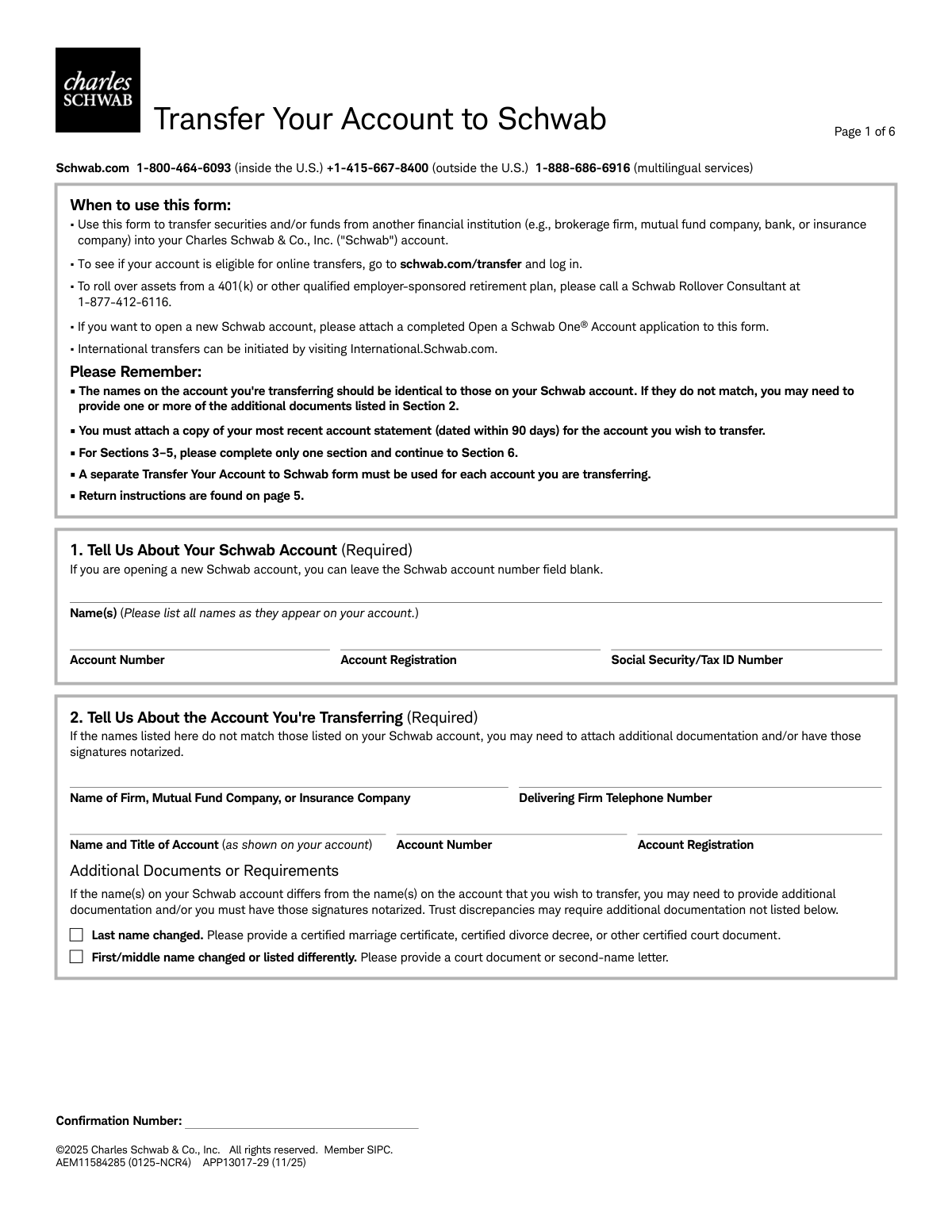
This form, officially titled 'Transfer Your Account to Schwab' (APP13017-29), allows clients to consolidate their assets by transferring securities, funds, and other investments from external brokerage firms, banks, or mutual fund companies into their Charles Schwab account. It streamlines the process of moving investments, centralizing financial management under one provider. Today, this form can be filled out quickly and accurately using AI-powered services like Instafill.ai, which can also convert non-fillable PDF versions into interactive fillable forms.
APP13017-29 is part of the
Schwab forms, account transfer forms and transfer forms categories on Instafill.
Rather not fill this in by hand? Instafill is an online form filler that completes PDF forms automatically — upload the blank form, answer a few questions, and the AI fills every field.
Form specifications
| Form name: | Form APP13017-29, Transfer Your Account to Schwab |
| Number of pages: | 1 |
| Language: | English |
Our AI automatically handles information lookup, data retrieval, formatting, and form filling.
It takes less than a minute to fill out APP13017-29 using our AI form filling.
Securely upload your data. Information is encrypted in transit and deleted immediately after the form is filled out.
Instafill Demo: How to fill out PDF forms in seconds with AI
How to Fill Out APP13017-29 Online for Free in 2026
Are you looking to fill out a APP13017-29 form online quickly and accurately? Instafill.ai offers the #1 AI-powered PDF filling software of 2026, allowing you to complete your APP13017-29 form in just 37 seconds or less.
Follow these steps to fill out your APP13017-29 form online using Instafill.ai:
- 1 Navigate to Instafill.ai and upload or select the 'Transfer Your Account to Schwab' form.
- 2 Provide your Charles Schwab account details in Section 1, including your name and account number.
- 3 In Section 2, enter the details of the account you are transferring from, such as the firm's name and your account number, and attach a recent account statement.
- 4 Choose the appropriate transfer type in Section 3, 4, or 5, specifying whether it's a full or partial transfer and listing any specific assets if applicable.
- 5 Carefully read the authorization agreement in Section 6, then provide your digital signature and the date to authorize the transfer.
- 6 Review the entire form for accuracy, download the completed document, and submit it to Charles Schwab via mail as per the instructions on page 5.
Our AI-powered system ensures each field is filled out correctly, reducing errors and saving you time.
Why Choose Instafill.ai for Your Fillable APP13017-29 Form?
Speed
Complete your APP13017-29 in as little as 37 seconds.
Up-to-Date
Always use the latest 2026 APP13017-29 form version.
Cost-effective
No need to hire expensive lawyers.
Accuracy
Our AI performs 10 compliance checks to ensure your form is error-free.
Security
Your personal information is protected with bank-level encryption.
Frequently Asked Questions About APP13017-29
This form is used to transfer securities and/or funds from another financial institution, such as a brokerage firm, mutual fund company, or bank, into your Charles Schwab account.
You must attach a copy of your most recent account statement, dated within the last 90 days, for the account you are transferring. Additional documents may be required if the names on the accounts do not match.
A typical transfer takes approximately three weeks. However, depending on the type of securities and the other institution, it can sometimes take up to six weeks or longer.
If the names differ, you may need to provide additional documentation, such as a marriage certificate or court document. You must also sign the form with all name variations, and your signatures may need to be notarized.
No, this form is not for rolling over assets from a 401(k) or other employer-sponsored retirement plan. For that, you should call a Schwab Rollover Consultant at 1-877-412-6116.
You have the option to transfer your entire account or make a partial transfer of specific assets or a cash amount. You will indicate your choice in Section 3, 4, or 5 of the form.
Your previous financial institution may charge an exit or transfer fee. Additionally, Schwab may charge set-up and maintenance fees if you are transferring nonstandard assets like limited partnerships.
It is highly recommended that you avoid buying or selling securities during the transfer process. Trading can complicate and delay your transfer, and some firms may even freeze the account until the transfer is complete.
For CDs and annuities, you must complete Section 4, specifying whether to liquidate immediately or at maturity. Be aware that liquidating an annuity can result in tax consequences, penalties, and fees.
Return instructions are provided on page 5 of the form. There are separate mailing addresses for regular and overnight mail for both U.S. and international clients.
No, you should only complete one of these sections based on the type of account you are transferring. Section 3 is for brokerage accounts, Section 4 for CDs/annuities, and Section 5 for mutual fund company accounts.
Yes, services like Instafill.ai use AI to accurately auto-fill form fields, which can help you complete the form faster and with fewer errors.
You can easily fill this form online using Instafill.ai. Simply upload the PDF to the platform, and its AI will help you fill in the required information before you download the completed document for submission.
If your PDF is a flat, non-fillable file, you can use a service like Instafill.ai to instantly convert it into an interactive, fillable form. This allows you to type your information directly into the fields online.
Compliance APP13017-29
Validation Checks by Instafill.ai
1
Ensures Schwab Account Details Are Complete
This check verifies that all required fields in Section 1, 'Tell Us About Your Schwab Account,' are filled out, including the account holder's name, account registration type, and Social Security/Tax ID Number. This information is fundamental for identifying the destination account for the transfer. A failure will prevent the form from being processed as the target account cannot be confirmed.
2
Validates Social Security or Tax ID Number Format
This validation ensures the Social Security Number (SSN) or Tax ID Number provided in Section 1 is in the correct format (e.g., XXX-XX-XXXX for SSN or XX-XXXXXXX for TIN). An incorrectly formatted number can cause tax reporting errors and processing delays with financial institutions and government agencies. If the format is invalid, the submission will be rejected until corrected.
3
Ensures Transferring Account Details Are Complete
This check confirms that all fields in Section 2, 'Tell Us About the Account You're Transferring,' are completed, including the firm name, phone number, account name, and account number. This information is critical for Schwab to contact the delivering firm and correctly identify the source account. Missing information will halt the transfer process as Schwab will not know which account to pull assets from.
4
Verifies Selection of a Single Transfer Type Section
This validation confirms that the user has filled out only one of the three main transfer type sections (Section 3, 4, or 5). The form logic requires a single, unambiguous instruction set for the type of assets being transferred. If more than one section is completed, the request is ambiguous and will be rejected for clarification.
5
Compares Account Holder Names Across Institutions
This validation compares the account holder names listed in Section 1 (Schwab Account) with those in Section 2 (Transferring Account). Mismatched names are a primary cause of transfer rejections and require additional legal documentation to prove ownership. A failed check will flag the submission for manual review and require the user to provide the necessary documents.
6
Confirms Attachment of a Recent Account Statement
This check verifies that a copy of the most recent account statement, dated within the last 90 days, from the delivering firm is attached to the submission. This statement is required to verify the assets, account number, and registration details of the account being transferred. Without this attachment, the transfer cannot be initiated, as it serves as the primary proof of the account's existence and holdings.
7
Validates Partial Brokerage Transfer Specification
When a 'Partial' transfer is selected in Section 3, this check ensures that either a specific cash amount is entered or that the asset description and quantity are provided for the securities to be transferred. This prevents ambiguity in the transfer instructions. If 'Partial' is checked but no specific assets or cash amount are listed, the form will be considered incomplete and rejected.
8
Validates CD/Annuity Maturity Date
For CD or Annuity transfers set to occur 'at maturity' in Section 4, this check validates that the provided date is in a valid 'mm/dd/yyyy' format and is not a date in the past. This ensures the transfer is scheduled correctly and avoids processing errors from an impossible or incorrectly formatted date. An invalid date will cause the request to be rejected until a valid future maturity date is provided.
9
Ensures Handling Instructions for Each Mutual Fund
In Section 5, for every mutual fund listed, this validation ensures that a 'Handling' option ('In Kind' or 'Liquidate') has been selected. This instruction is critical as it tells Schwab whether to transfer the fund shares directly or to sell them and transfer the cash proceeds. Missing handling instructions create ambiguity and will cause the transfer for that specific fund to be delayed or rejected.
10
Verifies Signature and Corresponding Date
This check ensures that each required account holder has signed the form in Section 6 and that each signature is accompanied by a valid date in 'mm/dd/yyyy' format. The signature provides legal authorization for the transfer, and the date establishes when the authorization was given. A missing signature or an invalid/future date will render the authorization void and stop the entire transfer process.
11
Validates Delivering Firm's Telephone Number Format
This check verifies that the 'Delivering Firm Telephone Number' in Section 2 is a valid phone number format. This number is crucial for the Schwab processing team to contact the other institution to resolve issues or coordinate the transfer. An invalid number can significantly delay the process if manual intervention is required.
12
Ensures All Account Holders Have Signed
This validation cross-references the printed names and signatures in Section 6 with the account holders listed in Sections 1 and 2. It ensures that all required parties have provided their signature to authorize the transfer, especially in cases of joint accounts or name discrepancies. Missing signatures from any account holder will invalidate the authorization and halt the transfer.
13
Validates CD/Annuity Transfer Amount Logic
Within Section 4, this check ensures that for a given transfer timing ('immediately' or 'at maturity'), the user has selected either 'All' or 'Partial' but not both. Furthermore, if 'Partial' is selected, it verifies that a valid dollar amount has been entered. This prevents conflicting or incomplete instructions regarding the value of the CD or annuity to be transferred.
14
Ensures Exclusive Selection of Mutual Fund Transfer Type
This validation confirms that in Section 5, the user has selected either 'Full' or 'Partial' for the 'Type of Transfer,' but not both. Selecting both creates a conflicting instruction for the transfer agent. The form must be rejected if both are selected to force the user to clarify their intent for the mutual fund transfer.
Common Mistakes in Completing APP13017-29
This occurs when the name(s) on the transferring account do not exactly match the name(s) on the receiving Schwab account (e.g., using a middle initial on one and a full middle name on another). This discrepancy forces a manual review and requires additional documentation, such as a marriage certificate or court documents, significantly delaying the transfer. To avoid this, carefully compare the account statements from both institutions and ensure the names are identical before submitting the form.
The form explicitly requires a copy of the most recent account statement (dated within 90 days) from the delivering firm. Applicants often forget to include this attachment or submit a statement that is too old. Without a valid, recent statement, Schwab cannot verify the account details and will put the transfer on hold, halting the process until the correct document is received.
The form instructs users to complete only one of Sections 3, 4, or 5. However, a user transferring a brokerage account that contains mutual funds might mistakenly fill out both Section 3 (Brokerage) and Section 5 (Mutual Fund). This creates conflicting instructions, leading to processing delays or rejection while the firm seeks clarification. You should only complete the single section that corresponds to the type of account you are transferring (e.g., Section 3 for a standard brokerage account).
All account holders listed on the form must sign it; for joint accounts, a single signature is insufficient. Furthermore, if there is a name variation between accounts, the form requires the person to sign with all name variations, a detail that is easily missed. An incomplete or incorrect signature section makes the form legally invalid and results in immediate rejection, forcing you to start the process over.
On page 4, the form states that all non-Schwab account holders must have their signatures notarized. Many people overlook this fine print, sign the form, and mail it without this crucial step. A transfer request without a required notarization will be rejected by the delivering firm, causing a complete stoppage until a properly notarized form is resubmitted.
When requesting a partial transfer in Section 3, users sometimes provide ambiguous descriptions of assets, such as 'my tech stocks' or an incorrect share quantity. The delivering firm requires precise instructions, including the exact asset name, ticker symbol, and number of shares ('ALL' or a specific number). Vague instructions will cause the transfer to be rejected for being 'not in good order' (NIGO), delaying the entire process.
This form is for transferring assets from another financial institution, but the instructions explicitly state it should not be used for 401(k) or other employer-sponsored retirement plan rollovers. Applicants may mistakenly use this general transfer form for that purpose. This will lead to rejection, as rollovers have a separate, dedicated process that must be initiated by calling a Schwab Rollover Consultant.
In Section 5, users must specify whether to transfer mutual funds 'In Kind' (as shares) or to 'Liquidate' them (sell them and transfer the cash). Accidentally selecting 'Liquidate' can trigger an unintended taxable event, such as capital gains. To prevent this, confirm whether your funds are transferable to Schwab and be certain of your choice, as liquidating assets can have significant financial consequences.
This form is often available as a non-fillable PDF, leading users to print it and fill it out by hand. Illegible handwriting, especially for critical information like account numbers or asset CUSIPs, is a common reason for rejection. If the delivering firm cannot accurately read the details, the request will fail. Using a tool like Instafill.ai can convert the flat PDF into a fillable version, ensuring all data is typed, legible, and accurate, thus preventing rejections due to poor handwriting.
The form is just one piece of the required package; it must be accompanied by an account statement and potentially other documents for name changes. Users can forget to include these attachments when mailing the form. An incomplete package cannot be processed and will be delayed until all required items are received. Always use the checklist in Section 7 to ensure all necessary documents are enclosed before sending.
Saved over 80 hours a year
“I was never sure if my IRS forms like W-9 were filled correctly. Now, I can complete the forms accurately without any external help.”
Kevin Martin Green
Your data stays secure with advanced protection from Instafill and our subprocessors




Robust compliance program
Transparent business model
You’re not the product. You always know where your data is and what it is processed for.
ISO 27001, HIPAA, and GDPR
Our subprocesses adhere to multiple compliance standards, including but not limited to ISO 27001, HIPAA, and GDPR.
Security & privacy by design
We consider security and privacy from the initial design phase of any new service or functionality. It’s not an afterthought, it’s built-in, including support for two-factor authentication (2FA) to further protect your account.
Fill out APP13017-29 with Instafill.ai
Worried about filling PDFs wrong? Instafill securely fills form-app13017-29-transfer-your-account-to-schwab forms, ensuring each field is accurate.
