Yes! You can use AI to fill out Transfer Shares as a Gift — Nonretirement

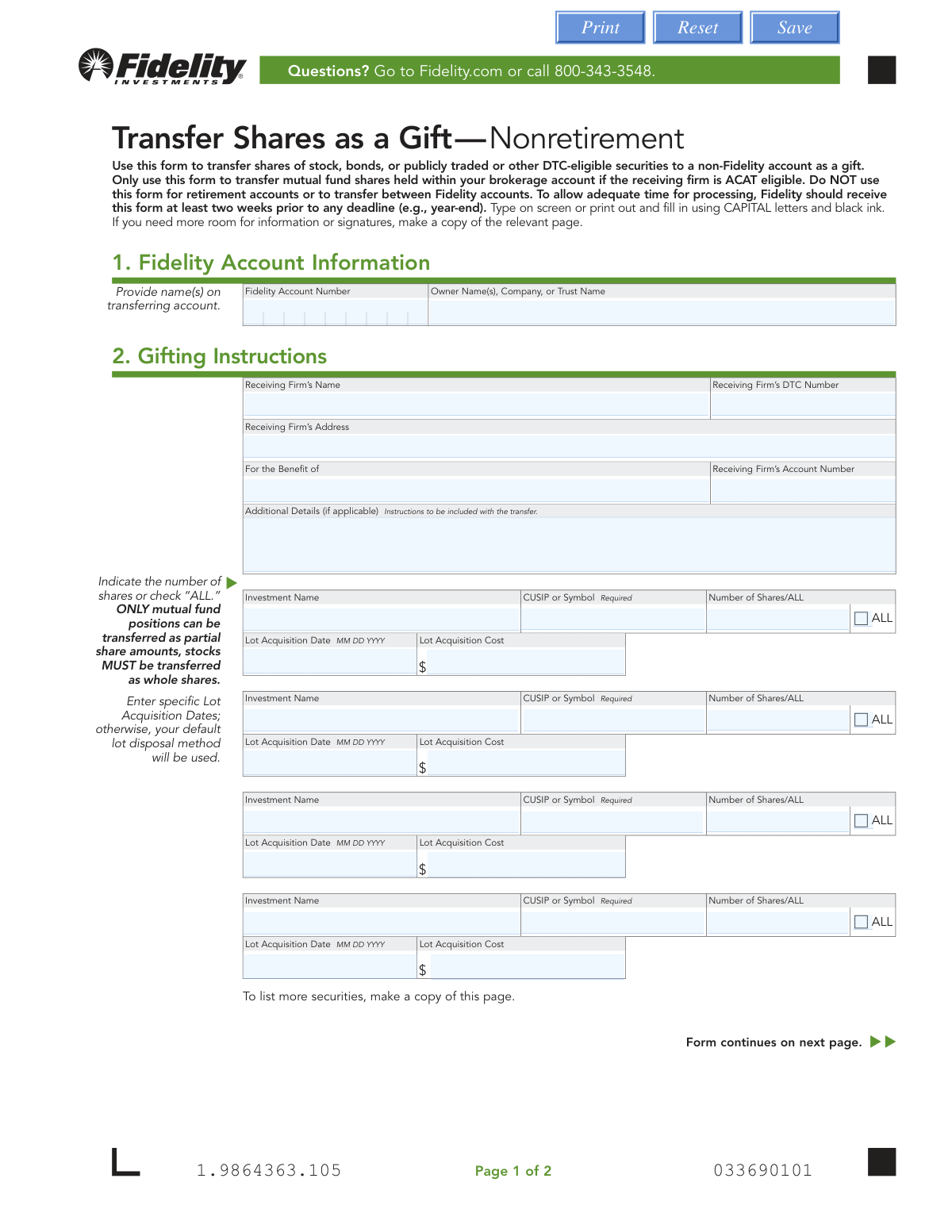
This form, officially titled "Transfer Shares as a Gift — Nonretirement," is a document provided by Fidelity Investments for account holders who wish to gift securities such as stocks, bonds, or mutual funds to an individual or entity with an account at a different, ACAT-eligible financial firm. It is crucial for authorizing Fidelity to move the specified assets from your nonretirement account and ensuring the transfer is processed correctly. Today, this form can be filled out quickly and accurately using AI-powered services like Instafill.ai, which can also convert non-fillable PDF versions into interactive fillable forms.
Our AI automatically handles information lookup, data retrieval, formatting, and form filling.
It takes less than a minute to fill out Fidelity Transfer Shares as a Gift using our AI form filling.
Securely upload your data. Information is encrypted in transit and deleted immediately after the form is filled out.

Form specifications

Form name: Transfer Shares as a Gift — Nonretirement
Number of pages: 1
Language: English
main-image

Instafill Demo: How to fill out PDF forms in seconds with AI

How to Fill Out Fidelity Transfer Shares as a Gift Online for Free in 2026

Are you looking to fill out a FIDELITY TRANSFER SHARES AS A GIFT form online quickly and accurately? Instafill.ai offers the #1 AI-powered PDF filling software of 2026, allowing you to complete your FIDELITY TRANSFER SHARES AS A GIFT form in just 37 seconds or less.
Follow these steps to fill out your FIDELITY TRANSFER SHARES AS A GIFT form online using Instafill.ai:
  1. 1 Navigate to Instafill.ai and upload or select the Fidelity 'Transfer Shares as a Gift — Nonretirement' form.
  2. 2 Provide your Fidelity account information in Section 1, including the account number and the full name(s) on the account.
  3. 3 Complete the Gifting Instructions in Section 2 with details about the receiving firm, their DTC number, and the recipient's account number.
  4. 4 List each security you are gifting, specifying the investment name, CUSIP or symbol, and the number of shares. You can also provide specific lot information if desired.
  5. 5 Review all the information auto-filled by the AI to ensure accuracy and completeness across all sections.
  6. 6 Electronically or manually sign and date the form in Section 3. Be aware that a Medallion signature guarantee may be required for transfers over a certain value.
  7. 7 Download the completed form and submit the entire document to Fidelity via the mail or overnight delivery addresses provided on the form.

Our AI-powered system ensures each field is filled out correctly, reducing errors and saving you time.

Why Choose Instafill.ai for Your Fillable Fidelity Transfer Shares as a Gift Form?

Speed

Complete your Fidelity Transfer Shares as a Gift in as little as 37 seconds.

Up-to-Date

Always use the latest 2026 Fidelity Transfer Shares as a Gift form version.

Cost-effective

No need to hire expensive lawyers.

Accuracy

Our AI performs 10 compliance checks to ensure your form is error-free.

Security

Your personal information is protected with bank-level encryption.

Frequently Asked Questions About Form Fidelity Transfer Shares as a Gift

This form is used to gift securities, such as stocks, bonds, or mutual funds, from your nonretirement Fidelity account to an individual or entity's account at a different financial firm.

No, this form is strictly for nonretirement brokerage accounts. You cannot use it to transfer assets from an IRA, 401(k), or any other type of retirement account.

No, this form is specifically for transferring assets to a non-Fidelity account. For gifting between two Fidelity accounts, you will need to use a different process; please contact Fidelity for instructions.

You need the receiving firm's name, DTC number, and address, as well as the recipient's account number and the full name on their account.

The CUSIP or Ticker Symbol for each security is required and can be found on your Fidelity account statements or by viewing your positions online at Fidelity.com.

If you do not specify the lot acquisition date and cost, Fidelity will use your account's default lot disposal method (such as FIFO - First-In, First-Out) to select the shares for the transfer.

No, stocks must be transferred in whole shares. However, you are permitted to transfer partial or fractional shares of mutual funds.

A Medallion signature guarantee is required if the total value of the securities being gifted is over $17,000. This is a special signature verification that you can obtain from most banks or credit unions.

To allow for adequate processing time, Fidelity recommends that they receive the completed form at least two weeks prior to any deadline you may have, such as the end of the calendar year.

You must mail the entire signed form to Fidelity. The form provides two addresses: one for regular mail to Cincinnati, OH, and another for overnight mail to Covington, KY.

Typically, only one authorized signature is required. However, if the assets are held in a Mutual Fund Account (where the account number begins with a '2' followed by two letters), all account owners must sign.

Yes, services like Instafill.ai use AI to accurately auto-fill form fields with your information, which can save time and help prevent common errors.

You can use a service like Instafill.ai to complete the form digitally. Simply upload the PDF, and the tool will enable you to type your information directly into the fields before printing for signature.

If you have a non-fillable or 'flat' PDF, you can use a platform like Instafill.ai. It can convert the document into an interactive, fillable form, allowing you to easily complete it on your computer.

Compliance Fidelity Transfer Shares as a Gift
Validation Checks by Instafill.ai

1
Fidelity Account Number Validation
This check verifies that the 'Fidelity Account Number' field is not empty and conforms to the standard format for a nonretirement brokerage account. It is crucial for identifying the correct source account for the transfer. If the number is missing or invalid, the system cannot locate the user's holdings, and the transfer request will be rejected immediately.
2
Account Ownership Verification
This validation cross-references the 'Owner Name(s)' provided in Section 1 with the account holder information on file for the given 'Fidelity Account Number'. This is a critical security measure to prevent unauthorized transfers and ensure the person initiating the gift is the legitimate account owner. A mismatch will halt the process and may trigger a security alert.
3
Receiving Firm DTC Number Format
This check ensures the 'Receiving Firm’s DTC Number' is a valid 4-digit number. The Depository Trust Company (DTC) number is essential for electronically routing the securities to the correct financial institution. An incorrect or improperly formatted DTC number will cause the transfer to fail, leading to delays and potential rejection of the entire transaction.
4
Investment Identifier Requirement
For each investment being gifted, this validation ensures that the 'CUSIP or Symbol' field is populated. This unique identifier is mandatory for accurately identifying the specific security to be transferred from the account. Without a valid CUSIP or symbol, Fidelity cannot execute the transfer, and the form will be considered incomplete.
5
Exclusive Share Quantity Selection
This check verifies that for each investment row, either the 'Number of Shares' field is filled or the 'ALL' checkbox is selected, but not both. Providing both creates ambiguity in the transfer instruction. This validation prevents processing errors by ensuring the user's intent to transfer a specific quantity or the entire position is clear.
6
Whole Share Transfer Rule for Stocks
Based on the form's instructions, this validation checks if the security being transferred is a stock and, if so, ensures the 'Number of Shares' is a whole number. The form explicitly states that stocks must be transferred as whole shares. Attempting to transfer a fractional share of a stock will result in a validation error, requiring the user to correct the quantity before submission.
7
Lot Acquisition Date Validity
If a 'Lot Acquisition Date' is provided, this check validates that it is in the correct MM DD YYYY format and represents a date in the past. Specifying a future date is illogical and would cause errors in tax lot accounting. This ensures that if specific lots are being identified for the gift, the data is accurate for cost basis reporting.
8
Lot Acquisition Cost Format
This validation ensures that if a 'Lot Acquisition Cost' is entered, it is a valid positive numerical value representing a currency amount. This data is used for cost basis tracking for the gift recipient. An invalid format (e.g., text or negative numbers) would corrupt financial data and must be corrected.
9
Signature and Date Completeness
This check confirms that the required signature and 'Today's Date' fields in Section 3 are completed. The form cannot be processed without a legal signature and date, as they serve as the account owner's authorization for the transaction. An omission will result in the form being rejected as incomplete and legally non-binding.
10
Non-Retirement Account Verification
This is a critical check to confirm that the provided Fidelity Account Number is not a retirement account (e.g., IRA). The form explicitly states it is for 'Nonretirement' accounts only, and using it for retirement funds could have significant tax implications and regulatory consequences. If a retirement account number is detected, the submission must be blocked with an explanation.
11
Receiving Firm Information Completeness
This validation ensures that all fields related to the recipient are filled, including 'Receiving Firm’s Name', 'Receiving Firm’s Address', 'For the Benefit of', and 'Receiving Firm’s Account Number'. All of this information is required to correctly identify the destination for the gifted shares. Missing any of these details will result in a failed transfer.
12
Logical Link Between Lot Date and Cost
This check ensures that if a 'Lot Acquisition Cost' is entered for a security, the corresponding 'Lot Acquisition Date' field for that same security is also filled out. The cost of a lot is meaningless without its acquisition date for tax purposes. This validation prevents incomplete cost basis information from being submitted.

Common Mistakes in Completing Fidelity Transfer Shares as a Gift

Using the Form for Ineligible Transfers

The form is exclusively for gifting nonretirement assets to an external (non-Fidelity) account. People often overlook this and try to use it for retirement accounts (like IRAs) or for transfers between two Fidelity accounts, which require different forms. This mistake leads to immediate rejection, causing significant delays. To avoid this, carefully read the form's title and purpose; AI-powered tools like Instafill.ai can also help identify the correct form for your specific transaction.

Omitting or Mismatching the Receiving Firm's DTC Number

The Depository Trust Company (DTC) number is a unique identifier for the receiving firm that is critical for the transfer. Senders often don't know this number or enter it incorrectly, causing the transfer to fail. An incorrect or missing DTC number will cause the transfer to be rejected by the clearinghouse. You must contact the receiving firm to obtain their correct DTC number before filling out the form.

Attempting to Transfer Fractional Stock Shares

The form's instructions clearly state that stocks must be transferred as whole shares, while only mutual funds can be transferred as partial shares. Filers may overlook this and request a fractional amount of a stock (e.g., 10.5 shares), which is not permissible. This will result in the rejection of that instruction or the entire form. An intelligent form filler like Instafill.ai can enforce such rules automatically, preventing you from entering invalid data.

Forgetting the Medallion Signature Guarantee

For gifts valued over $17,000, a Medallion signature guarantee is mandatory, and it is often confused with a more common notary stamp. A notary only verifies identity, while a Medallion guarantee insures the transaction against fraud. Submitting a form without the required guarantee, or with a notary stamp instead, will lead to its immediate rejection. You must visit a financial institution like a bank or credit union to obtain this specific guarantee.

Providing Ambiguous Share Transfer Instructions

The form provides a field to enter a specific number of shares and a checkbox for 'ALL' shares. A common error is to fill in both, creating a conflicting instruction. This forces the processor to either reject the form or contact the sender for clarification, delaying the transfer. You must choose one or the other: either specify the exact number of shares or check the 'ALL' box, but never both for the same investment.

Omitting the Required CUSIP or Ticker Symbol

The form marks the 'CUSIP or Symbol' field as 'Required' for each investment. People sometimes leave this blank, assuming the investment name is sufficient. However, the CUSIP/Symbol is the precise identifier used to execute the transfer, and its absence makes the instruction impossible to process. Using a tool like Instafill.ai can help by auto-populating the CUSIP/Symbol when you enter the investment name, ensuring accuracy.

Providing an Incorrect Number of Signatures

The signature requirements vary based on the account type; a standard brokerage account requires one signature, but a Mutual Fund Account requires signatures from all account owners. Filers often miss this detail and provide only one signature for a jointly-owned mutual fund account. This oversight will cause the form to be rejected for being improperly authorized, so you must carefully review your account type to ensure all required owners sign.

Ignoring Specific Share Lot Selection for Tax Purposes

The form allows you to specify which lots of a security to gift by entering the acquisition date and cost, which has significant tax implications. Many people leave this blank, causing Fidelity to use a default disposal method (e.g., FIFO) that may not be the most tax-efficient strategy. Failing to specify lots can result in a higher-than-necessary capital gains tax liability for the recipient, so it's wise to consult a tax advisor and fill this section carefully.

Entering Inaccurate Recipient Details

The 'For the Benefit of' name and the receiving firm's account number must exactly match the registration on the destination account. People may use a nickname for the recipient or make a typo in the long account number. Any mismatch will cause the receiving firm to reject the transfer, forcing the process to start over. AI form fillers like Instafill.ai can help by saving and reusing verified recipient profiles, minimizing the risk of typos.

Submitting an Illegible Handwritten Form

Although the form is a PDF, many people print and fill it out by hand, often with illegible writing or using the wrong color ink. The instructions specify using CAPITAL letters and black ink, and failing to do so can cause processing errors or rejection. Since this form may be a non-fillable PDF, tools like Instafill.ai can convert it into an interactive, fillable version, allowing you to type all entries for perfect clarity.
Saved over 80 hours a year

“I was never sure if my IRS forms like W-9 were filled correctly. Now, I can complete the forms accurately without any external help.”

Kevin Martin Green

Your data stays secure with advanced protection from Instafill and our subprocessors

Robust compliance program

Transparent business model

You’re not the product. You always know where your data is and what it is processed for.

ISO 27001, HIPAA, and GDPR

Our subprocesses adhere to multiple compliance standards, including but not limited to ISO 27001, HIPAA, and GDPR.

Security & privacy by design

We consider security and privacy from the initial design phase of any new service or functionality. It’s not an afterthought, it’s built-in, including support for two-factor authentication (2FA) to further protect your account.

Fill out Fidelity Transfer Shares as a Gift with Instafill.ai

Worried about filling PDFs wrong? Instafill securely fills transfer-shares-as-a-gift-nonretirement forms, ensuring each field is accurate.