
Yes! You can use AI to fill out Beneficiaries – Defined Contribution Retirement Plan
Don't type 80 fields by hand. Tell our AI about yourself, or upload a document you already have, and it fills every field in seconds. You check it, then download, print or sign.
The AI does the filling. You just check it.
No typing into boxes, nothing to install.
What this form asks for
The AI fills all of it, from your answers or your documents.
The AI checks your answers before you download
12 checks built for this form, so a wrong date or a missing answer is caught before anyone else sees it.
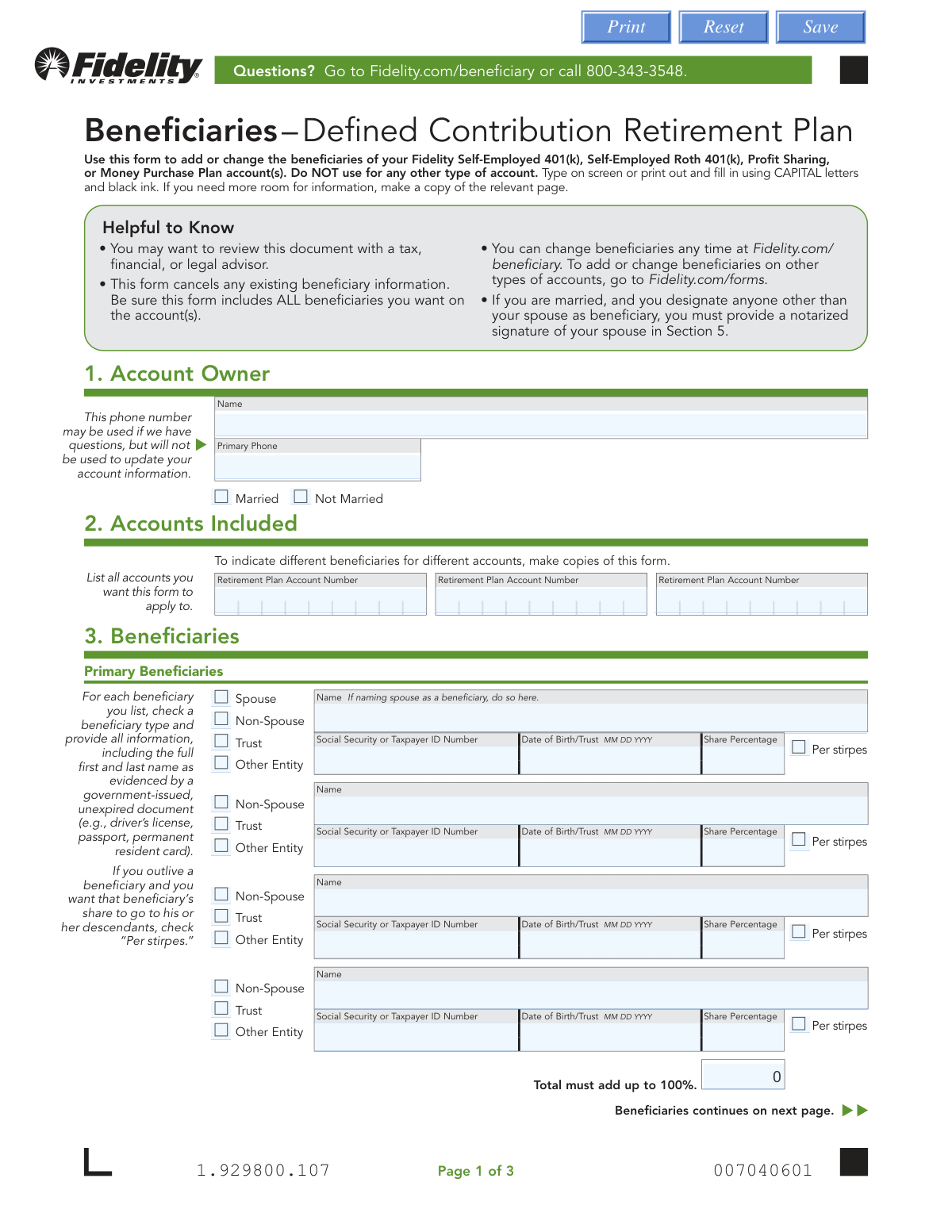
This check verifies that the sum of all 'Share Percentage' values for the listed primary beneficiaries equals exactly 100%. This is critical to ensure the entire account balance is allocated without ambiguity. If the total is not 100%, the form will be rejected to prevent disputes and ensure the account owner's intentions are fully and clearly captured.
This is a conditional logic check that verifies if the account owner is married and has designated a non-spouse as a primary beneficiary. If these conditions are met, the system validates that Section 5, 'Spouse’s Consent,' is fully completed, including the spouse's signature and notarization. Failure to provide this consent when required makes the beneficiary designation legally invalid and will result in the form's rejection.
This check ensures that the account owner has signed in Section 4 and provided a valid date. The signature is the legal authorization that makes the beneficiary designations official and binding, replacing all prior designations. An unsigned or undated form is legally non-binding and will be rejected immediately.
For every beneficiary listed (both primary and contingent), this validation ensures that all required fields are filled: Name, beneficiary type (Spouse, Non-Spouse, Trust, etc.), Social Security or Taxpayer ID Number, Date of Birth/Trust, and Share Percentage. Missing information for any beneficiary makes it impossible to properly identify or distribute assets to them. The form will be returned as incomplete.
This check ensures that the 'Social Security or Taxpayer ID Number' for each beneficiary is entered in a valid format (e.g., XXX-XX-XXXX for an SSN or XX-XXXXXXX for a TIN). A valid ID is essential for uniquely identifying the beneficiary and for future tax reporting purposes. An incorrectly formatted ID will cause a processing failure and require correction.
This validation confirms that at least one primary beneficiary has been designated in Section 3. The entire purpose of the form is to name beneficiaries, and without at least one primary beneficiary, the form fails its core function. If no primary beneficiary is listed, the form is considered incomplete and cannot be processed.
And 6 more checks
- Ensures Marital Status is Selected
- Validates Beneficiary Date of Birth/Trust Date
- Ensures Contingent Beneficiary Share Percentages Total 100%
- Verifies At Least One Account Number is Provided
- Prevents Duplicate Primary and Contingent Beneficiary Roles
- Validates Notary Section if Spousal Consent is Given
Let AI fill out your Fidelity Beneficiary Designation Form
No typing. Every field filled in seconds, checked, ready to sign.
How to Fill Out Fidelity Beneficiary Designation Form Online for Free in 2026
What the AI walks you through.
- Navigate to Instafill.ai and upload the 'Beneficiaries – Defined Contribution Retirement Plan' form or select it from their template library.
- Provide your personal information in Section 1, including your full name and marital status.
- In Section 2, list all retirement plan account numbers that this beneficiary designation should apply to.
- Complete Section 3 by entering the full details for your primary and contingent beneficiaries, including their names, Social Security Numbers, dates of birth, and the percentage of assets they should receive.
- Carefully review all entered information for accuracy, then sign and date the form in Section 4.
- If you are married and have designated a primary beneficiary other than your spouse, your spouse must sign the consent form in Section 5 in the presence of a Notary Public.
- Download the completed, signed, and notarized (if applicable) form and submit it to Fidelity following the instructions provided on the form.
Common Mistakes in Completing Fidelity Beneficiary Designation Form
The ones the AI is built to catch.
Forgetting to List All Beneficiaries
Missing Spousal Consent for Non-Spouse Beneficiaries
Incorrect Share Percentage Calculation
Incomplete Beneficiary Identification Details
Misunderstanding the 'Per Stirpes' Designation
Forgetting to Sign and Date the Form
Improperly Naming a Trust
Failing to List All Applicable Account Numbers
Confusing Primary and Contingent Beneficiaries
Submitting an Improperly Notarized Form
Using Incorrect Date Formats
Frequently Asked Questions About Fidelity Beneficiary Designation Form
Is it really free for 7 days?
Can I fill other forms too?
How do I cancel?
How does the AI fill out Fidelity Beneficiary Designation Form?
What happens to my information?
How complex is Fidelity Beneficiary Designation Form to fill out?
What is this form used for?
Who needs to fill out this form?
How do I submit the completed form?
I'm married. Do I need my spouse's signature?
What is the difference between a primary and a contingent beneficiary?
What does it mean to check the 'Per stirpes' box?
What information do I need for each beneficiary?
I just want to add one new beneficiary. Can I just list that person?
Can I have different beneficiaries for my different retirement accounts?
What happens if my percentages don't add up to 100%?
Can AI tools help me fill out this form?
How can I fill this form out online using Instafill.ai?
The PDF I have isn't fillable. What can I do?
Get your Fidelity Beneficiary Designation Form filled out by AI
$0 today. Cancel before Nov 1 and you pay nothing.
Other forms like this one
retirement forms: Form SSA-1-BK, Application for Retirement Benefits, Form 8880, Credit for Qualified Retirement Savings Contributions, Nationwide Retirement Solutions Participant Distribution Request Form (PNF-0875M9, TRAC Version, 01/2025), Nationwide Retirement Solutions Participant Distribution Request Form (PNF-0875M9, TRAC Version, 01/2025), Momentum Wealth Retirement Income Option Application (WIS060E), Fidelity Investment-Only (Non-Prototype) Retirement Account Application, One-Time Withdrawal — Defined Contribution Retirement Plan, Fidelity One-Time Withdrawal Form — Nonretirement, One-Time Withdrawal – Investment-Only (Non-Prototype) Retirement Account, Automatic Withdrawals—Defined Contribution Retirement Plan, Fidelity Automatic Withdrawals — Nonretirement, Beneficiaries — Nonretirement Transfer on Death, The Church of the Nazarene 403(b) Retirement Savings Plan Beneficiary Designation Form, Transfer Shares as a Gift — Nonretirement, Schwab Personal Choice Retirement Account® (PCRA) Limited Power of Attorney (LPOA) Form For a Participant, Vanguard Asset Transfer Authorization Form for the Emory University Retirement Plan, Retirement Transfer Between Existing Vanguard Accounts, Gift of Nonretirement Assets to Existing Vanguard Account Form, Vanguard Taking a Loan from Your Retirement Plan, Vanguard 403(b)(7) ERISA Retirement Plan Distribution Request (Retirement / Severance from Employment / Disability)
retirement plan forms: One-Time Withdrawal — Defined Contribution Retirement Plan, Automatic Withdrawals—Defined Contribution Retirement Plan, The Church of the Nazarene 403(b) Retirement Savings Plan Beneficiary Designation Form, Vanguard Asset Transfer Authorization Form for the Emory University Retirement Plan, Vanguard Taking a Loan from Your Retirement Plan, Vanguard 403(b)(7) ERISA Retirement Plan Distribution Request (Retirement / Severance from Employment / Disability), Vanguard Termination Request Form - Officer, SS, SSA Retirement Plan, Vanguard Retirement Plan Beneficiary Designation - Phillips 66 Savings Plan, Instructions for Changing Your Beneficiary on your Emory Retirement Plan, BNSF Investment and Retirement Plan [401(k) Plan for Salaried Employees], Vanguard Rollover Form for Retirement Plans, Incoming Rollover Election for Elevator Constructors Annuity and 401(k) Retirement Plan, Incoming Rollover Election for The Heritage Group Retirement Savings Plan, Empower Retirement Plan Withdrawal Request Form, Incoming Rollover Election Form for International Dairy Queen, Inc. Retirement Savings Plan, Account Reduction Loan Application 401(a) Plan, Electrical Workers Local Union No. 369 Retirement Plan, TE Connectivity Retirement Savings and Investment Plan (RSIP) Transition Frequently Asked Questions, Inotiv, Inc. Retirement Plan Rollover Investment Direction Form, Principal Retirement Plan Beneficiary Designation, Transamerica Retirement Plan Rollover Form
Let AI fill out your Fidelity Beneficiary Designation Form
Your trial starts once a card is added. You pay nothing before Nov 1.
Our AI already knows this form, all 80 fields of it. Skip the typing: tell it about yourself, or upload what you have, and it fills the whole form in seconds.
- AI fills every field on all 3 pages, checkboxes included
- No typing into boxes: answer a few questions, or upload a document you already have, an old copy of this form, a photo of a document
- The AI checks the answers; you review and change anything before you download
- Download the finished PDF, print it, or sign it online
- Encrypted, and never used to train AI
Cancel before Nov 1 and you pay nothing.
A card is needed to start the trial. Cancel in two clicks from your account.
Terms · Privacy