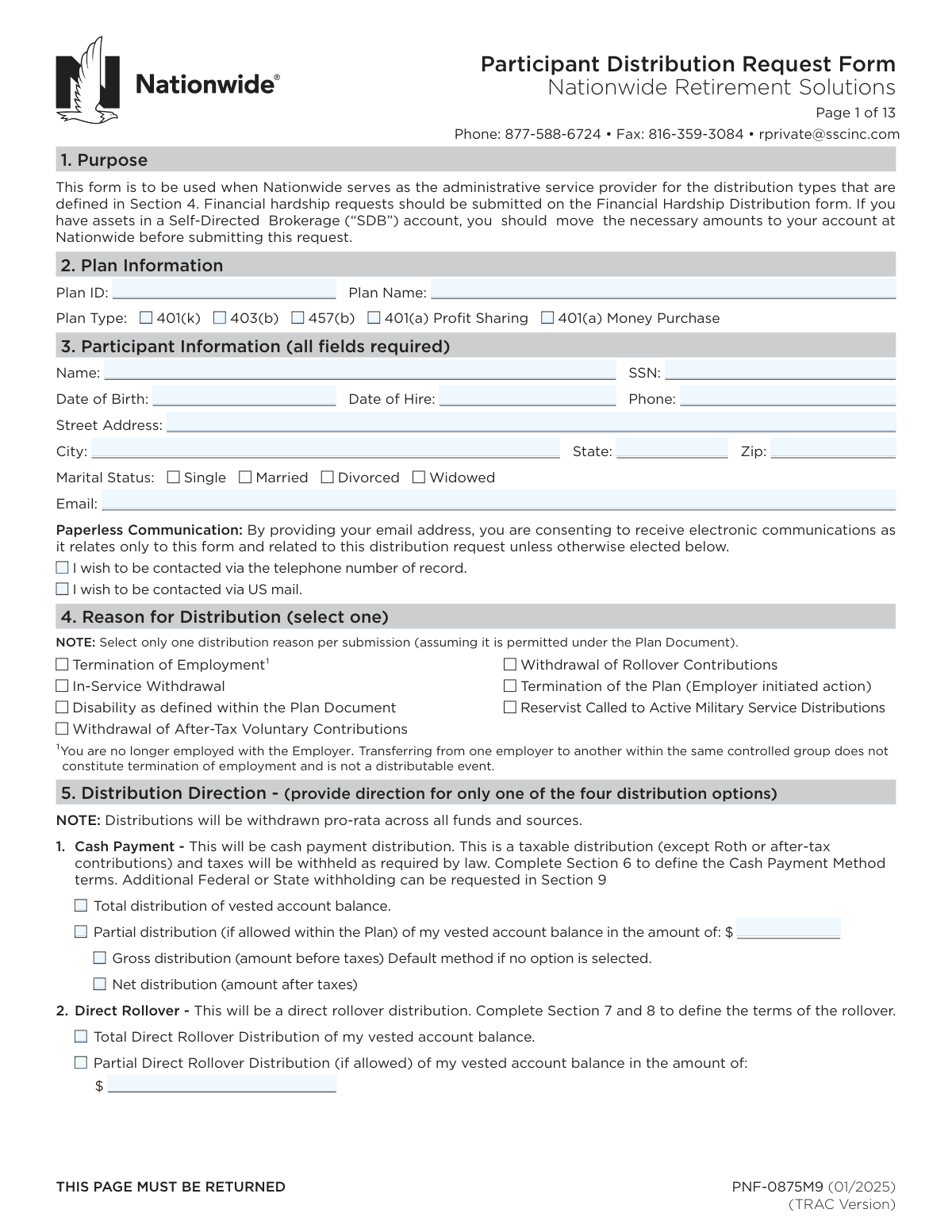
Yes! You can use AI to fill out Nationwide Retirement Solutions Participant Distribution Request Form (PNF-0875M9, TRAC Version, 01/2025)

PNF-0875M9 is an official Nationwide Retirement Solutions form that a plan participant (and, when applicable, a spouse and the plan sponsor/administrator) completes to authorize and direct a distribution from an employer-sponsored retirement plan (e.g., 401(k), 403(b), 457(b), or 401(a)). It captures the distribution reason, payment direction (cash vs. rollover), delivery method (check or ACH for cash payments), rollover destination details, and required tax withholding and certifications, along with participant and plan sponsor authorizations. It is important because it determines how funds are paid, how taxes are withheld and reported (e.g., Form 1099-R), and ensures the request complies with the plan document and IRS rules. Today, this form can be filled out quickly and accurately using AI-powered services like Instafill.ai, which can also convert non-fillable PDF versions into interactive fillable forms.
Our AI automatically handles information lookup, data retrieval, formatting, and form filling.
It takes less than a minute to fill out PNF-0875M9 using our AI form filling.
Securely upload your data. Information is encrypted in transit and deleted immediately after the form is filled out.

Form specifications

Form name: Nationwide Retirement Solutions Participant Distribution Request Form (PNF-0875M9, TRAC Version, 01/2025)
Number of pages: 5
Language: English
Categories: financial forms, Nationwide forms, retirement forms, Nationwide retirement forms
main-image

Instafill Demo: filling out a legal form in seconds

How to Fill Out PNF-0875M9 Online for Free in 2026

Are you looking to fill out a PNF-0875M9 form online quickly and accurately? Instafill.ai offers the #1 AI-powered PDF filling software of 2026, allowing you to complete your PNF-0875M9 form in just 37 seconds or less.
Follow these steps to fill out your PNF-0875M9 form online using Instafill.ai:
  1. 1 Go to Instafill.ai and upload the PNF-0875M9 Participant Distribution Request Form (or select it from the form library).
  2. 2 Enter plan details (Plan ID, Plan Name, and Plan Type) and confirm the form version/date to ensure you’re using the correct document.
  3. 3 Complete participant information (name, SSN, date of birth, contact details, address, marital status, and communication preferences).
  4. 4 Select one distribution reason (e.g., termination, in-service withdrawal, disability, etc.) and choose one distribution direction option (cash payment, direct rollover, combination, or repetitive payments) with the requested amounts (gross vs. net where applicable).
  5. 5 If requesting a cash payment, choose the cash payment method (mail check or ACH direct deposit) and provide bank routing/account details and account type if using ACH.
  6. 6 If requesting a direct rollover, select pre-tax and/or Roth rollover options, enter trustee/custodian and account information, attach any required Letter of Acceptance, and choose where the rollover check should be mailed.
  7. 7 Review tax withholding elections and certifications, then e-sign where permitted (or prepare wet signatures where required), obtain spousal consent/notary and plan sponsor/DPA authorization if applicable, and submit via the instructed fax/email/plan sponsor process.

Our AI-powered system ensures each field is filled out correctly, reducing errors and saving you time.

Why Choose Instafill.ai for Your Fillable PNF-0875M9 Form?

Speed

Complete your PNF-0875M9 in as little as 37 seconds.

Up-to-Date

Always use the latest 2026 PNF-0875M9 form version.

Cost-effective

No need to hire expensive lawyers.

Accuracy

Our AI performs 10 compliance checks to ensure your form is error-free.

Security

Your personal information is protected with bank-level encryption.

Frequently Asked Questions About Form PNF-0875M9

This form is used to request a distribution (payout) from your retirement plan when Nationwide Retirement Solutions is the administrative service provider. It covers common distribution reasons like termination, in-service withdrawals (if allowed), disability (as defined by the plan), and certain contribution withdrawals.

The participant (or beneficiary, if applicable) completes the participant sections, and the Plan Sponsor/Designated Plan Administrator (DPA) completes the employer authorization section. All participant fields in Section 3 are required, and the form must be signed with a wet signature (no electronic or stamped signatures).

No. The form states that financial hardship requests must be submitted on the separate Financial Hardship Distribution form.

You should move the necessary amounts from your SDB account to your Nationwide account before submitting this request. This helps avoid delays if the funds are not available for processing.

Yes. The form instructs you to select only one distribution reason per submission (as permitted under the Plan Document). If you have multiple reasons, you may need separate submissions or guidance from your plan administrator.

It means the distribution is taken proportionally from your investments and contribution sources rather than from a single fund you pick. You generally cannot direct Nationwide to pull from only one specific fund using this form.

You can request (1) a cash payment, (2) a direct rollover to an IRA or another eligible plan, (3) a combination of cash payment and direct rollover, or (4) repetitive cash payments (if your plan allows). You should provide directions for only one of these four options per submission.

A gross distribution is the amount before taxes are withheld (this is the default if you don’t select an option). A net distribution is the amount you receive after required taxes are withheld.

In Section 6, you can choose a mailed check (default) or Direct Deposit ACH. If you choose ACH, you must provide correct bank routing/account details, and direct deposit cannot be made to a pre-paid debit card.

You must complete the rollover direction (pre-tax and/or Roth) and provide the receiving trustee/custodian name, address, and the applicable account number(s). If both Roth and pre-tax funds are rolled over, separate account numbers must be provided, and a Letter of Acceptance from the new provider is required.

No. The form states that wires and Direct Deposit ACH are not available for rollover distributions; rollovers are issued by check.

Only complete Section 9 if you are receiving a cash payment (including the cash portion of a combination payout). If your distribution is only a direct rollover to an eligible plan or IRA, do not complete Section 9.

Form W-4R is required if you want additional federal withholding for certain direct payments/systematic payments, and it may also be required for RMD withholding elections. For systematic payments lasting 10 years or more, Form W-4P (or W-4R for RMDs) may be required to request a different withholding rate than the default.

Sometimes. If your plan requires spousal consent (often when an annuity option is available) and you are married, Section 12 must be completed and witnessed by the plan sponsor or a notary; otherwise you may check “Not Applicable” if you are not married and/or the plan does not require it.

Per the submission instructions, pages 1 through 7 can be faxed to 816-359-3084 or returned to the Plan Sponsor, who can submit via email to the Plan Contact at Nationwide. Ensure all required fields, signatures, dates, and any required attachments (like a Letter of Acceptance) are included to avoid processing delays.

Yes—AI tools can help reduce errors and save time; services like Instafill.ai can auto-fill form fields accurately based on your provided information. If your PDF is flat/non-fillable, Instafill.ai can convert it into an interactive fillable form and then guide you through completing and exporting it for signature and submission.

Compliance PNF-0875M9
Validation Checks by Instafill.ai

1
Plan Identification Completeness and Format (Plan ID, Plan Name, Plan Type)
Validates that Plan ID and Plan Name are present and that exactly one Plan Type checkbox (401(k), 403(b), 457(b), 401(a) Profit Sharing, 401(a) Money Purchase) is selected. Plan ID should match the expected format/length used by the sponsor/Nationwide (e.g., numeric/alphanumeric constraints) and Plan Name should not be blank or only whitespace. If this fails, the submission should be rejected or routed to exception handling because the request cannot be reliably matched to the correct plan rules and recordkeeping system.
2
Participant Required Fields Completeness (All fields required section)
Ensures all required Participant Information fields are provided: full name, SSN, date of birth, date of hire, phone, street address, city, state, ZIP, marital status, and email. This check should also confirm fields are not placeholders (e.g., 'N/A', 'unknown') and not empty after trimming. If incomplete, processing must stop because identity verification, tax reporting, and delivery of funds/communications cannot be completed.
3
SSN Format and Basic Validity Check
Validates SSN is exactly 9 digits (allowing optional dashes) and rejects known invalid patterns (e.g., all zeros in any group, 000-xx-xxxx, xxx-00-xxxx, xxx-xx-0000). This reduces risk of misapplied distributions and tax reporting errors (Form 1099-R). If validation fails, the form should be rejected and the participant prompted to correct the SSN before any distribution is initiated.
4
Date Fields Format and Chronological Consistency (DOB, Hire, Termination, Payroll Deduction, Signatures)
Checks that all dates are valid calendar dates in the expected format (mm/dd/yyyy where applicable; repetitive payment beginning date allows mm/dd as shown) and not impossible (e.g., 02/30). Also enforces logical ordering: Date of Birth < Date of Hire; if provided, Date of Hire ≀ Date of Termination; Date of Final Payroll Deduction should not be after Date of Termination (or must be explained by plan rules). If this fails, the submission should be flagged because eligibility and distributable event timing may be incorrect.
5
Phone Number Format Validation
Validates the phone number contains a valid US format (10 digits, optional country code +1, optional extension) and rejects clearly invalid values (too short/long, all same digit). A valid phone is important for resolving NIGO (not-in-good-order) issues quickly and for participant contact elections. If invalid, the system should require correction or default to mail contact if permitted by policy.
6
Email Address Syntax and Deliverability Guardrails
Validates email address syntax (local@domain, valid characters, domain contains a dot) and rejects common invalid entries (spaces, missing '@', placeholder text). Because the form states email implies consent for electronic communications related to the request, a malformed email can cause missed disclosures and processing delays. If validation fails, the system should require a corrected email or force selection of an alternate contact method (telephone or US mail) if allowed.
7
Mailing Address Validation (State/ZIP Consistency)
Ensures state is a valid US state/territory abbreviation (or mapped from full name) and ZIP is 5 digits or ZIP+4 (##### or #####-####). Optionally validates ZIP prefix aligns with the selected state to catch transposition errors. If this fails, the request should be held because checks and tax forms may be mailed to the wrong address and identity verification may be compromised.
8
Marital Status Single-Select and Spousal Consent Dependency
Validates exactly one marital status checkbox is selected (Single/Married/Divorced/Widowed). If Married is selected, the system must enforce spousal consent rules: either 'Not Applicable' is checked with a valid reason (plan does not require consent) or spouse consent section is completed with spouse signature/date and proper witnessing (plan sponsor or notary). If this fails, the distribution should be rejected as it may violate plan/QJSA requirements and create fiduciary risk.
9
Reason for Distribution Single-Select and Sponsor Data Alignment
Enforces the instruction 'Select only one distribution reason per submission' by requiring exactly one reason checkbox to be selected. Also cross-checks sponsor-provided data: if reason is Termination of Employment, Date of Termination should be present and consistent; if In-Service Withdrawal is selected, Date of Termination should generally be blank and sponsor authorization should not indicate termination-only processing. If inconsistent, the submission should be flagged for review because distributable event eligibility depends on the reason and plan document.
10
Distribution Direction: Exactly One of the Four Options Selected
Validates that the participant provides direction for only one distribution option: (1) Cash Payment, (2) Direct Rollover, (3) Combination Cash + Rollover, or (4) Repetitive Cash Payments. This prevents conflicting instructions (e.g., selecting both total cash and total rollover) and ensures the correct downstream workflow and tax withholding logic. If multiple or none are selected, the request should be treated as NIGO and returned for clarification.
11
Cash Payment Amount and Type Validation (Total vs Partial; Gross vs Net)
If Cash Payment is selected, validates that either 'Total distribution' is checked or 'Partial distribution' is checked with a positive dollar amount in valid currency format (no letters, max two decimals). Also enforces that Gross vs Net selection is either explicitly chosen or defaults to Gross, but not both checked simultaneously. If validation fails, processing should stop because the system cannot calculate withholding and payment amounts reliably.
12
Direct Rollover Amount and Rollover Direction Completeness
If Direct Rollover is selected, validates total vs partial selection and requires a positive partial rollover amount when partial is chosen. It also requires at least one rollover direction selection for pre-tax and/or Roth sources (or N/A where applicable) so the receiving account type is clear. If this fails, the rollover cannot be issued correctly and must be rejected pending corrected instructions.
13
Rollover Account Information Completeness and Separation Rule (Pre-tax vs Roth)
When any rollover is requested, validates that Trustee/Custodian payee name, trustee address (street/city/state/ZIP), and the appropriate account number(s) are provided. Enforces the note that when both Roth and pre-tax funds are being rolled over, separate account numbers must be provided (i.e., both fields populated and not identical if the receiving institution requires separation). If validation fails, the rollover check may be rejected by the receiving custodian, causing delays and potential tax consequences.
14
Direct Deposit ACH Banking Validation (Routing/Account/Account Type)
If Direct Deposit ACH is selected for a cash payment, validates routing number is 9 digits and passes the ABA checksum, and account number is present and within reasonable length constraints (e.g., 4–17 digits, allowing bank-specific formats if configured). Also enforces that exactly one account type is selected (checking or savings) or applies the documented default to checking if none is selected. If this fails, the system should default to mailing a check only if policy allows; otherwise reject to prevent misdirected funds and NACHA returns.
15
Repetitive Cash Payments Schedule Validation (Frequency, Begin Date, Gross Amount)
If Repetitive Cash Payments are selected, validates exactly one frequency is chosen and the gross amount is a positive currency value. Beginning date must be a valid mm/dd entry; if omitted, the system should explicitly apply the documented default (start on processing date) and record that defaulting occurred. If validation fails, the request should be held because systematic payment setup requires unambiguous scheduling and amounts.
16
Tax Withholding Section Applicability and Required Attachments (W-4R/W-4P)
Validates that Section 9 is not completed when the only distribution is a direct rollover (no cash component), and is completed/handled correctly when there is any cash payment or systematic payment. If the participant requests additional federal withholding or a non-default withholding election that requires Form W-4R or W-4P (as described), the system must require the attachment before accepting the election. If this fails, the system should revert to mandatory/default withholding rules and/or mark the submission NIGO to avoid incorrect tax withholding and compliance exposure.

Common Mistakes in Completing PNF-0875M9

Leaving Plan ID/Plan Name blank or using the wrong plan identifiers

People often assume Nationwide can “look up” the plan from their name/SSN alone, or they copy an internal employer code that doesn’t match Nationwide’s Plan ID. This can cause the request to be routed to the wrong plan or rejected for missing plan information, delaying processing. Always use the exact Plan ID and official Plan Name as shown on plan communications or provided by your Plan Sponsor. AI-powered tools like Instafill.ai can help by validating required plan identifiers and flagging missing fields before submission.

Selecting multiple distribution reasons (Section 4) on a single submission

This form explicitly requires selecting only one distribution reason per submission, but many participants check more than one (e.g., Termination + In-Service) to “cover all bases.” Multiple reasons can create eligibility conflicts under the Plan Document and typically triggers follow-up or a rejected request. Choose the single reason that matches your actual distributable event and submit separate forms if you truly have separate permissible events. Instafill.ai can enforce single-choice logic and prevent incompatible selections.

Misclassifying a transfer within a controlled group as a termination of employment

Participants frequently check “Termination of Employment” when they changed roles or moved to a related employer, not realizing the form states that transfers within the same controlled group are not a distributable event. This can lead to denial of the distribution and significant delays while the Plan Sponsor confirms employment status. Confirm with HR/Plan Sponsor whether your separation qualifies as a true termination under the plan rules before selecting this reason. Instafill.ai can surface the footnote warning and prompt you to confirm eligibility.

Providing distribution directions for more than one option in Section 5

Section 5 instructs you to provide direction for only one of the four distribution options, but people often fill out cash payment and rollover sections simultaneously (or also add repetitive payments). Conflicting directions can result in processing holds while Nationwide requests clarification. Decide whether you want (1) cash, (2) direct rollover, (3) combination, or (4) repetitive payments, and complete only the sections required for that choice. Instafill.ai can guide you through a single path and hide/disable irrelevant sections.

Entering partial distribution amounts without selecting the matching partial option (or vice versa)

A common mismatch is writing a dollar amount for a partial cash/rollover distribution but not checking the “Partial distribution” box, or checking the box and leaving the amount blank. This creates ambiguity and typically forces manual review or a request for correction. Always ensure the checkbox and the amount field are consistent, and confirm the amount is in dollars (not a percentage). Instafill.ai can cross-check checkbox/amount dependencies and prevent submission when they don’t align.

Confusing gross vs. net distribution elections and underestimating tax withholding impact

Many people select “Net distribution” expecting to receive a specific amount, but don’t realize mandatory withholding rules (e.g., 20% for eligible rollover distributions paid to them) can change the payout and may require a larger gross request. This can lead to receiving less cash than expected or triggering additional tax/penalty issues later. If you need a specific take-home amount, calculate the gross needed after withholding (and consider consulting a tax advisor). Instafill.ai can help by formatting the election correctly and prompting you to review withholding implications.

Incorrect ACH direct deposit details (routing/account number, account type, or using a prepaid card)

ACH errors are extremely common: transposed digits, using a deposit slip number instead of the routing number, omitting account type, or attempting to deposit to a prepaid debit card (not allowed). Incorrect banking info can cause rejected deposits, delays, or a default mailed check to the address of record. Use a voided check or official bank letter, enter the 9-digit ABA routing number, and confirm the account number and checking/savings selection. Instafill.ai can validate routing-number format and reduce data-entry mistakes by auto-formatting and checks.

Missing or incomplete rollover account information (trustee/custodian, payable-to line, address, and separate Roth/pre-tax account numbers)

For direct rollovers, participants often omit the trustee/custodian name, make the check payable to themselves, or fail to provide separate account numbers when rolling both Roth and pre-tax funds. These omissions can cause the rollover to be rejected by the receiving institution or delayed while Nationwide requests a Letter of Acceptance and corrected payee details. Ensure the check is payable to the trustee/custodian, provide the full mailing address, and include distinct account numbers for Roth vs. pre-tax when applicable. Instafill.ai can prompt for required rollover fields and enforce the “separate account numbers” rule.

Completing tax withholding section when the distribution is only a direct rollover (or failing to attach required W-4R/W-4P when changing withholding)

The form states not to complete Section 9 if the only distribution is a rollover, yet many people still fill it out, creating conflicting instructions. Conversely, people request additional withholding or different systematic-payment withholding but forget to attach the required IRS Form W-4R (or W-4P for certain systematic payments), causing defaults to IRS rules and unexpected withholding. Only complete Section 9 when you are receiving a cash payment, and attach the correct IRS withholding form when you want non-default withholding. Instafill.ai can detect when Section 9 is applicable and remind you to include required attachments.

Signature and witnessing errors (electronic/stamped signatures, missing dates, or missing spousal consent/notary when required)

This form prohibits electronic or stamped signatures, but many submissions include e-signatures, typed names, or missing signature dates, which are typically rejected. Married participants also frequently mark “Not Applicable” for spousal consent without confirming whether the plan requires it, or they provide spousal consent without proper witness (Plan Sponsor or notary). Review the plan’s SPD to confirm whether spousal consent applies, sign in ink, date all signature lines, and obtain the required witness/notary if needed. Instafill.ai can flag missing signature/date fields and highlight when spousal consent is likely required based on marital status and plan rules.

Submitting the wrong pages or not returning required pages (pages marked 'THIS PAGE MUST BE RETURNED')

Because the packet includes a long Special Tax Notice, participants often send only the signature page or omit pages that are explicitly marked as required to return. Missing required pages leads to processing delays and requests to resubmit the full set (often pages 1–7 as instructed). Follow the submission instructions carefully and include every page labeled “THIS PAGE MUST BE RETURNED,” plus any required attachments (e.g., Letter of Acceptance, W-4R/W-4P, state forms). If you’re working from a flat/non-fillable PDF, Instafill.ai can convert it into a fillable version and help ensure the correct pages are included before fax/email submission.
Saved over 80 hours a year

“I was never sure if my IRS forms like W-9 were filled correctly. Now, I can complete the forms accurately without any external help.”

Kevin Martin Green

Your data stays secure with advanced protection from Instafill and our subprocessors

Robust compliance program

Transparent business model

You’re not the product. You always know where your data is and what it is processed for.

ISO 27001, HIPAA, and GDPR

Our subprocesses adhere to multiple compliance standards, including but not limited to ISO 27001, HIPAA, and GDPR.

Security & privacy by design

We consider security and privacy from the initial design phase of any new service or functionality. It’s not an afterthought, it’s built-in, including support for two-factor authentication (2FA) to further protect your account.

Fill out PNF-0875M9 with Instafill.ai

Worried about filling PDFs wrong? Instafill securely fills nationwide-retirement-solutions-participant-distribution-request-form-pnf-0875m9-trac-version-012025 forms, ensuring each field is accurate.