Compliance WIS060E
Validation Checks by Instafill.ai
1
Application type selection is mutually exclusive and drives required attachments
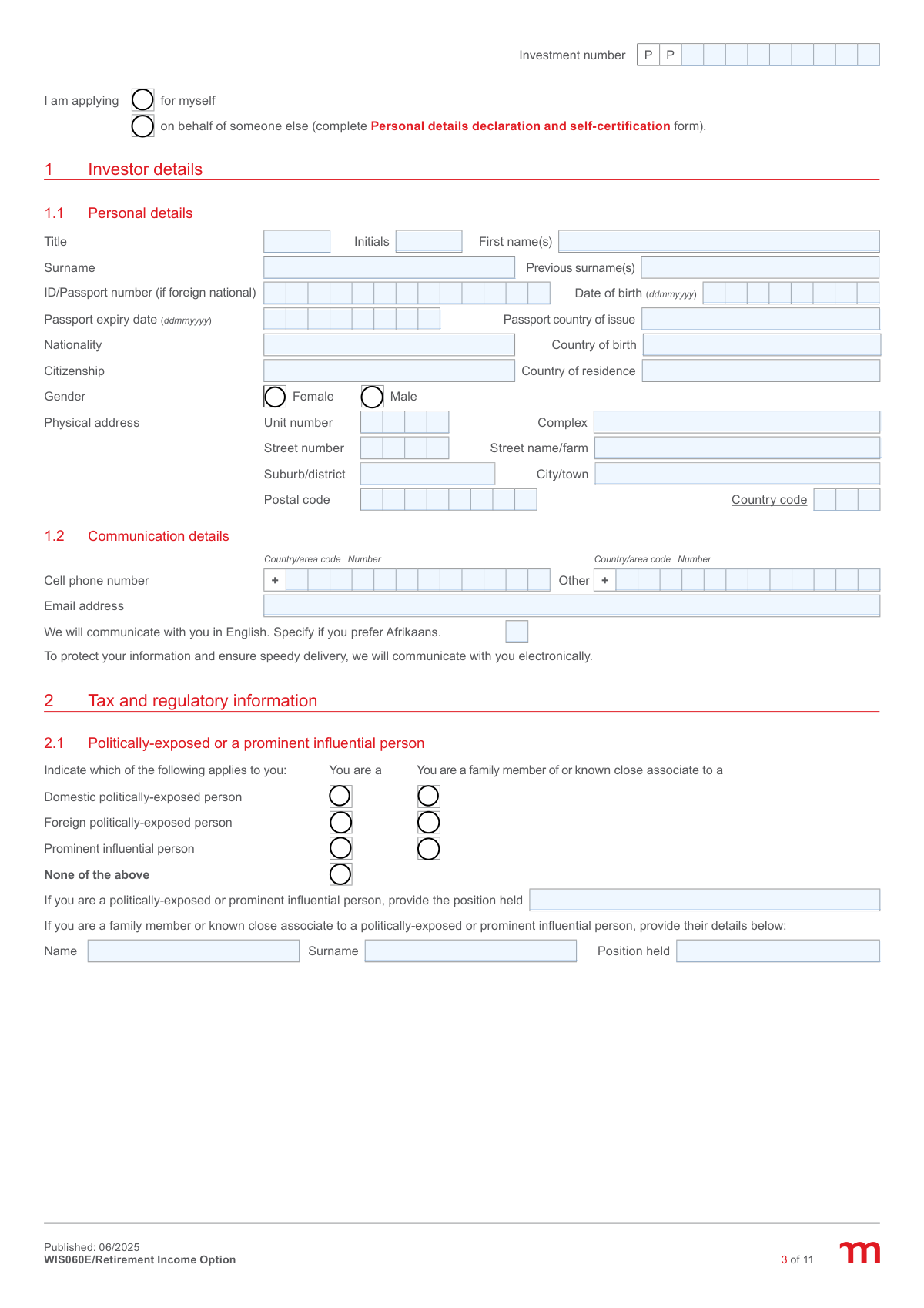
Validate that exactly one of the two application type options is selected: applying for self OR applying on behalf of someone else. If 'on behalf of someone else' is selected, require the Personal details declaration and self-certification form to be completed/attached and ensure the signatory capacity reflects acting for another person. If both or neither are selected, the submission should be rejected and returned for correction because downstream KYC and authority-to-act checks cannot be completed.
2
Investor identity number format and SA ID vs passport consistency
Validate that the ID/Passport field is populated and matches an acceptable format (e.g., South African ID number length/structure or a passport number pattern for foreign nationals). If a passport number is provided, require passport country of issue and passport expiry date; if a South African ID is provided, passport fields should be blank unless explicitly applicable. If the identity format is invalid or required supporting passport fields are missing, fail validation because identity verification and regulatory reporting cannot proceed.
3
Date fields are valid ddmmyyyy and logically consistent (DOB, passport expiry, directive dates, signatures)
Validate that all dates captured in ddmmyyyy are real calendar dates (including leap years) and not in the future where inappropriate (e.g., date of birth must be in the past). Passport expiry must be after the submission/signature date, and SARS directive validity 'from' must be on/before 'to'. If any date is malformed or inconsistent, block processing because it can cause failed KYC checks, invalid tax directive application, or unenforceable declarations.
4
Mandatory personal details completeness (name, gender, residence, contact)
Ensure required investor fields are completed: title, initials, first name(s), surname, date of birth, gender (exactly one), country of residence, and at least one reliable contact method (cell phone and/or email as per business rules). Also validate that the electronic communication consent aligns with the presence of an email address (if electronic communication is required, email must be present and valid). If incomplete, fail validation to prevent inability to contact the client and to meet onboarding/KYC requirements.
5
Email address format validation and deliverability safeguards
Validate email address syntax (single @, valid domain, no spaces, reasonable length) and optionally block known invalid patterns (e.g., 'test@test', missing TLD). This is important because the form states communication will be electronic for speed and security, and invalid emails lead to missed disclosures and statements. If invalid, require correction before acceptance or require an alternative verified communication method per policy.
6
Phone number format validation with country/area code pairing
Validate that phone numbers contain only allowed characters (digits, optional leading + in the country/area code field) and meet minimum/maximum length rules for the selected country/area code. Ensure the country/area code is present when a phone number is provided and that the local number is not duplicated in the code field. If invalid, fail validation because contactability and OTP/verification processes may fail.
7
Physical address completeness and postal code format by country
Validate that the physical address has sufficient detail to be usable: street number and street name/farm, suburb/district, city/town, postal code, and country code. Apply country-specific postal code rules (e.g., South Africa typically 4 digits) and ensure the country code is a valid SARS alphabetical country code where required. If incomplete or malformed, fail validation because address is required for regulatory/KYC and tax residency determinations.
8
Politically-exposed/prominent influential person (PEP/PIP) selection consistency and required details
Validate that the PEP/PIP section has a coherent selection: either 'None of the above' OR one/more applicable PEP/PIP categories, but not both. If the investor is a PEP/PIP, require 'position held (self)'; if the investor is a family member/close associate, require the related person's name, surname, and position held. If these dependencies are not met, fail validation because FICA risk rating and enhanced due diligence cannot be completed.
9
Nature of business/employment sector selection and 'Other' specification requirement
Validate that at least one employment sector option is selected, and if 'Other' is selected then the 'Other (specify)' text field is populated with a meaningful description (not blank or placeholder text). This is important for AML risk profiling and product suitability workflows. If missing, fail validation and request completion to avoid incomplete regulatory profiling.
10
Tax residency logic: SA residency, SARS tax number, and foreign TIN/No-TIN reason rules
Validate that the tax residency questions are answered consistently: if the investor is a tax resident in South Africa, require a SARS tax number in an acceptable format/length. If primary tax residence is not South Africa or foreign tax numbers apply, require at least one foreign tax residence row with country code and either a TIN or exactly one valid 'No TIN reason' (A/B/C) per row. If inconsistent or incomplete, fail validation because CRS/FATCA-style reporting and SARS submissions may be incorrect.
11
Transfer type selection and required transfer details/attachments
Validate that at least one transfer type is selected (cash transfer and/or unit/share portfolio transfer) and that the corresponding sections are completed. For cash transfers, require expected value and number of transferring funds/FSPs plus registered names; for unit/share transfers, require FSP name, reference number, expected value, and confirmation that a recent valuation statement (<=30 days) and the correct transfer forms are attached. If missing, fail validation because the application cannot be finalised without transfer source details and proof requirements.
12
Investment allocation percentages sum to 100% and are within valid bounds
Validate that all lump sum allocation percentage fields are numeric, between 0 and 100, and that the total allocation across selected investment components equals exactly 100.00% (allowing only a small rounding tolerance if the system supports decimals). Also ensure that any component marked as fee account/withdrawal account is actually one of the selected components and is rand-denominated where required. If totals do not reconcile, fail validation because trades and fee/withdrawal deductions cannot be executed correctly.
13
Phase-in instruction rules (number of phases, frequency, dates, and allocation totals)
If 'Request to phase in' is used, validate that the number of phases is between 2 and 24, exactly one frequency is selected (daily/weekly/monthly), and either a valid first phase-out date is provided or 'first available trade date' is selected (not both). Ensure the phase-in target allocation percentages sum to 100% and that the money market fund used for phase-in is specified with a valid allocation. If invalid, fail validation because the phasing schedule and trades would be ambiguous or impossible to execute.
14
Income selection constraints: percentage vs amount, frequency required, and regulatory min/max
Validate that the investor selects exactly one income basis: either a yearly income percentage OR a specific yearly gross amount, and that an income payment frequency is selected. Enforce the legislative limits stated on the form: the before-tax income must be between 2.5% and 17.5% of the product value (for amount-based selection, the system should compute the implied percentage using the transfer value once known and flag if outside limits). If the selection is missing or outside limits, fail validation because the annuity cannot be administered within regulatory requirements.
15
Income tax option selection and dependent fields (preferred rate and SARS directive)
Validate that exactly one tax deduction option is selected (6.2.1–6.2.4). If preferred tax rate is selected, require a numeric percentage and ensure it is higher than the calculated SARS table rate (system-calculated) and that end-date logic is consistent (either end of tax year, a valid specific end date, or no end date). If SARS directive option is selected, require directive number, directive tax rate percentage, and validity dates, and require the directive document to be attached; otherwise fail validation because applying an incorrect tax method can create compliance and client tax shortfall issues.
16
Income payment day and bank account eligibility (SA account, account type, and format)
Validate that the income payment day is either blank (default to 25) or a day between 5 and 25 inclusive, and that it is a two-digit day value. Validate bank details are present and eligible: South African bank account only, account number format/length is plausible, and exactly one account type is selected (cheque/current OR savings), and reject known disallowed account types (credit card/bond) as per the form. If invalid, fail validation because payments may be rejected by banking systems and the product rules prohibit non-qualifying accounts.
17
Beneficiary nomination integrity: required fields per beneficiary and total allocation equals 100%
For each beneficiary row with any data entered, require minimum identity details (name and surname, date of birth, relationship, country of residence, and benefit allocation percentage) and validate passport fields only when a passport number is used. Ensure benefit allocation percentages across all beneficiaries sum to exactly 100.00% (with defined rounding tolerance) and that no individual allocation is negative or exceeds 100. If the nomination is incomplete or totals do not equal 100%, fail validation because death benefit distribution instructions would be ambiguous or invalid.