Yes! You can use AI to fill out Group Transfer Form Fidelity Health Savings Account (HSA)
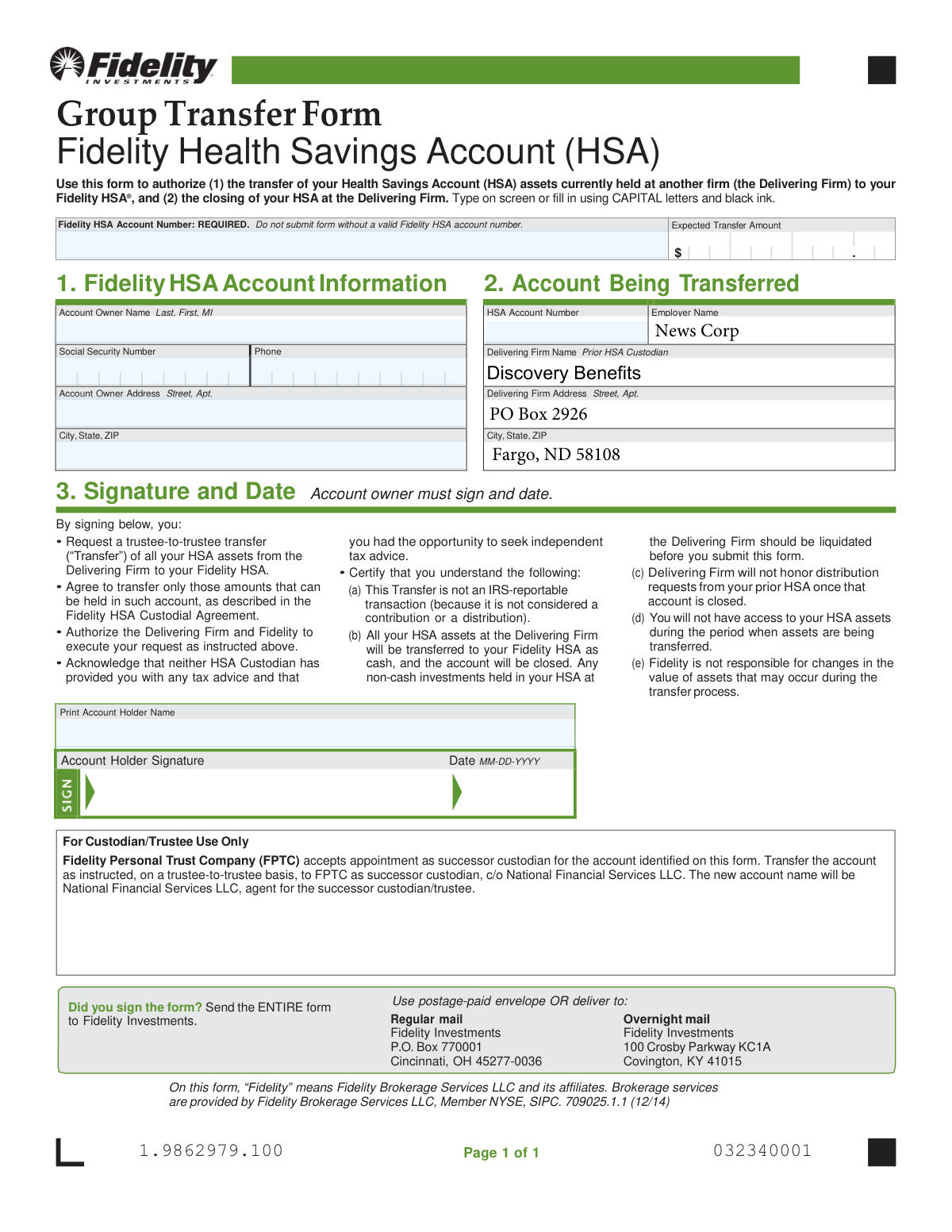
The Fidelity HSA Group Transfer Form is a legal document that authorizes the movement of Health Savings Account (HSA) assets from a previous custodian to a new Fidelity HSA. It facilitates a trustee-to-trustee transfer, which is a non-reportable IRS transaction, ensuring a seamless consolidation of your health savings without tax implications. Today, this form can be filled out quickly and accurately using AI-powered services like Instafill.ai, which can also convert non-fillable PDF versions into interactive fillable forms.
Fidelity HSA Group Transfer Form is part of the
Fidelity forms, HSA forms, health savings forms, account transfer forms, health forms, transfer forms, savings account forms and health savings account forms categories on Instafill.
Rather not fill this in by hand? Instafill is an online form filler that completes PDF forms automatically — upload the blank form, answer a few questions, and the AI fills every field.
Form specifications
| Form name: | Group Transfer Form Fidelity Health Savings Account (HSA) |
| Number of pages: | 1 |
| Language: | English |
Our AI automatically handles information lookup, data retrieval, formatting, and form filling.
It takes less than a minute to fill out Fidelity HSA Group Transfer Form using our AI form filling.
Securely upload your data. Information is encrypted in transit and deleted immediately after the form is filled out.
Instafill Demo: How to fill out PDF forms in seconds with AI
How to Fill Out Fidelity HSA Group Transfer Form Online for Free in 2026
Are you looking to fill out a FIDELITY HSA GROUP TRANSFER FORM form online quickly and accurately? Instafill.ai offers the #1 AI-powered PDF filling software of 2026, allowing you to complete your FIDELITY HSA GROUP TRANSFER FORM form in just 37 seconds or less.
Follow these steps to fill out your FIDELITY HSA GROUP TRANSFER FORM form online using Instafill.ai:
- 1 Navigate to Instafill.ai and upload or select the Fidelity HSA Group Transfer Form.
- 2 Provide your new Fidelity HSA account information, including the mandatory account number.
- 3 Enter the details of the account being transferred, including the delivering firm's name, address, and your old HSA account number.
- 4 Input your personal information, such as your full name, Social Security Number, and contact details.
- 5 Review all the information auto-filled by the AI for accuracy, ensuring all sections are complete.
- 6 Digitally sign and date the form in Section 3 to authorize the transfer and certify your understanding of the terms.
- 7 Download the completed form and send the entire document to Fidelity Investments using the provided regular or overnight mail addresses.
Our AI-powered system ensures each field is filled out correctly, reducing errors and saving you time.
Why Choose Instafill.ai for Your Fillable Fidelity HSA Group Transfer Form Form?
Speed
Complete your Fidelity HSA Group Transfer Form in as little as 37 seconds.
Up-to-Date
Always use the latest 2026 Fidelity HSA Group Transfer Form form version.
Cost-effective
No need to hire expensive lawyers.
Accuracy
Our AI performs 10 compliance checks to ensure your form is error-free.
Security
Your personal information is protected with bank-level encryption.
Frequently Asked Questions About Fidelity HSA Group Transfer Form
This form authorizes the transfer of your entire Health Savings Account (HSA) balance from another firm, referred to as the 'Delivering Firm', to your Fidelity HSA. It also authorizes the closure of your old HSA once the transfer is complete.
This form is for individuals who have an HSA at another institution (like Discovery Benefits, as mentioned on the form) and want to move their funds to a Fidelity HSA as part of a group plan.
You will need your new Fidelity HSA account number, your old HSA account number, your Social Security Number, and your personal contact information. Your Fidelity HSA account number is mandatory for the form to be processed.
You can find your Fidelity HSA account number by logging into your account on the Fidelity website or by reviewing the account opening documents you received. The form cannot be submitted without this number.
Yes, you must liquidate any non-cash investments in your old HSA before you submit this form. The transfer will only move assets as cash.
No, this form is for a full transfer of all your HSA assets. Submitting this form will result in the transfer of the entire balance and the closure of your old account.
No, this is a trustee-to-trustee transfer, which is not considered a contribution or distribution by the IRS. Therefore, it is not a taxable or reportable event.
Once all your assets are successfully moved to your Fidelity HSA, your old HSA at the delivering firm will be closed. You will no longer be able to request distributions from that account.
No, you will not have access to your HSA assets while they are being transferred between the two institutions. You should plan for any potential medical expenses during this period.
You must send the entire completed form to Fidelity Investments using either the regular mail or overnight mail addresses provided at the bottom of the form.
Yes, services like Instafill.ai use AI to accurately auto-fill form fields, which can save you time and help reduce errors.
You can use a service like Instafill.ai to complete the form digitally. Simply upload the PDF, and the tool will allow you to type your information directly into the fields before printing it for your signature.
If you have a non-fillable or 'flat' PDF, you can upload it to a service like Instafill.ai. The platform can convert it into an interactive, fillable form that you can easily complete on your computer.
The 'Delivering Firm' is the company that currently holds your HSA assets that you wish to transfer. In the example provided on the form, the Delivering Firm is Discovery Benefits.
Compliance Fidelity HSA Group Transfer Form
Validation Checks by Instafill.ai
1
Fidelity HSA Account Number Presence
This check verifies that the 'Fidelity HSA Account Number' field is not empty. This field is explicitly marked as REQUIRED on the form, and the transfer cannot be processed without a valid destination account. If this field is left blank, the submission should be rejected with an error message prompting the user to provide their Fidelity HSA account number.
2
Social Security Number Format
Validates that the 'Social Security Number' field contains exactly nine digits, optionally formatted as XXX-XX-XXXX. This is crucial for correctly identifying the account owner and for tax reporting purposes. An incorrectly formatted SSN can lead to processing delays or rejection by the delivering firm. If the format is invalid, the user must correct it before submission.
3
Signature Date Presence and Format
Ensures the 'Date' field next to the signature is filled out and follows the MM-DD-YYYY format. The signature date legally attests to when the transfer authorization was given. An absent or improperly formatted date can invalidate the request. The system should reject submissions without a valid date and guide the user to enter it correctly.
4
Signature Date Logical Validity
This check confirms that the provided signature date is not a future date. A post-dated authorization is legally invalid for initiating a current financial transaction. This validation prevents accidental errors or fraudulent post-dating. If a future date is entered, the form should not be accepted and the user should be prompted to enter the current date.
5
Account Holder Name Consistency
Compares the 'Account Owner Name' from Section 2 with the 'Print Account Holder Name' from Section 3 to ensure they match. This cross-reference confirms the identity of the person authorizing the transfer and reduces the risk of fraud or processing errors. A mismatch should trigger a review or require the user to correct the information to ensure both fields are identical.
6
Signature Field Completion
Verifies that the 'Account Holder Signature' field has been signed. A signature is a legal requirement to authorize the trustee-to-trustee transfer and the closing of the old account. In a digital workflow, this check would confirm that a digital signature has been applied or a confirmation checkbox has been ticked. Without a signature, the form is incomplete and legally non-binding, and must be rejected.
7
Delivering Firm HSA Account Number Presence
This validation ensures that the 'HSA Account Number' field in Section 2 (the account being transferred) is not empty. The delivering firm cannot locate the correct account to transfer assets from without this number. Failure to provide this information will result in an immediate rejection of the transfer request. The system should flag this field as mandatory.
8
Account Owner Address Completeness
Checks that the 'Street', 'City', 'State', and 'ZIP' fields for the Account Owner Address are all populated. A complete address is necessary for identity verification and for mailing any final correspondence or tax documents from the delivering firm. Incomplete address information can cause significant processing delays or failure. The user should be prompted to complete all address components.
9
ZIP Code Format Validation
Validates that the 'ZIP' code in the Account Owner Address is in a valid 5-digit or 9-digit (ZIP+4) format. An incorrect ZIP code can lead to mail delivery failures for important documents, such as final statements or tax forms. This check helps ensure data quality and successful communication. If the format is incorrect, an error message should appear asking for a valid ZIP code.
10
Phone Number Format
Ensures the 'Phone' number field is in a recognizable U.S. phone number format (e.g., 10 digits, with optional parentheses, spaces, or hyphens). A valid phone number is important in case either financial institution needs to contact the account owner to resolve issues with the transfer. An invalid format could prevent timely communication, so the user should be prompted to correct it.
11
Expected Transfer Amount Format and Value
This check verifies that the 'Expected Transfer Amount' is a valid, positive numerical value. The field should not contain text or negative numbers, as a transfer must involve a positive amount of money. This validation prevents data entry errors and ensures the intent is logical. If the value is non-numeric, zero, or negative, the submission should be blocked until a valid amount is entered.
12
Account Owner Name Completeness
Verifies that both the 'Last' and 'First' name fields under 'Account Owner Name' in Section 2 are filled in. A full name is fundamental for identifying the correct account holder at the delivering firm and matching them to the Fidelity account. Missing a first or last name will almost certainly cause the transfer to fail identity verification. The form should not be submittable without this information.
Common Mistakes in Completing Fidelity HSA Group Transfer Form
The form explicitly states the Fidelity HSA Account Number is 'REQUIRED'. Applicants often leave it blank because they haven't opened the Fidelity account yet, or they mistakenly enter their old HSA account number from the delivering firm. This error will cause immediate rejection of the form, as Fidelity has no destination account for the funds. To avoid this, ensure you have fully opened your new Fidelity HSA and have the correct account number on hand before starting this form.
A missing signature is one of the most common reasons for form rejection, as it legally invalidates the authorization to transfer funds. People are often in a hurry and overlook the signature box in Section 3, even with the reminder 'Did you sign the form?'. This simple oversight will halt the entire transfer process until a properly signed form is resubmitted. Always double-check for your signature in the 'Account Holder Signature' field before sending.
The signature section certifies that all non-cash investments in the old HSA have been liquidated into cash. Many people miss this fine print and submit the form while still holding investments like stocks or mutual funds, causing the transfer to be rejected by the delivering firm. Before submitting this form, you must contact your current HSA provider and sell any investments so the entire balance is in cash, ready for transfer.
This form requires two different account numbers: the new Fidelity HSA number in Section 1 and the old HSA number being transferred in Section 2. Applicants frequently mix these up, putting the old number in the new account field or vice-versa. This leads to processing delays and potential rejection as the firms cannot identify the correct accounts. Carefully enter the new Fidelity number in Section 1 and the account number from your old provider in Section 2.
Section 2 requires the name and address of the firm currently holding the HSA assets. People often provide an incomplete or colloquial name (e.g., 'My old job's HSA') instead of the specific legal name of the custodian (e.g., 'HealthEquity, Inc.'). This ambiguity forces Fidelity to manually research the firm, causing significant delays. To prevent this, find a recent statement from your old HSA which will list the exact custodian name and mailing address.
A typo in the Social Security Number is a critical error that will cause the transfer to fail due to an identity mismatch between the two financial institutions. Transposing just two digits is a frequent mistake that can be hard to spot and will lead to a rejection. Carefully proofread the SSN you entered to ensure it is completely accurate before submission. AI-powered form filling tools like Instafill.ai can help validate number formats to reduce such errors.
The form requires the account holder's name to be entered in Section 1 and printed again in Section 3. A common error is having a slight variation between these two fields, or using a nickname in one place and a legal name in another. This discrepancy can trigger a compliance review, delaying the transfer. Ensure the name printed in Section 3 exactly matches the 'Account Owner Name' provided in Section 1.
The form specifies a 'MM-DD-YYYY' format for the date next to the signature. Applicants may use other regional or personal preference formats, such as 'DD-MM-YYYY' or just 'MM/DD/YY'. While it may seem minor, non-standard formats can cause processing errors in automated systems, leading to delays. Always adhere to the specified 'MM-DD-YYYY' format to ensure smooth processing.
The top of the form instructs the user to 'fill in using CAPITAL letters and black ink.' People often fill out forms with whatever pen is handy (e.g., blue ink) or use mixed-case handwriting. This can cause issues with optical character recognition (OCR) software used to scan and process the form, leading to data entry errors or manual intervention. If the form is a non-fillable PDF, tools like Instafill.ai can convert it to a fillable version, ensuring legibility and proper formatting.
Saved over 80 hours a year
“I was never sure if my IRS forms like W-9 were filled correctly. Now, I can complete the forms accurately without any external help.”
Kevin Martin Green
Your data stays secure with advanced protection from Instafill and our subprocessors




Robust compliance program
Transparent business model
You’re not the product. You always know where your data is and what it is processed for.
ISO 27001, HIPAA, and GDPR
Our subprocesses adhere to multiple compliance standards, including but not limited to ISO 27001, HIPAA, and GDPR.
Security & privacy by design
We consider security and privacy from the initial design phase of any new service or functionality. It’s not an afterthought, it’s built-in, including support for two-factor authentication (2FA) to further protect your account.
Fill out Fidelity HSA Group Transfer Form with Instafill.ai
Worried about filling PDFs wrong? Instafill securely fills group-transfer-form-fidelity-health-savings-account-hsa forms, ensuring each field is accurate.
