Yes! You can use AI to fill out Vanguard Asset Transfer Authorization Form for the Emory University Retirement Plan
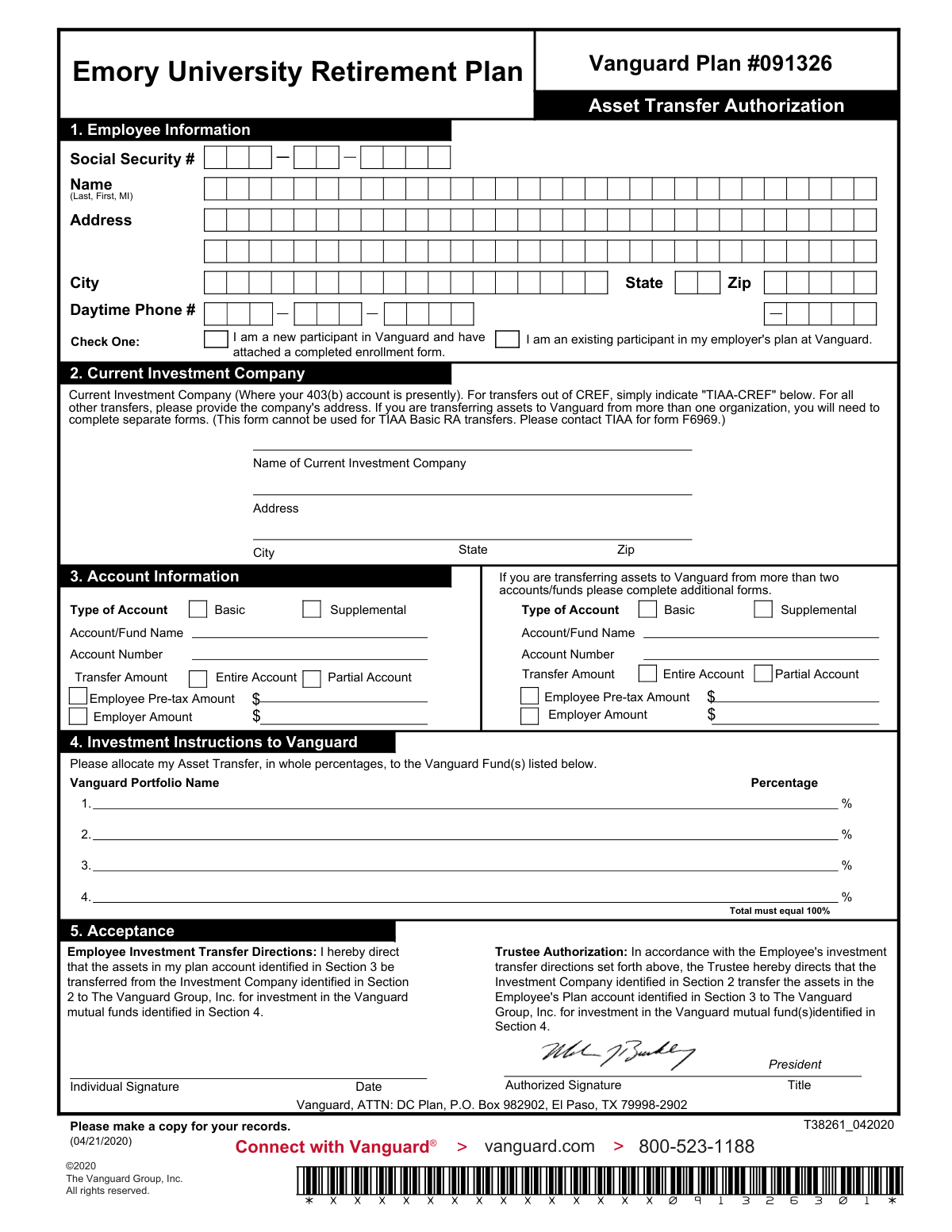
The Vanguard Asset Transfer Authorization form is a document for participants in the Emory University Retirement Plan to direct the transfer of their 403(b) account assets from a current investment company to The Vanguard Group. It is crucial for consolidating retirement funds into Vanguard's investment options. Today, this form can be filled out quickly and accurately using AI-powered services like Instafill.ai, which can also convert non-fillable PDF versions into interactive fillable forms.
Vanguard Asset Transfer Form is part of the
retirement forms, retirement plan forms, asset transfer forms, transfer forms, Vanguard forms, Emory forms, university forms, Vanguard University forms, university retirement forms and retirement transfer forms categories on Instafill.
Rather not fill this in by hand? Instafill is an online form filler that completes PDF forms automatically — upload the blank form, answer a few questions, and the AI fills every field.
Form specifications
| Form name: | Vanguard Asset Transfer Authorization Form for the Emory University Retirement Plan |
| Number of pages: | 1 |
| Language: | English |
Our AI automatically handles information lookup, data retrieval, formatting, and form filling.
It takes less than a minute to fill out Vanguard Asset Transfer Form using our AI form filling.
Securely upload your data. Information is encrypted in transit and deleted immediately after the form is filled out.
Instafill Demo: How to fill out PDF forms in seconds with AI
How to Fill Out Vanguard Asset Transfer Form Online for Free in 2026
Are you looking to fill out a VANGUARD ASSET TRANSFER FORM form online quickly and accurately? Instafill.ai offers the #1 AI-powered PDF filling software of 2026, allowing you to complete your VANGUARD ASSET TRANSFER FORM form in just 37 seconds or less.
Follow these steps to fill out your VANGUARD ASSET TRANSFER FORM form online using Instafill.ai:
- 1 Navigate to Instafill.ai and upload or select the Vanguard Asset Transfer Authorization form.
- 2 Provide your personal details in Section 1, 'Employee Information', including your name, address, and Social Security Number.
- 3 Complete Sections 2 and 3 with information about your current investment company and the specific accounts you wish to transfer.
- 4 In Section 4, 'Investment Instructions to Vanguard', specify the Vanguard funds and the percentage of assets to allocate to each, ensuring the total equals 100%.
- 5 Indicate whether you are transferring the entire account or a partial amount for each listed account.
- 6 Review all the information populated by the AI for accuracy, then sign and date the form in Section 5, 'Acceptance', to authorize the transfer.
Our AI-powered system ensures each field is filled out correctly, reducing errors and saving you time.
Why Choose Instafill.ai for Your Fillable Vanguard Asset Transfer Form Form?
Speed
Complete your Vanguard Asset Transfer Form in as little as 37 seconds.
Up-to-Date
Always use the latest 2026 Vanguard Asset Transfer Form form version.
Cost-effective
No need to hire expensive lawyers.
Accuracy
Our AI performs 10 compliance checks to ensure your form is error-free.
Security
Your personal information is protected with bank-level encryption.
Frequently Asked Questions About Vanguard Asset Transfer Form
This form is used to authorize the transfer of your retirement plan assets from another investment company into your Emory University Retirement Plan account held at Vanguard.
Emory University employees who participate in the university's retirement plan and wish to consolidate their 403(b) assets from a different provider into their Vanguard account should use this form.
If you are a new participant, check the appropriate box in Section 1 and make sure to attach a completed Vanguard enrollment form along with this asset transfer form.
For transfers from TIAA-CREF, you only need to write 'TIAA-CREF' in the 'Name of Current Investment Company' field. You do not need to provide a full address.
No, this form explicitly states it cannot be used for TIAA Basic RA transfers. You must contact TIAA to obtain their specific form, F6969, for that purpose.
You must complete a separate Asset Transfer Authorization form for each investment company you are transferring assets from. This form can only be used for one company at a time.
Yes, in Section 3, you can select 'Partial Account' and specify the exact dollar amount you wish to transfer. To move the entire balance, simply check 'Entire Account'.
You must list the Vanguard Portfolio Names you want to invest in and assign a whole percentage to each. The percentages you list must add up to exactly 100%.
Mail the completed and signed form to Vanguard, ATTN: DC Plan, P.O. Box 982902, El Paso, TX 79998-2902. It is recommended to make a copy for your records before mailing.
You, the employee, must sign and date the 'Individual Signature' line. The 'Trustee Authorization' section is for an authorized representative of your employer, Emory University, to sign.
The form provides space for two accounts in Section 3. If you are transferring more than two accounts from the same investment company, you will need to complete and attach additional copies of the form.
Yes, services like Instafill.ai use AI to accurately auto-fill form fields with your personal information, which saves time and helps reduce errors.
You can use a service like Instafill.ai to upload the PDF and fill it out on your computer. This allows you to type your information, add a digital signature, and download the completed form for printing.
If you have a non-fillable PDF, a tool like Instafill.ai can convert it into an interactive, fillable form. This lets you easily type your information into the proper fields online.
Compliance Vanguard Asset Transfer Form
Validation Checks by Instafill.ai
1
Investment Allocation Percentage Sum
This validation calculates the sum of all percentages listed in Section 4 ('Investment Instructions to Vanguard') and ensures the total is exactly 100%. This is crucial for correctly allocating the entire transferred amount across the new Vanguard funds without any ambiguity. A total other than 100% will result in the form being rejected, as Vanguard cannot proceed with an incomplete or over-allocated investment instruction.
2
Social Security Number Format Validation
Ensures the Social Security Number in Section 1 is provided in a valid format, either as a 9-digit number without separators or in the XXX-XX-XXXX format. This is crucial for tax reporting and correctly identifying the employee's account. An invalid SSN format will cause the transfer to fail due to a mismatch with existing records or inability to create a new account.
3
Individual Signature and Date Presence
Checks for the presence of the employee's signature and the date in Section 5 ('Acceptance'). The signature legally authorizes the transfer, and the date establishes when the authorization was given. A missing signature or date invalidates the entire request, and the form will be rejected immediately as it lacks legal standing.
4
Partial Account Transfer Amount Specification
For each account listed in Section 3, if 'Partial Account' is selected as the Transfer Amount, this check verifies that a specific dollar amount is entered in the corresponding field. This logic is critical to ensure the correct amount is transferred. Failing to specify a partial amount makes the instruction ambiguous and will cause the transfer to be rejected for clarification.
5
New Participant Enrollment Form Attachment
If the 'I am a new participant...' box is checked in Section 2, this validation confirms that a completed enrollment form is included with the submission. Without the enrollment form, Vanguard cannot create the necessary new account to receive the transferred assets. This omission will result in the rejection of the entire transfer request until the enrollment form is provided.
6
Employee Information Completeness
Verifies that all fields in Section 1 (Name, Address, City, State, Zip, Social Security #, Daytime Phone #) are filled out. This information is fundamental for identifying the employee and processing the transfer. Incomplete information will lead to rejection of the form as the employee cannot be uniquely and correctly identified.
7
Whole Percentage Allocation Check
Verifies that all percentage values entered in Section 4 are whole numbers, as the form explicitly states 'in whole percentages'. Fractional percentages could lead to processing errors or misallocations of funds. Submitting non-whole numbers will likely cause the form to be returned for correction to comply with the investment rules.
8
Current Investment Company Address Completeness
Checks that if the 'Name of Current Investment Company' in Section 3 is anything other than 'TIAA-CREF', the full address for that company is provided. This address is required for Vanguard to send the transfer request to the correct institution. Missing address information will prevent the initiation of the asset transfer.
9
Participant Status Selection Completeness
Verifies that the employee has selected exactly one of the two options in Section 2: 'I am an existing participant' or 'I am a new participant'. This choice determines critical subsequent processing steps. Failure to select an option will halt the process as the system won't know how to handle the incoming assets.
10
Minimum Account Specification for Transfer
Ensures that details for at least one account (Account/Fund Name, Account Number, Transfer Amount selection) are provided in Section 3. The purpose of the form is to authorize an asset transfer, so if no source account is specified, the form has no actionable instruction. The submission would be considered incomplete and rejected.
11
Paired Portfolio Name and Percentage
In Section 4, this check ensures that for every percentage entered, a corresponding 'Vanguard Portfolio Name' is also provided. It is impossible to allocate funds without knowing which fund to allocate them to. A missing portfolio name for a specified percentage makes the instruction incomplete and will cause the form to be rejected.
12
TIAA Basic RA Transfer Exclusion
This validation checks if the transfer request is for a 'TIAA Basic RA' account. The form explicitly states it cannot be used for such transfers and directs the user to form F6969. If a TIAA Basic RA account is identified, the form should be rejected immediately to prevent processing errors and delays.
13
Account Type Selection
For each account being transferred in Section 3, this confirms that one of the 'Type of Account' checkboxes ('Basic' or 'Supplemental') has been selected. This classification is important for plan administration and tax purposes. An unspecified account type creates ambiguity and will require clarification, delaying the transfer.
14
ZIP Code Format Validation
Validates that the ZIP codes in both Section 1 (Employee Information) and Section 3 (Current Investment Company) are in a valid 5-digit or 9-digit (ZIP+4) format. Correct ZIP codes are essential for mail correspondence and verifying addresses. An incorrect ZIP code can lead to returned mail and significant delays.
Common Mistakes in Completing Vanguard Asset Transfer Form
Users often make mathematical errors where the investment percentages do not total exactly 100%, or they use fractions/decimals instead of the required whole percentages. This happens due to simple miscalculation or misunderstanding the 'whole percentages' instruction. An incorrect total will cause the form to be rejected, as Vanguard cannot guess the user's intended allocation, leading to significant delays in investing the transferred assets. To avoid this, carefully add up all percentages before signing and ensure they equal 100%.
A frequent error is creating ambiguity about the amount to be transferred. This occurs when a user checks 'Partial Account' but fails to write a specific dollar amount, or checks both 'Entire Account' and 'Partial Account' for the same fund. This forces the processing agent to halt the transfer and contact the user for clarification, delaying the entire process. Always choose only one option and, if selecting 'Partial', clearly write the exact dollar amount to be transferred.
Employees sometimes mistakenly sign on the 'Authorized Signature' line under 'Trustee Authorization' in Section 5, which is reserved for the plan administrator. This happens because there are multiple signature lines on the page. An incorrectly placed signature invalidates the employee's authorization, causing the form to be immediately rejected and returned for correction. Ensure you sign only on the line labeled 'Individual Signature'.
Entering an incorrect or incomplete account number in Section 3 is one of the most critical errors. This often results from misreading an account statement or a simple typo. An invalid account number makes it impossible for the current investment company to locate the assets, leading to an automatic rejection of the transfer request. To prevent this, meticulously copy the full account number directly from your most recent account statement.
In Section 1, users who are new to the Vanguard plan often check the 'I am a new participant' box but forget to include the separate, completed enrollment form. The asset transfer cannot be processed without an established account to receive the funds. This oversight brings the entire process to a halt until the enrollment form is submitted. If you are a new participant, ensure the enrollment form is fully completed and attached to this transfer authorization.
In Section 2, people often list the general corporate headquarters address for their current investment company instead of the specific mailing address for rollovers or transfers. Financial institutions have dedicated departments and P.O. boxes for these transactions. Sending the form to the wrong address will cause major delays or result in the form being lost. You should call the company or check their website for the correct 'asset transfer' or 'rollover processing' address.
The form explicitly states to simply write 'TIAA-CREF' in Section 2 and not provide an address, but users often miss this note and spend time searching for an address. While this may not always cause a rejection, it can create confusion. Following the specific instructions for major providers like TIAA-CREF streamlines processing. Pay close attention to any special notes related to your specific investment company.
In Section 4, individuals may write incomplete, abbreviated, or incorrect names for the Vanguard funds they wish to invest in. This happens when working from memory or an unofficial source. Using an imprecise name forces Vanguard to either guess the fund, which could lead to incorrect investments, or reject the allocation instructions, delaying the investment of your funds. Always use the full, official Vanguard Portfolio Name as found on Vanguard's website or plan documents.
Forgetting to sign or date the form in Section 5 is a very common and fundamental mistake. An unsigned form is legally invalid and cannot be processed under any circumstances, leading to immediate rejection. A missing date can also cause compliance or processing issues. Before submitting, always perform a final check to ensure the 'Individual Signature' and 'Date' fields are completed. AI-powered tools like Instafill.ai can highlight required fields like signatures to help prevent this.
The form provides space for transferring assets from two accounts/funds. The instructions state to use additional forms if transferring from more than two, but people may miss this and only list their top two accounts. This results in an incomplete transfer, leaving assets behind in the old plan. If you have more than two accounts or funds to transfer, you must complete and submit a separate form for each additional set of two.
Saved over 80 hours a year
“I was never sure if my IRS forms like W-9 were filled correctly. Now, I can complete the forms accurately without any external help.”
Kevin Martin Green
Your data stays secure with advanced protection from Instafill and our subprocessors




Robust compliance program
Transparent business model
You’re not the product. You always know where your data is and what it is processed for.
ISO 27001, HIPAA, and GDPR
Our subprocesses adhere to multiple compliance standards, including but not limited to ISO 27001, HIPAA, and GDPR.
Security & privacy by design
We consider security and privacy from the initial design phase of any new service or functionality. It’s not an afterthought, it’s built-in, including support for two-factor authentication (2FA) to further protect your account.
Fill out Vanguard Asset Transfer Form with Instafill.ai
Worried about filling PDFs wrong? Instafill securely fills vanguard-asset-transfer-authorization-form-for-the-emory-university-retirement-plan forms, ensuring each field is accurate.
