Yes! You can use AI to fill out Instructions for Changing Your Beneficiary on your Emory Retirement Plan
The Emory Retirement Plan Beneficiary Change document outlines the online process for employees to update their designated beneficiaries with financial providers like Fidelity, TIAA, and Vanguard. Keeping this information current is crucial for ensuring your retirement assets are distributed according to your wishes after major life events. Today, many official forms, including beneficiary designations, can be filled out quickly and accurately using AI-powered services like Instafill.ai, which can also convert non-fillable PDF versions into interactive fillable forms.
Emory Retirement Plan Beneficiary Change is part of the
beneficiary forms, retirement forms, retirement plan forms and Emory forms categories on Instafill.
Rather not fill this in by hand? Instafill is an online form filler that completes PDF forms automatically — upload the blank form, answer a few questions, and the AI fills every field.
Form specifications
| Form name: | Instructions for Changing Your Beneficiary on your Emory Retirement Plan |
| Number of pages: | 1 |
| Language: | English |
Our AI automatically handles information lookup, data retrieval, formatting, and form filling.
It takes less than a minute to fill out Emory Retirement Plan Beneficiary Change using our AI form filling.
Securely upload your data. Information is encrypted in transit and deleted immediately after the form is filled out.
Instafill Demo: How to fill out PDF forms in seconds with AI
How to Fill Out Emory Retirement Plan Beneficiary Change Online for Free in 2026
Are you looking to fill out a EMORY RETIREMENT PLAN BENEFICIARY CHANGE form online quickly and accurately? Instafill.ai offers the #1 AI-powered PDF filling software of 2026, allowing you to complete your EMORY RETIREMENT PLAN BENEFICIARY CHANGE form in just 37 seconds or less.
Follow these steps to fill out your EMORY RETIREMENT PLAN BENEFICIARY CHANGE form online using Instafill.ai:
- 1 Navigate to Instafill.ai and upload your beneficiary designation form, or select it from a template library.
- 2 Enter your personal information as the plan participant, including your name, address, and account number.
- 3 Provide the full name, date of birth, Social Security number, and relationship for each primary beneficiary.
- 4 Specify the percentage of benefits each primary beneficiary should receive, ensuring the total equals 100%.
- 5 Optionally, add contingent beneficiaries who will receive the benefits if the primary beneficiaries are deceased.
- 6 If required (e.g., naming someone other than a spouse), complete the spousal consent section, which may need to be notarized.
- 7 Review all entered information for accuracy, then use the platform to securely sign and submit the completed form to your plan administrator.
Our AI-powered system ensures each field is filled out correctly, reducing errors and saving you time.
Why Choose Instafill.ai for Your Fillable Emory Retirement Plan Beneficiary Change Form?
Speed
Complete your Emory Retirement Plan Beneficiary Change in as little as 37 seconds.
Up-to-Date
Always use the latest 2026 Emory Retirement Plan Beneficiary Change form version.
Cost-effective
No need to hire expensive lawyers.
Accuracy
Our AI performs 10 compliance checks to ensure your form is error-free.
Security
Your personal information is protected with bank-level encryption.
Frequently Asked Questions About Emory Retirement Plan Beneficiary Change
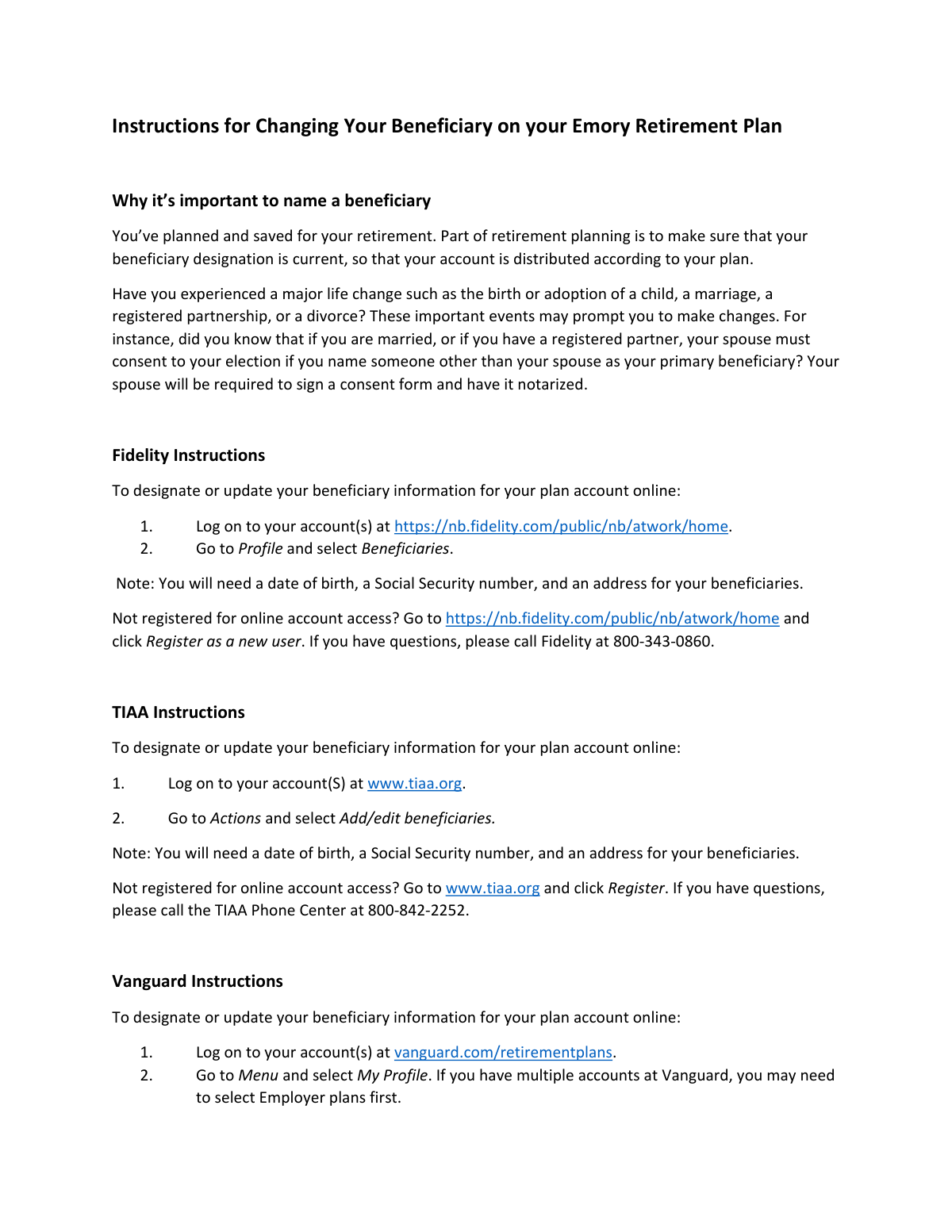
This document provides instructions on how to designate or update the beneficiaries for your Emory Retirement Plan account(s) with Fidelity, TIAA, or Vanguard.
Naming a beneficiary is a critical part of retirement planning that ensures your account assets are distributed according to your wishes after your death. You should review your beneficiaries after major life events like marriage, divorce, or the birth of a child.
To add or update a beneficiary, you will need their full name, date of birth, Social Security number, and current address.
Log on to your account on the Fidelity website, navigate to your 'Profile', and then select the 'Beneficiaries' option to make your updates.
After logging into your TIAA account online, go to the 'Actions' menu and select 'Add/edit beneficiaries' to begin the process.
Log in to your Vanguard retirement plan account, go to the 'Menu,' select 'My Profile,' and then click on 'Beneficiaries' to add or edit your information.
Yes, but your spouse must formally consent to this designation. They will be required to sign a consent form and have it notarized.
No, this document provides instructions for updating your beneficiary information online through your retirement provider's website. The only potential physical form is the spousal consent form, if applicable.
The instructions provide website links to register as a new user for Fidelity, TIAA, and Vanguard. You can also call the provider's customer service number listed in the document for assistance.
After logging in and selecting 'My Profile,' you may need to select 'Employer plans' first before you see the 'Beneficiaries' option.
Yes, services like Instafill.ai can help you securely gather and organize your beneficiaries' required information before you begin the online update process, saving time and ensuring accuracy.
You can use Instafill.ai to securely store your beneficiaries' details, like their SSNs and addresses. When you're ready to update your plan online, you can easily copy the information from your Instafill.ai profile to the provider's website.
While this process is online, if you were dealing with a non-fillable PDF form, a service like Instafill.ai can convert it into an interactive, fillable form. You could then type your information directly onto the form before printing it.
Compliance Emory Retirement Plan Beneficiary Change
Validation Checks by Instafill.ai
1
Beneficiary Social Security Number Format
This check verifies that the Social Security Number (SSN) for each beneficiary is entered in a valid format, such as XXX-XX-XXXX or XXXXXXXXX. It is crucial for correctly identifying the beneficiary for legal and tax purposes. If the SSN format is invalid, the submission will be rejected, and the user will be prompted to correct the entry to prevent future identification issues.
2
Beneficiary Date of Birth Validity
This validation ensures that the beneficiary's date of birth is a real, valid calendar date and is not in the future. This is important to confirm the beneficiary is a living person and to aid in their unique identification. An invalid or future date will trigger an error, requiring the user to provide a correct date of birth before the form can be submitted.
3
Completeness of Required Beneficiary Information
This check confirms that all mandatory fields for each designated beneficiary, including their full name, Social Security number, date of birth, and full address, have been completed. Incomplete information can make it impossible to locate or verify a beneficiary when the time comes to distribute assets. The form will not be accepted until all required information for every listed beneficiary is provided.
4
Primary Beneficiary Percentage Summation
This validation ensures that the allocation percentages assigned to all primary beneficiaries add up to exactly 100%. This is a critical logical check to guarantee that the entirety of the account's assets are designated for distribution. If the total is less than or greater than 100%, the user will receive an error message and must adjust the percentages accordingly.
5
Spousal Consent Requirement for Non-Spouse Primary Beneficiary
This check is triggered if the account holder is married and designates someone other than their spouse as the sole primary beneficiary (or gives the spouse less than 100%). The system verifies that a spousal consent form has been acknowledged or uploaded, as this is a legal requirement in many retirement plans. Failure to provide the required consent will block the submission and inform the user that a notarized consent form is needed.
6
Contingent Beneficiary Percentage Summation
If contingent beneficiaries are named, this check verifies that their designated percentages also sum to exactly 100%. This ensures a clear and complete plan for asset distribution in the event that the primary beneficiaries are unable to inherit. A mismatch in the total percentage will result in a validation error, requiring the user to correct the allocations.
7
Prohibition of Self-Beneficiary Designation
This check prevents the account holder from naming themselves as a beneficiary. An individual cannot inherit from their own retirement account upon their death. The system will compare the beneficiary's identifying information (e.g., name and SSN) against the account holder's information and block any attempt to self-designate.
8
Beneficiary Address Completeness and Format
This validation verifies that the beneficiary's address is complete, including a street address, city, state, and a valid ZIP code format. A complete and accurate address is essential for the plan administrator to contact the beneficiary when necessary. The form will prompt the user to complete or correct any invalid or missing address components.
9
Minimum Primary Beneficiary Designation
This check ensures that at least one primary beneficiary has been designated with a percentage greater than zero. Failing to name a primary beneficiary would leave the account's distribution to probate court, defeating the purpose of the form. The submission will be blocked if no primary beneficiaries are listed.
10
Unique Beneficiary Identification
This validation ensures that the same person (identified by their Social Security Number) is not added as a beneficiary multiple times in the same category (e.g., twice as a primary beneficiary). This prevents data entry errors and confusion in the allocation of assets. If a duplicate SSN is detected, the user will be prompted to remove the redundant entry.
11
Percentage Value Constraints
This check ensures that any value entered into a percentage allocation field is a positive number between 0 and 100. It prevents invalid entries such as negative numbers or values over 100 for a single beneficiary. An invalid entry will trigger an immediate error, requiring the user to input a valid percentage.
12
Spousal Consent Form Presence
When spousal consent is required, this validation confirms that a file has been uploaded to the designated field. While it cannot verify the contents, it ensures the procedural step of providing the document is not missed. If consent is required and no file is attached, the form submission will be halted with a message indicating the document is missing.
Common Mistakes in Completing Emory Retirement Plan Beneficiary Change
Account holders often assume they have the sole authority to name any beneficiary, not realizing that legal protections exist for spouses in retirement plans. If you are married and name someone other than your spouse as the primary beneficiary without their notarized consent, the designation may be legally invalid. This could result in your spouse automatically inheriting the assets by law, overriding your stated wishes, so always confirm consent rules and obtain a notarized signature when required.
Users often begin the online update process without gathering all the necessary details for their beneficiaries, such as their full legal name, Social Security Number (SSN), and date of birth. This forces them to abandon the process midway, leaving the beneficiary designation incomplete and outdated. To avoid this, collect all required information for each beneficiary before you log in to the provider's website.
Simple typographical errors or transposing digits are common when manually entering long strings of numbers like a Social Security Number or date of birth. An incorrect SSN or DOB can prevent the financial institution from properly identifying the beneficiary, leading to significant delays, legal complications, and added stress for your heirs. Always double-check numerical data before submitting the form; AI-powered tools like Instafill.ai can also help validate data formats to catch potential errors.
Many people focus only on naming a primary beneficiary and neglect to designate a contingent (or secondary) one. If your primary beneficiary predeceases you or disclaims the inheritance, the lack of a contingent beneficiary could cause your assets to go into your estate and be subject to the lengthy and costly probate process. Always name at least one contingent beneficiary to ensure your assets are distributed quickly and according to your wishes.
Instead of providing specific names and details, some users enter vague terms like 'my children' or 'my next of kin.' This creates ambiguity, especially in cases of blended families, adoptions, or future children, which can lead to legal disputes and significant delays in distributing the assets. Always use the full legal name and required personal data for each individual beneficiary to ensure clarity.
When naming multiple primary beneficiaries, the percentage shares assigned to them must total exactly 100%. Users can easily make miscalculations, causing the online form to reject the submission and forcing them to start over. This error delays the update and can cause frustration. To prevent this, carefully check that the percentages for all primary beneficiaries add up to 100% before finalizing the designation.
This is an error of omission where people forget to update their designations after a major life event like a marriage, divorce, birth of a child, or death of a beneficiary. The consequence is that assets could be unintentionally directed to an ex-spouse or fail to include a new child, going against the account holder's current wishes. It is critical to review and update your beneficiaries after any major life change.
People often use nicknames or informal versions of a beneficiary's name (e.g., 'Mike' instead of 'Michael') out of habit. This can create identification problems and legal hurdles when it is time to claim the assets, requiring extra documentation to prove the person's identity. To avoid this, always use the beneficiary's full, legal name as it appears on their government-issued ID or birth certificate.
Emory uses multiple retirement plan providers (Fidelity, TIAA, Vanguard), and employees may have accounts with more than one. A common mistake is forgetting which provider holds the specific account they wish to update and trying to log into the wrong portal. This leads to frustration and wasted time searching for a non-existent account. Before starting, verify which provider holds the plan you intend to update.
The instructions specify that a spousal consent form must be notarized, but users may obtain a signature while forgetting or neglecting the notarization step. A signature alone is insufficient; notarization is a legal requirement to validate the document. An un-notarized form is invalid, which could void the beneficiary designation and result in the spouse receiving the assets by default.
Saved over 80 hours a year
“I was never sure if my IRS forms like W-9 were filled correctly. Now, I can complete the forms accurately without any external help.”
Kevin Martin Green
Your data stays secure with advanced protection from Instafill and our subprocessors




Robust compliance program
Transparent business model
You’re not the product. You always know where your data is and what it is processed for.
ISO 27001, HIPAA, and GDPR
Our subprocesses adhere to multiple compliance standards, including but not limited to ISO 27001, HIPAA, and GDPR.
Security & privacy by design
We consider security and privacy from the initial design phase of any new service or functionality. It’s not an afterthought, it’s built-in, including support for two-factor authentication (2FA) to further protect your account.
Fill out Emory Retirement Plan Beneficiary Change with Instafill.ai
Worried about filling PDFs wrong? Instafill securely fills instructions-for-changing-your-beneficiary-on-your-emory-retirement-plan forms, ensuring each field is accurate.
