Yes! You can use AI to fill out Vanguard Rollover Form for Retirement Plans
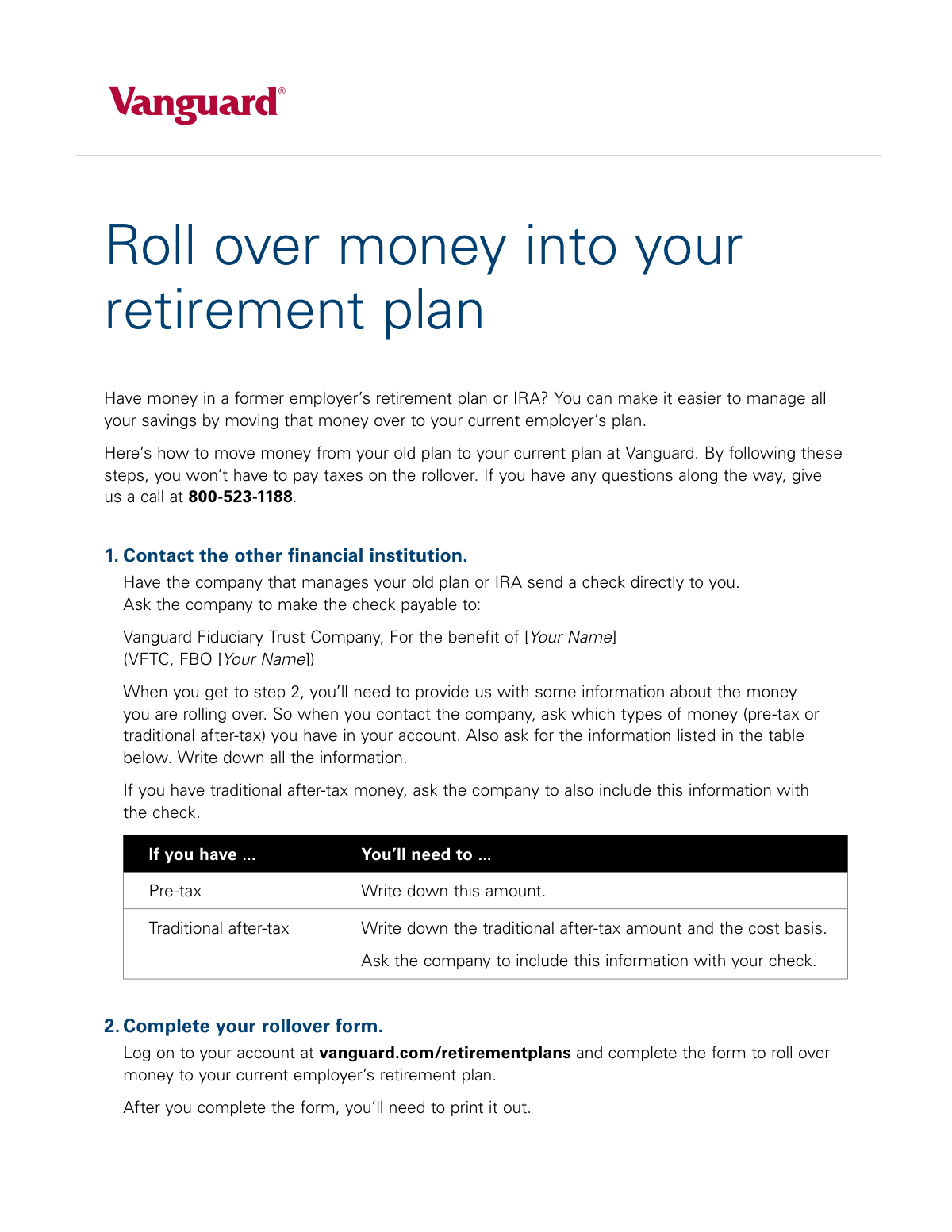
This form, provided by Vanguard, facilitates the process of consolidating retirement savings by rolling over money from a previous retirement account into your current plan. Completing this process correctly is crucial for avoiding taxes and penalties on the transfer, allowing you to manage your retirement assets more effectively in one place. Today, this form can be filled out quickly and accurately using AI-powered services like Instafill.ai, which can also convert non-fillable PDF versions into interactive fillable forms.
BBBBKQGL 082020 is part of the
retirement forms, retirement plan forms, rollover forms and Vanguard forms categories on Instafill.
Rather not fill this in by hand? Instafill is an online form filler that completes PDF forms automatically — upload the blank form, answer a few questions, and the AI fills every field.
Form specifications
| Form name: | Vanguard Rollover Form for Retirement Plans |
| Number of pages: | 1 |
| Language: | English |
Our AI automatically handles information lookup, data retrieval, formatting, and form filling.
It takes less than a minute to fill out BBBBKQGL 082020 using our AI form filling.
Securely upload your data. Information is encrypted in transit and deleted immediately after the form is filled out.
Instafill Demo: How to fill out PDF forms in seconds with AI
How to Fill Out BBBBKQGL 082020 Online for Free in 2026
Are you looking to fill out a BBBBKQGL 082020 form online quickly and accurately? Instafill.ai offers the #1 AI-powered PDF filling software of 2026, allowing you to complete your BBBBKQGL 082020 form in just 37 seconds or less.
Follow these steps to fill out your BBBBKQGL 082020 form online using Instafill.ai:
- 1 Navigate to Instafill.ai and upload or select the Vanguard Rollover Form for Retirement Plans.
- 2 Use the AI assistant to provide your personal details, such as your full name and Vanguard account information.
- 3 Input the details of the funds being rolled over, including the source institution and the amounts for pre-tax and after-tax contributions.
- 4 Review all the information auto-filled by the AI to verify that all your personal and financial data is accurate.
- 5 Download the completed, fillable PDF of your rollover form.
- 6 Print the completed form and mail it, along with the physical rollover check from your previous institution, to the specified Vanguard address.
Our AI-powered system ensures each field is filled out correctly, reducing errors and saving you time.
Why Choose Instafill.ai for Your Fillable BBBBKQGL 082020 Form?
Speed
Complete your BBBBKQGL 082020 in as little as 37 seconds.
Up-to-Date
Always use the latest 2026 BBBBKQGL 082020 form version.
Cost-effective
No need to hire expensive lawyers.
Accuracy
Our AI performs 10 compliance checks to ensure your form is error-free.
Security
Your personal information is protected with bank-level encryption.
Frequently Asked Questions About BBBBKQGL 082020
This process is for moving money from a former employer’s retirement plan or an IRA into your current employer’s plan with Vanguard, making it easier to manage all your savings in one place.
You should use this form if you have a retirement plan with your current employer at Vanguard and wish to consolidate funds from a previous employer's plan or an IRA.
No, as long as you follow the steps provided, you will not have to pay taxes on the money you are rolling over into your current plan.
Log on to your account at vanguard.com/retirementplans to complete the form online. After you finish filling it out, you must print a physical copy.
The check should be made payable to 'Vanguard Fiduciary Trust Company, For the benefit of [Your Name]' or the abbreviation 'VFTC, FBO [Your Name]'.
You need to ask them for the specific amounts of pre-tax and traditional after-tax money in your account. If you have after-tax money, you also need to obtain the 'cost basis' for that amount.
You must mail the physical rollover check from your old institution along with the completed rollover form that you printed from the Vanguard website.
One address is for standard U.S. mail, and the other is a physical street address for registered, certified, or overnight mail services. You should use the address that matches your chosen mailing method.
That is the correct procedure. The instructions state that your old institution should send the check directly to you, and then you are responsible for mailing it to Vanguard with the form.
If you have questions, you can call Vanguard at 800-523-1188 on weekdays between 8:30 a.m. and 9 p.m., Eastern time.
Yes, services like Instafill.ai use AI to accurately auto-fill form fields, which can save you time and help ensure the information is entered correctly.
Simply upload the form to the Instafill.ai platform. Its AI will populate the fields with your information, which you can then review and finalize before printing for submission.
If your PDF is not fillable, a tool like Instafill.ai can convert the flat document into an interactive, fillable form that you can easily complete on your computer.
Compliance BBBBKQGL 082020
Validation Checks by Instafill.ai
1
Ensures User's Full Name Matches Account Record
Validates that the full name provided on the rollover form matches the legal name associated with the Vanguard account number. This is crucial for regulatory compliance (KYC) and to ensure the funds are credited to the correct individual. A mismatch will prevent the form from being processed and require manual intervention.
2
Validates Social Security Number Format
Checks that the Social Security Number (SSN) is entered in a valid XXX-XX-XXXX or XXXXXXXXX format and contains only digits. An SSN is a critical identifier for tax reporting purposes by the IRS. An invalid format will trigger an error, preventing submission until corrected.
3
Requires Name of Source Financial Institution
Ensures that the field for the name of the financial institution where the funds are originating (the 'old plan or IRA') is not empty. This information is essential for tracking the origin of the funds for compliance and record-keeping. The form cannot be submitted without this information.
4
Validates Format of Pre-tax Rollover Amount
Verifies that the pre-tax rollover amount is entered as a valid positive numerical or currency value (e.g., 10,000.00). This prevents data entry errors from non-numeric characters or negative values. An invalid format will block submission and prompt the user to enter a correct monetary value.
5
Validates Format of Traditional After-tax Rollover Amount
Checks that the traditional after-tax rollover amount is a valid positive numerical or currency value. This ensures data integrity for tax basis tracking. If non-numeric characters or a negative value are entered, the user will receive an error message and must correct the field to proceed.
6
Requires Cost Basis for After-tax Rollovers
This rule checks that if a value greater than zero is entered in the 'Traditional after-tax' amount field, the 'Cost Basis' field must also be filled. The cost basis is legally required for tracking the non-taxable portion of the rollover. Failure to provide it will halt the submission and display a message explaining that the cost basis is mandatory for after-tax funds.
7
Ensures Cost Basis is Less Than or Equal to After-tax Amount
Validates that the provided 'Cost Basis' amount is not greater than the 'Traditional after-tax' rollover amount. The cost basis represents the portion of the after-tax amount that has already been taxed, so it cannot logically exceed the total. An invalid entry will result in an error, requiring the user to review and correct the amounts.
8
Verifies Sum of Rollover Components
This check confirms that the sum of the 'Pre-tax' amount and the 'Traditional after-tax' amount equals the total rollover amount specified on the form. This internal consistency check prevents mathematical errors and ensures the transaction is balanced. A discrepancy will flag the form for review or prevent submission until the values are corrected.
9
Validates Vanguard Account Number Existence and Format
Checks that the provided Vanguard retirement plan account number is in the correct format and corresponds to an active, valid account in the system. This is the most critical check to ensure the funds are deposited into the correct destination account. An invalid or non-existent account number will result in an immediate failure and prevent form submission.
10
Requires Current Employer's Plan Information
Ensures that the fields for the current employer's name and the specific retirement plan ID are completed. This information is necessary to associate the rollover with the correct employer-sponsored plan at Vanguard. Leaving these fields blank would make it impossible to process the rollover into the intended plan.
11
Confirms Check Payee Name Acknowledgement
Validates that the user has checked a box confirming the rollover check is correctly made payable to 'Vanguard Fiduciary Trust Company, FBO [Your Name]'. This confirmation helps prevent the submission of checks that will be rejected, which would cause significant delays. The form cannot be submitted without this acknowledgement.
12
Prohibits Zero or Negative Total Rollover Amount
Validates that the total amount being rolled over is a positive number greater than zero. A rollover of zero or a negative amount is not a valid financial transaction. This check prevents nonsensical or erroneous submissions from being processed.
13
Requires Source Account Type Specification
Validates that the user has specified the type of account the funds are coming from (e.g., 401(k), 403(b), Traditional IRA). This information is crucial for determining rollover eligibility and for proper tax reporting. The form submission will be blocked until a valid account type is selected from the provided options.
14
Requires User Acknowledgement and Electronic Signature
Verifies that the user has checked the box to electronically sign the form, attesting that the information provided is accurate and complete. This is the legal equivalent of a physical signature and is required for the form to be a binding instruction. The form cannot be submitted without this acknowledgement.
Common Mistakes in Completing BBBBKQGL 082020
Users often instruct their former plan administrator to make the check payable simply to 'Vanguard' or to themselves, rather than the required 'Vanguard Fiduciary Trust Company, For the benefit of [Your Name]'. An incorrect payee will cause the check to be rejected, leading to significant processing delays and requiring a new check to be issued. To avoid this, provide the exact payee wording from the instructions to the financial institution issuing the check.
The rollover form requires a breakdown of pre-tax and traditional after-tax funds. People frequently forget to ask their previous institution for this specific breakdown and either guess or lump everything into one category. This error can lead to incorrect tax tracking, potentially causing after-tax contributions to be taxed again upon future withdrawal. Always obtain a detailed statement from your old plan that clearly separates pre-tax and after-tax amounts before filling out the form.
When rolling over traditional after-tax money, providing the 'cost basis' is critical for tax purposes, but it is often overlooked. Forgetting to obtain and report this figure means Vanguard cannot properly track the non-taxable portion of your rollover. This can result in the entire after-tax amount being treated as taxable earnings upon withdrawal. To prevent this, explicitly ask your former plan administrator for the cost basis and ensure it is included on the form and in the documentation sent with the check.
The instructions require mailing the printed form and the physical check together in one envelope. However, users sometimes mail them separately, causing a processing nightmare where Vanguard must manually match a loose check to a form that arrived at a different time. This can lead to significant delays, lost documents, and the potential for the rollover to be rejected. Always wait until you have both the check and the printed form before mailing them together.
The document provides two distinct addresses: a P.O. Box for standard U.S. mail and a street address for overnight or certified mail. A common mistake is sending an overnight package via a courier like FedEx or UPS to the P.O. Box, which they cannot deliver to. This results in the package being returned, delaying the entire rollover process. Carefully select the correct address based on your chosen mailing method to ensure timely delivery.
Even though the check is mailed to the individual, it must be forwarded to Vanguard, not deposited. Some people mistakenly deposit the check into their personal bank account, which the IRS may classify as a taxable distribution. This can trigger income taxes and a 10% early withdrawal penalty if you are under age 59.5. To avoid severe tax consequences, never deposit the rollover check; endorse it if required and mail it directly to Vanguard with the form.
The rollover check must be made out 'For the benefit of [Your Name]', and that name must exactly match the name on the destination Vanguard account. Using a nickname, a maiden name, or having a typo can cause the check to be rejected for security reasons. This forces you to request a new check from the old institution, causing weeks of delay. Always verify your full legal name on your Vanguard account and provide it exactly as it appears.
The process requires users to complete the form online and then print a physical copy to mail with the check. A frequent error is assuming the online submission is the final step. When Vanguard receives the check without the corresponding printed form, they cannot process the rollover, leading to delays and confusion. Remember that the online portion is for data entry; the printed form is the official instruction that must accompany your check.
When manually transcribing the rollover amounts from a statement to the online form, it is easy to make a data entry error like a typo or a misplaced decimal. If the amounts on the form do not match the amount on the check, it will trigger an exception and delay processing until the discrepancy is resolved. To avoid this, carefully double-check all figures before submitting. AI-powered form-filling tools like Instafill.ai can help prevent these manual errors by validating data as it's entered.
The instructions specify logging into an online portal to complete the form, which is then printed. Some users may waste time searching for a blank, fillable PDF version of the form online, which may not exist or may be outdated. Using the wrong form will guarantee rejection. Always follow the instructions to log in and generate the form through the official website. For other financial processes where only a non-fillable PDF is provided, tools like Instafill.ai can convert it into an interactive, fillable version.
Saved over 80 hours a year
“I was never sure if my IRS forms like W-9 were filled correctly. Now, I can complete the forms accurately without any external help.”
Kevin Martin Green
Your data stays secure with advanced protection from Instafill and our subprocessors




Robust compliance program
Transparent business model
You’re not the product. You always know where your data is and what it is processed for.
ISO 27001, HIPAA, and GDPR
Our subprocesses adhere to multiple compliance standards, including but not limited to ISO 27001, HIPAA, and GDPR.
Security & privacy by design
We consider security and privacy from the initial design phase of any new service or functionality. It’s not an afterthought, it’s built-in, including support for two-factor authentication (2FA) to further protect your account.
Fill out BBBBKQGL 082020 with Instafill.ai
Worried about filling PDFs wrong? Instafill securely fills vanguard-rollover-form-for-retirement-plans forms, ensuring each field is accurate.
