Yes! You can use AI to fill out University of Colorado 403(b) Plan – DSW Scudder Enrollment and Beneficiary Designation Form
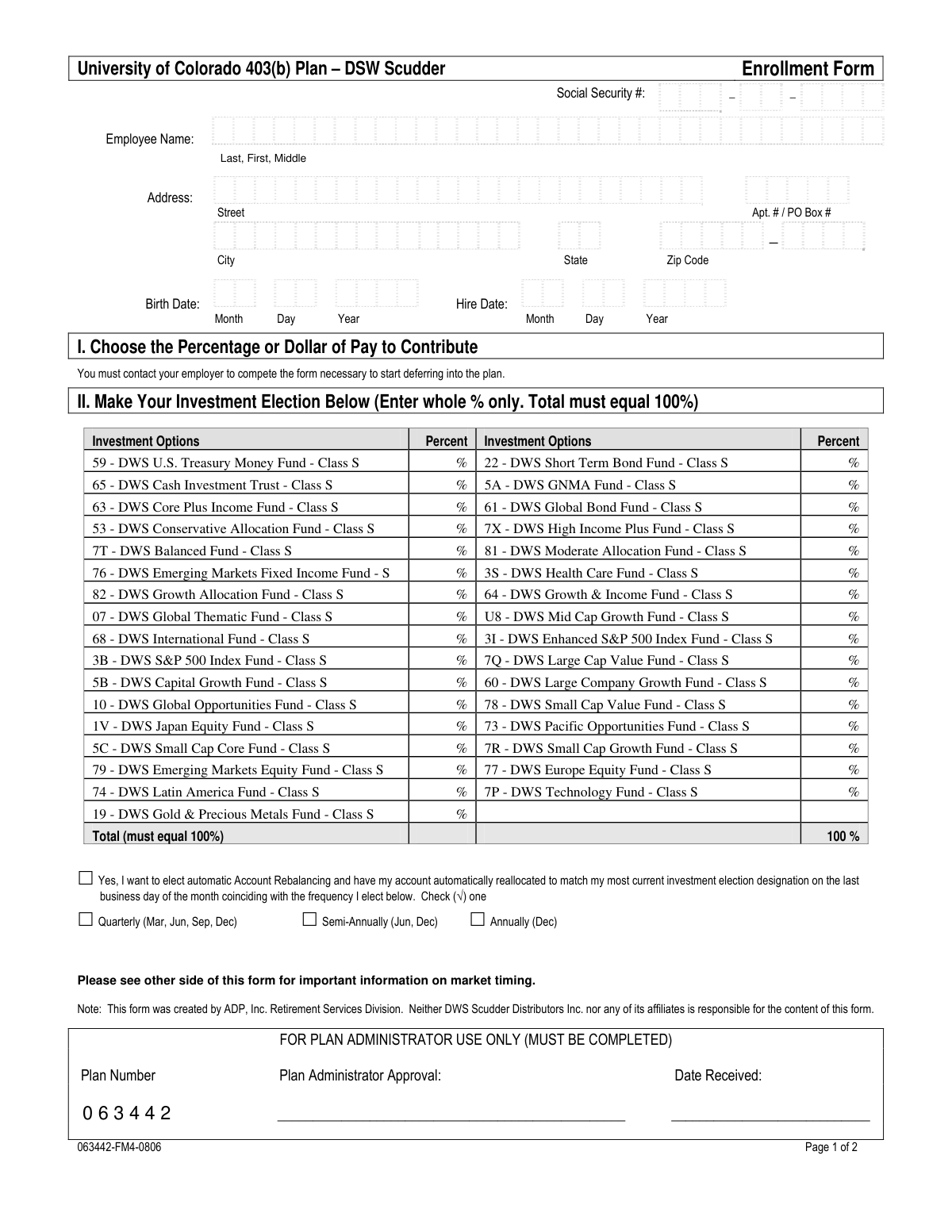
This form is an enrollment and beneficiary designation document for employees of the University of Colorado wishing to participate in the 403(b) retirement plan administered by DSW Scudder. It allows employees to provide personal information, specify their contribution amounts, choose investment funds for their contributions, and legally name who will receive their account balance upon their death. Today, this form can be filled out quickly and accurately using AI-powered services like Instafill.ai, which can also convert non-fillable PDF versions into interactive fillable forms.
University of Colorado 403(b) Enrollment Form is part of the
enrollment forms, university enrollment forms, beneficiary designation forms, university forms, Colorado university forms, 403(b) forms and Colorado DR forms categories on Instafill.
Rather not fill this in by hand? Instafill is an online form filler that completes PDF forms automatically — upload the blank form, answer a few questions, and the AI fills every field.
Form specifications
| Form name: | University of Colorado 403(b) Plan – DSW Scudder Enrollment and Beneficiary Designation Form |
| Number of pages: | 1 |
| Language: | English |
Our AI automatically handles information lookup, data retrieval, formatting, and form filling.
It takes less than a minute to fill out University of Colorado 403(b) Enrollment Form using our AI form filling.
Securely upload your data. Information is encrypted in transit and deleted immediately after the form is filled out.
Instafill Demo: How to fill out PDF forms in seconds with AI
How to Fill Out University of Colorado 403(b) Enrollment Form Online for Free in 2026
Are you looking to fill out a UNIVERSITY OF COLORADO 403(B) ENROLLMENT FORM form online quickly and accurately? Instafill.ai offers the #1 AI-powered PDF filling software of 2026, allowing you to complete your UNIVERSITY OF COLORADO 403(B) ENROLLMENT FORM form in just 37 seconds or less.
Follow these steps to fill out your UNIVERSITY OF COLORADO 403(B) ENROLLMENT FORM form online using Instafill.ai:
- 1 Navigate to Instafill.ai and upload or select the University of Colorado 403(b) Plan Enrollment Form.
- 2 Use the AI assistant to automatically fill in your personal information, such as your full name, Social Security Number, address, and birth date.
- 3 In Section I, specify the percentage or dollar amount of your pay you wish to contribute to the plan.
- 4 Complete Section II by allocating your investment elections among the available funds, ensuring the total percentage equals 100%.
- 5 Fill out the Beneficiary Designation section with the names, SSNs, and other details of your primary and secondary beneficiaries.
- 6 If you are married and have designated someone other than your spouse as the sole primary beneficiary, complete the Spousal Consent section, which requires a notarized signature.
- 7 Review all entered information for accuracy, electronically sign and date the form, and then submit it to your benefits office as instructed.
Our AI-powered system ensures each field is filled out correctly, reducing errors and saving you time.
Why Choose Instafill.ai for Your Fillable University of Colorado 403(b) Enrollment Form Form?
Speed
Complete your University of Colorado 403(b) Enrollment Form in as little as 37 seconds.
Up-to-Date
Always use the latest 2026 University of Colorado 403(b) Enrollment Form form version.
Cost-effective
No need to hire expensive lawyers.
Accuracy
Our AI performs 10 compliance checks to ensure your form is error-free.
Security
Your personal information is protected with bank-level encryption.
Frequently Asked Questions About University of Colorado 403(b) Enrollment Form
This form is used by University of Colorado employees to enroll in the 403(b) retirement savings plan and to designate beneficiaries for the account balance.
Any employee of the University of Colorado who wants to open an account and begin investing in the 403(b) plan with DSW Scudder should complete this form.
This form is for setting up your investment account. To specify your contribution amount and start deferring from your pay, you must contact your employer to complete a separate salary reduction agreement.
You must select one or more investment funds and assign a whole percentage to each. The total of all your selected percentages must equal exactly 100%.
If you do not complete the investment election section, your future contributions will automatically be invested in the plan's designated default fund.
Yes, if you are married, your spouse must be designated as the sole primary beneficiary. To name someone else, your spouse must complete and sign the 'Spousal Consent' waiver in Section IV, which requires notarization.
The Enrollment Form should be returned to your university Benefits Office. The Beneficiary Designation Form must be mailed separately to ADP Retirement Services at the address listed in Section V.
This is an optional feature that automatically adjusts your investments back to your chosen percentages on a quarterly, semi-annual, or annual basis. This helps ensure your investment mix stays aligned with your long-term strategy.
Yes, you can designate multiple primary and secondary beneficiaries. You must ensure the percentage shares for each group (primary and secondary) total 100% and attach an additional form if you need more space.
If your primary beneficiaries are not living at the time of your death, your account balance will be paid to your secondary beneficiaries. If no beneficiaries are living, the funds are distributed according to the plan's default rules.
Yes, services like Instafill.ai use AI to help you accurately auto-fill personal information like your name, address, and SSN, saving you time and helping to prevent errors.
To fill this form out online, you can upload the PDF to a service like Instafill.ai. The platform will make the document interactive so you can type your information, select options, and add a digital signature.
If your PDF is not fillable, you can use a tool like Instafill.ai to instantly convert it into an interactive form. This allows you to easily type your information into the fields instead of printing and writing by hand.
No, you should leave this section blank. It is reserved for your employer's Plan Administrator to complete during the processing of your enrollment.
Compliance University of Colorado 403(b) Enrollment Form
Validation Checks by Instafill.ai
1
Validates Employee Social Security Number Format and Presence
This check ensures the Social Security Number field on the enrollment form is not empty and follows the standard XXX-XX-XXXX format. The SSN is a critical unique identifier for the participant's account for tax reporting and record-keeping. If the SSN is missing or incorrectly formatted, the enrollment cannot be processed, and the form will be rejected for correction.
2
Ensures Investment Allocation Percentages Sum to 100%
This validation verifies that the sum of all percentages entered in the 'Make Your Investment Election' section equals exactly 100%. This is crucial to ensure the participant's entire contribution is allocated according to their wishes, leaving no portion uninvested or over-allocated. A failure will prevent form submission, requiring the user to adjust the percentages until they total 100%.
3
Verifies Investment Percentages are Whole Numbers
This check confirms that all values entered for investment options are whole percentages, as specified on the form. The system is designed to work with whole numbers, and fractional percentages can cause calculation errors and misallocation of funds. If a decimal or fraction is entered, the form will be flagged, and the user must correct the entry to a whole number.
4
Validates Employee Birth Date and Age
This check ensures the employee's birth date is a valid calendar date and that the employee meets the minimum age requirements for plan participation (e.g., 18 years old). This is important for legal and plan eligibility reasons. An invalid date or an underage applicant will result in the rejection of the enrollment form.
5
Checks for Logical Hire Date
This validation confirms the hire date is a valid date that occurs after the employee's birth date and on or before the current date. The hire date is essential for determining plan eligibility and vesting schedules. An illogical date, such as one in the future or before the employee was born, would indicate a data entry error and must be corrected before processing.
6
Confirms Rebalancing Frequency Selection
This check is triggered if the participant elects automatic account rebalancing. It verifies that one, and only one, frequency option (Quarterly, Semi-Annually, or Annually) is selected. Electing rebalancing without specifying a frequency makes the instruction incomplete; therefore, the form would be considered invalid until a frequency is chosen.
7
Validates Marital Status and Spousal Consent Logic
This is a critical check that verifies if the participant's marital status is 'Married' and their spouse is not the sole 100% primary beneficiary, the 'Spousal Consent' section must be completed. Federal law (ERISA) requires spousal consent to waive rights to the account balance. Failure to provide the required signed and notarized consent will render the beneficiary designation invalid and legally non-compliant.
8
Ensures Primary Beneficiary Percentages Sum to 100%
This validation confirms that the percentages assigned to all designated primary beneficiaries add up to exactly 100%. This ensures the entire account balance is distributed according to the participant's wishes upon their death. If the total is not 100%, the beneficiary designation is ambiguous and will be rejected for correction.
9
Ensures Secondary Beneficiary Percentages Sum to 100%
Similar to the primary beneficiary check, this validation ensures the percentages for all secondary beneficiaries also sum to 100%. This is necessary for the clear and complete distribution of assets in the event that all primary beneficiaries predecease the participant. An incorrect total will cause the form to be rejected.
10
Verifies Completeness of Beneficiary Information
This check ensures that for any beneficiary (primary or secondary) who is assigned a percentage greater than zero, all required personal information (Name, SSN, Address, Relationship, Birth Date) is provided. This information is essential for locating and verifying the beneficiary to distribute the account assets. Incomplete information for a designated beneficiary will halt processing until the missing data is supplied.
11
Requires Notarization for Spousal Consent
If the spousal consent waiver is required and has been signed by the spouse, this check verifies that the notary section has been completed. A notarized signature provides legal proof of identity and consent. A missing notary seal, signature, or commission expiration date will invalidate the spousal waiver, making the beneficiary designation non-compliant.
12
Validates Employee Signature and Date
This check confirms that the employee has signed and dated the enrollment form in the 'Acknowledgement and Signature' section. The signature legally binds the employee to the terms and certifications listed, and the date establishes when the agreement was made. A missing signature or date renders the entire form invalid and unenforceable.
13
Cross-Form SSN Consistency Check
This validation compares the Social Security Number on the Enrollment Form with the SSN on the Beneficiary Designation Form to ensure they match. This confirms that both documents pertain to the same individual, preventing mismatches and ensuring the correct beneficiary is linked to the correct retirement account. A discrepancy would require manual review and correction.
14
Requires Marital Status Selection
This check ensures that one of the marital status options on the Beneficiary Designation Form has been selected. This information is fundamental to determining whether spousal consent rules apply to the beneficiary choices. Failure to declare a marital status makes it impossible to validate the form's legal compliance, so the form will be rejected.
Common Mistakes in Completing University of Colorado 403(b) Enrollment Form
In Section II, employees must allocate their contributions across various investment options, and the sum of these percentages must equal exactly 100%. People often make simple arithmetic errors or leave a fund blank, causing the total to be over or under 100%. This error will lead to the form being rejected, delaying the investment of contributions until a corrected form is submitted. Double-check your math before signing to ensure the total is precisely 100%.
The Beneficiary Designation form requires full details for each beneficiary, including their full name, SSN, address, and birth date. It is common for participants to leave some of this information blank, especially the SSN or birth date, if it's not readily available. Missing information can create significant legal and administrative delays for your heirs when they try to claim the account balance. Always gather all required information before filling out the form to ensure a smooth process for your beneficiaries.
If a married participant names a primary beneficiary other than their spouse (or in addition to their spouse), federal law requires the spouse to formally waive their rights. This involves the spouse signing the 'Spousal Consent' section (Section IV) in the presence of a notary public, who must then complete the 'Acknowledgement of Witness' section. Failing to obtain this signed and notarized consent will invalidate the beneficiary designation, and the assets may legally default to the spouse upon the participant's death, regardless of their wishes.
A critical point of confusion is in Section I, which states, 'You must contact your employer to compete the form necessary to start deferring into the plan.' Many people assume that filling out this enrollment form automatically starts payroll deductions. This is incorrect; this form only sets up the investment account. Failure to complete the separate salary deferral agreement with the university's benefits office means no money will actually be contributed to the new 403(b) account.
Some individuals, feeling unsure about which funds to choose, leave Section II (Investment Election) completely empty. The form's fine print states that if this section is incomplete, all contributions will be invested in the plan's default fund. This default option may not align with the participant's risk tolerance or retirement goals, potentially leading to suboptimal investment performance. It is crucial to actively choose your investments or seek financial advice if you are uncertain.
Forgetting to sign and date the acknowledgment in Section III of the enrollment form or the signature line on the beneficiary form is a simple but frequent mistake. An unsigned form is legally invalid and will be rejected by the plan administrator. This can cause significant delays in opening the account and investing funds, potentially causing the participant to miss out on market gains. Always perform a final review to ensure all signature and date fields are completed.
The instructions for Section II explicitly state to 'Enter whole % only.' However, some people attempt to be more precise by entering fractional (e.g., 10.5%) or decimal (.10) values for their investment allocations. The processing system is likely not designed to handle these formats, which will cause the form to be flagged for correction, delaying the account setup. Ensure all allocation percentages are whole numbers (e.g., 10%, 11%, 12%).
The form specifies formats like 'Last, First, Middle' for the employee name and 'Month Day Year' for dates. People often default to their usual way of writing, such as 'First Last' or 'MM/DD/YYYY', which can cause data entry errors in the system. These inconsistencies can lead to processing delays or issues with matching records. Using an AI-powered tool like Instafill.ai can help prevent these errors by automatically formatting data correctly as you fill out the form.
In Section II, if a participant checks the box to elect automatic account rebalancing, they must also select a frequency: Quarterly, Semi-Annually, or Annually. A common oversight is to check 'Yes' but forget to specify the frequency. This ambiguity means the rebalancing instruction cannot be processed, and the participant's account will not be automatically rebalanced as they intended, potentially drifting from their desired asset allocation over time.
The document contains conflicting instructions: the enrollment form states to 'Return Form to Your Benefits Office,' while the beneficiary form says to 'Return the Form to ADP Retirement Services.' This ambiguity can easily lead to participants sending the paperwork to the wrong location. Sending the form to the incorrect address will delay processing until it is rerouted, potentially by weeks. It is essential to clarify the correct submission address with the university's benefits department before sending.
This form appears to be a scanned, non-fillable PDF, requiring it to be printed and completed by hand. Poor or illegible handwriting, especially for critical information like Social Security Numbers, names, and fund codes, is a major source of errors. A misinterpreted digit or letter can lead to a rejected application or, worse, an account being set up with incorrect information. To avoid this, write clearly in block letters or use a tool like Instafill.ai, which can convert flat PDFs into fillable forms for clean, typed entries.
Saved over 80 hours a year
“I was never sure if my IRS forms like W-9 were filled correctly. Now, I can complete the forms accurately without any external help.”
Kevin Martin Green
Your data stays secure with advanced protection from Instafill and our subprocessors




Robust compliance program
Transparent business model
You’re not the product. You always know where your data is and what it is processed for.
ISO 27001, HIPAA, and GDPR
Our subprocesses adhere to multiple compliance standards, including but not limited to ISO 27001, HIPAA, and GDPR.
Security & privacy by design
We consider security and privacy from the initial design phase of any new service or functionality. It’s not an afterthought, it’s built-in, including support for two-factor authentication (2FA) to further protect your account.
Fill out University of Colorado 403(b) Enrollment Form with Instafill.ai
Worried about filling PDFs wrong? Instafill securely fills university-of-colorado-403b-plan-dsw-scudder-enrollment-and-beneficiary-designation-form forms, ensuring each field is accurate.
