Fill out Colorado university forms
with AI.
Managing administrative tasks within the Colorado university system often requires precise documentation, especially regarding employee benefits and financial planning. The Colorado university forms category encompasses the essential paperwork required for faculty and staff to navigate their professional lifecycle, from initial onboarding to long-term retirement planning. These documents are critical for ensuring that personal data is accurately recorded and that institutional benefits are correctly allocated according to state and university guidelines.
By continuing, you acknowledge Instafill's Privacy Policy and agree to get occasional product update and promotional emails.
About Colorado university forms
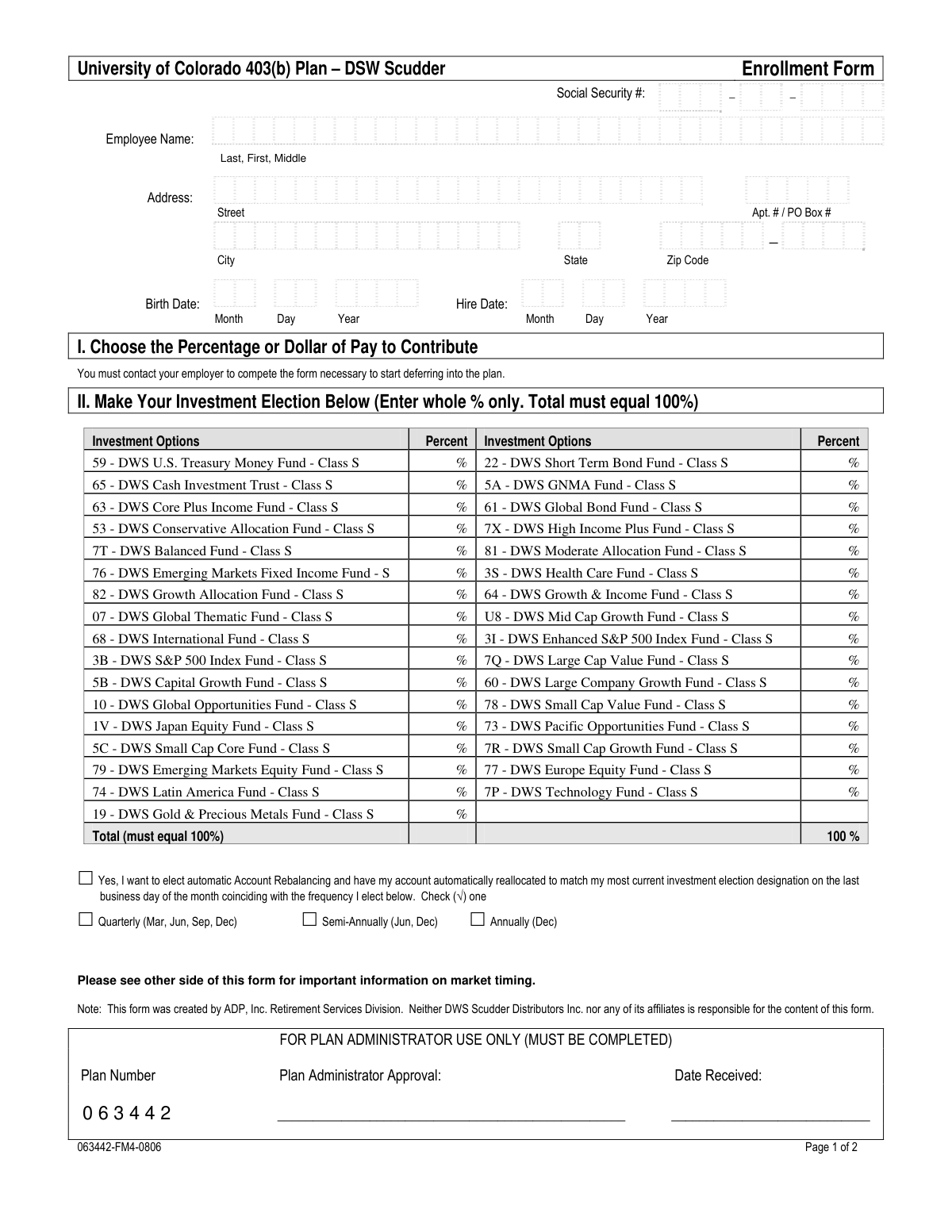
Typically, these forms are utilized by current and prospective employees of the University of Colorado who need to manage their retirement accounts, update beneficiary information, or enroll in specific savings plans like the 403(b). For example, the DSW Scudder Enrollment and Beneficiary Designation Form is a vital document for those looking to secure their financial future while working within the university system. Whether you are a new hire setting up your portfolio for the first time or a long-term employee adjusting your investment strategy, having access to clear, accessible versions of these documents is essential for maintaining your benefits and ensuring your family's security.
Navigating the complexities of university administration can be time-consuming, but modern digital tools have streamlined the process significantly. Platforms like Instafill.ai allow users to complete these forms using AI in under 30 seconds, ensuring that data is handled accurately and securely without the need for manual data entry. This approach simplifies the administrative burden on university staff, allowing them to focus more on their academic and professional contributions rather than paperwork.
Every form on this page can be completed without typing. Instafill is form filling software that reads a PDF and fills it for you — including flat and scanned documents that carry no fillable fields at all.
Forms in This Category
| Form Name | Pages | FCI | |
|---|---|---|---|
| 1. | University of Colorado 403(b) Plan – DSW Scudder Enrollment and Beneficiary Designation Form | 1 | – |
- Enterprise-grade security & data encryption
- 99%+ accuracy powered by AI
- 1,000+ forms from all industries
- Complete forms in under 60 seconds
How to Choose the Right Form
Managing Your University of Colorado Retirement Benefits
Navigating university administrative paperwork can be complex, especially when it involves long-term financial planning. Currently, this category focuses on essential retirement documentation for University of Colorado (CU) faculty and staff. Understanding whether a specific form matches your current HR status is the first step to ensuring your benefits are processed correctly.
When to Use the 403(b) Enrollment Form
The primary document in this category is the University of Colorado 403(b) Plan – DSW Scudder Enrollment and Beneficiary Designation Form. You should select and complete this form if you are a CU employee looking to perform any of the following actions:
- Start a New Retirement Account: If you are a new hire or a current employee who has decided to begin participating in the voluntary 403(b) retirement plan.
- Designate or Update Beneficiaries: This is the legal document used to ensure your retirement assets are distributed according to your wishes. It is vital to update this form after major life events like marriage, divorce, or the birth of a child.
- Select Investment Allocations: Use this form to specify exactly how your contributions should be distributed across the various investment funds managed by DSW Scudder.
Is This the Correct Form for You?
Before you begin filling out the University of Colorado 403(b) Plan – DSW Scudder Enrollment and Beneficiary Designation Form, double-check your plan provider. The University of Colorado often offers multiple vendors (such as TIAA or Corebridge Financial) for different retirement tracks. You should choose this specific form only if you have confirmed that DSW Scudder is your designated service provider for this specific voluntary tax-deferred annuity.
Practical Filling Tips
To make the most of the AI-powered tools on Instafill.ai, ensure you have your employee ID and beneficiary details (including Social Security Numbers and birthdates) ready. Our platform can help you convert the PDF into an interactive experience, making it easier to navigate the investment fund selection section and ensuring your contribution percentages total 100% without manual calculation errors.
Form Comparison
| Form | Purpose | Key Information Required | Frequency of Use |
|---|---|---|---|
| University of Colorado 403(b) Plan – DSW Scudder Enrollment and Beneficiary Designation Form | Enrolling in the university retirement plan and designating account beneficiaries. | Personal data, contribution percentages, investment fund selections, and beneficiary names. | Used during initial employment or when updating contribution amounts and beneficiaries. |
Tips for Colorado university forms
Accuracy is critical when filling out university payroll and retirement documents. Double-check your official university employee ID and Social Security number before submitting, as even a small typo can lead to significant delays in processing your retirement contributions or beneficiary designations.
When completing beneficiary forms, it is a best practice to name both a primary and a contingent beneficiary. This ensures that your retirement assets are handled according to your wishes even if your primary beneficiary is unable to receive the funds, providing extra security for your estate planning.
Managing complex university paperwork is much easier with modern technology. AI-powered tools like Instafill.ai can complete these forms in under 30 seconds with high accuracy, ensuring all fields are correctly populated while your data stays secure during the entire process.
Many enrollment forms require you to allocate your contributions across different investment funds. Before you start filling out the form, decide on your percentages and ensure they total exactly 100% to prevent the document from being rejected by the plan administrator.
Beneficiary and enrollment forms should be reviewed whenever you experience a significant life change, such as marriage, divorce, or the birth of a child. Keeping these forms updated ensures your university benefits always align with your current family and financial situation.
Always download and store a completed copy of your university forms for your personal records. Having these documents organized digitally makes it much easier to coordinate your university retirement plan with your overall long-term financial strategy and tax preparation.
Frequently Asked Questions
Employees, faculty, and student workers at institutions like the University of Colorado often need these forms to manage their benefits, payroll, and retirement plans. These documents ensure that personal data and financial elections are correctly recorded by the university's human resources or employee services departments.
A 403(b) enrollment form allows university employees to participate in tax-advantaged retirement savings plans specific to educational and non-profit institutions. By completing this document, staff members can specify their contribution amounts and choose investment funds to build their retirement savings.
Yes, AI tools like Instafill.ai can fill out these forms in under 30 seconds by accurately extracting data from your source documents and placing it into the required fields. This technology simplifies the process and helps ensure that complex administrative forms are completed without manual entry errors.
Most Colorado university forms are submitted to the institution's Employee Services or Human Resources office. Depending on the university's specific policy, you may submit them through a secure online portal, via encrypted email, or by physical mail to the benefits coordinator.
Using modern AI-powered services like Instafill.ai, you can complete these forms in less than 30 seconds by automating the data entry process. Traditional manual completion may take longer, especially when gathering beneficiary details and investment fund codes.
It is advisable to review your beneficiary designations annually or whenever you experience a significant life event such as a change in marital status or the birth of a child. Keeping these forms updated ensures that your retirement assets are handled according to your current preferences.
You will generally need your employee identification number, Social Security number, and the full legal names and birthdates of your beneficiaries. Additionally, you should be prepared to select your contribution percentage and identify which investment portfolios you wish to participate in.
Many Colorado universities and their third-party plan administrators now accept digital signatures for benefit and enrollment forms. However, you should verify with your specific HR department whether a physical 'wet' signature is required for certain legal or financial documents.
Yes, enrollment forms typically allow you to designate multiple primary and contingent beneficiaries. You must specify the percentage of the account balance that each individual should receive, ensuring the total for each category equals 100%.
While the form requires you to select specific funds, the university usually provides a guide or a list of available investment options managed by the plan provider. It is often helpful to review the plan's prospectus or consult with a financial advisor before finalizing these selections on your form.
Glossary
- 403(b) Plan
- A tax-advantaged retirement savings plan designed specifically for employees of public schools and certain tax-exempt organizations like the University of Colorado.
- Beneficiary
- The person or legal entity designated to receive the assets within the retirement account upon the death of the account holder.
- Contingent Beneficiary
- A secondary person named to receive account benefits only if the primary beneficiary is deceased at the time of the participant's death.
- Investment Election
- The process of choosing which specific financial funds or portfolios your retirement contributions will be placed into.
- Salary Reduction Agreement
- A formal authorization by the employee to have a specific portion of their gross pay withheld and contributed directly to their retirement plan.
- Pre-tax Contribution
- Funds deducted from an employee's paycheck before federal and state income taxes are calculated, which lowers the employee's current taxable income.
- DSW Scudder
- The financial services provider and investment manager authorized by the University of Colorado to administer these specific retirement plan funds.