Yes! You can use AI to fill out Vanguard Taking a Loan from Your Retirement Plan
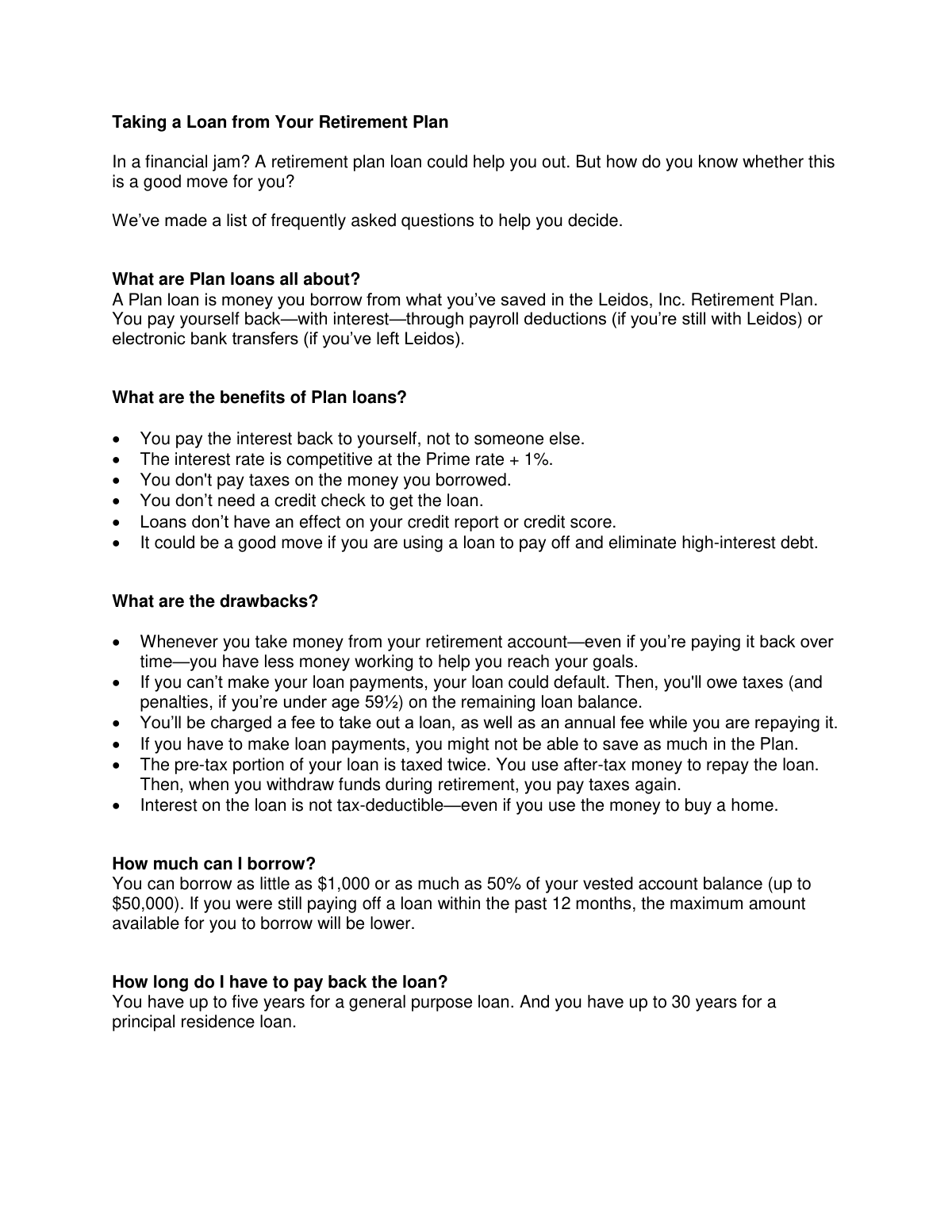
The Vanguard 'Taking a Loan from Your Retirement Plan' document is a guide for employees of Leidos, Inc. who are considering borrowing money from their retirement savings account. It details the terms, interest rates, fees, and repayment options, helping individuals make an informed decision during a financial need without undergoing a credit check. Today, any associated documentation can be filled out quickly and accurately using AI-powered services like Instafill.ai, which can also convert non-fillable PDF versions into interactive fillable forms.
BBBBNRNN 082019 is part of the
retirement forms, retirement plan forms, loan forms and Vanguard forms categories on Instafill.
Rather not fill this in by hand? Instafill is an online form filler that completes PDF forms automatically — upload the blank form, answer a few questions, and the AI fills every field.
Form specifications
| Form name: | Vanguard Taking a Loan from Your Retirement Plan |
| Number of pages: | 1 |
| Language: | English |
Our AI automatically handles information lookup, data retrieval, formatting, and form filling.
It takes less than a minute to fill out BBBBNRNN 082019 using our AI form filling.
Securely upload your data. Information is encrypted in transit and deleted immediately after the form is filled out.
Instafill Demo: How to fill out PDF forms in seconds with AI
How to Fill Out BBBBNRNN 082019 Online for Free in 2026
Are you looking to fill out a BBBBNRNN 082019 form online quickly and accurately? Instafill.ai offers the #1 AI-powered PDF filling software of 2026, allowing you to complete your BBBBNRNN 082019 form in just 37 seconds or less.
Follow these steps to fill out your BBBBNRNN 082019 form online using Instafill.ai:
- 1 Navigate to Instafill.ai and upload the retirement plan loan application form or any related documents.
- 2 Use the AI assistant to automatically fill in your personal information, such as your name, address, and plan details.
- 3 Specify the loan amount you wish to borrow, ensuring it complies with the plan's limits (e.g., up to 50% of your vested balance, not exceeding $50,000).
- 4 Indicate the purpose of the loan, whether it's for a general purpose (up to 5-year repayment) or for a principal residence (up to 30-year repayment).
- 5 Review all the information pre-filled by the AI for accuracy, including repayment terms and personal details.
- 6 Electronically sign and date the application within the Instafill.ai platform if required.
- 7 Download the completed application and submit it according to the instructions provided by Vanguard, typically via their online portal.
Our AI-powered system ensures each field is filled out correctly, reducing errors and saving you time.
Why Choose Instafill.ai for Your Fillable BBBBNRNN 082019 Form?
Speed
Complete your BBBBNRNN 082019 in as little as 37 seconds.
Up-to-Date
Always use the latest 2026 BBBBNRNN 082019 form version.
Cost-effective
No need to hire expensive lawyers.
Accuracy
Our AI performs 10 compliance checks to ensure your form is error-free.
Security
Your personal information is protected with bank-level encryption.
Frequently Asked Questions About BBBBNRNN 082019
A plan loan is money you borrow from your savings in the Leidos, Inc. Retirement Plan. You repay the loan to yourself, with interest, through payroll deductions or electronic bank transfers.
Any participant in the Leidos, Inc. Retirement Plan with a vested account balance can take out a loan. A credit check is not required to qualify.
You can borrow as little as $1,000 and as much as 50% of your vested account balance, up to a maximum of $50,000. This maximum amount may be reduced if you had an outstanding loan in the past 12 months.
You have up to five years to repay a general-purpose loan. If the loan is for a principal residence, the repayment period can be extended up to 30 years.
There is an application fee of $35 for online applications or $85 for phone assistance. Additionally, an annual maintenance fee of $25 is charged for each loan.
If you leave Leidos, you can no longer make payments via payroll deduction. However, you can continue to repay your loan using electronic bank transfers.
You can suspend your loan payments during a leave of absence until you return to work. You will be responsible for making up any missed payments upon your return.
Yes, you can pay off your loan in full or make extra payments at any time without incurring any prepayment penalties.
The borrowed money is no longer invested and growing for your retirement, you'll be charged fees, and the pre-tax portion of your loan is effectively taxed twice. If you default, you could owe taxes and penalties on the remaining balance.
You can apply online by logging into your account at vanguard.com/retirementplans or by calling Vanguard at 800-523-1188. Note that the application fee is lower for online submissions.
No, a loan from your retirement plan does not require a credit check and will not have any effect on your credit report or credit score.
Yes, services like Instafill.ai use AI to accurately auto-fill form fields, which can save you time and help prevent errors on your application.
Simply upload your loan application form to the Instafill.ai platform. The AI will automatically detect the fields and fill them in with your information, which you can then review and finalize.
If you have a non-fillable PDF, you can use a tool like Instafill.ai. It can convert flat PDFs into interactive, fillable forms that you can easily complete and sign online.
Compliance BBBBNRNN 082019
Validation Checks by Instafill.ai
1
Loan Amount Minimum Threshold
This check verifies that the requested loan amount is at least $1,000. The plan rules specify a minimum loan amount to ensure the administrative costs of processing and maintaining the loan are justified. If the user enters an amount less than $1,000, the form will display an error message and require them to increase the amount to proceed.
2
Loan Amount Maximum Calculation
This validation ensures the requested loan amount does not exceed the lesser of $50,000 or 50% of the user's vested account balance. This is a federal limit designed to protect retirement savings. The calculation must also account for any outstanding loan balances from the past 12 months, which may reduce the maximum available amount. An invalid amount will trigger an error explaining the limit and displaying the maximum borrowable amount.
3
Loan Purpose Requirement
This check ensures that the applicant has selected a purpose for the loan, either 'General Purpose' or 'Principal Residence'. This selection is critical because it determines the maximum allowable repayment term for the loan. Failure to select a purpose will prevent the form submission and prompt the user to make a choice.
4
General Purpose Loan Term Limit
This is a logical consistency check that validates the repayment term for a 'General Purpose' loan. If the user selects 'General Purpose' as the loan reason, the repayment term they choose cannot exceed five years. This rule is based on plan and regulatory guidelines. If a longer term is entered, the system will reject it and inform the user of the 5-year maximum for this loan type.
5
Principal Residence Loan Term Limit
This check validates the repayment term for a loan designated for a 'Principal Residence'. For this specific loan type, the term can be up to 30 years. This validation ensures the selected term is within this limit. If the user selects 'Principal Residence' but enters a term longer than 30 years, an error will be shown.
6
Outstanding Loan Count Limit
This validation checks the applicant's account to see how many loans are currently outstanding. According to the plan rules, a participant can have a maximum of two loans at any given time. If the system detects two existing loans, this new loan application will be blocked, and a message will inform the user they have reached the maximum number of loans.
7
Single Principal Residence Loan Rule
This check is triggered if the applicant requests a 'Principal Residence' loan. It verifies that the applicant does not already have an outstanding loan of this type. The plan rules permit only one principal residence loan at a time. If an existing one is found, the application for a new one will be denied.
8
Repayment Method for Separated Employees
This validation ensures that if an applicant's employment status is 'Separated from Leidos', the repayment method is set to 'Electronic Bank Transfer'. Payroll deductions are not possible for former employees, so this is the only valid option. If the form were to allow 'Payroll Deduction' to be selected, this check would fail and force the user to correct the repayment method.
9
Bank Routing Number Format
For applicants paying via electronic bank transfer, this check validates that the bank routing number is exactly nine digits long. This is a standard format for all U.S. financial institutions and is essential for correctly processing payments. An entry that is not nine digits will be flagged as invalid, preventing submission until a valid number is provided.
10
Bank Information Completeness
If 'Electronic Bank Transfer' is the selected repayment method, this check ensures that all required banking fields (Routing Number, Account Number, and Account Type) are filled out. Missing any of this information would cause the automated payment setup to fail. The form will not be submittable until all necessary bank details are provided.
11
Application Fee Verification
This check validates that the correct application fee is being charged based on the submission method. The fee is $35 for online or automated phone (VOICE) applications, but $85 for applications completed with assistance from a Vanguard associate. This ensures accurate billing and transparency for the applicant. A mismatch would require system correction before the application is finalized.
12
SSN Format and Presence
This validation ensures a Social Security Number (SSN) is provided and follows the standard 9-digit format (XXX-XX-XXXX or XXXXXXXXX). The SSN is crucial for identity verification and for tax reporting purposes, especially if the loan defaults. The form will be rejected if the SSN is missing or formatted incorrectly.
Common Mistakes in Completing BBBBNRNN 082019
Applicants often request more than the allowable limit (50% of vested balance, up to $50,000) or less than the minimum ($1,000). They may also forget that the maximum is reduced if they've had a loan in the past 12 months. This error leads to immediate application rejection and delays. To avoid this, carefully check your vested balance and loan history on the Vanguard portal before applying.
A common error is selecting 'principal residence loan' to get the longer 30-year repayment term for a loan that doesn't qualify, such as for debt consolidation. This can be considered fraudulent and will lead to application denial or later complications. Be sure to select 'general purpose loan' for all non-residence needs to ensure compliance with the 5-year repayment term.
Applicants frequently confuse their total account balance with their 'vested' account balance when calculating their maximum loan amount. Only the vested portion, which is the money you own outright, can be used for the loan calculation. Using the total balance will result in requesting an ineligible amount and having the application rejected.
When an employee leaves Leidos, they often forget that payroll deductions stop automatically and they must proactively set up electronic bank transfers to continue payments. Failure to do so will cause the loan to go into default, triggering significant tax liabilities and penalties. Always confirm your repayment method if your employment status changes.
Many retirement plan loan applications legally require the consent of the spouse, often with a notarized signature on a separate form. Overlooking this step is a primary reason for application delays and rejections. Always verify if spousal consent is needed early in the process to gather the necessary signatures and documentation without delay.
Many applicants are surprised by the fees deducted from their loan proceeds or account, such as the $35 online application fee and the $25 annual maintenance fee. This oversight can affect financial planning, as the net amount received is less than the borrowed amount. Always factor these costs into your calculations before finalizing the loan.
The plan allows for a maximum of two outstanding loans, with only one being for a principal residence. People sometimes forget about an existing loan and apply for a third, or try to take a second principal residence loan. This will result in an automatic rejection of the new loan application.
Employees going on a leave of absence may assume payments are automatically paused, but they are not. The employee must contact Vanguard to formally suspend payments. Neglecting this step can lead to missed payments and potential default, requiring complicated catch-up payments or re-amortization later.
Applicants, especially those who have left the company, may have outdated addresses or bank account details on file. This can cause delays in receiving loan funds or, more critically, lead to failed electronic payments during repayment, risking a loan default. AI-powered tools like Instafill.ai can help prevent this by autofilling the most current information, but you should always double-check before submitting.
An applicant might make an extra payment assuming it will allow them to skip their next scheduled payment, but the document states this is not the case. The extra amount is applied to the principal, but the next payment is still due as scheduled. This misunderstanding can lead to an unintentional missed payment if the borrower doesn't make their next regular payment.
Saved over 80 hours a year
“I was never sure if my IRS forms like W-9 were filled correctly. Now, I can complete the forms accurately without any external help.”
Kevin Martin Green
Your data stays secure with advanced protection from Instafill and our subprocessors




Robust compliance program
Transparent business model
You’re not the product. You always know where your data is and what it is processed for.
ISO 27001, HIPAA, and GDPR
Our subprocesses adhere to multiple compliance standards, including but not limited to ISO 27001, HIPAA, and GDPR.
Security & privacy by design
We consider security and privacy from the initial design phase of any new service or functionality. It’s not an afterthought, it’s built-in, including support for two-factor authentication (2FA) to further protect your account.
Fill out BBBBNRNN 082019 with Instafill.ai
Worried about filling PDFs wrong? Instafill securely fills vanguard-taking-a-loan-from-your-retirement-plan forms, ensuring each field is accurate.
