Yes! You can use AI to fill out Authorization to transfer funds from a bank retirement account
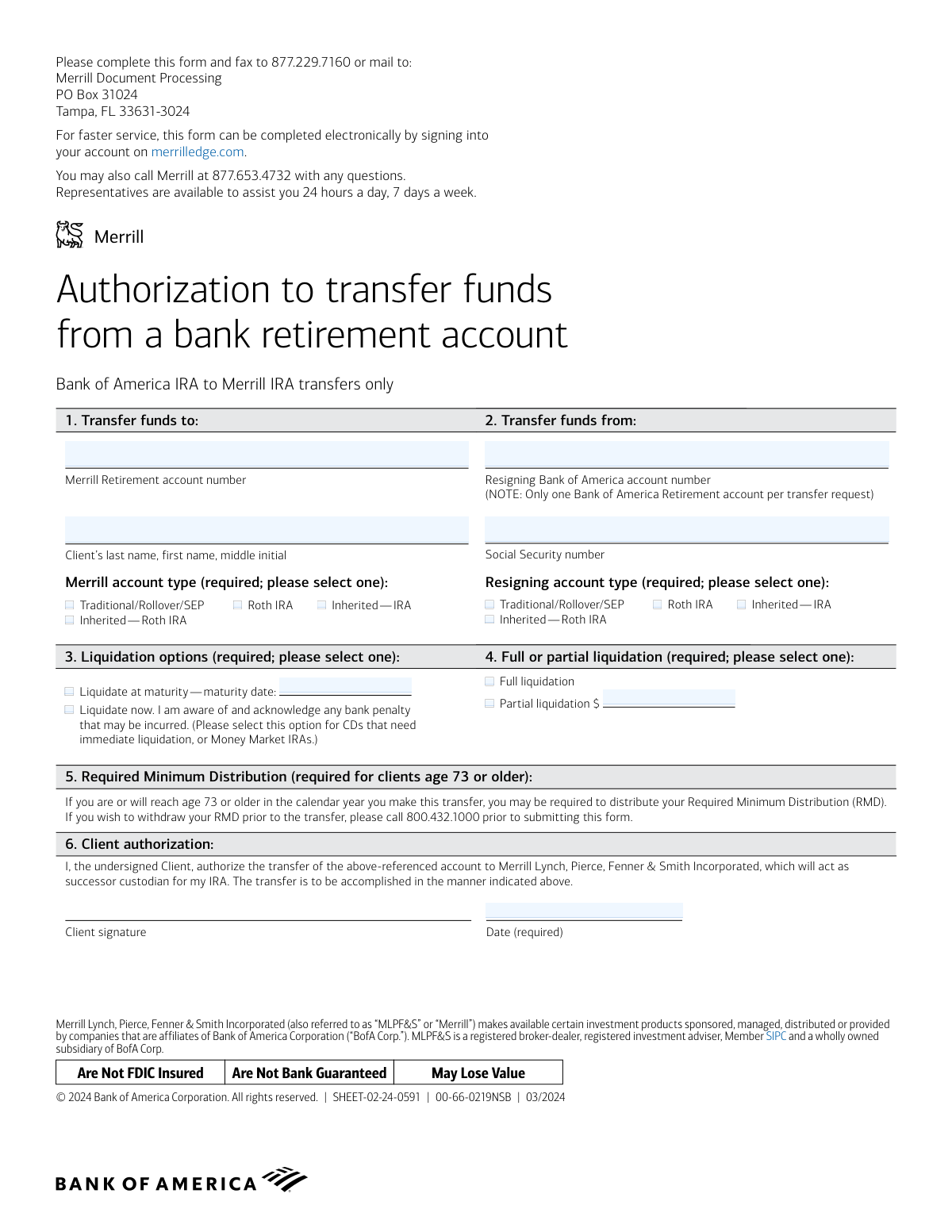
This form, officially titled 'Authorization to transfer funds from a bank retirement account,' is a specific document used by clients to authorize the movement of their retirement assets from a Bank of America IRA directly to a Merrill IRA. It is a crucial step for consolidating retirement accounts under the Merrill platform, specifying the accounts involved, liquidation options, and requiring client authorization. Today, this form can be filled out quickly and accurately using AI-powered services like Instafill.ai, which can also convert non-fillable PDF versions into interactive fillable forms.
Our AI automatically handles information lookup, data retrieval, formatting, and form filling.
It takes less than a minute to fill out SHEET-02-24-0591 using our AI form filling.
Securely upload your data. Information is encrypted in transit and deleted immediately after the form is filled out.
Form specifications
| Form name: | Authorization to transfer funds from a bank retirement account |
| Number of pages: | 1 |
| Language: | English |
| Categories: | retirement forms, authorization forms, bank account forms, retirement fund forms, retirement account forms, account transfer forms, transfer forms, funds transfer forms, bank transfer forms |
Instafill Demo: How to fill out PDF forms in seconds with AI
How to Fill Out SHEET-02-24-0591 Online for Free in 2026
Are you looking to fill out a SHEET-02-24-0591 form online quickly and accurately? Instafill.ai offers the #1 AI-powered PDF filling software of 2026, allowing you to complete your SHEET-02-24-0591 form in just 37 seconds or less.
Follow these steps to fill out your SHEET-02-24-0591 form online using Instafill.ai:
- 1 Navigate to Instafill.ai and upload the 'Authorization to transfer funds from a bank retirement account' form or select it from their template library.
- 2 Use the AI assistant to automatically populate your personal details, such as your name and Social Security number, into the appropriate fields.
- 3 Enter your Merrill retirement account number in Section 1 and select the correct account type (e.g., Traditional/Rollover/SEP, Roth IRA).
- 4 Provide your Bank of America account number in Section 2 and specify the corresponding account type you are transferring from.
- 5 Choose your liquidation option in Section 3 (e.g., 'Liquidate at maturity' or 'Liquidate now') and indicate whether it's a full or partial liquidation in Section 4.
- 6 Address the Required Minimum Distribution (RMD) section if you are age 73 or older.
- 7 Review all the information pre-filled by the AI for accuracy, then digitally sign and date the form in the 'Client authorization' section before submitting it to Merrill.
Our AI-powered system ensures each field is filled out correctly, reducing errors and saving you time.
Why Choose Instafill.ai for Your Fillable SHEET-02-24-0591 Form?
Speed
Complete your SHEET-02-24-0591 in as little as 37 seconds.
Up-to-Date
Always use the latest 2026 SHEET-02-24-0591 form version.
Cost-effective
No need to hire expensive lawyers.
Accuracy
Our AI performs 10 compliance checks to ensure your form is error-free.
Security
Your personal information is protected with bank-level encryption.
Frequently Asked Questions About Form SHEET-02-24-0591
This form authorizes the transfer of funds from a Bank of America Individual Retirement Account (IRA) to a Merrill IRA. It is specifically for moving retirement funds between these two affiliated institutions.
You should use this form if you have a retirement account at Bank of America and want to transfer the funds into your retirement account at Merrill.
You will need your Merrill retirement account number, your Bank of America retirement account number, and your Social Security Number. You must also select the account types for both the sending and receiving accounts.
No, this form is exclusively for transfers from a Bank of America IRA to a Merrill IRA. You cannot use it for transfers from other financial institutions.
You can fax the completed form to 877.229.7160 or mail it to the Merrill Document Processing center. For faster service, the form notes you can complete the process electronically on merrilledge.com.
Selecting 'Liquidate now' instructs the bank to sell your assets, such as a CD or Money Market IRA, immediately, even if it's before the maturity date. Be aware that doing so may result in a bank penalty.
If you are age 73 or older, you may need to take your RMD for the year before transferring the account. The form advises calling 800.432.1000 to handle your RMD withdrawal prior to submitting the transfer request.
Yes, in Section 4 you can select 'Partial liquidation' and specify the exact dollar amount you wish to transfer to your Merrill account.
No, the form states that you can only list one Bank of America retirement account per transfer request. You must complete a separate form for each account you wish to transfer.
Yes, the form indicates that for faster service, you can complete this process electronically by signing into your account on merrilledge.com.
You can call Merrill at 877.653.4732 for assistance. Representatives are available 24 hours a day, 7 days a week.
Yes, services like Instafill.ai use AI to accurately auto-fill form fields with your information, which can save you time and help prevent errors.
You can use a service like Instafill.ai to upload the PDF and fill it out on your computer. After completing the form, you can download it for printing and submission via mail or fax.
If you have a non-fillable or 'flat' PDF, tools like Instafill.ai can convert it into an interactive, fillable form. This allows you to easily type your information into the fields before printing.
Compliance SHEET-02-24-0591
Validation Checks by Instafill.ai
1
SSN Format and Validity
Ensures the Social Security Number is provided in a valid 9-digit format (e.g., XXX-XX-XXXX or XXXXXXXXX). This is critical for uniquely identifying the client for tax reporting and account verification. A missing or malformed SSN will prevent the system from matching the client to their accounts and will cause the transaction to fail.
2
Required Signature Date
Verifies that the 'Date' field in the Client Authorization section is completed with a valid date. This date legally records when the client authorized the transfer. The validation should also check that the date is not in the future and is reasonably recent, as stale-dated forms may be rejected.
3
Exclusive 'To' Account Type Selection
Confirms that exactly one account type (e.g., Traditional/Rollover/SEP, Roth IRA) is selected for the destination Merrill account. Selecting zero or more than one type creates ambiguity and prevents the correct setup or processing of the receiving account. This is a required field for regulatory and tax classification.
4
Exclusive 'From' Account Type Selection
Confirms that exactly one account type is selected for the source Bank of America account. This information is required to ensure the transfer is handled correctly according to the rules governing the specific type of retirement account. Failure to select one option will halt the process.
5
Exclusive Liquidation Option Selection
Validates that the client has selected exactly one liquidation option: either 'Liquidate at maturity' or 'Liquidate now'. This choice is mandatory as it dictates the timing of the asset sale in the source account. The form cannot be processed without this instruction.
6
Conditional Maturity Date Requirement
Checks that if the 'Liquidate at maturity' option is selected, a corresponding maturity date is provided. The date is essential for scheduling the liquidation and transfer. If the option is checked but the date is missing, the request is incomplete and cannot be fulfilled.
7
Maturity Date Logical Check
Ensures that the provided maturity date is a valid date that occurs in the future. A past date is illogical for a future-dated liquidation instruction. This check prevents scheduling errors and ensures the client's instruction is viable.
8
Exclusive Liquidation Portion Selection
Verifies that the client has selected exactly one option for the amount to liquidate: either 'Full liquidation' or 'Partial liquidation'. This is a required field that determines the scope of the transfer. An ambiguous or missing selection will prevent the transaction from being processed.
9
Conditional Partial Liquidation Amount
Ensures that if 'Partial liquidation' is selected, a specific dollar amount is entered. A partial transfer cannot be executed without knowing how much money to move. The validation should confirm the amount is a positive numeric value.
10
Client Name Completeness
Checks that the client's name field is not empty and appears to contain at least a first and last name. This information is fundamental for matching the form to the correct individual and their accounts. An incomplete name could lead to processing delays or errors.
11
Client Signature Presence
Verifies that the client's signature is present on the form. A signature is the legal authorization for the transfer and is a non-negotiable requirement. A missing signature renders the entire form invalid and the transfer cannot proceed.
12
Account Holder and SSN Match
Performs a critical cross-validation to ensure the client name and Social Security Number on the form match the owner of both the source Bank of America account and the destination Merrill account. A mismatch indicates a serious error or potential fraud and must immediately halt the transfer process pending investigation.
13
Account Type Transfer Logic
Checks for logical consistency between the 'From' account type and the 'To' account type. For example, transferring from a Roth IRA to a Traditional IRA is generally not permitted. This validation flags potentially invalid or complex transfers (like conversions) that may require special handling or client confirmation.
14
RMD Age Warning
If the client's age, as determined from their profile linked to the SSN, is 73 or older, this check flags the form for review. It serves as a reminder to the processor or a warning to the client that a Required Minimum Distribution (RMD) may need to be taken before the transfer to avoid tax penalties. This is a 'soft' validation to prevent financial harm to the client.
Common Mistakes in Completing SHEET-02-24-0591
Users often select different IRA types in Section 1 and Section 2, for example, transferring from a 'Traditional IRA' to a 'Roth IRA'. This is not a simple transfer; it's a conversion with significant tax implications that this form is not designed to handle. Such a mismatch will cause the transfer to be rejected, delaying the process until a corrected form or a proper conversion form is submitted. Always ensure the account types selected in both sections are identical.
Forgetting to sign or date the form in Section 6 is one of the most frequent and critical errors. An unsigned or undated form is legally invalid and cannot be processed, leading to an automatic rejection and significant delays. Applicants must physically sign and write the current date to authorize the transfer. Using a digital completion tool can help by providing a clear, mandatory field for the date, reducing the chance of omission.
Clients age 73 or older often overlook the instructions in Section 5 regarding their RMD. They submit the transfer request without first taking their required distribution for the year from the Bank of America account. This can lead to compliance issues and potential tax penalties. Before submitting this form, eligible clients must call the specified number to arrange their RMD withdrawal to avoid complications.
In Sections 3 and 4, users must make specific choices about liquidation. Common mistakes include selecting 'Liquidate at maturity' without providing the date, or choosing 'Partial liquidation' without specifying the dollar amount. This ambiguity halts the process as the financial institution cannot act on unclear instructions. To avoid this, carefully fill in all required details for your chosen option and select only one option per section.
A simple typo in the Merrill or Bank of America account numbers (Sections 1 and 2) is a very common data entry error. Transposing just two digits will cause the transfer to fail because the system cannot locate the correct accounts. This results in processing delays and requires resubmission of the form. Double-check each account number digit by digit against your account statements before submitting.
Applicants sometimes attempt to use this form for transfers that are not between a Bank of America IRA and a Merrill IRA, as specified in the title. Using this form for accounts from other institutions will result in immediate rejection. It is crucial to read the form's title and purpose carefully to ensure it is the correct document for your specific transfer needs.
The name entered in Section 1 must perfectly match the legal name on the Merrill account, including the last name, first name, and middle initial. People often use nicknames, omit their middle initial, or reverse the first and last names, causing a name mismatch that can delay or block the transfer for security and verification reasons. Always refer to an official account statement to ensure the name is entered exactly as it appears on the account.
Both Section 1 and Section 2 require the user to select an account type (e.g., Traditional IRA, Roth IRA). It's a common oversight to leave one or both of these checkbox sections blank. Since this information is required to correctly process the transfer and maintain its tax-advantaged status, an omission will cause the form to be returned, delaying the entire process. AI-powered form filling tools like Instafill.ai can prevent this by flagging mandatory fields that have been missed.
When the form is printed and filled out by hand, poor or unclear handwriting can make account numbers, names, and dates impossible to read accurately. This leads to data entry errors on the processing end or outright rejection of the form. To guarantee clarity, it is best to fill out the form electronically. If the PDF is not fillable, tools like Instafill.ai can convert it into a fillable version, allowing you to type directly into the fields for perfect legibility.
Saved over 80 hours a year
“I was never sure if my IRS forms like W-9 were filled correctly. Now, I can complete the forms accurately without any external help.”
Kevin Martin Green
Your data stays secure with advanced protection from Instafill and our subprocessors

Robust compliance program
Transparent business model
You’re not the product. You always know where your data is and what it is processed for.
ISO 27001, HIPAA, and GDPR
Our subprocesses adhere to multiple compliance standards, including but not limited to ISO 27001, HIPAA, and GDPR.
Security & privacy by design
We consider security and privacy from the initial design phase of any new service or functionality. It’s not an afterthought, it’s built-in, including support for two-factor authentication (2FA) to further protect your account.
Fill out SHEET-02-24-0591 with Instafill.ai
Worried about filling PDFs wrong? Instafill securely fills authorization-to-transfer-funds-from-a-bank-retirement-account forms, ensuring each field is accurate.