Yes! You can use AI to fill out Form ORP-RMD-1, State University System Optional Retirement Program (SUSORP) Application for a Required Minimum Distribution
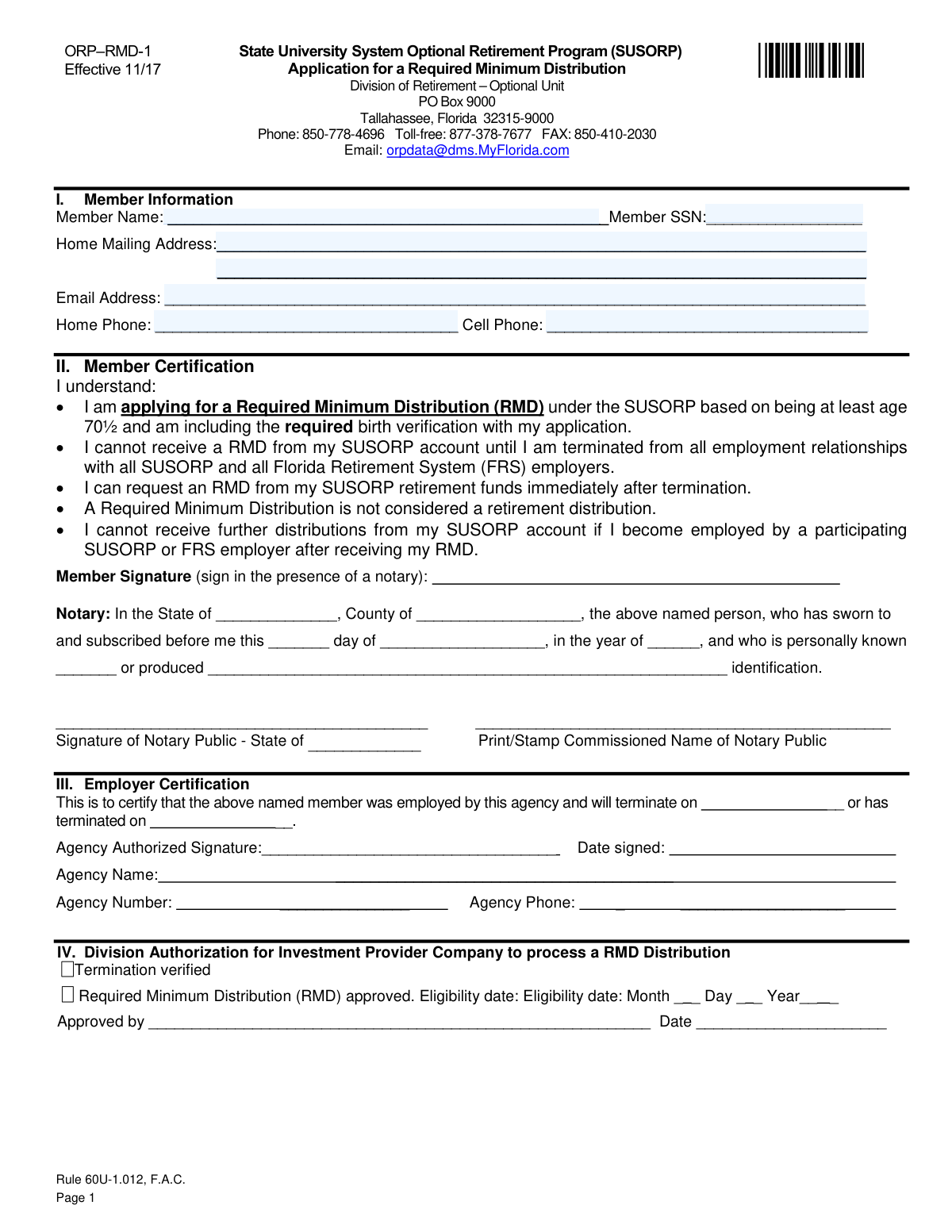
Form ORP-RMD-1 is an application for former employees of Florida's State University System to request a Required Minimum Distribution (RMD) from their Optional Retirement Program (SUSORP) account. To be eligible, applicants must be at least 70½ years old and terminated from all employment with SUSORP and Florida Retirement System (FRS) employers. Today, this form can be filled out quickly and accurately using AI-powered services like Instafill.ai, which can also convert non-fillable PDF versions into interactive fillable forms.
ORP-RMD-1 is part of the
retirement forms, PA state forms, RMD forms, distribution forms, retirement system forms, NJ state forms, university forms, retirement distribution forms, required minimum distribution forms, university retirement forms, optional retirement program forms and state university system forms categories on Instafill.
Rather not fill this in by hand? Instafill is an online form filler that completes PDF forms automatically — upload the blank form, answer a few questions, and the AI fills every field.
Form specifications
| Form name: | Form ORP-RMD-1, State University System Optional Retirement Program (SUSORP) Application for a Required Minimum Distribution |
| Number of pages: | 1 |
| Language: | English |
Our AI automatically handles information lookup, data retrieval, formatting, and form filling.
It takes less than a minute to fill out ORP-RMD-1 using our AI form filling.
Securely upload your data. Information is encrypted in transit and deleted immediately after the form is filled out.
Instafill Demo: How to fill out PDF forms in seconds with AI
How to Fill Out ORP-RMD-1 Online for Free in 2026
Are you looking to fill out a ORP-RMD-1 form online quickly and accurately? Instafill.ai offers the #1 AI-powered PDF filling software of 2026, allowing you to complete your ORP-RMD-1 form in just 37 seconds or less.
Follow these steps to fill out your ORP-RMD-1 form online using Instafill.ai:
- 1 Navigate to Instafill.ai and upload or select Form ORP-RMD-1.
- 2 Use the AI assistant to automatically populate your personal details in Section I, including your name, SSN, and address.
- 3 Carefully review the member certifications in Section II to understand the terms of the RMD application.
- 4 Print the completed form. Sign the Member Certification section in the presence of a notary public.
- 5 Gather a copy of an acceptable birth verification document, such as a birth certificate or valid U.S. passport.
- 6 Submit the notarized form and your birth verification document to your last SUSORP or FRS employer for them to complete the Employer Certification in Section III.
- 7 Your former employer will then forward the completed application to the Division of Retirement for final processing and authorization.
Our AI-powered system ensures each field is filled out correctly, reducing errors and saving you time.
Why Choose Instafill.ai for Your Fillable ORP-RMD-1 Form?
Speed
Complete your ORP-RMD-1 in as little as 37 seconds.
Up-to-Date
Always use the latest 2026 ORP-RMD-1 form version.
Cost-effective
No need to hire expensive lawyers.
Accuracy
Our AI performs 10 compliance checks to ensure your form is error-free.
Security
Your personal information is protected with bank-level encryption.
Frequently Asked Questions About ORP-RMD-1
This form is used to apply for a Required Minimum Distribution (RMD) from the State University System Optional Retirement Program (SUSORP). An RMD is a mandatory withdrawal from your retirement account, not a regular retirement distribution.
You need to fill out this form if you are at least 70½ years old and have terminated all employment with SUSORP and Florida Retirement System (FRS) employers. Both conditions must be met to be eligible for an RMD.
You must submit the completed and notarized Form ORP-RMD-1 along with a copy of a birth verification document. Acceptable documents include a birth certificate, a valid U.S. passport, or a REAL ID-compliant Florida driver's license issued after January 1, 2010.
Submit your completed form and birth verification to your last SUSORP or FRS employer. They will certify your termination in Section III and forward the packet to the Division of Retirement for you.
Yes, your signature in Section II (Member Certification) must be signed in the presence of a Notary Public. The notary must complete their section on the form for it to be valid.
Your employer certifies your termination and sends the form to the Division of Retirement, which approves it and forwards it to your Investment Provider Company. Your provider then processes the distribution.
After your application is approved, your distribution should be processed by the 15th day of the following month. If you have not received it by the 20th, you should contact your Investment Provider Company directly.
Yes, you must contact your Investment Provider Company to request and complete their separate distribution documents. These documents should be returned directly to the provider, not to the Division of Retirement.
While an RMD is not a retirement distribution, the form states that you cannot receive further distributions from your SUSORP account if you become employed by a participating employer after receiving your RMD.
Yes, services like Instafill.ai use AI to accurately auto-fill form fields with your personal information, which can save time and help prevent errors.
You can use a service like Instafill.ai to complete the form online. Simply upload the PDF, and the tool will make the fields fillable so you can type your information before printing the form for notarization.
If you have a non-fillable or 'flat' PDF, you can use a tool like Instafill.ai to instantly convert it into an interactive, fillable form. This allows you to easily type your information instead of filling it out by hand.
Section III must be completed and signed by an authorized representative from your last employing agency. They will certify your termination date before forwarding the form to the Division of Retirement.
Compliance ORP-RMD-1
Validation Checks by Instafill.ai
1
Validates Member Social Security Number Format and Presence
This check ensures the Member SSN field is not empty and conforms to the standard 9-digit format (XXX-XX-XXXX or XXXXXXXXX). The SSN is a critical unique identifier for locating the member's account and verifying their identity. If the SSN is missing or invalid, the application cannot be processed and will be rejected.
2
Verifies Member Age Eligibility for RMD
This validation confirms that the applicant meets the minimum age requirement of 70½ years for a Required Minimum Distribution (RMD). The system should calculate the member's age based on the date of birth provided in the required birth verification documents. Failure to meet this age requirement will result in the immediate denial of the RMD application as it is a primary eligibility criterion.
3
Confirms Termination from All FRS/SUSORP Employment
This check verifies that the member has terminated all employment relationships with all Florida Retirement System (FRS) and State University System Optional Retirement Program (SUSORP) employers. This is a mandatory eligibility requirement for receiving an RMD. The system should cross-reference the member's status against central employment records, and if active employment is found, the application will be denied.
4
Ensures Birth Verification Document is Attached
This validation checks for the presence of an attached copy of an acceptable birth verification document as listed on the information page (e.g., birth certificate, valid U.S. passport, etc.). This document is required to prove the member meets the age 70½ eligibility rule. An application submitted without the required proof of birth will be considered incomplete and will not be approved until the documentation is provided.
5
Validates Employer-Certified Termination Date
This check ensures the termination date provided in Section III by the employer is a complete and valid date. It also verifies that the date is not in the distant future, as it is used to establish the RMD eligibility date. An invalid or missing termination date prevents the Division from confirming eligibility, causing the application processing to be halted until a correction is received from the employer.
6
Verifies Completeness of Member Certification and Notarization
This check confirms that the member's signature is present and that all fields in the notary block (State, County, Date, Notary Signature, and Notary Name/Stamp) are completed. A properly notarized signature is a legal requirement that attests to the member's identity and intent. An incomplete or missing notarization will render the application legally invalid and result in its rejection.
7
Validates Notarization Date Logic
This check ensures the date of notarization in Section II is a valid calendar date and is not a future date. The date establishes when the legal attestation occurred. A future or invalid date would invalidate the notarization, requiring the member to have the form re-signed and re-notarized before it can be accepted.
8
Ensures Completeness of Employer Certification Section
This validation verifies that all fields in Section III, including Agency Name, Agency Number, Agency Authorized Signature, and Date Signed, are fully completed. This information is crucial for confirming which employer is certifying the member's termination and for any necessary follow-up. Incomplete employer certification will halt the process, and the form will be returned to the employer for completion.
9
Validates Member Email Address Format
This check ensures that the provided email address in Section I follows the standard '[email protected]' format. A valid email address is important for efficient communication with the member regarding their application status or any issues. While not always a blocking issue, an invalid format should trigger a warning or require correction to ensure the member receives important notifications.
10
Verifies Presence of Member Contact Information
This check ensures that at least one method of contact, either a Home Phone, Cell Phone, or a valid Email Address, is provided in Section I. This is essential for the Division of Retirement to communicate with the applicant if there are questions or issues with the application. If no contact information is provided, it can significantly delay processing if clarification is needed.
11
Validates Home Mailing Address Completeness
This check ensures the Home Mailing Address field contains enough information (e.g., street, city, state, ZIP code) to be considered a deliverable address. This address may be used for sending official correspondence or payments. An incomplete or invalid address could lead to lost mail and significant delays, so the application may be held until a valid address is confirmed.
12
Validates Phone Number Format
This check verifies that the Home Phone and Cell Phone numbers are entered in a recognizable U.S. phone number format (e.g., 10 digits, possibly with parentheses, spaces, or hyphens). Proper formatting ensures the data is clean and can be used by automated dialing or contact systems. An improperly formatted number might be flagged for manual review and correction.
13
Logical Check on Employer Signature Date
This validation compares the employer's signature date with the member's termination date in Section III. The signature date should logically be on or after the termination date, as the employer is certifying that the termination 'will happen' or 'has happened'. A signature dated before the termination date could indicate a procedural error and may require clarification from the employer.
Common Mistakes in Completing ORP-RMD-1
Applicants often mistakenly mail the completed Form ORP-RMD-1 directly to the Division of Retirement. The instructions explicitly state the form must first be submitted to the applicant's last SUSORP or FRS employer for certification in Section III. Submitting to the wrong entity causes significant processing delays, as the form will be returned or rerouted, restarting the timeline. To avoid this, carefully follow Step 1 of the application process and deliver the form and birth verification to your last employer's HR or benefits office.
A common error is failing to include a copy of an acceptable birth verification document with the application, or submitting a document that is not on the approved list (e.g., a hospital birth announcement). This is a strict requirement to verify the applicant is age 70½, and its absence will halt the application process until the correct documentation is received. Always submit a copy of one of the specific documents listed, such as a valid U.S. passport, REAL ID-compliant driver's license, or state-registered birth certificate.
Applicants frequently sign the form in Section II before meeting with the notary public, which invalidates the notarization. The purpose of the notary is to witness the signature. An improperly notarized form, or one where the notary forgets their stamp or commission details, will be rejected. To prevent this, do not sign the form until you are physically in the presence of the notary and have presented your identification.
Many applicants apply for the RMD as soon as they turn 70½, without realizing they must also be terminated from *all* employment with *all* SUSORP and FRS employers. Applying while still employed will result in an automatic denial of the application. Before filling out the form, confirm your termination date and ensure you have no active employment relationships with any participating Florida state employer.
This form is a non-fillable PDF, requiring applicants to write information by hand, which can lead to illegible entries for names, addresses, and Social Security Numbers. Poor handwriting can cause data entry errors by the processing staff, leading to returned mail, incorrect records, or processing delays. To avoid this, print clearly in block letters. Using a tool like Instafill.ai can convert the flat PDF into a fillable form, allowing you to type your information for perfect clarity and accuracy.
The process requires interacting with two separate entities: the Division of Retirement (for Form ORP-RMD-1) and the Investment Provider Company (for their own distribution documents). Applicants sometimes send their provider's forms to the Division, or assume the Division handles all paperwork. This confusion delays the distribution, as the Division does not process provider-specific forms. Always send Form ORP-RMD-1 to your employer and the separate distribution documents directly back to your Investment Provider Company as instructed in Step 2.
In an effort to be thorough, some applicants send original documents like their birth certificate or passport for birth verification. The instructions clearly state to submit copies only and that originals will not be returned, leading to the permanent loss of valuable personal documents. Always make clear, high-quality photocopies of your verification documents to submit with your application and keep your originals in a safe place.
Leaving fields blank in Section I or providing outdated information, such as a previous mailing address or an incorrect Social Security Number, is a frequent mistake. These errors can lead to critical communications being lost or the application being rejected due to a failure to identify the member in the system. Double-check every field for accuracy and completeness before submission. AI-powered tools like Instafill.ai can help prevent these errors by auto-filling from a secure profile and validating data formats for fields like SSN and email addresses.
Applicants may fill out the 'Member Name' field with a nickname or a shortened version of their name instead of their full legal name. This can cause a mismatch with official records held by the employer and the retirement system, leading to verification failures and processing delays. Ensure the name you enter on the form exactly matches the name on your Social Security card and other official documents.
Saved over 80 hours a year
“I was never sure if my IRS forms like W-9 were filled correctly. Now, I can complete the forms accurately without any external help.”
Kevin Martin Green
Your data stays secure with advanced protection from Instafill and our subprocessors




Robust compliance program
Transparent business model
You’re not the product. You always know where your data is and what it is processed for.
ISO 27001, HIPAA, and GDPR
Our subprocesses adhere to multiple compliance standards, including but not limited to ISO 27001, HIPAA, and GDPR.
Security & privacy by design
We consider security and privacy from the initial design phase of any new service or functionality. It’s not an afterthought, it’s built-in, including support for two-factor authentication (2FA) to further protect your account.
Fill out ORP-RMD-1 with Instafill.ai
Worried about filling PDFs wrong? Instafill securely fills form-orp-rmd-1-state-university-system-optional-retirement-program-susorp-application-for-a-required-minimum forms, ensuring each field is accurate.
