
Yes! You can use AI to fill out Make a contribution - Vanguard Charitable
Don't type 202 fields by hand. Tell our AI about yourself, or upload a document you already have, and it fills every field in seconds. You check it, then download, print or sign.
The AI does the filling. You just check it.
No typing into boxes, nothing to install.
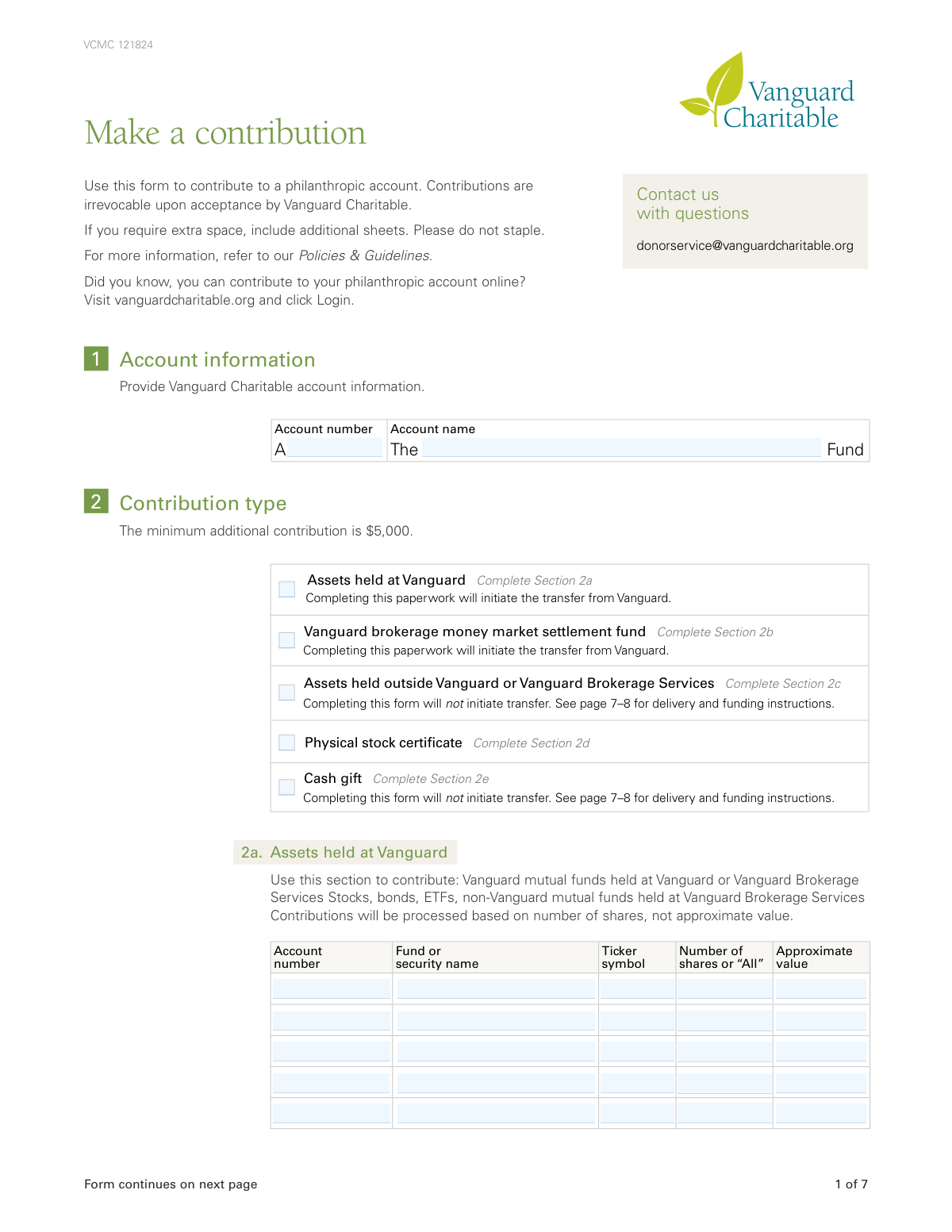
What this form asks for
The AI fills all of it, from your answers or your documents.
The AI checks your answers before you download
12 checks built for this form, so a wrong date or a missing answer is caught before anyone else sees it.
This check ensures that the total approximate value of all contributed assets listed in Section 2 meets the minimum requirement of $5,000. This is a fundamental business rule to ensure contributions are substantial enough to warrant processing. If the total value is less than $5,000, the form submission will be rejected with an error message indicating the minimum contribution threshold has not been met.
This validation checks the investment allocation percentages in Section 5. If any percentage is entered in this section, the sum of all entered percentages must equal exactly 100%. This is critical for ensuring the contributed funds are allocated correctly according to the donor's wishes. A failure will prompt the user to adjust the percentages until they sum to 100, or to clear the section to use the default allocation.
This check verifies that for each 'Contribution type' checkbox selected in Section 1, the corresponding subsection (2a, 2b, 2c, 2d, or 2e) is properly filled out. This ensures that all necessary details for the specific type of asset being transferred are provided. If a contribution type is selected but its corresponding section is empty, the submission will be flagged as incomplete and the user will be directed to fill out the required fields.
This check cross-references the typed names under the signature lines in Section 6 with the donor names provided in Section 3a and 3b. The names must match exactly to ensure the person signing has the authority to make the contribution. A mismatch could indicate a potential error or fraud, and the form will be rejected pending correction to ensure legal and security compliance.
This rule ensures all date fields (e.g., 'Birth date', 'Approximate send date', 'Date shares acquired', 'Date' of signature) are entered in the 'mm-dd-yyyy' format and represent a valid, logical date. For example, a birth date cannot be in the future, and a month cannot be '13'. This prevents data entry errors and ensures accurate record-keeping and processing. An invalid date format or value will trigger an error message requiring the user to correct the entry.
This check calculates the total approximate value of the contribution from Section 2 and determines if it exceeds $10 million. If it does, the validation ensures that Section 7 ('Authentication for assets transferred from Vanguard') has been completed. This is a critical security measure to prevent fraudulent high-value transfers. If the threshold is met and Section 7 is incomplete, the submission will be blocked until the required voice verification or signature guarantee information is provided.
And 6 more checks
- Validates Last 4 Digits of SSN/PIN/TIN
- Ensures Completeness for Joint Donors
- Validates Ticker Symbol Format
- Verifies Donor Type Information
- Validates Email Address Syntax
- Checks for Vanguard Brokerage Account Number Format
Let AI fill out your VCMC 121824
No typing. Every field filled in seconds, checked, ready to sign.
How to Fill Out VCMC 121824 Online for Free in 2026
What the AI walks you through.
- Navigate to Instafill.ai and upload or select the Vanguard Charitable 'Make a contribution' form.
- Provide your Vanguard Charitable account number and name in Section 1.
- Select the contribution type in Section 2, detailing the specific assets you are donating, whether they are held at Vanguard, outside Vanguard, or are a cash gift.
- Complete Section 3 with the primary and joint donor's information, including name, address, and taxpayer identification details.
- In Section 5, specify the percentage allocation for how the contribution proceeds should be invested among the various portfolio options.
- Carefully review all entered information, then sign and date the form in Section 6. Obtain a Medallion signature guarantee if required for your contribution type and value.
- Download the completed, signed form and submit it to Vanguard Charitable according to the instructions provided on the final page.
Common Mistakes in Completing VCMC 121824
The ones the AI is built to catch.
Assuming the Form Initiates All Asset Transfers
Incorrect Investment Allocation Percentages
Obtaining a Notary Public Stamp Instead of a Medallion Signature Guarantee
Mismatched Donor Information and Signatures
Providing Approximate Value Instead of Number of Shares
Failing to Include Account Details on Wire or ACH Transfers
Submitting a Form with a Medallion Guarantee via Fax or Email
Incomplete or Incorrect Cost Basis Information
Selecting the Incorrect Contribution Type in Section 1
Missing Information for a Trust or Organization
Frequently Asked Questions About VCMC 121824
Is it really free for 7 days?
Can I fill other forms too?
How do I cancel?
How does the AI fill out VCMC 121824?
What happens to my information?
How complex is VCMC 121824 to fill out?
What is the purpose of this 'Make a contribution' form?
Is there a minimum amount I can contribute using this form?
Does filling out this form automatically transfer my assets?
What kind of assets can I contribute?
Where do I provide my personal and account information?
What is a Medallion signature guarantee and when is it required?
How do I choose how my contribution is invested?
Can I make a contribution online instead of using this paper form?
How and where do I submit the completed form?
Can I use an AI tool to help me fill out this form?
How can I use Instafill.ai to complete this form online?
What should I do if my PDF version of this form is not fillable?
What happens if I don't specify which shares to donate?
Who needs to sign the form in Section 6?
Get your VCMC 121824 filled out by AI
$0 today. Cancel before Nov 1 and you pay nothing.
Other forms like this one
charitable forms: Contribute to a Charitable Gift Account, Form 8283, Noncash Charitable Contributions, Form 501A, Fantasy Contest Operator Personal Information Form (Commonwealth of Virginia, VDACS Office of Charitable & Regulatory Programs), Fidelity Charitable 144/145 Contribution Form, Fidelity Charitable Letter of Authorization, Transfer of Assets Out - Partial Account or Charitable Gift Transfers, Schwab Charitable Fund Transfer of Assets, Charles Schwab Charitable Gift Donation - Letter Of Authorization for DTC Transfer, Sample IRA Distribution Letter for a Qualified Charitable Distribution (QCD), Charles Schwab Charitable Gift Transfer Letter of Authorization, IRA Distribution to Charitable Beneficiary, IRA Distribution to Charitable Beneficiary, Fidelity Charitable Contribution Form, Fidelity Charitable Irrevocable Contribution Form and Letter of Instruction, Request for a Qualified Charitable Distribution (QCD) from a Brokerage Individual Retirement Account (IRA), Request for qualified charitable distribution from individual retirement account, Request for a Charitable Distribution from an Individual Retirement Account (IRA), Merrill Lynch One-Time Qualified Charitable Distribution, Individual Retirement Account (IRA) — Qualified Charitable Distribution Form, Fidelity Charitable Investment Advisor Program Application
charitable contribution forms: Fidelity Charitable 144/145 Contribution Form, Form 8283, Noncash Charitable Contributions, Fidelity Charitable Contribution Form, Fidelity Charitable Irrevocable Contribution Form and Letter of Instruction, Irrevocable Contribution Form and Letter of Instruction
Vanguard forms: Gift of Nonretirement Assets to Existing Vanguard Account Form, Vanguard VRPA Transfer Request Form, Vanguard Personal Investor – Transfer form, Vanguard Asset Transfer Authorization Form for the Emory University Retirement Plan, Retirement Transfer Between Existing Vanguard Accounts, Vanguard Personal Investor – Transfer initiation form – Transfer out, Vanguard Asset Transfer Authorization, Moving your Vanguard funds to a Vanguard Brokerage Account Disclosure statement, Vanguard Transfer Form, Vanguard Full Agent Authorization, Vanguard Transfer on Death Plan Form, The Vanguard 529 College Savings Plan: Power of Attorney, Vanguard Direct Rollover IRA Adoption Agreement, Vanguard Limited Agent Authorization, The Vanguard 529 College Savings Plan Agent Authorization/Limited Power of Attorney, The Vanguard 529 College Savings Plan Direct Rollover Out to Roth IRA Form, The Vanguard 529 College Savings Plan Transfer Due to Death of Account Owner Form, Your guide to completing a rollover - Vanguard, Vanguard IRA Distribution Kit (including IRA Distribution Form RRDFT and Form W-4R), The Vanguard 529 College Savings Plan Incoming Direct Rollover Form
Vanguard Charitable forms: Vanguard Charitable Open a Philanthropic Account
Let AI fill out your VCMC 121824
Your trial starts once a card is added. You pay nothing before Nov 1.
Our AI already knows this form, all 202 fields of it. Skip the typing: tell it about yourself, or upload what you have, and it fills the whole form in seconds.
- AI fills every field on all 6 pages, checkboxes included
- No typing into boxes: answer a few questions, or upload a document you already have, an old copy of this form, a photo of a document
- The AI checks the answers; you review and change anything before you download
- Download the finished PDF, print it, or sign it online
- Encrypted, and never used to train AI
Cancel before Nov 1 and you pay nothing.
A card is needed to start the trial. Cancel in two clicks from your account.
Terms · Privacy