
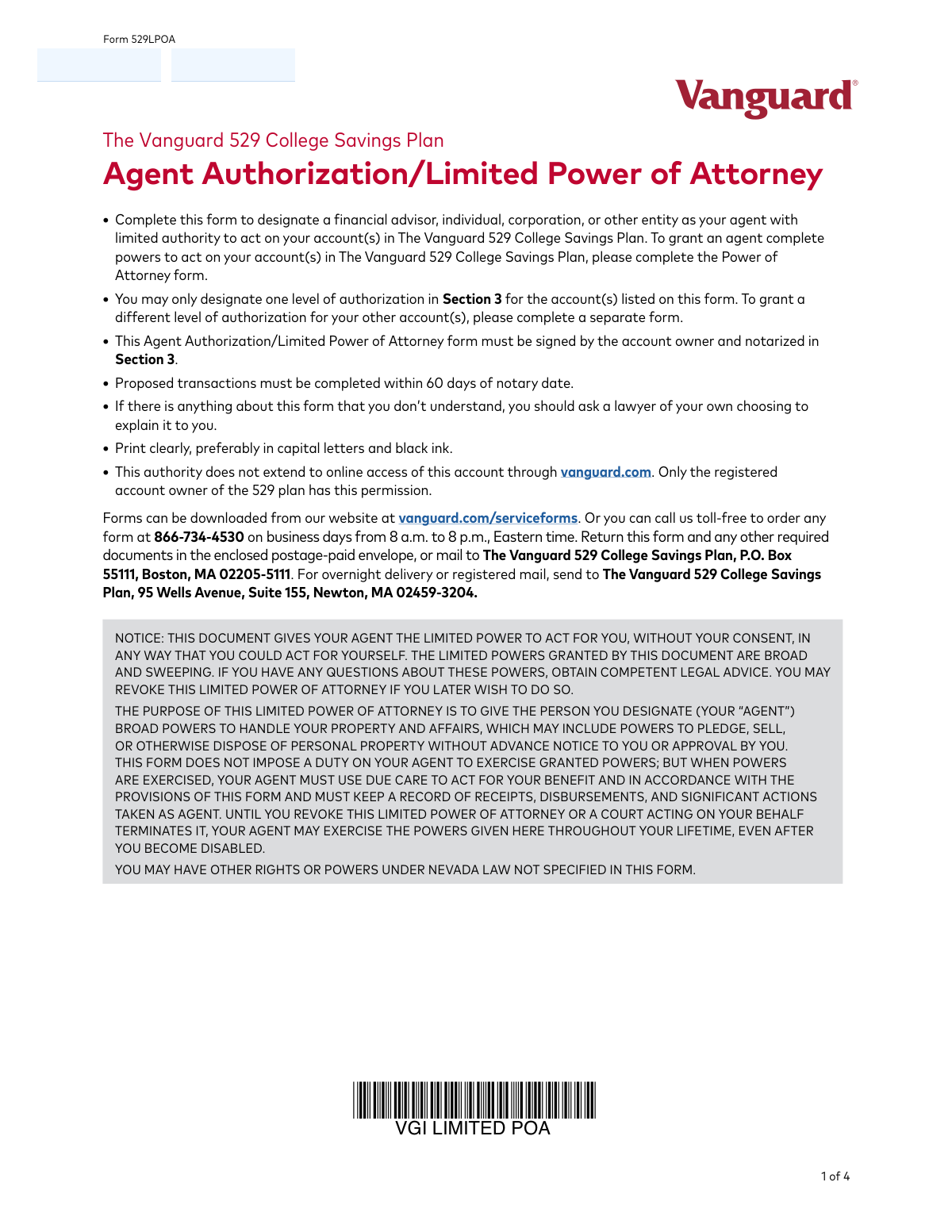
Yes! You can use AI to fill out The Vanguard 529 College Savings Plan Agent Authorization/Limited Power of Attorney
Don't type 46 fields by hand. Tell our AI about yourself, or upload a document you already have, and it fills every field in seconds. You check it, then download, print or sign.
The AI does the filling. You just check it.
No typing into boxes, nothing to install.
What this form asks for
The AI fills all of it, from your answers or your documents.
The AI checks your answers before you download
12 checks built for this form, so a wrong date or a missing answer is caught before anyone else sees it.
This check verifies that the account owner's name provided in Section 1 ('Account owner information') exactly matches the name written in the notary acknowledgement section (Section 4). This consistency is crucial for establishing the legal validity of the notarized document and confirming the identity of the person granting power of attorney. A mismatch would render the form invalid and require correction and re-submission.
This validation confirms that the permanent address provided in Section 1 is a physical street address. The form explicitly states that a P.O. box or rural route is not acceptable for the account owner's address, likely for legal identity verification and compliance reasons. If a non-physical address is detected, the form will be rejected until a valid street address is provided.
This check ensures that the account owner has initialed exactly one of the three authorization level boxes in Section 3. The form instructions clearly state to select only one level of access for the listed accounts. Submissions with no selection or multiple selections are ambiguous and will be rejected to prevent incorrect permissions from being granted.
This check confirms that the notary's commission expiration date, found in Section 4, is a valid date that occurs after the date of notarization. A document notarized by someone with an expired commission is legally invalid. If the commission is expired or the date is missing, the form cannot be processed and must be re-notarized.
This validation verifies that the form is being submitted and processed within 60 days of the notary date listed in Section 4. The form explicitly states this timeline for proposed transactions, making it a critical deadline for the document's validity. Forms submitted outside this 60-day window are considered stale and will be rejected, requiring the owner to complete and re-notarize a new form.
This check ensures the date of the account owner's signature in Section 3 is on or before the date of notarization in Section 4. A notary cannot acknowledge a signature that has not yet occurred. This chronological validation is essential for the legal integrity of the power of attorney document, and any discrepancy will result in rejection.
And 6 more checks
- Validates Format of Agent's Taxpayer ID Number
- Confirms Presence of at Least One Account Number
- Verifies Completeness of Notarization Section
- Validates Format of Account Owner's SSN/TIN (Last 4)
- Ensures Agent Relationship Is Specified
- Verifies Authorization Box Contains Initials
Let AI fill out your 529LPOA
No typing. Every field filled in seconds, checked, ready to sign.
How to Fill Out 529LPOA Online for Free in 2026
What the AI walks you through.
- Navigate to Instafill.ai and upload or select the Vanguard 529LPOA form.
- Use the AI assistant to accurately fill in your account owner information in Section 1, including your name, address, and account numbers.
- Provide the information for your designated agent in Section 2, such as their name, contact details, and relationship to you.
- In Section 3, carefully select and initial one of the three levels of authorization you wish to grant your agent.
- Sign and date the form in the designated area within Section 3.
- Take the completed form to a notary public to have your signature acknowledged and the notary section completed and sealed.
- Review the entire document for accuracy before submitting it to The Vanguard 529 College Savings Plan via mail or overnight delivery as instructed on the form.
Common Mistakes in Completing 529LPOA
The ones the AI is built to catch.
Improperly Initialing the Authorization Level
Missing or Improper Notarization
Exceeding the 60-Day Notarization Window
Using a P.O. Box for the Permanent Address
Omitting the Required 'Organization Resolution' Form
Attempting to Set Different Access Levels on a Single Form
Entering Incomplete or Incorrect Account Numbers
Submitting an Illegible Form
Misunderstanding the Scope of 'Limited' Authority
Substituting a Signature Guarantee for Notarization
Frequently Asked Questions About 529LPOA
Is it really free for 7 days?
Can I fill other forms too?
How do I cancel?
How does the AI fill out 529LPOA?
What happens to my information?
How complex is 529LPOA to fill out?
What is the purpose of the Vanguard 529 Agent Authorization/Limited Power of Attorney form?
Who should fill out this form?
What's the difference between this form and the full Power of Attorney form?
Does this form need to be notarized?
How do I select the level of access for my agent?
Can I set different access levels for my different 529 accounts?
Will my agent get online access to my account at vanguard.com?
What actions are my agent prohibited from taking with this form?
Where do I mail the completed form?
Is there a deadline for using this form after it's notarized?
How do I cancel the authority I've given to my agent?
Can I use an AI tool to help fill out this form?
How can I fill out this Vanguard 529 LPOA form online?
What should I do if my PDF copy of the form is not fillable?
Get your 529LPOA filled out by AI
$0 today. Cancel before Nov 2 and you pay nothing.
Other forms like this one
college HR forms: Melbourne City College Australia Education Agent Application Form, South Sydney College International Student Application Form, Sidney Sussex College Cambridge, Application for Employment, Rollover Request — 529 College Savings Plan, Fidelity Investments Withdrawals—529 College Savings Plan, The Vanguard 529 College Savings Plan: Power of Attorney, The Vanguard 529 College Savings Plan Direct Rollover Out to Roth IRA Form, The Vanguard 529 College Savings Plan Transfer Due to Death of Account Owner Form, The Vanguard 529 College Savings Plan Incoming Direct Rollover Form, The Vanguard 529 College Savings Plan: Withdrawal Request Form, Merrill Lynch 529 College Savings Plan Withdrawal Request Form, Form 529TCF, The Vanguard 529 College Savings Plan, Trustee Certification, Fidelity Institutional 529 College Savings Plan Beneficiary Change, 529 College Savings Plan Beneficiary Change Form, CollegeAdvantage Direct 529 Savings Plan Beneficiary Change Form
529 plan forms: Fidelity Investments Withdrawals—529 College Savings Plan, Rollover Request — 529 College Savings Plan, The Vanguard 529 College Savings Plan: Power of Attorney, The Vanguard 529 College Savings Plan Direct Rollover Out to Roth IRA Form, The Vanguard 529 College Savings Plan Transfer Due to Death of Account Owner Form, The Vanguard 529 College Savings Plan Incoming Direct Rollover Form, The Vanguard 529 College Savings Plan: Withdrawal Request Form, IAdvisor 529 Plan Certification of Authorized Individual(s), Merrill Lynch 529 College Savings Plan Withdrawal Request Form, 529 Plan Account Transfer Form, Fidelity Institutional CHET Advisor 529 Plan New Account Application, Form 529TCF, The Vanguard 529 College Savings Plan, Trustee Certification, 529 Plan Account Application, Fidelity Institutional 529 College Savings Plan Beneficiary Change, 529 College Savings Plan Beneficiary Change Form, CollegeAdvantage Direct 529 Savings Plan Beneficiary Change Form, Account Application for Merrill West Virginia Residents - The Hartford SMART529, Nest 529 Beneficiary Change Form, NextGen 529 Client Direct Series Withdrawal Request Form, NextGen 529 Series Change Form
college savings forms: Fidelity Investments Withdrawals—529 College Savings Plan, Rollover Request — 529 College Savings Plan, The Vanguard 529 College Savings Plan: Power of Attorney, The Vanguard 529 College Savings Plan Direct Rollover Out to Roth IRA Form, The Vanguard 529 College Savings Plan Transfer Due to Death of Account Owner Form, The Vanguard 529 College Savings Plan Incoming Direct Rollover Form, The Vanguard 529 College Savings Plan: Withdrawal Request Form, Merrill Lynch 529 College Savings Plan Withdrawal Request Form, Form 529TCF, The Vanguard 529 College Savings Plan, Trustee Certification, Fidelity Institutional 529 College Savings Plan Beneficiary Change, 529 College Savings Plan Beneficiary Change Form, CollegeAdvantage Direct 529 Savings Plan Beneficiary Change Form, 529 Plan Account Application, 529 Plan Account Transfer Form, Account Application for Merrill West Virginia Residents - The Hartford SMART529, Bright Directions 529 Beneficiary Change Form, Fidelity Institutional CHET Advisor 529 Plan New Account Application, Nest 529 Beneficiary Change Form, NextGen 529 Client Direct Series Incoming Rollover Form, NextGen 529 Client Direct Series Withdrawal Request Form
Vanguard forms: Gift of Nonretirement Assets to Existing Vanguard Account Form, Vanguard VRPA Transfer Request Form, Vanguard Personal Investor – Transfer form, Vanguard Asset Transfer Authorization Form for the Emory University Retirement Plan, Retirement Transfer Between Existing Vanguard Accounts, Vanguard Personal Investor – Transfer initiation form – Transfer out, Vanguard Asset Transfer Authorization, Moving your Vanguard funds to a Vanguard Brokerage Account Disclosure statement, Make a contribution - Vanguard Charitable, Vanguard Transfer Form, Vanguard Full Agent Authorization, Vanguard Transfer on Death Plan Form, The Vanguard 529 College Savings Plan: Power of Attorney, Vanguard Direct Rollover IRA Adoption Agreement, Vanguard Limited Agent Authorization, The Vanguard 529 College Savings Plan Direct Rollover Out to Roth IRA Form, The Vanguard 529 College Savings Plan Transfer Due to Death of Account Owner Form, Your guide to completing a rollover - Vanguard, Vanguard IRA Distribution Kit (including IRA Distribution Form RRDFT and Form W-4R), The Vanguard 529 College Savings Plan Incoming Direct Rollover Form
savings plan forms: Rollover Request — 529 College Savings Plan, Fidelity Investments Withdrawals—529 College Savings Plan, The Church of the Nazarene 403(b) Retirement Savings Plan Beneficiary Designation Form, The Vanguard 529 College Savings Plan: Power of Attorney, The Vanguard 529 College Savings Plan Direct Rollover Out to Roth IRA Form, The Vanguard 529 College Savings Plan Transfer Due to Death of Account Owner Form, The Vanguard 529 College Savings Plan Incoming Direct Rollover Form, Vanguard Phillips 66 Savings Plan Rollover Contribution Request, The Vanguard 529 College Savings Plan: Withdrawal Request Form, Vanguard Retirement Plan Beneficiary Designation - Phillips 66 Savings Plan, Incoming Rollover Election for The Heritage Group Retirement Savings Plan, AbbVie Savings Plan 401(k) Account Transfer Notice, Incoming Rollover Election Form for International Dairy Queen, Inc. Retirement Savings Plan, TE Connectivity Retirement Savings and Investment Plan (RSIP) Transition Frequently Asked Questions, Principal Life Insurance Company UCTIE INTERNATIONAL UNION 401(K) SAVINGS PLAN Enrollment Form, Principal Financial Group Pre-Approved Basic Savings Plan - Plus, In-Service Withdrawal Request, City of Toledo Savings and Protection Plan, Merrill Lynch 529 College Savings Plan Withdrawal Request Form, XL America, Inc. Employee Savings Plan Rollover Contribution Form, Distribution Request Form Local No. 1 Retirement Savings Plan #241805
power of attorney forms: The Vanguard 529 College Savings Plan: Power of Attorney, Form 2848, Power of Attorney, Iowa Advance Directive: Durable Power of Attorney for Health Care and Declaration (Living Will), Schwab Personal Choice Retirement Account® (PCRA) Limited Power of Attorney (LPOA) Form For a Participant, Form F11014, TIAA Brokerage Power of Attorney (POA) Form, TIAA Brokerage Durable Power Of Attorney Affidavit Of Full Force And Effect, Alpine SPRIM™ Private Markets Fund Subscription Agreement and Power of Attorney, Alpine Spring Private Venture & Growth Fund Subscription Agreement and Power of Attorney, Alabama Form 2848A, Power of Attorney and Declaration of Representative, Form FTB 3520-PIT, Individual or Fiduciary Power of Attorney Declaration, Form POA-1, Indiana Department of Revenue Power of Attorney, Maryland Form 548, Power of Attorney, CALIFORNIA FORM 3520-BE, Business Entity or Group Nonresident Power of Attorney Declaration, Form LGL-001, Power of Attorney, Form IL-2848, Power of Attorney, Customs (Import/Export) Power of Attorney, Power of Attorney for a Motor Vehicle, Mobile Home, or Vessel, Texas Statutory Durable Power of Attorney, Republic of Namibia Ministry of Home Affairs, Immigration, Safety and Security Power of Attorney
agent forms: ACORD 36, Agent/Broker of Record Change, New licence application – Form 1–1 (IND), Application for an individual’s licence (Real estate agent, property auctioneer, resident letting agent, motor dealer, chattel auctioneer, field agent), Department of Home Affairs — Appointment or cessation of a registered migration agent, legal practitioner or exempt person providing immigration assistance (Appointment notification form), Form 956, Appointment of a registered migration agent, legal practitioner or exempt person, Louisiana Secretary of State – Notice of Change of Registered Office and/or Change of Registered Agent (Domestic Limited Liability Company) (R.S. 12:1308) (Form SS983, Rev. 01/24), Melbourne City College Australia Education Agent Application Form, Vanguard Full Agent Authorization, Vanguard Limited Agent Authorization, Transamerica Change of Servicing Agent Authorization Form, Form 1583, Application for Delivery of Mail Through Agent, RECO Information Guide: Working with a real estate agent
529 forms: Bright Directions 529 Beneficiary Change Form, Transfer Due to Divorce — IRA/HSA/529, Rollover Request — 529 College Savings Plan, Fidelity Investments Withdrawals—529 College Savings Plan, The Vanguard 529 College Savings Plan: Power of Attorney, The Vanguard 529 College Savings Plan Direct Rollover Out to Roth IRA Form, The Vanguard 529 College Savings Plan Transfer Due to Death of Account Owner Form, The Vanguard 529 College Savings Plan Incoming Direct Rollover Form, The Vanguard 529 College Savings Plan: Withdrawal Request Form, IAdvisor 529 Plan Certification of Authorized Individual(s), NextGen 529 Series Change Form, NextGen 529 Client Direct Series Incoming Rollover Form, Merrill Lynch 529 College Savings Plan Withdrawal Request Form, 529 Plan Account Transfer Form, Fidelity Institutional CHET Advisor 529 Plan New Account Application, Form 529TCF, The Vanguard 529 College Savings Plan, Trustee Certification, Account Application for Merrill West Virginia Residents - The Hartford SMART529, 529 Plan Account Application, Fidelity Institutional 529 College Savings Plan Beneficiary Change, 529 College Savings Plan Beneficiary Change Form
529 college savings forms: Form 529TCF, The Vanguard 529 College Savings Plan, Trustee Certification, Rollover Request — 529 College Savings Plan, Fidelity Investments Withdrawals—529 College Savings Plan, The Vanguard 529 College Savings Plan: Power of Attorney, The Vanguard 529 College Savings Plan Direct Rollover Out to Roth IRA Form, The Vanguard 529 College Savings Plan Transfer Due to Death of Account Owner Form, The Vanguard 529 College Savings Plan Incoming Direct Rollover Form, The Vanguard 529 College Savings Plan: Withdrawal Request Form, Merrill Lynch 529 College Savings Plan Withdrawal Request Form, Fidelity Institutional 529 College Savings Plan Beneficiary Change, 529 College Savings Plan Beneficiary Change Form, CollegeAdvantage Direct 529 Savings Plan Beneficiary Change Form
Let AI fill out your 529LPOA
Your trial starts once a card is added. You pay nothing before Nov 2.
Our AI already knows this form, all 46 fields of it. Skip the typing: tell it about yourself, or upload what you have, and it fills the whole form in seconds.
- AI fills every field on all 4 pages, checkboxes included
- No typing into boxes: answer a few questions, or upload a document you already have, an old copy of this form, a photo of a document
- The AI checks the answers; you review and change anything before you download
- Download the finished PDF, print it, or sign it online
- Encrypted, and never used to train AI
Cancel before Nov 2 and you pay nothing.
A card is needed to start the trial. Cancel in two clicks from your account.
Terms · Privacy