Yes! You can use AI to fill out Vanguard Termination Request Form - Officer, SS, SSA Retirement Plan
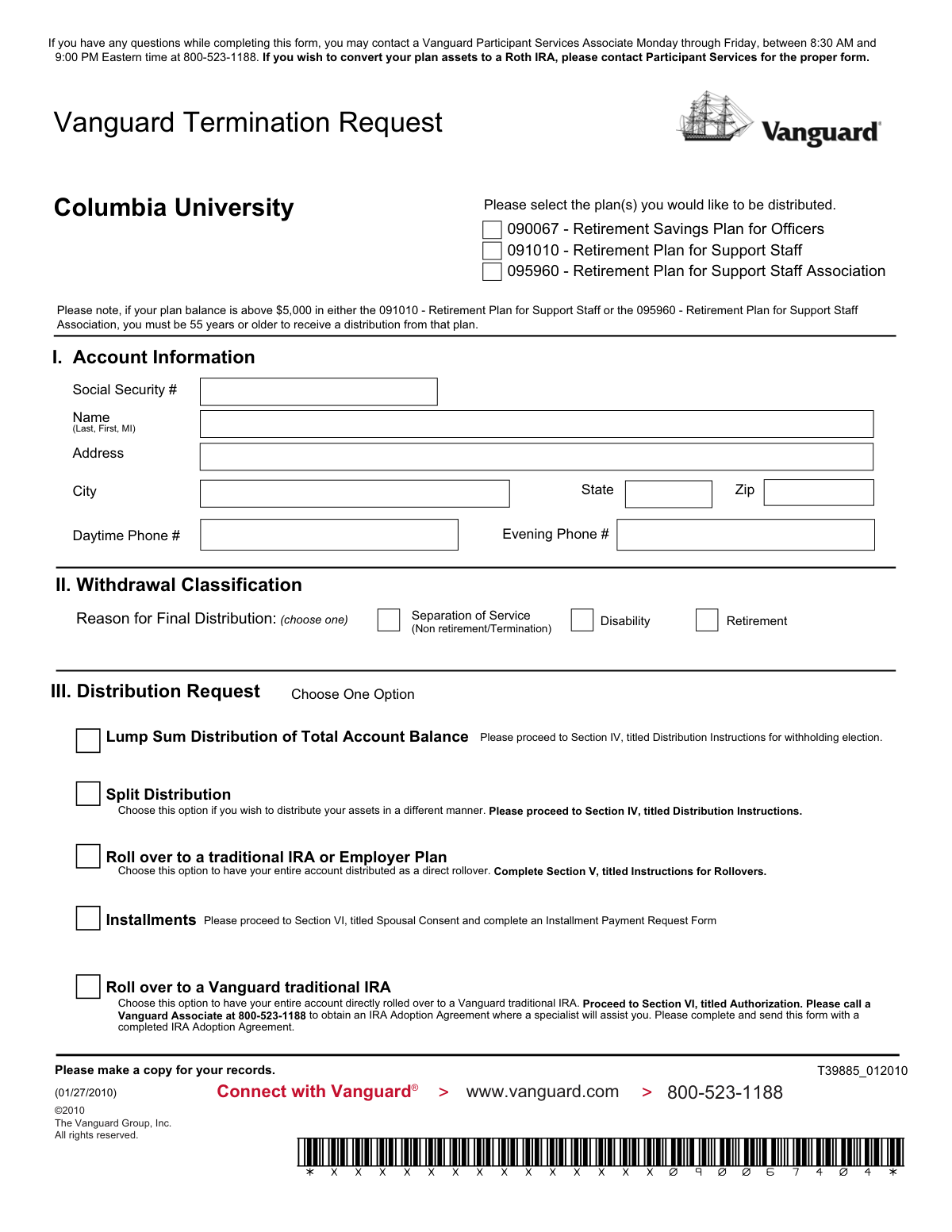
This form is a formal request for participants in specific Columbia University retirement plans (Retirement Savings Plan for Officers, Retirement Plan for Support Staff, and Retirement Plan for Support Staff Association) managed by Vanguard to receive a distribution of their assets upon termination of employment. It details various distribution options such as lump-sum payments, rollovers to an IRA or another employer plan, and installment payments, while also addressing tax withholding and required spousal consent. Today, this form can be filled out quickly and accurately using AI-powered services like Instafill.ai, which can also convert non-fillable PDF versions into interactive fillable forms.
T39885_012010 is part of the
retirement forms, SSA forms, retirement plan forms, Vanguard forms and ERM forms categories on Instafill.
Rather not fill this in by hand? Instafill is an online form filler that completes PDF forms automatically — upload the blank form, answer a few questions, and the AI fills every field.
Form specifications
| Form name: | Vanguard Termination Request Form - Officer, SS, SSA Retirement Plan |
| Number of pages: | 1 |
| Language: | English |
Our AI automatically handles information lookup, data retrieval, formatting, and form filling.
It takes less than a minute to fill out T39885_012010 using our AI form filling.
Securely upload your data. Information is encrypted in transit and deleted immediately after the form is filled out.
Instafill Demo: How to fill out PDF forms in seconds with AI
How to Fill Out T39885_012010 Online for Free in 2026
Are you looking to fill out a T39885_012010 form online quickly and accurately? Instafill.ai offers the #1 AI-powered PDF filling software of 2026, allowing you to complete your T39885_012010 form in just 37 seconds or less.
Follow these steps to fill out your T39885_012010 form online using Instafill.ai:
- 1 Navigate to Instafill.ai and upload or select the Vanguard Termination Request Form.
- 2 Use the AI assistant to accurately fill in your personal details in Section I: Account Information, including your name, Social Security Number, and address.
- 3 In Section II and III, select your reason for distribution and choose your desired distribution method, such as a lump-sum payment, direct rollover, or installments.
- 4 Complete Section IV (Distribution Instructions) or Section V (Instructions for Rollovers) to specify payment details, tax withholding preferences, and receiving institution information.
- 5 Address Section VI: Spousal Consent. Certify if you are not married, or if you are, complete the waiver and obtain your spouse's notarized signature.
- 6 Review all the information auto-filled by the AI for accuracy, then electronically sign and date the Authorization section.
- 7 Download the completed form, obtain the Plan Sponsor's signature, and submit it to Vanguard as instructed.
Our AI-powered system ensures each field is filled out correctly, reducing errors and saving you time.
Why Choose Instafill.ai for Your Fillable T39885_012010 Form?
Speed
Complete your T39885_012010 in as little as 37 seconds.
Up-to-Date
Always use the latest 2026 T39885_012010 form version.
Cost-effective
No need to hire expensive lawyers.
Accuracy
Our AI performs 10 compliance checks to ensure your form is error-free.
Security
Your personal information is protected with bank-level encryption.
Frequently Asked Questions About T39885_012010
This form is used by former Columbia University employees to request a distribution from their retirement plan after separating from service, retiring, or due to disability.
This form applies to the Columbia University Retirement Savings Plan for Officers (090067), the Retirement Plan for Support Staff (091010), and the Retirement Plan for Support Staff Association (095960).
To receive your funds as a lump sum or rollover, you must waive the default 'qualified joint and survivor annuity' benefit. If you are married, federal law requires your spouse's notarized consent to waive this right.
If you are not married, you do not need a spouse's signature. Simply check the box in Section VI-A to certify that you are not married.
You can choose a full lump-sum cash distribution, a direct rollover to an IRA or another employer's plan, a split distribution (part cash, part rollover), or installments. Note that installments require a separate form.
Yes, a mandatory 20% federal tax is withheld on any taxable amount paid directly to you. No federal tax is withheld if you choose a direct rollover to another qualified retirement account.
You must provide the name of the receiving financial institution, your new account number, and their mailing address in Section V. It is your responsibility to open the new account before submitting this form.
Yes, if your balance is over $5,000 in the Support Staff (091010) or Support Staff Association (095960) plans, you must be age 55 or older to receive a distribution.
The Plan Sponsor is your former employer, Columbia University. You must have an authorized representative from the university sign Section VII before the form can be processed by Vanguard.
No, this form does not support Roth IRA conversions. You must contact a Vanguard Participant Services Associate at 800-523-1188 to obtain the proper form for a Roth conversion.
You can call a Vanguard Participant Services Associate for assistance at 800-523-1188, Monday through Friday, between 8:30 AM and 9:00 PM Eastern time.
Yes, services like Instafill.ai use AI to accurately auto-fill form fields with your personal information, which saves time and helps reduce errors.
You can use a service like Instafill.ai to upload the PDF and fill it out directly in your web browser. The tool makes the form interactive, allowing you to type your answers and add your signature electronically.
If you have a non-fillable or 'flat' PDF, you can use a tool like Instafill.ai to convert it into an interactive, fillable form. This allows you to easily type your information into the correct fields online.
Compliance T39885_012010
Validation Checks by Instafill.ai
1
Social Security Number Format and Presence
This check verifies that the Social Security Number in Section I is present and follows the standard 9-digit format (XXX-XX-XXXX or XXXXXXXXX). The SSN is a critical unique identifier for locating the correct account and for tax reporting purposes. If the SSN is missing or invalid, the form cannot be processed as the participant's identity and account cannot be confirmed.
2
Plan Selection Completeness
Ensures that the participant has selected at least one of the available Columbia University retirement plans at the top of the form. This selection is mandatory to specify which account(s) the distribution request applies to. A failure to select a plan will result in the form being rejected as 'not in good order' because the source of the funds is unknown.
3
Age and Balance Eligibility for Support Staff Plans
This is a conditional check for plans 091010 and 095960. If the participant's balance in either of these plans is over $5,000, the system must verify that the participant is 55 years of age or older. This rule is a specific plan provision, and failing to meet the age requirement will prevent the distribution from being processed from that specific plan.
4
Exclusive Distribution Method Selection
Validates that the participant has selected exactly one distribution option in Section III (e.g., Lump Sum, Split Distribution, Rollover). Choosing a single method is crucial as it dictates which subsequent sections of the form are required and how the funds will be handled. If zero or multiple options are selected, the request is ambiguous and will be delayed or rejected.
5
100% Asset Allocation in Distribution Instructions
For participants choosing a 'Lump Sum' or 'Split Distribution', this check confirms that the allocations in Section IV (between 'Roll over' and 'Make payable to me') sum to exactly 100% of the account balance. The form explicitly states this requirement. An incomplete or incorrect allocation will cause the request to be deemed 'not in good order' and halt processing until corrected.
6
Rollover Institution Details Presence
If the participant elects to roll over funds to another institution (in Section IV or V), this check ensures that the 'Trustee/Institution Name' and 'Plan/Account Number' are provided in Section V. This information is necessary to make the rollover check payable to the correct entity and reference the correct destination account. Missing information may result in the check being mailed directly to the participant, potentially creating an unintended taxable event.
7
Marital Status and Spousal Consent Consistency
This check enforces the logic in Section VI. If the participant checks box A, certifying they are not married, then the spousal consent section (C) must be blank. Conversely, if box A is not checked, the spousal consent section (C) is required. This prevents contradictory information and ensures compliance with federal law regarding spousal rights to retirement assets.
8
Spousal Consent and Notarization Completeness
If spousal consent is required (i.e., the participant is married and waiving the annuity), this validates that the spouse's name, signature, and date are all present, and that the entire notary section is completed. A spouse's consent is legally required to waive their survivor rights, and the notarization validates their identity. An incomplete or un-notarized consent will render the entire distribution request invalid.
9
Valid Notary Commission
When spousal consent is notarized in Section VI, this check verifies that the notary's commission expiration date is present and is a future date. An expired commission invalidates the notarization, which in turn invalidates the spousal consent. This would require the form to be re-signed by the spouse and re-notarized before the distribution can be processed.
10
Participant Signature and Date Presence
Verifies that the 'Signature of Participant' and 'Date' fields in Section VII are both completed. The participant's signature is the legal authorization for Vanguard to execute the transaction. Without a valid signature and date, the request is not legally binding and cannot be processed.
11
Plan Sponsor Authorization Completeness
Ensures the 'To Be Completed by Plan Sponsor' section (Section VII) is fully filled out, including Date of Hire, Date of Termination, vested percentages, and the sponsor's signature and date. This information confirms the participant's employment status and eligibility for the distribution. A missing sponsor signature means the employer has not approved the termination request, halting the process.
12
Logical Date of Termination
This check compares the 'Date of Termination' with the 'Signature of Participant' date in Section VII. The termination date must be on or before the date the participant signed the form. A signature date that precedes the termination date is illogical and would indicate an error, requiring clarification from the plan sponsor.
13
Withdrawal Reason Selection
Validates that one, and only one, reason for the final distribution has been chosen in Section II ('Separation of Service', 'Disability', or 'Retirement'). This classification is important for plan administration and determining eligibility for the withdrawal. Failure to select a reason makes the request incomplete and will cause processing delays.
14
Complete Participant Contact Information
This check ensures that the participant's full name, a complete mailing address (street, city, state, zip), and at least one phone number are provided in Section I. This information is essential for mailing distribution checks, tax forms (like a 1099-R), and other important correspondence. Incomplete information could lead to lost funds or critical documents not being received.
Common Mistakes in Completing T39885_012010
Married participants often fail to have their spouse sign the consent waiver, or the signature is not properly witnessed by a notary public as required in Section VI. Conversely, unmarried participants may skip the section entirely, failing to certify their unmarried status. This section is legally required to waive the default annuity payment option, and any error will halt the distribution process. To avoid this, married participants must ensure their spouse signs in the presence of a notary, who must also sign and affix their seal, while unmarried participants must complete their certification.
Participants frequently overlook the 'To Be Completed by Plan Sponsor' portion of Section VII, assuming their own signature is sufficient. The Plan Sponsor (the former employer's benefits department) must sign to verify employment details like termination date. Submitting the form without this signature will result in an automatic rejection and require resubmission, causing significant delays. Before sending the form to Vanguard, you must first send it to your former plan sponsor for their review and signature.
When choosing a 'Split Distribution,' filers must specify how 100% of their assets should be handled, but often make calculation errors or leave fields blank. For example, they might enter dollar amounts that do not equal their total account balance, or percentages that do not add up to 100. The form explicitly states that failure to direct 100% of assets will deem the request 'not in good order.' To prevent this, carefully calculate the dollar or percentage amounts for each distribution type and double-check that they sum to the total.
Section V requires detailed information for the receiving institution, including the Trustee Name and Account Number. People often attempt to fill out this form before they have opened the new IRA or employer plan account, leaving this critical information blank or incorrect. This leads to processing delays or the rollover check being mailed to the participant, which can create tax complications. Always establish your new account first and have the exact trustee name and account number ready before completing this section.
Section III presents options that require additional actions which are often missed. For instance, selecting 'Installments' requires a separate 'Installment Payment Request Form,' and choosing 'Roll over to a Vanguard traditional IRA' requires calling Vanguard to obtain an 'IRA Adoption Agreement.' Simply checking the box on this form is not enough, leading to an incomplete application. Carefully read the instructions for your chosen option and ensure you obtain and include all other required forms with your submission.
At the very top of the form, the user must select which of the three listed retirement plans they wish to distribute funds from. Participants may be unsure which plan number applies to them or simply forget to check any boxes. Submitting the form without a plan selected makes it impossible for Vanguard to know which account to process, causing an immediate rejection. Before filling out any other section, confirm which plan(s) you are terminating and check the corresponding box(es).
When rolling over funds, Section V requires the precise legal name of the trustee 'as check should be made payable.' Filers often use a common brand name (e.g., 'Fidelity') instead of the required trustee name (e.g., 'Fidelity Management Trust Company, FBO [Your Name]'). An incorrect payee name on the rollover check can cause the receiving institution to reject the deposit, leading to significant delays. To prevent this, contact the receiving institution and ask for their exact 'check payable to' instructions for a direct rollover.
When requesting a cash distribution in Section IV, participants must make an election regarding state income tax. Many people focus on the mandatory 20% federal withholding and skip over the state tax options, failing to check either 'Withhold state taxes' or 'Do not withhold state taxes.' This ambiguity forces the processor to either follow a default rule or reject the form as incomplete. To avoid this, explicitly choose one of the two state tax options to ensure your distribution is processed according to your preference.
This form is a non-fillable PDF, meaning it must be printed and filled out by hand, which can lead to illegible handwriting or smudges. Financial institutions have strict requirements for legibility to prevent fraud and will reject any form they cannot clearly read, especially for critical data like a Social Security Number. To avoid this, write clearly in block letters. AI-powered tools like Instafill.ai can convert flat PDFs like this into fillable forms, allowing you to type directly onto the form for perfect legibility before printing for signatures.
A surprisingly common error is for the participant to forget to sign or date the form in Section VII. An unsigned or undated form is legally invalid and cannot be processed. This often happens when filers are focused on the more complex sections and simply overlook the final signature line. To avoid this critical mistake, make it a habit to review the entire form one last time specifically looking for all required signature and date fields before submission. Using a tool like Instafill.ai can help by highlighting all required fields to ensure none are missed.
Saved over 80 hours a year
“I was never sure if my IRS forms like W-9 were filled correctly. Now, I can complete the forms accurately without any external help.”
Kevin Martin Green
Your data stays secure with advanced protection from Instafill and our subprocessors




Robust compliance program
Transparent business model
You’re not the product. You always know where your data is and what it is processed for.
ISO 27001, HIPAA, and GDPR
Our subprocesses adhere to multiple compliance standards, including but not limited to ISO 27001, HIPAA, and GDPR.
Security & privacy by design
We consider security and privacy from the initial design phase of any new service or functionality. It’s not an afterthought, it’s built-in, including support for two-factor authentication (2FA) to further protect your account.
Fill out T39885_012010 with Instafill.ai
Worried about filling PDFs wrong? Instafill securely fills vanguard-termination-request-form-officer-ss-ssa-retirement-plan forms, ensuring each field is accurate.
