Yes! You can use AI to fill out Vanguard Transfer Form
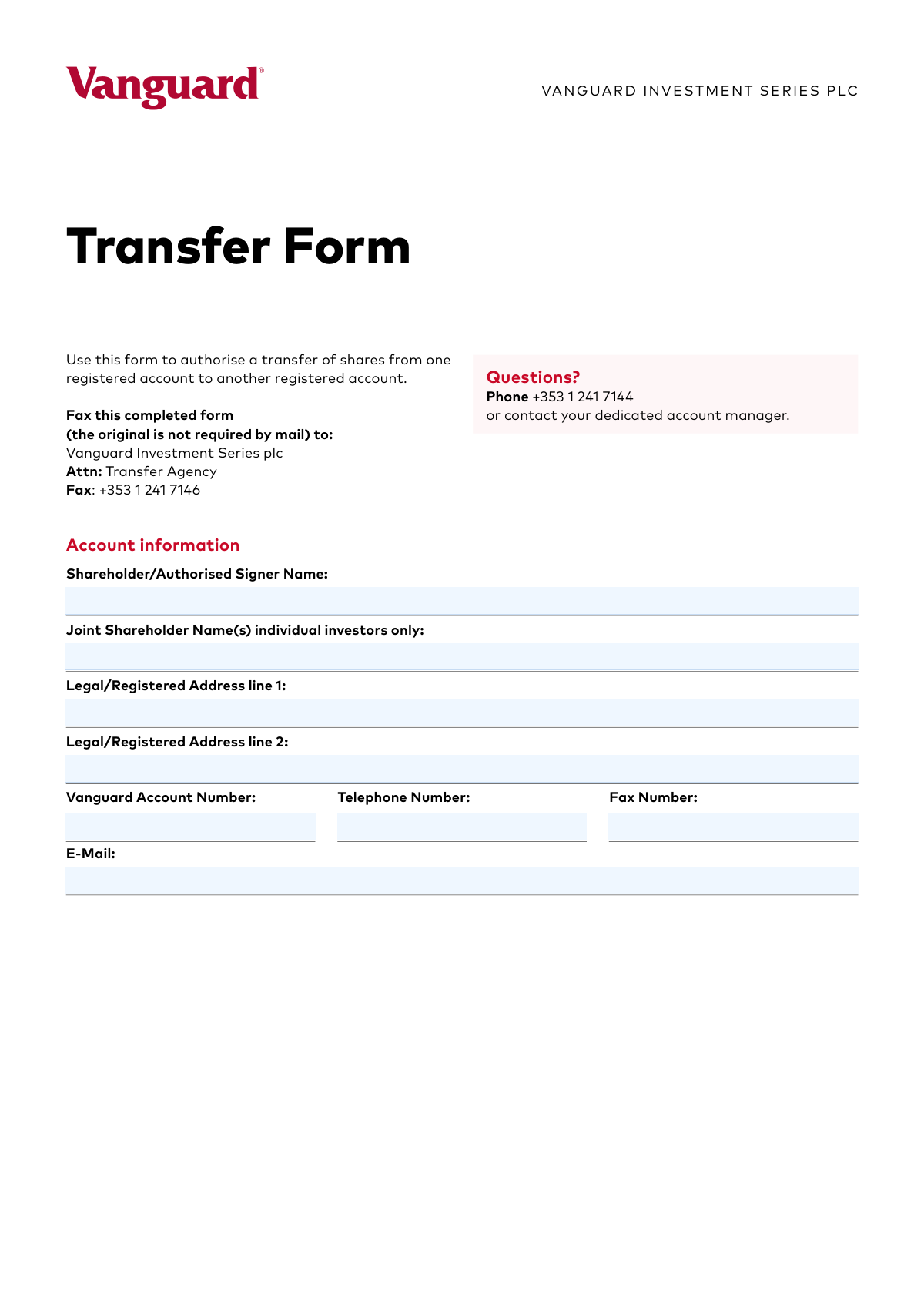
The Vanguard Transfer Form is a document used by investors to formally request and authorize the movement of shares from one registered Vanguard account to another. It is essential for consolidating investments, changing account ownership, or reorganizing a portfolio. Today, this form can be filled out quickly and accurately using AI-powered services like Instafill.ai, which can also convert non-fillable PDF versions into interactive fillable forms.
Vanguard Transfer Form is part of the
VA forms, HR forms, transfer forms and Vanguard forms categories on Instafill.
Rather not fill this in by hand? Instafill is an online form filler that completes PDF forms automatically — upload the blank form, answer a few questions, and the AI fills every field.
Form specifications
| Form name: | Vanguard Transfer Form |
| Number of pages: | 1 |
| Language: | English |
Our AI automatically handles information lookup, data retrieval, formatting, and form filling.
It takes less than a minute to fill out Vanguard Transfer Form using our AI form filling.
Securely upload your data. Information is encrypted in transit and deleted immediately after the form is filled out.
Instafill Demo: How to fill out PDF forms in seconds with AI
How to Fill Out Vanguard Transfer Form Online for Free in 2026
Are you looking to fill out a VANGUARD TRANSFER FORM form online quickly and accurately? Instafill.ai offers the #1 AI-powered PDF filling software of 2026, allowing you to complete your VANGUARD TRANSFER FORM form in just 37 seconds or less.
Follow these steps to fill out your VANGUARD TRANSFER FORM form online using Instafill.ai:
- 1 Navigate to Instafill.ai and upload or select the Vanguard Transfer Form.
- 2 Provide your account information, including your name, address, and Vanguard account number, in the designated fields.
- 3 In the 'Details of Transfer Request' section, specify the account you are transferring from, the fund code and name, and the exact units or monetary amount to be transferred.
- 4 Enter the account number for the destination account where the shares will be transferred to.
- 5 Indicate whether the transfer results in a change of beneficial ownership by checking 'Yes' or 'No'.
- 6 Review all the information pre-filled by the AI to ensure accuracy and completeness.
- 7 Electronically sign and date the form in the 'Authorised Signature(s)' section before submitting it to Vanguard as instructed.
Our AI-powered system ensures each field is filled out correctly, reducing errors and saving you time.
Why Choose Instafill.ai for Your Fillable Vanguard Transfer Form Form?
Speed
Complete your Vanguard Transfer Form in as little as 37 seconds.
Up-to-Date
Always use the latest 2026 Vanguard Transfer Form form version.
Cost-effective
No need to hire expensive lawyers.
Accuracy
Our AI performs 10 compliance checks to ensure your form is error-free.
Security
Your personal information is protected with bank-level encryption.
Frequently Asked Questions About Vanguard Transfer Form
This form is used to authorize the transfer of shares from one registered Vanguard account to another registered Vanguard account.
Any current Vanguard shareholder who wants to move shares they own from one of their accounts to another should use this form.
You need to fax the completed form to the Transfer Agency at +353 1 241 7146. The form explicitly states that the original is not required by mail.
Vanguard aims to complete transfer requests within 3 business days of receiving the form, as long as it is filled out correctly and in good order.
You will need your name, address, Vanguard account numbers (for both the sending and receiving accounts), and the details of the shares being transferred, including the fund code and amount.
A transfer may be delayed if there is any outstanding documentation from when the original account was first established. Ensure all your account paperwork is complete to avoid this.
The form allows you to specify either the number of units or a specific monetary amount for the transfer. You must also write this value out in words.
This indicates whether the ultimate owner of the shares is changing with the transfer. You should check 'Yes' if the person or entity who truly owns the shares will be different after the transfer is complete.
For any questions, you can call Vanguard at +353 1 241 7144 or get in touch with your dedicated account manager.
Yes, the form includes sections for two separate transfer requests, so you can transfer shares from two different funds or accounts at the same time.
Yes, services like Instafill.ai use AI to accurately auto-fill form fields, which can save you time and help reduce errors.
Simply upload the PDF of the Transfer Form to the Instafill.ai platform. Their service will help you fill in the required fields digitally before you print it for signing and faxing.
If you have a non-fillable or 'flat' PDF, a service like Instafill.ai can convert it into an interactive, fillable form that you can complete on your computer.
The form must be signed and dated by the shareholder or an authorized signer on the account. For joint accounts, all listed shareholders may be required to sign.
Compliance Vanguard Transfer Form
Validation Checks by Instafill.ai
1
Ensures Shareholder/Authorised Signer Name is Provided
This check verifies that the 'Shareholder/Authorised Signer Name' field is not empty. This name is a primary identifier for the account holder initiating the transfer and is crucial for verification against account records. If this field is left blank, the form will be rejected as the source of the request cannot be authenticated.
2
Validates Vanguard Account Number Format
This validation ensures the 'Vanguard Account Number' in the main account information section conforms to the expected format (e.g., specific length, character type, or pattern). A correctly formatted account number is essential for the system to accurately locate the shareholder's master account. An invalid format will result in a lookup failure and an immediate rejection of the form.
3
Requires At Least One Complete Transfer Request
This check confirms that at least one of the two 'Details of Transfer Request' sections is fully completed. A transfer form submitted without any specific transfer instructions is not actionable. If no transfer details are provided, the form is considered incomplete and will be returned to the sender.
4
Verifies Consistency Between Numeric and Written Amounts
This validation compares the numeric value entered in the 'Units/Amount' field with the text value in the 'Units/Amount in Words' field. This is a critical control to prevent fraud and clerical errors, ensuring the shareholder's intent is clear. Any mismatch between the two fields will place the transfer on hold until clarification is received from the shareholder.
5
Prevents Transfer to the Same Account
This check ensures that for any given transfer request, the 'Transfer From Account Number' is different from the 'Transfer to Account Number'. Transferring assets from an account back to itself is an invalid and illogical operation. This validation prevents processing errors and rejects such requests automatically.
6
Validates Signature Date Format (dd/mm/yyyy)
This validation confirms that the 'Date' field next to the signature is provided and follows the specified 'dd/mm/yyyy' format. Standardizing the date format is essential for legal and audit trail purposes, ensuring there is no ambiguity about when the authorization was given. An incorrect format may lead to processing delays or rejection of the form.
7
Ensures Authorised Signature is Present
This check verifies that a signature has been provided in the 'Authorised Signature(s)' section. A signature is the legal confirmation of the shareholder's intent and authorization to perform the transfer. A form without a signature is not legally binding and will be rejected immediately.
8
Validates E-Mail Address Format
This check ensures the value provided in the 'E-Mail' field adheres to the standard format for an email address (e.g., '[email protected]'). A valid email address is necessary for sending transfer confirmations, status updates, or contacting the client with questions. An invalid format could result in the client not receiving critical communications regarding their transaction.
9
Verifies Fund Code and Name Against Account Holdings
This check validates that the 'Fund Code and Name' specified in a transfer request corresponds to an actual fund held within the 'Transfer From Account Number'. It also implicitly checks if the account holds sufficient 'Units/Amount' to complete the transfer. This prevents errors from typos and stops transactions that are impossible to fulfill, which would otherwise fail during processing.
10
Requires Selection for 'Change in Beneficial Ownership'
This validation ensures that for each active transfer request, either the 'Yes' or 'No' checkbox for 'Change in Beneficial Ownership' has been selected. This information is critical for regulatory compliance, anti-money laundering (AML) checks, and tax reporting. A missing selection will halt the transfer until the required information is provided.
11
Ensures Printed Name and Date Accompany Signature
This check validates that if a signature is present, the corresponding 'Name (please type or print)' and 'Date' fields are also filled out. This combination is required to clearly identify the signatory and the exact time of authorization, which is essential for the document's legal validity. A missing printed name or date can render the signature ambiguous and lead to rejection.
12
Validates Existence of 'From' and 'To' Accounts
This check performs a system lookup to confirm that both the 'Transfer From Account Number' and 'Transfer to Account Number' are valid, active accounts. This is a fundamental prerequisite for any transfer, as assets cannot be moved from or to a non-existent account. If either account number is invalid, the specific transfer request will be rejected.
13
Ensures 'Units/Amount' is a Positive Numeric Value
This validation confirms that the value entered in the 'Units/Amount' field is a positive number, allowing for decimals but not text or negative values. It is impossible to transfer a zero or negative quantity of shares, so this check prevents basic data entry errors. An invalid entry will cause the form to be flagged for correction before it can be processed.
14
Ensures All Fields in an Active Transfer Request are Complete
This check triggers if any field in a 'Details of Transfer Request' block is filled, and then verifies that all other fields in that same block are also complete. This prevents the submission of partial or ambiguous instructions, which cannot be processed. An incomplete block will be flagged, requiring the user to either complete it or clear it entirely.
Common Mistakes in Completing Vanguard Transfer Form
Users frequently enter the wrong 'Vanguard Account Number' for the source or destination account due to typos or confusion between multiple accounts. This is a critical error that prevents Vanguard from identifying the correct accounts for the transaction. A mismatched number will lead to immediate rejection of the form and significant processing delays, requiring a new submission.
A common mistake is when the figure entered in the 'Units/Amount' field does not match the value written out in the 'Units/Amount in Words' field. This discrepancy creates ambiguity and flags the form as 'not in good order,' halting the transfer process. To avoid this, carefully write out the full amount in words after entering the numeric value, ensuring they are identical.
Forgetting to date the form or entering it in the wrong format (e.g., MM/DD/YYYY) is a frequent oversight. The form explicitly requires a 'dd/mm/yyyy' format, and failing to adhere to this can cause processing delays or rejection. An undated signature is legally invalid, so always double-check that the date is present and correctly formatted before submission.
Submitting a form with unclear or illegible handwriting, especially for critical data like account numbers and fund names, can lead to errors or rejection. The form instructs users to 'please type or print' to prevent this. If the transfer agency cannot read the information, they may reject the form or, worse, process the transaction incorrectly, causing significant financial and administrative issues.
Many people overlook the mandatory 'Change in Beneficial Ownership' checkboxes, often because they don't understand the term or simply miss it. This information is vital for legal and compliance reasons, and leaving it blank will render the form incomplete. This will delay the transfer until the shareholder provides the necessary clarification to Vanguard.
Providing only a partial fund name or omitting the fund code makes it difficult for Vanguard to identify the exact asset to be transferred. Shareholders may not know both pieces of information or may misspell the name. This ambiguity will cause the request to be put on hold until the correct fund details are confirmed, delaying the entire transfer.
When an account is held by more than one person, all authorized signatories must sign the form. A frequent error is having only one of the joint shareholders sign, which invalidates the request. Vanguard requires authorization from all account owners to execute a transfer, so a missing signature will result in the form being rejected.
The form clearly instructs the user to 'Fax this completed form' and notes that the original is not required by mail. A common mistake is to ignore this and mail the form instead. This sends the document to the wrong processing queue, causing significant delays beyond the stated 3-business-day turnaround for faxed requests.
The 'Units/Amount' field can cause confusion, leading users to enter a number without specifying whether it represents units or a currency amount (e.g., writing '500' instead of '500 units' or '€500'). This ambiguity forces Vanguard to contact the client for clarification, which delays the transaction. Always be explicit to ensure the request is processed correctly and without delay.
Entering an old phone number or an incorrect email address is a simple but consequential mistake. If Vanguard has a question or needs to report an issue with the form, they will use these details to make contact. Incorrect information means they cannot reach you, leaving the transfer request in a pending state indefinitely until you follow up.
This form is a flat PDF, which often leads to the aforementioned issue of illegible handwriting. Manually filling it out increases the chance of errors, smudges, and misinterpretation by the processing team. To avoid this, AI-powered tools like Instafill.ai can convert non-fillable PDFs into interactive, fillable forms, allowing you to type your information clearly and ensure accuracy.
Saved over 80 hours a year
“I was never sure if my IRS forms like W-9 were filled correctly. Now, I can complete the forms accurately without any external help.”
Kevin Martin Green
Your data stays secure with advanced protection from Instafill and our subprocessors




Robust compliance program
Transparent business model
You’re not the product. You always know where your data is and what it is processed for.
ISO 27001, HIPAA, and GDPR
Our subprocesses adhere to multiple compliance standards, including but not limited to ISO 27001, HIPAA, and GDPR.
Security & privacy by design
We consider security and privacy from the initial design phase of any new service or functionality. It’s not an afterthought, it’s built-in, including support for two-factor authentication (2FA) to further protect your account.
Fill out Vanguard Transfer Form with Instafill.ai
Worried about filling PDFs wrong? Instafill securely fills vanguard-transfer-form forms, ensuring each field is accurate.
