Yes! You can use AI to fill out Vanguard 403(b)(7) ERISA Retirement Plan Distribution Request (Retirement / Severance from Employment / Disability)
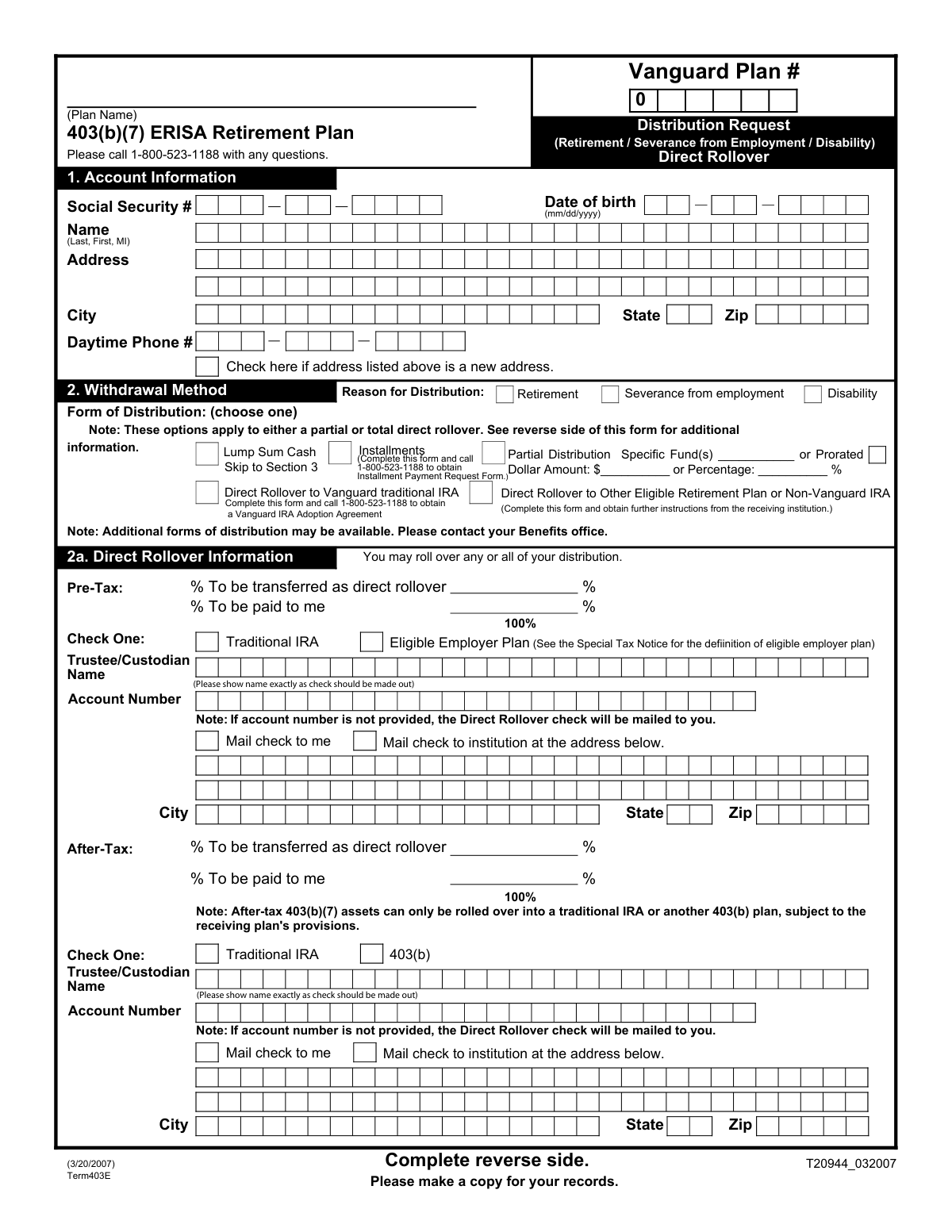
This form is an official request for a participant to withdraw funds from their Vanguard 403(b)(7) ERISA Retirement Plan. It allows the individual to specify the reason for the distribution and choose how they want to receive their money, whether as a lump sum, partial payment, or a direct rollover to another retirement account. Completing this form correctly is essential for accessing retirement savings under qualifying circumstances. Today, this form can be filled out quickly and accurately using AI-powered services like Instafill.ai, which can also convert non-fillable PDF versions into interactive fillable forms.
Term403E is part of the
disability forms, employment forms, retirement forms, retirement plan forms, distribution forms, ERISA forms, Vanguard forms, 403(b) forms, retirement distribution forms and distribution request forms categories on Instafill.
Rather not fill this in by hand? Instafill is an online form filler that completes PDF forms automatically — upload the blank form, answer a few questions, and the AI fills every field.
Form specifications
| Form name: | Vanguard 403(b)(7) ERISA Retirement Plan Distribution Request (Retirement / Severance from Employment / Disability) |
| Number of pages: | 1 |
| Language: | English |
Our AI automatically handles information lookup, data retrieval, formatting, and form filling.
It takes less than a minute to fill out Term403E using our AI form filling.
Securely upload your data. Information is encrypted in transit and deleted immediately after the form is filled out.
Instafill Demo: How to fill out PDF forms in seconds with AI
How to Fill Out Term403E Online for Free in 2026
Are you looking to fill out a TERM403E form online quickly and accurately? Instafill.ai offers the #1 AI-powered PDF filling software of 2026, allowing you to complete your TERM403E form in just 37 seconds or less.
Follow these steps to fill out your TERM403E form online using Instafill.ai:
- 1 Navigate to Instafill.ai and upload or select the Vanguard 403(b)(7) Distribution Request form.
- 2 Use the AI assistant to accurately fill in your personal account information in Section 1, including your name, address, and Social Security number.
- 3 In Section 2, select your desired withdrawal method, such as a lump sum, partial distribution, or direct rollover, and specify the amounts or percentages for each.
- 4 Complete Section 3 to waive the qualified joint and survivor annuity if necessary. If you are married, this section requires spousal consent witnessed by a notary or plan representative.
- 5 Indicate your income tax withholding preferences in Section 4, noting the 20% mandatory withholding for distributions not directly rolled over.
- 6 Carefully review all the information populated by the AI for accuracy, then electronically sign and date the authorization in Section 5.
- 7 Download the completed form and submit it to your Benefits Office as instructed on the document.
Our AI-powered system ensures each field is filled out correctly, reducing errors and saving you time.
Why Choose Instafill.ai for Your Fillable Term403E Form?
Speed
Complete your Term403E in as little as 37 seconds.
Up-to-Date
Always use the latest 2026 Term403E form version.
Cost-effective
No need to hire expensive lawyers.
Accuracy
Our AI performs 10 compliance checks to ensure your form is error-free.
Security
Your personal information is protected with bank-level encryption.
Frequently Asked Questions About Term403E
This form is used to request a withdrawal from your Vanguard 403(b)(7) ERISA Retirement Plan account. You can use it when you become eligible due to retirement, severance from employment, or disability.
You should complete this form if you are a participant in the specified Vanguard 403(b)(7) plan and are eligible to take a distribution for one of the reasons listed on the form.
You can choose to receive a full lump sum in cash, take a one-time partial distribution, or execute a direct rollover to an IRA or another eligible retirement plan. You can also request installment payments, which requires a separate form.
A direct rollover moves your funds directly to another retirement account, such as an IRA. This option is popular because it avoids the mandatory 20% federal tax withholding that applies to distributions paid directly to you.
If you are married, your spouse must consent to you waiving the 'qualified joint and survivor annuity' benefit, which is the default payment form under law. Their signature, witnessed by a notary or plan representative, confirms their consent for you to receive the funds in the different form you selected.
If you are not married, you only need to complete Section 3A by checking the box to certify you are not married and Section 3B to waive the annuity. The spousal consent portion (Section 3C) can be left blank.
Yes, if you elect to have all or a portion of the funds paid directly to you, a mandatory 20% federal tax withholding will be applied to the taxable amount. State tax withholding may also apply based on your state's regulations.
The form instructions state that you should return the completed and signed form to your employer's Benefits Office for authorization and processing.
Possibly. If you choose installment payments, you will need the 'Installment Payment Request Form'. If you are rolling over to a new Vanguard IRA, you will need to complete a 'Vanguard IRA Adoption Agreement'.
In Section 2a, you must provide the name of the receiving institution (Trustee/Custodian), your account number at that institution, and its full mailing address. If the account number is missing, the check may be mailed to you instead, triggering tax withholding.
You can have your after-tax balance paid to you or roll it over. However, after-tax 403(b)(7) assets can only be rolled over into a traditional IRA or another 403(b) plan.
Yes, services like Instafill.ai use AI to accurately auto-fill form fields with your personal information. This can save you time and help you avoid common mistakes.
You can upload the PDF of the form to the Instafill.ai platform. The service will make the fields interactive, allowing you to type your information, before you print the completed form for the required signatures.
If you have a non-fillable or 'flat' PDF, you can use a service like Instafill.ai. It can convert the document into an interactive, fillable form that you can easily complete on your computer.
Compliance Term403E
Validation Checks by Instafill.ai
1
Social Security Number Format and Presence
This check ensures the Social Security Number field in Section 1 is not empty and is formatted correctly as a 9-digit number (either XXXXXXXXX or XXX-XX-XXXX). This is critical for proper tax reporting to the IRS and for uniquely identifying the plan participant. A failure would prevent the processing of the distribution due to compliance and identification requirements.
2
Reason for Distribution Selection
Validates that one and only one 'Reason for Distribution' (Retirement, Severance from employment, or Disability) has been selected in Section 1. This information is legally required to determine eligibility for the withdrawal and may affect tax consequences. An incomplete or ambiguous selection would halt the request until clarified.
3
Termination Date and Date of Birth Logical Consistency
This check verifies that the 'Termination Date' in Section 1 is a valid date in the past or present, and that it occurs after the participant's 'Date of birth'. This ensures the chronological integrity of the data, confirming the termination event happened during the person's lifetime and after they began life. An illogical date would indicate a data entry error that must be corrected.
4
Exclusive Withdrawal Method Selection
Ensures that exactly one 'Form of Distribution' option is chosen in Section 2. A participant cannot select both 'Lump Sum Cash' and 'Partial Distribution' simultaneously. This validation prevents ambiguity and ensures the system can correctly process the single intended withdrawal type.
5
Partial Distribution Amount Exclusivity
If 'Partial Distribution' is selected in Section 2, this check validates that either a 'Dollar Amount' or a 'Percentage' is provided, but not both. It also confirms the value is a positive number. This prevents conflicting instructions for calculating the partial withdrawal amount.
6
Direct Rollover Allocation Total
For both the 'Pre-Tax' and 'After-Tax' portions in Section 2a, this validation confirms that the sum of the '% To be paid to me' and '% To be transferred as direct rollover' equals exactly 100%. This is crucial to ensure that the entire balance of each fund type is accounted for in the distribution instructions, leaving no portion unallocated.
7
Conditional Rollover Institution Details
If a percentage greater than zero is entered for a 'direct rollover' in Section 2a and 'Mail check to institution' is selected, this check verifies that the receiving institution's details (Trustee/Custodian Name, Account Number, and full address) are complete. Without this information, Vanguard cannot correctly issue and send the rollover check, causing significant delays.
8
Rollover Destination Type Selection
When a direct rollover is requested in Section 2a, this check ensures a destination plan type is selected (e.g., 'Traditional IRA' or 'Eligible Employer Plan'). This selection is required for regulatory and tax purposes to ensure the funds are moved to a compliant and appropriate receiving account. Failure to specify the type would put the request on hold.
9
Marital Status and Spousal Consent Consistency
This validation enforces the logic in Section 3. If the participant checks 'I am not married', it verifies that the spousal consent section (3C) is blank. Conversely, if the box is not checked, it flags the spousal consent section as required. This is a critical legal check for ERISA plans to protect spousal rights.
10
Mandatory Spousal Consent for Married Participants
If the participant is married (did not check the 'not married' box in Section 3A), this check ensures the 'Required Spousal Consent' in Section 3C is fully completed. This includes the spouse's signature, the date, and the signature and title of a notary or plan representative. A missing or incomplete consent section will prevent the distribution from being processed.
11
State Tax Withholding Option Exclusivity
In Section 4, if the user opts to 'Withhold state taxes', this check validates that they have specified either a dollar amount or a percentage, but not both. This prevents conflicting instructions and ensures the correct amount of state tax is withheld from the distribution.
12
Employee Authorization Signature Requirement
Verifies that the employee has signed and dated the form in Section 5. This signature is the final legal authorization for Vanguard to execute the distribution as requested. A missing signature renders the entire form invalid and unprocessed.
13
Employer Authorization Signature Requirement
This check confirms that an authorized employer representative has signed and dated the form in Section 5. This signature certifies the employee's reason for distribution (e.g., severance) and their eligibility to take funds from the plan. Without employer approval, the distribution cannot be processed.
14
Date of Birth Validity
Validates that the 'Date of birth' in Section 1 is a complete and logical date in MM/DD/YYYY format. The check ensures the date represents a plausible age for a retirement plan participant (e.g., over 18 and under 120). This prevents clear data entry errors and confirms the identity of the account holder.
15
Conditional Form Requirement for Installments
If 'Installments' is selected as the 'Form of Distribution' in Section 2, this validation flags that a separate 'Installment Payment Request Form' must be included with the submission. This ensures that all necessary paperwork for the chosen distribution method is present, preventing incomplete requests.
Common Mistakes in Completing Term403E
When requesting a direct rollover to another institution, users often provide an incomplete custodian name, an incorrect account number, or a missing address. This happens because they may not have the new account information readily available. An error here will cause the rollover to fail, and the check may be mailed directly to the participant, potentially creating an unintended taxable event and requiring a 60-day rollover to fix.
Married participants frequently overlook the requirement in Section 3 to have their spouse sign the consent waiver in the presence of a notary or plan representative. This is a legal requirement under ERISA to waive the Qualified Joint and Survivor Annuity benefit. Submitting the form without a properly witnessed spousal signature will result in an immediate rejection and significant processing delays until the requirement is met.
The form has separate sections for rolling over pre-tax and after-tax money, which have different rules. Users often get confused and misallocate funds or are unaware that after-tax assets can only be rolled into a traditional IRA or another 403(b) plan. This mistake can lead to a rejected rollover request or complex tax reporting issues if the receiving plan cannot accept the funds as directed.
In Section 2, individuals sometimes select multiple, conflicting distribution options (e.g., both 'Lump Sum Cash' and 'Installments') or fail to select any option at all. This ambiguity forces the plan administrator to halt the request and contact the participant for clarification, delaying access to funds. It's crucial to choose only one form of distribution that accurately reflects your intention.
When splitting a distribution between a direct rollover and a cash payment, the percentages in Section 2a must add up to exactly 100% for each fund type (Pre-Tax and After-Tax). Simple calculation errors are common and will cause the form to be flagged for correction. Using a tool like Instafill.ai can help prevent these errors by performing automatic calculations and validations.
Participants often don't realize that if any portion of their eligible distribution is paid directly to them in cash, a 20% federal tax withholding is mandatory and cannot be waived. In Section 4, they might incorrectly select 'Do not withhold state taxes' thinking it applies to federal taxes as well. This misunderstanding can lead to confusion when the received check amount is 20% less than expected.
Section 3 requires a clear indication of marital status to determine spousal rights. Unmarried participants often forget to check the box certifying they are not married, while married participants must complete the spousal consent. Leaving this section blank or filling it out incorrectly creates legal ambiguity and will stop the processing of the distribution request.
A surprising number of forms are submitted without the required signatures and dates in the Authorization section. The form requires a signature from the employee and, in many cases, an authorized plan representative or employer. An unsigned or undated form is legally invalid and will be returned, restarting the entire submission process.
When selecting 'Partial Distribution' in Section 2, users must specify either a precise dollar amount or a percentage, but not both. A common mistake is leaving this field blank, entering both values, or writing an ambiguous term like 'half'. This lack of clarity requires follow-up and delays the payment. Since this form is a non-fillable PDF, a tool like Instafill.ai can convert it into a smart, fillable version that guides users to enter the information correctly.
If a participant has recently moved, they may write their new address in Section 1 but forget to check the 'Check here if address listed above is a new address' box. This oversight can cause critical documents, including the distribution check itself, to be mailed to the old address on file if the system update is missed. This can result in lost checks and significant delays in receiving funds.
Saved over 80 hours a year
“I was never sure if my IRS forms like W-9 were filled correctly. Now, I can complete the forms accurately without any external help.”
Kevin Martin Green
Your data stays secure with advanced protection from Instafill and our subprocessors




Robust compliance program
Transparent business model
You’re not the product. You always know where your data is and what it is processed for.
ISO 27001, HIPAA, and GDPR
Our subprocesses adhere to multiple compliance standards, including but not limited to ISO 27001, HIPAA, and GDPR.
Security & privacy by design
We consider security and privacy from the initial design phase of any new service or functionality. It’s not an afterthought, it’s built-in, including support for two-factor authentication (2FA) to further protect your account.
Fill out Term403E with Instafill.ai
Worried about filling PDFs wrong? Instafill securely fills vanguard-403b7-erisa-retirement-plan-distribution-request-retirement-severance-from-employment-disability forms, ensuring each field is accurate.
