Yes! You can use AI to fill out Vanguard Retirement Plan Beneficiary Designation

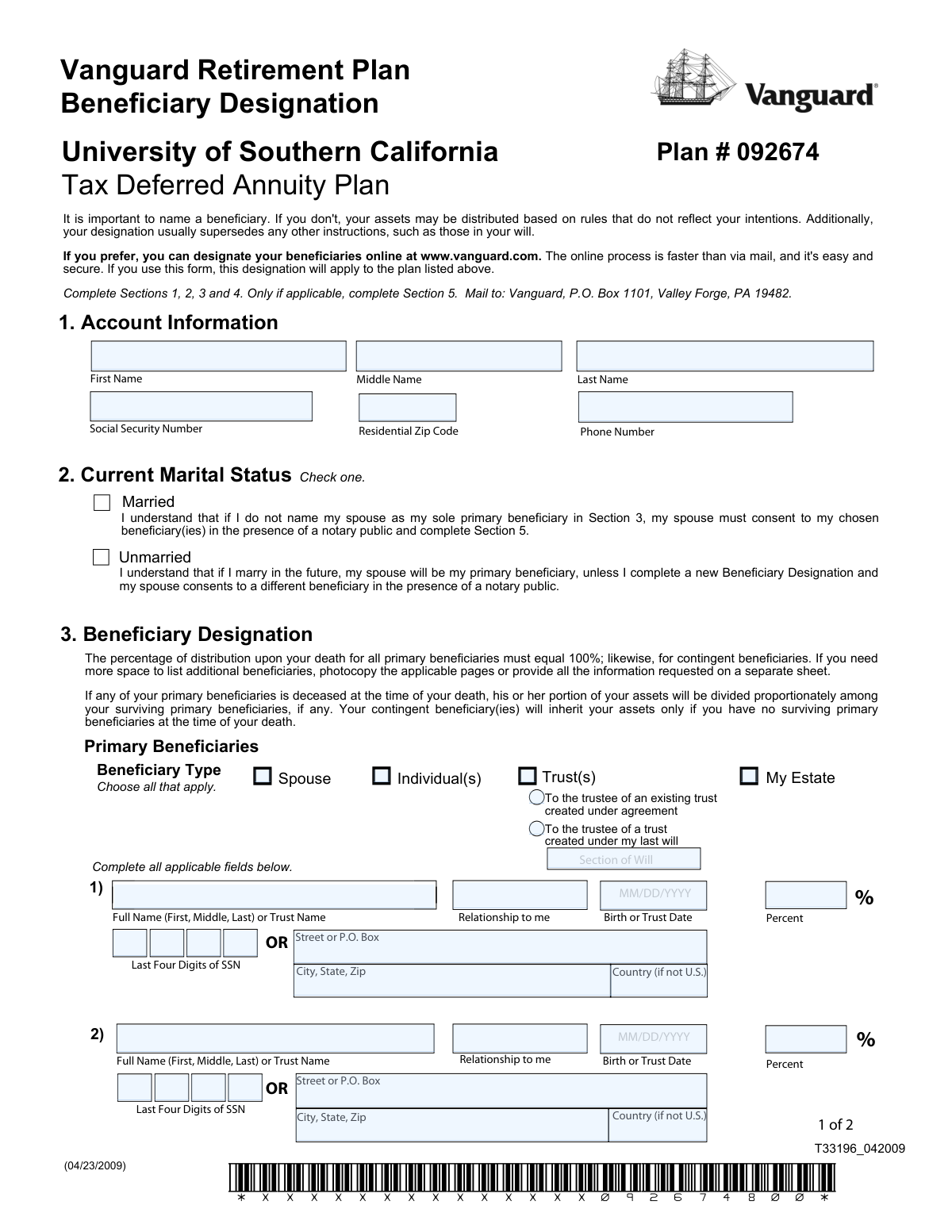
This form allows a Vanguard retirement plan account owner to officially designate primary and contingent beneficiaries to receive the account's assets upon their death. It is a critical document because this designation typically supersedes instructions in a will, ensuring your assets are distributed according to your direct wishes. Today, this form can be filled out quickly and accurately using AI-powered services like Instafill.ai, which can also convert non-fillable PDF versions into interactive fillable forms.
Our AI automatically handles information lookup, data retrieval, formatting, and form filling.
It takes less than a minute to fill out T33196_042009 using our AI form filling.
Securely upload your data. Information is encrypted in transit and deleted immediately after the form is filled out.

Form specifications

Form name: Vanguard Retirement Plan Beneficiary Designation
Number of pages: 1
Language: English
main-image

Instafill Demo: How to fill out PDF forms in seconds with AI

How to Fill Out T33196_042009 Online for Free in 2026

Are you looking to fill out a T33196_042009 form online quickly and accurately? Instafill.ai offers the #1 AI-powered PDF filling software of 2026, allowing you to complete your T33196_042009 form in just 37 seconds or less.
Follow these steps to fill out your T33196_042009 form online using Instafill.ai:
  1. 1 Navigate to Instafill.ai and upload or select the Vanguard Retirement Plan Beneficiary Designation form.
  2. 2 Provide your personal account information in Section 1, including your name, Social Security Number, and plan details.
  3. 3 Indicate your current marital status in Section 2, as this determines if spousal consent is needed for your beneficiary choices.
  4. 4 Use the AI assistant to accurately list your primary and contingent beneficiaries in Section 3, specifying their full names, relationship, and the percentage of assets they should receive.
  5. 5 Carefully review all the information entered by the AI, then digitally or manually sign and date the form in Section 4.
  6. 6 If you are married and did not name your spouse as the sole primary beneficiary, complete the Spousal Consent in Section 5, which requires a notary.
  7. 7 Download the completed, signed form and mail it to the Vanguard address listed on the document.

Our AI-powered system ensures each field is filled out correctly, reducing errors and saving you time.

Why Choose Instafill.ai for Your Fillable T33196_042009 Form?

Speed

Complete your T33196_042009 in as little as 37 seconds.

Up-to-Date

Always use the latest 2026 T33196_042009 form version.

Cost-effective

No need to hire expensive lawyers.

Accuracy

Our AI performs 10 compliance checks to ensure your form is error-free.

Security

Your personal information is protected with bank-level encryption.

Frequently Asked Questions About Form T33196_042009

This form is used to designate or update the beneficiaries who will inherit the assets in your University of Southern California Tax Deferred Annuity Plan upon your death. It ensures your assets are distributed according to your wishes.

Any owner of the Vanguard retirement plan listed on the form who wants to name beneficiaries for the first time or change their existing beneficiary information should complete and submit this document.

A primary beneficiary is the first in line to receive your assets. Contingent beneficiaries will only receive the assets if all of your primary beneficiaries are deceased at the time of your death.

Yes, if you name someone other than your spouse as your sole primary beneficiary, your spouse must sign the Spousal Consent in Section 5 in the presence of a notary. If your spouse is your only primary beneficiary, their signature is not needed.

The total percentage for all your primary beneficiaries must equal 100%. Likewise, if you name contingent beneficiaries, their total percentage allocation must also equal 100%.

If you have more beneficiaries than the space provided, you can photocopy the applicable pages or attach a separate sheet of paper. Be sure to include all the same information requested on the form for each additional beneficiary.

After completing and signing the form, you must mail it to Vanguard, P.O. Box 1101, Valley Forge, PA 19482. Vanguard also notes that designating beneficiaries online at their website is a faster and more secure option.

Yes, for this specific retirement plan, the beneficiary designation on this form will generally supersede any conflicting instructions in your will or other estate documents.

Yes, this form completely replaces all prior designations for this plan. You must list all the primary and contingent beneficiaries you want, even if you are only making a single change.

If you marry in the future, your new spouse will automatically become your primary beneficiary by law. To designate someone else, you would need to submit a new form with your spouse's notarized consent.

Yes, you can use services like Instafill.ai, which leverage AI to help you accurately auto-fill form fields. This can save time and help prevent common errors.

Simply upload the PDF to the Instafill.ai platform. The service will make the fields interactive, allowing you to type your information, save your progress, and download the completed form for printing and mailing.

If you have a non-fillable or 'flat' PDF, you can upload it to a service like Instafill.ai. It can convert the document into an interactive, fillable form that you can easily complete on your computer.

Compliance T33196_042009
Validation Checks by Instafill.ai

1
Primary Beneficiary Percentages Must Total 100%
Checks that the sum of the percentages assigned to all primary beneficiaries equals exactly 100%. This is critical to ensure the account owner's assets are fully and correctly allocated upon their death. If the total is not 100%, the form is considered 'not in good order' and will be rejected, preventing the designation from taking effect.
2
Contingent Beneficiary Percentages Must Total 100%
Verifies that the sum of percentages for all listed contingent beneficiaries equals exactly 100%. Contingent beneficiaries only inherit if all primary beneficiaries are deceased, and their allocation must also be complete and unambiguous. A failure to total 100% will cause the form to be rejected, leaving the contingent designations invalid.
3
Mandatory Spousal Consent for Non-Spouse Primary Beneficiary
This is a crucial logical check that confirms if the account owner's marital status is 'Married' and their spouse is not designated as the sole (100%) primary beneficiary, then Section 5 (Spousal Consent) must be fully completed and notarized. This is a legal requirement in many retirement plans to protect spousal rights. Without this consent, the beneficiary designation is legally invalid and will be rejected.
4
Account Owner Signature and Date Presence
Validates that the account owner has signed and dated the form in Section 4. A signature is required to legally authorize the beneficiary designation, and the date establishes when the authorization was made. An unsigned or undated form is not a legally binding document and will be rejected, leaving any prior designations in place.
5
Mandatory Marital Status Selection
Ensures that one of the two marital status options ('Married' or 'Unmarried') in Section 2 has been selected. This information is fundamental as it determines whether spousal consent rules apply to the designations made in Section 3. Failure to select a status makes it impossible to process the form correctly, leading to its rejection.
6
Beneficiary Date of Birth/Trust Date Format and Validity
Checks that any 'Birth or Trust Date' provided for a beneficiary is in the correct MM/DD/YYYY format and is a valid date that is not in the future. This date is a key identifier for an individual or a legal marker for a trust, helping to prevent ambiguity and ensure assets are paid to the correct entity. An invalid or improperly formatted date will result in the form being returned for correction.
7
Last Four Digits of SSN Format
Verifies that the 'Last Four Digits of SSN' field for any individual beneficiary contains exactly four numeric digits. This information is used as a secondary identifier to accurately locate and verify the identity of a beneficiary. Submitting incorrect or improperly formatted data can delay processing, so the form will be rejected if this field is invalid.
8
Spousal Consent Section Completeness
When spousal consent is required, this check ensures all fields within the main part of Section 5 are complete: Spouse's Name, Spouse's Signature, and the Date of signature. Each piece is required to create a legally valid consent. Missing any of this information invalidates the consent and the entire beneficiary designation, causing the form to be rejected.
9
Notary Section Completeness and Validity
If Section 5 is completed, this validates that the notary public has filled out all required information, including their signature, the date of notarization, and their commission expiration date. The commission expiration date must be a valid date in the future. Incomplete or expired notary information makes the spousal consent invalid and the form will be rejected.
10
Signature Date Consistency
This check ensures the date provided next to the Account Owner's signature in Section 4 is not in the future. Furthermore, if spousal consent is provided in Section 5, the spousal consent date and notary date must be on or after the account owner's signature date. A logical date conflict will cause the form to be flagged for review or rejection.
11
Beneficiary Information Completeness
For every beneficiary row that has any information entered (either primary or contingent), this check verifies that the essential fields—Full Name, Relationship, and Percentage—are all filled out. This ensures that every intended beneficiary is clearly identified and has a specific allocation assigned. Incomplete entries create ambiguity and will cause the form to be considered 'not in good order' and rejected.
12
Account Holder Identification Completeness
Validates that the account holder's full name and Social Security Number are present in Section 1. This information is paramount for matching the form to the correct retirement account. Without this data, Vanguard cannot identify which account the beneficiary designation applies to, and the form will be rejected as unprocessable.

Common Mistakes in Completing T33196_042009

Incorrect Beneficiary Percentage Totals

A frequent error is assigning percentages to beneficiaries that do not total exactly 100%. The form requires the sum for all primary beneficiaries to be 100%, and likewise, the sum for all contingent beneficiaries must also be 100%. Any other total will cause the form to be rejected, delaying the update. To avoid this, carefully double-check your math before signing; AI-powered tools like Instafill.ai can automatically validate these totals to ensure accuracy.

Forgetting Required Spousal Consent

Married account owners often overlook the spousal consent requirement in Section 5 when naming someone other than their spouse as a primary beneficiary. If a spouse is not the sole primary beneficiary, they must sign the consent section in the presence of a notary. Failure to obtain this notarized consent will render the entire designation invalid and Vanguard will reject the form as 'not in good order'.

Incomplete Beneficiary List on an Updated Form

The form explicitly states that it 'will completely replace any prior designations.' A common mistake is to submit a form listing only a new or updated beneficiary, assuming the old ones will carry over. This action inadvertently removes all previously named beneficiaries. To prevent this, you must list every single primary and contingent beneficiary you want on the account each time you submit the form.

Missing Key Beneficiary Information

People often leave critical fields blank for their beneficiaries, such as the full legal name, date of birth, or the last four digits of the Social Security Number. This incomplete information can cause significant delays in processing the form or, more seriously, create major difficulties in identifying and paying the correct beneficiary in the future. Always gather all required details for each person before you begin filling out the form.

Missing Account Owner Signature or Date

Forgetting to sign and date the form in Section 4 is a simple but critical error that immediately invalidates the document. An unsigned or undated beneficiary designation holds no legal weight and will be rejected by Vanguard upon receipt. To avoid this, make a final check of the entire form, paying special attention to the signature and date fields, before mailing it.

Invalid Notarization of Spousal Consent

Even when spousal consent is obtained, it is often done incorrectly. The spouse must sign Section 5 in the physical presence of a notary public, who must then complete their portion with a signature, seal, and commission expiration date. Signing the form beforehand or having an incomplete notary section will invalidate the consent. Always coordinate with a notary and ensure their section is filled out completely before you leave.

Using Ambiguous Beneficiary Identifiers

Instead of using a full legal name, filers sometimes use vague terms like 'My children' or informal nicknames. This creates ambiguity that can lead to legal challenges and disputes among heirs, delaying the distribution of assets. To ensure your wishes are carried out precisely, always use the beneficiary's full, legal first, middle, and last name as it appears on their government-issued identification.

Misunderstanding Primary vs. Contingent Roles

Account holders frequently misunderstand the hierarchy, believing contingent beneficiaries receive a share alongside primary ones. Contingent beneficiaries only inherit if all primary beneficiaries have predeceased the account owner. This confusion can lead to listing the same person in both sections or splitting percentages in a way that does not reflect true intentions. Clearly define your primary heirs first, then list backup heirs only in the contingent section.

Submitting an Illegible Handwritten Form

When a paper form is filled out by hand, illegible handwriting can lead to critical data entry errors when processed by Vanguard. A misspelled name or an incorrect digit in a birth date can create significant issues for your heirs. To prevent this, either print very clearly in block letters or use a fillable PDF. Since this form is a flat PDF, a tool like Instafill.ai can convert it into a fillable version, ensuring all your entries are clean, typed, and legible.

Incomplete or Incorrect Trust Designation

When naming a trust, filers often provide incomplete information, such as just a common name for the trust without the official creation date. The form requires the full, formal name of the trust and its date of creation to be valid. Omitting these details or failing to check the 'Trust(s)' box can cause the designation to be rejected or create legal hurdles for the trustee. Always reference your official trust documents to copy the exact information required.
Saved over 80 hours a year

ā€œI was never sure if my IRS forms like W-9 were filled correctly. Now, I can complete the forms accurately without any external help.ā€

Kevin Martin Green

Your data stays secure with advanced protection from Instafill and our subprocessors

Robust compliance program

Transparent business model

You’re not the product. You always know where your data is and what it is processed for.

ISO 27001, HIPAA, and GDPR

Our subprocesses adhere to multiple compliance standards, including but not limited to ISO 27001, HIPAA, and GDPR.

Security & privacy by design

We consider security and privacy from the initial design phase of any new service or functionality. It’s not an afterthought, it’s built-in, including support for two-factor authentication (2FA) to further protect your account.

Fill out T33196_042009 with Instafill.ai

Worried about filling PDFs wrong? Instafill securely fills vanguard-retirement-plan-beneficiary-designation-1 forms, ensuring each field is accurate.