Yes! You can use AI to fill out Schwab Charitable Fund Transfer of Assets
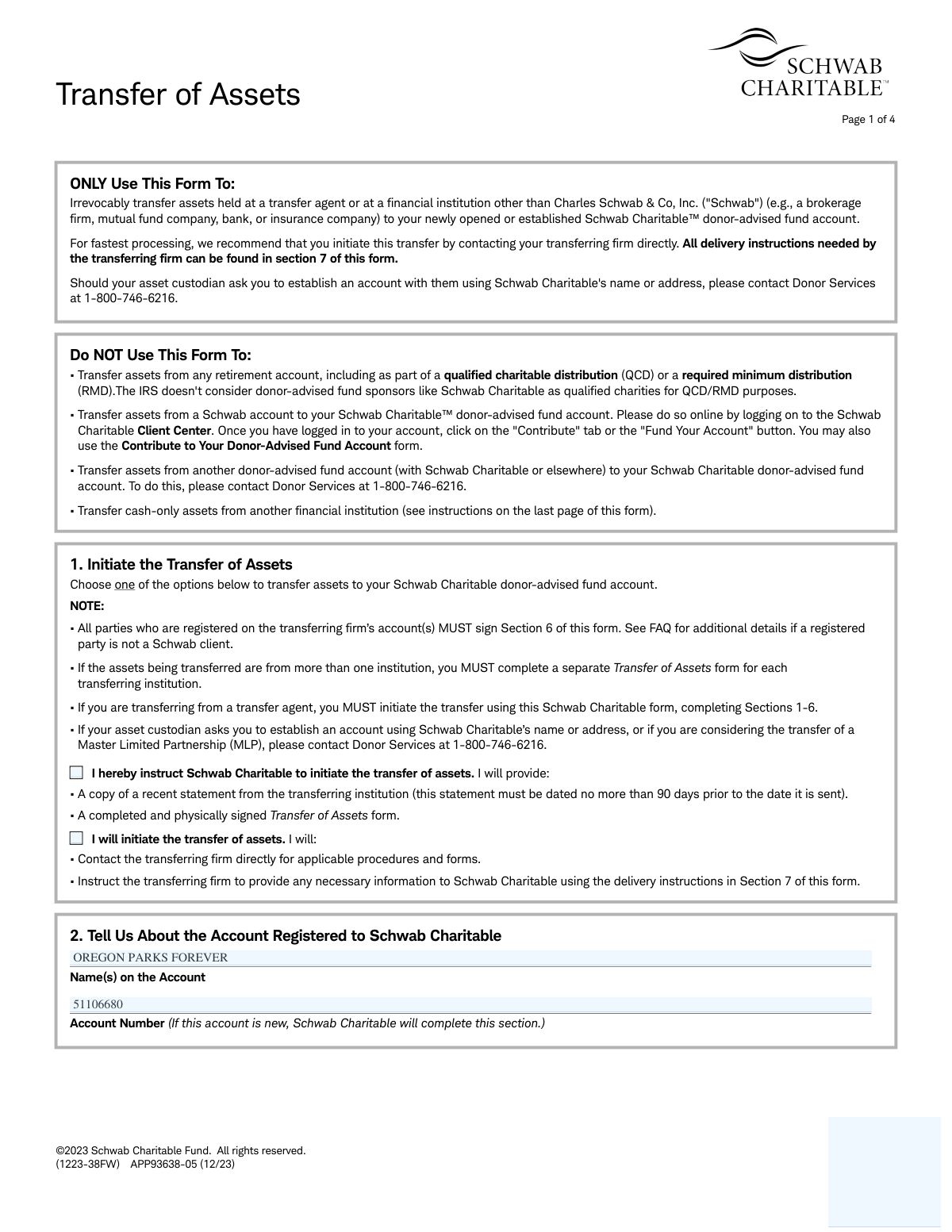
The Schwab Charitable Transfer of Assets (TOA) form is a legal document used to authorize the irrevocable transfer of assets, such as stocks or mutual funds, from a financial institution (other than Charles Schwab & Co, Inc.) to your Schwab Charitable donor-advised fund account. It ensures the proper documentation and execution of your charitable contribution, specifying the accounts and assets involved. Today, this form can be filled out quickly and accurately using AI-powered services like Instafill.ai, which can also convert non-fillable PDF versions into interactive fillable forms.
APP93638-05 / TOA is part of the
Schwab forms, asset transfer forms, charitable forms, transfer forms, Schwab Charitable forms and fund transfer forms categories on Instafill.
Rather not fill this in by hand? Instafill is an online form filler that completes PDF forms automatically — upload the blank form, answer a few questions, and the AI fills every field.
Form specifications
| Form name: | Schwab Charitable Fund Transfer of Assets |
| Number of pages: | 1 |
| Language: | English |
Our AI automatically handles information lookup, data retrieval, formatting, and form filling.
It takes less than a minute to fill out APP93638-05 / TOA using our AI form filling.
Securely upload your data. Information is encrypted in transit and deleted immediately after the form is filled out.
Instafill Demo: How to fill out PDF forms in seconds with AI
How to Fill Out APP93638-05 / TOA Online for Free in 2026
Are you looking to fill out a APP93638-05 / TOA form online quickly and accurately? Instafill.ai offers the #1 AI-powered PDF filling software of 2026, allowing you to complete your APP93638-05 / TOA form in just 37 seconds or less.
Follow these steps to fill out your APP93638-05 / TOA form online using Instafill.ai:
- 1 Navigate to Instafill.ai and upload or select the Schwab Charitable Transfer of Assets form.
- 2 Use the AI assistant to populate your Schwab Charitable account information in Section 2.
- 3 Enter the details of the transferring firm and the account from which you are moving assets in Section 3.
- 4 Specify the assets to be transferred in Section 4, including security names, symbols, and share numbers, attaching a spreadsheet if necessary.
- 5 Carefully review the certification in Section 5, acknowledging the irrevocable nature of the contribution.
- 6 Print the form to provide a physical signature in Section 6, as e-signatures are not accepted, and gather any required account statements.
- 7 Download the completed and signed form, then submit it to Schwab Charitable using the delivery instructions provided.
Our AI-powered system ensures each field is filled out correctly, reducing errors and saving you time.
Why Choose Instafill.ai for Your Fillable APP93638-05 / TOA Form?
Speed
Complete your APP93638-05 / TOA in as little as 37 seconds.
Up-to-Date
Always use the latest 2026 APP93638-05 / TOA form version.
Cost-effective
No need to hire expensive lawyers.
Accuracy
Our AI performs 10 compliance checks to ensure your form is error-free.
Security
Your personal information is protected with bank-level encryption.
Frequently Asked Questions About APP93638-05 / TOA
This form is used to make an irrevocable transfer of assets, such as stocks and mutual funds, from a financial institution other than Charles Schwab to your Schwab Charitable donor-advised fund account.
You should use this form if you are contributing assets held at an external brokerage firm, mutual fund company, or bank. Do not use it for transfers from Schwab accounts, retirement accounts, or other donor-advised funds.
You must attach a copy of a recent account statement from the transferring institution. The statement must be dated within the last 90 days and show the account registration and assets being transferred.
No, you cannot transfer assets from any retirement account using this form. The IRS does not recognize donor-advised funds like Schwab Charitable as eligible recipients for QCDs.
For the quickest processing, the form recommends contacting your current financial firm directly to initiate the transfer. You can provide them with the delivery instructions found in Section 7 of the form.
All account owners listed on the statement from the transferring firm must provide a physical signature on the form. Electronic signatures are not permitted.
You can submit the form by uploading it via the secure Message Center on schwab.com, or by sending it via regular mail, overnight delivery, or fax. All addresses and numbers are provided in Section 7.
No, you must complete and submit a separate Transfer of Assets form for each financial institution from which you are transferring assets.
No, this form is not for cash-only transfers. To contribute cash, you should send a check, wire, or use an Electronic Funds Transfer (EFT) following the instructions on the last page of the form.
Once received, Schwab Charitable typically liquidates the securities at the earliest possible date. The resulting cash proceeds are then credited to your donor-advised fund account for future granting.
Yes, services like Instafill.ai use AI to accurately auto-fill form fields with your information, which can save you time and help prevent errors.
You can use a service like Instafill.ai to fill out the form on your computer. Simply upload the PDF, and the tool will allow you to type your information into the fields before printing it for the required physical signature.
If you have a non-fillable or 'flat' PDF, you can use a service like Instafill.ai to convert it into an interactive, fillable form. This makes it easy to complete the form digitally before printing and signing.
Compliance APP93638-05 / TOA
Validation Checks by Instafill.ai
1
Verifies All Account Holders Have Signed
This check compares the names listed on the transferring account in Section 3 with the printed names and signatures provided in Section 6. It ensures that all registered owners of the transferring account have provided a valid signature, as required by the form's instructions. Failure to obtain signatures from all account holders will result in the rejection of the transfer request, as it lacks full legal authorization.
2
Ensures Physical Signature Requirement is Met
This validation confirms that the signatures in Section 6 are physical ink signatures and not electronic signatures (e.g., DocuSign). The form explicitly states that it is 'not e-sign eligible'. Submissions with electronic signatures will be rejected, and the donor will be required to resubmit the form with a wet signature to ensure legal compliance and enforceability.
3
Validates Transfer Initiation Method Selection
Checks that one of the two options in Section 1 ('I hereby instruct Schwab Charitable to initiate...' or 'I will initiate...') has been selected. This choice is mandatory as it dictates the workflow and responsibility for initiating the asset transfer. If no option is selected, the form is incomplete and cannot be processed, leading to a delay until the donor provides the missing information.
4
Confirms Completeness of Transferring Firm Details
This check ensures that all fields in Section 3, including the transferring firm's name, account number, account holder names, full mailing address, and telephone number, are completed. This information is critical for Schwab Charitable to correctly identify the source account and communicate with the other institution. Missing information will halt the process and require outreach to the donor to complete the form.
5
Verifies Asset Specification and Required Totals
This validation ensures that at least one asset is detailed in the table in Section 4 (or a signed attachment is provided) and that the 'Sum of approximate values ($)' field is filled. The form cannot be processed without knowing which assets are to be transferred and their estimated value. An empty asset section will cause the form to be rejected as incomplete.
6
Checks for Logical Consistency of Asset Value Calculations
This check verifies the arithmetic in Section 4, ensuring that the 'Sum of approximate values ($)' correctly totals the individual 'Approximate value ($)' entries for each security. It also confirms that the 'TOTAL CASH AND SECURITIES $' field is the correct sum of the 'Sum of approximate values ($)' and the 'Cash contribution $' fields. Incorrect calculations can lead to processing errors and require correction by the donor.
7
Prohibits Invalid Cash-Only Transfers
Based on the FAQ, this form cannot be used for cash-only transfers. This validation checks if the asset table in Section 4 is empty while the 'Cash contribution $' field contains a value. If this condition is met, the submission is flagged as an improper use of the form and will be rejected with instructions to use the correct method (check, wire, or EFT).
8
Validates Date Formats and Plausibility
This check ensures that all date fields, specifically 'Acquired date' in Section 4 and 'Today's Date' in Section 6, are in the valid 'mm/dd/yyyy' format. It also verifies that these dates are not in the future. Incorrectly formatted or future dates are invalid and will cause the form to be returned for correction, preventing processing delays and data entry errors.
9
Confirms Attachment of Recent Account Statement
If the donor selects the option in Section 1 for Schwab Charitable to initiate the transfer, this validation confirms that a copy of the transferring firm's account statement is included with the submission. It also checks that the statement date is no more than 90 days prior to the submission date. A missing or outdated statement will prevent Schwab Charitable from acting, and the request will be put on hold pending receipt of the required document.
10
Validates 'Number of Shares' Field Format
This check ensures the 'Number of shares to be transferred' in Section 4 is a positive numerical value. It also enforces the rule that for mutual funds, fractional shares can be specified up to a maximum of three decimal points. Non-numeric or improperly formatted entries will cause a processing failure and require clarification from the donor.
11
Detects Prohibited Retirement Account Transfers
This validation scans the attached account statement for keywords indicating a retirement account, such as 'IRA', '401k', 'QCD', or 'RMD'. The form explicitly prohibits transfers from such accounts as per IRS rules. If a retirement account is detected, the transfer will be rejected to prevent a non-compliant and potentially taxable event for the donor.
12
Verifies Primary Account Holder Signature Block is Complete
This check ensures that the primary account holder block in Section 6 contains a signature, a printed name, and a date. All three components are required to authorize the transfer. If any of these elements are missing, the form is considered incomplete and legally invalid, and it will be returned to the sender for completion.
13
Validates Transferring Firm's ZIP Code Format
This check ensures the 'Zip Code' provided in Section 3 for the transferring firm is in a valid 5-digit or 9-digit (ZIP+4) format. A correct ZIP code is essential for any physical mail correspondence that may be required to process the transfer. An invalid format would be flagged for correction to prevent mail delivery failures.
14
Validates Transferring Firm's Telephone Number Format
This validation checks that the 'Firm Telephone Number' in Section 3 is a valid 10-digit phone number, potentially with expected formatting like parentheses or hyphens. A valid phone number is crucial for resolving any issues or questions with the transferring institution quickly. An invalid number would be flagged for correction to ensure a clear line of communication is available.
Common Mistakes in Completing APP93638-05 / TOA
Applicants often skim the instructions and mistakenly use this form for prohibited transfers, such as from retirement accounts (QCD/RMD), other Schwab accounts, or other donor-advised funds. This happens because the form's title seems generic, but its use is highly specific. This error results in an automatic rejection of the form, causing significant delays and requiring the applicant to start the correct process from scratch.
This form requires the physical signature of every single account holder listed on the transferring firm's account, a detail that is frequently missed. Forgetting a co-owner's signature or failing to get a signature notarized (if an owner is not a Schwab client) will cause the transfer to be rejected. To avoid this, carefully review the transferring account statement to identify all owners and ensure each one physically signs the form in Section 6.
In today's digital environment, many people default to using an electronic or digital signature for convenience. However, the FAQ and signature section explicitly state that this form is not e-sign eligible and requires a physical, 'wet' signature. Submitting a form with an e-signature guarantees its rejection, forcing a complete resubmission. While an AI tool like Instafill.ai can accurately populate the form's data fields after converting the flat PDF into a fillable version, you must still print the document for the final physical signature.
The form requires a copy of a recent statement (dated within 90 days) from the transferring institution, which is a commonly forgotten attachment. Without this statement, Schwab Charitable cannot verify the account ownership and assets, halting the process until the document is provided. To prevent this delay, create a checklist and ensure a complete, recent statement is included with your submission packet.
Applicants often leave critical fields blank in the asset table, such as the security symbol, number of shares, or the mandatory 'Sum of approximate values'. This usually happens when rushing or if the information isn't readily available. These omissions prevent the receiving institution from identifying the assets, leading to processing holds and follow-up requests. AI-powered tools like Instafill.ai can help prevent this by highlighting all required fields and validating data formats to ensure nothing is missed.
The form has separate sections for the receiving Schwab Charitable account (Section 2) and the source account at the transferring firm (Section 3). It is a common data entry error to mix these up, entering the wrong account number or firm name in a section. This mistake can cause the transfer request to fail entirely or be sent to the wrong institution. Using an intelligent form-filler can help prevent this by mapping data to the correct fields, reducing the chance of manual entry errors.
The instructions and FAQ clearly state this form should not be used for cash-only transfers, yet people still attempt it, assuming it's an all-purpose transfer document. This form is exclusively for transferring securities 'in-kind.' Using it for cash will result in rejection, and the applicant will be instructed to send the funds via the correct method (wire, EFT, or check), delaying their contribution.
The form offers the convenience of attaching a spreadsheet for listing many assets, but filers often overlook the fine print requiring the attachment itself to be signed and dated. An unsigned spreadsheet is considered an invalid instruction and will stop the entire transfer from being processed. If you use an attachment, ensure every page is physically signed and dated by all account holders who are authorizing the transfer.
In an effort to be efficient, an applicant might list assets from different brokerage firms (e.g., Fidelity and Vanguard) on one form. However, the instructions in Section 1 mandate a separate form for each transferring institution. This error causes significant processing delays, as only the assets from the one firm listed in Section 3 can be processed, leaving other intended transfers incomplete and requiring new forms to be submitted.
Saved over 80 hours a year
“I was never sure if my IRS forms like W-9 were filled correctly. Now, I can complete the forms accurately without any external help.”
Kevin Martin Green
Your data stays secure with advanced protection from Instafill and our subprocessors




Robust compliance program
Transparent business model
You’re not the product. You always know where your data is and what it is processed for.
ISO 27001, HIPAA, and GDPR
Our subprocesses adhere to multiple compliance standards, including but not limited to ISO 27001, HIPAA, and GDPR.
Security & privacy by design
We consider security and privacy from the initial design phase of any new service or functionality. It’s not an afterthought, it’s built-in, including support for two-factor authentication (2FA) to further protect your account.
Fill out APP93638-05 / TOA with Instafill.ai
Worried about filling PDFs wrong? Instafill securely fills schwab-charitable-fund-transfer-of-assets forms, ensuring each field is accurate.
