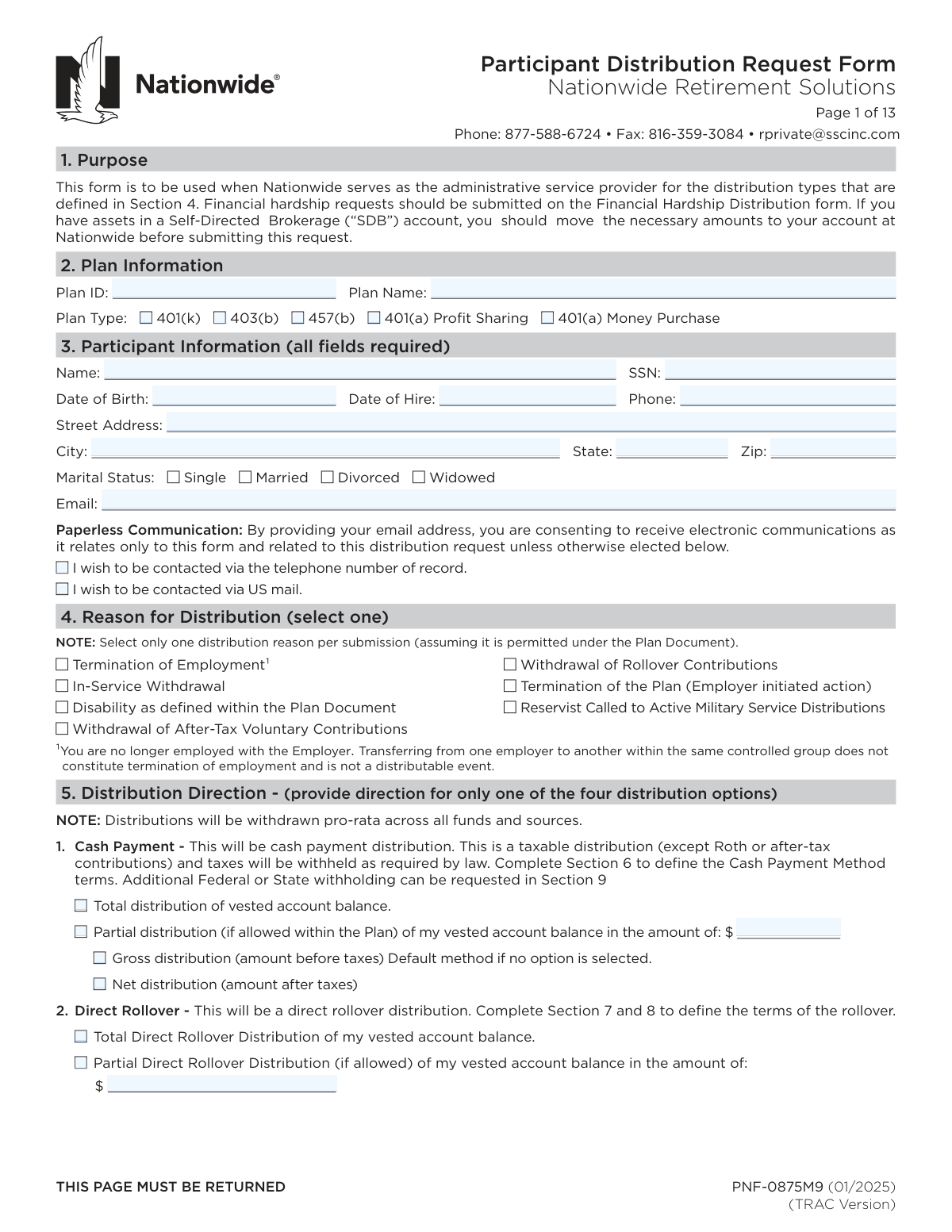
Compliance PNF-0875M9
Validation Checks by Instafill.ai
1
Plan Information Completeness and Plan Type Single-Select Validation
Validates that Plan ID and Plan Name are provided and that exactly one Plan Type checkbox (401(k), 403(b), 457(b), 401(a) Profit Sharing, 401(a) Money Purchase) is selected. This is important because distribution eligibility, tax rules, and processing workflows depend on the correct plan identification and plan type. If missing or multiple plan types are selected, the submission should be rejected or routed to manual review with a request for correction.
2
Participant Identity Required Fields and Basic Format Validation
Ensures all participant fields marked “all fields required” are present: Participant Name, SSN, Date of Birth, Date of Hire, Phone, Street Address, City, State, Zip, Marital Status, and Email. Also validates basic formatting (e.g., name not blank/initials-only, state is a valid 2-letter code, zip is 5 digits or ZIP+4). If any required field is missing or malformed, the form should fail validation because the record cannot be reliably matched and payments/notices may be misdirected.
3
SSN Format and Disallowed Values Check
Validates SSN is exactly 9 digits (allowing standard hyphen formatting) and rejects known invalid patterns (e.g., all zeros, 123-45-6789, 000-xx-xxxx). This reduces identity mismatch, fraud risk, and downstream IRS reporting errors (Form 1099-R). If the SSN fails validation, the submission should be blocked and the participant prompted to correct the SSN.
4
Date Fields Format and Chronological Consistency (DOB, Hire, Termination, Payroll Deduction, Signatures)
Checks that all dates are valid calendar dates in the expected format (mm/dd/yyyy where applicable) and that they are logically consistent: Date of Birth < Date of Hire; participant signature date is not before key elections are made; termination date (if provided) is on/after hire date; final payroll deduction date is on/after hire date and not after termination date (if termination is provided). This prevents impossible timelines that can invalidate distributable event determinations and payroll-based contribution reconciliation. If inconsistencies are found, the submission should be rejected or flagged for plan sponsor verification.
5
Participant Age Reasonableness and Eligibility Flagging
Calculates participant age from Date of Birth and flags implausible ages (e.g., under 14 or over 100) and potential early distribution scenarios (under 59½) for additional tax notice/withholding handling. While age alone may not block a distribution, it is critical for correct tax treatment and exception handling. If the age is implausible, the submission should fail; if merely under 59½, it should be flagged for tax/penalty disclosure and processing rules.
6
Marital Status Selection and Spousal Consent Conditional Requirement
Validates that exactly one marital status is selected and, if Married, enforces completion of Spousal Consent unless the participant explicitly selects “Not Applicable” and the plan does not require consent (as determined by plan rules/config). If spousal consent is required, the spouse’s printed name, signature, date, and witness (plan sponsor or notary) details must be present. If required spousal consent is missing or incomplete, the distribution must not be processed and should be returned for completion.
7
Reason for Distribution Single-Select and Supporting Plan Sponsor Data Alignment
Ensures exactly one “Reason for Distribution” checkbox is selected per submission (as stated on the form). Also checks alignment with plan sponsor-provided data when applicable (e.g., if “Termination of Employment” is selected, a termination date should be provided by the plan sponsor/DPA and should not be blank). If multiple reasons are selected or required sponsor data is missing, the request should be rejected to avoid processing under the wrong distributable event.
8
Distribution Direction Exclusive Option Validation (One of Four Options Only)
Validates that the participant provides direction for only one distribution option: (1) Cash Payment, (2) Direct Rollover, (3) Combination Cash + Rollover, or (4) Repetitive Cash Payments. This is essential because each option triggers different required sections (6 vs 7/8 vs both vs repetitive schedule) and different tax withholding rules. If more than one option is completed/selected, the submission should fail validation and require resubmission with a single clear direction.
9
Cash Payment Amount and Total/Partial Selection Consistency
If Cash Payment is selected, validates that either “Total distribution of vested account balance” OR “Partial distribution” is selected (not both), and if partial is selected, the partial amount is present, numeric, and greater than $0 with two-decimal currency precision. Also enforces that Gross vs Net selection is either one or defaults to Gross if none is selected, but never both. If the amount is missing/invalid or conflicting selections exist, the request should be rejected to prevent incorrect payout calculations.
10
Direct Rollover Amount and Total/Partial Selection Consistency
If Direct Rollover is selected, validates that either “Total Direct Rollover” OR “Partial Direct Rollover” is selected (not both), and if partial is selected, the rollover amount is present, numeric, and greater than $0. This prevents ambiguous instructions and ensures the rollover check is issued for the correct amount. If validation fails, the submission should be blocked and corrected instructions requested.
11
Combination Cash + Rollover Amount Logic
If the Combination option is selected, validates that the cash payment amount is provided, numeric, and greater than $0, and that the cash payment is designated as Gross or Net (or defaults to Gross if blank) but not both. Also enforces that rollover sections (7 and 8) are completed for the remaining balance and that cash payment method (Section 6) is completed for the cash portion. If any required component is missing, the submission should fail because the administrator cannot split the distribution correctly.
12
Repetitive Cash Payments Schedule and Amount Validation
If Repetitive Cash Payments are selected, validates that exactly one frequency is selected, the gross amount is provided and > $0, and the beginning date (if provided) is a valid mm/dd date; if omitted, system should default to processing date per form instructions. This is important to avoid unintended recurring payments or incorrect start timing. If frequency or amount is missing/invalid, the request should be rejected; if the date is invalid, it should be rejected or corrected before scheduling.
13
Direct Deposit ACH Banking Details Validation (Routing/Account/Type) and Check-by-Mail Fallback Rules
If Direct Deposit ACH is selected, validates that Financial Institution Name is present, ABA routing number is exactly 9 digits and passes the ABA checksum, and account number is present and within reasonable length/character constraints (digits only if required by system). Also validates account type selection (checking/savings) or applies the documented default to checking if blank. If banking details fail validation or are incomplete, the system should not attempt ACH and should either reject the submission (strict mode) or follow the form’s stated fallback to mail a check to the address of record (configurable), while flagging the record for potential delay.
14
Rollover Contribution Type Elections (Pre-Tax and Roth) Mutual Exclusivity and Completeness
If any direct rollover is requested, validates that for Pre-Tax contributions exactly one option is selected (N/A or one rollover destination) and for Roth contributions exactly one option is selected (N/A or one rollover destination). This prevents contradictory instructions such as selecting both “N/A” and a rollover destination, or multiple destinations for the same source type. If the selections are missing or conflicting, the submission should be rejected because the rollover cannot be allocated correctly.
15
Rollover Account Information Completeness and Separate Account Number Rule
When a rollover destination is selected, validates that the Trustee/Custodian payee name, address, city, state, and zip are complete and properly formatted, and that the relevant account number(s) are provided. Enforces the form rule that when both Roth and pre-tax funds are being rolled over, separate account numbers must be provided (i.e., both Pre-tax Account Number and Roth Account Number must be present and not identical if the receiving institution requires separation). If required rollover account details are missing, the request should fail because the rollover check cannot be issued correctly and may be rejected by the receiving custodian.
16
Tax Withholding Section Applicability and Required Attachment Checks (W-4R/W-4P/State Forms)
Validates that Section 9 is not completed when the only distribution is a direct rollover (no cash component), and that withholding elections requiring attachments are accompanied by the correct form: W-4R for additional federal withholding on direct/systematic payments <10 years, and W-4P or W-4R for systematic payments ≥10 years/RMD adjustments as described. Also flags state withholding adjustments as requiring an attached state form when the participant indicates an adjustment. If withholding is requested without required attachments, the submission should be rejected or defaulted to statutory withholding rules with a clear exception flag, per operational policy.