Yes! You can use AI to fill out Schwab Personal Choice Retirement Account® (PCRA) Limited Power of Attorney (LPOA) Form For a Participant
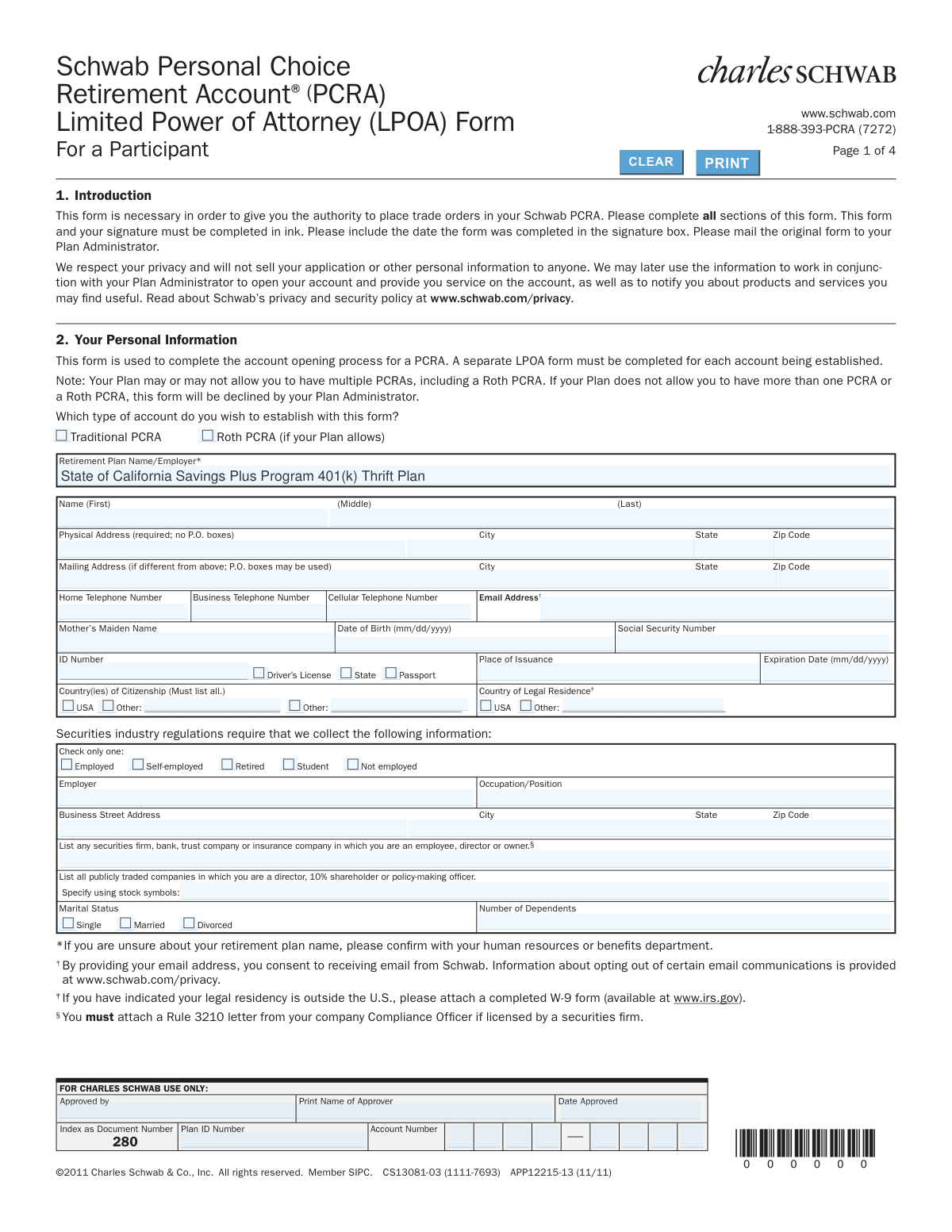
This form is a Limited Power of Attorney (LPOA) that a retirement plan participant uses to grant themselves the authority to place trade orders within their Schwab Personal Choice Retirement Account (PCRA). It is a crucial document for the account opening process, enabling the participant to self-direct investments within their retirement plan's brokerage window. Today, this form can be filled out quickly and accurately using AI-powered services like Instafill.ai, which can also convert non-fillable PDF versions into interactive fillable forms.
Schwab PCRA LPOA Form is part of the
retirement forms, Schwab forms, retirement account forms, CRA forms and power of attorney forms categories on Instafill.
Rather not fill this in by hand? Instafill is an online form filler that completes PDF forms automatically — upload the blank form, answer a few questions, and the AI fills every field.
Form specifications
| Form name: | Schwab Personal Choice Retirement Account® (PCRA) Limited Power of Attorney (LPOA) Form For a Participant |
| Number of pages: | 1 |
| Language: | English |
Our AI automatically handles information lookup, data retrieval, formatting, and form filling.
It takes less than a minute to fill out Schwab PCRA LPOA Form using our AI form filling.
Securely upload your data. Information is encrypted in transit and deleted immediately after the form is filled out.
Instafill Demo: How to fill out PDF forms in seconds with AI
How to Fill Out Schwab PCRA LPOA Form Online for Free in 2026
Are you looking to fill out a SCHWAB PCRA LPOA FORM form online quickly and accurately? Instafill.ai offers the #1 AI-powered PDF filling software of 2026, allowing you to complete your SCHWAB PCRA LPOA FORM form in just 37 seconds or less.
Follow these steps to fill out your SCHWAB PCRA LPOA FORM form online using Instafill.ai:
- 1 Navigate to Instafill.ai and upload or select the Schwab PCRA LPOA Form.
- 2 Use the AI assistant to accurately fill in your personal information, including name, address, contact details, date of birth, and Social Security Number.
- 3 Indicate the type of PCRA you are establishing (Traditional or Roth) and provide your retirement plan and employer information.
- 4 Complete the 'Investment Profile' section by providing details about your investment knowledge, experience, income, and overall objectives.
- 5 Answer the questions regarding your employment status and any affiliations with securities firms or publicly traded companies.
- 6 Carefully review the entire agreement, including the terms and conditions and the predispute arbitration clause, ensuring all entered information is correct.
- 7 Electronically sign and date the form, then download the completed document to mail the original to your Plan Administrator as instructed.
Our AI-powered system ensures each field is filled out correctly, reducing errors and saving you time.
Why Choose Instafill.ai for Your Fillable Schwab PCRA LPOA Form Form?
Speed
Complete your Schwab PCRA LPOA Form in as little as 37 seconds.
Up-to-Date
Always use the latest 2026 Schwab PCRA LPOA Form form version.
Cost-effective
No need to hire expensive lawyers.
Accuracy
Our AI performs 10 compliance checks to ensure your form is error-free.
Security
Your personal information is protected with bank-level encryption.
Frequently Asked Questions About Schwab PCRA LPOA Form
This form is necessary to grant you, the retirement plan participant, the authority to place trade orders and manage investments within your Schwab Personal Choice Retirement Account (PCRA). It is a required step to open and activate your self-directed brokerage account.
Any retirement plan participant who is eligible for and wishes to open a Schwab PCRA to have more control over their retirement investments needs to complete this form. By signing, you are establishing a Limited Power of Attorney for yourself to trade in the account.
Yes, you can indicate your preference for a Roth PCRA in Section 2, but it is only available if your specific retirement plan allows for it. You should confirm eligibility with your Plan Administrator or benefits department before submitting the form.
You will need to provide your full name, physical address (no P.O. boxes), Social Security Number, date of birth, and employment details. You must also provide information from a valid government ID like a driver's license or passport.
Yes, you must list any securities firm, bank, or insurance company where you are an employee, director, or owner. If you are licensed by a securities firm, you must also attach a Rule 3210 letter from your company's Compliance Officer.
Answer the questions about your investment knowledge, experience, and financial situation to the best of your ability. The form provides definitions for the 'Overall Investment Objective' to help you choose the one that best fits your goals for this account.
Yes, PCRA accounts generally prohibit trading in collectibles, currencies, futures, private placements, and short sales. Your specific retirement plan may have additional restrictions, so you should review your plan documents for a complete list.
You must mail the original, signed form (all pages) directly to your Plan Administrator, not to Charles Schwab. Be sure to keep a copy for your own records.
You are responsible for contacting your Retirement Plan Service Provider to direct transfers from your core retirement plan options into your PCRA. Once transferred, funds are typically held in a money market fund until you direct them into other investments.
While the signature must be original and in ink, you can use services like Instafill.ai to fill out the form's fields online accurately and neatly. After filling it, you would print the form, sign it in ink, and then mail it as instructed.
If you have a non-fillable or 'flat' PDF, you can use a service like Instafill.ai to convert it into an interactive, fillable form. This allows you to type your information easily before printing the document for your signature.
Yes, AI-powered services like Instafill.ai can help you accurately auto-fill your personal information, saving you time and reducing the risk of errors. You are still responsible for reviewing all information for accuracy and making your own investment profile selections.
All uninvested funds held within your PCRA will be automatically invested, or 'swept,' into the sweep vehicle selected by your Plan Sponsor, which is often a money market fund. It is your responsibility to then allocate those funds into other investments if you choose.
After signing and dating the form in ink, you must return all four pages to your Plan Administrator. The form explicitly states to keep a copy for your personal records.
Compliance Schwab PCRA LPOA Form
Validation Checks by Instafill.ai
1
Validates Social Security Number Format
This check ensures the Social Security Number is provided and follows the standard 9-digit format (XXX-XX-XXXX or XXXXXXXXX). A valid SSN is a critical and legally required identifier for financial accounts for tax reporting and identity verification. If the number is missing, incomplete, or in an incorrect format, the form submission will be rejected until a valid SSN is provided.
2
Ensures Physical Address is a Valid, Non-P.O. Box Location
This validation verifies that the Physical Address field is complete and does not contain 'P.O. Box' or similar text, as explicitly forbidden by the form. A physical address is required by federal regulations (Patriot Act) to verify a customer's identity and is distinct from a mailing address. A submission with a P.O. Box in this field will be flagged for correction, as it fails to meet regulatory requirements.
3
Verifies Date of Birth Format and Minimum Age
This check confirms that the Date of Birth is a valid date in mm/dd/yyyy format and that the applicant is of legal age (e.g., 18 years or older) to enter into a contract. This is crucial for legal and compliance reasons, ensuring the account holder has the capacity to agree to the terms. If the date is invalid or the applicant is underage, the account opening process cannot proceed and the application will be rejected.
4
Confirms Signature and Date are Present
This validation ensures that the participant has signed the form and provided a date in the signature box on page 4. The signature and date are legally required to execute the Limited Power of Attorney and acknowledge the terms of the agreement, including the arbitration clause. A form lacking a signature or date is legally incomplete and will be returned to the participant for completion.
5
Checks for Logical Consistency in Employment Information
This check verifies that if the employment status is 'Employed' or 'Self-employed', the 'Employer' and 'Occupation/Position' fields are filled out. This information is required by securities industry regulations to understand the customer's financial profile and potential conflicts of interest. If the status is 'Employed' but the employer details are missing, the form will be considered incomplete and require clarification.
6
Validates Identification Document Expiration Date
This check ensures the expiration date on the provided ID (Driver's License or Passport) is a valid date and has not passed. Financial institutions are required to maintain records of unexpired government-issued identification for their clients as part of Customer Identification Programs. An application with an expired ID will be rejected, and the applicant will be asked to provide current identification.
7
Verifies Completeness of 'Other' Citizenship or Residency
This validation checks that if the 'Other' checkbox is selected for either 'Country(ies) of Citizenship' or 'Country of Legal Residence', the corresponding text field is filled in. This information is essential for determining tax status (e.g., W-9 requirement for non-U.S. residents) and complying with international regulations. An incomplete entry will halt the process until the specific country is provided.
8
Ensures All Required Fields Are Populated
This is a general completeness check to verify that all fields marked with an asterisk (*) or explicitly noted as required (e.g., Physical Address, Retirement Plan Name) have been filled in. Missing required information prevents the proper and compliant establishment of the account. The submission will be flagged as incomplete, and the user will be prompted to fill in all mandatory fields before the application can be processed.
9
Validates Consistency Between Printed Name and Signature Name
This check compares the 'Print Name' in the signature section with the full name provided in the 'Your Personal Information' section. The names should match to ensure the person signing the agreement is the same individual applying for the account. A significant discrepancy could indicate an error or a fraudulent application, triggering a manual review or rejection.
10
Checks for Completeness of Optional Mailing Address
This validation rule ensures that if any part of the 'Mailing Address' section is filled out, all its components (address, city, state, zip) are present. An incomplete mailing address is unusable and can lead to lost correspondence and compliance issues. If the section is partially filled, the system will return an error requesting either the completion of the address or the clearing of the partial data.
11
Verifies Selection of an Account Type
This check ensures that the participant has selected exactly one account type: either 'Traditional PCRA' or 'Roth PCRA'. This selection is fundamental to establishing the correct account structure for tax and contribution purposes. If no box is checked, or if both are checked, the form is ambiguous and will be returned for clarification.
12
Flags Requirement for Rule 3210 Letter
This check identifies if the applicant has listed an employer in the 'securities firm, bank, trust company or insurance company' field. If so, it flags the application to ensure the required 'Rule 3210 letter' from the employer's compliance officer is attached, as noted in the form's footnote. This is a critical compliance step for employees of other financial firms, and failure to provide the letter will prevent account approval.
13
Validates Email Address Format
This check ensures that the provided email address follows a standard format (e.g., '[email protected]'). A valid email is crucial for electronic communication, delivery of statements, and account notifications as consented to by the applicant. An invalid format would prevent successful communication, so the system will reject malformed addresses and request correction.
14
Ensures Investment Profile Selections are Complete
This validation verifies that one option has been selected for each category within the 'Investment Profile' section (Knowledge, Experience, Tax Bracket, Income, Net Worth, Objective). This information is required by securities regulations to assess the suitability of investments for the client. An incomplete profile prevents this assessment, so the form will be rejected until all profile questions are answered.
Common Mistakes in Completing Schwab PCRA LPOA Form
Applicants often mistakenly enter their employer's name instead of the official 'Retirement Plan Name'. This happens because the two are often related but not identical, and finding the exact plan name can require extra effort. An incorrect plan name will cause the application to be rejected or significantly delayed as the Plan Administrator cannot match the form to the correct retirement plan. To avoid this, confirm the exact plan name with your HR or benefits department as suggested in the form's footnote before filling it out.
The form explicitly requires a physical street address and prohibits P.O. boxes in that field for regulatory and identity verification purposes. Many people use a P.O. Box for all their mail and enter it out of habit, leading to an immediate rejection of the form. Always provide a valid street address where you reside; a separate field is provided for a P.O. Box if your mailing address is different. AI-powered tools like Instafill.ai can help by recognizing address field constraints and ensuring the correct type of address is entered.
The form requires specific attachments under certain conditions, such as a W-9 form for non-U.S. legal residents or a Rule 3210 letter for employees of securities firms. Applicants often overlook these footnotes or forget to include the physical documents with their submission. This results in an incomplete application that cannot be processed until the missing documents are received, causing significant delays. Carefully review all footnotes related to your personal situation and gather all necessary attachments before mailing the form.
Forgetting to sign, date, or print a name in the designated signature box is one of the most common reasons for form rejection. Applicants may be focused on the complex personal information sections and simply overlook the final step on page 4. An unsigned form is legally invalid and will be returned immediately, forcing you to restart the submission process. Always double-check the signature page to ensure you have signed, printed your name, and added the current date in ink.
The form offers a choice between a 'Traditional PCRA' and a 'Roth PCRA', but explicitly warns that the Roth option is only available 'if your Plan allows'. Applicants may select the Roth option without verifying their eligibility, assuming it's available to them. This will cause the form to be declined by the Plan Administrator, wasting time and effort. Before selecting an account type, you must confirm with your plan provider which options are available to you.
The instructions clearly state to 'mail the original form to your Plan Administrator,' not to Charles Schwab. Applicants may see the Schwab branding and address and incorrectly send the form there directly. This misrouting creates significant processing delays as Schwab will then need to forward the form to the correct Plan Administrator, if they are able to identify them. Always read the submission instructions carefully to ensure the form reaches the correct recipient on the first attempt.
The form requires applicants to list all countries of citizenship, which is a critical detail for financial and tax regulations (e.g., FATCA). Individuals with dual citizenship sometimes only list one country out of habit or misunderstanding. This omission can lead to compliance issues and future account problems. Ensure you list every country of which you are a citizen to maintain compliance and prevent processing holds.
The section for Driver's License or Passport details is often filled out incorrectly, with applicants providing an expired ID, omitting the issuance location, or using an incorrect date format. This information is essential for identity verification as required by law. Submitting expired or incomplete ID details will halt the account opening process until valid information is provided. Before filling out the form, check your ID to confirm it is current and that you are transcribing all information accurately.
The form instructions specify that it 'must be completed in ink.' In an increasingly digital world, applicants might attempt to use a digital signature tool on the PDF or fill it out with a pencil. These submissions are typically rejected because a 'wet signature' in ink is a legal requirement for this type of agreement. To avoid rejection, print the form and fill it out completely using a pen with blue or black ink. Tools like Instafill.ai can fill the form digitally for clean text, but the final printed version must still be signed by hand.
Regulatory rules require strict monitoring of trading activity by individuals affiliated with securities firms, banks, or who are major shareholders of public companies. Applicants may not realize their role qualifies or may forget to disclose it, along with the required 'Rule 3210 letter'. This is a serious compliance failure that can lead to immediate rejection and potential regulatory scrutiny. Carefully read the questions and disclose any relevant affiliations to ensure your application is compliant from the start.
The instructions on page 4 state to 'Please return the completed form (pages 1 through 4)'. Applicants sometimes assume only the pages with input fields (like page 1) and the signature page (page 4) are needed, and discard the pages containing the terms and agreements. Submitting an incomplete set of pages can cause the application to be rejected, as the recipient needs the full, unaltered document for their records. Always return all pages of the form as a single packet.
The form specifies the 'mm/dd/yyyy' format for Date of Birth and ID Expiration Date. Applicants, especially those from regions where 'dd/mm/yyyy' is standard, may use the wrong format without thinking. This can lead to data entry errors, failed identity verification, and processing delays. Always double-check the required format next to the date field. AI form-filling tools like Instafill.ai can help prevent this by automatically formatting dates correctly based on the form's specific requirements.
Saved over 80 hours a year
“I was never sure if my IRS forms like W-9 were filled correctly. Now, I can complete the forms accurately without any external help.”
Kevin Martin Green
Your data stays secure with advanced protection from Instafill and our subprocessors




Robust compliance program
Transparent business model
You’re not the product. You always know where your data is and what it is processed for.
ISO 27001, HIPAA, and GDPR
Our subprocesses adhere to multiple compliance standards, including but not limited to ISO 27001, HIPAA, and GDPR.
Security & privacy by design
We consider security and privacy from the initial design phase of any new service or functionality. It’s not an afterthought, it’s built-in, including support for two-factor authentication (2FA) to further protect your account.
Fill out Schwab PCRA LPOA Form with Instafill.ai
Worried about filling PDFs wrong? Instafill securely fills schwab-personal-choice-retirement-account-pcra-limited-power-of-attorney-lpoa-form-for-a-participant forms, ensuring each field is accurate.
