Yes! You can use AI to fill out Your guide to completing a rollover - Vanguard
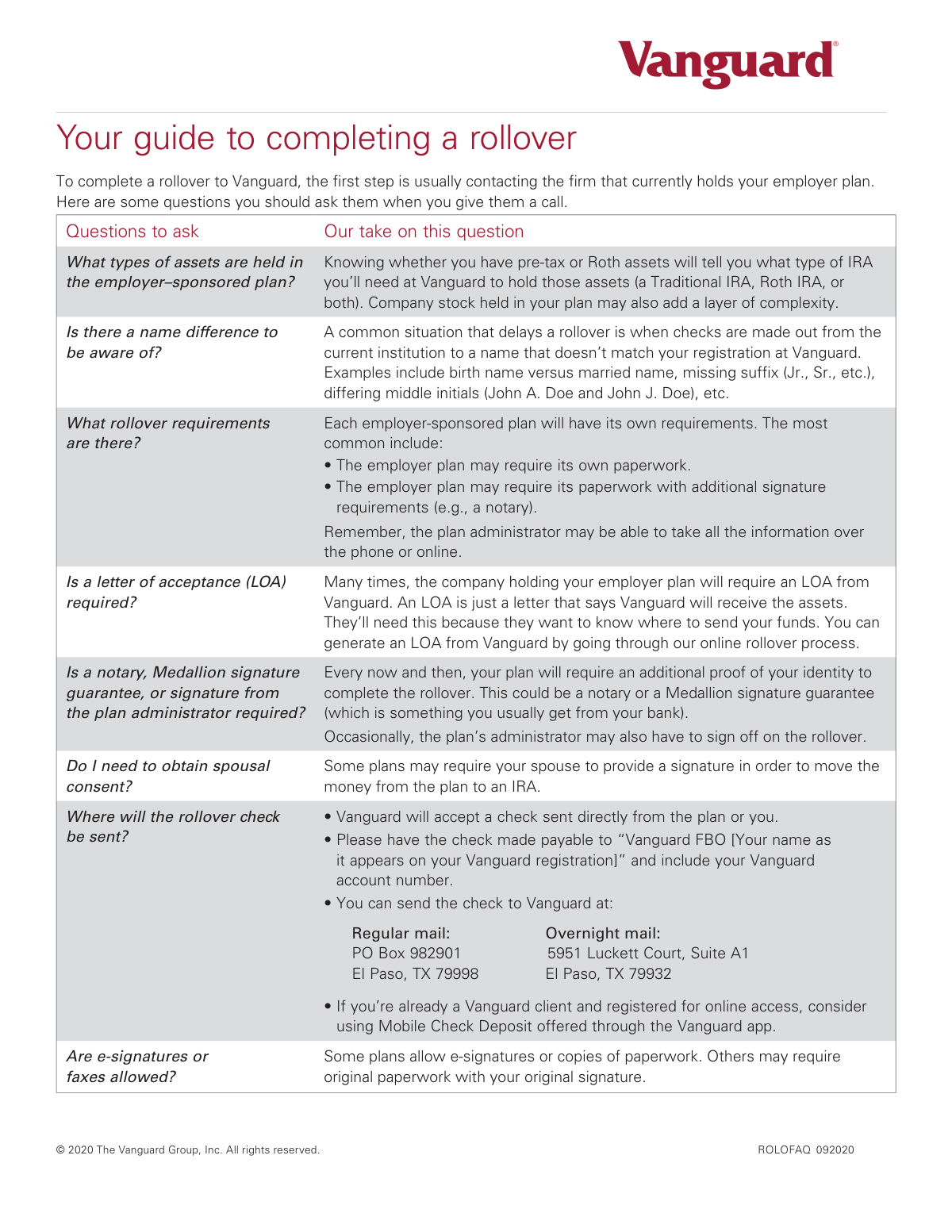
The Vanguard ROLOFAQ is a guide designed to help individuals navigate the process of rolling over retirement funds from an employer-sponsored plan into a Vanguard account. It outlines key questions to ask your current plan administrator regarding asset types, name differences, and specific requirements like signatures or letters of acceptance. Today, the actual rollover forms required by your employer's plan can be filled out quickly and accurately using AI-powered services like Instafill.ai, which can also convert non-fillable PDF versions into interactive fillable forms.
Rather not fill this in by hand? Instafill is an online form filler that completes PDF forms automatically — upload the blank form, answer a few questions, and the AI fills every field.
Form specifications
| Form name: | Your guide to completing a rollover - Vanguard |
| Number of pages: | 1 |
| Language: | English |
Our AI automatically handles information lookup, data retrieval, formatting, and form filling.
It takes less than a minute to fill out ROLOFAQ 092020 using our AI form filling.
Securely upload your data. Information is encrypted in transit and deleted immediately after the form is filled out.
Instafill Demo: How to fill out PDF forms in seconds with AI
How to Fill Out ROLOFAQ 092020 Online for Free in 2026
Are you looking to fill out a ROLOFAQ 092020 form online quickly and accurately? Instafill.ai offers the #1 AI-powered PDF filling software of 2026, allowing you to complete your ROLOFAQ 092020 form in just 37 seconds or less.
Follow these steps to fill out your ROLOFAQ 092020 form online using Instafill.ai:
- 1 Navigate to Instafill.ai and upload the specific rollover paperwork provided by your current employer's plan administrator.
- 2 Use the AI-powered tool to automatically populate your personal details, such as your full name, address, and contact information.
- 3 Review the pre-filled information and provide details for the rollover, including your existing plan information and your new Vanguard account number.
- 4 Answer questions about the assets being moved, such as whether they are pre-tax or Roth, as prompted by the intelligent form fields.
- 5 The AI can help identify fields that may require special attention, such as spousal consent or a Medallion Signature Guarantee.
- 6 Securely e-sign the document if allowed, or download the completed form for printing and manual submission as required by your plan.
Our AI-powered system ensures each field is filled out correctly, reducing errors and saving you time.
Why Choose Instafill.ai for Your Fillable ROLOFAQ 092020 Form?
Speed
Complete your ROLOFAQ 092020 in as little as 37 seconds.
Up-to-Date
Always use the latest 2026 ROLOFAQ 092020 form version.
Cost-effective
No need to hire expensive lawyers.
Accuracy
Our AI performs 10 compliance checks to ensure your form is error-free.
Security
Your personal information is protected with bank-level encryption.
Frequently Asked Questions About ROLOFAQ 092020
This guide helps you understand the process and key questions to ask when moving funds from an employer-sponsored retirement plan into a Vanguard IRA.
The first step is to contact the financial firm that currently manages your employer plan to understand their specific rollover requirements and procedures.
Knowing your asset type is crucial because pre-tax funds must be rolled into a Traditional IRA and Roth funds into a Roth IRA to maintain their tax-advantaged status.
An LOA is a document from Vanguard confirming it will accept your funds. Your current plan administrator may require one, and you can generate it through Vanguard's online rollover process.
A name mismatch, such as due to marriage or a missing initial, can delay your rollover. You must clarify this with your old plan administrator to ensure the check is made out correctly.
Make the check payable to 'Vanguard FBO [Your name]' and include your Vanguard account number. You can mail it to the address in the guide or use Mobile Check Deposit in the Vanguard app.
Some plans require a notary or Medallion signature guarantee for identity verification. Check with your plan administrator to see if this is necessary for your rollover.
Depending on the rules of your specific plan, you may be required to obtain your spouse's signature to authorize moving the money to an IRA.
Some plans accept e-signatures or faxes, while others require original paperwork with a physical signature. You must confirm what your plan administrator will accept.
No, each employer plan has its own unique requirements for paperwork and signatures. It is essential to contact your plan administrator for their specific instructions.
Yes, services like Instafill.ai use AI to accurately auto-fill required forms, which can save you time and help prevent errors in your paperwork.
You can upload your rollover paperwork to the Instafill.ai platform. The service's AI will identify the form fields, allowing you to fill them out quickly and accurately online.
If you have a non-fillable PDF, you can use a tool like Instafill.ai. It can convert flat PDFs into interactive, fillable forms that you can complete and sign digitally.
Compliance ROLOFAQ 092020
Validation Checks by Instafill.ai
1
Name Consistency Between Institutions
Validates that the full legal name provided for the originating account (including first name, middle initial, last name, and any suffixes like Jr. or Sr.) perfectly matches the name registered on the target Vanguard account. A mismatch is a common reason for rollover delays, as financial institutions may reject checks made out to a name that doesn't align with their records. The system should flag discrepancies and prompt the user to confirm or correct the information.
2
Vanguard Account Number Format
Verifies that the provided Vanguard account number follows the correct format (e.g., specific length, character type). This is critical to ensure the rolled-over funds are credited to the correct account. An invalid or missing account number will cause the transaction to fail or be significantly delayed while the funds are manually located.
3
Asset Type Specification
Ensures the user specifies whether the assets being rolled over are pre-tax, Roth, or a combination of both. This information is crucial for directing the funds to the correct type of IRA (Traditional for pre-tax, Roth for Roth) at Vanguard. Failure to specify could lead to incorrect account setup and potential tax complications for the user.
4
Spousal Consent Requirement Acknowledgment
Checks if the user has indicated whether spousal consent is required by their current plan administrator. If the user answers 'Yes', the system should flag that additional signed documentation from the spouse will be necessary to proceed. This proactive check prevents delays caused by missing but required spousal authorization signatures.
5
Letter of Acceptance (LOA) Requirement
Checks if the user has answered whether their current plan requires a Letter of Acceptance (LOA) from Vanguard. If the user selects 'Yes', the system should automatically trigger the process to generate the LOA or guide the user on how to obtain it. This validation ensures a required document is not overlooked, preventing the originating firm from holding the funds due to missing paperwork.
6
Special Signature Requirement Confirmation
Validates that the user has specified whether their originating plan requires special signatures like a notary, Medallion Signature Guarantee, or plan administrator sign-off. This is important because these requirements involve external steps that can take time. The system can then provide guidance or checklists to ensure the user completes these necessary steps before submitting paperwork.
7
Payee Name Instruction Confirmation
Verifies the user has acknowledged the correct payee format for the rollover check: 'Vanguard FBO [Your name]'. While the user doesn't write the check themselves, confirming this instruction reduces the risk of them providing incorrect information to their old plan. An incorrectly issued check must be voided and reissued, causing significant delays.
8
Originating Institution Name Completeness
Ensures the user has provided the full, non-abbreviated name of the financial institution currently holding their employer plan. An incomplete or incorrect name can cause confusion and processing delays when Vanguard or the user communicates with the institution. The validation should check that the field is not empty and is sufficiently detailed.
9
Signature Method Validation
Verifies the user has indicated the acceptable signature method (e.g., e-signature, fax, original 'wet' signature) for their old plan's paperwork. This prevents the submission of improperly signed documents, which would be rejected by the originating institution. The validation ensures the user is aware of the specific requirement and can plan accordingly.
10
Source Account Number Presence
Verifies that the account number for the employer-sponsored plan at the originating institution has been provided. This number is essential for the old plan administrator to identify the correct account from which to withdraw the funds. A missing account number would make it impossible to process the rollover request.
11
Rollover Amount Format
Validates that the rollover amount is entered as a positive numerical value and formatted correctly as currency. This check prevents data entry errors, such as including text or negative numbers, which would cause calculation or transaction failures. It ensures the financial data being processed is clean and accurate.
12
Logical Check for Asset Allocation
If the form captures separate amounts for pre-tax and Roth assets, this check ensures their sum equals the total rollover amount entered. This cross-field validation maintains logical consistency and financial accuracy within the form submission. A mismatch would indicate a data entry error that needs correction before processing.
Common Mistakes in Completing ROLOFAQ 092020
This error occurs when the name on the originating account (e.g., maiden name, missing suffix) does not perfectly match the name on the new Vanguard account. This causes the rollover check to be issued to a name that Vanguard cannot verify, leading to deposit rejection and significant delays. To avoid this, confirm your exact registered name on both accounts before starting the process and ensure they are identical.
Plan administrators may incorrectly make a check payable to just your name or to 'Vanguard' instead of the required format. This happens when specific instructions are not provided or followed. An incorrectly named check cannot be deposited, forcing you to request a new one. Always instruct your old plan to make the check payable to 'Vanguard FBO [Your full name as it appears on your Vanguard registration]'.
Individuals often assume all their retirement funds are of one type, but many plans contain both pre-tax and Roth (post-tax) assets. Rolling these funds into the wrong type of IRA (e.g., Roth assets into a Traditional IRA) can create serious tax complications and require complex corrective actions. Before starting, ask your plan administrator for a breakdown of your assets to ensure you open the correct corresponding IRA(s) at Vanguard.
When sending a rollover check, people frequently forget to include their new Vanguard account number on the check's memo line or accompanying paperwork. Without this number, Vanguard's processing team cannot match the funds to your account, causing delays while they investigate. To prevent this, always write your new account number clearly on the check and any transmittal documents you send.
Many people assume that initiating a rollover with the new institution (Vanguard) is all that's needed, but the current plan administrator almost always has its own required forms. Failing to complete the originating institution's specific paperwork will cause the rollover request to be ignored or rejected. Always contact your current plan first to obtain and complete their required documentation.
This mistake happens when a form is submitted without a required notary seal or Medallion Signature Guarantee, which are used for identity verification. Plan administrators will reject paperwork lacking these authentications, forcing you to get the proper signature and resubmit, delaying the entire process. Confirm with your plan if a special guarantee is needed and where to obtain it, such as your local bank.
Some plan administrators require a Letter of Acceptance (LOA) from the receiving institution to prove that an account is ready to accept the funds. Forgetting to include this letter with your rollover paperwork will cause the administrator to halt the process until they receive it. You can avoid this by asking if an LOA is required and generating one from Vanguard's online rollover portal to submit with your forms.
Certain retirement plans, particularly pensions, legally require your spouse's written consent to move funds out of the plan. People often overlook this, especially if they are unfamiliar with their specific plan's rules. Submitting paperwork without a required spousal signature will result in an automatic rejection until the consent form is properly signed and returned.
With the rise of digital tools, it's easy to assume an e-signature or a faxed copy is acceptable, but many financial institutions still require original 'wet' signatures on physical documents. Submitting a form with an unapproved signature type or via the wrong method (e.g., fax when mail is required) leads to rejection. Always verify the acceptable signature and submission methods with your plan administrator beforehand.
Financial institutions often have different addresses for regular and overnight mail, typically a P.O. Box for the former and a physical street address for the latter. Sending a check to the wrong address can cause it to be delayed or even lost, requiring a stop payment and re-issuance. To avoid this, carefully match the mailing address to your chosen shipping method. AI-powered tools like Instafill.ai can help by automatically populating the correct address fields.
Rolling over company stock from an employer plan without understanding the tax implications is a complex and costly mistake. You could inadvertently forfeit favorable tax treatment known as Net Unrealized Appreciation (NUA), resulting in a much higher tax bill. If your plan holds company stock, always consult a tax advisor to understand your options before initiating a rollover.
A common misconception is that you only need to tell the new institution you want to roll over funds, and they handle the rest. In reality, the account holder must actively coordinate between the old and new firms, starting by contacting the current plan administrator to get their specific requirements and paperwork. Failing to initiate the process with your old plan means the rollover will never begin.
Saved over 80 hours a year
“I was never sure if my IRS forms like W-9 were filled correctly. Now, I can complete the forms accurately without any external help.”
Kevin Martin Green
Your data stays secure with advanced protection from Instafill and our subprocessors




Robust compliance program
Transparent business model
You’re not the product. You always know where your data is and what it is processed for.
ISO 27001, HIPAA, and GDPR
Our subprocesses adhere to multiple compliance standards, including but not limited to ISO 27001, HIPAA, and GDPR.
Security & privacy by design
We consider security and privacy from the initial design phase of any new service or functionality. It’s not an afterthought, it’s built-in, including support for two-factor authentication (2FA) to further protect your account.
Fill out ROLOFAQ 092020 with Instafill.ai
Worried about filling PDFs wrong? Instafill securely fills your-guide-to-completing-a-rollover-vanguard forms, ensuring each field is accurate.
