Yes! You can use AI to fill out New York State Deferred Compensation Plan Outgoing Rollover
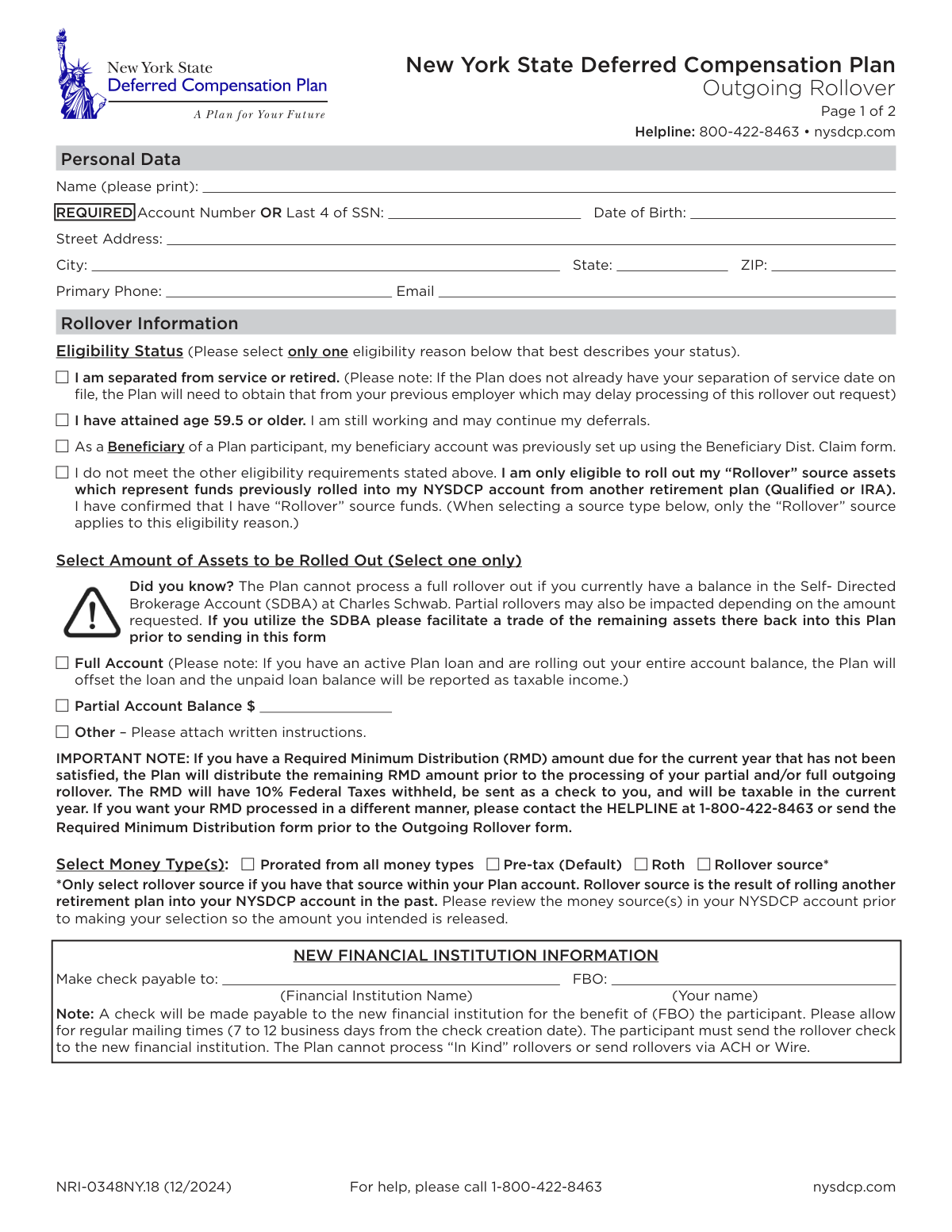
This form authorizes the transfer of assets from a participant's New York State Deferred Compensation Plan (NYSDCP) account to another retirement account, such as an IRA or a new employer's plan. It is essential for individuals who have separated from service, reached age 59.5, or are beneficiaries, and wish to consolidate their retirement savings. Today, this form can be filled out quickly and accurately using AI-powered services like Instafill.ai, which can also convert non-fillable PDF versions into interactive fillable forms.
NRI-0348NY.18 is part of the
New York forms, New York State forms, rollover forms and deferred compensation forms categories on Instafill.
Rather not fill this in by hand? Instafill is an online form filler that completes PDF forms automatically — upload the blank form, answer a few questions, and the AI fills every field.
Form specifications
| Form name: | New York State Deferred Compensation Plan Outgoing Rollover |
| Number of pages: | 1 |
| Language: | English |
Our AI automatically handles information lookup, data retrieval, formatting, and form filling.
It takes less than a minute to fill out NRI-0348NY.18 using our AI form filling.
Securely upload your data. Information is encrypted in transit and deleted immediately after the form is filled out.
Instafill Demo: How to fill out PDF forms in seconds with AI
How to Fill Out NRI-0348NY.18 Online for Free in 2026
Are you looking to fill out a NRI-0348NY.18 form online quickly and accurately? Instafill.ai offers the #1 AI-powered PDF filling software of 2026, allowing you to complete your NRI-0348NY.18 form in just 37 seconds or less.
Follow these steps to fill out your NRI-0348NY.18 form online using Instafill.ai:
- 1 Navigate to Instafill.ai and upload the Outgoing Rollover form PDF or select it from their template library.
- 2 Provide your personal information in the 'Personal Data' section, including your name, account number or last 4 of SSN, and contact details.
- 3 Select your eligibility status for the rollover, such as being separated from service or having attained age 59.5.
- 4 Specify the rollover details, including whether it's a full or partial account rollover and which money types (e.g., Pre-tax, Roth) to include.
- 5 Enter the information for the new financial institution, including the name to which the rollover check should be made payable.
- 6 Carefully review all the information auto-filled by the AI, then digitally or manually sign and date the authorization section.
- 7 Download the completed form and submit it to the New York State Deferred Compensation Plan via mail or fax using the addresses provided on the form.
Our AI-powered system ensures each field is filled out correctly, reducing errors and saving you time.
Why Choose Instafill.ai for Your Fillable NRI-0348NY.18 Form?
Speed
Complete your NRI-0348NY.18 in as little as 37 seconds.
Up-to-Date
Always use the latest 2026 NRI-0348NY.18 form version.
Cost-effective
No need to hire expensive lawyers.
Accuracy
Our AI performs 10 compliance checks to ensure your form is error-free.
Security
Your personal information is protected with bank-level encryption.
Frequently Asked Questions About NRI-0348NY.18
This form is used to request a transfer of funds from your New York State Deferred Compensation Plan (NYSDCP) account to another eligible retirement plan, such as an IRA or a new employer's 401(k).
You are eligible if you have separated from service, are age 59.5 or older, are a beneficiary of a deceased participant, or are only rolling out funds that you previously rolled into the plan from another source.
If you request a full account rollover with an active loan, the Plan will offset the unpaid loan balance from your distribution. This offset amount will be reported as taxable income to you for the current year.
You cannot process a full rollover if you have a balance in the SDBA. You must first facilitate a trade of those assets back into the main Plan before submitting this form for a full account rollover.
If you have an unsatisfied RMD for the current year, the Plan will automatically pay out that RMD amount to you as a taxable distribution before processing your rollover. To manage your RMD differently, you must submit the RMD form prior to this one.
Processing can take 24-48 hours if you are over 59.5 and still working, but may take up to 45 days after separation from service is verified. After processing, please allow 7-12 business days for the check to be delivered by mail.
A physical check will be mailed to your address on file, made payable to the new financial institution for your benefit (FBO). You are responsible for sending the check to your new institution, as the Plan cannot send funds via wire or ACH.
You must provide the full name of the new financial institution where the funds will be deposited. The check will be made payable to this institution 'FBO' (For the Benefit Of) you.
A 'Full Account' rollover transfers your entire balance and will close your account if you are separated from service. A 'Partial Account' rollover allows you to transfer a specific dollar amount while keeping your account open.
The 'Rollover source' refers to funds that you previously transferred into your NYSDCP account from a different retirement plan, such as a 401(k) from a former employer or an IRA.
You can mail the form to the Administrative Service Agency in Columbus, OH, or for faster delivery, use the overnight mail address or fax it to 1-877-677-4329.
Yes, services like Instafill.ai use AI to accurately auto-fill your personal information and other fields on the form, which can save you time and help reduce errors.
You can use a service like Instafill.ai to fill out the form online. Simply upload the PDF, and the tool will allow you to type your information directly into the fields before printing for signature.
If you have a non-fillable or 'flat' PDF, you can upload it to a platform like Instafill.ai. The service can convert the static document into an interactive, fillable form that you can easily complete on your computer.
Compliance NRI-0348NY.18
Validation Checks by Instafill.ai
1
Participant Identification Completeness
This check ensures that either the Account Number or the Last 4 digits of the Social Security Number (SSN) is provided. This information is critical for uniquely identifying the participant's account. If neither is provided, the form cannot be processed, and the request will be rejected pending submission of the required identifier.
2
SSN Format Validation
If the Last 4 of SSN is provided for identification, this validation confirms that the entry consists of exactly four numeric digits. This prevents errors from typos or incomplete data entry. A failure would trigger an error message prompting the user to correct the entry before submission.
3
Date of Birth Validity and Logic
This check verifies that the Date of Birth is a complete and valid date in a recognized format (e.g., MM/DD/YYYY) and that the date is in the past. It is essential for identity verification and for confirming eligibility for certain distribution options. An invalid or future date will cause the form to be rejected.
4
Exclusive Eligibility Status Selection
Validates that the user has selected exactly one option from the 'Eligibility Status' section. Selecting more than one or none at all creates ambiguity about the reason for the rollover, which affects processing rules. The form should be returned to the user for correction if this rule is violated.
5
Age Eligibility Consistency Check
If the user selects 'I have attained age 59.5 or older' as their eligibility status, this validation cross-references their provided Date of Birth to confirm they meet the age requirement. This is a crucial logical check to prevent ineligible distributions. If the age does not match the claim, the request will be flagged for review or rejected.
6
Exclusive Rollover Amount Selection
This check ensures that one and only one option is selected in the 'Select Amount of Assets to be Rolled Out' section (Full, Partial, or Other). This is necessary to provide clear instructions on the amount to be distributed. If zero or multiple options are selected, the form is considered incomplete and cannot be processed.
7
Partial Rollover Amount Presence
If the 'Partial Account Balance' option is selected, this validation ensures that a specific dollar amount is entered in the corresponding field. The value must be a positive number greater than zero. Without a specified amount, the instruction is incomplete, and the transaction cannot be executed.
8
Full Rollover SDBA Balance Check
As noted on the form, a full rollover cannot be processed if there is a balance in the Self-Directed Brokerage Account (SDBA). This validation performs a backend check to confirm the SDBA balance is zero when 'Full Account' is selected. If a balance exists, the request must be rejected, and the participant notified to liquidate their SDBA assets first.
9
Rollover Source Fund Verification
If the 'Rollover source' money type is selected, this check verifies against the participant's account data that funds from a previous rollover actually exist. This prevents processing errors and ensures the distribution is made from the correct asset pool as intended by the participant. If no such funds exist, the request is invalid.
10
Financial Institution Name Presence
This validation confirms that the 'Make check payable to' field, which specifies the new financial institution's name, is not empty. This information is legally required to make the rollover check payable to the correct receiving institution. A missing institution name will halt the rollover process.
11
FBO Name Consistency
This check verifies that the name entered in the 'FBO' (For Benefit Of) field matches the participant's name listed in the 'Personal Data' section. This ensures the check is properly credited to the correct individual's account at the new institution. A mismatch could lead to significant delays or rejection of the deposit by the receiving institution.
12
Authorization Signature and Date Presence
Ensures that both the signature and date fields in the 'Authorization' section are completed. The signature provides legal authorization for the transaction, and the date establishes when the authorization was given. An unsigned or undated form is not legally binding and will be rejected immediately.
13
Authorization Date Logic
This validation checks that the date provided in the 'Authorization' section is a valid, non-future date. A future date would imply post-dating, which is not permissible for financial authorizations. This ensures the request is current and was authorized on or before the submission date.
14
Money Type Selection Completeness
This check ensures that at least one option is selected under the 'Select Money Type(s)' section. This instruction is necessary to determine which tax-status funds (Pre-tax, Roth, etc.) should be included in the rollover. Without this selection, the Plan does not know which assets to distribute.
Common Mistakes in Completing NRI-0348NY.18
Participants often overlook the prominent warning that a full account rollover cannot be processed if they have a balance in the Self-Directed Brokerage Account (SDBA). This mistake results in the form being rejected, forcing the participant to first liquidate their SDBA assets and then resubmit the form, causing significant delays. To avoid this, always check for and transfer any SDBA balance back into the main plan before submitting a full rollover request.
Participants of RMD age frequently forget that their required distribution for the current year must be satisfied before a rollover can occur. The plan will automatically issue the RMD as a separate, taxable check with 10% federal tax withheld, which can be an unwelcome surprise and alter the final rollover amount. To prevent this, review your RMD status and submit the RMD form with your desired instructions *before* sending this rollover form.
A common error is incorrectly writing the name of the new financial institution or omitting the 'FBO: [Your Name]' detail. An incorrect payee name can make the rollover check undepositable, requiring a stop payment and reissuance that can take weeks. Always verify the exact legal name required by your new institution and ensure your name is listed in the 'FBO' (For the Benefit Of) field as instructed.
Participants with an outstanding plan loan who select a 'Full Account' rollover often miss the fine print stating the loan will be offset. This means the unpaid loan balance is treated as a taxable distribution in the current year, potentially leading to a significant and unexpected tax bill. Before requesting a full rollover, understand the tax implications of any outstanding loans and consider your options.
Applicants sometimes select the wrong reason for eligibility, such as a working individual over age 59.5 mistakenly checking 'separated from service'. This error leads to processing delays as the plan administrator must verify the incorrect status, which may involve contacting a former employer. Carefully read each option and select the one that accurately describes your current situation to ensure smooth processing.
Forgetting to sign and date the authorization section is one of the most frequent yet easily avoidable mistakes. An unsigned or undated form is considered 'not in good order' and will be immediately rejected, halting the entire rollover process. Always perform a final review of the form before submission, paying special attention to the signature and date fields on the final page.
People may select 'Roth' or 'Rollover source' without confirming they actually have funds in those specific buckets within their account. This causes a mismatch between the request and the account holdings, leading to rejection or a delay while the plan seeks clarification. Before filling out the form, log in to your NYSDCP account online to verify the exact money types and balances you hold.
The form states the check will be mailed to the participant, who is then responsible for forwarding it to the new financial institution. Many people assume the plan handles the entire transfer, causing them to wait for a deposit that never arrives at the new institution. To avoid missing the 60-day rollover window and incurring taxes, be prepared to receive the check at your address and promptly send it to your new provider.
The 'Personal Data' section requires either an Account Number or the last four digits of a Social Security Number. Leaving this critical field blank prevents the plan from locating the correct account, resulting in an automatic rejection of the form. Ensure this required information is filled in clearly and accurately. AI-powered form filling tools like Instafill.ai can help prevent this by auto-filling data from a secure profile.
Handwritten forms can often be difficult to read, leading to data entry errors for names, addresses, or dollar amounts. Since this is a non-fillable PDF, users might also miss fields entirely, causing delays as the administrator contacts the participant for clarification. To avoid this, print clearly in block letters or use a tool like Instafill.ai, which can convert flat PDFs into fillable forms and ensure all required fields are completed correctly.
Saved over 80 hours a year
“I was never sure if my IRS forms like W-9 were filled correctly. Now, I can complete the forms accurately without any external help.”
Kevin Martin Green
Your data stays secure with advanced protection from Instafill and our subprocessors




Robust compliance program
Transparent business model
You’re not the product. You always know where your data is and what it is processed for.
ISO 27001, HIPAA, and GDPR
Our subprocesses adhere to multiple compliance standards, including but not limited to ISO 27001, HIPAA, and GDPR.
Security & privacy by design
We consider security and privacy from the initial design phase of any new service or functionality. It’s not an afterthought, it’s built-in, including support for two-factor authentication (2FA) to further protect your account.
Fill out NRI-0348NY.18 with Instafill.ai
Worried about filling PDFs wrong? Instafill securely fills new-york-state-deferred-compensation-plan-outgoing-rollover forms, ensuring each field is accurate.
