Yes! You can use AI to fill out Rollover Valet™ Request Form
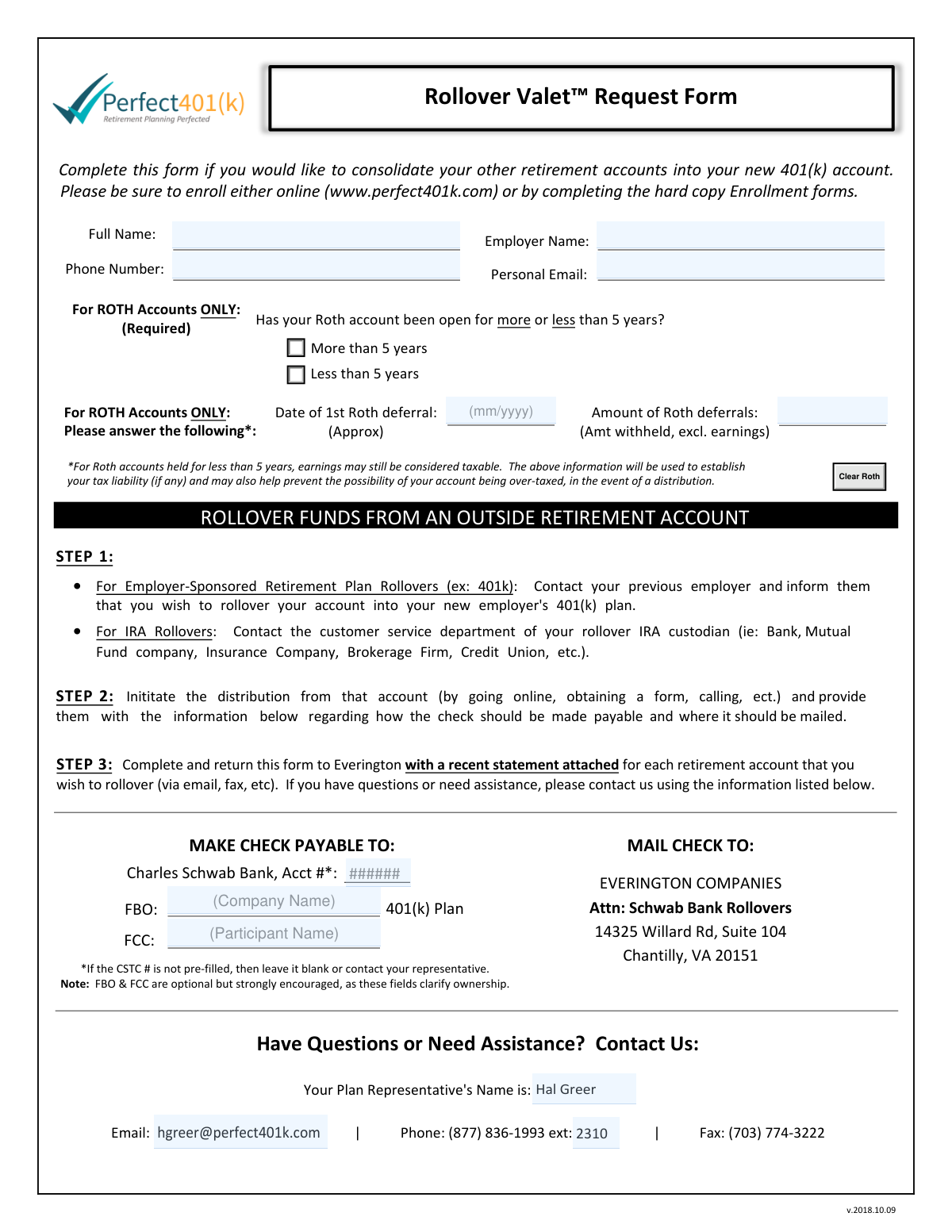
The Rollover Valet™ Request Form is a document used to initiate the process of moving funds from an old retirement account, such as a 401(k) from a previous employer or an IRA, into your new employer-sponsored 401(k) account. Completing this form provides the necessary authorization and details for the financial institutions to transfer the assets correctly. Today, this form can be filled out quickly and accurately using AI-powered services like Instafill.ai, which can also convert non-fillable PDF versions into interactive fillable forms.
Our AI automatically handles information lookup, data retrieval, formatting, and form filling.
It takes less than a minute to fill out Rollover Valet Request Form using our AI form filling.
Securely upload your data. Information is encrypted in transit and deleted immediately after the form is filled out.
Form specifications
| Form name: | Rollover Valet™ Request Form |
| Number of pages: | 1 |
| Language: | English |
Instafill Demo: How to fill out PDF forms in seconds with AI
How to Fill Out Rollover Valet Request Form Online for Free in 2026
Are you looking to fill out a ROLLOVER VALET REQUEST FORM form online quickly and accurately? Instafill.ai offers the #1 AI-powered PDF filling software of 2026, allowing you to complete your ROLLOVER VALET REQUEST FORM form in just 37 seconds or less.
Follow these steps to fill out your ROLLOVER VALET REQUEST FORM form online using Instafill.ai:
- 1 Navigate to Instafill.ai and upload or select the Rollover Valet™ Request Form.
- 2 Use the AI assistant to automatically populate your personal information, such as your full name, employer, and contact details.
- 3 Provide the details of the retirement account you wish to roll over, including the financial institution's name and account type.
- 4 If you are rolling over a ROTH account, answer the specific questions regarding the account's age and contribution amounts.
- 5 Carefully review all the information pre-filled by the AI to ensure its accuracy and completeness.
- 6 Securely e-sign the form and download the final, completed document.
- 7 Submit the completed form and a recent statement from your old retirement account to Everington via email or fax as instructed.
Our AI-powered system ensures each field is filled out correctly, reducing errors and saving you time.
Why Choose Instafill.ai for Your Fillable Rollover Valet Request Form Form?
Speed
Complete your Rollover Valet Request Form in as little as 37 seconds.
Up-to-Date
Always use the latest 2026 Rollover Valet Request Form form version.
Cost-effective
No need to hire expensive lawyers.
Accuracy
Our AI performs 10 compliance checks to ensure your form is error-free.
Security
Your personal information is protected with bank-level encryption.
Frequently Asked Questions About Form Rollover Valet Request Form
This form is used to consolidate your other retirement accounts, such as a previous 401(k) or an IRA, into your new employer's 401(k) account.
You should complete this form if you have already enrolled in your new 401(k) plan and wish to move funds from other retirement accounts into it.
You must attach a recent statement for each retirement account that you wish to roll over. The form and statements should be sent to Everington.
You can send the completed form and your account statements to Everington via email or fax using the contact information listed on the form.
First, contact your old plan provider to start the rollover. Then, provide them with the payment and mailing details from this form. Finally, complete and return this form with your account statements to Everington.
If the CSTC account number is not pre-filled on your form, you should either leave it blank or contact your plan representative for assistance.
No, if you are not rolling over funds from a Roth 401(k) or Roth IRA, you can leave that entire section blank.
This information helps determine your tax liability, as earnings on Roth accounts held for less than five years may be considered taxable upon distribution.
FBO stands for 'For Benefit Of' and FCC means 'For Further Credit.' Filling these fields with your name is encouraged to help clarify ownership of the rollover funds.
You must provide the check and mailing instructions to your previous retirement plan's custodian (e.g., your old 401(k) provider or IRA company) when you request the distribution.
Yes, services like Instafill.ai use AI to accurately auto-fill form fields with your saved information, which saves time and helps prevent errors.
Simply upload the Rollover Valet™ Request Form to Instafill.ai. The AI will populate your personal details, and you can then fill in the remaining account-specific information and submit it.
You can use a service like Instafill.ai, which can convert non-fillable PDFs into interactive forms that you can easily complete and sign online.
Compliance Rollover Valet Request Form
Validation Checks by Instafill.ai
1
Ensures Full Name is Provided
This check verifies that the 'Full Name' field is not empty. The full legal name is critical for correctly identifying the participant and associating the rollover funds with the correct individual's account. A failed validation will prevent form submission and prompt the user to enter their name.
2
Ensures Employer Name is Provided
This validation confirms that the 'Employer Name' field has been filled out. This information is essential for linking the rollover request to the correct employer-sponsored 401(k) plan. If the field is empty, the form cannot be processed, and the user will be required to provide the employer's name.
3
Validates Phone Number Format
This check ensures the 'Phone Number' field contains a valid 10-digit number, accommodating common formats like (XXX) XXX-XXXX or XXX-XXX-XXXX. A valid phone number is crucial for contacting the participant if there are any questions or issues with the rollover request. An invalid format will trigger an error message asking the user to correct the entry.
4
Validates Personal Email Address Format
This check verifies that the value entered in the 'Personal Email' field follows the standard email format, such as '[email protected]'. Email is a primary method for communication regarding the status of the rollover, so a valid address is mandatory. If the format is incorrect, the user will be notified to provide a valid email address before proceeding.
5
Verifies Attachment of Recent Account Statement
This validation confirms that the user has attached at least one file, as STEP 3 requires a recent statement for each account being rolled over. The statement is necessary to verify account details and balances, and its absence will halt the rollover process. If no file is attached, the submission will be blocked with a message reminding the user to attach the required document.
6
Ensures All Roth Fields are Completed Together
This is a logical check that ensures if any one of the Roth-specific fields ('Date of 1st Roth deferral', 'Amount of Roth deferrals', 'Years') is filled, then all three must be completed. This is important because partial information about a Roth account is insufficient for processing and tax purposes. A failure will prompt the user to either complete all Roth-related fields or clear them entirely.
7
Validates Roth Deferral Date Format and ensures it is in the past
This check verifies that the 'Date of 1st Roth deferral' is a valid date format (e.g., MM/DD/YYYY) and is not a future date. An accurate, historical date is needed to determine the account's age for tax purposes. An invalid format or a future date will result in an error, requiring the user to enter a plausible, past date.
8
Validates Roth Amount Deferred is a Positive Number
This validation ensures that the 'Amount of Roth deferrals' field contains a positive numeric or currency value. This amount represents the total contributions and must be a valid number to be processed correctly. Non-numeric or negative values will trigger an error, asking the user to input a valid monetary amount.
9
Ensures Roth Account Age is Selected
This check confirms that if Roth information is provided, one of the two options ('More than 5 years' or 'Less than 5 years') has been selected. This information is required to help determine the tax liability on earnings. If a Roth amount or date is entered but this selection is missed, the form will prompt the user to make a selection.
10
Cross-Validates Roth Deferral Date with Account Age Selection
This check compares the 'Date of 1st Roth deferral' with the 'Years' selection to ensure they are logically consistent. For example, if the date entered is less than five years in the past, the selection must be 'Less than 5 years'. This prevents contradictory data that could lead to incorrect tax calculations, and a mismatch will require the user to correct one of the fields.
11
Validates Representative's Email Format
This check ensures that if a value is entered into the 'Rep Email' field, it is a properly formatted email address. While optional, if provided, the email must be valid to ensure communications can be sent to the representative if needed. An invalid format will display an error until corrected or cleared.
12
Validates Representative's Phone Extension is Numeric
This validation checks that the 'Ext' field for the representative's phone number contains only numeric digits. This ensures the extension is valid and can be used in an automated dialing system. Any non-numeric characters will cause a validation failure, prompting the user to enter a valid extension number.
Common Mistakes in Completing Rollover Valet Request Form
Step 3 explicitly requires attaching a recent statement for each retirement account being rolled over. People often forget this step, which is a primary cause for processing delays or outright rejection, as the receiving firm cannot verify the account details and funds. To avoid this, gather all necessary statements before you begin filling out the form.
The 'For ROTH Accounts ONLY' section requires specific data like the date of the first deferral and the total amount deferred, excluding earnings. Many people guess this information, which can lead to significant tax complications and potential over-taxation on distributions. It is critical to find this precise information from old statements or by contacting your previous plan administrator to ensure correct tax reporting.
The 'Employer Name' field is for the new employer whose 401(k) plan you are rolling funds into. A frequent mistake is to list the previous employer associated with the old retirement account. This causes confusion and can lead to the form being misrouted or rejected, delaying the consolidation of your funds.
The 'MAKE CHECK PAYABLE TO' and 'MAIL CHECK TO' details are instructions that the user must provide to their previous retirement plan custodian, not for the user to act on themselves. A common misunderstanding is thinking they need to write a check, or failing to relay this exact information to the old provider. This error can result in the rollover check being lost, delayed, or made out to the wrong entity, putting the funds at risk.
Fields like 'FBO' (For Benefit Of) and 'FCC' (For Further Credit) are noted as optional but strongly encouraged because they help clarify ownership. Skippng these fields can slow down the process, as the receiving institution may need to perform extra verification steps to ensure the funds are credited to the correct participant's account. Filling them out completely helps ensure a smooth and fast transaction.
The 'Full Name' provided on this form must be your full legal name and exactly match the name on the retirement account you are rolling over. Using a nickname, a shortened name, or a name that hasn't been updated after a life event (like marriage) will cause a data mismatch. This will likely lead to the rejection of the rollover request by your old custodian, forcing you to restart the process.
This form is designed to consolidate funds into a new 401(k) account, which must exist before the rollover can be processed. A critical error is submitting this request before officially enrolling in the new employer's 401(k) plan. This will cause the request to be rejected or placed on an indefinite hold until your new account is active and ready to receive funds.
The question 'Has your Roth account been open for more or less than 5 years?' has direct and significant tax implications for the earnings portion of any distribution. Guessing the answer or misunderstanding the rule can lead to unexpected tax bills or compliance issues down the road. It is essential to verify the opening date of your very first Roth account to answer accurately.
The 'MAKE CHECK PAYABLE TO' line includes 'Acct #*', which is the critical destination account number for the funds. Users often don't know this number and may leave it blank, which can cause the funds to be misapplied or placed in a suspense account, significantly delaying the rollover. This number should be obtained from the plan representative if it is not already pre-filled on the form.
Simple typos in the 'Personal Email' field are common and will prevent you from receiving important status updates about your rollover. It is also a mistake to use a work email from a previous job, as you may lose access to it. Always use a permanent, personal email address and double-check it for accuracy to stay informed throughout the process. AI-powered tools like Instafill.ai can help validate email formats to prevent such errors.
Saved over 80 hours a year
“I was never sure if my IRS forms like W-9 were filled correctly. Now, I can complete the forms accurately without any external help.”
Kevin Martin Green
Your data stays secure with advanced protection from Instafill and our subprocessors

Robust compliance program
Transparent business model
You’re not the product. You always know where your data is and what it is processed for.
ISO 27001, HIPAA, and GDPR
Our subprocesses adhere to multiple compliance standards, including but not limited to ISO 27001, HIPAA, and GDPR.
Security & privacy by design
We consider security and privacy from the initial design phase of any new service or functionality. It’s not an afterthought, it’s built-in, including support for two-factor authentication (2FA) to further protect your account.
Fill out Rollover Valet Request Form with Instafill.ai
Worried about filling PDFs wrong? Instafill securely fills rollover-valet-request-form forms, ensuring each field is accurate.