Yes! You can use AI to fill out Rollover Contribution Instructions & Application
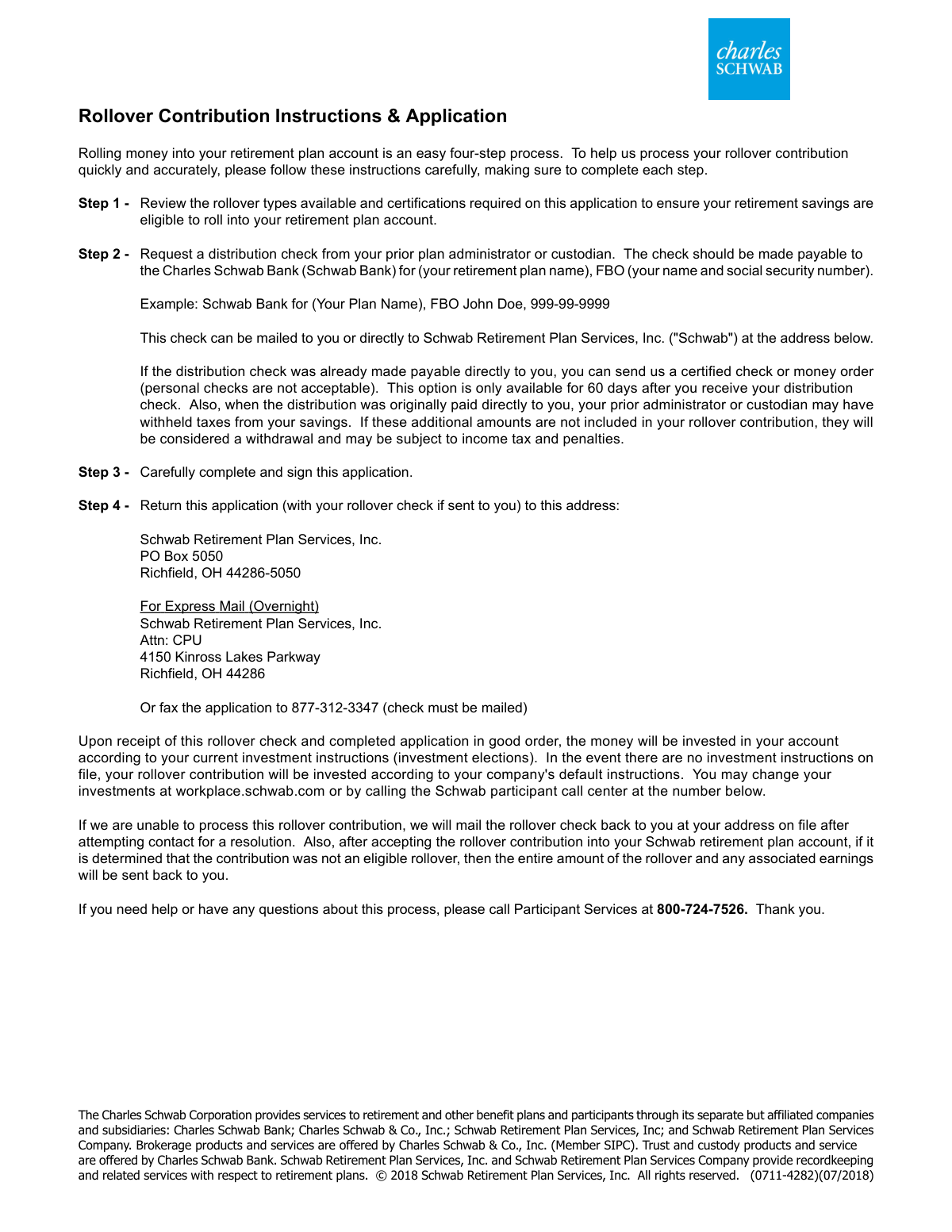
This form provides instructions and an application for individuals to roll over their retirement savings from a prior plan administrator or custodian into their Charles Schwab retirement plan account. It ensures the proper transfer of funds from accounts like a 401(k), 403(b), or IRA, maintaining their tax-advantaged status. Today, this form can be filled out quickly and accurately using AI-powered services like Instafill.ai, which can also convert non-fillable PDF versions into interactive fillable forms.
Schwab Form 0711-4282 is part of the
rollover forms category on Instafill.
Rather not fill this in by hand? Instafill is an online form filler that completes PDF forms automatically — upload the blank form, answer a few questions, and the AI fills every field.
Form specifications
| Form name: | Rollover Contribution Instructions & Application |
| Number of pages: | 1 |
| Language: | English |
Our AI automatically handles information lookup, data retrieval, formatting, and form filling.
It takes less than a minute to fill out Schwab Form 0711-4282 using our AI form filling.
Securely upload your data. Information is encrypted in transit and deleted immediately after the form is filled out.
Instafill Demo: How to fill out PDF forms in seconds with AI
How to Fill Out Schwab Form 0711-4282 Online for Free in 2026
Are you looking to fill out a SCHWAB FORM 0711-4282 form online quickly and accurately? Instafill.ai offers the #1 AI-powered PDF filling software of 2026, allowing you to complete your SCHWAB FORM 0711-4282 form in just 37 seconds or less.
Follow these steps to fill out your SCHWAB FORM 0711-4282 form online using Instafill.ai:
- 1 Navigate to Instafill.ai and upload or select the Rollover Contribution Application form.
- 2 Provide your personal information, including your name, Social Security number, contact details, and employer information.
- 3 Enter the details of the distributing plan or IRA from which the funds are being rolled over.
- 4 Select the correct rollover type (e.g., 401(k), IRA) and provide details for any ROTH savings being transferred.
- 5 Carefully review the certifications to confirm that your contribution qualifies as an eligible rollover distribution.
- 6 Use the AI tool to review all entered data for accuracy and completeness before finalizing.
- 7 Sign and date the application, then download the completed form to submit it to Schwab Retirement Plan Services, Inc. along with your rollover check.
Our AI-powered system ensures each field is filled out correctly, reducing errors and saving you time.
Why Choose Instafill.ai for Your Fillable Schwab Form 0711-4282 Form?
Speed
Complete your Schwab Form 0711-4282 in as little as 37 seconds.
Up-to-Date
Always use the latest 2026 Schwab Form 0711-4282 form version.
Cost-effective
No need to hire expensive lawyers.
Accuracy
Our AI performs 10 compliance checks to ensure your form is error-free.
Security
Your personal information is protected with bank-level encryption.
Frequently Asked Questions About Schwab Form 0711-4282
This form is used to transfer, or 'roll over,' funds from a previous retirement plan or an IRA into your current retirement plan account managed by Charles Schwab.
The check must be made payable to 'Charles Schwab Bank for [Your Retirement Plan Name], FBO [Your Name and Social Security Number].' An example is provided on the form.
You have 60 days from receiving the funds to send a certified check or money order to Schwab. Note that if taxes were withheld, you must include that amount in your rollover to avoid it being considered a taxable withdrawal.
Mail the signed application and your rollover check to the Schwab Retirement Plan Services, Inc. address in Richfield, OH. Use the P.O. Box for regular mail or the Kinross Lakes Parkway address for express mail.
Yes, you can fax the application to 877-312-3347. However, the original rollover check cannot be faxed and must be mailed separately to Schwab.
Your Schwab plan accepts rollovers from most qualified retirement accounts, including 401(k)s, 403(b)s, government 457 plans, and most IRAs. Refer to the 'Rollover Type' section for a complete list.
Yes, you cannot roll over funds from hardship distributions, required minimum distributions (RMDs), or a series of periodic payments. You also cannot roll over non-ROTH after-tax contributions.
The funds will be invested according to your current investment elections on file. If you have no instructions on file, the money will be invested based on your company's default investment option.
Schwab will attempt to contact you to resolve the issue. If they are unable to process the rollover, the check will be mailed back to you at your address on file.
You will need the name of the distributing plan or IRA and its administrator or custodian. You may also need to contact them to verify the account type and if your rollover includes any ROTH savings.
You must submit the fully completed and signed application along with the rollover check from your prior plan administrator. No other documents are typically required.
Yes, services like Instafill.ai use AI to accurately auto-fill form fields with your information, which can save you time and help reduce errors.
Simply upload the Rollover Contribution Application PDF to the Instafill.ai platform. The AI will identify the fields, allowing you to automatically populate your personal information and complete the form before downloading.
You can use a service like Instafill.ai, which can convert flat, non-fillable PDFs into interactive forms that you can easily type into online.
If you need help or have questions about the rollover process, you can call Schwab Participant Services at 800-724-7526.
Compliance Schwab Form 0711-4282
Validation Checks by Instafill.ai
1
Validates Social Security Number Format and Presence
This check ensures the Social Security Number field is not empty and conforms to the standard 9-digit format, either as XXXXXXXXX or XXX-XX-XXXX. The SSN is a critical identifier for linking the rollover to the correct participant account and for tax reporting. An invalid or missing SSN will result in immediate rejection of the application until corrected.
2
Ensures All Required Personal Information is Provided
Verifies that the 'Name', 'Social Security #', 'Date of Birth', 'Current Employer', and 'Retirement Plan Name' fields are all completed. These fields are fundamental for identifying the individual and the target plan for the rollover. Incomplete applications cannot be processed and will be returned to the applicant, potentially causing them to miss important deadlines.
3
Validates Date of Birth for Plausibility
This check confirms that the 'Date of Birth' is a valid calendar date and is not in the future. It also ensures the date indicates the applicant is of a reasonable age to have a retirement plan (e.g., over 18). This prevents obvious data entry errors and flags applications that may not meet basic eligibility requirements.
4
Ensures Distributing Plan Information is Complete
Verifies that the 'Administrator or Custodian' and 'Name of Retirement Plan or IRA' fields under the 'Distributing Plan' section are filled out. This information is crucial for verifying the source of the funds and ensuring it's an eligible plan type. Without this information, Schwab cannot confirm the legitimacy of the rollover source, leading to application rejection.
5
Confirms Selection of an Eligible Rollover Source Type
This check ensures that the applicant has selected at least one checkbox from the 'My rollover contribution is from' list. The form explicitly states it only accepts rollovers from these specific account types. Failing to select a source type makes it impossible to determine eligibility, and the application will be considered incomplete and returned.
6
Requires Disaster Name for Qualified Disaster Relief Claim
This validation is triggered if the 'Qualified Disaster Relief Distribution' checkbox is selected. It ensures that the corresponding 'name of disaster' text field is not empty. This documentation is required for compliance and tax purposes, and its absence would render the special distribution claim invalid and require follow-up with the applicant.
7
Verifies Logical Consistency of ROTH Amounts
If values are entered for 'ROTH Contributions', 'ROTH Earnings', and 'Total' ROTH savings, this check confirms that the sum of Contributions and Earnings equals the Total amount. This ensures the financial data provided is accurate and internally consistent. A mismatch would indicate a data entry error that must be corrected before processing the ROTH portion of the rollover.
8
Requires ROTH Start Date if ROTH Amounts are Provided
This check ensures that if any of the ROTH financial fields ('ROTH Contributions', 'ROTH Earnings', 'Total') contain a value greater than zero, the 'ROTH Start Date' field must also be filled with a valid date. The start date is critical for determining the five-year aging requirement for qualified ROTH distributions. An application with ROTH amounts but no start date is incomplete.
9
Verifies Presence of Signature and Date
Confirms that the 'Signature' and 'Date' fields in the certification section are completed. The signature legally certifies that all information is correct and that the applicant agrees to the terms, while the date establishes when the certification was made. An unsigned or undated application is legally invalid and will be rejected immediately.
10
Validates Certification Date is Not in the Future
Checks that the date provided next to the signature is a valid calendar date that is not in the future. This ensures the application was signed on or before the date of submission. A future date is a logical impossibility and indicates a data entry error that must be corrected.
11
Validates Optional Phone Number Formatting
If the 'Home Phone' or 'Work Phone' fields are filled, this check ensures they conform to a standard phone number format (e.g., 10 digits, possibly with parentheses or hyphens). While optional, correctly formatted numbers are essential if Schwab needs to contact the applicant to resolve issues. An invalid format could hinder communication and delay the rollover process.
12
Validates Optional Email Address Format
If the 'Email Address' field is completed, this validation confirms it follows the standard '[email protected]' format. This ensures that any electronic communication regarding the rollover application reaches the applicant. An invalid email address could lead to missed notifications and important updates about the application status.
Common Mistakes in Completing Schwab Form 0711-4282
The form requires the check be payable to 'Charles Schwab Bank for (your retirement plan name), FBO (your name and social security number)'. Applicants often shorten this to 'Charles Schwab' or make it out to themselves, which causes the check to be rejected. This error requires the applicant to request a new check from their prior custodian, leading to significant processing delays. To avoid this, copy the payee information exactly as specified in Step 1 of the instructions.
Applicants sometimes mail the rollover check without the signed application, or fax the application but forget to mail the check. The instructions clearly state that the completed application and the check must be received to process the transaction. An incomplete submission is considered 'not in good order' and will be returned or held, halting the rollover process and potentially causing you to miss the 60-day indirect rollover window.
Forgetting to sign or date the application is a frequent and critical oversight. An unsigned form is legally invalid and cannot be processed, forcing the institution to return the entire packet. This simple mistake stops the rollover dead in its tracks and requires the applicant to resubmit everything, wasting valuable time. Always perform a final review of the form, specifically checking the signature and date fields, before sending it.
When a distribution check is made payable directly to the participant, it's an 'indirect rollover' that must be completed within 60 days. People often miss this deadline or fail to add back the 20% mandatory tax withholding, resulting in a taxable event and penalties. To prevent this, always request a 'direct rollover' where the check is made payable to the new financial institution. If an indirect rollover is unavoidable, use a certified check (not a personal one) and act immediately.
The form lists specific eligible plan types (e.g., 401(k), 403(b), IRA). Participants may be unsure of their exact account type and guess, or attempt to roll over funds from an ineligible source. An incorrect selection will cause the rollover to be rejected after review, as the funds are not permitted in the new plan. Before filling out this section, you must contact your prior plan administrator to verify the exact account type.
When rolling over ROTH funds, the form requires the ROTH start date, total contributions, and earnings, which participants rarely know offhand. Providing estimates or leaving this section blank can lead to processing delays and incorrect tax basis tracking for future withdrawals. To avoid this, obtain a detailed statement from your prior custodian that explicitly breaks down your ROTH contributions and earnings before completing the application.
The application asks for the 'Retirement Plan Name' of the new Schwab account in the 'Your Information' section, and the 'Name of Retirement Plan or IRA' for the old account in a separate section. Applicants frequently mix these up, writing the old plan's name in the new plan's field. This causes confusion and can lead to processing delays while the firm clarifies which account should receive the funds. Carefully read the section headers to ensure you are entering the correct information in each field.
The instructions explicitly state that if a distribution check was made payable to you, you must send a certified check or money order, as 'personal checks are not acceptable'. Submitting a personal check will result in its rejection, delaying the rollover process. This delay can be critical, as it may cause you to miss the 60-day deadline for indirect rollovers, triggering taxes and penalties. Always obtain a certified check from your bank for the correct amount.
By signing, the applicant certifies several important facts, such as the funds not being from a hardship distribution or a required minimum distribution. Many people sign this section without reading the bullet points, potentially making a false certification. If the rollover is later found to be ineligible, the entire amount plus earnings will be returned and become a taxable event. It is crucial to read each point and verify your eligibility before signing.
A typographical error in the Social Security Number is a common data entry mistake that will cause the entire application to fail. The SSN is the primary identifier used to match the funds to your account and for tax reporting. An incorrect number means the system cannot find your account, leading to an automatic rejection and requiring a full resubmission. AI-powered form filling tools like Instafill.ai can help prevent these errors by auto-filling from a saved profile and validating the format, and can also make non-fillable PDFs like this one fillable.
Saved over 80 hours a year
“I was never sure if my IRS forms like W-9 were filled correctly. Now, I can complete the forms accurately without any external help.”
Kevin Martin Green
Your data stays secure with advanced protection from Instafill and our subprocessors




Robust compliance program
Transparent business model
You’re not the product. You always know where your data is and what it is processed for.
ISO 27001, HIPAA, and GDPR
Our subprocesses adhere to multiple compliance standards, including but not limited to ISO 27001, HIPAA, and GDPR.
Security & privacy by design
We consider security and privacy from the initial design phase of any new service or functionality. It’s not an afterthought, it’s built-in, including support for two-factor authentication (2FA) to further protect your account.
Fill out Schwab Form 0711-4282 with Instafill.ai
Worried about filling PDFs wrong? Instafill securely fills rollover-contribution-instructions-application forms, ensuring each field is accurate.
