
Yes! You can use AI to fill out Rollover Request — 529 College Savings Plan
Don't type 67 fields by hand. Tell our AI about yourself, or upload a document you already have, and it fills every field in seconds. You check it, then download, print or sign.
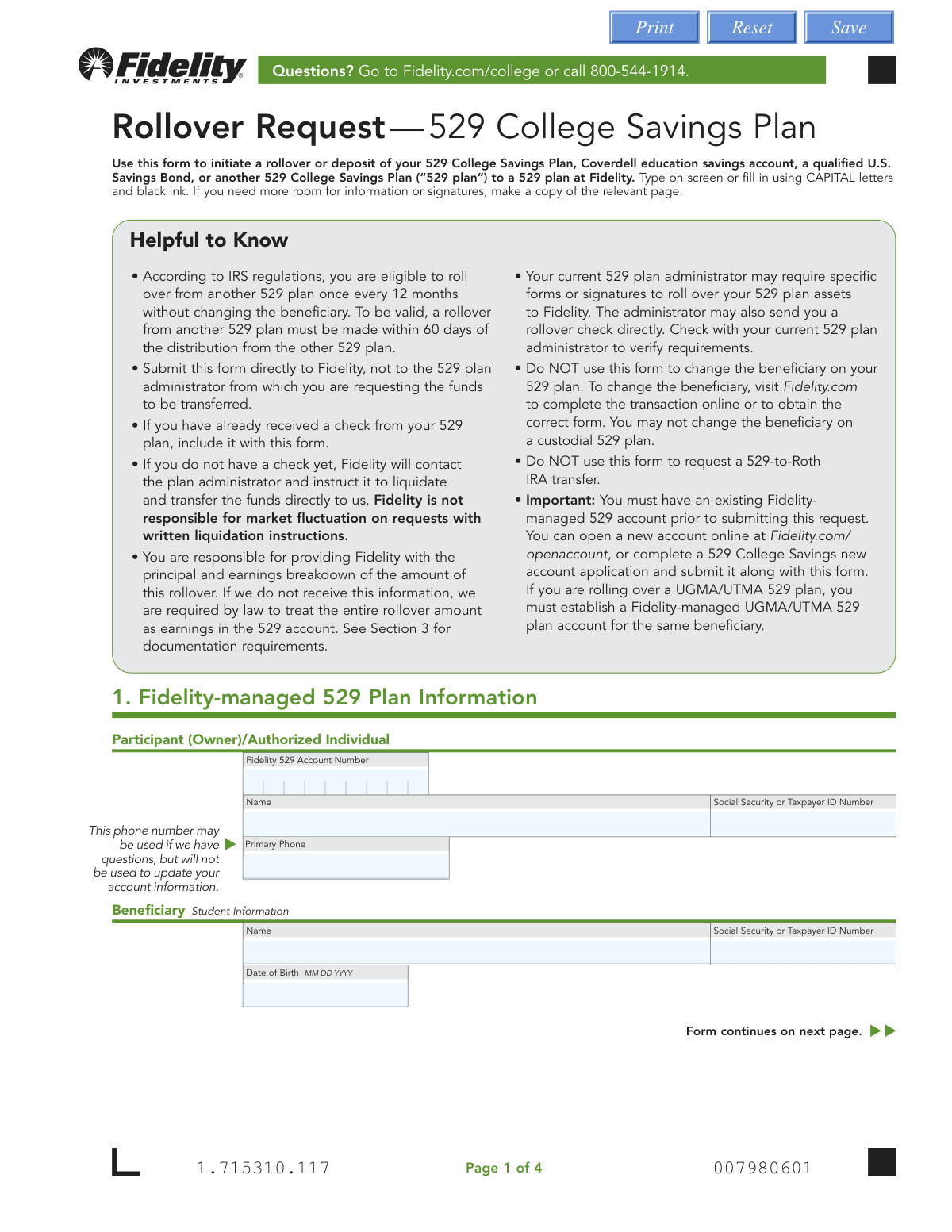
The AI does the filling. You just check it.
No typing into boxes, nothing to install.
What this form asks for
The AI fills all of it, from your answers or your documents.
The AI checks your answers before you download
16 checks built for this form, so a wrong date or a missing answer is caught before anyone else sees it.
Validates that the Fidelity 529 Account Number (AccountNumber field) is present and conforms to the expected numeric format used by Fidelity. This field is required because the form explicitly states the participant must have an existing Fidelity-managed 529 account prior to submitting the request. If this field is missing or improperly formatted, the rollover cannot be processed and the submission must be rejected.
Checks that all Social Security or Taxpayer ID Number fields (AccountOwnerSSN, BeneSSN, RollAccountOwnerSSN, RollBeneAccountOwnerSSN, RollBeneAccountOwnerSSN1) follow the standard 9-digit SSN format (XXX-XX-XXXX or 9 consecutive digits). SSNs are required for IRS reporting purposes and incorrect formatting can cause tax reporting errors or rejection of the rollover. Any SSN field that is populated but does not match the expected format should trigger a validation failure.
Ensures the BeneDOB field is populated and follows the MM/DD/YYYY format as specified on the form, and that the date represents a valid calendar date (e.g., no month value greater than 12, no day value exceeding the days in the given month). The beneficiary's date of birth is critical for 529 plan eligibility and IRS compliance. An invalid or missing date of birth will prevent proper account identification and may cause the rollover to be misapplied.
Validates that the signature date fields follow the MM/DD/YYYY format and that the date is not in the future and is reasonably recent. The form requires today's date at signing, and an incorrect or future date could indicate a fraudulent or improperly completed submission. Additionally, since rollovers from non-Fidelity 529 plans must be completed within 60 days of distribution, the signature date helps establish the timeline for compliance.
Checks that the submitter has not completed both Section 2 (Rollover between Fidelity-managed 529 Plans) and Section 3 or Section 4 (rollovers from non-Fidelity plans) simultaneously, as these sections are mutually exclusive based on whether both accounts are held at Fidelity. Completing conflicting sections would create ambiguity about the source of funds and the applicable processing rules. If both sections contain data, the form should be flagged for manual review or returned to the submitter for clarification.
For partial rollover selections in Section 2 or Section 4, validates that each portfolio entry with a dollar amount also has a corresponding portfolio name populated, and that neither the portfolio name nor the amount is left partially blank. A portfolio entry with an amount but no name (or vice versa) cannot be processed and would result in an incomplete transfer. Additionally, if the 'ALL' checkbox is selected for a portfolio row, the corresponding dollar amount field should be empty to avoid conflicting instructions.
And 10 more checks
- Total Dollar Amount Matches Sum of Portfolio Amounts
- Rollover Type Selection Presence in Section 3
- Account Type Selection Presence in Section 4
- Transferring Firm Name and Contact Information Completeness
- Transferring Firm Address Completeness and State Format Validation
- Beneficiary Name Consistency Across Sections
- Owner/Authorized Individual Name and Signature Presence
- UGMA/UTMA Account Cross-Validation with Fidelity Account Type
- Trust Account Trustee Information Completeness
- Daytime Phone Number Format Validation
Let AI fill out your Fidelity 529 Rollover Request
No typing. Every field filled in seconds, checked, ready to sign.
How to Fill Out Fidelity 529 Rollover Request Online for Free in 2026
What the AI walks you through.
- Navigate to Instafill.ai, search for the Fidelity Rollover Request — 529 College Savings Plan form, and upload or select it to begin filling it out online.
- Complete Section 1 by entering the Fidelity 529 account number, participant/owner name, Social Security or Taxpayer ID number, primary phone number, and beneficiary (student) information including name, SSN, and date of birth.
- If rolling over between two Fidelity-managed 529 plans, complete Section 2 by providing the source Fidelity 529 account number, beneficiary name, and specifying whether you want a full or partial rollover along with portfolio names and dollar amounts.
- If you have already received a check from a non-Fidelity 529 plan, complete Section 3 by selecting the appropriate rollover type (Coverdell, U.S. Savings Bonds, or another 529 plan) and attaching the required documentation showing principal and earnings breakdown.
- If requesting a direct transfer from a non-Fidelity 529 plan, complete Section 4 by selecting the account type, providing the transferring account number, participant/trustee information, beneficiary details, and the transferring firm's contact and address information, then specify full or partial liquidation instructions.
- Review all entered information for accuracy, ensure all required documentation (account statements, Form 1099-INT, or earnings statements) is attached, and confirm that you have an existing Fidelity-managed 529 account prior to submission.
- Sign and date the form in Section 5 (all account owners must sign, with a Medallion Signature Guarantee if required), then submit the completed form along with any required documents and checks to Fidelity Investments via regular or overnight mail.
Common Mistakes in Completing Fidelity 529 Rollover Request
The ones the AI is built to catch.
Submitting the form to the wrong institution
Missing the 60-day rollover deadline
Failing to provide principal and earnings breakdown documentation
Attempting a rollover more than once in a 12-month period without changing the beneficiary
Not having an existing Fidelity-managed 529 account before submitting
Entering incorrect or mismatched Social Security Numbers
Selecting the wrong section or completing inapplicable sections
Omitting the Medallion Signature Guarantee when required
Not having all account owners sign the form
Incorrectly completing partial rollover portfolio details
Using this form to change the beneficiary or initiate a 529-to-Roth IRA transfer
Providing incomplete or incorrect transferring firm information in Section 4
Frequently Asked Questions About Fidelity 529 Rollover Request
Is it really free for 7 days?
Can I fill other forms too?
How do I cancel?
How does the AI fill out Fidelity 529 Rollover Request?
What happens to my information?
How complex is Fidelity 529 Rollover Request to fill out?
What is the Fidelity Rollover Request — 529 College Savings Plan form used for?
Do I need an existing Fidelity 529 account before submitting this form?
How often can I roll over funds from another 529 plan without changing the beneficiary?
What is the 60-day rule for 529 rollovers?
Where should I submit this form — to Fidelity or to my current 529 plan administrator?
What documentation do I need to provide for the principal and earnings breakdown?
Can I do a partial rollover, or does it have to be the full account balance?
Can I use this form to change the beneficiary on my 529 plan?
Can I use this form to request a 529-to-Roth IRA transfer?
What signatures are required on this form?
How do I submit the completed form to Fidelity?
What happens if I'm rolling over a UGMA/UTMA 529 plan?
Can I use AI tools like Instafill.ai to fill out this form?
How do I fill out this form online using Instafill.ai?
Who should I contact if I have questions about completing this form?
Get your Fidelity 529 Rollover Request filled out by AI
$0 today. Cancel before Nov 1 and you pay nothing.
Other forms like this one
college HR forms: Melbourne City College Australia Education Agent Application Form, South Sydney College International Student Application Form, Sidney Sussex College Cambridge, Application for Employment, Fidelity Investments Withdrawals—529 College Savings Plan, The Vanguard 529 College Savings Plan: Power of Attorney, The Vanguard 529 College Savings Plan Agent Authorization/Limited Power of Attorney, The Vanguard 529 College Savings Plan Direct Rollover Out to Roth IRA Form, The Vanguard 529 College Savings Plan Transfer Due to Death of Account Owner Form, The Vanguard 529 College Savings Plan Incoming Direct Rollover Form, The Vanguard 529 College Savings Plan: Withdrawal Request Form, Merrill Lynch 529 College Savings Plan Withdrawal Request Form, Form 529TCF, The Vanguard 529 College Savings Plan, Trustee Certification, Fidelity Institutional 529 College Savings Plan Beneficiary Change, 529 College Savings Plan Beneficiary Change Form, CollegeAdvantage Direct 529 Savings Plan Beneficiary Change Form
rollover forms: Fidelity Investments Transfer/Rollover/Exchange Form, Fidelity Investments Transfer/Rollover Form, Fidelity Advisor IRA Distribution Request for Automatic Rollover Accounts, Special Tax Notice: Your Rollover Options - Fidelity Investments, Rollover Contribution Instructions & Application, A Place for Mom 401(k) Plan Request for Rollover Contribution Form, 401(k) Program Rollover Certification, New York State Deferred Compensation Plan Outgoing Rollover, Rollover Valet™ Request Form, Special Tax Notice: Your Rollover Options, New York State Deferred Compensation Plan Direct Rollover to a Roth IRA, WTIA 401(k) Plan Rollover Contribution Employee Certification, Fidelity Plan-to-Plan Direct Rollover Form, Fidelity Distribution—Rollover, Plan-to-Plan Direct Rollover Form, Rollover/Transfer Request — ABLE Account, Rollover Valet™ Request Form, Vanguard Direct Rollover IRA Adoption Agreement, The Vanguard 529 College Savings Plan Direct Rollover Out to Roth IRA Form, Your guide to completing a rollover - Vanguard
529 plan forms: Fidelity Investments Withdrawals—529 College Savings Plan, The Vanguard 529 College Savings Plan: Power of Attorney, The Vanguard 529 College Savings Plan Agent Authorization/Limited Power of Attorney, The Vanguard 529 College Savings Plan Direct Rollover Out to Roth IRA Form, The Vanguard 529 College Savings Plan Transfer Due to Death of Account Owner Form, The Vanguard 529 College Savings Plan Incoming Direct Rollover Form, The Vanguard 529 College Savings Plan: Withdrawal Request Form, IAdvisor 529 Plan Certification of Authorized Individual(s), Merrill Lynch 529 College Savings Plan Withdrawal Request Form, 529 Plan Account Transfer Form, Fidelity Institutional CHET Advisor 529 Plan New Account Application, Form 529TCF, The Vanguard 529 College Savings Plan, Trustee Certification, 529 Plan Account Application, Fidelity Institutional 529 College Savings Plan Beneficiary Change, 529 College Savings Plan Beneficiary Change Form, CollegeAdvantage Direct 529 Savings Plan Beneficiary Change Form, Account Application for Merrill West Virginia Residents - The Hartford SMART529, Nest 529 Beneficiary Change Form, NextGen 529 Client Direct Series Withdrawal Request Form, NextGen 529 Series Change Form
college savings forms: Fidelity Investments Withdrawals—529 College Savings Plan, The Vanguard 529 College Savings Plan: Power of Attorney, The Vanguard 529 College Savings Plan Agent Authorization/Limited Power of Attorney, The Vanguard 529 College Savings Plan Direct Rollover Out to Roth IRA Form, The Vanguard 529 College Savings Plan Transfer Due to Death of Account Owner Form, The Vanguard 529 College Savings Plan Incoming Direct Rollover Form, The Vanguard 529 College Savings Plan: Withdrawal Request Form, Merrill Lynch 529 College Savings Plan Withdrawal Request Form, Form 529TCF, The Vanguard 529 College Savings Plan, Trustee Certification, Fidelity Institutional 529 College Savings Plan Beneficiary Change, 529 College Savings Plan Beneficiary Change Form, CollegeAdvantage Direct 529 Savings Plan Beneficiary Change Form, 529 Plan Account Application, 529 Plan Account Transfer Form, Account Application for Merrill West Virginia Residents - The Hartford SMART529, Bright Directions 529 Beneficiary Change Form, Fidelity Institutional CHET Advisor 529 Plan New Account Application, Nest 529 Beneficiary Change Form, NextGen 529 Client Direct Series Incoming Rollover Form, NextGen 529 Client Direct Series Withdrawal Request Form
savings plan forms: Fidelity Investments Withdrawals—529 College Savings Plan, The Church of the Nazarene 403(b) Retirement Savings Plan Beneficiary Designation Form, The Vanguard 529 College Savings Plan: Power of Attorney, The Vanguard 529 College Savings Plan Agent Authorization/Limited Power of Attorney, The Vanguard 529 College Savings Plan Direct Rollover Out to Roth IRA Form, The Vanguard 529 College Savings Plan Transfer Due to Death of Account Owner Form, The Vanguard 529 College Savings Plan Incoming Direct Rollover Form, Vanguard Phillips 66 Savings Plan Rollover Contribution Request, The Vanguard 529 College Savings Plan: Withdrawal Request Form, Vanguard Retirement Plan Beneficiary Designation - Phillips 66 Savings Plan, Incoming Rollover Election for The Heritage Group Retirement Savings Plan, AbbVie Savings Plan 401(k) Account Transfer Notice, Incoming Rollover Election Form for International Dairy Queen, Inc. Retirement Savings Plan, TE Connectivity Retirement Savings and Investment Plan (RSIP) Transition Frequently Asked Questions, Principal Life Insurance Company UCTIE INTERNATIONAL UNION 401(K) SAVINGS PLAN Enrollment Form, Principal Financial Group Pre-Approved Basic Savings Plan - Plus, In-Service Withdrawal Request, City of Toledo Savings and Protection Plan, Merrill Lynch 529 College Savings Plan Withdrawal Request Form, XL America, Inc. Employee Savings Plan Rollover Contribution Form, Distribution Request Form Local No. 1 Retirement Savings Plan #241805
529 forms: Bright Directions 529 Beneficiary Change Form, Transfer Due to Divorce — IRA/HSA/529, Fidelity Investments Withdrawals—529 College Savings Plan, The Vanguard 529 College Savings Plan: Power of Attorney, The Vanguard 529 College Savings Plan Agent Authorization/Limited Power of Attorney, The Vanguard 529 College Savings Plan Direct Rollover Out to Roth IRA Form, The Vanguard 529 College Savings Plan Transfer Due to Death of Account Owner Form, The Vanguard 529 College Savings Plan Incoming Direct Rollover Form, The Vanguard 529 College Savings Plan: Withdrawal Request Form, IAdvisor 529 Plan Certification of Authorized Individual(s), NextGen 529 Series Change Form, NextGen 529 Client Direct Series Incoming Rollover Form, Merrill Lynch 529 College Savings Plan Withdrawal Request Form, 529 Plan Account Transfer Form, Fidelity Institutional CHET Advisor 529 Plan New Account Application, Form 529TCF, The Vanguard 529 College Savings Plan, Trustee Certification, Account Application for Merrill West Virginia Residents - The Hartford SMART529, 529 Plan Account Application, Fidelity Institutional 529 College Savings Plan Beneficiary Change, 529 College Savings Plan Beneficiary Change Form
529 college savings forms: Form 529TCF, The Vanguard 529 College Savings Plan, Trustee Certification, Fidelity Investments Withdrawals—529 College Savings Plan, The Vanguard 529 College Savings Plan: Power of Attorney, The Vanguard 529 College Savings Plan Agent Authorization/Limited Power of Attorney, The Vanguard 529 College Savings Plan Direct Rollover Out to Roth IRA Form, The Vanguard 529 College Savings Plan Transfer Due to Death of Account Owner Form, The Vanguard 529 College Savings Plan Incoming Direct Rollover Form, The Vanguard 529 College Savings Plan: Withdrawal Request Form, Merrill Lynch 529 College Savings Plan Withdrawal Request Form, Fidelity Institutional 529 College Savings Plan Beneficiary Change, 529 College Savings Plan Beneficiary Change Form, CollegeAdvantage Direct 529 Savings Plan Beneficiary Change Form
Let AI fill out your Fidelity 529 Rollover Request
Your trial starts once a card is added. You pay nothing before Nov 1.
Our AI already knows this form, all 67 fields of it. Skip the typing: tell it about yourself, or upload what you have, and it fills the whole form in seconds.
- AI fills every field on all 4 pages, checkboxes included
- No typing into boxes: answer a few questions, or upload a document you already have, an old copy of this form, a photo of a document
- The AI checks the answers; you review and change anything before you download
- Download the finished PDF, print it, or sign it online
- Encrypted, and never used to train AI
Cancel before Nov 1 and you pay nothing.
A card is needed to start the trial. Cancel in two clicks from your account.
Terms · Privacy