Yes! You can use AI to fill out WTIA 401(k) Plan Rollover Contribution Employee Certification
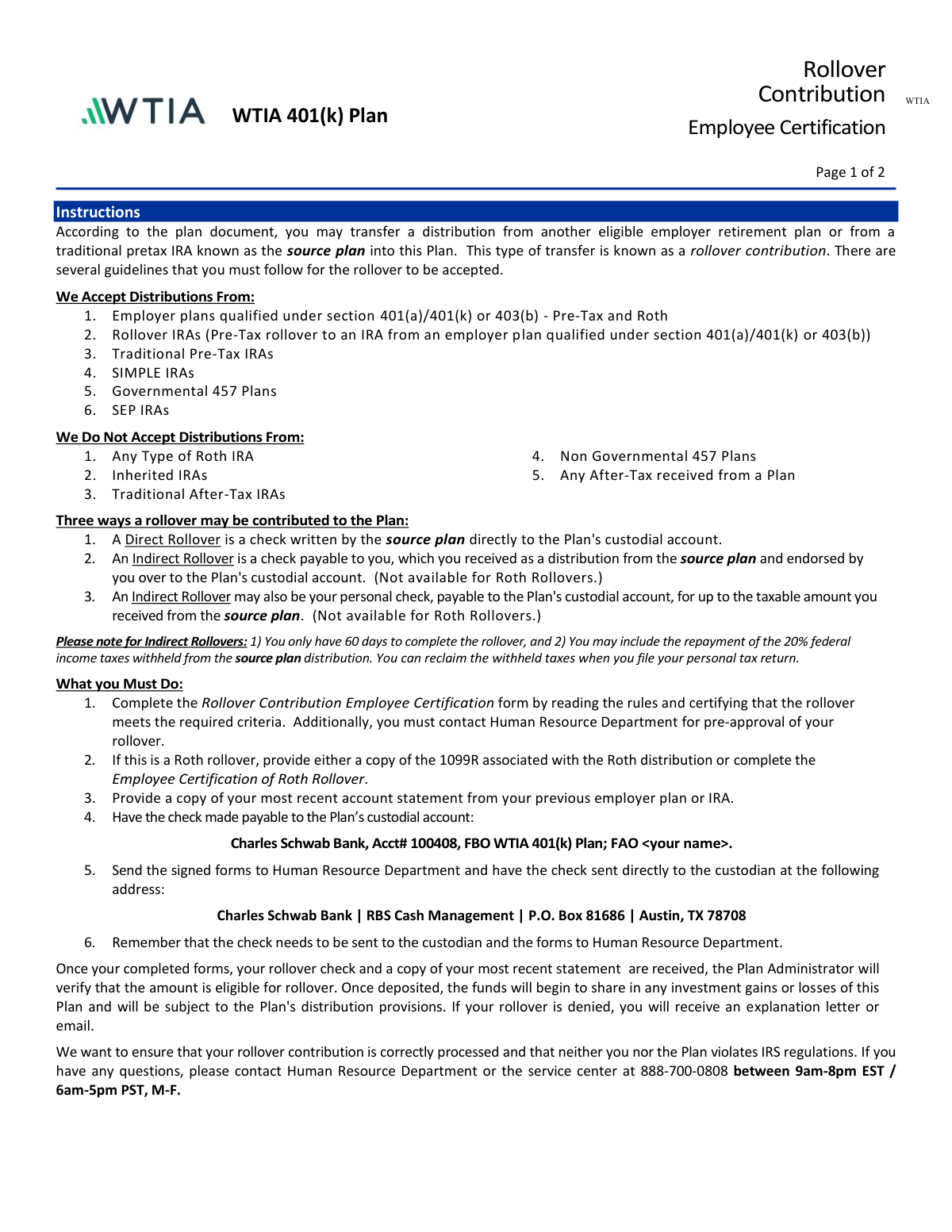
This form allows an employee to certify that a distribution from another retirement plan, such as a 401(k) or traditional IRA, is eligible to be rolled over into the WTIA 401(k) Plan. It ensures the transfer complies with IRS regulations and the plan's specific rules for accepting rollover contributions. Today, this form can be filled out quickly and accurately using AI-powered services like Instafill.ai, which can also convert non-fillable PDF versions into interactive fillable forms.
WTIA Rollover Contribution Form is part of the
employee forms, rollover forms, certification forms and WTIA forms categories on Instafill.
Rather not fill this in by hand? Instafill is an online form filler that completes PDF forms automatically — upload the blank form, answer a few questions, and the AI fills every field.
Form specifications
| Form name: | WTIA 401(k) Plan Rollover Contribution Employee Certification |
| Number of pages: | 1 |
| Language: | English |
Our AI automatically handles information lookup, data retrieval, formatting, and form filling.
It takes less than a minute to fill out WTIA Rollover Contribution Form using our AI form filling.
Securely upload your data. Information is encrypted in transit and deleted immediately after the form is filled out.
Instafill Demo: How to fill out PDF forms in seconds with AI
How to Fill Out WTIA Rollover Contribution Form Online for Free in 2026
Are you looking to fill out a WTIA ROLLOVER CONTRIBUTION FORM form online quickly and accurately? Instafill.ai offers the #1 AI-powered PDF filling software of 2026, allowing you to complete your WTIA ROLLOVER CONTRIBUTION FORM form in just 37 seconds or less.
Follow these steps to fill out your WTIA ROLLOVER CONTRIBUTION FORM form online using Instafill.ai:
- 1 Navigate to Instafill.ai and upload or select the WTIA Rollover Contribution form.
- 2 Use the AI assistant to automatically fill in your personal information, such as your full name and Social Security Number.
- 3 Complete the certification section by checking the boxes to confirm that your distribution qualifies as an eligible rollover and is not from a prohibited source.
- 4 Designate the type of rollover (e.g., Direct, Indirect) and enter the exact dollar amount of the contribution check.
- 5 If applicable, complete the 'Employee Certification of Roth Rollover' section with details about the source plan and the breakdown of contributions and earnings.
- 6 Review all the information for accuracy, then securely e-sign and date the form in the designated fields.
- 7 Download the completed certification form to submit to your Human Resource Department as instructed.
Our AI-powered system ensures each field is filled out correctly, reducing errors and saving you time.
Why Choose Instafill.ai for Your Fillable WTIA Rollover Contribution Form Form?
Speed
Complete your WTIA Rollover Contribution Form in as little as 37 seconds.
Up-to-Date
Always use the latest 2026 WTIA Rollover Contribution Form form version.
Cost-effective
No need to hire expensive lawyers.
Accuracy
Our AI performs 10 compliance checks to ensure your form is error-free.
Security
Your personal information is protected with bank-level encryption.
Frequently Asked Questions About WTIA Rollover Contribution Form
This form is used to request and certify the transfer of funds from another eligible retirement plan, like a former employer's 401(k) or a traditional IRA, into your WTIA 401(k) Plan.
Any WTIA employee who wishes to move their retirement savings from a previous plan or IRA into their current WTIA 401(k) account must complete this form.
The plan accepts rollovers from employer plans like 401(k)s and 403(b)s, as well as Traditional, Rollover, SEP, and SIMPLE IRAs. It does not accept funds from any type of Roth IRA or Inherited IRA.
You must provide the completed and signed certification form, a copy of your most recent account statement from your old plan, and the rollover check. For Roth rollovers, you also need a 1099-R or the separate Roth Certification form.
Yes, the form instructions state that you must contact the Human Resources Department for pre-approval before initiating the rollover process.
No, they go to different addresses. You must send the signed forms to the WTIA Human Resources Department, while the rollover check must be sent directly to the custodian, Charles Schwab Bank, in Austin, TX.
The check must be made payable to 'Charles Schwab Bank, Acct# 100408, FBO WTIA 401(k) Plan; FAO '.
A direct rollover is a check sent from your old plan's custodian directly to the WTIA plan's custodian. An indirect rollover is when you receive the check yourself and then have 60 days to deposit it into the WTIA plan.
Yes, for a Roth 401(k) rollover, you must provide either a copy of your 1099-R or complete the 'Employee Certification of Roth Rollover' form. Also, Roth funds can only be moved via a direct rollover.
If your rollover is denied, the Plan Administrator will send you an explanation letter or email detailing the reason for the denial.
Yes, services like Instafill.ai use AI to accurately auto-fill form fields, which can help you complete the form quickly and reduce errors.
You can use a service like Instafill.ai to upload the PDF and fill it out online. The platform allows you to type directly into the fields, add your signature, and then download the completed document.
If you have a non-fillable or 'flat' PDF, you can upload it to a tool like Instafill.ai. It will automatically convert the document into an interactive, fillable form for you to complete online.
For an indirect rollover, you must deposit the funds into the new plan within 60 days of receiving them from your old plan. Failing to do so can result in taxes and penalties.
Compliance WTIA Rollover Contribution Form
Validation Checks by Instafill.ai
1
SSN Format Validation
This check ensures that the Social Security Number (SSN) entered in Step 1 follows the standard 9-digit format, with or without hyphens (e.g., XXX-XX-XXXX or XXXXXXXXX). This is critical for correctly identifying the employee's account and for tax reporting purposes. If the format is invalid, the form cannot be processed, leading to delays in the rollover.
2
Mandatory Certification Checkboxes
Verifies that all three checkboxes in 'Step 2: Your Certification' have been selected. The form instructions state 'check all options below', making this a mandatory attestation that the rollover meets IRS eligibility rules. Failure to check all boxes indicates the user cannot certify the legality of the rollover, and the submission must be rejected to prevent compliance violations.
3
Exclusive Rollover Type Selection
Ensures that the user has selected exactly one option from the four choices in 'Step 3: Designate the Type of Rollover'. The form requires a single, unambiguous choice to determine how to process the funds (Direct, Indirect, Pre-Tax, Roth). If zero or more than one option is selected, the system cannot determine the user's intent, and the form is considered incomplete.
4
Rollover Amount Presence and Format
This check confirms that a valid, positive monetary value is entered into the amount field corresponding to the selected rollover type in Step 3. The amount is essential for the transaction and must be a properly formatted number (e.g., 15000.00). A missing or non-numeric amount will prevent the financial transaction from being processed.
5
Conditional Requirement for Roth Documentation
If the 'DIRECT ROLLOVER from a Roth' option is selected, this validation confirms that the user has attached either a 1099-R tax form or the completed 'Employee Certification of Roth Rollover' form. This documentation is required by the IRS to track the basis (contributions) and earnings of the Roth funds. Without it, the rollover cannot be accepted.
6
Conditional Requirement for Indirect Rollover Source Plan
When the 'INDIRECT ROLLOVER' option is chosen in Step 3, this check verifies that the 'Source Plan' name field has been filled out. This information is necessary for the plan administrator to verify the eligibility of the source plan and maintain proper records. An empty source plan field for an indirect rollover will result in the form being rejected for incompleteness.
7
Prohibits Indirect Roth Rollovers
This logical check prevents the submission if the user attempts to perform an indirect rollover with Roth funds. The form explicitly states that Indirect Rollovers are 'Pre-Tax Only'. This validation enforces plan rules and IRS regulations, preventing a non-compliant transaction that could have negative tax consequences for the employee.
8
Account Statement Attachment Verification
Based on the user's certification in Step 2 ('Attached is a copy of the most recent account statement...'), this check verifies that a document has actually been uploaded or attached to the submission. The statement is required for the Plan Administrator to verify the source and amount of the funds. If the checkbox is marked but no file is present, the submission is incomplete and will be denied pending receipt of the statement.
9
Roth Certification Form Completeness
If the 'Employee Certification of Roth Rollover' form is submitted, this validation ensures all its fields are complete, including Name, SSN, Source Plan, first contribution year, and the breakdown of contributions and earnings. Each piece of information is critical for proper tax accounting of the Roth assets. An incomplete form will halt the rollover process until all required data is provided.
10
Roth Amounts Consistency Check
This validation cross-references the amounts on the 'Employee Certification of Roth Rollover' form with the main form. It ensures that the sum of the 'Roth contributions' and 'Roth earnings' on the certification page equals the total rollover amount entered for the Roth rollover in Step 3. A mismatch indicates a data entry error that must be corrected before the funds can be accurately allocated.
11
Roth Contribution Year Format
On the 'Employee Certification of Roth Rollover' form, this check validates that the 'first year of designated Roth contribution' is entered as a valid four-digit year. This date is crucial for determining the 5-year aging period for qualified Roth distributions. An invalid or missing year prevents proper tax tracking and will cause the form to be rejected.
12
Personal Information Consistency Across Forms
If both the main certification and the Roth certification forms are submitted, this check ensures the Name and SSN are identical on both documents. Mismatched personal information suggests a clerical error or that the forms are for different individuals. This validation prevents account mix-ups and ensures the rollover is credited to the correct person.
13
Signature and Date Completion
Verifies that the 'Your Signature' and 'Date' fields are completed in Step 1 of the main form (and on the Roth form, if applicable). A signature is a legal attestation that the provided information is true, and the date establishes when the certification was made. Missing either of these fields invalidates the legal standing of the form, requiring rejection.
14
Valid Date Format
This check ensures that all date fields on the form are entered in a valid, recognizable format (e.g., MM/DD/YYYY). An invalid date format can cause processing errors and ambiguity, especially when rules like the 60-day indirect rollover window are concerned. The system should reject submissions with improperly formatted dates to ensure data integrity.
Common Mistakes in Completing WTIA Rollover Contribution Form
The form requires a very specific payee format: 'Charles Schwab Bank, Acct# 100408, FBO WTIA 401(k) Plan; FAO '. People often shorten this or omit their own name, causing the check to be rejected by the custodian. This leads to significant delays as a new check must be requested from the source institution. To avoid this, copy the payee information exactly as written on the form.
A frequent error is mailing both the completed forms and the rollover check to a single address. The instructions explicitly state that the signed forms must be sent to the Human Resource Department, while the check must be sent to Charles Schwab Bank in Austin, TX. Sending everything to one place causes major processing delays and increases the risk of lost documents. Double-check the submission instructions to ensure each item is sent to its correct destination.
Applicants often forget to include all necessary documentation, such as a copy of their most recent account statement from the prior plan. For Roth rollovers, they may also forget to include either the Form 1099-R or the completed 'Employee Certification of Roth Rollover'. An incomplete submission package will be rejected, halting the rollover process until all required documents are provided.
Step 2 requires the applicant to check all three certification boxes to attest that the funds are eligible and not from a prohibited source. Due to the dense legal language, people sometimes miss a box or are unsure and leave one blank. An incompletely checked section will invalidate the form, requiring resubmission and delaying the rollover.
The form presents four distinct rollover types (e.g., Direct Pre-Tax, Direct Roth, Indirect). A common mistake is choosing the wrong option, such as selecting an 'Indirect Rollover' for Roth funds, which is explicitly disallowed. This error can lead to the rollover being rejected or misclassified, potentially creating unintended tax consequences for the employee.
The dollar amount entered in Step 3 must exactly match the amount on the corresponding rollover check. People may make a typo or write the gross amount when the check is for the net amount after tax withholding. Any discrepancy will cause the plan administrator to halt processing until the employee clarifies and corrects the information.
The instructions clearly list sources from which rollovers are not accepted, such as Roth IRAs, Inherited IRAs, and non-governmental 457 plans. Applicants who do not read the instructions carefully may initiate a rollover from one of these sources. This results in the rollover being denied by the plan administrator after the check and forms have already been submitted.
Forgetting to sign and date the form in Step 1 is a simple but very common oversight. An unsigned or undated form is not legally valid and cannot be processed. This requires the HR department to return the form to the employee for completion, causing unnecessary delays. AI-powered form filling tools like Instafill.ai can flag missing signature fields to prevent this error.
When a 1099-R is not available for a Roth rollover, the separate certification form must be filled out. This form requires specific data like the 'first year of designated Roth contribution' and a breakdown of contributions versus earnings. Applicants often struggle to find this information or guess, leading to inaccurate records for their new account and potential future tax complications. This data should be obtained from the source plan administrator before filling out the form.
The instructions state that the employee must contact their Human Resource Department for pre-approval before submitting the rollover. Many people skip this step and proceed directly with filling out the forms and having the check sent. This can result in the rollover being unexpectedly denied if it doesn't meet specific internal criteria, wasting the time and effort spent on the process.
Saved over 80 hours a year
“I was never sure if my IRS forms like W-9 were filled correctly. Now, I can complete the forms accurately without any external help.”
Kevin Martin Green
Your data stays secure with advanced protection from Instafill and our subprocessors




Robust compliance program
Transparent business model
You’re not the product. You always know where your data is and what it is processed for.
ISO 27001, HIPAA, and GDPR
Our subprocesses adhere to multiple compliance standards, including but not limited to ISO 27001, HIPAA, and GDPR.
Security & privacy by design
We consider security and privacy from the initial design phase of any new service or functionality. It’s not an afterthought, it’s built-in, including support for two-factor authentication (2FA) to further protect your account.
Fill out WTIA Rollover Contribution Form with Instafill.ai
Worried about filling PDFs wrong? Instafill securely fills wtia-401k-plan-rollover-contribution-employee-certification forms, ensuring each field is accurate.
