Yes! You can use AI to fill out Application for Sabbatical Leave
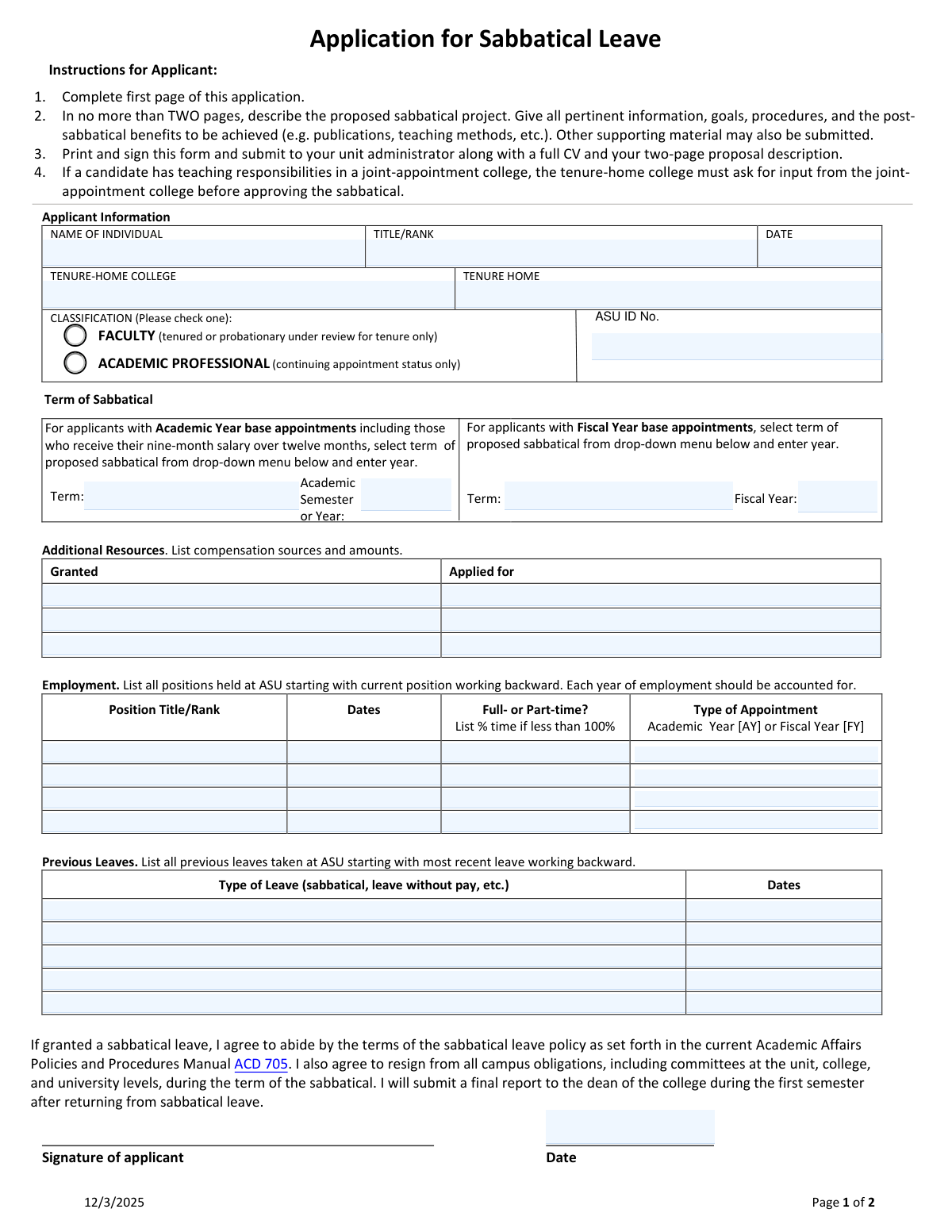
This form is an official application for academic staff at an institution, such as ASU, to request a sabbatical leave. It requires applicants to provide personal and employment details, specify the proposed leave period, and agree to the terms of the sabbatical policy. The application is a critical step in securing approved time away for scholarly projects that benefit both the individual and the institution. Today, this form can be filled out quickly and accurately using AI-powered services like Instafill.ai, which can also convert non-fillable PDF versions into interactive fillable forms.
Our AI automatically handles information lookup, data retrieval, formatting, and form filling.
It takes less than a minute to fill out Sabbatical Leave Application using our AI form filling.
Securely upload your data. Information is encrypted in transit and deleted immediately after the form is filled out.
Form specifications
| Form name: | Application for Sabbatical Leave |
| Number of pages: | 1 |
| Language: | English |
| Categories: | leave forms |
Instafill Demo: How to fill out PDF forms in seconds with AI
How to Fill Out Sabbatical Leave Application Online for Free in 2026
Are you looking to fill out a SABBATICAL LEAVE APPLICATION form online quickly and accurately? Instafill.ai offers the #1 AI-powered PDF filling software of 2026, allowing you to complete your SABBATICAL LEAVE APPLICATION form in just 37 seconds or less.
Follow these steps to fill out your SABBATICAL LEAVE APPLICATION form online using Instafill.ai:
- 1 Navigate to Instafill.ai and upload or select the Application for Sabbatical Leave form.
- 2 Use the AI assistant to automatically populate your personal information, including your name, title, rank, and tenure-home college.
- 3 Select the proposed term for your sabbatical, specifying the academic or fiscal year as applicable.
- 4 Enter your employment history and list any previous leaves taken at the institution, allowing the AI to format the dates and details correctly.
- 5 List any additional compensation sources you have been granted or have applied for to support your sabbatical project.
- 6 Carefully review all the information filled in by the AI for accuracy, then print the completed form.
- 7 Sign the printed application and submit it with your CV and project proposal to your unit administrator as instructed.
Our AI-powered system ensures each field is filled out correctly, reducing errors and saving you time.
Why Choose Instafill.ai for Your Fillable Sabbatical Leave Application Form?
Speed
Complete your Sabbatical Leave Application in as little as 37 seconds.
Up-to-Date
Always use the latest 2026 Sabbatical Leave Application form version.
Cost-effective
No need to hire expensive lawyers.
Accuracy
Our AI performs 10 compliance checks to ensure your form is error-free.
Security
Your personal information is protected with bank-level encryption.
Frequently Asked Questions About Form Sabbatical Leave Application
This form is used by eligible ASU faculty and academic professionals to formally apply for a sabbatical leave for a specific academic or fiscal term.
Eligibility is limited to tenured faculty, probationary faculty under review for tenure, and academic professionals who have continuing appointment status.
You must submit the completed and signed application form, a full Curriculum Vitae (CV), and a detailed project description of no more than two pages.
Submit your signed application form, CV, and project description to your unit administrator, such as your department Chair or Director.
Your project description should outline the goals, procedures, and anticipated post-sabbatical benefits of your proposed project, such as publications or improved teaching methods.
An Academic Year appointment is typically nine months, while a Fiscal Year appointment is twelve months. You must select the term type that matches your current base appointment at ASU.
You must list all previous leaves you have taken at ASU, including prior sabbaticals, leaves without pay, or other official leave types, starting with the most recent.
If you have teaching duties in a joint-appointment college, your tenure-home college must request input from the other college before your sabbatical can be approved.
You must resign from all campus committee obligations during your leave and submit a final report to your college dean during the first semester after you return.
Your unit administrator will review your application, attach a letter of evaluation, and forward the entire package to the dean's office for a final decision.
Yes, services like Instafill.ai use AI to accurately auto-fill form fields from your saved profile, which can save you time and help prevent errors.
Upload the Application for Sabbatical Leave PDF to Instafill.ai. The platform will make the form interactive, allowing you to use its AI tools to quickly populate the fields before downloading.
You can use a service like Instafill.ai to convert the flat, non-fillable PDF into an interactive form. This will allow you to type your information directly into the fields online.
You need to list all positions held at ASU, starting with your current role and working backward. Ensure each year of employment is accounted for, including dates, title, and appointment type.
Compliance Sabbatical Leave Application
Validation Checks by Instafill.ai
Common Mistakes in Completing Sabbatical Leave Application
Applicants often enter the same information for both 'Tenure-Home College' and 'Tenure Home', failing to distinguish the broader college from the specific department or school. This ambiguity can cause routing delays and require administrators to seek clarification. To avoid this, enter your specific department/school (e.g., School of Historical, Philosophical and Religious Studies) as the 'Tenure Home' and the larger academic body (e.g., The College of Liberal Arts and Sciences) as the 'Tenure-Home College'.
The form requires that 'Each year of employment should be accounted for,' but applicants frequently leave gaps between appointments or omit part-time roles. An incomplete history can raise questions about eligibility and may require resubmission, delaying the review process. To prevent this, carefully review your HR records to provide a continuous, reverse-chronological history of all positions held at the university.
The instructions require submitting the signed form, a full CV, and a two-page proposal description. A critical and common error is forgetting one or more of these documents, which makes the application incomplete. An incomplete package will be returned or put on hold, potentially causing the applicant to miss the review cycle. Always use the instructions as a final checklist before submitting your materials.
The form has separate, distinct sections for applicants with 'Academic Year' versus 'Fiscal Year' appointments. Applicants who are unsure of their appointment type may fill out the wrong section or, in some cases, both. This error creates confusion for payroll and administration and requires correction, delaying the processing of the leave. Before filling, confirm your official appointment type and complete only the corresponding section.
In the 'Additional Resources' section, applicants often fail to distinguish between funding that is 'Granted' versus 'Applied for,' or they neglect to list the specific monetary amounts. This information is crucial for the university to understand the full financial scope of the sabbatical project. Leaving this section incomplete or vague can lead to follow-up questions and slow down the approval process.
When listing employment history, the form asks for the percentage of time if an appointment was less than 100%. Applicants often just write 'Part-time' without providing the specific FTE percentage (e.g., 50% or 75%). This lack of detail is insufficient for verifying service time and eligibility, forcing administrators to seek clarification. Always look up and include the exact percentage for any part-time appointments listed.
The instructions clearly state to 'Print and sign this form,' and a dedicated signature line is provided. In the rush to compile documents, applicants sometimes forget to physically sign the application, which renders it invalid. An unsigned form cannot be processed and will be returned, causing significant delays that could make you miss the submission deadline.
Instructions state that the application package must first go to the 'unit administrator' (Chair/Director) for their review and recommendation. A common procedural error is for an applicant to send materials directly to the dean's office, bypassing this required level of review. This will result in the application being sent back to the department, delaying the entire process and potentially irritating the reviewers.
The form mentions 'drop-down menus' but is presented as a flat, non-fillable PDF, which is confusing. Applicants may print it and handwrite information messily or struggle with clunky PDF editors, leading to an unprofessional and hard-to-read submission. To avoid this, AI-powered tools like Instafill.ai can convert the flat PDF into a cleanly fillable version, ensuring a professional and accurately completed document.
Applicants may only list previous sabbaticals, forgetting that the form asks for all previous leaves taken at ASU, including 'leave without pay, etc.' Omitting other types of leave can affect eligibility calculations and raise questions about the applicant's disclosure during the review. To prevent this, review your official HR records for a complete history of all leaves and list them in reverse chronological order as requested.
Saved over 80 hours a year
“I was never sure if my IRS forms like W-9 were filled correctly. Now, I can complete the forms accurately without any external help.”
Kevin Martin Green
Your data stays secure with advanced protection from Instafill and our subprocessors

Robust compliance program
Transparent business model
You’re not the product. You always know where your data is and what it is processed for.
ISO 27001, HIPAA, and GDPR
Our subprocesses adhere to multiple compliance standards, including but not limited to ISO 27001, HIPAA, and GDPR.
Security & privacy by design
We consider security and privacy from the initial design phase of any new service or functionality. It’s not an afterthought, it’s built-in, including support for two-factor authentication (2FA) to further protect your account.
Fill out Sabbatical Leave Application with Instafill.ai
Worried about filling PDFs wrong? Instafill securely fills application-for-sabbatical-leave forms, ensuring each field is accurate.