Yes! You can use AI to fill out Leave of Absence Application (LOA)
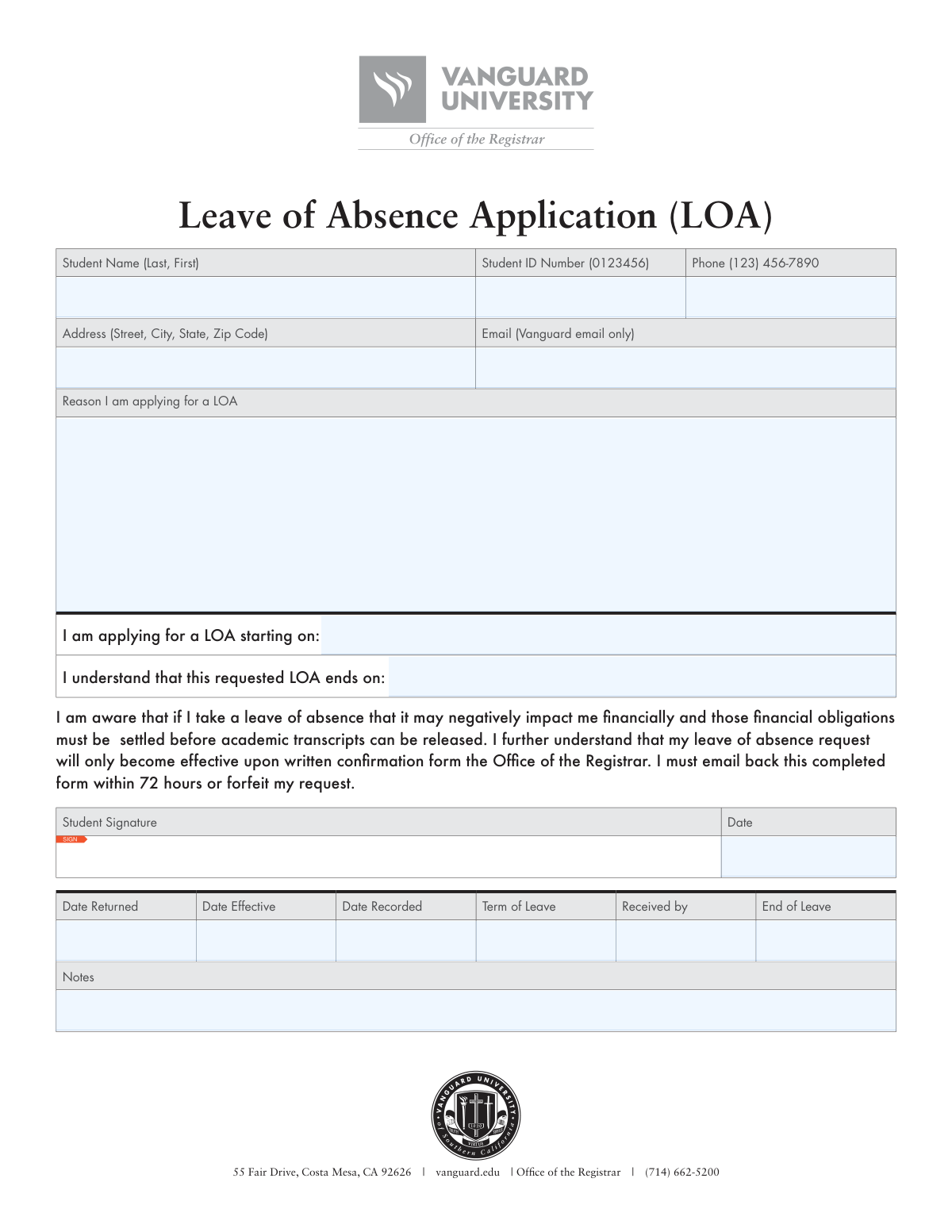
A Leave of Absence (LOA) Application is a formal document submitted by a student to their educational institution to request a temporary withdrawal from their studies. It's important because it officially records the student's intent to take a break while outlining their understanding of the potential financial and academic consequences. Today, this form can be filled out quickly and accurately using AI-powered services like Instafill.ai, which can also convert non-fillable PDF versions into interactive fillable forms.
Our AI automatically handles information lookup, data retrieval, formatting, and form filling.
It takes less than a minute to fill out LOA Application using our AI form filling.
Securely upload your data. Information is encrypted in transit and deleted immediately after the form is filled out.
Form specifications
| Form name: | Leave of Absence Application (LOA) |
| Number of pages: | 1 |
| Language: | English |
Instafill Demo: How to fill out PDF forms in seconds with AI
How to Fill Out LOA Application Online for Free in 2026
Are you looking to fill out a LOA APPLICATION form online quickly and accurately? Instafill.ai offers the #1 AI-powered PDF filling software of 2026, allowing you to complete your LOA APPLICATION form in just 37 seconds or less.
Follow these steps to fill out your LOA APPLICATION form online using Instafill.ai:
- 1 Navigate to Instafill.ai and upload or select the Leave of Absence Application form.
- 2 Use the AI assistant to automatically populate your personal details, including your full name, student ID number, and contact information.
- 3 Enter the proposed start and end dates for your leave of absence in the designated fields.
- 4 Write a clear and concise explanation for your leave of absence request in the 'Reason' section.
- 5 Carefully review the acknowledgement section regarding financial obligations and the official confirmation process.
- 6 Digitally sign and date the application to certify your request and understanding of the terms.
- 7 Download the completed form and submit it to the Office of the Registrar via email within the required timeframe.
Our AI-powered system ensures each field is filled out correctly, reducing errors and saving you time.
Why Choose Instafill.ai for Your Fillable LOA Application Form?
Speed
Complete your LOA Application in as little as 37 seconds.
Up-to-Date
Always use the latest 2026 LOA Application form version.
Cost-effective
No need to hire expensive lawyers.
Accuracy
Our AI performs 10 compliance checks to ensure your form is error-free.
Security
Your personal information is protected with bank-level encryption.
Frequently Asked Questions About Form LOA Application
This form is used by students to formally request a temporary break from their studies at Vanguard University. It must be submitted to the Office of the Registrar for approval.
Any current student who wishes to take a temporary leave from their academic program for personal, medical, or other reasons must complete and submit this application.
You need to provide your personal details like name and student ID, contact information, the reason for your leave, and the specific start and end dates of your requested leave.
No, the form explicitly states that you must provide your official Vanguard email address. All official communication regarding your LOA will be sent to that address.
You must email the completed and signed form to the Office of the Registrar. It is critical to send it within 72 hours of receiving it, or your request will be forfeited.
Your leave of absence only becomes effective after you receive written confirmation from the Office of the Registrar. Submitting the form does not automatically grant the leave.
Taking a leave can negatively impact you financially, and you must settle all financial obligations to the university. Your academic transcripts cannot be released until your balance is paid.
If you do not email the completed form back within 72 hours, your request for a leave of absence is automatically forfeited. You would need to start the application process over again.
No, that section is for internal administrative use by the Office of the Registrar only. Students should leave those fields blank.
Provide a brief and clear explanation for your leave request. You don't need to include excessive personal detail, but give enough context for the university to understand your circumstances.
Yes, services like Instafill.ai use AI to accurately auto-fill form fields with your information, which saves time and helps reduce errors.
You can upload the LOA application PDF to the Instafill.ai website. The AI will detect the fields, allow you to fill them in, add your digital signature, and download the completed form.
If your PDF is not interactive, you can use a tool like Instafill.ai. It can convert flat, non-fillable PDFs into fillable forms that you can easily complete on your device.
Compliance LOA Application
Validation Checks by Instafill.ai
1
Ensures Student Name is Complete
This check verifies that the 'Student Name' field is not empty and contains both a first and last name, ideally separated by a comma as suggested by the '(Last, First)' hint. A complete name is crucial for accurately identifying the student in the university's records. Failure to provide a complete name will prevent the registrar from processing the application.
2
Validates Student ID Number Format
This validation ensures the 'Student ID Number' field contains exactly 7 digits, matching the format example '(0123456)'. It prevents data entry errors and confirms the ID can be used to look up the student's official record. An invalid or incorrectly formatted ID will result in a failed database lookup and rejection of the LOA request.
3
Verifies Vanguard-Specific Email Address
This check confirms the 'Email' field contains a valid email address that belongs to the Vanguard domain (e.g., ends in '@vanguard.edu'). The form explicitly states this requirement for official communication, including the written confirmation of the LOA. Using a non-Vanguard email will result in the form's rejection to ensure compliance and reliable communication.
4
Ensures US Phone Number Format
This validation checks that the 'Phone' field contains a 10-digit number, accommodating common formats like '(123) 456-7890'. A valid phone number is essential for the registrar's office to contact the student for urgent matters or clarifications regarding their application. An invalid number could cause significant delays in processing.
5
Checks for Complete Mailing Address
This check verifies that the 'Address' field contains a plausible street, city, state, and zip code. A complete and accurate mailing address is required for any official paper correspondence that may need to be sent during the student's leave. An incomplete address could lead to missed communications and administrative complications.
6
Confirms Reason for Leave is Provided
This validation ensures the 'Reason I am applying for a LOA' field is not left blank. The justification for the leave is a mandatory component for the registrar to evaluate and approve the request. An application submitted without a reason will be considered incomplete and will be returned to the student.
7
Validates LOA Start Date Presence and Format
This check ensures the 'LOA starting on' field is filled out with a valid, recognizable date format (e.g., MM/DD/YYYY). This date is fundamental for defining the leave period for academic and financial purposes. A missing or improperly formatted start date makes the request ambiguous and impossible to process.
8
Validates LOA End Date Presence and Format
This validation confirms the 'LOA ends on' field contains a valid date. The end date is critical for defining the full duration of the leave and for planning the student's re-enrollment. An application without a clear end date is incomplete and will be rejected.
9
Ensures LOA End Date is After Start Date
This is a logical consistency check that verifies the 'LOA ends on' date is chronologically after the 'LOA starting on' date. A leave of absence cannot end before it begins. This validation prevents logical errors that would make the application invalid and require correction by the student.
10
Verifies Student Signature is Present
This check confirms that the 'Student Signature' field is not empty, indicating that a digital or physical signature has been applied. The signature is a legal acknowledgment that the student understands the terms and potential impacts of the LOA. An unsigned form is not legally binding and will be rejected immediately.
11
Validates Signature Date is Present and Reasonable
This check ensures the 'Date' field next to the signature is filled with a valid date that is not in the future. The signature date records when the student formally submitted their request and agreed to the terms. A missing or future date can invalidate the document for administrative and legal purposes.
12
Checks if LOA Start Date is in the Future
This validation ensures the requested 'LOA starting on' date is not in the past relative to the submission date. Leave of absence requests are typically not processed retroactively. This check prevents invalid requests and ensures the registrar has adequate time to process the application before the leave begins.
13
Verifies Office Use Fields are Empty on Submission
This validation confirms that fields reserved for the Office of the Registrar (e.g., 'Date Returned', 'Date Effective', 'Received by') are empty on the student's submission. This prevents students from entering data in administrative sections, which could cause confusion and processing errors. If these fields contain data, the form may be rejected for correction.
Common Mistakes in Completing LOA Application
The form explicitly requires a 'Vanguard email only,' but students often use their personal email out of habit. This mistake can cause the form to be rejected or lead to missed communications, as the official approval confirmation is sent only to the university email. To avoid this, always read field-specific instructions carefully. AI-powered form fillers like Instafill.ai can be configured to automatically use the correct institutional email for such documents.
Applicants sometimes mistakenly complete the fields at the bottom of the form intended for the registrar's office, such as 'Date Recorded' or 'Received by'. This creates confusion and extra work for the administrative staff, potentially slowing down the application's processing time. To prevent this error, only fill out the sections clearly designated for the student and leave any areas with administrative labels blank.
In the 'Reason I am applying for a LOA' section, students may provide overly vague explanations like 'personal reasons' or 'taking time off'. This lack of detail can prevent the registrar from making an informed decision, leading to a request for more information or an outright denial. It is crucial to provide a concise yet clear explanation that justifies the need for a leave of absence.
A critical clause states the form must be emailed back within 72 hours, or the request is forfeited. Students often miss this fine print, assuming they have more time, which results in an automatic cancellation of their request. To avoid this, read every part of the form, including the paragraphs, and be prepared to submit it promptly after completion.
The form specifies the format 'Last, First,' but it's a common habit for students to write their name as 'First Last.' This formatting error slows down processing as staff must manually search or correct the entry to match it with official student records. Always follow the exact format instructions provided next to a field to prevent delays.
A student might submit the form and immediately stop attending classes, believing the leave is active. However, the form clearly states the leave is effective only upon 'written confirmation from the Office of the Registrar.' Acting prematurely can result in unexcused absences and failing grades. Students must wait for official approval before altering their academic participation.
The Student ID is the primary key for locating a student's record. A simple typo, transposed digit, or incomplete number can make it impossible for the office to process the application, causing significant delays. Always double-check the Student ID number against your official student card before submitting the form.
An unsigned or undated application is considered incomplete and will be rejected immediately. This often happens when students are in a hurry or are unsure how to add a digital signature to a PDF. This forces a resubmission, risking missed deadlines. Always perform a final review, ensuring the signature and date fields are properly filled out.
If the form is a non-fillable PDF, students might print, handwrite, and scan it with poor quality, making it illegible. Others may not know how to add text and submit it blank. This results in an unusable submission. To avoid this, use a PDF editor to add text boxes, or use a tool like Instafill.ai which can convert flat PDFs into fillable forms for clean, legible data entry.
Saved over 80 hours a year
“I was never sure if my IRS forms like W-9 were filled correctly. Now, I can complete the forms accurately without any external help.”
Kevin Martin Green
Your data stays secure with advanced protection from Instafill and our subprocessors

Robust compliance program
Transparent business model
You’re not the product. You always know where your data is and what it is processed for.
ISO 27001, HIPAA, and GDPR
Our subprocesses adhere to multiple compliance standards, including but not limited to ISO 27001, HIPAA, and GDPR.
Security & privacy by design
We consider security and privacy from the initial design phase of any new service or functionality. It’s not an afterthought, it’s built-in, including support for two-factor authentication (2FA) to further protect your account.
Fill out LOA Application with Instafill.ai
Worried about filling PDFs wrong? Instafill securely fills leave-of-absence-application-loa forms, ensuring each field is accurate.