Yes! You can use AI to fill out Long-Term Leave of Absence (LOA) Request for an Extended Unpaid Leave
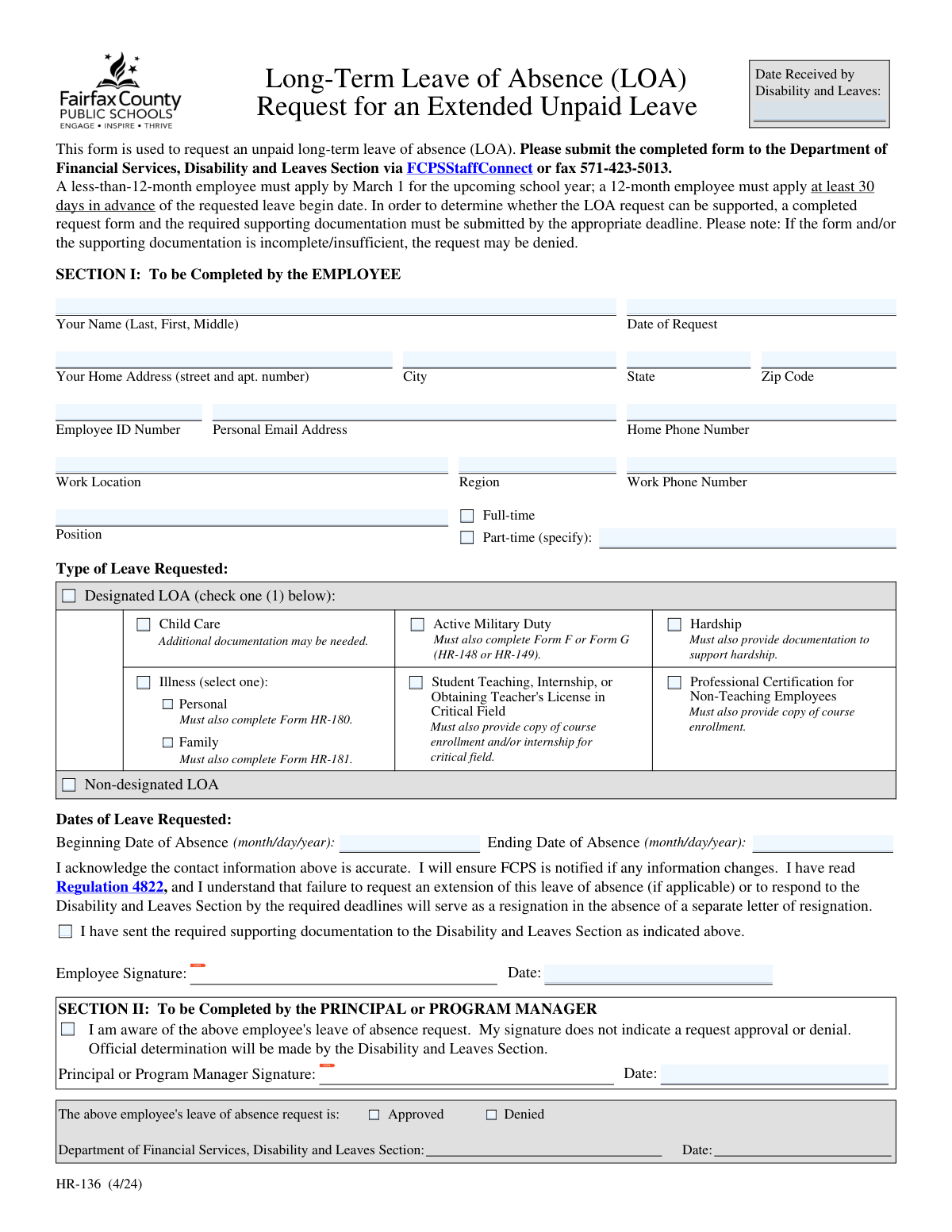
Form HR-136, the Long-Term Leave of Absence (LOA) Request, is a document used by employees to formally apply for an extended period of unpaid leave from their job. It is important because it initiates the official process for approval, requiring details about the employee, the type of leave (e.g., childcare, military duty, illness, hardship), and the requested dates. Today, this form can be filled out quickly and accurately using AI-powered services like Instafill.ai, which can also convert non-fillable PDF versions into interactive fillable forms.
HR-136 is part of the
HR forms, leave forms, leave of absence forms, leave request forms and ERM forms categories on Instafill.
Rather not fill this in by hand? Instafill is an online form filler that completes PDF forms automatically — upload the blank form, answer a few questions, and the AI fills every field.
Form specifications
| Form name: | Long-Term Leave of Absence (LOA) Request for an Extended Unpaid Leave |
| Number of pages: | 1 |
| Language: | English |
Our AI automatically handles information lookup, data retrieval, formatting, and form filling.
It takes less than a minute to fill out HR-136 using our AI form filling.
Securely upload your data. Information is encrypted in transit and deleted immediately after the form is filled out.
Instafill Demo: How to fill out PDF forms in seconds with AI
How to Fill Out HR-136 Online for Free in 2026
Are you looking to fill out a HR-136 form online quickly and accurately? Instafill.ai offers the #1 AI-powered PDF filling software of 2026, allowing you to complete your HR-136 form in just 37 seconds or less.
Follow these steps to fill out your HR-136 form online using Instafill.ai:
- 1 Navigate to Instafill.ai and upload or select the Long-Term Leave of Absence (LOA) Request form, also known as HR-136.
- 2 Use the AI assistant to automatically fill in your personal information in Section I, such as your name, address, employee ID, and work location.
- 3 Select the type of leave you are requesting (e.g., Child Care, Hardship, Illness) and enter the beginning and ending dates for your absence.
- 4 Review all the auto-filled information for accuracy and make any necessary corrections before proceeding.
- 5 Electronically sign and date the form to acknowledge you have read the regulations and provided accurate information.
- 6 Download the completed form and gather any required supporting documentation mentioned for your specific leave type (e.g., Form HR-180 for personal illness).
- 7 Submit the completed HR-136 and all supporting documents to the Department of Financial Services via the specified methods (e.g., FCPSStaffConnect or fax).
Our AI-powered system ensures each field is filled out correctly, reducing errors and saving you time.
Why Choose Instafill.ai for Your Fillable HR-136 Form?
Speed
Complete your HR-136 in as little as 37 seconds.
Up-to-Date
Always use the latest 2026 HR-136 form version.
Cost-effective
No need to hire expensive lawyers.
Accuracy
Our AI performs 10 compliance checks to ensure your form is error-free.
Security
Your personal information is protected with bank-level encryption.
Frequently Asked Questions About HR-136
This form is used by an employee to formally request an extended, unpaid leave of absence from their position.
Any FCPS employee who wishes to take a long-term, unpaid leave for reasons such as child care, military duty, illness, or professional development must complete this form.
Less-than-12-month employees must apply by March 1 for the upcoming school year, while 12-month employees must apply at least 30 days before the requested leave begin date.
You must submit the completed form and all required documentation to the Department of Financial Services, Disability and Leaves Section via FCPSStaffConnect or by fax to 571-423-5013.
The required documentation depends on your reason for leave and may include specific forms for illness (HR-180/HR-181), military orders (Form F/G), or proof of course enrollment for educational leave.
If your form or supporting documentation is incomplete or insufficient, your request for a leave of absence may be denied.
No, your principal's or program manager's signature only confirms they are aware of your request. The official approval or denial is determined by the Disability and Leaves Section.
Failure to request an extension or respond to the Disability and Leaves Section by the required deadlines will be treated as a resignation from your position.
The official determination of whether your leave is approved or denied is made by the Department of Financial Services, Disability and Leaves Section.
Yes, you must provide your current home address, personal email, and home phone number, and you are responsible for notifying FCPS if this information changes.
Yes, services like Instafill.ai use AI to accurately auto-fill form fields, which can save you time and help prevent errors.
You can use a service like Instafill.ai to upload the PDF and fill it out easily on any device, then download or print the completed form.
If your PDF is not interactive, you can use a tool like Instafill.ai to convert the flat PDF into a fillable form that you can complete online.
Compliance HR-136
Validation Checks by Instafill.ai
1
Ensures Employee Name is Complete
This check verifies that both a first and last name have been entered in the 'Your Name' field. A full name is essential for accurate record-keeping and to uniquely identify the employee within the HR system. If the name is incomplete, the form cannot be processed and the request will be returned to the employee for correction.
2
Validates Employee ID Number Format
This validation ensures the 'Employee ID Number' is present and matches the expected format, such as being a numeric value of a specific length. The Employee ID is the primary key used to link this request to the employee's master record in the HR and payroll systems. An invalid or missing ID will prevent the system from identifying the employee, causing the request to be rejected.
3
Verifies Completeness of Home Address and Email
This check confirms that the street address, city, state, zip code, and personal email address fields are all filled out. This contact information is critical for communicating with the employee regarding their leave status, benefits, and return-to-work instructions. Missing information can lead to communication failures and delays in processing the leave request.
4
Ensures Valid Zip Code Format
This validation checks that the 'Zip Code' field contains a valid 5-digit numeric format. An accurate zip code is necessary for all mail correspondence and to ensure employee records are geographically correct for tax and other purposes. An invalid format will trigger an error, requiring the user to correct the entry before submission.
5
Validates Employment Status Selection
This check ensures that the employee has selected either 'Full-time' or 'Part-time'. If 'Part-time' is selected, it further validates that the specifying details (e.g., hours or percentage) are provided. This information is crucial for determining benefits eligibility and calculating leave accruals, and failure to provide it will halt the request.
6
Ensures a Single Leave Type is Selected
This validation verifies that the employee has selected exactly one 'Type of Leave Requested' from the available options. Selecting zero or multiple types creates ambiguity and prevents the Disability and Leaves Section from determining eligibility and required documentation. The form will be considered incomplete and rejected if this rule is not met.
7
Conditional Validation for Illness Sub-Type
This check is triggered only if 'Illness' is selected as the leave type. It ensures that the employee then selects one of the sub-options: 'Personal' or 'Family'. This distinction is legally significant and determines which specific supporting forms (HR-180 or HR-181) are required, impacting FMLA eligibility and other entitlements. The request cannot proceed without this specific selection.
8
Confirms Acknowledgment of Supporting Documentation
This validation confirms the employee has checked the box indicating they have sent the required supporting documentation based on their leave type selection. The form explicitly states that incomplete documentation may lead to denial. This check serves as a gate to ensure the employee is aware of this critical requirement before submitting, reducing the number of incomplete applications.
9
Validates Presence of Leave Start and End Dates
This check ensures that both the 'Beginning Date of Absence' and 'Ending Date of Absence' fields are filled out with valid dates in MM/DD/YYYY format. These dates define the scope of the leave request and are essential for payroll, benefits administration, and workforce planning. A request without a clear start and end date is considered incomplete and cannot be evaluated.
10
Ensures Logical Order of Leave Dates
This validation compares the 'Beginning Date of Absence' and the 'Ending Date of Absence' to ensure the end date occurs after the start date. An illogical date range, such as an end date before the start date, is an error that would make the request impossible to process. The system will prevent submission until the dates are corrected to reflect a valid time period.
11
Validates Leave Request Timeliness (30-Day Rule)
This check enforces the business rule that a 12-month employee must apply at least 30 days in advance of the requested leave begin date. It calculates the difference between the 'Date of Request' and the 'Beginning Date of Absence'. This rule ensures the department has adequate time for planning and processing, and failure to meet this deadline may result in the denial of the request.
12
Validates Personal Email Address Format
This check verifies that the value entered in the 'Personal Email Address' field conforms to a standard email format, such as '[email protected]'. A valid email is the primary method for off-duty communication about the leave request. An incorrectly formatted email address would prevent the employee from receiving critical updates, so the system requires a valid format before submission.
13
Requires Employee Signature and Date
This validation ensures the 'Employee Signature' and its corresponding 'Date' field are both completed before submission. The signature legally attests that the information is accurate and that the employee understands the terms of the leave as outlined in Regulation 4822. A missing signature or date invalidates the request, making it legally non-binding and forcing its rejection.
14
Verifies Date of Request is a Valid Date
This check ensures the 'Date of Request' field contains a properly formatted date that is not in the future. This date serves as the official timestamp for the submission and is used to evaluate timeliness against application deadlines. An invalid or future date would compromise the integrity of the request's timeline, so it must be corrected before the form can be submitted.
Common Mistakes in Completing HR-136
The form clearly states that specific leave types, such as for illness, military duty, or hardship, require additional forms (e.g., HR-180, HR-181) or documentation. Employees often overlook these requirements, leading to an incomplete application and almost certain denial or significant processing delays. To avoid this, carefully review the section for your chosen leave type and gather all necessary documents before submitting the form.
Employees sometimes submit the form directly to the Disability and Leaves Section after filling out their portion, forgetting that Section II must be completed by their Principal or Program Manager. This signature is required to confirm that management is aware of the request, and its absence will cause the form to be returned, delaying the entire process. Always route the form to your manager for their signature before final submission.
The form specifies strict deadlines: March 1 for less-than-12-month employees and 30 days in advance for 12-month employees. Missing these deadlines is a common reason for denial, as it may not give the department enough time to arrange for coverage. To prevent this, mark the deadline on your calendar and submit the completed form and all documentation well in advance.
Typos in the personal email address, a missing apartment number, or providing a work email instead of a personal one are frequent errors. This is critical because the department will use this information to communicate important updates about your leave status and return to work. An error here could mean you miss vital information, so double-check every field in the contact section for accuracy.
Users may enter dates in the wrong format (e.g., DD-MM-YYYY instead of MM/DD/YYYY), reverse the start and end dates, or provide ambiguous date ranges. This creates confusion and requires follow-up, delaying the approval of the leave request. Ensure dates are logical and strictly follow the 'month/day/year' format as specified on the form.
When an employee checks the 'Part-time' box, they often forget to fill in the subsequent field specifying their hours or work schedule. This information is necessary for HR and payroll to correctly process the leave and benefits. Forgetting to specify these details results in an incomplete form and requires clarification from the department.
In the rush to complete the form, it's easy to overlook the employee signature and date fields at the end of Section I. An unsigned form is not legally valid and cannot be processed, leading to immediate rejection. Always perform a final review of the form to ensure you have signed and dated it before submission.
The Employee ID Number is the primary key used to identify you in the HR system. Transposing digits or accidentally omitting the number entirely can cause the system to fail to locate your record, halting the entire process. This can be avoided by carefully cross-referencing the number with your employee badge or a recent pay stub. AI-powered tools like Instafill.ai can help by storing and accurately populating this recurring information.
An employee might be unsure of the distinction between 'Hardship,' 'Personal Illness,' or 'Family Illness' and select the wrong one. This mistake often leads to submitting the incorrect supporting documentation, causing the request to be denied. It is crucial to read the descriptions or consult with HR to select the precise leave type that matches your situation.
Since the form can be submitted via fax or an online portal, users might submit a blurry scan or a fax with poor transmission quality. If the text is illegible, the department cannot process the request, leading to delays or denial. When submitting digitally, ensure you use a high-resolution scanner or a clear photo, and if the form is a non-fillable PDF, a tool like Instafill.ai can convert it into a clean, fillable version for a professional submission.
Saved over 80 hours a year
“I was never sure if my IRS forms like W-9 were filled correctly. Now, I can complete the forms accurately without any external help.”
Kevin Martin Green
Your data stays secure with advanced protection from Instafill and our subprocessors




Robust compliance program
Transparent business model
You’re not the product. You always know where your data is and what it is processed for.
ISO 27001, HIPAA, and GDPR
Our subprocesses adhere to multiple compliance standards, including but not limited to ISO 27001, HIPAA, and GDPR.
Security & privacy by design
We consider security and privacy from the initial design phase of any new service or functionality. It’s not an afterthought, it’s built-in, including support for two-factor authentication (2FA) to further protect your account.
Fill out HR-136 with Instafill.ai
Worried about filling PDFs wrong? Instafill securely fills long-term-leave-of-absence-loa-request-for-an-extended-unpaid-leave forms, ensuring each field is accurate.
