Yes! You can use AI to fill out Sodexo Leave of Absence Request Packet
The Sodexo Leave of Absence (LOA) Request is the official paperwork employees must complete to apply for time off from work for various personal or medical reasons. Submitting this request is a critical step for managing benefits, ensuring compliance with company policies, and securing job protection under laws like FMLA. Today, this process can be streamlined by filling out the required forms quickly and accurately using AI-powered services like Instafill.ai, which can also convert non-fillable PDF versions into interactive fillable forms.
Sodexo LOA Request is part of the
HR forms, leave forms, Sodexo forms, Sodexo HR forms, leave of absence forms and leave request forms categories on Instafill.
Rather not fill this in by hand? Instafill is an online form filler that completes PDF forms automatically — upload the blank form, answer a few questions, and the AI fills every field.
Form specifications
| Form name: | Sodexo Leave of Absence Request Packet |
| Number of pages: | 1 |
| Language: | English |
Our AI automatically handles information lookup, data retrieval, formatting, and form filling.
It takes less than a minute to fill out Sodexo LOA Request using our AI form filling.
Securely upload your data. Information is encrypted in transit and deleted immediately after the form is filled out.
Instafill Demo: How to fill out PDF forms in seconds with AI
How to Fill Out Sodexo LOA Request Online for Free in 2026
Are you looking to fill out a SODEXO LOA REQUEST form online quickly and accurately? Instafill.ai offers the #1 AI-powered PDF filling software of 2026, allowing you to complete your SODEXO LOA REQUEST form in just 37 seconds or less.
Follow these steps to fill out your SODEXO LOA REQUEST form online using Instafill.ai:
- 1 Navigate to Instafill.ai and upload or select the Sodexo Leave of Absence Request form.
- 2 Allow the AI to scan and identify all the required fields on the form, such as employee information, leave type, and dates.
- 3 Answer a series of simple questions about your personal details, the reason for your leave, and the expected start and end dates.
- 4 Watch as Instafill.ai uses your answers to automatically populate the leave request paperwork with the correct information in the appropriate fields.
- 5 Review the completed form for accuracy, then electronically sign it to certify the information provided.
- 6 Download the completed and signed LOA packet and submit it to your manager or the PeopleCenter as instructed in the guidelines.
Our AI-powered system ensures each field is filled out correctly, reducing errors and saving you time.
Why Choose Instafill.ai for Your Fillable Sodexo LOA Request Form?
Speed
Complete your Sodexo LOA Request in as little as 37 seconds.
Up-to-Date
Always use the latest 2026 Sodexo LOA Request form version.
Cost-effective
No need to hire expensive lawyers.
Accuracy
Our AI performs 10 compliance checks to ensure your form is error-free.
Security
Your personal information is protected with bank-level encryption.
Frequently Asked Questions About Sodexo LOA Request
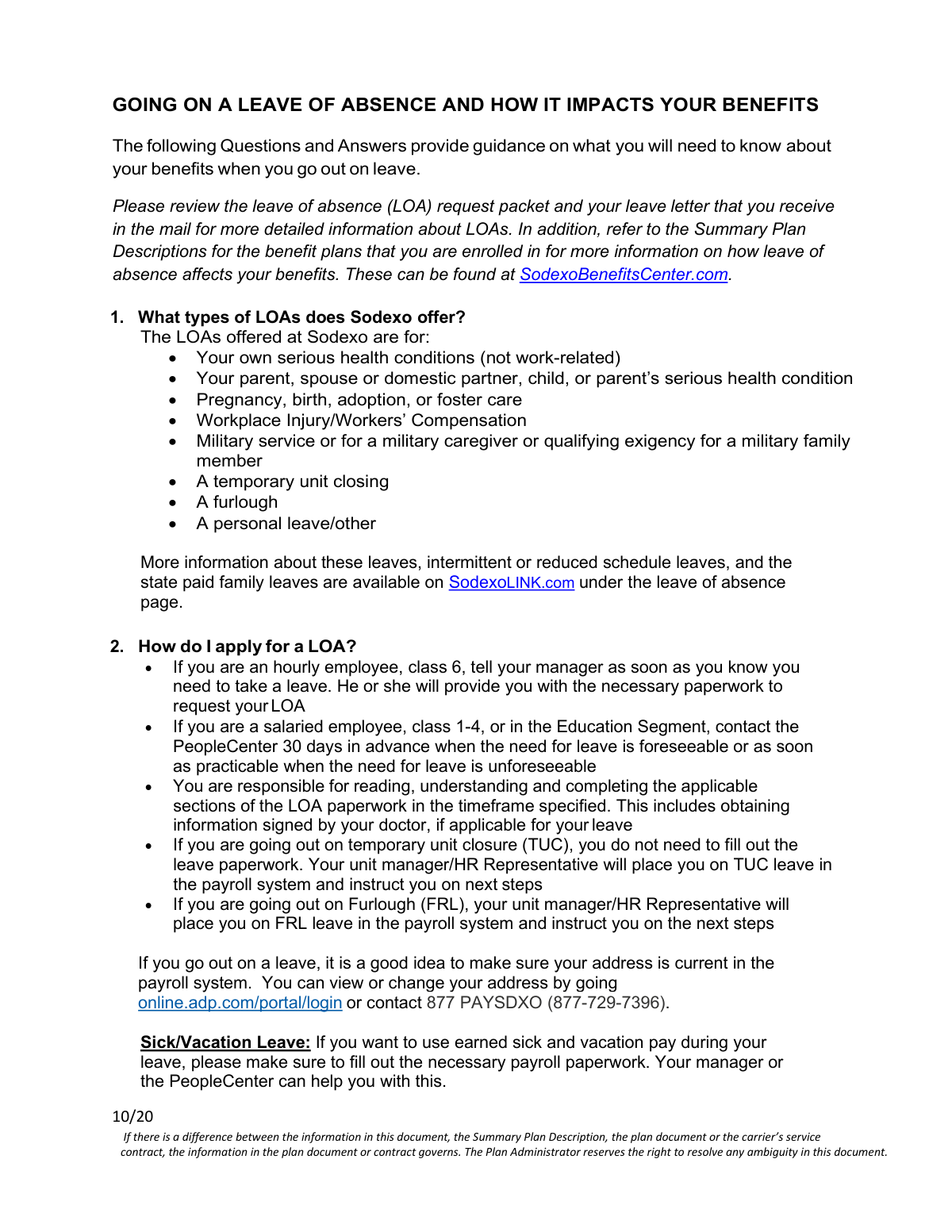
This document provides guidance for Sodexo employees on how a Leave of Absence (LOA) will impact their benefits, including how to apply for leave and maintain coverage.
Any employee needing to take time off for reasons such as their own serious health condition, caring for a family member, military service, or other personal reasons should apply for an LOA.
Hourly employees should notify their manager, while salaried employees should contact the PeopleCenter. You are responsible for completing the necessary LOA paperwork, which may require a doctor's signature.
You must mail a personal check or money order, payable to Sodexo, to the address provided on your billing coupon. Be sure to include your Employee ID number on the payment, as cash and credit cards are not accepted.
If your payments fall approximately six weeks behind, you will receive a cancellation notice. Your benefits coverage will be canceled retroactively to the last date your coverage was paid in full.
Yes, you can request to cancel your benefits by contacting the Sodexo Benefits Center. The effective date of cancellation depends on how soon you make the request after your leave begins.
Yes, you can re-enroll in benefits within 30 days of your return to work by contacting the Sodexo Benefits Center. However, re-enrolling in disability or life insurance will require an approved Evidence of Insurability (EOI) form.
An EOI is a form that provides information about your health to the insurance company for their approval. It is required if you are a late enrollee or wish to re-enroll in disability and/or life insurance plans after a cancellation.
You cannot contribute to your HCSA during an unpaid LOA, and your debit card will be deactivated. However, you can still request reimbursement for eligible expenses incurred before your leave began.
If you continue coverage, the taxes you owe for imputed income will accumulate during your leave. This entire amount will be deducted from your paychecks upon your return to work.
Yes, disability benefits are not paid automatically. You must file a claim directly with Cigna within 31 days of the date you became disabled.
Yes, services like Instafill.ai use AI to auto-fill form fields accurately and save time. This can be particularly helpful for completing the detailed paperwork required for an LOA.
Simply upload your LOA paperwork to the Instafill.ai platform. The AI-powered tool will help you fill in your information quickly and accurately, directly on the digital form.
You can use a service like Instafill.ai, which can instantly convert flat, non-fillable PDFs into interactive, fillable forms. This allows you to complete and sign your paperwork easily online.
Compliance Sodexo LOA Request
Validation Checks by Instafill.ai
1
Validates Employee ID on Payment Coupon
This check ensures that a valid Employee ID number is present on any benefit payment submission, such as in the memo line of a check or the designated field on a money order. The Employee ID is crucial for accurately applying the payment to the correct employee's account, especially when they are on a leave of absence. Failure to provide a valid ID will result in processing delays and could lead to the payment being unapplied, potentially causing benefit cancellation for non-payment.
2
Prohibits Social Security Number on Payments
This validation scans payment documents and related form fields to ensure a Social Security Number (SSN) has not been included. This is a critical security measure to protect the employee's sensitive personal information from potential exposure or theft during mail and payment processing. If an SSN is detected, the submission should be flagged for manual review and correction, and the user should be instructed to resubmit without the SSN.
3
Restricts Payment Method to Check or Money Order
This check verifies that the indicated method of payment for benefits during a leave of absence is either a personal check or a money order. The policy explicitly forbids cash, credit card, or debit card payments. This validation is important for enforcing company financial processes and ensuring payments are handled through approved, traceable channels. An attempt to submit payment via an unapproved method would be rejected.
4
Enforces 30-Day Advance Notice for Foreseeable Leave
For Leave of Absence (LOA) requests where the reason for leave is marked as 'foreseeable' (e.g., planned surgery), this validation checks that the requested start date is at least 30 days after the submission date. This rule ensures that the company and the employee's department have adequate time to plan for the absence. If the notice period is less than 30 days, the request may be flagged for review or require additional justification for the shorter notice.
5
Verifies Qualified Status Change (QSC) Reporting Window
This check confirms that a request to change benefits due to a Qualified Status Change (e.g., marriage, birth of a child) is submitted within 30 days of the event date. This is a federal and plan-mandated deadline to ensure compliance and proper benefits administration. Submissions made after the 30-day window will be rejected, and the employee will have to wait until the next Annual Enrollment period to make changes.
6
Validates Disability Claim Filing Deadline
This validation ensures that a disability claim is filed within 31 days of the date the employee became disabled. This is a strict deadline set by the insurance carrier (Cigna) to be eligible for benefits. If the claim submission date is more than 31 days after the disability date, the claim will likely be denied by the insurer, resulting in a loss of disability income for the employee.
7
Enforces Post-LOA Re-enrollment Window
This check verifies that an employee's request to re-enroll in benefits after their coverage was canceled during a leave of absence is made within 30 days of their official return-to-work date. This ensures timely reinstatement of benefits and accurate calculation of retroactive premiums. Requests made outside this 30-day window will be denied, forcing the employee to wait until the next Annual Enrollment period to regain coverage.
8
Validates Evidence of Insurability (EOI) Submission Timeliness
For employees who are considered late enrollees or are re-enrolling in life or disability insurance, this check ensures the Evidence of Insurability (EOI) form is submitted within 30 days of their return to work. This deadline is critical for initiating the underwriting and approval process with the insurance company. Failure to submit the EOI form within this timeframe will result in the enrollment request being voided, and the employee will not gain coverage.
9
Ensures Completeness of LOA Request Packet
This validation confirms that all required documentation for a specific type of leave has been submitted with the initial LOA request. For example, a leave for a serious health condition must be accompanied by information signed by a doctor. This check is important because a leave cannot be formally approved until all paperwork is complete. An incomplete submission will delay the approval process and communication to the employee.
10
State-Specific Disability Claim Routing Logic
This check uses the employee's work state to determine the correct procedure for filing a state-mandated disability claim. If the state is CA, NJ, PR, or RI, the system should prevent submission and direct the user to the appropriate state agency. This prevents misdirected claims and ensures employees follow the correct process for their location, avoiding significant delays in receiving state-provided benefits.
11
Validates Benefit Cancellation Request Rules
This check applies conditional logic to benefit cancellation requests made during an LOA. It verifies if the request is made within 30 days of the LOA start date; if it is made after 30 days, the system will prevent the cancellation of any before-tax benefit plans. This enforces plan rules and prevents employees from making impermissible mid-year changes to certain tax-advantaged plans. An invalid request would be rejected with an explanation of the rule.
12
Requires Selection of a Valid Leave Type
This is a basic completeness check on the LOA request form to ensure that the employee has selected a valid reason for their leave from the provided list (e.g., 'Your own serious health condition', 'Military service'). This information is fundamental for determining eligibility, required documentation, and how benefits will be handled during the leave. A form cannot be submitted without a valid leave type being selected.
Common Mistakes in Completing Sodexo LOA Request
Employees often fail to distinguish between the application process for hourly versus salaried staff, leading them to contact the wrong person. This mistake delays the initiation of the leave request, as hourly employees must go through their manager while salaried employees must contact the PeopleCenter. To avoid this, carefully read the instructions to identify your employee class and the correct first point of contact for your paperwork.
Many employees forget to ensure their home address is current in the payroll system before going on leave. All critical documents, including the LOA letter, billing notices for benefit payments, and Annual Enrollment materials, are mailed to the address on file. An outdated address means you won't receive these communications, which can lead to missed payments and unintentional cancellation of your benefits.
When submitting benefit premium payments by check or money order, a frequent error is forgetting to include the Employee ID number. The payment processing system relies on this number to credit the correct account. Without it, payments are delayed or misapplied, which can result in an account becoming delinquent and coverage being canceled for non-payment.
The initial billing notice sent during a leave of absence may show a balance of $0.00, confusing employees into thinking no payment is due yet. This happens if benefits were pre-paid through the last paycheck, but premiums begin accruing immediately after. This misunderstanding leads to falling behind on payments, risking benefit cancellation once the account is six weeks in arrears. Always use your last paystub or Confirmation of Coverage statement to calculate and send payments in advance.
If an employee's benefits were canceled during their leave, they often mistakenly assume coverage will restart automatically upon their return to work. Employees must proactively contact the Sodexo Benefits Center within 30 days of returning to re-enroll. Missing this critical 30-day window can leave you and your family without coverage until the next Annual Enrollment period.
Employees often believe that applying for a medical leave of absence automatically triggers a claim for short-term or long-term disability benefits. However, disability benefits are not automatic and require a separate claim to be filed directly with the insurance provider (e.g., Cigna) within 31 days of becoming disabled. Failure to file this claim results in not receiving any disability income replacement payments you may be entitled to.
Employees who are considered late enrollees for life or disability insurance must complete an Evidence of Insurability (EOI) form within 30 days of returning to work. It's common to forget this step amidst the business of returning to work, but failing to submit the EOI form means the insurance coverage will not be activated. Since the form is often a non-fillable PDF, tools like Instafill.ai can convert it into an interactive version and help ensure all required fields are completed accurately before submission.
Employees with a domestic partner on their benefits plan are often surprised by a large tax deduction from their first paychecks upon returning from leave. The taxes on the imputed income for the domestic partner's coverage accumulate during the unpaid leave and are deducted as a lump sum upon return. This can result in a significantly smaller paycheck than expected, causing financial strain. It is crucial to review your paystub before your leave to estimate this liability and budget accordingly.
Upon submitting a leave request, an employee receives an LOA letter with information on benefit payments, which is often mistaken for a final approval of the leave itself. The document clearly states this letter is not an approval and that all required documentation, such as a doctor's certification, must still be submitted. This misunderstanding can cause an employee to stop pursuing the necessary paperwork, leading to the leave request ultimately being denied.
The instructions for making benefit payments during a leave are very specific, only allowing for personal checks or money orders. However, people frequently attempt to pay with a credit card, debit card, or cash, all of which are not accepted. This error leads to the payment being rejected, causing delays that can put the employee's account in arrears and risk the cancellation of their health coverage.
Saved over 80 hours a year
“I was never sure if my IRS forms like W-9 were filled correctly. Now, I can complete the forms accurately without any external help.”
Kevin Martin Green
Your data stays secure with advanced protection from Instafill and our subprocessors




Robust compliance program
Transparent business model
You’re not the product. You always know where your data is and what it is processed for.
ISO 27001, HIPAA, and GDPR
Our subprocesses adhere to multiple compliance standards, including but not limited to ISO 27001, HIPAA, and GDPR.
Security & privacy by design
We consider security and privacy from the initial design phase of any new service or functionality. It’s not an afterthought, it’s built-in, including support for two-factor authentication (2FA) to further protect your account.
Fill out Sodexo LOA Request with Instafill.ai
Worried about filling PDFs wrong? Instafill securely fills sodexo-leave-of-absence-request-packet forms, ensuring each field is accurate.
