Yes! You can use AI to fill out Application for Special Leave of Absence without Pay
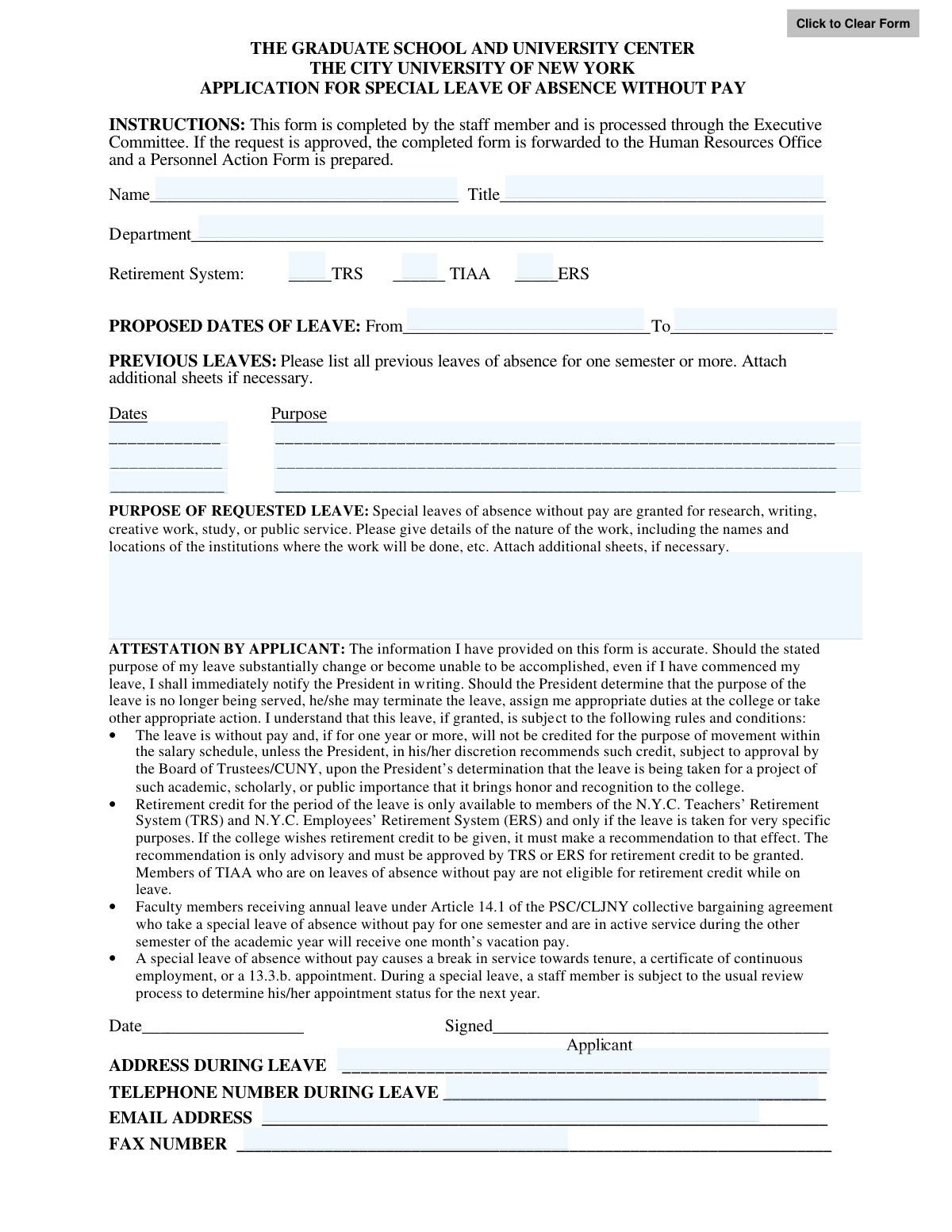
This form is an official request submitted by staff members of The City University of New York (CUNY) to apply for a special leave of absence without pay. It is used for specific purposes such as research, writing, creative work, study, or public service, and requires detailed justification. The form outlines the rules and conditions regarding retirement credit, salary schedule movement, and tenure implications, making it a crucial document for formalizing such leave. Today, this form can be filled out quickly and accurately using AI-powered services like Instafill.ai, which can also convert non-fillable PDF versions into interactive fillable forms.
CUNY Application for LOA Without Pay is part of the
government forms, HR forms, employee forms, leave forms, personnel forms and leave of absence forms categories on Instafill.
Rather not fill this in by hand? Instafill is an online form filler that completes PDF forms automatically — upload the blank form, answer a few questions, and the AI fills every field.
Form specifications
| Form name: | Application for Special Leave of Absence without Pay |
| Number of pages: | 1 |
| Language: | English |
Our AI automatically handles information lookup, data retrieval, formatting, and form filling.
It takes less than a minute to fill out CUNY Application for LOA Without Pay using our AI form filling.
Securely upload your data. Information is encrypted in transit and deleted immediately after the form is filled out.
Instafill Demo: How to fill out PDF forms in seconds with AI
How to Fill Out CUNY Application for LOA Without Pay Online for Free in 2026
Are you looking to fill out a CUNY APPLICATION FOR LOA WITHOUT PAY form online quickly and accurately? Instafill.ai offers the #1 AI-powered PDF filling software of 2026, allowing you to complete your CUNY APPLICATION FOR LOA WITHOUT PAY form in just 37 seconds or less.
Follow these steps to fill out your CUNY APPLICATION FOR LOA WITHOUT PAY form online using Instafill.ai:
- 1 Navigate to Instafill.ai and upload or select the 'Application for Special Leave of Absence without Pay' form.
- 2 Use the AI assistant to automatically fill in your personal information, including your name, title, department, and retirement system details.
- 3 Enter the proposed start and end dates for your leave of absence.
- 4 Provide details of any previous leaves of absence you have taken for one semester or more.
- 5 Clearly describe the purpose of your requested leave, including the nature of the work and the institutions involved, attaching additional sheets if necessary.
- 6 Carefully read the attestation section, then provide your contact information for during the leave, and e-sign and date the application.
- 7 Review the entire form for accuracy, then download the completed document to submit it through the proper university channels, starting with the Executive Committee.
Our AI-powered system ensures each field is filled out correctly, reducing errors and saving you time.
Why Choose Instafill.ai for Your Fillable CUNY Application for LOA Without Pay Form?
Speed
Complete your CUNY Application for LOA Without Pay in as little as 37 seconds.
Up-to-Date
Always use the latest 2026 CUNY Application for LOA Without Pay form version.
Cost-effective
No need to hire expensive lawyers.
Accuracy
Our AI performs 10 compliance checks to ensure your form is error-free.
Security
Your personal information is protected with bank-level encryption.
Frequently Asked Questions About CUNY Application for LOA Without Pay
This form is for CUNY staff members to formally request an unpaid leave of absence for professional purposes such as research, writing, creative work, study, or public service.
Any staff member at The Graduate School and University Center of CUNY who wishes to take an unpaid leave for one semester or more must complete this application.
After you submit the form, it is processed through your Executive Committee and requires recommendations from several offices, including the Provost and the President, before being forwarded to Human Resources.
No, this is a leave of absence without pay. You will not receive your salary from the university during the approved leave period.
This depends on your retirement system. TIAA members are not eligible for retirement credit, while TRS and ERS members may be eligible for specific purposes, subject to recommendation and final approval by the retirement system.
Yes, this type of leave causes a break in service towards tenure or a certificate of continuous employment. You will still be subject to the usual review process for your appointment status for the next year.
You must provide specific details about the work you will be doing, including the names and locations of any institutions involved. You can attach additional sheets if you need more space.
You must immediately notify the President in writing. The President may then decide to terminate the leave or take other appropriate action based on the new circumstances.
Generally, no. An exception can be made if the President determines your leave project is of such high importance that it brings honor to the college, but this requires special recommendation and approval.
That section is to be completed by your Executive Officer. They will describe the arrangements made to cover your responsibilities during your absence.
Yes, services like Instafill.ai use AI to accurately auto-fill form fields with your personal information, which can save you time and help ensure accuracy.
You can use a service like Instafill.ai to upload the PDF form. The platform allows you to type directly into the fields, add your signature, and download the completed document for submission.
If you have a non-fillable or 'flat' PDF, you can upload it to Instafill.ai. The service can convert it into an interactive, fillable form, allowing you to easily complete it on your computer.
Faculty members who receive annual leave and take a special leave without pay for one semester will still receive one month's vacation pay for that academic year.
Compliance CUNY Application for LOA Without Pay
Validation Checks by Instafill.ai
1
Ensures Applicant Name is Provided
This check verifies that the 'Name' field is not empty. The applicant's name is a primary identifier for the request and is essential for processing, record-keeping, and communication. Failure to provide a name will prevent the form from being submitted, as the application cannot be associated with a specific staff member.
2
Validates Presence of Leave Start and End Dates
This validation ensures that both the 'From' and 'To' fields under 'PROPOSED DATES OF LEAVE' are filled out. These dates define the exact duration of the requested absence, which is critical for departmental planning, payroll processing, and benefits administration. An application with incomplete dates cannot be evaluated and will be rejected.
3
Ensures Leave End Date is After Start Date
This check performs a logical comparison to confirm that the 'To' date of the proposed leave is chronologically after the 'From' date. An end date that is before or the same as the start date is illogical and would represent an invalid leave period. This validation prevents data entry errors and ensures the requested leave duration is valid for processing.
4
Standard Date Format Validation
This validation rule checks that all date fields on the form (e.g., 'From', 'To', 'Date' of attestation) are entered in a valid and consistent format, such as MM/DD/YYYY. Proper formatting is crucial for the system to correctly parse and store the date information for scheduling and record-keeping. Submissions with invalid date formats will be flagged for correction to avoid processing errors.
5
Verifies Single Retirement System Selection
This check ensures that the applicant has selected exactly one option from the 'Retirement System' choices (TRS, TIAA, ERS). An employee belongs to only one system, and this information is vital for determining eligibility for retirement credit during the leave. The form will be considered incomplete if zero or more than one system is selected.
6
Ensures Detailed Purpose of Leave is Provided
This validation confirms that the 'PURPOSE OF REQUESTED LEAVE' text area is not empty and contains a reasonably detailed explanation, enforcing a minimum character count. A vague or missing purpose prevents the committee from evaluating whether the leave aligns with approved reasons like research or study. Applications lacking sufficient detail will be returned to the applicant for clarification.
7
Applicant Attestation Date Presence
This check verifies that the 'Date' field next to the applicant's signature is filled in. This date documents when the applicant attested to the accuracy of the information and agreed to the terms of the leave. It is a required component for creating a valid record of the request and will halt submission if missing.
8
Validates Email Address Format
This rule ensures that the value entered in the 'EMAIL ADDRESS' field conforms to the standard email format, such as '[email protected]'. A valid email is a primary means of communication with the applicant during their leave. An invalid format would prevent communication, so the system will require correction before submission.
9
Validates Telephone Number Format
This check verifies that the 'TELEPHONE NUMBER DURING LEAVE' is entered in a recognizable phone number format, including an area code and the appropriate number of digits. This number is a critical piece of contact information for urgent matters. The validation helps ensure the data is usable and prevents the storage of nonsensical entries.
10
Ensures Consistency for Previous Leave Entries
This validation rule checks the 'PREVIOUS LEAVES' section to ensure that if a 'Dates' field is filled out, the corresponding 'Purpose' field is also filled out, and vice versa. Incomplete pairs of data are ambiguous and not useful for reviewing the applicant's leave history. This check enforces data integrity for historical records on the application.
11
Ensures Leave Address is Provided
This check verifies that the 'ADDRESS DURING LEAVE' field is not left blank. This physical address is essential for official correspondence, mailing of documents, or any other communication that cannot be handled electronically. Failure to provide this information can hinder the university's ability to contact the staff member, so the field is mandatory.
12
Verifies Applicant Title is Provided
This validation ensures the 'Title' field is completed by the applicant. The staff member's title is necessary for identification and for understanding their role within the university, which is relevant context for the leave request. An application without a title is incomplete and cannot be properly processed.
13
Verifies Department is Provided
This check confirms that the 'Department' field has been filled out. The department information is crucial for routing the application to the correct Executive Committee and Executive Officer for review and approval. Without this information, the workflow cannot begin, and the application will be halted until the department is specified.
14
TIAA and Retirement Credit Logic Check
This is a business rule validation that cross-references the selected retirement system with recommendations for retirement credit. Based on the form's text, TIAA members are not eligible for retirement credit. If 'TIAA' is selected, this check would flag or prevent the selection of 'With retirement credit' in the recommendation sections, ensuring compliance with university policies.
Common Mistakes in Completing CUNY Application for LOA Without Pay
Applicants often provide a generic purpose like 'research' or 'study' without the required details, such as the project's nature, collaborating institutions, and specific locations. A weak or incomplete justification can lead to the request being denied as it fails to demonstrate the academic or scholarly merit required for approval. To avoid this, be highly specific and attach additional sheets to fully detail the work, its importance, and where it will be conducted.
People frequently enter dates in non-standard formats (e.g., DD/MM/YY) or use vague terms like 'Fall Semester 2024' instead of specific dates. This ambiguity causes confusion for HR and payroll, requiring clarification and delaying the entire approval process. Always use a clear and complete MM/DD/YYYY format for both the 'From' and 'To' dates to ensure they align with academic and payroll calendars.
Forgetting to sign and date the 'Attestation by Applicant' section is a very common and critical error that immediately invalidates the form. An unsigned application cannot be processed and will be returned, significantly delaying the start of the multi-stage approval workflow. Always double-check that you have physically or digitally signed and dated the form before submitting it.
The form requires listing all prior leaves of one semester or more, but applicants sometimes omit this information, either by accident or because they don't have the records handy. This omission can be discovered during the review and may be perceived as misleading, potentially jeopardizing the current application's approval. It is crucial to maintain accurate personal records and report all previous leaves as requested.
Staff members may be unsure of their retirement system (TRS, TIAA, or ERS) and either guess, check the wrong box, or leave it blank. This is a critical field as it directly impacts eligibility for retirement credit during the leave, as detailed in the attestation section. Incorrect information can lead to significant financial and administrative complications regarding retirement benefits down the line.
Applicants often neglect to provide a complete and accurate address, phone number, and email for the period of their leave, assuming it's unimportant. However, the university may need to send important notifications regarding appointment status, benefits, or changes to the leave. Ensure all contact fields are filled with reliable information where you can be reached to avoid missing critical communications.
The form explicitly states to 'Attach additional sheets, if necessary' for detailed sections like 'Purpose of Leave'. Many applicants try to squeeze extensive information into the small boxes provided, resulting in an illegible, unprofessional, and incomplete application. This prevents reviewers from fully understanding the request and can directly contribute to its denial.
Applicants sometimes mistakenly write in the section for 'PROPOSED ARRANGEMENT FOR COVERING PROFESSIONAL DUTIES,' which is clearly marked 'To be completed by the Executive Officer.' This indicates a failure to read instructions carefully and creates confusion and extra work for administrators during the review process. Applicants must only fill out the sections designated for them.
An applicant might enter a colloquial or outdated version of their official job title or department name, rather than the one on record. This can cause mismatches in the HR system when the final Personnel Action Form is prepared, leading to processing delays and administrative errors. Always use the exact, official title and department name as they appear on your paystub or in the university directory.
If the form is a non-fillable PDF, applicants may fill it out by hand with illegible writing, or use inconsistent formatting. This makes it difficult for HR staff to accurately enter data and can lead to errors or requests for resubmission, delaying approval. AI-powered tools like Instafill.ai can convert flat PDFs into clean, fillable versions, ensuring all entries are legible and professionally presented.
Saved over 80 hours a year
“I was never sure if my IRS forms like W-9 were filled correctly. Now, I can complete the forms accurately without any external help.”
Kevin Martin Green
Your data stays secure with advanced protection from Instafill and our subprocessors




Robust compliance program
Transparent business model
You’re not the product. You always know where your data is and what it is processed for.
ISO 27001, HIPAA, and GDPR
Our subprocesses adhere to multiple compliance standards, including but not limited to ISO 27001, HIPAA, and GDPR.
Security & privacy by design
We consider security and privacy from the initial design phase of any new service or functionality. It’s not an afterthought, it’s built-in, including support for two-factor authentication (2FA) to further protect your account.
Fill out CUNY Application for LOA Without Pay with Instafill.ai
Worried about filling PDFs wrong? Instafill securely fills application-for-special-leave-of-absence-without-pay forms, ensuring each field is accurate.
