Yes! You can use AI to fill out JPMorgan Chase As You Leave Guide
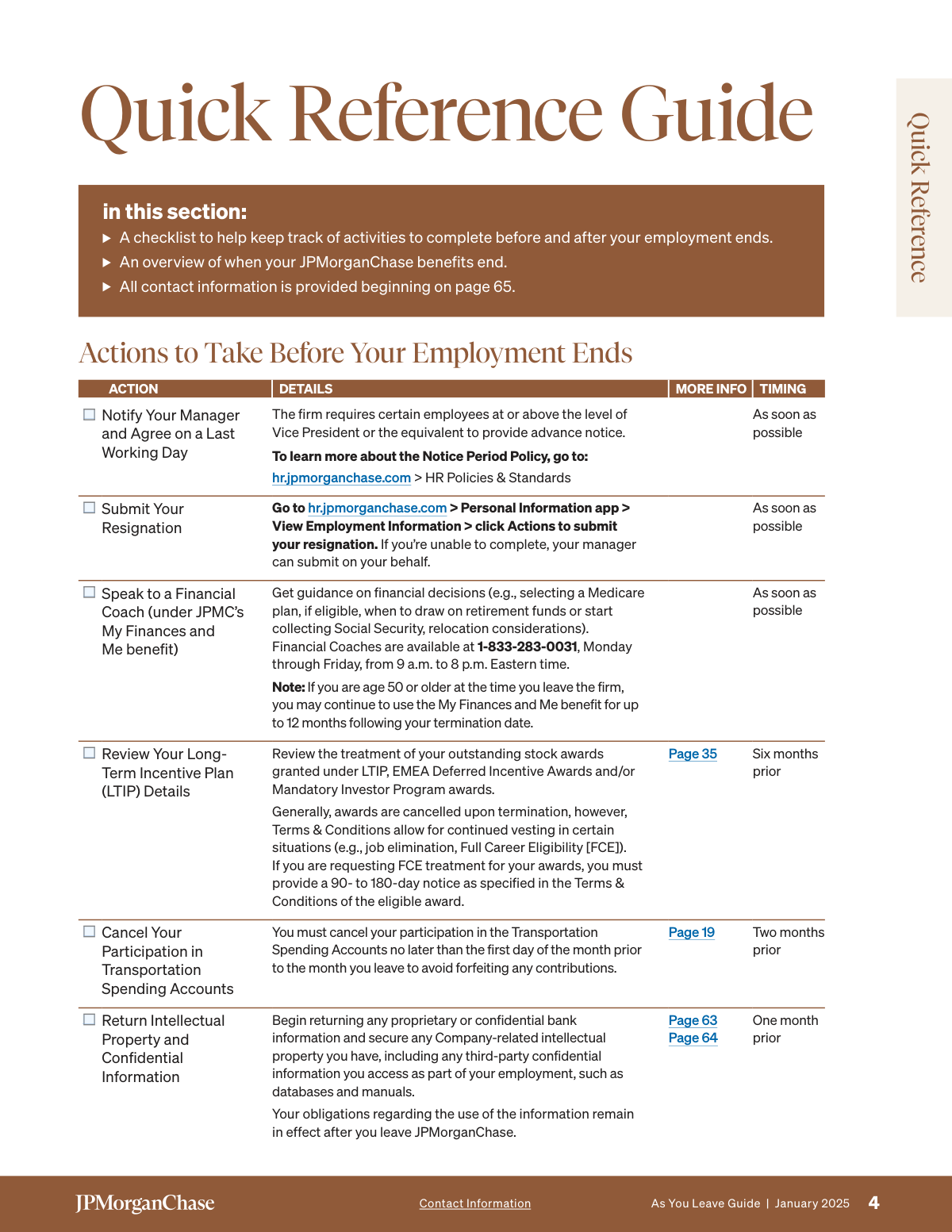
The JPMorgan Chase As You Leave Guide is a comprehensive document for employees who are leaving the company, whether through resignation, retirement, or job elimination. It details the process for managing final pay, paid time off, healthcare and insurance continuation (COBRA), retirement savings plans, and other compensation programs. Today, any forms required during this transition can be filled out quickly and accurately using AI-powered services like Instafill.ai, which can also convert non-fillable PDF versions into interactive fillable forms.
Our AI automatically handles information lookup, data retrieval, formatting, and form filling.
It takes less than a minute to fill out JPMC As You Leave Guide using our AI form filling.
Securely upload your data. Information is encrypted in transit and deleted immediately after the form is filled out.
Form specifications
| Form name: | JPMorgan Chase As You Leave Guide |
| Number of pages: | 1 |
| Language: | English |
Instafill Demo: How to fill out PDF forms in seconds with AI
How to Fill Out JPMC As You Leave Guide Online for Free in 2026
Are you looking to fill out a JPMC AS YOU LEAVE GUIDE form online quickly and accurately? Instafill.ai offers the #1 AI-powered PDF filling software of 2026, allowing you to complete your JPMC AS YOU LEAVE GUIDE form in just 37 seconds or less.
Follow these steps to fill out your JPMC AS YOU LEAVE GUIDE form online using Instafill.ai:
- 1 Navigate to Instafill.ai and upload or select the relevant form mentioned in the guide, such as a COBRA election form or a 401(k) distribution request.
- 2 Use the AI-powered tool to automatically populate your personal information, such as your full name, address, and contact details, ensuring accuracy as emphasized in the guide.
- 3 Review the sections on healthcare and insurance. Use the guide to understand your options (e.g., COBRA, retiree benefits) and complete the form fields to make your elections.
- 4 Complete the sections related to your retirement savings, such as the 401(k) Savings Plan or Pension Plan, to specify your choices for rollovers, withdrawals, or deferrals.
- 5 Address any final sections requiring your input, such as beneficiary designations or acknowledgments for long-term incentive plans, based on the guide's instructions.
- 6 Securely review all entered information for accuracy, e-sign the completed document, and download or submit it as required by JPMorgan Chase or its plan administrators.
Our AI-powered system ensures each field is filled out correctly, reducing errors and saving you time.
Why Choose Instafill.ai for Your Fillable JPMC As You Leave Guide Form?
Speed
Complete your JPMC As You Leave Guide in as little as 37 seconds.
Up-to-Date
Always use the latest 2026 JPMC As You Leave Guide form version.
Cost-effective
No need to hire expensive lawyers.
Accuracy
Our AI performs 10 compliance checks to ensure your form is error-free.
Security
Your personal information is protected with bank-level encryption.
Frequently Asked Questions About Form JPMC As You Leave Guide
This guide is for JPMorgan Chase employees whose employment ends on or after January 1, 2025. It explains the steps to take before and after your last day and details how your benefits and compensation are affected.
Your final pay is generally deposited within two pay periods after your termination date, using the same method as your previous paychecks. You can view your final Statement of Earnings in the Former Employee Support Center.
Your final pay will include payment for any accrued and unused vacation time for which you are eligible. However, if you have used more vacation than you have accrued, the difference will be recovered from your final pay.
Your active employee medical, dental, and vision benefits will remain active until the end of the calendar month in which your employment ends. Afterwards, you may be eligible to continue coverage through COBRA.
You can elect to continue your health plans through COBRA for up to 18 months. You will receive COBRA enrollment information from the administrator, Alight, about two weeks after your termination and will have 60 days to make an election.
Your options depend on your vested balance; you can leave funds in the plan (if over $1,000), roll it over to an IRA or another employer's plan, or take a cash distribution. Be aware that cash distributions have tax consequences.
You can repay the loan in full or set up automatic electronic withdrawals to continue payments. If you do not repay it and request a withdrawal of your account, the outstanding loan balance will be treated as a taxable distribution.
Generally, unvested RSUs are canceled upon voluntary termination. However, they may continue to vest in specific situations like job elimination or if you qualify for Full Career Eligibility (FCE), which has specific notice requirements.
You can access financial documents by visiting the Former Employee Support Center at formeremployee.jpmorganchase.com. You will need to reset your Single Sign-On (SSO) password to log in for the first time after your employment ends.
You must cancel your participation no later than the first day of the month *prior* to the month you leave to avoid forfeiting contributions. For example, if you leave in November, you must cancel by October 1st.
You may qualify for the Retiree Benefits Program if you are at least age 55 with 15 years of total service. Alternative eligibility criteria may apply for job eliminations.
This guide is for informational purposes and doesn't have fields to fill. However, if you encounter other non-fillable PDF forms, services like Instafill.ai can convert them into interactive, fillable forms for easy completion.
Yes, AI tools can be very helpful for managing related tasks, like filling out benefits enrollment or 401(k) rollover forms. Services like Instafill.ai use AI to accurately auto-fill form fields, saving you time and reducing errors.
You can upload your forms, such as a COBRA election or 401(k) rollover form, to the Instafill.ai platform. The AI will identify the fields and help you fill them out quickly and accurately online.
Compliance JPMC As You Leave Guide
Validation Checks by Instafill.ai
1
Validates Personal Contact Information for Post-Employment Communication
This check ensures that the departing employee's personal contact information, including a complete home address, personal email, and a non-work phone number, is present and correctly formatted in the HR system. This is critical for delivering essential post-employment documents like tax forms (W-2, 1099-R), COBRA enrollment packages, and retirement plan information. If this information is missing or invalid, the system should flag the record for manual review and prompt the employee or their manager to update it before the final day of employment.
2
Verifies Identity for Former Employee Single Sign-On (SSO) Password Reset
This validation confirms that the identity details provided by a former employee—such as Standard ID (SID), date of birth, last four digits of SSN, and current postal code—perfectly match the data stored in the HR system of record. This is a crucial security measure to prevent unauthorized access to sensitive personal, financial, and benefits information via the Former Employee Support Center. A mismatch will block the password reset process until the user can provide the correct information or contacts support to verify their identity.
3
Validates 401(k) Loan Status Prior to Withdrawal Request
This check verifies if a departing employee has an outstanding 401(k) loan when they request a withdrawal or rollover of their plan balance. It is important because an outstanding loan balance will be defaulted and treated as a taxable distribution if not repaid first, potentially incurring significant tax penalties for the employee. The system should block the withdrawal request and present the user with options to repay the loan or acknowledge the tax consequences of the default.
4
Enforces Spousal Consent Requirement for Pension Distributions
For married participants with a vested pension balance over $7,000, this validation ensures that a notarized spousal consent form is submitted if the employee elects a distribution option other than a qualified joint and survivor annuity (e.g., a lump sum). This is a legal requirement under federal law to protect spousal rights to retirement assets. The system must prevent the processing of such a distribution election until the valid, notarized consent form is received and verified.
5
Validates Timeliness of Transportation Spending Account Cancellation
This check ensures that an employee's request to cancel their Transportation Spending Account participation is submitted by the required deadline, which is the first day of the month prior to their departure month. This is critical because contributions are deducted a month in advance, and IRS regulations prevent refunds of pre-tax contributions. If the cancellation is late, the system will reject it for the current cycle, leading to the employee forfeiting their final contribution.
6
Verifies Notice Period for Full Career Eligibility (FCE) LTIP Treatment
This validation confirms that an employee requesting Full Career Eligibility treatment for their Long-Term Incentive Plan (LTIP) awards has provided the required advance notice of 90 to 180 days prior to their voluntary termination date. This notice period is a strict condition specified in the award's Terms & Conditions. A request submitted outside this window will be automatically rejected, resulting in the forfeiture of unvested awards that would have otherwise continued to vest.
7
Flags Education Benefit Repayment Obligation at Termination
This system check automatically reviews the employee's record upon termination to determine if they received Education Benefit funding within the last two years. The validation calculates the repayment amount (100% if within one year, 50% if within two years) and flags the employee's file for the collections process. This is crucial for recovering funds owed to the company and ensuring compliance with the program's policy, as failure to repay can result in ineligibility for rehire.
8
Monitors COBRA Election Window Deadline
This validation tracks the 60-day period following an employee's loss of coverage or notification date, during which they are eligible to elect COBRA continuation coverage. This is a federally mandated deadline that is critical for the employee to maintain continuous health coverage. The system should send reminders as the deadline approaches and automatically close the election window once the 60 days have passed, preventing any further online elections.
9
Segregates Retirees by Medicare Eligibility for Health Plan Enrollment
This validation checks the retiree's age and Medicare status to direct them to the appropriate healthcare enrollment path. Retirees under 65 are directed to the JPMorgan Chase Pre-Medicare plan, while those 65 or older (or otherwise Medicare-eligible) are routed to the Via Benefits marketplace. This is essential for ensuring compliance with Medicare as the primary payer rules and guiding retirees to the correct coverage options. Incorrectly enrolling a Medicare-eligible person in a pre-Medicare plan can lead to claim denials and coverage gaps.
10
Ensures Final Pay Timeline Complies with State Law
This validation cross-references the employee's state of employment with state-specific labor laws governing the timing of final pay upon termination. Some states require payment on the last day of employment, while others allow it in the next regular pay cycle. This check is critical for legal compliance and avoiding potential fines and penalties for the company. The system should prioritize payment processing based on the strictest applicable state requirement for the employee's record.
11
Validates Spending Account Claim Deadlines and Service Dates
This validation ensures that claims submitted against a Health Care Spending Account (HCSA) or Dependent Care Spending Account (DCSA) are valid. It checks that the service date occurred prior to the employee's termination date and that the claim is submitted by the March 31 deadline of the following year. This is crucial for complying with IRS 'use-it-or-lose-it' rules and preventing the reimbursement of ineligible expenses. The system will reject claims that fail either the service date or submission deadline checks, resulting in forfeiture of the funds.
12
Verifies Grace Period for 401(k) Small Balance Automatic Cash-Out
This check ensures the system waits approximately 120 days after an employee's termination date before automatically distributing vested 401(k) balances under $1,000. This waiting period is important as it gives the former employee time to proactively elect a direct rollover to an IRA or another employer's plan, thereby avoiding mandatory tax withholding. The validation prevents premature distribution and ensures the employee has a reasonable window to make a tax-advantaged choice.
Common Mistakes in Completing JPMC As You Leave Guide
Employees often forget to verify and update their personal email, phone number, and home address before their last day. This is a critical error because all post-employment communications, including tax forms (W-2, 1099-R), COBRA notices, and pension information, are sent to the address on record. Failure to receive these documents can lead to missed enrollment deadlines, tax penalties, and loss of benefits. Before leaving, double-check all details in the HR system and continue to update them via the Former Employee Support Center if you move.
A frequent and costly mistake is failing to cancel Transportation Spending Account contributions on time. The policy requires cancellation by the first day of the month *prior* to the month of departure, a deadline that is easily overlooked. Because contributions are non-refundable, missing this two-month advance deadline results in forfeiting money deducted from your final paychecks for a commute you will no longer be making. Set a calendar reminder well in advance to avoid this direct financial loss.
Employees seeking 'Full Career Eligibility' treatment for their unvested stock awards often miss the required 90 to 180-day advance notice period. Forgetting this or providing insufficient notice leads to the automatic cancellation and forfeiture of potentially valuable awards upon termination. To avoid this significant financial loss, review your specific award Terms & Conditions months before your planned departure and submit your request to HR within the specified window.
Departing employees make several errors with COBRA: assuming enrollment is automatic, missing the 60-day election window, or failing to make the first payment on time, which causes a lapse in coverage. A particularly serious mistake is electing COBRA when Medicare-eligible, which can trigger Medicare late-enrollment penalties later. To avoid this, watch for the enrollment packet, elect and pay promptly, and consult with a benefits advisor about Medicare interactions before making a decision.
Many people assume their 401(k) loan repayments will continue automatically, but they stop with your final paycheck. If you don't proactively repay the loan in full or arrange for new automatic withdrawals, the outstanding balance will be treated as a taxable distribution. This 'default' can result in a substantial, unexpected tax bill, including a 10% early withdrawal penalty if you are under age 59.5. Contact the 401(k) provider immediately after leaving to establish a new repayment plan.
When you convert life insurance to an individual policy or roll over your 401(k) to an IRA, your beneficiary designations from JPMorgan Chase do not carry over. A common oversight is failing to name new beneficiaries with the new providers (e.g., MetLife, Empower). This can cause your assets to go to your estate or an unintended recipient by default, bypassing your wishes and creating legal complications for your heirs. Always complete new beneficiary designation forms for every new account you establish.
Employees often misunderstand the HCSA rules upon termination, leading to forfeited funds. They may not realize that expenses can only be incurred through the end of the termination month (unless COBRA is elected), while claims can be submitted until March 31 of the following year. This confusion causes them to either miss the claim submission deadline or fail to use up their balance on eligible expenses. To maximize your benefit, be sure to incur expenses before your coverage ends and submit all claims before the final deadline.
There is a strict 31-day window after termination to convert or port your group life insurance to an individual policy. Many former employees miss this deadline, permanently losing the opportunity to continue their coverage without providing new evidence of insurability. This is especially damaging if you have developed a health condition that would make obtaining new insurance difficult or expensive. Contact MetLife immediately after your last day to begin the process and avoid losing this valuable benefit.
Participants in deferred compensation plans often fail to take required actions, such as making a distribution election within 60 days for pre-2005 plans. This inaction can trigger a default lump-sum payout in the following year, potentially pushing you into a higher tax bracket and negating the tax-planning benefits of the deferral. Before leaving, contact the Deferred Compensation Call Center to understand the specific rules for your plan and make timely elections to control the payout schedule.
Employees often fail to verify their contact information in the HR system before leaving, which is required to reset their Single Sign-On (SSO) password after termination. When they later try to access the Former Employee Support Center for tax forms or pay stubs, the identity validation fails, locking them out. This creates a frustrating cycle of support calls and delays. Ensuring your phone number is correct before your last day is a simple step to guarantee seamless access to your information. Managing the tasks in a complex guide like this can be challenging; AI-powered tools like Instafill.ai can help by turning non-fillable PDFs into manageable checklists to ensure no step is missed.
Saved over 80 hours a year
“I was never sure if my IRS forms like W-9 were filled correctly. Now, I can complete the forms accurately without any external help.”
Kevin Martin Green
Your data stays secure with advanced protection from Instafill and our subprocessors

Robust compliance program
Transparent business model
You’re not the product. You always know where your data is and what it is processed for.
ISO 27001, HIPAA, and GDPR
Our subprocesses adhere to multiple compliance standards, including but not limited to ISO 27001, HIPAA, and GDPR.
Security & privacy by design
We consider security and privacy from the initial design phase of any new service or functionality. It’s not an afterthought, it’s built-in, including support for two-factor authentication (2FA) to further protect your account.
Fill out JPMC As You Leave Guide with Instafill.ai
Worried about filling PDFs wrong? Instafill securely fills jpmorgan-chase-as-you-leave-guide forms, ensuring each field is accurate.