Fill out JPMorgan Chase forms
with AI.
JPMorgan Chase forms encompass a vital range of documentation used to manage professional and financial transitions within one of the world’s largest financial institutions. These documents are essential for ensuring that personal records, benefits, and legal obligations are handled correctly during significant changes. Whether you are managing your accounts or navigating internal corporate processes, having access to the correct paperwork is the first step in maintaining compliance and securing your financial interests.
By continuing, you acknowledge Instafill's Privacy Policy and agree to get occasional product update and promotional emails.
About JPMorgan Chase forms
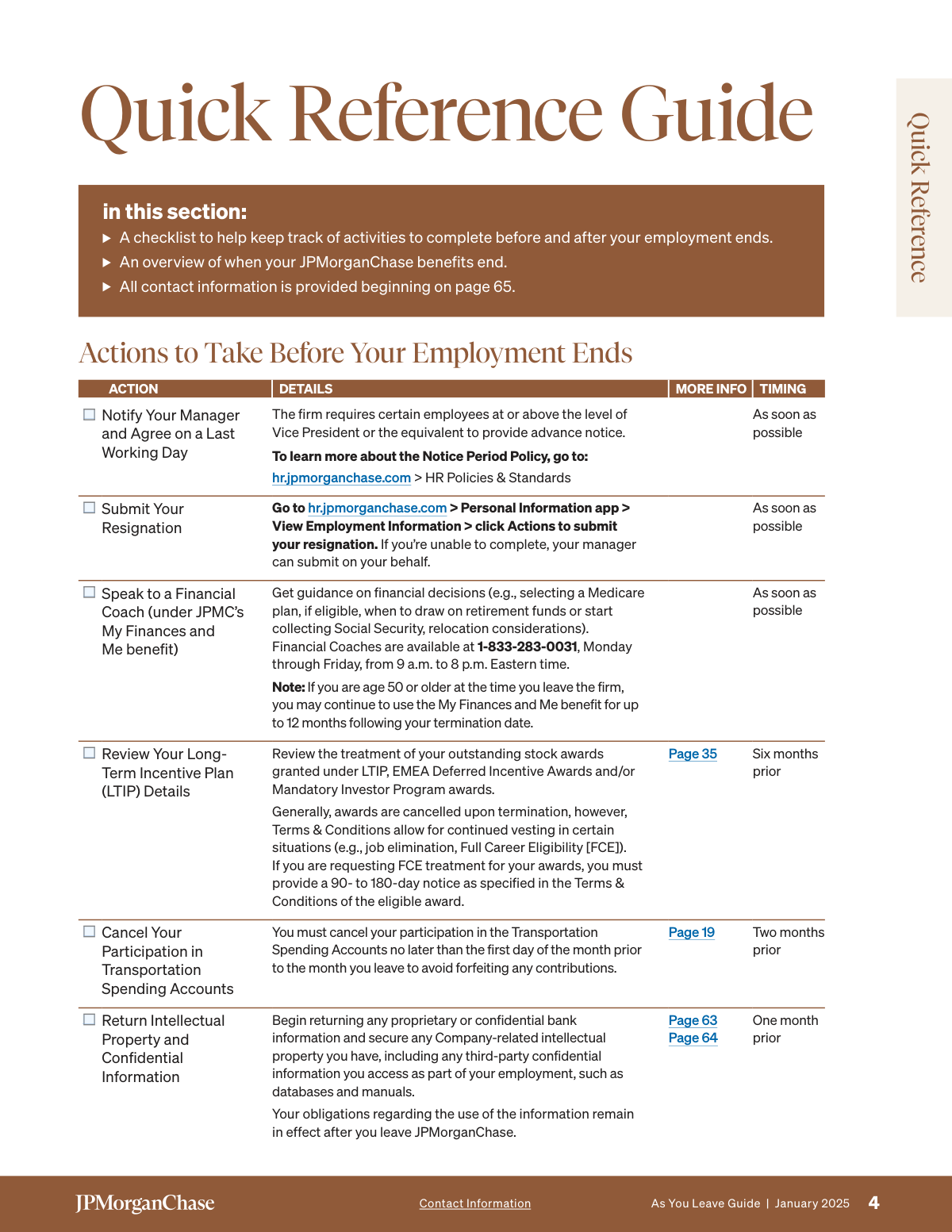
This category is particularly relevant for employees and contractors who are transitioning through different stages of their tenure at the firm. For instance, individuals moving toward retirement, resignation, or job elimination frequently need to process documents like the As You Leave Guide. These forms are critical for managing sensitive tasks such as final pay distribution, healthcare continuation via COBRA, and the transfer of retirement savings. Because these processes often involve strict deadlines and complex data, accuracy is paramount to avoid delays in benefits or compensation.
Completing these administrative requirements manually can be a tedious process that involves repetitive data entry. Tools like Instafill.ai use AI to fill these forms in under 30 seconds, ensuring that your data is handled accurately and securely. This technology simplifies the transition by automating the paperwork, allowing you to focus on your next steps while ensuring all necessary documentation is completed professionally and efficiently.
Every form on this page can be completed without typing. Instafill is form filling software that reads a PDF and fills it for you — including flat and scanned documents that carry no fillable fields at all.
Forms in This Category
The forms in this category have a median Form Complexity Index of 40/100 (Basic), measured across 1 forms by field count, input difficulty, length, conditional logic and structure. See how it is calculated.
| Form Name | Pages | FCI | |
|---|---|---|---|
| 1. | JPMorgan Chase As You Leave Guide | 1 | Basic 40 |
- Enterprise-grade security & data encryption
- 99%+ accuracy powered by AI
- 1,000+ forms from all industries
- Complete forms in under 60 seconds
How to Choose the Right Form
Navigating Your Departure from JPMorgan Chase
When you are transitioning out of a role at JPMorgan Chase, whether due to a new career opportunity, retirement, or a change in organizational structure, there is a significant amount of administrative work to manage. Currently, the primary resource available in this category is designed to streamline that transition and ensure you do not miss critical deadlines regarding your benefits.
The Essential Departure Resource
The JPMorgan Chase As You Leave Guide is the central document for any employee ending their tenure with the firm. Rather than searching through various HR portals, this guide consolidates everything you need to know about your final weeks and the period immediately following your departure.
You should select and utilize this document if you need to manage any of the following:
- Final Compensation: Understanding how your final paycheck, prorated bonuses, and outstanding commissions are processed.
- Paid Time Off (PTO): Determining the payout for unused vacation days based on your specific location and company policy.
- Health and Welfare Benefits: Detailed instructions on how to continue your medical, dental, and vision coverage through COBRA, as well as deadlines for enrollment.
- Retirement Savings: Information regarding your 401(k) plan, pension distributions, or the process for rolling over assets to a new provider.
- Life Insurance and Disability: Evaluating your options for converting or porting existing coverage to an individual policy.
Why Use Instafill.ai for Your Exit Paperwork?
Handling exit documents can be stressful during a major life transition. The JPMorgan Chase As You Leave Guide often contains sections that require careful attention to detail. By using Instafill.ai, you can convert static PDF instructions into interactive, fillable fields. This ensures that all personal information is entered accurately and legibly before you submit your final documents to HR, helping you secure the benefits you’ve earned during your career at JPMorgan Chase.
Form Comparison
| Form | Primary Purpose | Target Audience | Key Sections Covered |
|---|---|---|---|
| JPMorgan Chase As You Leave Guide | Provides comprehensive guidance on benefits and pay for departing employees. | JPMorgan Chase employees resigning, retiring, or leaving due to job elimination. | Details final pay, COBRA healthcare, retirement savings plans, and life insurance. |
Tips for JPMorgan Chase forms
Before your last day, ensure you have downloaded copies of your performance reviews, recent pay stubs, and benefit summaries. Once your corporate login is deactivated, accessing these records through internal portals becomes significantly more difficult.
Ensure the HR department has your current personal email and mailing address on file before you depart. This ensures you receive critical post-employment correspondence, such as COBRA enrollment kits and future tax documents like W-2s, without any delivery delays.
Transitioning healthcare coverage is time-sensitive, so pay close attention to the election deadlines mentioned in your exit guide. Missing these windows can lead to a lapse in coverage, so it is best to submit your healthcare continuation forms as soon as you receive them.
Decide whether to leave your 401(k) in the current plan, roll it over to an IRA, or move it to a new employer's plan. Each option has different tax implications, so reviewing the retirement section of the guide is essential for making an informed choice regarding your savings.
Completing various exit forms can be tedious during a busy career transition. AI-powered tools like Instafill.ai can complete these forms in under 30 seconds with high accuracy, and your data stays secure during the process, making it a major time-saver for those handling multiple documents.
Review the company's specific policy regarding the payout of accrued but unused vacation time or personal days. Comparing your final pay stub against the guidelines in the guide helps ensure that all earned compensation and bonuses are correctly processed and paid out.
Many exit-related tasks have different due dates ranging from 30 to 90 days after your departure. Creating a simple checklist or digital folder to track which forms have been submitted will help you stay organized and avoid missing critical benefits deadlines.
Frequently Asked Questions
This guide is intended for any employee departing from JPMorgan Chase, regardless of whether the departure is due to resignation, retirement, or job elimination. It provides a structured framework for managing the transition and understanding your rights and responsibilities during the exit process.
These documents generally cover essential administrative details such as final pay, the payout of accrued paid time off (PTO), and healthcare continuation via COBRA. They also provide instructions regarding retirement savings plans, life insurance, and other deferred compensation programs.
Yes, you can use AI-powered tools like Instafill.ai to complete these forms quickly. The AI can accurately extract your personal data from source documents and place it into the correct fields, reducing the risk of manual entry errors.
While manual completion can be time-consuming, AI tools like Instafill.ai can fill out JPMorgan Chase forms in under 30 seconds. This allows you to finalize your paperwork almost instantly by automating the data entry process.
Typically, these forms should be submitted to the JPMorgan Chase Human Resources department or uploaded through the company's internal employee benefits portal. You should refer to the specific instructions provided in your exit package for the correct submission path.
Yes, the exit documentation is designed to be comprehensive for all types of departures. Whether you are retiring or moving to a new company, the forms ensure that your final compensation and benefit transitions are handled according to corporate policy.
Submitting the required paperwork triggers the administrative process for benefit transitions, such as COBRA enrollment or 401(k) status updates. The guide helps you understand the timeline for when your active employee coverage ends and when your post-employment options begin.
If you have a flat or non-interactive PDF version of a Chase form, AI services like Instafill.ai can convert it into a fillable format. This allows you to type directly into the document on your computer rather than having to print and fill it out by hand.
For questions regarding specific pay amounts, tax implications, or retirement fund balances, it is recommended to contact the JPMorgan Chase HR Service Center. While AI tools help with the physical completion of the form, official policy questions should be directed to the company's HR professionals.
Generally, you should aim to complete all exit documentation during your notice period or immediately following your final day. Timely submission is often required to ensure there is no delay in your final paycheck or the activation of your COBRA healthcare benefits.
Glossary
- Form Complexity Index
- Instafill’s 0–100 measure of how much effort a form takes to complete, calculated deterministically from the form’s own structure rather than estimated. It combines the number of fillable fields (the largest factor), how difficult those fields are to complete based on their type, the number of pages that contain fields, the amount of conditional “fill-only-if” logic, and how many sections the form is divided into, then adds modifiers for tables and repeating lists, bundled instruction pages, and dense page layouts. A higher score means the form is harder to fill out by hand. The forms in this category have a median Form Complexity Index of 40/100 (Basic). See exactly how it is calculated.
- COBRA
- The Consolidated Omnibus Budget Reconciliation Act, which allows departing employees to temporarily continue their employer-sponsored health insurance coverage at their own expense.
- Vesting
- The process by which an employee earns full ownership of employer-contributed funds in a 401(k) or stock options, typically based on years of service at JPMorgan Chase.
- Rollover
- The transfer of retirement savings from a company-sponsored 401(k) plan into an Individual Retirement Account (IRA) or a new employer's plan to avoid tax penalties.
- Restricted Stock Units (RSUs)
- A form of equity compensation that JPMorgan Chase may grant to employees, which usually has specific rules regarding forfeiture or acceleration upon leaving the firm.
- Separation Agreement
- A legal contract between the company and the departing employee that outlines the terms of the exit, which may include severance pay and a release of legal claims.
- Fidelity NetBenefits
- The third-party platform used by JPMorgan Chase to manage employee retirement accounts, pension details, and stock-based compensation.
- Qualified Life Event
- A change in status, such as termination of employment, that triggers a special enrollment period for healthcare and other insurance benefits.
- Lump Sum Distribution
- A one-time payment of the entire balance of a retirement or pension account rather than receiving the funds in smaller installments over time.