Yes! You can use AI to fill out Incoming Rollover Election for The Heritage Group Retirement Savings Plan
This form, the Incoming Rollover Election, facilitates the consolidation of retirement funds by allowing a participant to move money from other retirement accounts, such as an IRA, 401(k), or 403(b), into their current employer-sponsored plan with The Heritage Group Retirement Savings Plan. Completing this process helps individuals manage their retirement savings more effectively in a single account. Today, this form can be filled out quickly and accurately using AI-powered services like Instafill.ai, which can also convert non-fillable PDF versions into interactive fillable forms.
Incoming Rollover Election is part of the
retirement forms, retirement plan forms, rollover forms, savings plan forms and retirement savings forms categories on Instafill.
Rather not fill this in by hand? Instafill is an online form filler that completes PDF forms automatically — upload the blank form, answer a few questions, and the AI fills every field.
Form specifications
| Form name: | Incoming Rollover Election for The Heritage Group Retirement Savings Plan |
| Number of pages: | 1 |
| Language: | English |
Our AI automatically handles information lookup, data retrieval, formatting, and form filling.
It takes less than a minute to fill out Incoming Rollover Election using our AI form filling.
Securely upload your data. Information is encrypted in transit and deleted immediately after the form is filled out.
Instafill Demo: How to fill out PDF forms in seconds with AI
How to Fill Out Incoming Rollover Election Online for Free in 2026
Are you looking to fill out a INCOMING ROLLOVER ELECTION form online quickly and accurately? Instafill.ai offers the #1 AI-powered PDF filling software of 2026, allowing you to complete your INCOMING ROLLOVER ELECTION form in just 37 seconds or less.
Follow these steps to fill out your INCOMING ROLLOVER ELECTION form online using Instafill.ai:
- 1 Navigate to Instafill.ai and upload or select the Incoming Rollover Election form for The Heritage Group Retirement Savings Plan.
- 2 Use the AI assistant to accurately fill in your personal participant information, including your name, Social Security Number, and contact details.
- 3 Specify the rollover information, indicating the type of rollover (Direct or In-direct) and the source of the funds (e.g., 401(k), IRA, 403(b)).
- 4 Provide details about your previous financial provider and attach required documentation, such as a recent account statement, as prompted.
- 5 Select your investment options for the incoming funds, either by mirroring your existing allocations or choosing new ones from the provided list.
- 6 Carefully review all the auto-filled information for accuracy, then provide your handwritten signature and the date as required by the form.
- 7 Submit the completed form, along with any necessary checks or attachments, following the specific mailing or faxing instructions outlined in the document.
Our AI-powered system ensures each field is filled out correctly, reducing errors and saving you time.
Why Choose Instafill.ai for Your Fillable Incoming Rollover Election Form?
Speed
Complete your Incoming Rollover Election in as little as 37 seconds.
Up-to-Date
Always use the latest 2026 Incoming Rollover Election form version.
Cost-effective
No need to hire expensive lawyers.
Accuracy
Our AI performs 10 compliance checks to ensure your form is error-free.
Security
Your personal information is protected with bank-level encryption.
Frequently Asked Questions About Incoming Rollover Election
This form is used to move funds from a previous employer's retirement plan or an Individual Retirement Account (IRA) into your current Heritage Group Retirement Savings Plan.
You should fill out this form if you are an employee participating in The Heritage Group Retirement Savings Plan and wish to consolidate funds from another retirement account into this plan.
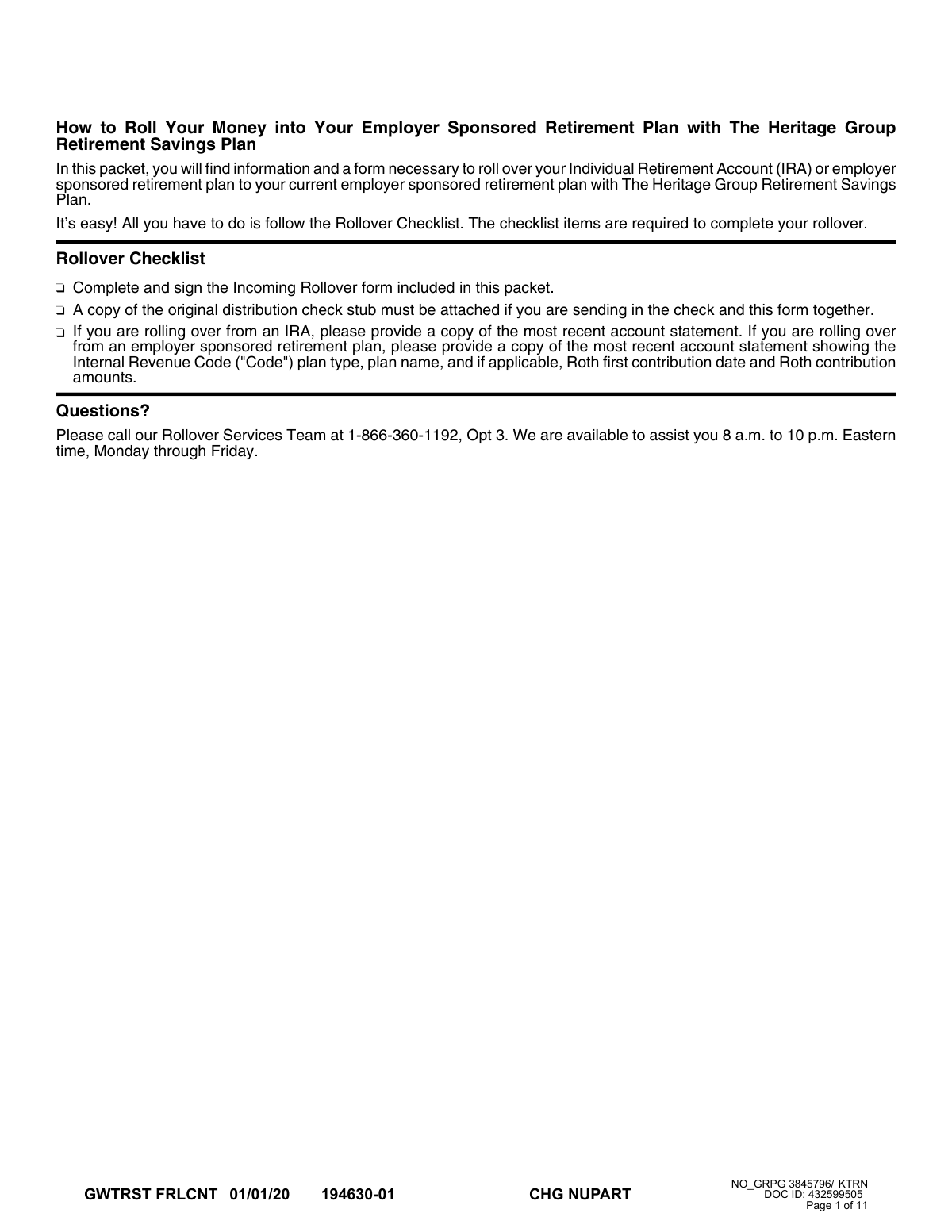
You must provide a copy of your most recent account statement from your previous plan or IRA. If you are sending a check, you must also attach a copy of the original distribution check stub.
A Direct Rollover is when your old provider makes the check payable directly to Great-West Trust Company. An Indirect Rollover is when the check is made out to you, and you have 60 days to deposit it into your new plan.
If your statement is missing this required information, you must have your previous plan administrator complete and sign the 'Required Documentation' section of the form.
Mail the completed form, the check, and the check stub together to the appropriate address listed in the 'Payment Instructions' section. The check must be payable to 'Great-West Trust Company, LLC'.
Yes, you can call the Rollover Services Team at 1-866-360-1192, Option 3. A dedicated specialist can help you initiate your incoming rollover over the phone.
No, an outstanding loan balance cannot be included in the rollover. You must either pay off the loan before submitting the request or roll over only the cash value of the account, excluding the loan.
You may still complete the rollover if you meet certain IRS criteria for a waiver, such as a financial institution error or serious illness. You must certify the reason for the delay in the 'Reasons for Late Contribution' section of the form.
In the 'Investment Option Information' section, you can either allocate the funds according to your existing elections or select new investment options and percentages from the provided list.
No, a handwritten signature is required. The form explicitly states that an electronic signature will not be accepted and will result in a significant delay.
Yes, you cannot roll over required minimum distributions (RMDs), hardship distributions, a series of periodic payments, excess contributions, or assets from a Roth IRA.
Yes, services like Instafill.ai use AI to accurately auto-fill form fields with your information, which can save you time and help reduce errors.
Simply upload the form's PDF to the Instafill.ai platform. The AI will make the form fillable and help you enter your information, after which you can download the completed document to print and sign.
You can use a service like Instafill.ai, which is designed to convert flat, non-fillable PDFs into interactive, fillable forms that you can easily complete on your computer.
Compliance Incoming Rollover Election
Validation Checks by Instafill.ai
1
Social Security Number Format and Validity
This check ensures the Social Security Number in the 'Participant Information' section is a 9-digit number, ideally in XXX-XX-XXXX format. This is critical for uniquely identifying the participant and linking the rollover to the correct account. If the SSN is missing, incomplete, or invalid, the form cannot be processed, and the rollover will be rejected pending correction.
2
Participant Signature Presence and Type
Validates that a handwritten signature is present in the 'Required Signature' section on page 6. The form explicitly states that electronic signatures will not be accepted and will cause significant delays. This check is crucial for legal authorization, and its failure means the entire transaction is not authorized and must be returned to the participant for a physical signature.
3
Investment Allocation Total Percentage
If the participant chooses '(B) Select Your Own Investment Options', this check verifies that the sum of all percentages entered for the various funds equals exactly 100%. This ensures the entire rollover amount is allocated according to the participant's wishes. A total not equal to 100% would result in an ambiguous instruction, causing the form to be considered not in good order and delaying the investment of funds.
4
Exclusive Investment Option Selection
This validation ensures the participant has selected either '(A) Existing Ongoing Allocations' or '(B) Select Your Own Investment Options', but not both. Selecting both creates a conflicting instruction for how to invest the rolled-over funds. If both are selected, the form must be rejected and sent back to the participant for clarification to avoid misallocating their retirement savings.
5
Rollover Type and Source Plan Selection
Verifies that the participant has selected one primary rollover type ('Direct Rollover' or 'In-direct 60-Day Rollover') and has also checked at least one source plan type (e.g., 'Qualified 401(k) plan'). These selections are fundamental to defining the nature of the transaction for processing and tax purposes. Failure to select both a rollover type and a source plan makes the form incomplete and stops the process until the information is provided.
6
Traditional IRA Rollover Logic
This check confirms that if 'Traditional IRA' is selected as the source plan, no dollar amount is entered in any 'Roth' contribution field. The form explicitly states that only pre-tax amounts may be rolled over from a Traditional IRA. An entry in a Roth field would indicate a misunderstanding or an invalid transaction type, requiring rejection and clarification to ensure compliance with tax laws.
7
Date of Birth Format and Plausibility
Ensures the 'Date of Birth' is provided in a valid MM/DD/YEAR format and represents a plausible age for an individual with a retirement account (e.g., over 18 and not in the future). This information is essential for identity verification and for determining eligibility for certain plan features or distributions. An invalid or missing date of birth will halt processing until corrected.
8
Partial Liquidation Amount Specification
If the participant selects the 'Part ($...)' option under the 'Instructions and Authorization' section, this check validates that a specific dollar amount has been entered in the corresponding field. Without a specified amount, the instruction to liquidate a partial amount is incomplete and cannot be acted upon. The form would be returned for completion, delaying the transfer of funds.
9
Late Contribution Justification Logic
This validation ensures that if any reason is checked in the 'Reasons for Late Contribution' section, the 'In-direct 60-Day Rollover' option is also selected. These reasons are only applicable to late 60-day rollovers. Checking a reason without selecting the corresponding rollover type is a logical contradiction that makes the form invalid and requires correction.
10
Required Documentation Presence
This is a processing check to confirm that the submission includes the required attachments, such as a copy of the most recent account statement or a distribution check stub. The form states these documents are required to verify the source plan type, Roth basis, and other critical details. Missing documentation will place the entire rollover request on hold until all necessary paperwork is received in good order.
11
Previous Provider Information Completeness
Validates that the 'Previous Provider Information' section, including 'Company Name' and 'Account Number', is filled out. This information is essential for the new custodian to identify the source account from which funds are being transferred. Incomplete provider information can make it impossible to process the rollover or may require significant manual follow-up, causing delays.
12
Investment Percentage Format
This check verifies that all percentages entered in the 'Select Your Own Investment Options' section are whole numbers, as specified by the form's layout. Using decimals or fractions would violate the input requirement and could lead to processing errors or incorrect fund allocations. The form must be rejected if non-whole percentages are used.
13
Roth Amount and Source Plan Consistency
Ensures that if a dollar amount is entered for a Roth contribution, the selected source plan type is one that can have a Roth component (e.g., 401(k), 403(b), or 457(b)). As a Traditional IRA cannot be rolled over as Roth, this check prevents an invalid transaction. A mismatch would require clarification from the participant to ensure the rollover is compliant.
14
Participant Full Name Completeness
This check verifies that at least the 'First Name' and 'Last Name' fields in the 'Participant Information' section are completed. A full name is the primary identifier and is required to match the participant's account on file. A missing name makes it impossible to process the form, leading to immediate rejection.
Common Mistakes in Completing Incoming Rollover Election
The form explicitly states on pages 6 and 9 that a handwritten signature is required and electronic signatures will not be accepted. In an age of digital documents, many people miss this fine print and e-sign, which leads to an automatic rejection of the form and significant processing delays. To avoid this, always print the completed form and physically sign it with a pen before submitting. If the original document is a non-fillable PDF, tools like Instafill.ai can convert it into a fillable version to type in your information before printing for signature.
Applicants often fail to include a copy of their most recent account statement from the previous institution, as required by the checklist on page 1. This statement is critical for verifying the source of funds, the plan type (e.g., 401(k), IRA), and Roth contribution details. Submitting the form without the correct statement will halt the rollover process until the documentation is provided, causing major delays. Always gather all required documents before you begin filling out the form.
When manually selecting investment options in section (B) on page 5, it is a common error to make a calculation mistake where the percentages do not add up to exactly 100%. This forces the processing agent to either reject the form for correction or use a default allocation that may not match your investment strategy. To prevent this, carefully double-check your math to ensure the percentages sum to 100%. AI-powered form-filling tools like Instafill.ai can help prevent this by automatically validating such calculations.
The form requires a signature from the previous plan administrator on page 4 if the account statement does not list the plan type or Roth details. Participants often overlook this conditional requirement, assuming their statement is sufficient. This omission stops the process, as the receiving institution cannot legally accept the funds without this certification. Review your statement carefully; if the required information is missing, you must contact your old provider to get this section signed before submitting the packet.
Participants frequently confuse a 'Direct Rollover' (funds move between institutions) with an 'In-direct 60-Day Rollover' (participant receives a check). Selecting the wrong type on page 2 or 3 can lead to incorrect processing, and in the case of an indirect rollover, could result in missed deadlines and significant tax penalties. Before filling out the form, confirm with your previous provider how the funds will be disbursed and read the definitions on page 10 to ensure you select the correct option.
When a rollover includes both pre-tax and Roth money, the form requires entering the specific dollar amounts for each. People often guess, enter the total amount in one field, or leave a field blank. This information is critical for tax tracking, and any inaccuracies will cause the form to be rejected pending correction. To avoid this, refer to your most recent account statement from the previous provider, which should clearly itemize the values for pre-tax contributions, Roth contributions, and earnings.
The 'Participant Information' section on page 2 specifies that the name provided 'MUST match the name on file with Service Provider.' Using a nickname, a different last name, or even a simple typo will cause a data mismatch and delay the rollover while your identity is verified. To prevent this, enter your full legal name exactly as it appears on your account statements for both the old and new plans. Using a tool like Instafill.ai can help by storing and accurately populating your legal name across all forms.
The instructions on pages 1 and 10 clearly state that a copy of the original distribution check stub must be attached if sending the check and form together. This stub contains crucial data for reconciling the deposit, including gross amounts and tax withholding. Forgetting to include it can delay the application of funds to your account, as the processor must manually verify the transaction details. Always make a copy of the check stub and attach it securely to your completed form before mailing.
Applicants sometimes provide incomplete information for their previous provider on page 4, such as missing an account number or a full mailing address. This information is essential for the new plan administrator to verify the source of the rollover funds and communicate with the previous institution if necessary. An incomplete section will lead to processing delays while the administrator contacts you for the missing details. Have your previous account statement handy to accurately fill in all required fields.
A participant may neglect to complete the 'Investment Option Information' section on page 5, assuming a default choice will be made for them. While the form does mention a default allocation, this may not align with the participant's risk tolerance or financial goals, potentially placing funds in an undesirable investment. To ensure your money is invested according to your wishes, you must either select option (A) for existing allocations or fully complete option (B) with your specific choices totaling 100%.
Saved over 80 hours a year
“I was never sure if my IRS forms like W-9 were filled correctly. Now, I can complete the forms accurately without any external help.”
Kevin Martin Green
Your data stays secure with advanced protection from Instafill and our subprocessors




Robust compliance program
Transparent business model
You’re not the product. You always know where your data is and what it is processed for.
ISO 27001, HIPAA, and GDPR
Our subprocesses adhere to multiple compliance standards, including but not limited to ISO 27001, HIPAA, and GDPR.
Security & privacy by design
We consider security and privacy from the initial design phase of any new service or functionality. It’s not an afterthought, it’s built-in, including support for two-factor authentication (2FA) to further protect your account.
Fill out Incoming Rollover Election with Instafill.ai
Worried about filling PDFs wrong? Instafill securely fills incoming-rollover-election-for-the-heritage-group-retirement-savings-plan forms, ensuring each field is accurate.
