Yes! You can use AI to fill out Plan–to-Plan Transfer, Plan Exchange, or Service Credit Authorization Form
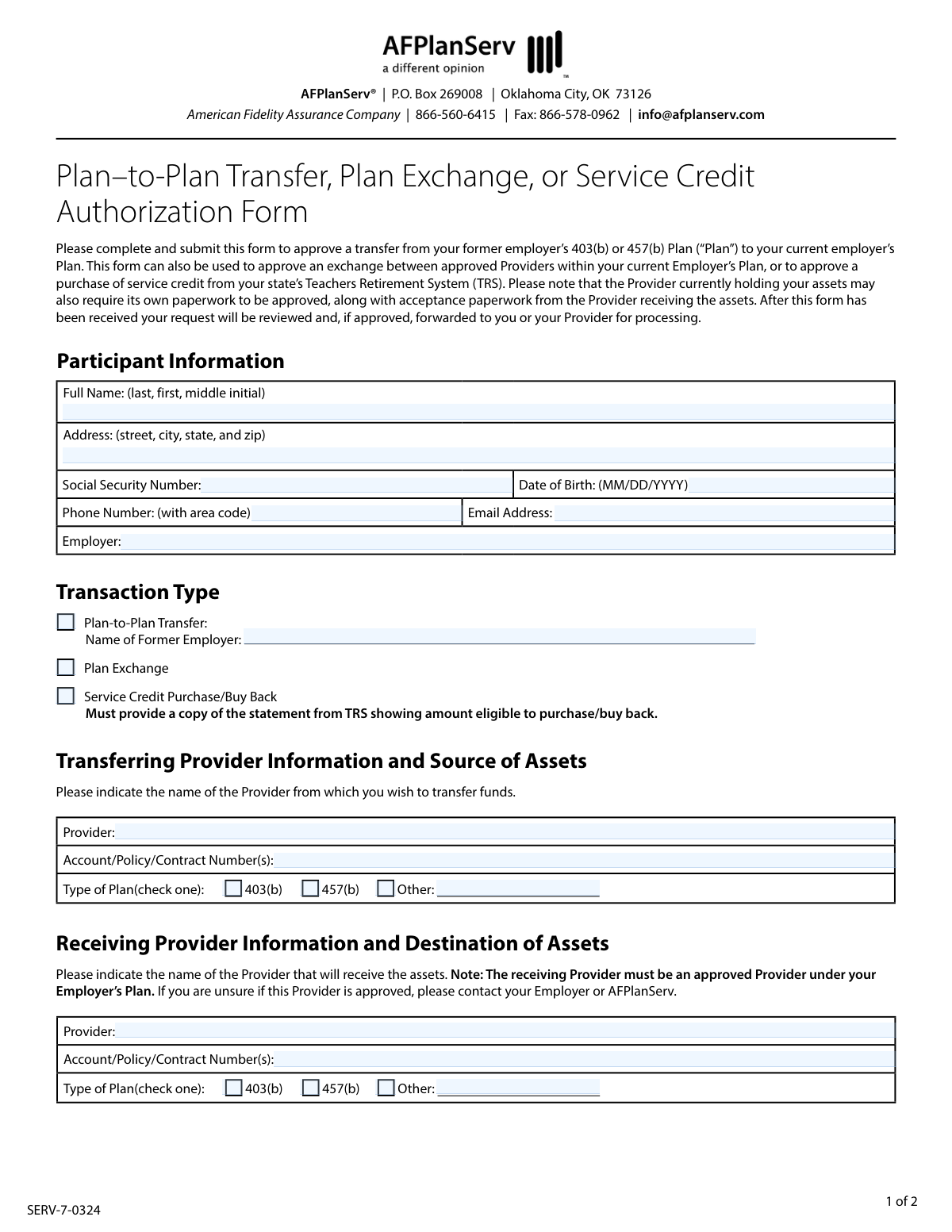
The Plan–to-Plan Transfer, Plan Exchange, or Service Credit Authorization Form is a document required by AFPlanServ to approve the movement of assets from a 403(b) or 457(b) retirement plan. It is used to authorize a transfer from a former employer's plan, an exchange between providers in a current plan, or to purchase service credit from a state's retirement system. This authorization is a critical step before the financial providers involved can process the transaction. Today, this form can be filled out quickly and accurately using AI-powered services like Instafill.ai, which can also convert non-fillable PDF versions into interactive fillable forms.
SERV-7-0324 is part of the
authorization forms, service authorization forms, credit forms and transfer forms categories on Instafill.
Rather not fill this in by hand? Instafill is an online form filler that completes PDF forms automatically — upload the blank form, answer a few questions, and the AI fills every field.
Form specifications
| Form name: | Plan–to-Plan Transfer, Plan Exchange, or Service Credit Authorization Form |
| Number of pages: | 1 |
| Language: | English |
Our AI automatically handles information lookup, data retrieval, formatting, and form filling.
It takes less than a minute to fill out SERV-7-0324 using our AI form filling.
Securely upload your data. Information is encrypted in transit and deleted immediately after the form is filled out.
Instafill Demo: How to fill out PDF forms in seconds with AI
How to Fill Out SERV-7-0324 Online for Free in 2026
Are you looking to fill out a SERV-7-0324 form online quickly and accurately? Instafill.ai offers the #1 AI-powered PDF filling software of 2026, allowing you to complete your SERV-7-0324 form in just 37 seconds or less.
Follow these steps to fill out your SERV-7-0324 form online using Instafill.ai:
- 1 Navigate to Instafill.ai and upload or select the Plan–to-Plan Transfer, Plan Exchange, or Service Credit Authorization Form.
- 2 Provide your personal details in the Participant Information section, including your full name, address, Social Security Number, and contact information.
- 3 In the Transaction Type section, check the box corresponding to your request: Plan-to-Plan Transfer, Plan Exchange, or Service Credit Purchase.
- 4 Complete the 'Transferring Provider Information' section with details about the institution currently holding your assets, including the provider name, account number, and plan type.
- 5 Fill out the 'Receiving Provider Information' section with details about the institution that will receive the assets.
- 6 Carefully review all entered information for accuracy, then sign and date the Participant Acknowledgement section.
- 7 Download the completed form and submit it to AFPlanServ or your provider as instructed, ensuring any other required paperwork is included.
Our AI-powered system ensures each field is filled out correctly, reducing errors and saving you time.
Why Choose Instafill.ai for Your Fillable SERV-7-0324 Form?
Speed
Complete your SERV-7-0324 in as little as 37 seconds.
Up-to-Date
Always use the latest 2026 SERV-7-0324 form version.
Cost-effective
No need to hire expensive lawyers.
Accuracy
Our AI performs 10 compliance checks to ensure your form is error-free.
Security
Your personal information is protected with bank-level encryption.
Frequently Asked Questions About SERV-7-0324
This form is used to get authorization to move retirement funds from a former employer's 403(b) or 457(b) plan, exchange funds between providers within your current plan, or purchase service credit from a Teachers Retirement System (TRS).
You should fill out this form if you are an employee who wants to transfer retirement assets from a previous job, switch investment providers in your current plan, or use plan funds to buy service credit for your pension.
A 'Plan-to-Plan Transfer' moves funds from a former employer's retirement plan to your current one. A 'Plan Exchange' moves funds between different investment providers that are both approved under your current employer's plan.
Yes, if you are requesting a 'Service Credit Purchase', you must attach a copy of the statement from your TRS showing the eligible purchase amount. Your financial providers may also require their own separate paperwork.
The receiving provider must be on your current employer's list of approved providers. If you are unsure, you should contact your employer or AFPlanServ to verify the provider's status before submitting the form.
Not always. This form provides authorization from AFPlanServ, but the provider releasing the funds and the provider receiving them may each require their own separate forms to complete the transaction.
You can submit the completed form to AFPlanServ by mail to P.O. Box 269008, Oklahoma City, OK 73126, or by fax to 866-578-0962.
AFPlanServ will review your request, and if it is approved, they will forward the authorization to you or your provider to continue the process. The providers will then handle the actual movement of funds.
Your Social Security Number is used as a unique identifier to ensure your retirement accounts are correctly located and the funds are accurately transferred. It is a standard requirement for financial transactions to prevent errors and fraud.
Yes, services like Instafill.ai use AI to help you accurately auto-fill form fields with your personal information. This can save you time and help reduce common errors.
To use Instafill.ai, you upload a digital copy of the form to their platform. The AI will make the form fillable online, allowing you to type your information and have it automatically placed in the correct fields.
If you have a non-fillable or 'flat' PDF, you can use a service like Instafill.ai. It can convert the document into an interactive, fillable form that you can easily complete and sign on your computer.
If you have questions about the form or the approval process, you can contact AFPlanServ directly by phone at 866-560-6415 or by email at [email protected].
Compliance SERV-7-0324
Validation Checks by Instafill.ai
1
Social Security Number Format
Ensures the Social Security Number is a 9-digit number, strictly following the XXX-XX-XXXX or XXXXXXXXX format. This validation is critical for accurate participant identification and for tax reporting purposes. A failure would prevent the system from matching the participant to their account and could cause significant processing delays.
2
Date of Birth Validity
Validates that the Date of Birth is in a valid MM/DD/YYYY format, represents a real calendar date, and is in the past. It also checks that the participant is of a plausible age to be enrolled in a retirement plan (e.g., over 18). An invalid or future date would be rejected as it indicates a data entry error.
3
Exclusive Transaction Type Selection
Verifies that the participant has selected exactly one transaction type from the available options: 'Plan-to-Plan Transfer', 'Plan Exchange', or 'Service Credit Purchase'. Selecting zero or multiple options creates ambiguity and makes the request impossible to process. The form must be returned to the user for clarification if this check fails.
4
Conditional Requirement for Former Employer Name
Checks that the 'Name of Former Employer' field is filled out if the 'Plan-to-Plan Transfer' transaction type is selected. This information is essential for verifying eligibility and coordinating the transfer from the previous employer's plan. The submission will be considered incomplete without this information for this transaction type.
5
Conditional Requirement for Service Credit Documentation
If 'Service Credit Purchase/Buy Back' is chosen, this check confirms that a supporting document (the statement from TRS) has been attached to the submission. The form explicitly states this document is required to determine the eligible purchase amount. Failure to attach the document will result in the request being put on hold until the documentation is provided.
6
Participant Information Completeness
Ensures all fields within the 'Participant Information' section (Full Name, Address, SSN, Date of Birth, Phone Number, Email Address, Employer) are completed. This basic information is the foundation for the entire transaction and is required for identity verification and communication. An incomplete section will cause the form to be rejected immediately.
7
Email Address Format
Validates that the provided Email Address conforms to the standard '[email protected]' format. A valid email is crucial for sending status updates, confirmations, and any requests for additional information. An invalid format would prevent automated communications and delay the process.
8
Phone Number Format
Checks that the Phone Number is a valid 10-digit number, accommodating common formats like (XXX) XXX-XXXX or XXX-XXX-XXXX. This ensures a valid contact number is on file in case AFPlanServ needs to speak directly with the participant. An invalid number would be flagged for correction.
9
Source Plan Type Selection
Verifies that exactly one plan type (403(b), 457(b), or Other) is selected under the 'Transferring Provider Information' section. This designation is critical as different plan types are subject to different federal regulations regarding transfers and exchanges. The form is invalid without this specific selection.
10
Destination Plan Type Selection
Verifies that exactly one plan type (403(b), 457(b), or Other) is selected under the 'Receiving Provider Information' section. This ensures the funds are directed to the correct type of account under the new provider. An incorrect or missing selection could lead to the creation of a wrong account type or rejection of the transfer.
11
Conditional Requirement for 'Other' Plan Specification
If 'Other' is checked as the plan type for either the transferring or receiving provider, this validation ensures the adjacent text field is filled in with the specific plan name. This clarification is necessary for compliance and processing, as 'Other' is not a sufficient descriptor. The submission is incomplete if this field is blank when 'Other' is selected.
12
Provider and Account Number Completeness
Ensures that the Provider name and Account/Policy/Contract Number(s) are filled out for both the 'Transferring Provider' and 'Receiving Provider' sections. This information is the core instruction for moving the assets. Missing account details would make it impossible to locate the funds or direct them to the correct destination.
13
Participant Signature Date Validity
Validates that the date next to the 'Participant Signature' is a valid calendar date that is not in the future. This date serves as the official record of when the participant authorized the transaction. A future or invalid date would render the authorization void and require correction.
14
Logical Check for Plan Exchange
If 'Plan Exchange' is selected, this check verifies that the 'Transferring Provider' and 'Receiving Provider' are different. A plan exchange, by definition, is a movement of assets between different providers within the same employer's plan. If the providers are the same, the transaction is illogical and will be flagged for review.
Common Mistakes in Completing SERV-7-0324
Participants often confuse a 'Plan-to-Plan Transfer' (between different employers) with a 'Plan Exchange' (between providers under the same employer). This mistake leads to incorrect processing, as the requirements and destinations for the funds are different. To avoid this, carefully read the definitions on the form and confirm your goal; a transfer is for moving funds from a former employer, while an exchange is for moving funds between providers at your current job.
A single mistyped digit in an account, policy, or contract number is one of the most common and critical errors. This happens due to simple data entry mistakes and can lead to the rejection of the transfer or funds being misapplied. Carefully transcribe the number directly from your most recent account statement and double-check it for accuracy before submitting. AI-powered form filling tools like Instafill.ai can help prevent these errors by validating data formats.
The form explicitly requires a copy of the TRS statement for a 'Service Credit Purchase.' Applicants frequently overlook this instruction and submit the form without the necessary attachment. This results in an immediate rejection or delay until the required documentation is provided. Always gather all required documents before filling out the form to ensure a complete and processable submission.
Applicants may write an abbreviated or informal name for the financial provider, such as 'Fidelity' instead of 'Fidelity Investments.' This ambiguity can cause significant delays as the plan administrator must manually verify the correct entity. To prevent this, use the full, official legal name of the provider as it appears on your account statements.
An unsigned or undated form is legally invalid and cannot be processed. This is a simple oversight that happens when people are in a hurry, but it will always result in the form being returned and the entire process being delayed. Always perform a final review of the form before submission, paying special attention to the 'Participant Signature' and 'Date' fields.
The 'Employer' field is for your current employer, while the 'Name of Former Employer' field is only for 'Plan-to-Plan Transfers.' People sometimes mistakenly list their former employer in the main 'Employer' field, causing confusion and processing delays. Ensure your current employer's name is in the 'Participant Information' section and only fill out the 'Former Employer' field if applicable.
The form states that the receiving provider must be an approved vendor under the current employer's plan. Participants may assume their preferred provider is approved without verifying, leading to the request being denied after submission. Before filling out the form, contact your employer's benefits department or AFPlanServ to get a list of approved providers to avoid this rejection.
Transposing numbers or accidentally omitting a digit in the Social Security Number field is a frequent error. Since the SSN is the primary identifier for financial accounts, any mistake will halt the process and require correction. This sensitive information should be entered with extreme care, and it's wise to review it multiple times before submission.
The form specifies the MM/DD/YYYY format for the Date of Birth, but applicants, especially those accustomed to other international formats (DD/MM/YYYY), often make a mistake. This can cause data validation failures in automated systems or identity verification issues. To avoid this, explicitly follow the requested format, for example, entering June 15, 1980, as '06/15/1980'.
Applicants sometimes mistakenly fill in the section at the bottom of the second page marked 'AFPlanServ Use Only.' This can create confusion for the processing team and may require them to seek clarification, causing delays. Avoid this by carefully reading all section headings and leaving any areas marked for administrator or office use completely blank.
When the form is printed and filled out by hand, poor handwriting can make critical data like names and account numbers impossible to read accurately. This forces the administrator to return the form for clarification, delaying the transaction. If the form is a non-fillable PDF, AI-powered tools like Instafill.ai can convert it into a fillable version, allowing you to type your information clearly and avoid legibility issues.
Saved over 80 hours a year
“I was never sure if my IRS forms like W-9 were filled correctly. Now, I can complete the forms accurately without any external help.”
Kevin Martin Green
Your data stays secure with advanced protection from Instafill and our subprocessors




Robust compliance program
Transparent business model
You’re not the product. You always know where your data is and what it is processed for.
ISO 27001, HIPAA, and GDPR
Our subprocesses adhere to multiple compliance standards, including but not limited to ISO 27001, HIPAA, and GDPR.
Security & privacy by design
We consider security and privacy from the initial design phase of any new service or functionality. It’s not an afterthought, it’s built-in, including support for two-factor authentication (2FA) to further protect your account.
Fill out SERV-7-0324 with Instafill.ai
Worried about filling PDFs wrong? Instafill securely fills planto-plan-transfer-plan-exchange-or-service-credit-authorization-form forms, ensuring each field is accurate.
