Yes! You can use AI to fill out Manulife Group Benefits Drug Prior Authorization Form (Ozempic/Semaglutide) – GL5197E
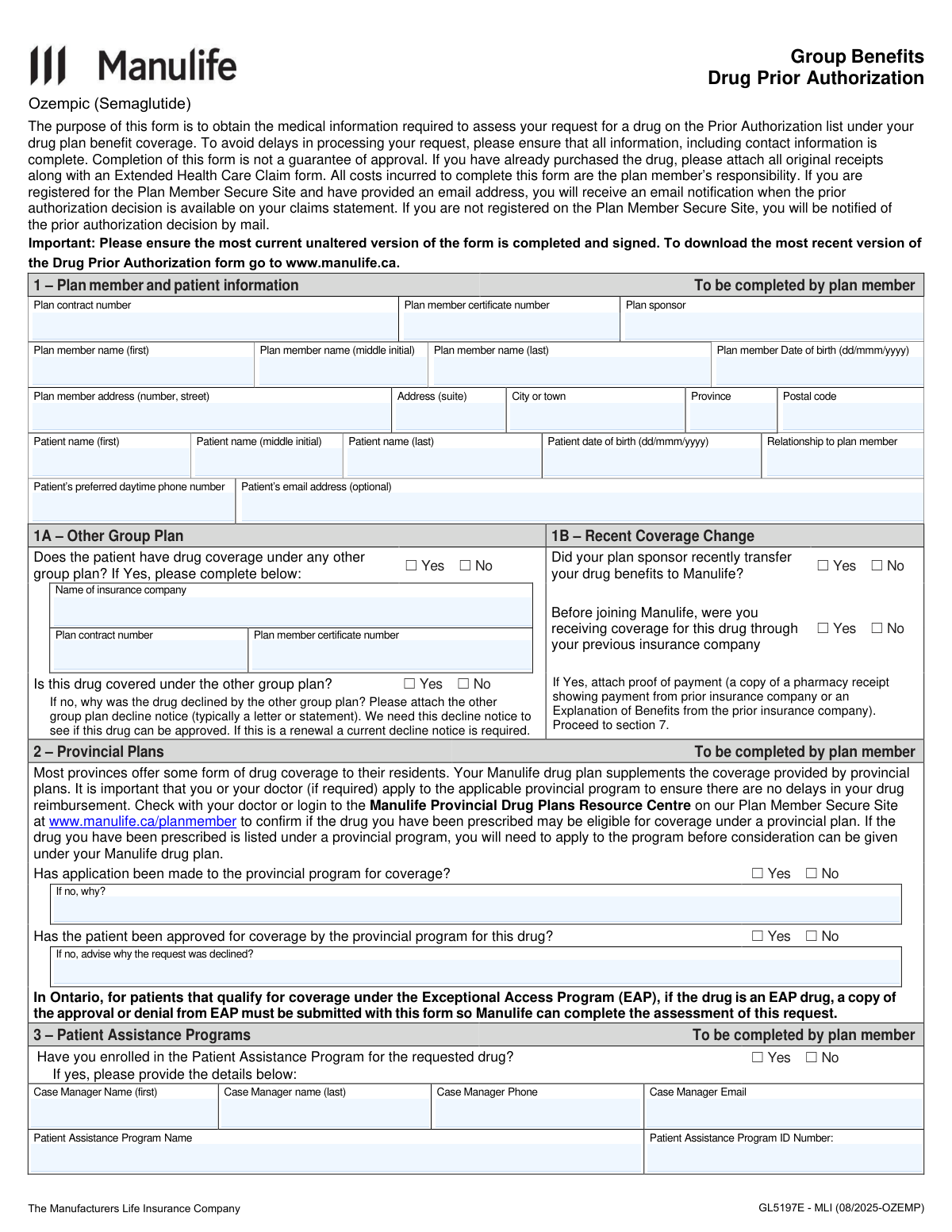
This is an insurer prior-authorization request form for Manulife Group Benefits that collects plan member/patient details, other coverage and provincial program information, and prescribing physician medical criteria to determine whether a requested drug (here, Ozempic/semaglutide) will be covered under the plan. It is important because incomplete information or missing supporting documents (e.g., provincial program decisions, other plan decline notices, receipts) can delay review and may affect reimbursement. The form also includes physician certification and plan member consent/authorization for Manulife to collect, use, and disclose personal and health information for claim assessment and administration. Today, this form can be filled out quickly and accurately using AI-powered services like Instafill.ai, which can also convert non-fillable PDF versions into interactive fillable forms.
Our AI automatically handles information lookup, data retrieval, formatting, and form filling.
It takes less than a minute to fill out GL5197E (Ozempic) using our AI form filling.
Securely upload your data. Information is encrypted in transit and deleted immediately after the form is filled out.
Form specifications
| Form name: | Manulife Group Benefits Drug Prior Authorization Form (Ozempic/Semaglutide) – GL5197E |
| Number of pages: | 4 |
| Language: | English |
| Categories: | insurance forms, prior authorization forms, health insurance forms, Manulife forms, benefit forms, authorization forms |
Instafill Demo: filling out a legal form in seconds
How to Fill Out GL5197E (Ozempic) Online for Free in 2026
Are you looking to fill out a GL5197E (OZEMPIC) form online quickly and accurately? Instafill.ai offers the #1 AI-powered PDF filling software of 2026, allowing you to complete your GL5197E (OZEMPIC) form in just 37 seconds or less.
Follow these steps to fill out your GL5197E (OZEMPIC) form online using Instafill.ai:
- 1 Go to Instafill.ai and upload the Manulife Group Benefits Drug Prior Authorization form (GL5197E – Ozempic/Semaglutide) or select it from the form library.
- 2 Let the AI detect fields and then enter plan member and patient information (contract/certificate numbers, sponsor, names, DOBs, address, relationship, phone/email).
- 3 Complete coverage coordination sections: other group plan coverage and recent coverage change details, and upload any required proof (other plan decline notice or proof of payment/EOB if applicable).
- 4 Fill out provincial plan questions (application/approval/denial) and attach supporting documents (e.g., Ontario EAP approval/denial if applicable).
- 5 Add Patient Assistance Program details (if enrolled), including case manager contact information and program ID.
- 6 Have the prescribing physician complete medical information and drug history (dose/strength, administration location, diagnosis criteria—initial/renewal/other—and prior therapies/outcomes), then add physician identifiers and e-sign/date.
- 7 Review for completeness, e-sign the plan member authorization and date, then submit via the Plan Member Secure Site or generate a final PDF to mail/fax to Manulife using the addresses/fax number listed on the form.
Our AI-powered system ensures each field is filled out correctly, reducing errors and saving you time.
Why Choose Instafill.ai for Your Fillable GL5197E (Ozempic) Form?
Speed
Complete your GL5197E (Ozempic) in as little as 37 seconds.
Up-to-Date
Always use the latest 2026 GL5197E (Ozempic) form version.
Cost-effective
No need to hire expensive lawyers.
Accuracy
Our AI performs 10 compliance checks to ensure your form is error-free.
Security
Your personal information is protected with bank-level encryption.
Frequently Asked Questions About Form GL5197E (Ozempic)
This form collects the medical and plan information Manulife needs to assess coverage for a drug that is on your planâs Prior Authorization list (e.g., Ozempic/semaglutide). Submitting the form helps Manulife decide whether the drug will be covered under your group drug benefit.
You (the plan member) complete Sections 1â3 and sign Section 7. Your prescribing physician completes Sections 4â6 and signs the Physician Authorization section.
No. The form is required to assess eligibility, but approval depends on your plan rules and the medical criteria provided by your physician.
Have your plan contract number, certificate/member ID number, plan sponsor (usually your employer), and full mailing address ready. Youâll also need the patientâs full name, date of birth, relationship to the plan member, and a daytime phone number (email is optional).
Enter the plan memberâs details in the plan member fields and the patientâs details in the patient fields. Be sure to select the correct relationship to the plan member.
Answer âYesâ in Section 1A and provide the other insurerâs name, contract number, and certificate number. If the other plan declined the drug, attach the decline notice (a current one is required for renewals).
In Section 1B, indicate whether you previously had coverage for this drug with your prior insurer. If you did, attach proof of payment such as a pharmacy receipt showing payment by the prior insurer or an Explanation of Benefits from the prior insurance company.
Often, yesâManulifeâs plan may supplement provincial coverage, and the form asks whether you applied and whether you were approved or declined. If the drug is eligible under a provincial program, you generally need to apply first to avoid reimbursement delays.
If the drug is an EAP drug and the patient qualifies, include a copy of the EAP approval or denial with your submission. Manulife uses that document to complete the assessment.
Section 3 asks whether you enrolled in the manufacturerâs Patient Assistance Program and requests the case managerâs contact details and program ID if applicable. Enrollment isnât stated as mandatory on the form, but providing details can help coordinate coverage and support.
Your doctor must select the correct diagnosis pathway (Type 2 DiabetesâInitial Criteria, Type 2 DiabetesâRenewal Criteria, or Any Other Diagnosis) and answer the related questions. For renewals, the form asks for objective evidence of continued benefit (e.g., decreased HbA1c).
Yesâthe form specifically asks whether the dose will exceed 2 mg once weekly for both initial and renewal requests. Your physician should answer based on the prescribed regimen.
Your physician should list previous and current therapies for the diagnosis, including start/end dates and whether outcomes were intolerance/adverse events or inadequate response. If no previous therapies were tried, the physician must provide a medical rationale (e.g., contraindication or drug interaction).
Attach all original receipts and submit them along with an Extended Health Care Claim form, as instructed on the form. Keep copies for your records in case Manulife requests additional information.
You can submit using the âSubmit a Claimâ feature on the Plan Member Secure Site, or mail/fax it to Manulifeâs Prior Authorization Team. Mailing addresses differ for Quebec vs outside Quebec, and the fax number listed is 1-855-752-0404.
If youâre registered on the Plan Member Secure Site and have an email address on file, youâll receive an email notification when the decision is available on your claims statement. If youâre not registered, Manulife will notify you by mail.
YesâAI form-filling services like Instafill.ai can help auto-fill form fields accurately from your information, reducing errors and saving time. You should still review everything carefully, and your physician must complete and sign the medical sections.
Upload the PDF to Instafill.ai, then provide your plan member/patient details and any supporting documents (e.g., provincial decision letters or other plan decline notices) so the tool can populate the fields. Download the completed form, review it for accuracy, and then have your physician complete Sections 4â6 and sign before submission.
Instafill.ai can convert flat, non-fillable PDFs into interactive fillable forms so you can type directly into the fields. After conversion, you can auto-fill and export a clean, completed version for signatures and submission.
Compliance GL5197E (Ozempic)
Validation Checks by Instafill.ai
1
Ensures Plan Contract Number and Certificate Number are present and in an acceptable identifier format
Validate that both the Plan contract number and Plan member certificate number are provided, since they are required to locate eligibility and benefits. Enforce a reasonable identifier pattern (e.g., alphanumeric, length bounds, no unsupported symbols) and trim leading/trailing spaces. If either value is missing or fails format rules, the submission should be rejected or routed to manual review because the request cannot be reliably matched to a plan/member record.
2
Validates plan member and patient names for completeness and character rules
Check that required name fields (first and last) are populated for both plan member and patient, and that middle initial is either blank or a single letter. Names should not contain digits or disallowed punctuation, and should meet minimum length requirements to reduce data-entry errors. If validation fails, prompt correction because inaccurate names can prevent matching to plan records and can delay authorization decisions.
3
Validates date fields use required formats and represent real calendar dates
Validate that plan member DOB, patient DOB, physician signature date, and plan member signature date match the formâs required formats (dd/mmm/yyyy for DOB/signature dates; yyyy/mmm for drug history start/end dates). Ensure the dates are valid (e.g., no 31/Feb) and month abbreviations are recognized consistently (e.g., Jan, Feb, Mar). If invalid, block submission because incorrect dates can break eligibility checks, renewal timing, and audit trails.
4
Checks age and date logic for plan member/patient and signature dates
Ensure DOBs are not in the future and that the plan member/patient ages are within plausible bounds (e.g., 0â120 years). Verify signature dates are not in the future and are not unreasonably earlier than the form completion context (e.g., far in the past), and that physician signature date is present when physician section is completed. If these checks fail, flag for correction or manual review because they indicate likely data entry errors or invalid attestations.
5
Validates Canadian address fields and province/postal code consistency
Require plan member mailing address fields (street, city, province, postal code) and validate postal code format as Canadian (e.g., A1A 1A1) with optional space. Confirm the province is a valid Canadian province/territory and that the postal codeâs first letter is consistent with the selected province where feasible. If invalid or incomplete, reject or request correction because mailing decisions and jurisdictional rules (e.g., Quebec handling) depend on accurate address data.
6
Validates phone number formats for patient and provider contacts
Validate patient preferred daytime phone number and any clinic/hospital/physician phone/fax numbers using a consistent rule set (e.g., 10-digit NANP with optional country code, allowing separators, and optional extension only in the extension field). Ensure the extension field contains only digits and is not embedded in the main phone number field. If validation fails, require correction because missing/invalid contact numbers can prevent clinical follow-up and delay authorization.
7
Validates email address format when provided (patient and case manager)
If patient email or case manager email is provided, validate it against standard email syntax (single @, valid domain, no spaces) and normalize casing/whitespace. Email is optional for the patient, but if present it must be usable for notifications; case manager email is required when the Patient Assistance Program is marked Yes. If invalid, prompt correction because unusable emails undermine notification workflows and case coordination.
8
Enforces mutually exclusive Yes/No selections for all binary questions
For each Yes/No pair (e.g., other group plan coverage, recent transfer to Manulife, provincial application made, provincial approval, patient assistance enrollment, and all clinical Yes/No items), ensure exactly one option is selected. Prevent both boxes being checked or neither being checked when the question is required by the chosen pathway. If this fails, block submission because ambiguous answers prevent correct adjudication and downstream conditional requirements.
9
Validates conditional completion for Other Group Plan section when coverage is Yes
If 'Other Group Plan Coverage' is Yes, require the other insurer name, other plan contract number, other certificate number, and whether the drug is covered under that plan (Yes/No). If the drug is not covered, require an explanation and the presence of an attached decline notice indicator; if covered, require proof-of-payment/benefits documentation indicator. If conditional fields are missing, route back for completion because coordination of benefits and eligibility for Manulife consideration depends on these details.
10
Validates conditional completion for Recent Coverage Change questions
If the plan sponsor recently transferred drug benefits to Manulife is Yes, require an answer to whether the member previously received coverage for this drug through the prior insurer. If that prior coverage is Yes, require an attachment indicator for proof of payment/EOB as stated on the form. If missing, flag for follow-up because transition-of-coverage evidence can be necessary to assess continuity and avoid improper duplication.
11
Validates Provincial Program application/approval logic and required reasons
If provincial application made is No, require a non-empty reason explaining why no application was made. If provincial approval is No, require a decline reason; additionally, if the memberâs province is Ontario and the drug is an EAP drug context, require an attachment indicator for EAP approval/denial documentation. If these validations fail, the request should be held because Manulife coverage is described as supplemental and provincial outcomes may be prerequisite to assessment.
12
Validates Patient Assistance Program details when enrollment is Yes
If Patient Assistance Program Enrollment is Yes, require case manager first/last name, phone, program name, and program ID; require case manager email if email is part of the contact workflow. Validate phone/email formats and ensure the ID is not blank and meets basic length/character constraints. If incomplete, return for correction because PAP coordination can affect access, cost-sharing, and case management communications.
13
Validates treatment administration location selection and dependent facility details
Ensure exactly one treatment administration location is selected (Home, MD office, Private Clinic, Hospital In-Patient, Hospital Out-patient). If location is not Home, require facility name, phone, and full address; if MD office is selected, require the 'MD office located in a hospital' Yes/No response, and if Yes require the administration area description. If these checks fail, flag because site-of-care impacts clinical review, billing, and potential preferred-provider routing.
14
Validates diagnosis selection is singular and triggers the correct clinical question set
Require exactly one diagnosis pathway to be selected: Type 2 Diabetes Mellitus (Initial), Type 2 Diabetes Mellitus (Renewal), or Any Other Diagnosis. Enforce that only the questions relevant to the selected pathway are answered, and that required questions within that pathway are completed. If invalid (multiple selected or none selected), block submission because clinical criteria and approval rules differ by pathway.
15
Validates Type 2 Diabetes clinical criteria logical consistency (Initial and Renewal)
For Initial criteria, require responses to all listed Yes/No questions and enforce key contradictions (e.g., if 'confirmed diagnosis' is No, the Initial pathway should not proceed; if 'used with other GLP-1 analogs' is Yes, flag as likely non-compliant with criteria). For Renewal criteria, require the continued benefit (HbA1c) response and enforce that if 'used with metformin' is No then 'documented intolerance/contraindication to metformin' must be Yes. If these checks fail, route to clinical review or reject as incomplete because inconsistent clinical answers undermine criteria-based adjudication.
16
Validates Ozempic dose limit and dosage field completeness
Require the 'Drug strength and dosage' free-text field to be non-empty and to include at least a numeric strength and unit plus frequency (e.g., mg and weekly/daily) using pattern checks. Cross-check the stated dose against the 'Will the dose exceed 2mg once weekly?' answer; if the text indicates >2 mg weekly but the checkbox says No (or vice versa), flag for correction. If validation fails, hold submission because dosing is central to safety, coverage rules, and correct application of the 2 mg once-weekly limit.
17
Validates drug history entries for date order, outcome selection, and rationale when none tried
For each drug therapy row that has a drug name, require a start date and ensure end date (if provided) is not earlier than start date; enforce yyyy/mmm format. Require at least one outcome checkbox (Intolerance or Inadequate/Suboptimal Response) for completed rows, and require a Yes/No selection for whether the medication will be continued. If no previous therapies are listed, require at least one rationale checkbox and a non-empty medical rationale explanation; otherwise, flag as incomplete because prior therapy history is needed to justify prior authorization.
18
Validates prescribing physician identity, licensing, and contact information completeness
Require physician first/last name, college/license number, specialty, practice address, and telephone number; validate license number against basic format/length rules and ensure phone/fax formats are valid. Ensure province and postal code are present and plausible for the practice address. If missing/invalid, reject or route to manual review because prescriber verification and contactability are essential for clinical assessment and compliance.
19
Ensures both physician and plan member signatures and dates are present and chronologically reasonable
Require physician signature and physician signature date, and require plan member signature and date signed, since both attestations are necessary for consent and clinical authorization. Validate that signature dates are valid and not in the future, and optionally flag if the plan member signature date precedes the physician signature date by an unusual margin (or vice versa) indicating potential form assembly issues. If signatures/dates are missing or invalid, the submission should be rejected because consent and certification requirements are not met.
Common Mistakes in Completing GL5197E (Ozempic)
People often keep an old PDF on file or download a cached copy, then submit it even though the form explicitly asks for the most current unaltered version. Using an outdated version can lead to missing fields or criteria, which commonly results in processing delays or a request to resubmit. Always download the latest form from manulife.ca right before completion and avoid editing the template structure. If the form is a flat, non-fillable PDF, Instafill.ai can convert it into a fillable version and help ensure youâre completing the current required fields.
A very common error is swapping the plan contract number and the plan member certificate/ID number, or entering partial numbers from the wrong card/document. This can prevent Manulife from matching the request to the correct benefits plan, causing delays or rejection for âunable to identify member.â Copy these numbers exactly as shown on benefits documentation and double-check digit counts and leading zeros. Instafill.ai can help by validating expected formats and flagging missing/invalid identifiers before submission.
Applicants frequently enter nicknames, omit legal last names, or mix up the plan memberâs DOB with the patientâs DOBâespecially when the patient is a dependent. Even small mismatches can trigger manual verification, slowing the prior authorization decision. Use the exact legal names as they appear on plan records and enter dates in the required format (dd/mmm/yyyy). AI-powered tools like Instafill.ai can standardize names and enforce date formatting to reduce these avoidable discrepancies.
Many people check âYesâ for other group plan coverage or a recent transfer to Manulife but fail to complete the follow-up fields (other insurer name, contract/certificate numbers, coverage status). This creates an incomplete coordination-of-benefits picture and often results in a request for more information. If you answer âYes,â complete every related field and attach the required proof (EOB/receipt or decline notice). Instafill.ai can prompt for dependent fields when a âYesâ box is selected so nothing is missed.
The form repeatedly requires supporting documents in specific scenarios (e.g., other plan decline notice, Ontario EAP approval/denial, proof of payment from prior insurer, original receipts if already purchased). People often submit the form alone, assuming the insurer will âlook it up,â which typically leads to delays or an automatic request for documentation. Before sending, review each âattachâ instruction and include the exact document requested, ensuring itâs current (especially for renewals). Instafill.ai can provide a checklist based on your answers and help ensure the right files are included.
Applicants commonly skip the provincial program questions or answer âNoâ without explaining why, even though the form states provincial coverage should be pursued first when applicable. This can stall assessment because Manulife may require evidence that provincial options were explored or denied. If no application was made, provide a specific reason (e.g., not eligible, awaiting documents, drug not listed) and include any relevant decision details if declined. Instafill.ai can enforce completion of the âIf no, why?â and decline-reason fields when âNoâ is selected.
People often indicate they enrolled in a PAP but leave the case manager name, phone/email, program name, or PAP ID blank. That prevents coordination with the program and can slow verification of support, bridging, or coverage details. If enrolled, provide complete contact information and the exact PAP ID (including letters/special characters). Instafill.ai can validate email/phone formats and ensure all PAP fields are completed when enrollment is marked âYes.â
This form is split: sections 1â3 and 7 are for the plan member, while sections 4â6 must be completed by the prescribing physician. A frequent mistake is the patient filling physician-only fields, or the physician omitting key identifiers like College/License number, specialty, fax, or full clinic address. Missing provider details can prevent clinical review follow-up and delay the authorization decision. Ensure the physician completes sections 4â6 fully and legibly; Instafill.ai can help route the right sections to the right person and validate required provider fields.
Prescribers sometimes check the wrong pathway (e.g., Renewal when itâs an initial request) or leave both unchecked, then answer questions that donât match the selected criteria. Inconsistencies (e.g., âconfirmed T2DM = Noâ but continuing with T2DM criteria) can lead to denial or a request for clarification. Select exactly one diagnosis pathway and ensure all subsequent Yes/No answers align with that pathway and the patientâs chart. Instafill.ai can flag contradictory selections and require a single, consistent criteria track.
A common clinical-data issue is writing an incomplete dose (missing units, frequency, or strength) or indicating a dose that exceeds the formâs stated limit (over 2 mg once weekly) without additional context. Incomplete dosing prevents proper assessment, and exceeding limits may trigger denial or additional review. Always document strength, dose, route (if relevant), and frequency clearly, and ensure the âexceed 2 mg once weeklyâ question is answered accurately. Instafill.ai can standardize medication dosing formats and highlight out-of-range entries for review.
Physicians often list prior therapies without start/end dates (required format yyyy/mmm), omit outcomes (intolerance vs. inadequate response), or forget to state whether the patient will continue those meds alongside the new therapy. If no previous therapies were tried, the rationale checkboxes are selected but the medical rationale narrative is left blank, which weakens the clinical justification. Provide complete therapy timelines, outcomes, and continuation status, and include a clear rationale when prior options werenât used. Instafill.ai can enforce date formats and require an outcome/continuation selection for each listed therapy.
Submissions are frequently delayed because either the physician signature/date or the plan member signature/date is missing, or dates are entered in the wrong format (the form specifies dd/mmm/yyyy). Unsigned forms are typically considered invalid and must be resubmitted, restarting the timeline. Confirm both signatures are present and dated correctly on the day they are signed, and ensure the plan member signs section 7 while the physician signs section 6. Instafill.ai can prompt for required e-signatures and validate date formats before finalizing the packet.
Saved over 80 hours a year
âI was never sure if my IRS forms like W-9 were filled correctly. Now, I can complete the forms accurately without any external help.â
Kevin Martin Green
Your data stays secure with advanced protection from Instafill and our subprocessors
Robust compliance program
Transparent business model
Youâre not the product. You always know where your data is and what it is processed for.
ISO 27001, HIPAA, and GDPR
Our subprocesses adhere to multiple compliance standards, including but not limited to ISO 27001, HIPAA, and GDPR.
Security & privacy by design
We consider security and privacy from the initial design phase of any new service or functionality. Itâs not an afterthought, itâs built-in, including support for two-factor authentication (2FA) to further protect your account.
Fill out GL5197E (Ozempic) with Instafill.ai
Worried about filling PDFs wrong? Instafill securely fills manulife-group-benefits-drug-prior-authorization-form-ozempicsemaglutide-gl5197e forms, ensuring each field is accurate.




