
Yes! You can use AI to fill out HIPAA Authorization Form, Authorization for the Release of Protected Health Information
Don't type 59 fields by hand. Tell our AI about yourself, or upload a document you already have, and it fills every field in seconds. You check it, then download, print or sign.
The AI does the filling. You just check it.
No typing into boxes, nothing to install.
What this form asks for
The AI fills all of it, from your answers or your documents.
The AI checks your answers before you download
16 checks built for this form, so a wrong date or a missing answer is caught before anyone else sees it.
Validates that every field across Sections 1–10 contains a value, or the literal entry "N/A" where the form allows it (e.g., expiration fields, translator fields if not applicable). This is critical because the form explicitly states that any blank sections make the authorization invalid. If any required field is empty and not marked N/A, the submission should be rejected and returned for completion.
Checks that Last Name and First Name are present and contain only acceptable characters (letters, spaces, hyphens, apostrophes) and are not placeholders (e.g., "unknown", "test"). Middle Name may be blank only if the system allows N/A; otherwise it must be completed per the form’s “no blanks” instruction. If invalid characters or missing required name parts are detected, the form should fail validation to prevent misidentification of the patient.
Ensures the Date of Birth is in an accepted date format (e.g., MM/DD/YYYY) and represents a real calendar date. It must not be a future date and should be within a reasonable range (e.g., not older than 120–130 years) to catch entry errors. If DOB is invalid, the authorization may be applied to the wrong individual and must be rejected.
Validates that Address and City/State/ZIP are populated and that ZIP is in a valid format (5 digits or 5+4). If the system captures State separately, it should be a valid US state/territory abbreviation; if captured as a combined field, it should still contain city, state, and ZIP components. If address data is incomplete or malformed, the form should be flagged because it undermines identity verification and contactability.
Checks that Section 2 includes a Name and/or Organization (per business rules) plus a usable contact method and address details. Telephone/email must not be blank; at least one should be present and valid to support revocation requests and follow-up. If Section 2 is incomplete, the authorization is operationally unusable and should be rejected.
Ensures Section 3 includes the recipient Name, Relationship to Patient/Plan Member, and a valid contact method and address. Relationship should not be blank and should be meaningful (e.g., "spouse", "attorney", "care coordinator") rather than placeholders. If recipient details are missing or invalid, the disclosure destination is ambiguous and the form should fail validation.
And 10 more checks
- Telephone number format validation (Sections 2 and 3)
- Email address format validation (Sections 2 and 3)
- Authorization expiration fields are logically consistent (Section 4)
- At least one PHI category selected for disclosure (Sections 5 and/or 6)
- "Other" disclosure selections require descriptive details (Sections 5 and 6)
- Section 6 item-level initials and dates required when specific items are selected
- Purpose of release selection and "Other" purpose detail requirement (Section 7)
- Signature block completeness and signature date validity (Section 10)
- Representative signatory authority required when signer is not the patient (Section 10)
- Translator fields must be complete when translator is used (Section 10)
Let AI fill out your HIPAA Authorization (Release of PHI)
No typing. Every field filled in seconds, checked, ready to sign.
How to Fill Out HIPAA Authorization (Release of PHI) Online for Free in 2026
What the AI walks you through.
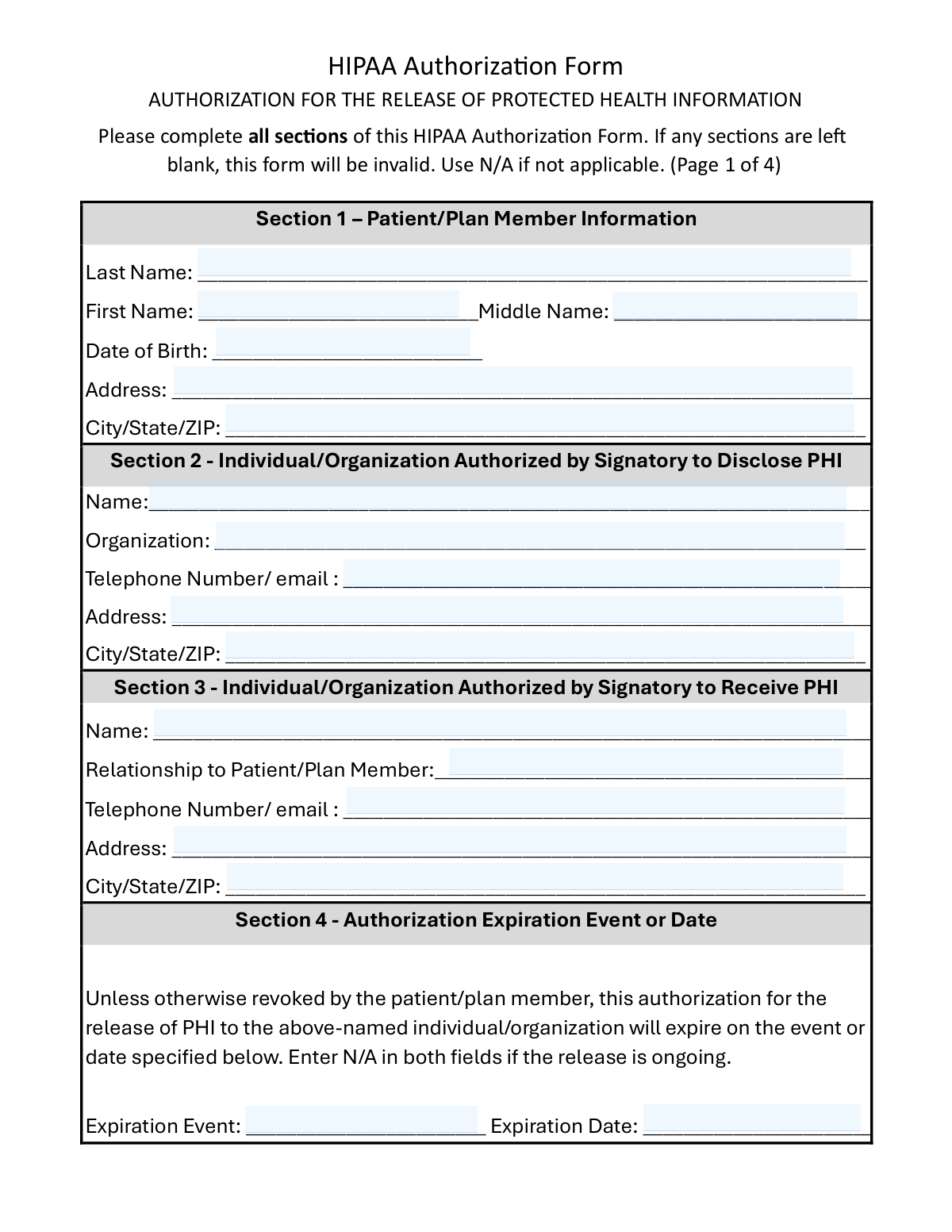
- Enter the patient/plan member details in Section 1 (name, date of birth, and current address).
- Complete Section 2 with the individual/organization authorized to disclose PHI (name, organization, contact information, and address).
- Complete Section 3 with the individual/organization authorized to receive PHI, including relationship to the patient and full contact details.
- Set the authorization expiration in Section 4 by providing an expiration event and/or date, or enter N/A if the release is intended to be ongoing.
- Select the health information to be disclosed in Sections 5 and 6, adding details for any “Other” selections and providing initials and dates where required for specific items.
- Choose the purpose of the release in Section 7 (e.g., continuity of care, legal, personal use) and specify any “Other” purpose; add any special terms in Section 9 if applicable.
- Sign and date Section 10 (patient or authorized representative), and complete representative authority and translator fields if applicable; download/save a copy for your records.
Common Mistakes in Completing HIPAA Authorization (Release of PHI)
The ones the AI is built to catch.
Leaving any field blank instead of writing N/A
Incomplete patient identification (name, DOB, or address mismatches)
Confusing Section 2 (disclosing party) with Section 3 (receiving party)
Providing vague or missing organization details and contact information
Not specifying the recipient’s relationship to the patient (Section 3)
Incorrect or inconsistent expiration information (Section 4)
Checking PHI categories without completing required initials and dates (Section 6)
Selecting “Other” without providing details (Sections 5, 6, or 7)
Misunderstanding the limits on psychotherapy notes vs. summarized mental health information
Missing or incorrect signature block completion (Section 10)
Ignoring translator fields when a translator was used
Frequently Asked Questions About HIPAA Authorization (Release of PHI)
Is it really free for 7 days?
Can I fill other forms too?
How do I cancel?
How does the AI fill out HIPAA Authorization (Release of PHI)?
What happens to my information?
How complex is HIPAA Authorization (Release of PHI) to fill out?
What is this HIPAA Authorization Form used for?
Who should fill out and sign this form?
Do I have to complete every section for the form to be valid?
What do I put in Section 2 (Authorized to Disclose PHI)?
What do I put in Section 3 (Authorized to Receive PHI)?
How do I choose an expiration date or event in Section 4?
What’s the difference between Section 5 (General) and Section 6 (Specific) information to be disclosed?
Why do I need to initial and date each item in Section 6?
Does this form allow release of psychotherapy notes?
How do I complete Section 7 (Purpose of the Release)?
Can I revoke (cancel) this authorization after I sign it?
Will my treatment or insurance benefits be affected if I don’t sign this form?
What if the recipient in Section 3 is not a HIPAA-covered entity?
Do I have a right to get a copy of the signed form?
What should I include in Section 9 (Additional Conditions)?
Get your HIPAA Authorization (Release of PHI) filled out by AI
$0 today. Cancel before Nov 3 and you pay nothing.
Other forms like this one
authorization forms: Form I-765, Application for Employment Authorization, Form CMS-588, EFT Authorization Agreement, Form 8821, Tax Information Authorization, Form 8879, IRS e-file Signature Authorization, Form SSA-827, Authorization to Disclose Information, Form I-905, Application for Authorization to Issue Certification for Health Care Workers, Form G-1650, Authorization for ACH Transactions, Arizona Form 285, General Disclosure/Representation Authorization Form, Arizona Form 285-I, Individual Income Tax Disclosure/Representation Authorization Form, The Department of Medical Assistance Services Applied Behavior Analysis Preservice Service Authorization Request Form (Effective Dates of Service 09/01/2025 and after), Form CH-006: PA-BH-Res-PCS, Oregon Behavioral Health Support Program Plan of Care Authorization (Plan of Care Request for Behavioral Health Residential or Personal Care Services), Continental American Insurance Company (CAIC) / Aflac Group Critical Illness Claim Form (with Attending Physician’s Statement, HIPAA Authorization to Obtain Information, and Electronic Funds Transaction Authorization), Form G-1450, Authorization for Credit Card Transactions, Prior Authorization (PA) Request Form – Adult Palliative Care (Alameda Alliance for Health), Alameda Alliance for Health Prior Authorization (PA) Request Form – Adult Palliative Care, Manulife Group Benefits Drug Prior Authorization Form – Mounjaro (Tirzepatide) (GL5197E), Manulife Group Benefits Drug Prior Authorization Form (Ozempic/Semaglutide) – GL5197E, Out-of-Network Pre-Authorization and Exception Request Form, Form SSA-827 (06-2024), Authorization to Disclose Information to the Social Security Administration (SSA), Manulife Group Benefits Drug Prior Authorization Form (Wegovy/Semaglutide) – GL5197E - MLI (08/2025-WEGOV)
health forms: Form 1095-A, Health Insurance Marketplace Statement, Form 8889, Health Savings Accounts, Form WH-380-E, Certification of Health Care Provider, Form 7206, Self-Employed Health Ins. Ded., Form 8885, Health Coverage Tax Credit, Form WH-380-F, Certification of Health Care Provider, Form 1095-C, Employer-Provided Health Insurance Offer and Coverage, Form 1095-B, Health Coverage, Form I-905, Application for Authorization to Issue Certification for Health Care Workers, Form BHVH, Outpatient Behavioral Health – ABA Treatment Request, Form SHA, Separation Health Assessment, DHS-6696-ENG, Minnesota Health Care Programs Application (MNsure/DHS), Geisinger Health Plan Behavioral Health Professional Services Questionnaire, Priority Health Small Group Renewal Decision Form, Form CH-006: PA-BH-Res-PCS, Oregon Behavioral Health Support Program Plan of Care Authorization (Plan of Care Request for Behavioral Health Residential or Personal Care Services), Form 7206 (2025), Self-Employed Health Insurance Deduction, Prior Authorization (PA) Request Form – Adult Palliative Care (Alameda Alliance for Health), Medicare Enrolment Application (Australia) – Enrol in Medicare, Re-enrol/Extend Eligibility, Enrol a Newborn, and Register for My Health Record, Alameda Alliance for Health Prior Authorization (PA) Request Form – Adult Palliative Care, Health Assessment – Ontario Health atHome (Fixing Long-Term Care Act, 2021) (Form 4768-69E)
HIPAA forms: HIPAA Authorization for Release of Health-Related Information, Continental American Insurance Company (CAIC) / Aflac Group Critical Illness Claim Form (with Attending Physician’s Statement, HIPAA Authorization to Obtain Information, and Electronic Funds Transaction Authorization), California HIPAA Authorization Form, Authorization for the Release of Protected Health Information, Kaiser Permanente Authorization for Use or Disclosure of Patient Health Information, Minnesota Standard Consent Form to Release Health Information, UCLA Form #30910, Authorization for Release of Health Information, HIPAA Authorization Form for Release of Protected Health Information, OCA Official Form No.: 960, Authorization for Release of Health Information Pursuant to HIPAA
health information forms: Minnesota Standard Consent Form to Release Health Information, Outpatient Behavioral Health (BH) – ABA Treatment Request: Required Information for Precertification (GR-69017-4), HIPAA Authorization for Release of Health-Related Information, Kaiser Permanente Authorization for Use or Disclosure of Patient Health Information, California HIPAA Authorization Form, Authorization for the Release of Protected Health Information, UCLA Form #30910, Authorization for Release of Health Information, HIPAA Authorization Form for Release of Protected Health Information, Form CMS-10106, Medicare Authorization to Disclose Personal Health Information, OCA Official Form No.: 960, Authorization for Release of Health Information Pursuant to HIPAA, CenCal Health Provider Information Form, Gold Coast Health Plan (GCHP) Provider Information Update Form, Outpatient Behavioral Health (BH) – ABA Treatment Request: Required Information for Precertification, Authorization for Use or Disclosure of Protected Health Information
Let AI fill out your HIPAA Authorization (Release of PHI)
Your trial starts once a card is added. You pay nothing before Nov 3.
Our AI already knows this form, all 59 fields of it. Skip the typing: tell it about yourself, or upload what you have, and it fills the whole form in seconds.
- AI fills every field on all 4 pages, checkboxes included
- No typing into boxes: answer a few questions, or upload a document you already have, an old copy of this form, a photo of a document
- The AI checks the answers; you review and change anything before you download
- Download the finished PDF, print it, or sign it online
- Encrypted, and never used to train AI
Cancel before Nov 3 and you pay nothing.
A card is needed to start the trial. Cancel in two clicks from your account.
Terms · Privacy